


You get one primary Google Business Profile category and up to nine additional ones. The primary does most of the work, the additional ones help at the margins, and the whole decision takes about ten minutes once you know the rule: choose by what you are paid for most often, not by how you describe yourself.
That last part is where businesses go wrong. A firm that thinks of itself as a design studio but earns 70 percent of its money from installation work should be listed as an installer. The category is not a mission statement.
What categories actually control
Categories decide which searches your profile is eligible to appear for at all. Not your position in those results, your eligibility.
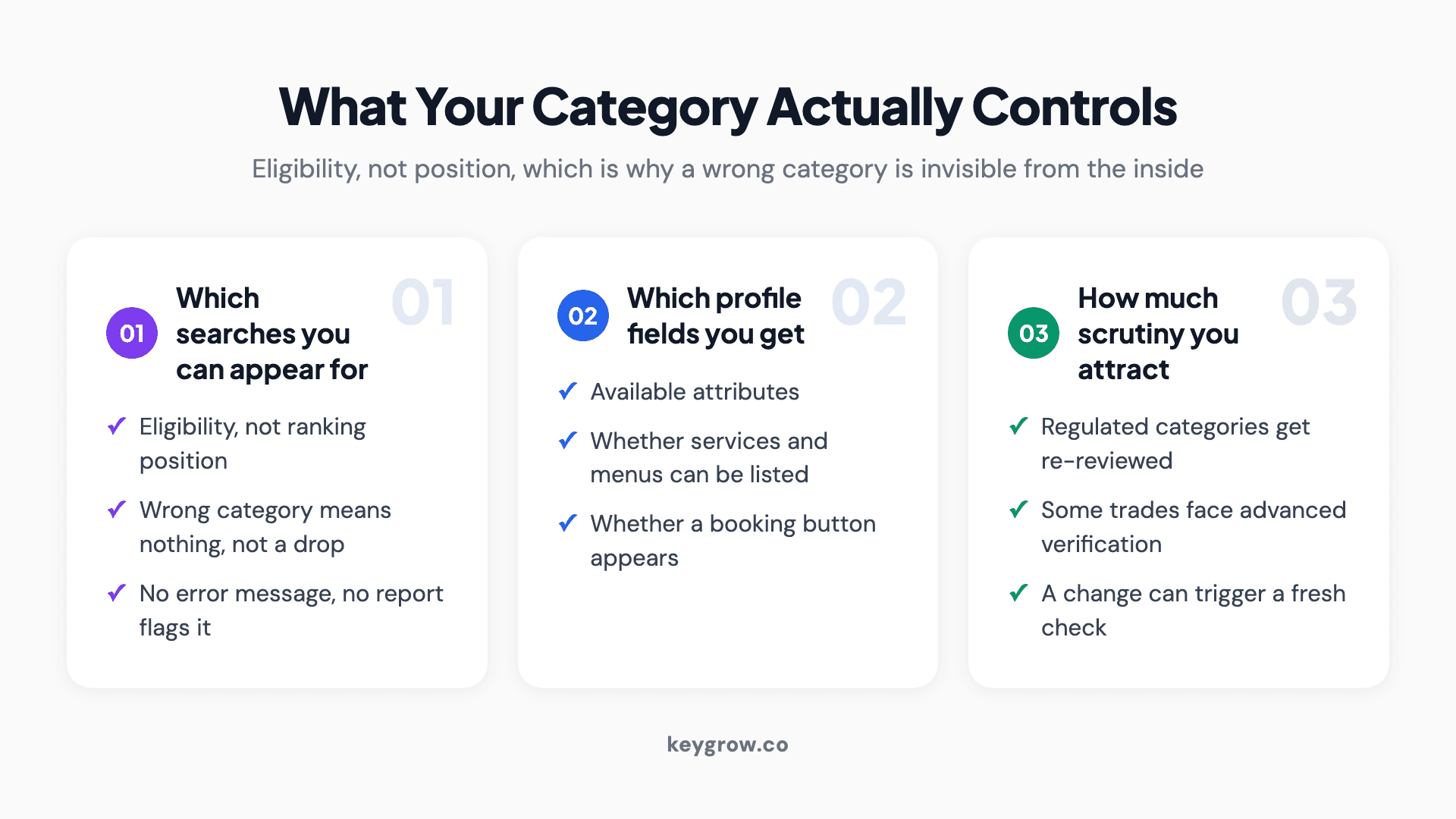
Three cards explaining what a Google Business Profile category controls: which searches you are eligible for, which profile fields you get, and how much scrutiny you attract.
That distinction matters because it changes what a wrong category feels like from the inside. You do not see a drop. You see nothing, for an entire class of searches, while everything else looks normal. There is no error message and no report that flags it.
Categories also control secondary things that are easy to miss. They decide which attributes you can set, whether you can list services and menus, whether a booking button appears, and which fields Google offers you at all. A business that cannot find the attribute it wants is usually in the wrong category rather than looking in the wrong place.
The primary category is the whole decision
Google's own guidance is short and worth following literally: select the category that best describes the business, and be specific. Their example is choosing "Nail salon" over "Salon".
Specific beats broad because a specific category still surfaces for broader searches, while a broad one does not automatically surface for specific ones. A nail salon listed as "Nail salon" appears for people searching salons. A nail salon listed as "Salon" competes with hairdressers and barbers for a term it will lose, and misses the search it should have won.
Work out your primary category this way. Take last year's revenue and split it by service line. Whichever line brought in the most money, find the most specific category that describes it. That is your primary. Not the thing you enjoy most, not the thing you want to grow into, and not the widest category that technically covers everything you do.
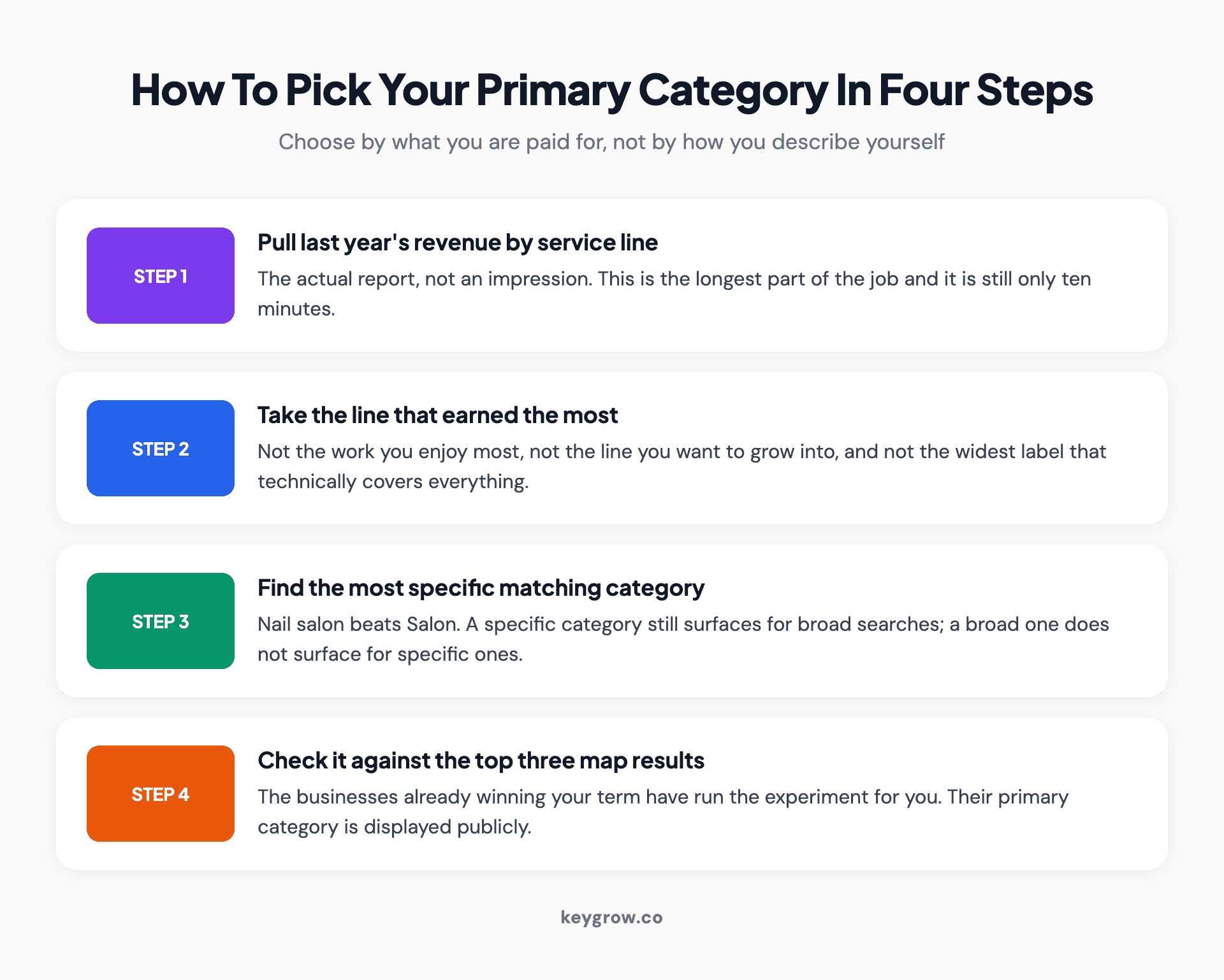
Four-step process for choosing a primary Google Business Profile category: pull last year's revenue by service line, take the highest earning line, find the most specific matching category, then check it against the top three map results.
If two lines are genuinely close, pick the one with higher margin or the one you want more of, and revisit in six months. This is a reversible decision, which is the part most people do not realize.
How many additional categories should you add?
There is real data on this and it is more interesting than the confident advice usually offered.
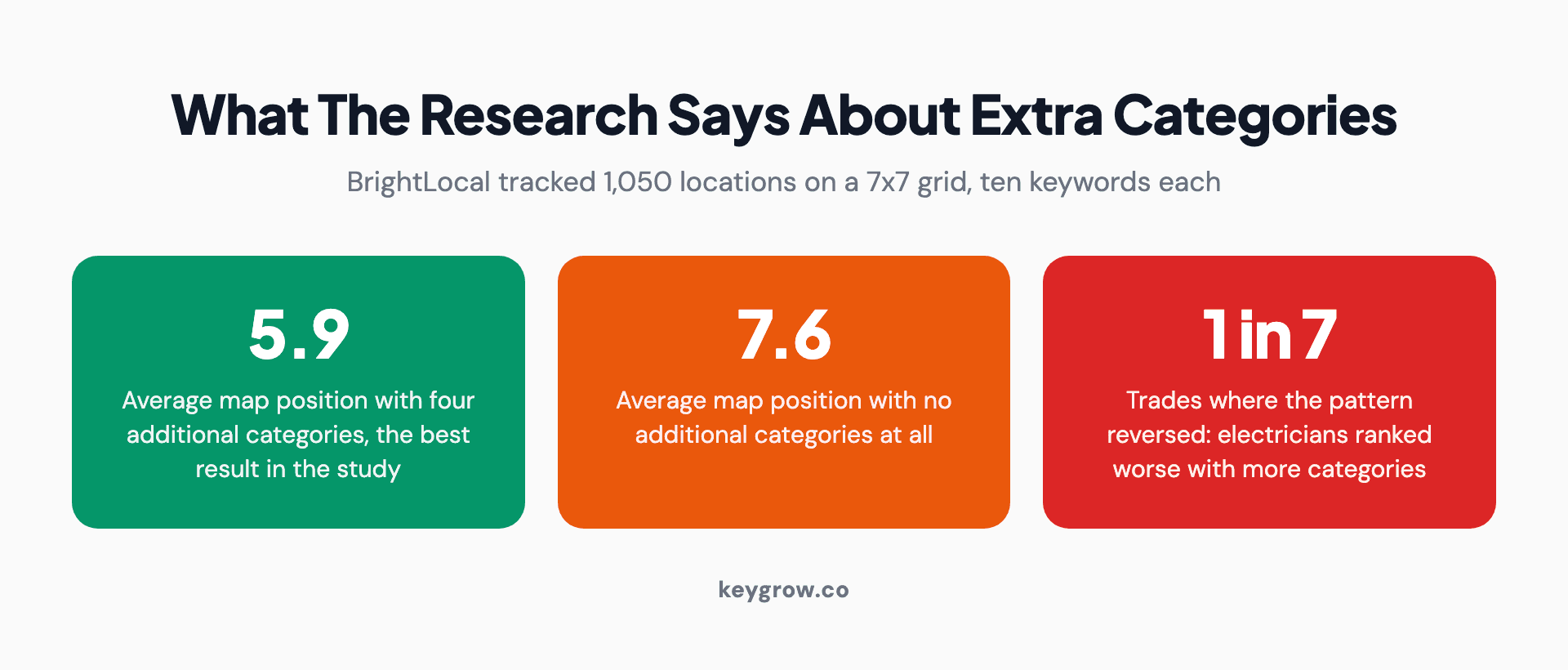
Three statistics from BrightLocal's category study: an average map position of 5.9 with four additional categories, 7.6 with none, and one trade in seven where the pattern reversed.
BrightLocal's category study tracked 1,050 business locations across seven primary categories, using a 7x7 grid at 500 metre spacing and ten keywords per location. On average, more categories helped: businesses with four additional categories had the best average map position at 5.9, against 7.6 for businesses with none.
Then there is the detail almost nobody quotes. Electricians showed the opposite pattern, with more categories correlating with worse rankings. One trade in seven ran backwards.
Take two things from that. First, four or so genuinely relevant additional categories is a sensible target, and adding them is worth ten minutes of your afternoon. Second, treat anyone who tells you to fill all nine as someone quoting an average they have not read the caveats to.
The mechanism behind the electrician result is probably dilution: an emergency trade with one dominant intent gets muddier, not clearer, when you attach four adjacent trades to it. If your business is one thing that people need urgently, be that one thing.
Finding the category your competitors use
This is the highest-value ten minutes in the whole exercise, because the businesses already ranking have effectively run the experiment for you.

Open laptop on a plain desk with a mug beside it.
The manual method: search the term you want to win, open the top three map results, and look at the category shown under each business name in the profile panel. That label is their primary category. If all three show something you had not considered, you have found your answer.
For additional categories, which are not displayed publicly, you need a tool. Several local SEO tools expose a competitor's full category list, and most offer it free for a handful of lookups. Or you can infer: search a service you both offer and see who appears, then search a service only they offer and see whether they still do.
Do this for three or four terms that matter, not one. A single search tells you who is nearest. A pattern across several tells you which category the category actually is.
When your business is really two businesses
Plenty of firms sell two things that live in different category families, and the profile only has one primary slot.
Take the revenue split first, as above. Then ask whether the second line is large enough to deserve its own presence, which depends on whether it has its own address, its own staff, and its own entrance. If it does, Google's rules on departments may allow a separate profile, and we went through those rules in our post on multi-location local SEO.
If it does not, the second line lives as an additional category, a service listing inside the profile, and a page on your website. That combination is usually enough, and it is the correct answer far more often than a second profile is. If you already have one, duplicate Google Business Profile covers whether to merge it or remove it.
The failure mode to avoid is choosing a compromise category that half-describes both. A firm doing kitchen fitting and general carpentry should be listed as whichever pays the bills, not as something vague enough to cover both. Vague categories do not rank for either intent.
A worked example, start to finish
Take a firm that fits bathrooms. They also do tiling for other contractors, they handle small plumbing jobs, and they occasionally build a wet room.
Revenue split for last year: bathroom installations 62 percent, contract tiling 24 percent, small plumbing 9 percent, wet rooms 5 percent.
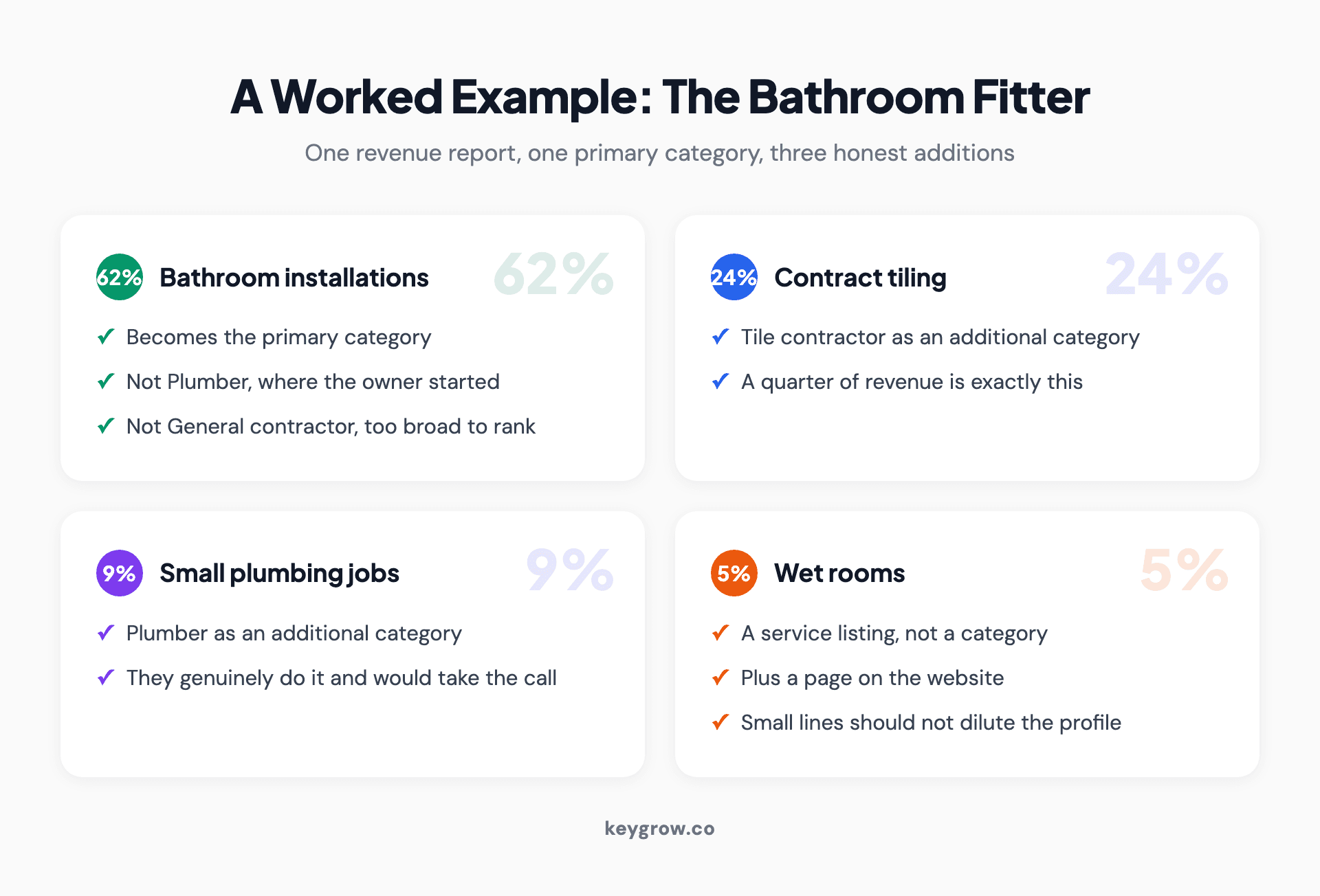
Worked example showing how a bathroom fitter turns a revenue split into one primary category and three additional categories, with the smallest service line handled as a service listing instead.
Primary category: Bathroom remodeler. Not Plumber, which is where they started and how the owner still describes himself at parties. Not General contractor, which is broad enough to be true and too broad to rank. The money says bathroom installation, so the profile says bathroom installation.
Additional categories: Tile contractor, because a quarter of revenue is exactly that. Plumber, because they genuinely do it and would take the call. Bathroom supply store, only if they actually sell fittings from premises somebody can visit, and otherwise not.
What they should not add: Kitchen remodeler, because they do not do kitchens and would be scrambling if somebody rang. Interior designer, because tiling is not design. Construction company, because it is the redundant broad parent of a category they already hold.
That produces one primary and two or three real additional categories, which is where the research says the returns sit. It took the owner longer to pull the revenue report than to make the decision.
The wet rooms, at 5 percent, get a service listing inside the profile and a page on the website rather than a category. That is the right home for a small line: visible, searchable, and not diluting what the profile is for.
Keeping categories straight across several locations
If you run more than one location, the categories should match unless the locations genuinely do different work.
Two branches of the same business with different primary categories will compete for different searches, which sounds like broader coverage and is usually just an accident nobody noticed. Somebody set up the second profile a year later, chose a near-miss category from memory, and it never got checked.
The exception is real: a firm whose downtown location does only consultations and whose suburban location does the actual installation work has two different businesses in the ways that matter, and the categories should say so. Deliberate difference is fine. Drift is not.
Put every location's primary and additional categories in one spreadsheet, once. The inconsistencies become obvious immediately, and it is the same document that makes the twice-yearly audit take five minutes instead of an afternoon.
Categories not to add
Three kinds of addition make things worse rather than neutral.
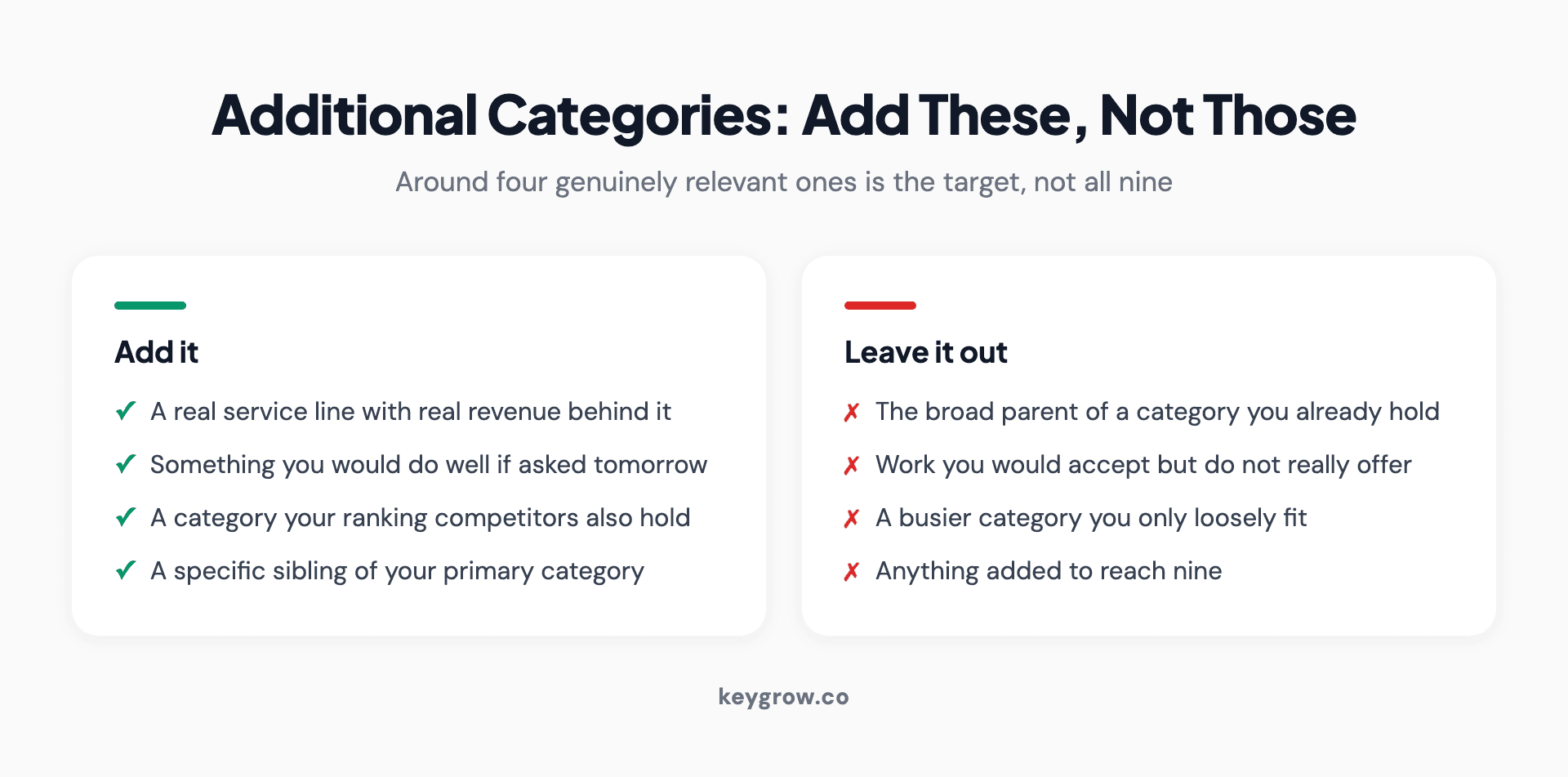
Two-column comparison of additional Google Business Profile categories worth adding against ones to leave out, including redundant broad parents and categories chosen for volume.
Redundant broader categories. Google's guidance says it plainly: if your primary is specific, you do not need the broad parent as a secondary. The example they use is a grocery store with a bakery and deli, where you add "Bakery" and "Deli" rather than every food-related label available.
Categories for services you technically could do. If somebody called tomorrow and asked for it, would you say yes and do a good job this week? If not, it is not a service you offer, it is a service you would accept. Those additions dilute relevance and bring calls you do not want.
Categories chosen for volume. Picking a busier category you only loosely fit is the local search equivalent of keyword stuffing. It attracts the wrong calls, it is visible to anyone comparing your listing to your website, and it is one of the things that invites a profile edit or a suspension.
Categories change under you
This is the part no guide covers, and it costs businesses visibility quietly.
Google adds, renames, merges and retires categories continuously. There are somewhere around four thousand of them and the list is not stable. Three things can happen without you doing anything: a better-fitting category appears that did not exist when you set up, a category you use gets merged into another and your profile is reassigned, or a category is retired and silently drops off your listing.
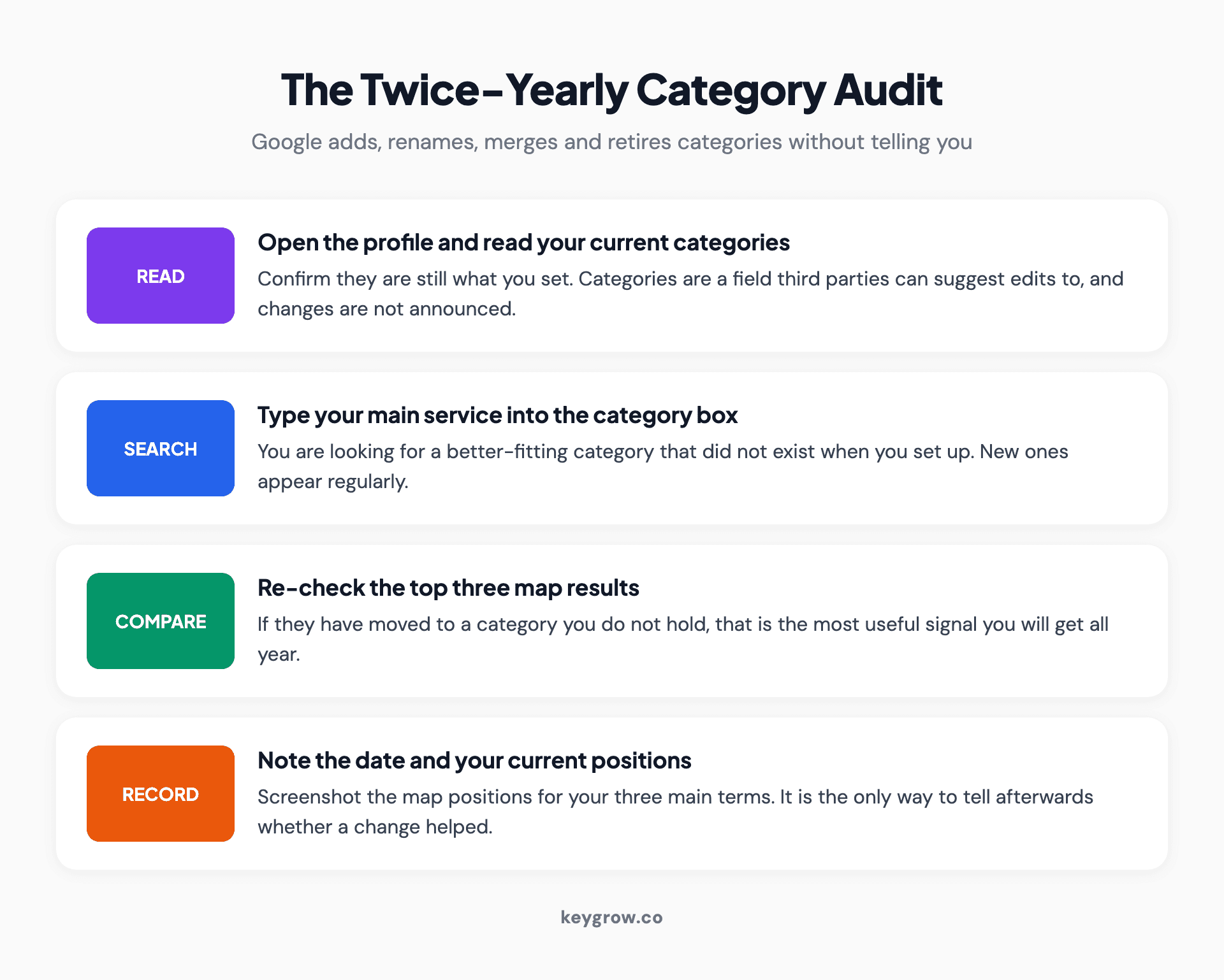
Four-step twice-yearly category audit: read your current categories, search the category box for your main service, re-check the top three map results, then record the date and your positions.
So audit it. Twice a year, open your profile, read your current categories, and then type your main service into the category search box to see what Google offers now. It takes five minutes and every so often it turns up something better than what you have.
The same check catches unauthorized edits. Categories are one of the fields that third parties can suggest changes to, and a competitor or a well-meaning stranger can alter what you appear for. If your category is not what you set it to, that is what happened.
When the category you need does not exist
It happens, particularly for niche and emerging services.

Hanging painted sign reading Miss Nellie's outside a shop front.
Pick the closest available category rather than a broad one, then carry the exact wording you wanted everywhere else: your business description, your services list, your website, and the way you answer reviews. Google reads more than the category field, and a specific description with a near-miss category outperforms a vague category with nothing to support it.
Check again in six months, because this is exactly the situation the audit above is for. New categories appear regularly, and being early to an accurate new one is a genuine advantage while your competitors sit on the old approximation.
Changing a category without breaking anything
You can change a category whenever you like, and nothing dramatic happens.
Expect some ranking movement over a week or two while Google reassesses what you are eligible for. Make one change at a time so you can tell what caused what. Note the date somewhere, because in three weeks you will want to know when the change went in.
One caution: a category change sometimes triggers a re-review of the profile, particularly if it moves you into a regulated category. That is not a reason to avoid the change, it is a reason not to make it the week before your busiest season.
Take a screenshot of your current map positions for your three main terms before you change anything. It is the only way to know afterwards whether the change helped, and it takes a minute.
FAQs
How many Google Business Profile categories can I have?
One primary category and up to nine additional ones. Filling all ten is rarely the right move: the available research suggests around four additional categories performs best on average, and only where each one genuinely describes something you do.
Which category is the most important?
The primary, by a wide margin. It carries most of the weight in deciding which searches your profile can appear for, and getting it wrong makes you invisible for a whole class of searches with no warning that anything is wrong.
Can I change my primary category later?
Yes, at any time, and it is a reversible decision. Expect a week or two of movement while Google reassesses, change one thing at a time so you can attribute the result, and avoid making the change immediately before your busiest trading period.
Do secondary categories actually help rankings?
On average, yes. A study of 1,050 locations found businesses with four additional categories ranked better than those with none. Results varied by industry though, and in at least one trade more categories correlated with worse positions, so relevance matters more than count.
What if my exact category is not available?
Choose the nearest one and put the precise wording in your business description, your services list and your website. Google reads all of those. Then check the category list again in six months, because new categories are added regularly.
Can my competitors see my categories?
Your primary category is displayed publicly on your profile, so yes. Additional categories are not shown, though several local SEO tools can reveal them. You can see your competitors' primary categories the same way, which is the fastest research you can do on this.
Do categories affect anything besides rankings?
Yes. They determine which attributes you can set, whether services and menus can be listed, and whether features like booking buttons are available to you. If a profile field you expected is missing, the category is usually the reason.
One field, ten minutes, twice a year
Set the primary category from your revenue, not your self-image. Add three or four additional categories that are genuinely true. Check what the businesses beating you have chosen. Then put a reminder in the calendar for six months' time to look again, because the list will have changed.
This is a job to do yourself rather than to outsource. It takes ten minutes, you know your own revenue split better than any agency will, and the data suggests the difference between a good category set and no additional categories is worth nearly two positions on the map. Very little else in local marketing pays that well per minute spent.
If you want the rest of the profile brought up to the same standard, our guide to Business Profile optimization covers every other field in order of what it changes, and our SEO work starts with exactly this kind of audit. Send us your listing if you would rather have a second pair of eyes on it.



