

To submit a sitemap to Google: open Google Search Console, pick your property, click Sitemaps in the left sidebar under Indexing, paste the sitemap path (usually sitemap.xml) into the box, and click Submit. That is the whole job, and it takes under a minute once you know where your sitemap lives.
The parts that actually cause trouble come after: finding the file in the first place, understanding that submitting is a request rather than an instruction, and reading the report when it says something went wrong.
One thing worth clearing up immediately. You are not uploading anything to Google. You are telling Google the address of a file that already sits on your own server.

Lines of website code on a monitor.
Step one: find your sitemap
Most sites already have one and the owner has never looked at it. Try yourdomain.com/sitemap.xml in a browser first. If that returns a page of URLs or a list of other sitemap files, you are done looking.
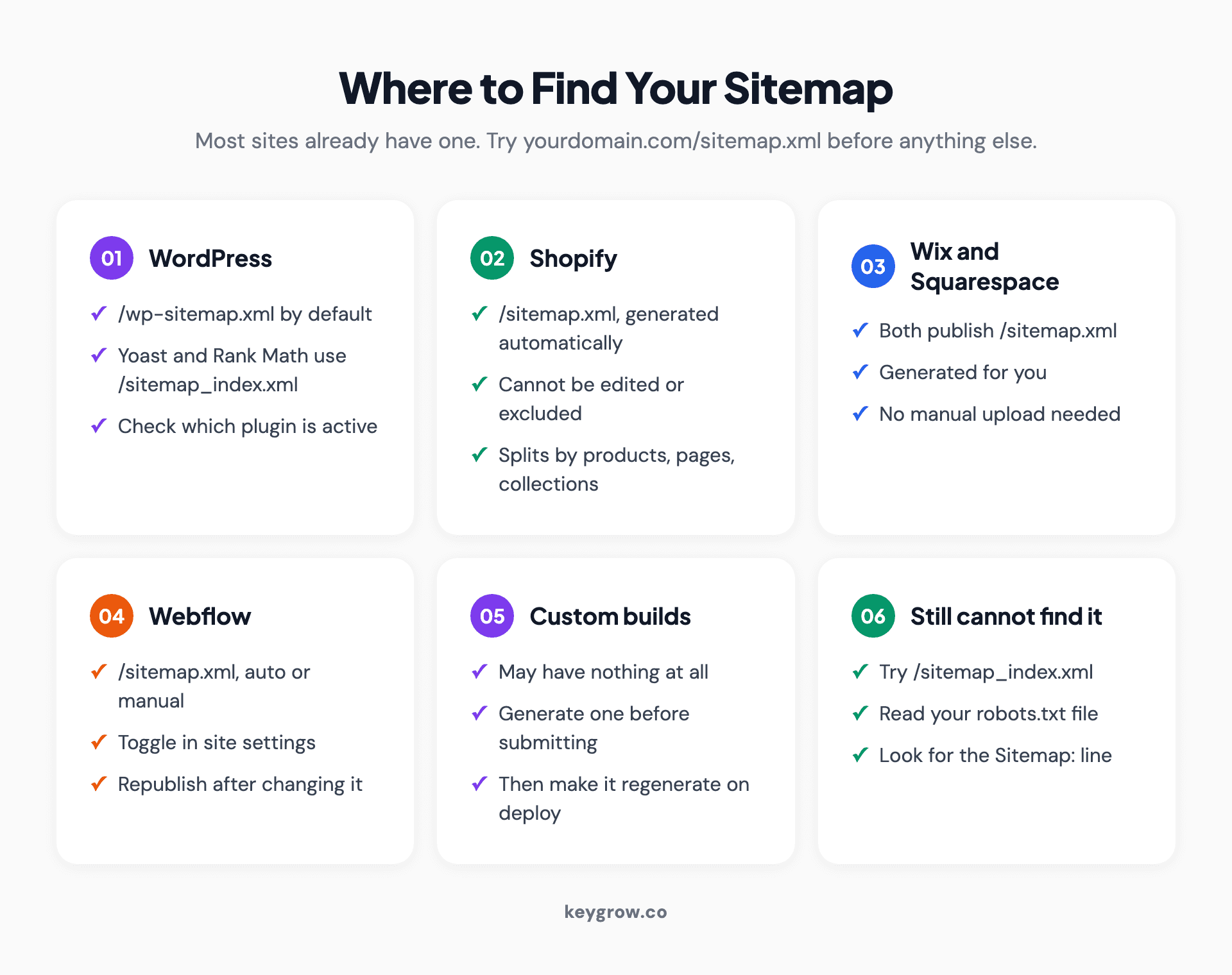
Card grid showing where to find the sitemap on common platforms: WordPress with Yoast or Rank Math, Shopify, Wix, Squarespace, Webflow and custom builds.
If it 404s, check sitemap_index.xml, which is what several plugins generate instead. Failing that, open yourdomain.com/robots.txt and look for a line beginning with Sitemap:, because that is where the address is usually declared.
By platform: WordPress generates one at /wp-sitemap.xml by default, and Yoast or Rank Math replace it with /sitemap_index.xml. Shopify publishes /sitemap.xml automatically and it cannot be edited. Wix and Squarespace both generate one at /sitemap.xml. Webflow does the same and lets you toggle it. A custom build may have nothing at all, in which case someone has to generate one before the rest of this applies.
Step two: submit it in Search Console
You need a verified Search Console property before you can submit anything. If you have never set one up, do that first; domain verification through DNS is the version worth doing because it covers every subdomain and protocol at once.
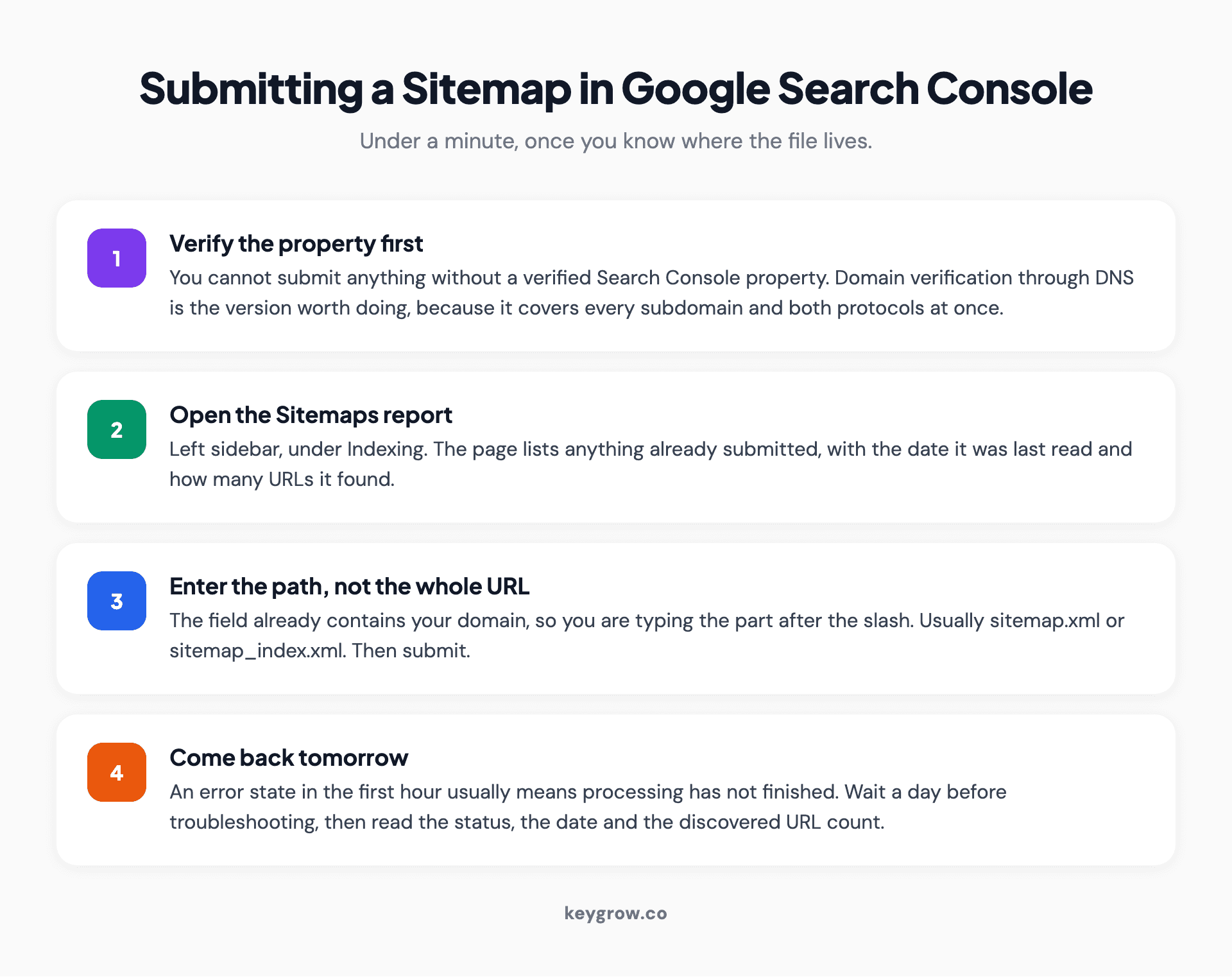
Four-step process for submitting a sitemap in Google Search Console: select the property, open the Sitemaps report, enter the sitemap path, and check the status after processing.
Then: select the property, open the Sitemaps report under Indexing, type the path into the "Add a new sitemap" field, and submit. The field already contains your domain, so you are only adding the part after the slash.
Status will show "Couldn't fetch" for a while even when nothing is wrong, because processing is not instant. Come back in a day rather than refreshing for an hour. When it works you will see Success, a date, and a count of discovered URLs.
If you have several sitemaps, submit each one, or submit a sitemap index file that points at them all. An index file is the tidier option and the one most plugins produce anyway.
Step three, optional but worth it: declare it in robots.txt
There is a second method that costs one line and works without any account at all. Add a line to your robots.txt file reading Sitemap: followed by a space and the full URL of the file, for example Sitemap: https://example.com/sitemap.xml on its own line.
Every major crawler reads that line, not just Google, so it covers Bing and the AI crawlers in the same stroke. Use the full absolute URL, not a relative path. You can list more than one Sitemap line if you have several.
Do both. Search Console gives you the reporting, robots.txt gives you the coverage.
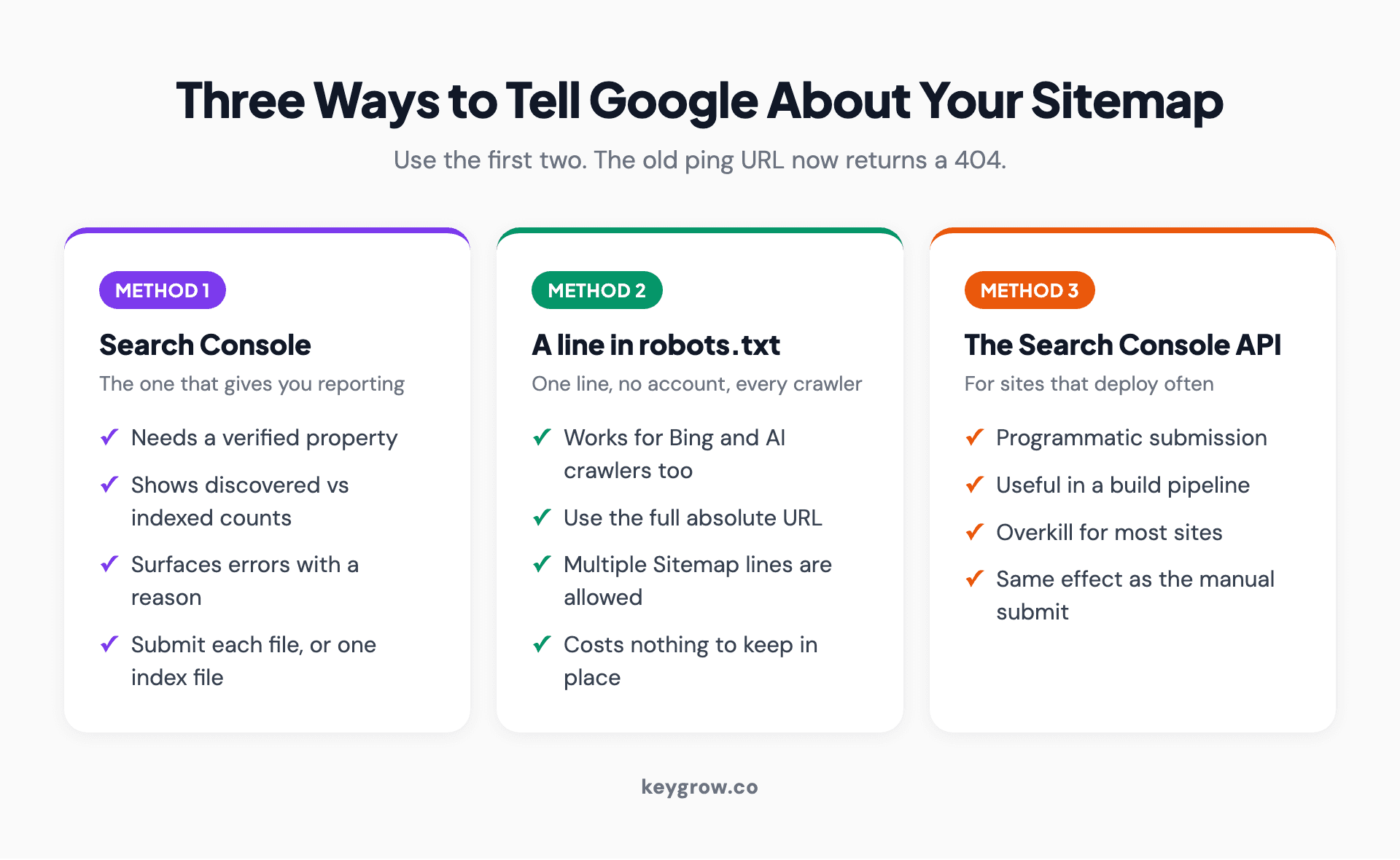
Three-column comparison of the ways to tell Google about a sitemap: the Search Console report, a robots.txt line, and the Search Console API, plus the retired ping endpoint.
One caution on robots.txt editing, because this is where small sites break themselves. The file is read literally and a stray Disallow line above your Sitemap line will deindex the site. If your platform manages robots.txt for you, use its interface rather than uploading a replacement file, and check the result by loading yourdomain.com/robots.txt in a browser afterwards.
The old ping URL is dead, and plenty of guides still recommend it
If you find advice telling you to visit google.com/ping?sitemap=, ignore it. That endpoint was retired at the end of 2023 and now returns a 404.
Google's announcement explained the reasoning: unauthenticated submissions turned out to be mostly spam and did little for anyone. Existing plugins that still call it will not hurt you, they just accomplish nothing.
This matters because a lot of ranking content on this topic is old enough to still list it as a step. If a guide recommends the ping URL, treat the rest of its advice as being from a previous era too.
What "submitted" actually means
Here is the expectation management. Google's sitemap documentation puts it plainly: submitting a sitemap is merely a hint. It does not commit Google to downloading the file or crawling anything listed in it.
A sitemap helps with discovery. It does not help with ranking, it does not force indexing, and it will not rescue a page that Google has looked at and decided not to keep. If you submit 400 URLs and 120 get indexed, the sitemap did its job and the other 280 have a quality, duplication or crawl-budget problem that a file cannot fix.
The practical version: use the sitemap to make sure Google knows the pages exist, then use the Page indexing report to find out why the ones it skipped were skipped.
The same applies to speed. Submitting does not put a page in a queue ahead of anything else, and there is no way to pay for or request faster processing. For a single urgent page, the URL Inspection tool's request-indexing button is the right instrument, and it is rate limited precisely because people abuse it. A sitemap is for coverage across a site, not for pushing one page through.
What belongs in a sitemap, and what does not
A sitemap full of the wrong URLs is worse than a short accurate one, because you are actively pointing a crawler at pages you do not want in the index.
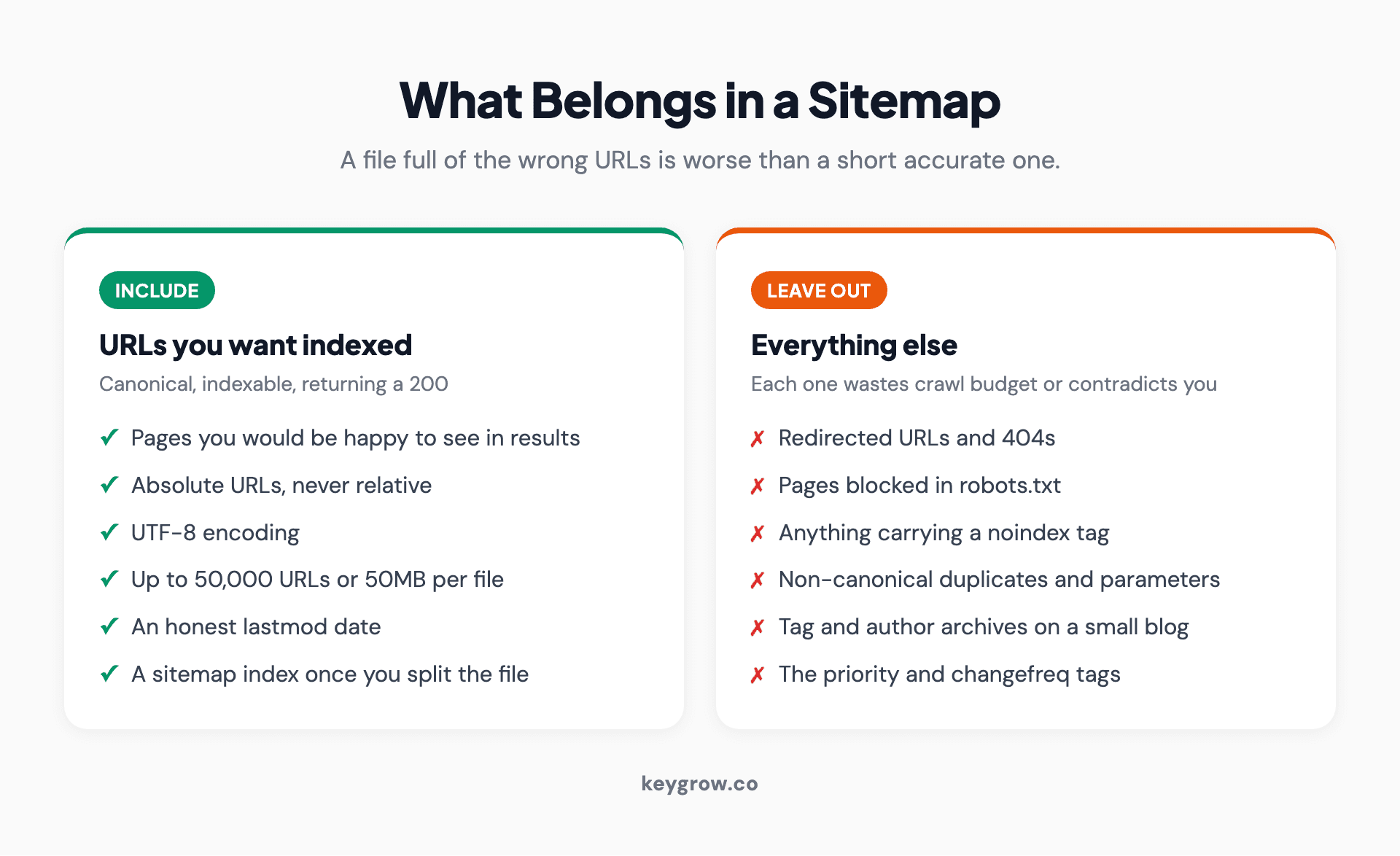
Two-column list of what to include in an XML sitemap and what to leave out, with the technical limits Google enforces.
Include canonical, indexable URLs that return a 200 and that you would be happy to see in search results. Nothing else.
Leave out redirected URLs, 404s, pages blocked by robots.txt, pages carrying a noindex tag, non-canonical duplicates, parameter variants, tag and author archives on a small blog, and anything behind a login.
The hard limits are 50,000 URLs or 50MB uncompressed per file, whichever you hit first. Past that, split into several sitemaps and point a sitemap index at them. The file has to be UTF-8 encoded and every URL has to be absolute rather than relative.
Two tags are not worth your time. Google ignores the priority and changefreq tags entirely, so anyone selling you a sitemap optimization service that tunes them is charging for nothing. The lastmod tag is used, but only if it is honest. A CMS that stamps today's date on every page every time the sitemap regenerates teaches Google to ignore the field on your whole site.
If you are unsure whether yours is lying, open the raw XML and compare a few lastmod values against pages you know have not been touched in a year. It is a thirty second check and it is the single most common thing wrong with an otherwise fine sitemap.
Large sites benefit from splitting by type rather than just by size: one sitemap for products, one for blog posts, one for location pages. The limits are the same, but the reporting becomes useful, because Search Console shows discovered and indexed counts per submitted file. Splitting by section turns one vague number into a diagnosis.
Reading the report when something breaks
Most sitemap errors have boring causes. Here are the ones that come up repeatedly and what they usually mean.
| What you see | What it usually is |
|---|---|
| Couldn't fetch | Wrong path, or the file 404s, or it is blocked in robots.txt |
| Sitemap is HTML | You submitted a page, not an XML file. Check the URL opens raw XML |
| URL not allowed | The sitemap lists URLs outside the property you submitted it under |
| Compression error | A .gz file that is not actually gzipped, or is corrupt |
| Discovered URLs: 0 | The file is empty, or the XML is malformed |
| Success but pages not indexed | Normal. The sitemap worked; the indexing decision is separate |
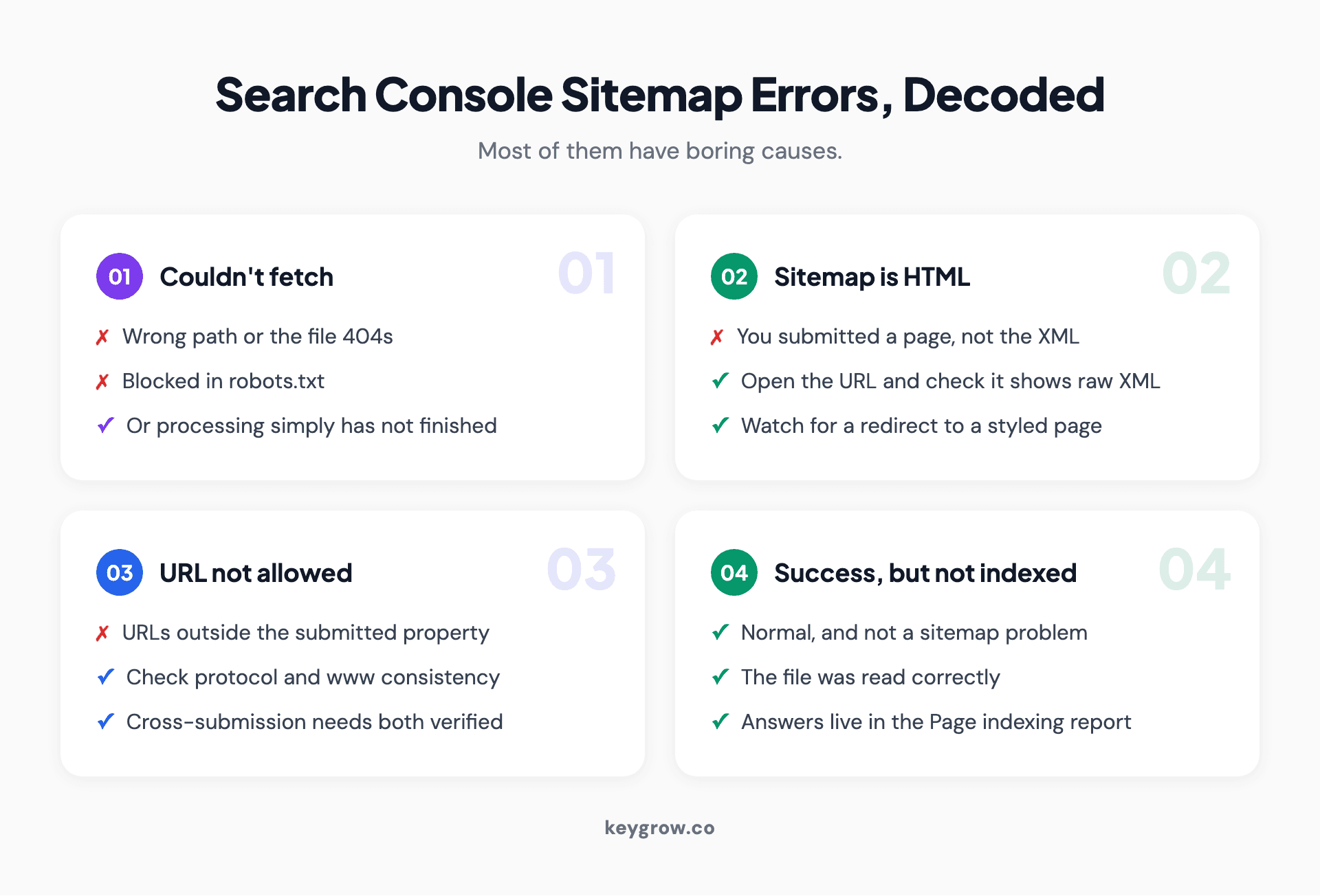
Card grid decoding the most common Google Search Console sitemap errors and what each one usually means.
The last row is the one that generates the most unnecessary anxiety. Success means Google read your file. Whether it keeps the pages is a different question answered in a different report.
If you need to resubmit after fixing something, you do not have to delete the old entry first. Submitting the same URL again refreshes it. Delete an entry only when the sitemap itself is gone for good, and remember that removing it from Search Console does not remove the file from your server.
Bing, and the crawlers that are not Google
Submitting to Google only tells Google. Bing has its own console, and it matters more than most people assume because Bing's index feeds several AI assistants.

Dark screen showing structured code in an editor.
Create a Bing Webmaster Tools account and point it at the same file. It takes five minutes and it can import your Search Console property directly rather than making you start over. Bing also supports IndexNow, which pushes new and changed URLs to participating engines instead of waiting for a crawl.
The robots.txt line covers the rest. Anything that respects the standard, including the crawlers behind AI assistants, will find the sitemap declared there. If you are thinking about that audience specifically, our llms.txt generator produces the companion file some AI crawlers now look for, which does a different job to a sitemap but lives in the same corner of your site.
When you can skip all of this
A small site with good internal linking does not strictly need a sitemap. If every page is reachable within three clicks of the homepage and you have fewer than a few hundred pages, Google will find everything without one. We went through that argument in detail in whether sitemaps are necessary.
Submit one anyway, because it costs a minute and gives you a diagnostic surface you would not otherwise have. The number of discovered URLs against the number indexed is genuinely useful information, and it is the only place you get it in that form.
Where a sitemap moves from nice to necessary: large sites, sites with pages that are not linked from anywhere, new sites with no external links pointing at them, and sites with a lot of media. If you are in one of those groups, the sitemap is doing real work rather than acting as a formality.
FAQs
How long does Google take to process a submitted sitemap?
Usually hours, sometimes a few days. The status can show an error for the first while simply because processing has not finished, so wait a day before troubleshooting. Once processed you will see a success state, a read date and a count of discovered URLs.
Does submitting a sitemap help you rank better?
No. A sitemap helps Google discover pages. It has no effect on where those pages rank, and no sitemap tag influences ranking either. The benefit is faster and more complete discovery, which matters most on large sites and brand new ones.
Discovered URLs and indexed URLs are different numbers. Why?
Discovered means Google read the URL from your sitemap. Indexed means Google crawled the page, evaluated it and chose to keep it. A gap between the two numbers is normal, and the reasons for exclusions live in the Page indexing report rather than the sitemap report.
Do I need to resubmit my sitemap when I add pages?
No, if your sitemap is generated dynamically by your CMS or plugin, which almost all are. Google rechecks the file periodically. Resubmit manually only when you have changed the sitemap's location or fixed a structural error in it.
Can a sitemap hurt your SEO?
Indirectly, yes. Listing redirected, noindexed or broken URLs sends crawlers to pages you do not want indexed and wastes crawl budget on a large site. An inaccurate lastmod date across every URL is the other common self-inflicted problem.
Where should the sitemap file be located?
At the root of the domain in almost every case, for example example.com/sitemap.xml. A sitemap can only contain URLs from the same site and path level it sits in, so a file placed in a subfolder is limited to that subfolder unless you use cross-submission.
Should I submit a sitemap to Bing as well?
Yes. Bing Webmaster Tools takes a couple of minutes to set up and can import your Search Console property, and Bing's index feeds several AI assistants. Adding the Sitemap line to robots.txt covers both engines and every other well-behaved crawler at once.
One minute now, one report to read later
Find the file, submit it in Search Console, add the line to robots.txt, then leave it alone. Check the report in a week and compare discovered URLs against indexed ones, because that gap is the only part of this worth thinking about.
If the gap is large and you cannot work out why, that is a crawl and content problem rather than a sitemap problem, and it is the sort of thing our SEO service spends its first month on. Send us the property and we will tell you which of the two you have.



