


Most of what people mean by crawl errors are not errors, and fixing the whole list is a way to spend a week moving nothing.
To fix crawl errors properly you do three things. Open the right report, which is no longer the one most guides name. Sort every row into one of three buckets, because only one of those buckets is actionable. Then fix the actionable ones in order of how much traffic they are costing you, which is rarely the order the report presents them in.
The rest of this walks through each of those, with the specific fix for every status Google reports.
The report is not called Crawl Errors any more
If a guide tells you to open Coverage and click Errors, it was written for a version of Search Console that no longer exists. The old Crawl Errors report was retired years ago and what replaced it sits in two different places.
Page indexing is the main one, under Indexing in the left menu. It lists every URL Google knows about and why each one is or is not in the index. This is where almost everything people call a crawl error actually lives.
Crawl stats is separate, buried under Settings, and it answers a different question: how Google's crawling of your site is going overall. Requests, response codes, response times, and a host status indicator. Google describes it as aimed at advanced users, and it is only available on root-level properties, which catches people out when their property was set up as a URL prefix.
The distinction matters because they diagnose different things. Page indexing tells you about individual URLs. Crawl stats tells you whether your server is the problem, which no amount of per-URL fixing will address.
Sort every row into three buckets first
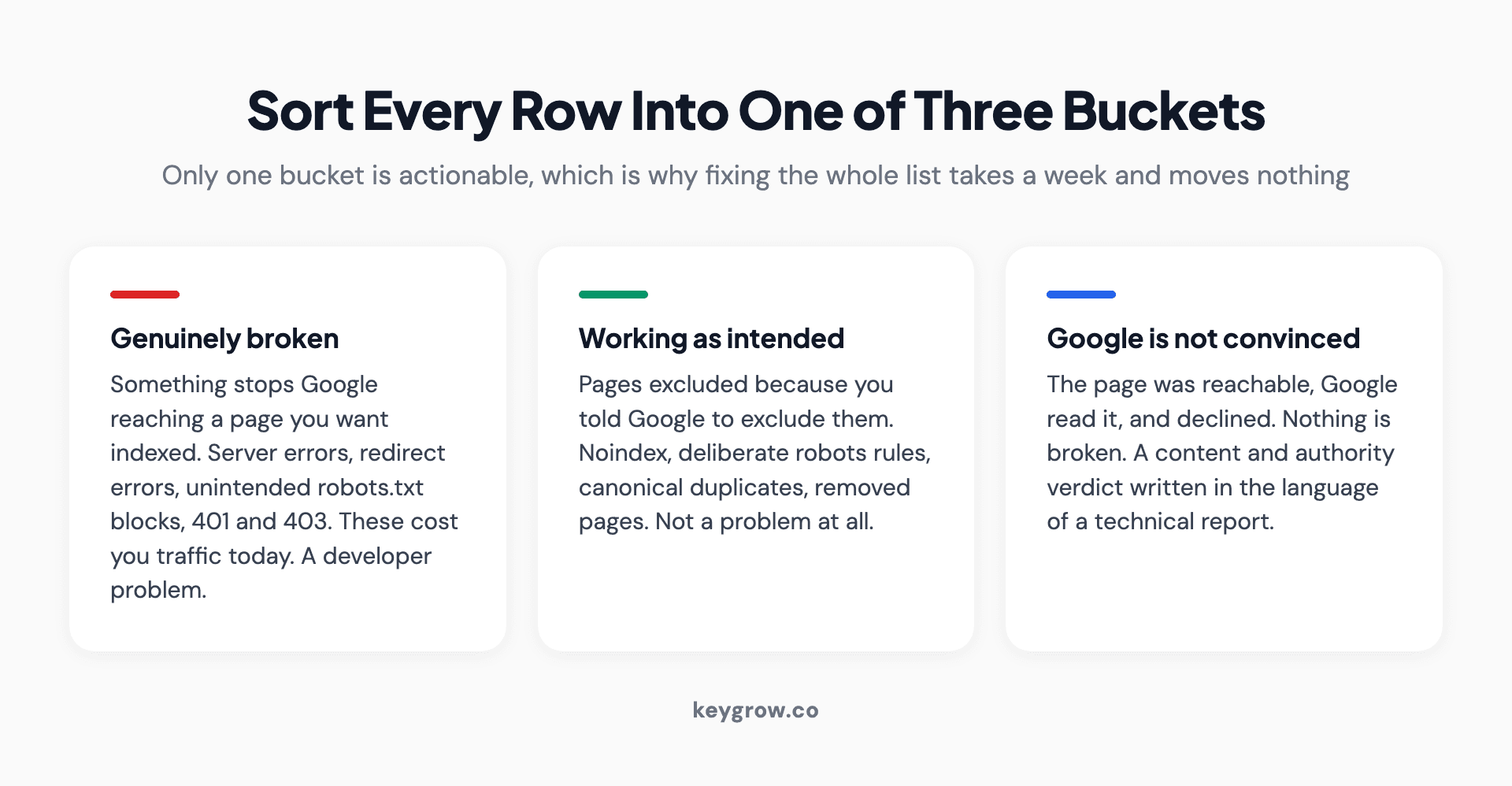
Three buckets for sorting Search Console indexing rows: genuinely broken, working as intended, and Google is not convinced the page is worth indexing.
Before fixing anything, go down the list of statuses and put each one in a bucket.
Bucket one: genuinely broken. Something is preventing Google from reaching a page you want indexed. Server errors, redirect errors, pages you meant to be public that are blocked or returning 403. These are the ones that cost you traffic today.
Bucket two: working as intended. Pages excluded because you told Google to exclude them. Google is explicit that this is fine. Its page indexing documentation says "It's fine for a URL not to be indexed for the right reasons," and gives the examples: an expected robots.txt rule, a noindex tag, a duplicate URL, or a 404 for a page you removed. A site with zero excluded URLs would be an odd site.
Bucket three: Google is not convinced. The page was reachable, Google looked at it, and decided not to index it. Nothing is broken. This is a content and site-authority verdict written in the language of a technical report, which is why so much effort gets wasted here.
Roughly speaking, bucket one is a developer problem, bucket two is not a problem, and bucket three is an editorial problem. Treating all three as the same kind of task is the single biggest reason this work feels endless.
Bucket one: the statuses to fix this week
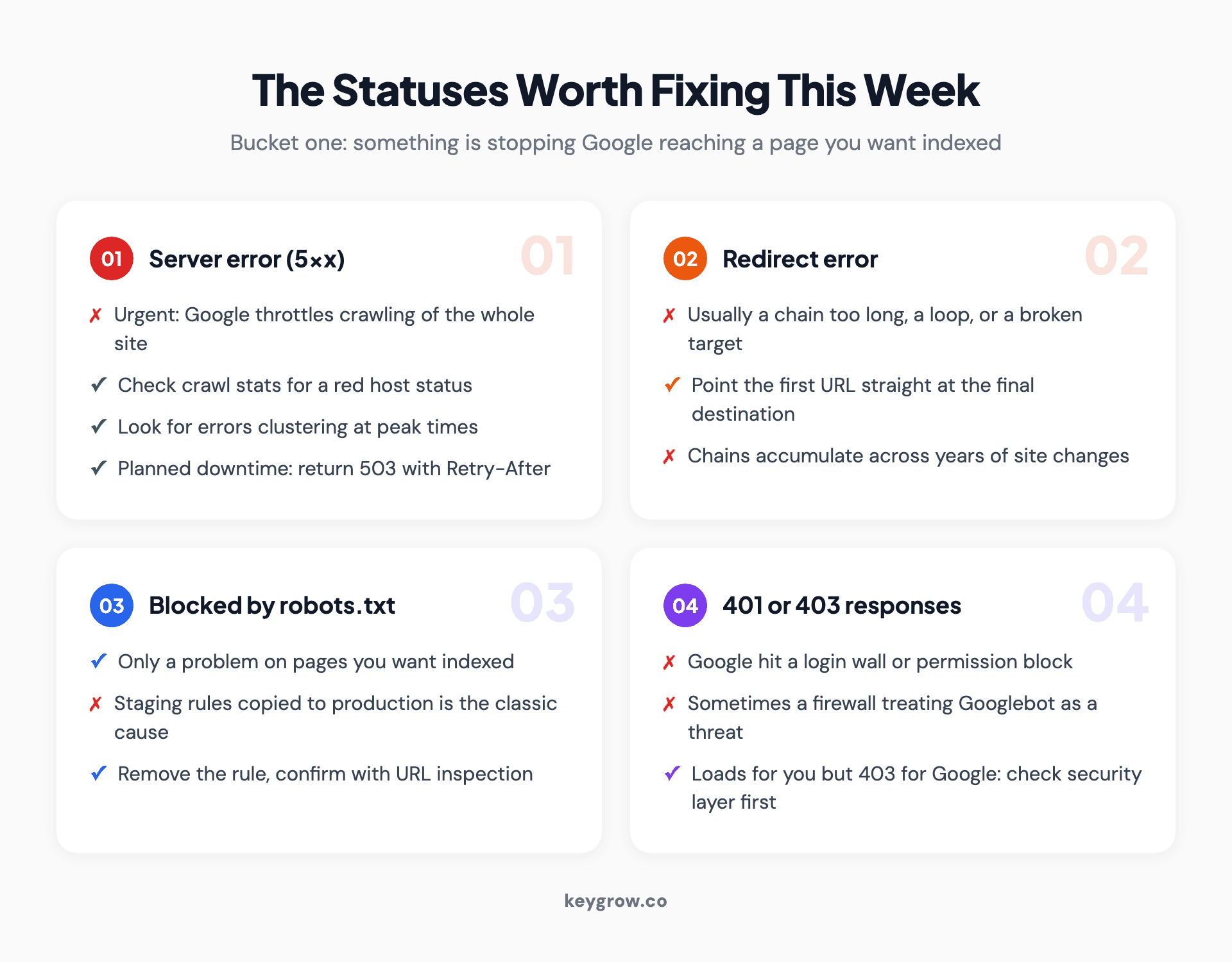
Four Search Console statuses that need fixing, paired with the fix for each: server errors, redirect errors, robots.txt blocks on pages you want indexed, and 401 or 403 responses.
Server error (5xx). Google asked for the page and your server failed. Treat this as urgent, not because of the individual URLs but because of what it does to everything else. Google throttles back crawling when the error rate rises, so a server problem quietly slows the crawling of your entire site. Check crawl stats for a red host status, look at whether the errors cluster at particular times, which usually means load, and talk to your host. If you are taking a site down deliberately, return a 503 with a Retry-After header rather than letting requests fail.
Redirect error. Usually a redirect chain that got too long, a loop, or a redirect pointing at a URL that itself redirects somewhere broken. Fix by pointing the first URL directly at the final destination. Chains accumulate quietly across years of site changes, and a rebuild is the usual moment they all surface at once.
Blocked by robots.txt, on a page you want indexed. Someone disallowed a directory that turned out to contain pages that matter. Staging rules copied to production are the classic version. Check the file, remove the rule, and confirm with the URL inspection tool.
Blocked due to unauthorized request (401) or access forbidden (403). Google hit a login wall or a permission block. Sometimes a genuine misconfiguration, sometimes a firewall or bot protection service treating Googlebot as a threat. If the page loads for you but returns 403 to Google, look at your security layer before your CMS.
Bucket two: the ones that are supposed to be there
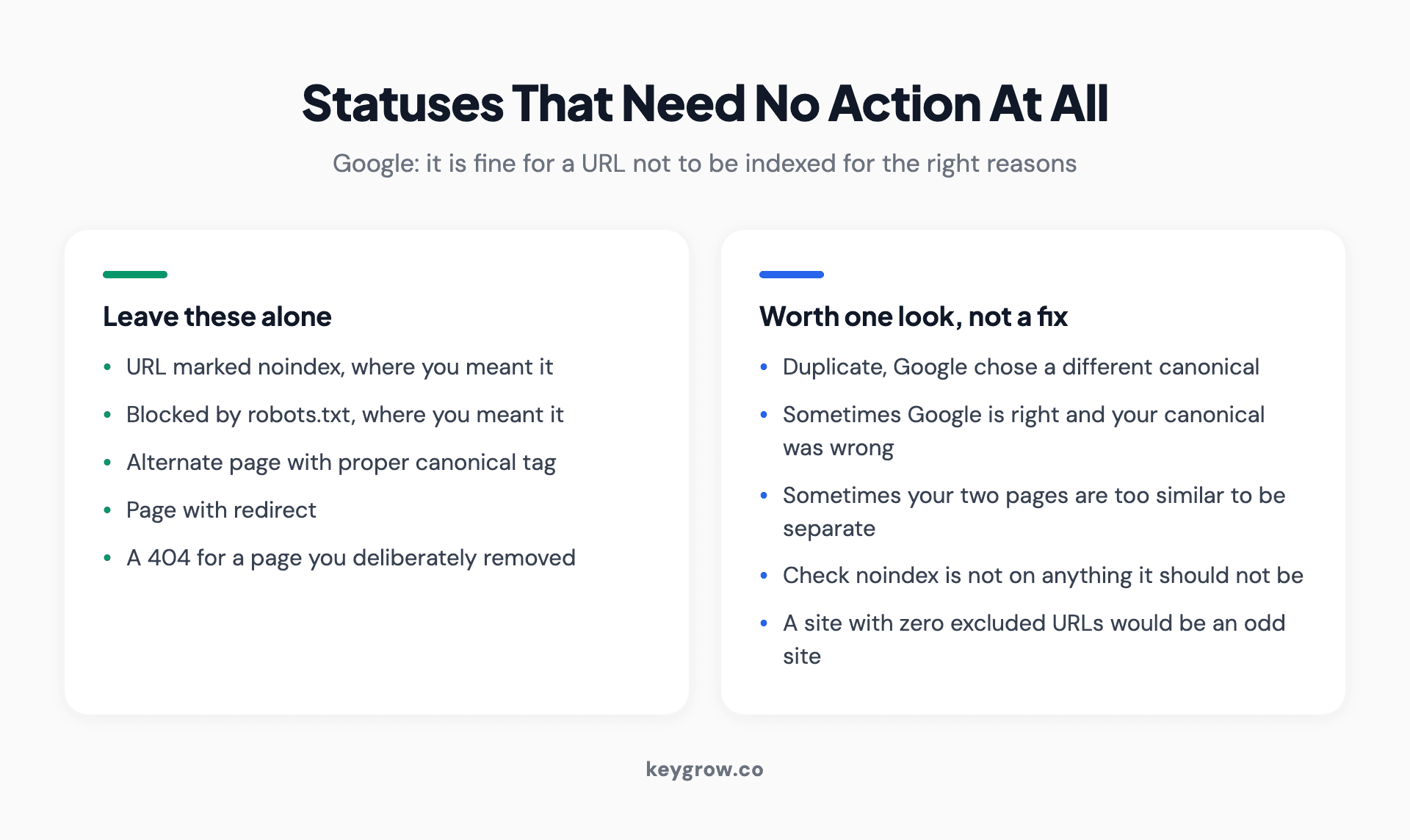
Five Search Console exclusion statuses that are normal and need no action: noindex, robots.txt rules you intended, canonical duplicates, alternate pages, and pages with redirects.
URL marked noindex. You told Google not to index it. It listened. The only question worth asking is whether the tag is on anything it should not be, which the URL list answers in a minute.
URL blocked by robots.txt, where you meant it. Admin paths, internal search results, filtered views. Correct as-is.
Alternate page with proper canonical tag. Google found a duplicate, followed your canonical, and indexed the version you nominated. This is the system working.
Duplicate, Google chose different canonical than user. This one deserves a look rather than a fix. Google disagreed with your canonical choice. Sometimes it is right and your canonical was pointing somewhere unhelpful. Sometimes it is a signal your two pages are too similar to be separate pages at all.
Page with redirect. The URL redirects, so the redirect target got indexed instead. Expected.
Clearing these out of your mental list is most of the work. A typical site has far more rows in this bucket than in the other two combined, and none of them need anything.
Bucket three: crawled and discovered, currently not indexed

A close-up of error messages on a computer screen.
These two statuses generate more confusion than the rest of the report put together, so here is what each one actually means.
Crawled, currently not indexed. Google fetched the page, read it, and decided not to index it. There is no technical fault to find. The page was judged and did not make the cut, usually because it is thin, duplicative of something you already have, or offers nothing the already-indexed results do not.
Discovered, currently not indexed. Google knows the URL exists but has not bothered fetching it yet. On small sites this often means the page has almost no internal links pointing at it, so Google has no reason to prioritize it. On large sites it can mean crawl capacity is going elsewhere.
The fixes are editorial and structural, not technical:
Make the page substantially better or merge it into the page it duplicates. Link to it properly from somewhere that matters, because a page reachable only through the sitemap is a page nothing vouches for. Cut the number of near-identical pages competing for the same thing. And give it time, because both statuses can resolve on their own once the site's overall standing improves.
What does not work is requesting indexing repeatedly. Google already crawled it. You are asking the same question again and getting the same answer.
The 404 question everyone gets wrong
404s in the report are the most common cause of unnecessary work, because the instinct is to redirect every one of them somewhere.
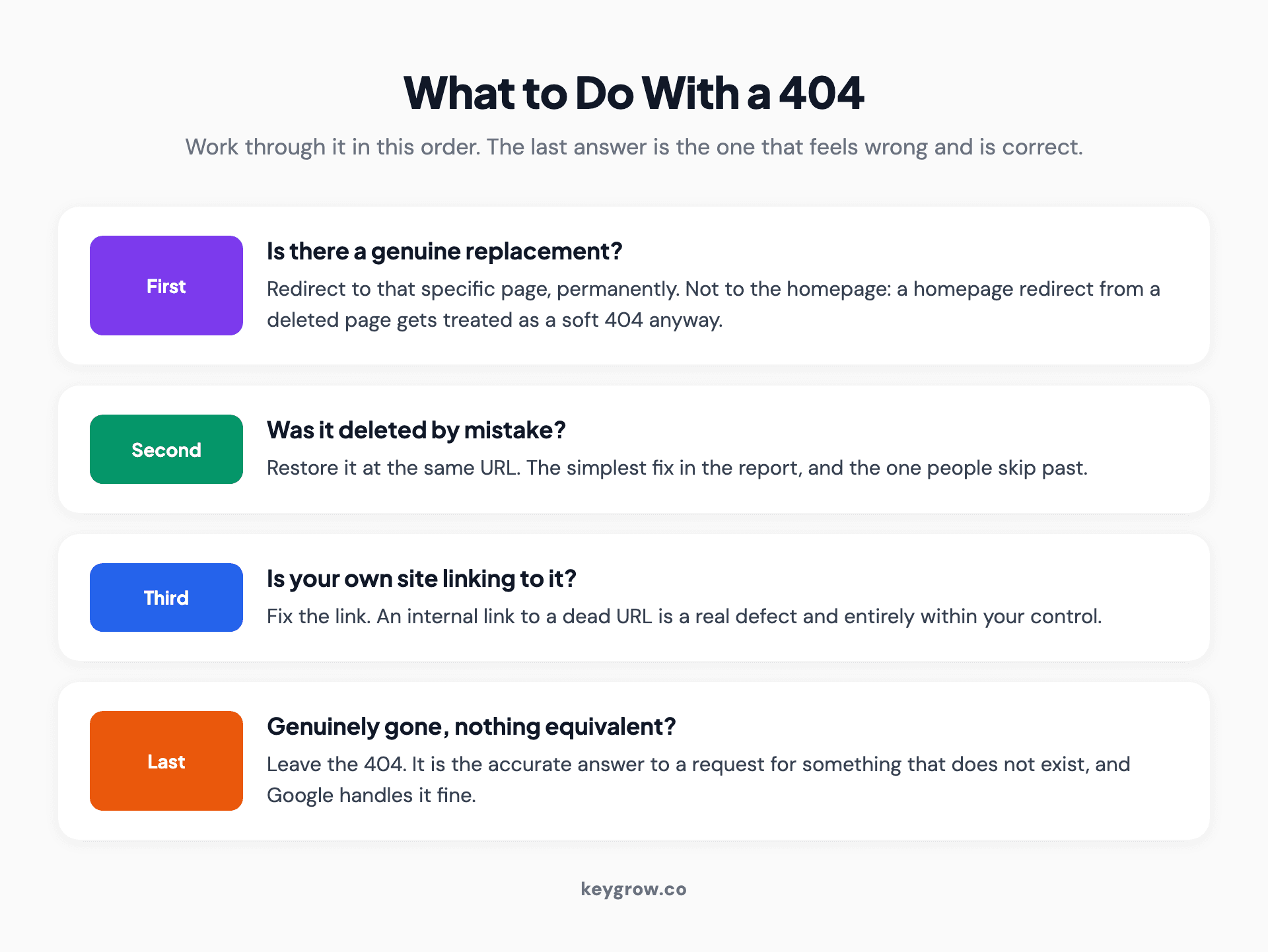
A decision path for handling a 404 in Search Console: redirect when a replacement exists, restore when the page was deleted in error, fix the internal link, and leave it when the page is genuinely gone.
Work through it in this order.
Is there a genuine replacement for this page? Then redirect to it, permanently. Not to the homepage. A redirect to the homepage from a deleted product page is treated as a soft 404 anyway, so you have swapped one status for another and lost the user's context on the way.
Was the page deleted by mistake? Restore it at the same URL. Simplest fix in the report and the one people skip past.
Is something on your own site linking to it? Fix the link. An internal link to a dead URL is a real defect and it is entirely within your control.
Is the page genuinely gone with nothing equivalent? Leave the 404. This is the part that feels wrong and is correct. A 404 is the accurate answer to a request for something that does not exist, and Google handles it fine. The report will keep listing it for a while and then stop.
A large pile of 404s from external sites linking to URLs you never had is not your problem to solve. Scrapers and mistyped links generate these constantly.
Soft 404s are a content verdict, not a status code
A soft 404 is Google saying a page returned a success code but looks empty. The server said 200, the page said nothing.
The usual causes are an empty category or search results page, a page whose content failed to load for Googlebot even though it renders for you, a thin placeholder that was never filled in, or a redirect to the homepage as described above.
The fix depends on which one it is. If the page genuinely has no content, return a real 404 or remove it. If the content is there but rendered by JavaScript that Googlebot did not execute, that is a rendering problem and a much bigger conversation. Test with the URL inspection tool's rendered HTML view, which shows you what Google saw rather than what your browser shows you. Our walkthrough of a technical SEO site audit covers the rendering checks in more detail.
Fix, then validate, then wait

Lines of code on a screen during a website fix.
Once the fix is deployed, there is a specific sequence and skipping it is why people think nothing happened.
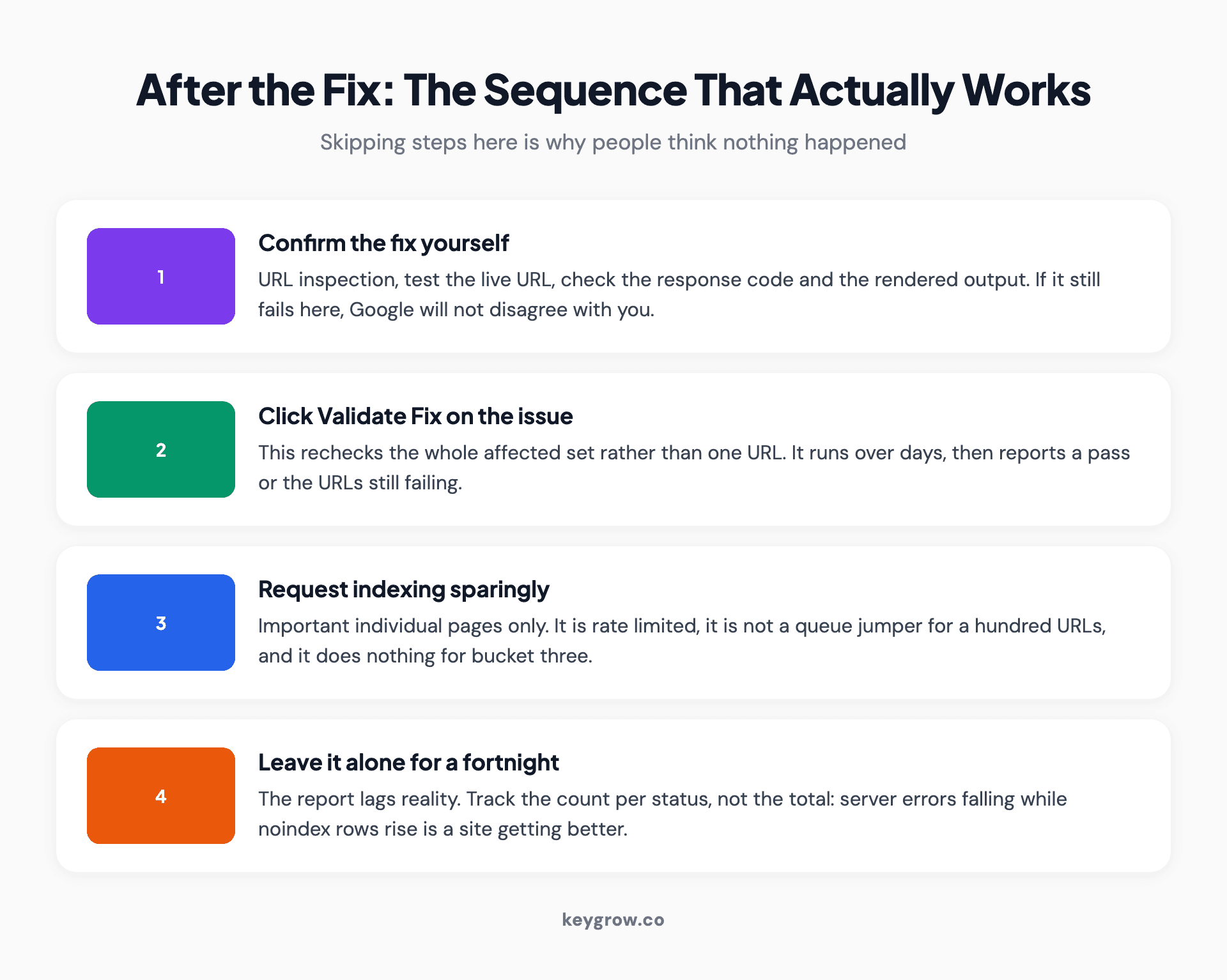
Four-step sequence after deploying a crawl error fix: confirm it yourself with URL inspection, click Validate Fix, request indexing only for important individual pages, then leave it alone for two weeks.
Confirm the fix yourself first. Use URL inspection, test the live URL, and check the response code and the rendered output. If it still fails here, Google will not disagree with you.
Click Validate Fix on the issue. This asks Google to recheck the affected set rather than the single URL. Validation runs over days, not minutes, and it will report back with a pass or the URLs that still fail.
Request indexing for genuinely important individual pages only. It is rate limited, it is not a queue jumper for a hundred URLs, and it does nothing for pages in bucket three.
Then leave it alone for a fortnight. The report lags reality. A number that does not move the next morning has not failed.
One practical note on reading progress: track the count per status, not the total. A total that stays flat while server errors go to zero and noindex rows go up is a site that got better, not one that stood still.
What not to do
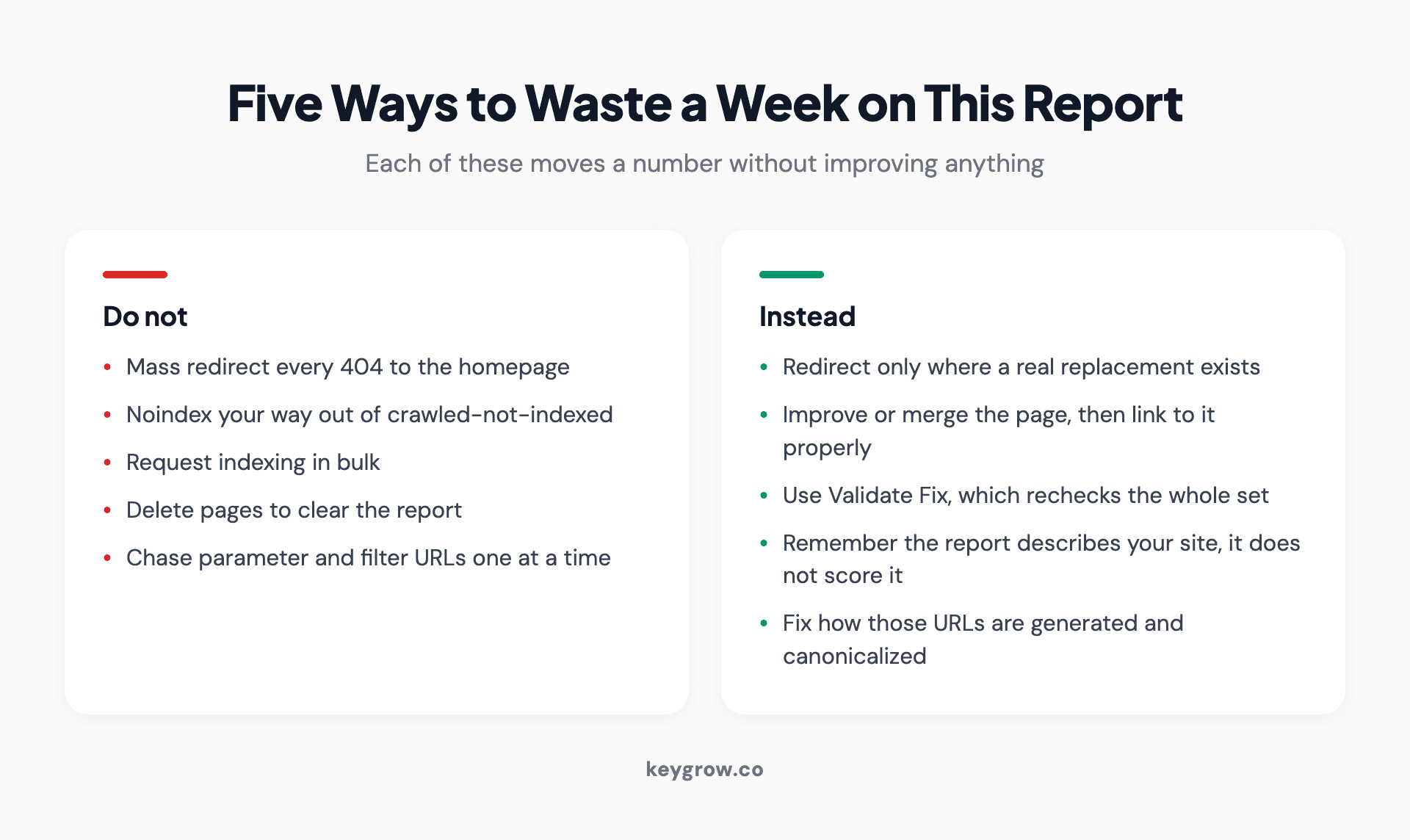
Two columns pairing five common crawl error mistakes with what to do instead.
Do not mass redirect every 404 to the homepage. It creates soft 404s, loses the signal about what was actually linked, and makes the next person's job harder.
Do not noindex your way out of bucket three. Adding noindex to pages Google declined to index moves them to a different row in the report and changes nothing about why they were not wanted.
Do not request indexing in bulk. It is rate limited and it does not override quality judgments.
Do not delete pages to clear the report. The report is a description of your site, not a score. A tidier report with less traffic is not an improvement.
Do not chase parameter and filter URLs one at a time. If faceted navigation is generating thousands of rows, the fix is at the level of how those URLs are generated and canonicalized, not in the list.
When this is not worth your time
Honest section. If your site has under fifty pages and the report shows a handful of excluded URLs that are all noindex or canonical duplicates, there is nothing here for you. Close the tab.
The threshold where this work starts paying is when one of three things is true: a page that should rank is not indexed, server errors are appearing at all, or the share of your site that is indexed has dropped without you changing anything. Absent those, the report is background noise and your time goes further on the page itself.
This is also a genuinely DIY-able job at small scale. A site owner who can read a status list and edit a robots.txt file can handle most of what shows up here without paying anyone. Where it stops being DIY is large sites, faceted navigation, or anything involving rendering, because those failures are structural and the fix lives in the build rather than in the CMS.
FAQs
How do I find crawl errors in Google Search Console?
Open the Page indexing report under Indexing in the left menu. The old Crawl Errors report no longer exists. For site-wide crawling health, including server response codes and availability, the Crawl stats report sits separately under Settings.
Do crawl errors hurt my rankings?
Some do and most do not. Server errors matter because Google slows its crawling of the whole site when they persist. Pages excluded by noindex, robots.txt or canonical tags are working as intended and carry no penalty. Pages crawled but not indexed reflect a quality judgment rather than a technical fault.
Should I redirect every 404 page?
No. Redirect only where a genuine replacement exists, and redirect to that specific page rather than the homepage. If the page is gone and nothing replaces it, leaving the 404 is the correct answer. Blanket redirects to the homepage are usually reclassified as soft 404s anyway.
What does "Crawled, currently not indexed" mean?
Google fetched the page, assessed it, and chose not to index it. There is no error to fix. It usually means the page is thin, duplicates something already indexed, or adds nothing over the results already ranking. The fix is to improve or consolidate the page and link to it properly.
How long does it take for crawl errors to clear after a fix?
Days to several weeks. Use Validate Fix on the issue so Google rechecks the whole affected set, then leave it. The report lags reality, so a count that has not moved the following morning does not mean the fix failed.
Why is Google not indexing pages that are in my sitemap?
A sitemap tells Google a page exists; it does not oblige Google to index it. If those URLs show as discovered or crawled but not indexed, the sitemap is doing its job and the page has not earned a place. Internal links and page quality decide the rest.
Read the report as three lists, not one
What changes the outcome here is not a better fixing technique. It is refusing to treat the report as a to-do list in the first place. Almost every row in it is either fine or not a technical problem, and the small number that are broken are worth finding quickly precisely because everything else is noise.
So: open Page indexing, split the statuses into the three buckets, fix bucket one, ignore bucket two, and treat bucket three as a content question for another day. Check crawl stats if server errors appear at all.
If the indexed share of your site has dropped and you cannot work out why, that is a real problem and worth a second pair of eyes. Our SEO work usually starts by reading this report properly before anything gets changed, and you can send us what you are seeing.



