

How do you conduct a technical SEO site audit? You crawl the whole site like a search engine would, then work through it in layers: crawlability, indexation, site architecture, the on-page technical elements, speed and Core Web Vitals, structured data, and security. The indexation layer has its own guide, how to fix crawl errors, because most of what that report lists needs no action at all. You log every issue with the page it affects and the fix it needs, then you do the part most guides skip: you put the issues in order of impact and fix the ones that move rankings first. A technical SEO audit is not a 200-item to-do list. It is a triage.
That last point is the whole game. Anyone can run a crawler and export a wall of red warnings. The skill is knowing which five of those two hundred problems are costing you traffic. This guide walks the full process with the free tools named at every step, then gives you a triage framework so you fix the right things in the right order.
What a technical SEO audit actually checks
A technical SEO audit checks whether search engines can crawl, render, and index your site, and whether it loads fast and cleanly on every device. It is the plumbing beneath your content.
A technical audit is different from a general SEO audit or a content audit. Content audits ask whether your pages are good enough to rank. A technical audit asks whether they can rank at all. Can a search engine reach the page, read it, and serve it without tripping over a broken redirect or a blocked resource on the way?
These problems are more common than most owners think. In a Semrush study of 100,000 sites and 450 million pages, duplicate content was the single most common issue, affecting half the sites analyzed, and 35 percent had broken internal links. The point of an audit is to find your version of those problems before they quietly cap your growth.
Before you start: the tools you need
You can run a complete technical SEO audit with free tools: Search Console, PageSpeed Insights, the URL Inspection tool, and the Rich Results Test. A paid crawler only earns its keep past a few hundred pages.
The paid crawlers save time on large sites, but they are not the entry ticket, and you should not let anyone tell you they are. The free stack covers most of what a small or mid-size site needs:
Where a paid crawler earns its money is scale. Once a site runs past a few hundred pages, a tool like Screaming Frog or Sitebulb crawls the whole thing and surfaces broken links, redirect chains, missing titles, and duplicate content in one pass instead of page by page. Screaming Frog is free up to 500 URLs, which covers a lot of small sites outright. Buy the crawler when the manual approach starts costing you more time than the license costs in money.
How to conduct a technical SEO site audit, step by step
Crawl the site, then check crawlability, indexation, the sitemap, architecture, on-page technical elements, speed, mobile, structured data, and security, logging each issue as you go.
Here is the full sequence. Work it in order, because each layer depends on the one before it: there is no point optimizing a page's speed if a search engine cannot crawl it in the first place.
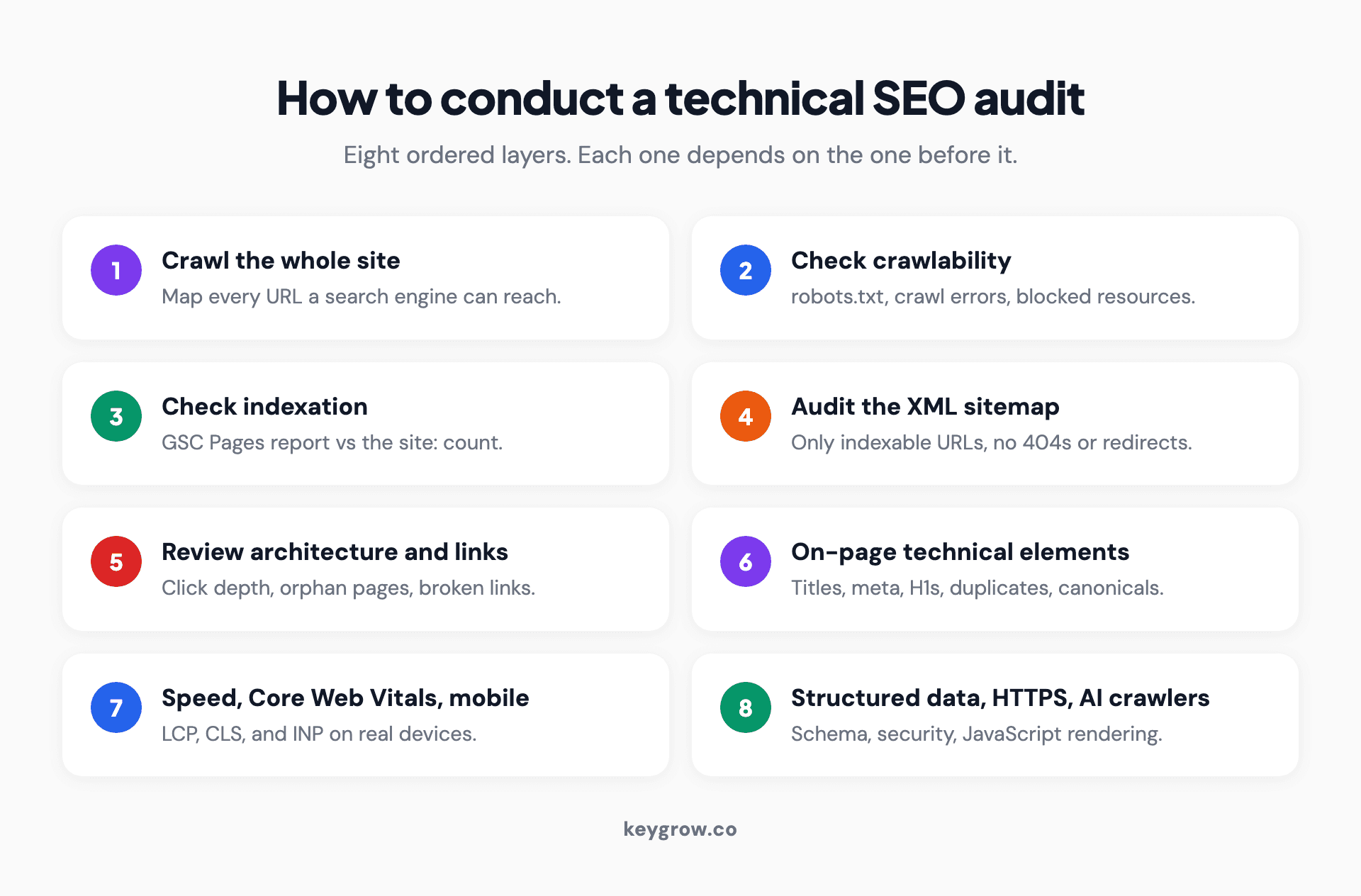
Infographic of the technical SEO audit process as eight ordered steps: crawl the site, check crawlability, check indexation, audit the XML sitemap, review site architecture and internal links, audit on-page technical elements, test speed and Core Web Vitals, then validate structured data and security.
Steps 1 to 3: crawl, crawlability, and indexation
Start by crawling the site so you have a full map of every URL, then confirm search engines can reach and store those pages.
Run your crawler against the live site. While it works, open your robots.txt file (at yourdomain.com/robots.txt) and read it line by line. A single stray Disallow rule can hide an entire section from Google, and an accidental sitewide block is the most expensive one-line mistake in SEO. Then check indexation in Search Console's Pages report. The gap between pages you have published and pages Google has indexed is where the problems hide: pages excluded as duplicates, pages marked noindex by mistake, pages Google crawled but chose not to index. Cross-check the rough total with a site: search. If you have 400 pages and Google shows 120, you have an indexation problem worth chasing down.
Steps 4 to 5: sitemap, architecture, and internal links
Your XML sitemap should list every page you want indexed and nothing you do not. Check that it exists, that it is submitted in Search Console, and that it does not contain redirects, 404s, or noindexed URLs, which send mixed signals about what matters.
Then look at structure. How many clicks does it take to reach your most important page from the homepage? Anything past three or four clicks is buried, both for users and for crawlers that spend less time on deep pages. Find orphan pages, the ones with no internal links pointing to them, because a page nothing links to is a page search engines struggle to find and value. Most of what a crawler reports as orphaned is not, so our guide to orphan pages covers how to triage that list before acting on it. While you are here, hunt down broken links and redirect chains. Broken links waste the authority you have already earned, and they pile up on their own over time. Ahrefs found that 66.5 percent of links to sites it sampled had decayed over the prior nine years, so expect to find dead links; the only question is how many.
Step 6: on-page technical elements
This layer is where a crawler pays for itself, because it flags these issues across thousands of pages at once. Check for missing or duplicate title tags and meta descriptions, pages with no H1 or several H1s, and thin or duplicate content. For anything duplicated, confirm the canonical tags point to the version you want ranked. Duplicate content is rarely a penalty, but it splits your signals and lets Google rank the wrong URL, which we cover in depth in our guide to duplicate content. For the title-and-meta side, our SEO meta data guide has the specifics.
Step 7: speed, Core Web Vitals, and mobile
Run your key page types through PageSpeed Insights and read the Core Web Vitals. The three that count are Largest Contentful Paint (how fast the main content loads), Cumulative Layout Shift (how much the page jumps around while loading), and Interaction to Next Paint, which Google made an official Core Web Vital in March 2024, replacing First Input Delay. If a guide still tells you to optimize for FID, it is out of date.
Speed is worth the effort because slow pages lose people before they read a word. Google's data shows that as a mobile page goes from one second to ten seconds to load, the probability of a visitor bouncing rises 123 percent. And most sites have room to improve here: the Web Almanac found only 43 percent of sites had good Core Web Vitals on mobile in 2024. Check mobile rendering too, since Google indexes the mobile version of your site first.
Step 8: structured data, HTTPS, and the 2026 layer
Validate your structured data with the Rich Results Test so your pages stay eligible for rich results, which we explain in our rich snippets guide. Confirm the whole site runs on HTTPS with no mixed-content warnings and no pages still served over plain HTTP.
Then add the layer the older guides miss entirely: AI crawlers and rendering. AI engines are now a real source of discovery, and they crawl differently. Cloudflare reported that GPTBot climbed from 2.2 percent of AI and search crawler traffic in May 2024 to 7.7 percent a year later, moving from the ninth to the third most active crawler. The catch is how these bots read pages. A Vercel and Merj study covered by Search Engine Land found that most major AI crawlers, including ChatGPT and Claude, fetch JavaScript files but do not execute them, so content that only appears after client-side JavaScript runs is effectively invisible to them. Google's Gemini is the exception, since it renders through Googlebot's infrastructure. The takeaway holds: if your important content is not in the raw HTML, most AI engines cannot see it, and auditing for that is now part of the job.
How to prioritize what you find
Sort every issue by impact and effort. Fix high-impact, low-effort problems first, schedule the high-impact hard ones, and ignore the low-impact noise no matter how many warnings it throws.
This is the step that separates a useful audit from a stressful spreadsheet. A crawl will hand you hundreds of flagged issues, and treating them as equally urgent is how businesses waste a month fixing trailing slashes while a noindex tag quietly keeps half their site out of Google.
Plot each issue on two axes: how much it affects rankings or traffic, and how much work it takes to fix. That gives you four buckets.
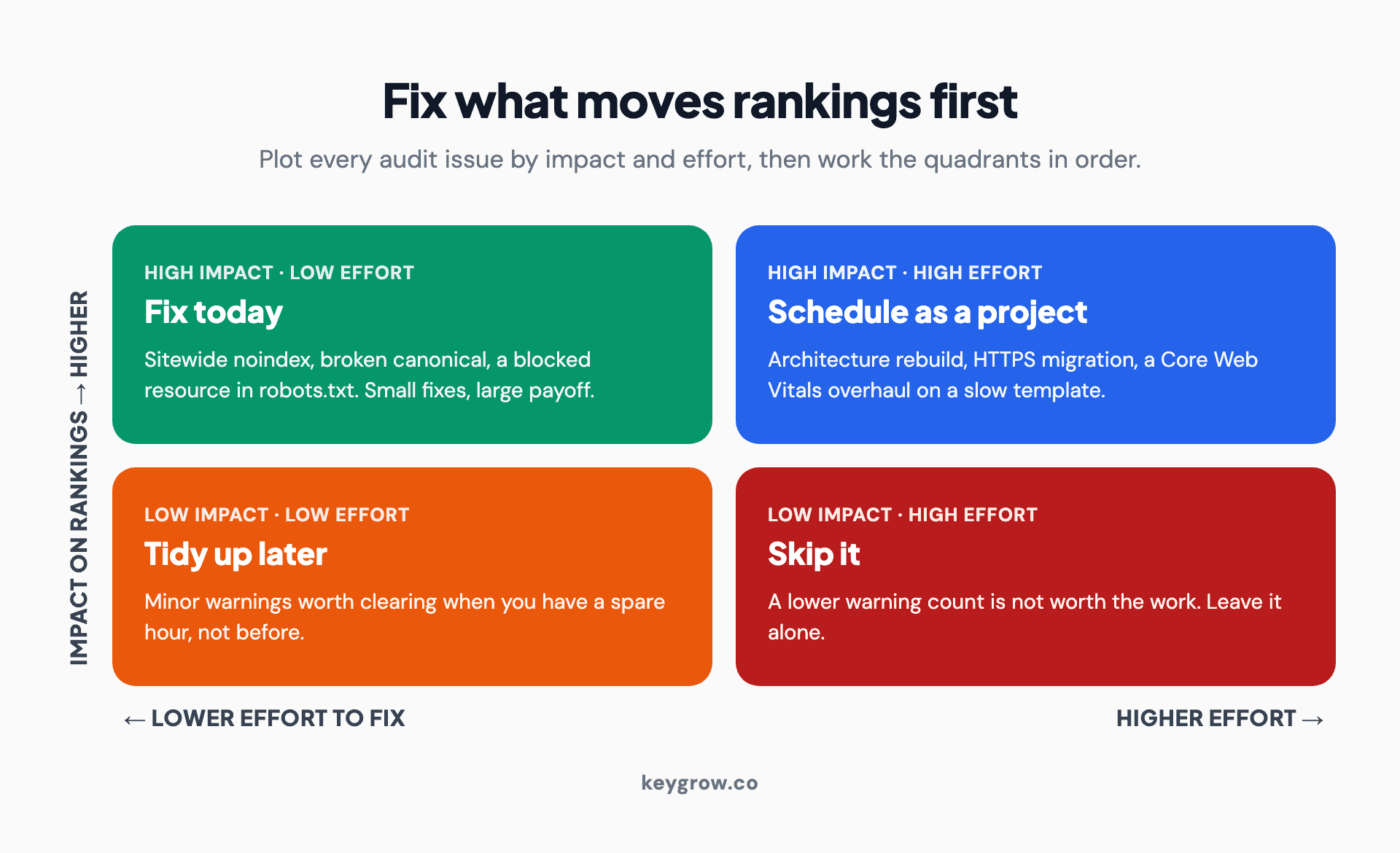
Infographic of a two-by-two technical SEO triage matrix with impact on one axis and effort on the other: high impact and low effort are fix-now quick wins, high impact and high effort are scheduled projects, low impact and low effort are optional tidying, and low impact and high effort should be skipped.
| Low effort to fix | High effort to fix | |
|---|---|---|
| **High impact** | Fix today: sitewide noindex, broken canonical, a resource blocked in robots.txt | Schedule as a project: architecture rebuild, HTTPS migration, Core Web Vitals overhaul |
| **Low impact** | Tidy up when you have a spare hour | Skip it; a lower warning count is not worth the work |
Log everything in a simple spreadsheet with the issue, the pages it affects, the fix, and which bucket it lands in. That document is the actual deliverable of an audit, not the raw crawl export.
How often to audit, and whether to DIY it
Run a light technical check monthly and a deep audit every quarter or two, plus one after any redesign or migration. Small sites can DIY this with free tools.
We go deeper on cadence in our guide to how often to audit. Here is the honest part: if you run a small site and you are willing to learn, you can do most of this yourself. Search Console and PageSpeed Insights are free and they cover the issues that matter most for a site under a few hundred pages. DIY is the right call more often than agencies will admit. Run the free-tool audit, fix the high-impact items, and only bring in help when the site is large, the issues are structural, or the opportunity cost of your time has passed the price of hiring out. Where a team like ours earns its fee is on big, complex sites where a missed redirect chain across ten thousand URLs is real money, not on a ten-page brochure site you can audit over a weekend.
FAQs
What is a technical SEO site audit and what does it cover?
A technical SEO audit is a check of whether search engines can reach your pages, read them, store them in the index, and serve them quickly and cleanly. It covers crawlability, indexation, the XML sitemap, site architecture, internal links, broken links and redirects, title and meta tags, duplicate content and canonicals, page speed and Core Web Vitals, mobile-friendliness, structured data, and HTTPS security.
How do you conduct a technical SEO audit from start to finish?
Crawl the whole site, then work in layers: confirm crawlability in robots.txt, check indexation in Google Search Console, audit the sitemap, review architecture and internal links, check on-page technical elements, test speed and Core Web Vitals, validate structured data, and confirm HTTPS. Log every issue with the page it affects and the fix, then prioritize by impact before you start fixing.
How long does a complete technical SEO audit take?
A small site of under a hundred pages can be audited in a day or two. A mid-size site usually takes several days once you account for the crawl, the manual checks, and writing up the findings. Large or e-commerce sites with tens of thousands of URLs can take a week or more, since the crawl alone runs longer and the issue volume is higher.
Can I do a technical SEO audit myself or should I hire a professional?
You can do a solid technical audit yourself on a small site using free tools, mainly Google Search Console and PageSpeed Insights. Hire a professional when the site is large, the issues are structural like a migration or an architecture rebuild, or you do not have time to learn the tools. The free-tool audit is genuinely enough for most small businesses to start.
What free tools do you need for a technical SEO audit?
The core free stack is Google Search Console (indexation and crawl issues), PageSpeed Insights (Core Web Vitals and speed), the URL Inspection tool (how Google sees one page), and the Rich Results Test (structured data validation). The site: search operator gives a quick indexed-page count. Screaming Frog is free up to 500 URLs, which covers many small sites.
What is the difference between a technical SEO audit and a general SEO audit?
A technical SEO audit checks the foundations: whether search engines can crawl, render, and index the site and whether it loads well. A general SEO audit is broader and also covers content quality, keyword targeting, and backlinks. Think of the technical audit as the plumbing and the general audit as the whole house, including how good the rooms are.
Do technical SEO audits improve rankings directly?
Not on their own. An audit finds the problems; fixing them is what can improve rankings, and only when those problems were actually holding the site back. Clearing a sitewide noindex or a crawl block can produce a fast jump, while many smaller fixes mostly prevent decline. The audit is the diagnosis, not the treatment.
How often should you run a technical SEO audit?
Run a light technical check monthly to catch new issues early, and a deeper audit every quarter or two. Always run one after a major change such as a site redesign, a platform migration, or a big content reorganization, since those are when technical problems are introduced. Larger and faster-changing sites need more frequent checks than small, stable ones.
The short version
An audit is only as good as the order you fix things in. Sort every issue by impact and effort before you touch one, so your time goes to the handful that move rankings instead of the hundred that do not. Do not assume you need to outsource it either: most small sites can run the whole process with Search Console and PageSpeed Insights over a weekend, then fix the top of the list. Crawl, log, triage, repeat.
If your site is large enough that a missed technical issue is costing real traffic, that is what our SEO service is built for. Tell us about your site and we will tell you what to fix first.


