

What is meta data in SEO? Meta data is information about your web page that lives in the page's code, not on the visible page itself. It tells search engines and browsers what the page is about, how to display it in search results, and whether to index it at all. The most important pieces are your title tag, meta description, and meta robots tag.
That is the short answer. The longer one matters, because "meta data" gets used as a catch-all for everything from the title that shows up in Google to schema markup to the keywords tag that has been dead for over a decade. Some of it moves rankings. Some of it only earns clicks. And some of it does absolutely nothing, no matter how many hours you spend filling it in. This guide sorts the three apart, gives you the exact limits to write to, and shows you what actually changes in 2026 now that AI answers sit on top of the results.
What is meta data in SEO, exactly?
Meta data (or metadata) is structured information about a page that search engines read but visitors usually do not see. It sits inside the head section of your HTML as a series of meta tags. Each tag hands a search engine a specific instruction or description: this is the page's title, this is its summary, this is the language, do not index this one, here is the image to use when someone shares it.
Think of it as the label on a tin. The visible page is the food inside. The label is what tells the shop where to shelve it and what the shopper sees before they decide to buy. A great product with a blank label still sells badly, because nobody can tell what it is at a glance.
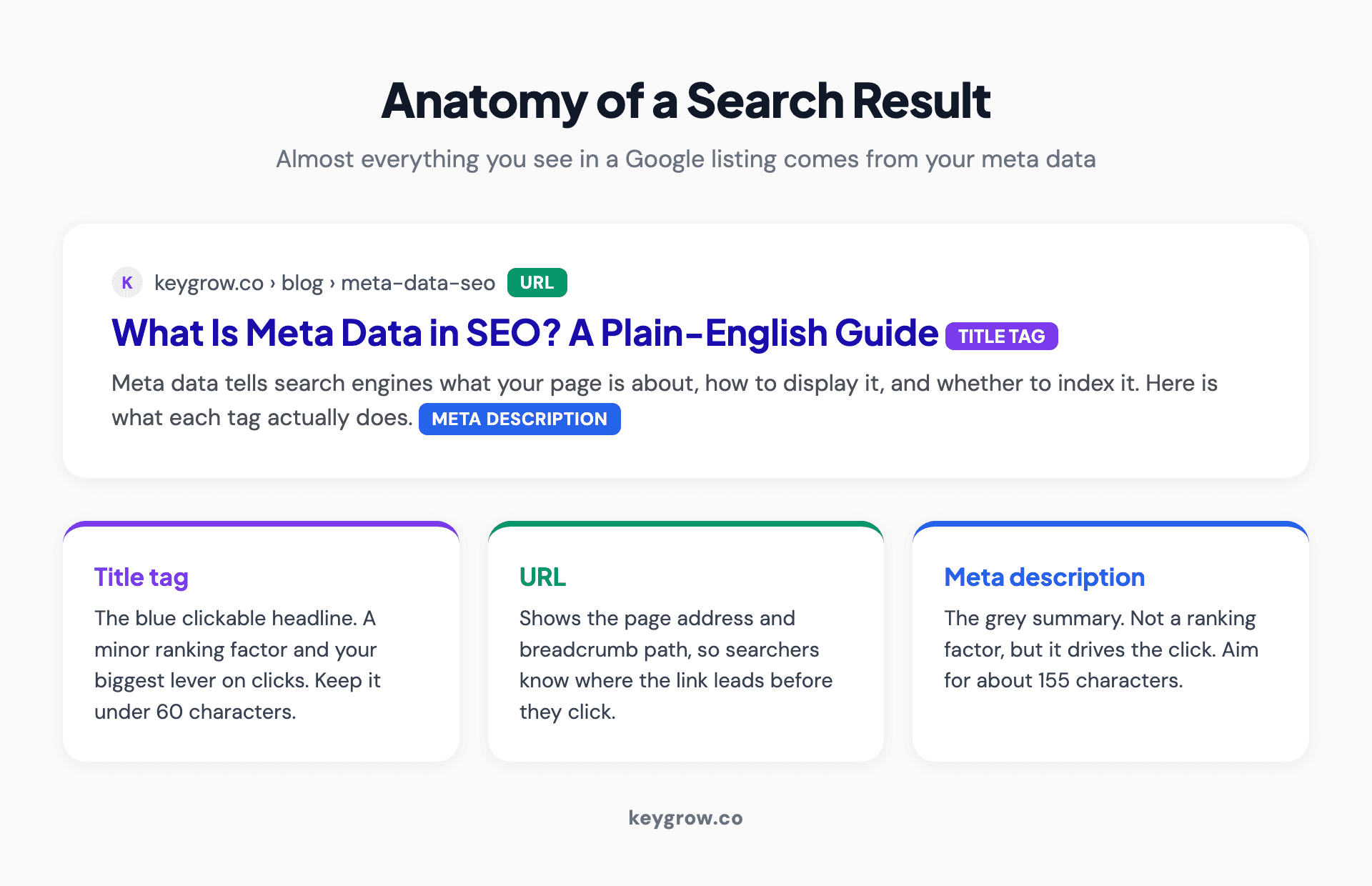
Diagram showing the anatomy of a Google search result, with the title tag, URL, and meta description labeled on a sample search listing.
When you search Google, almost everything you see in a single result comes from meta data: the blue clickable headline is the title tag, the grey text underneath is the meta description (or Google's rewrite of it), and behind the scenes a robots tag decided whether the page was allowed to appear at all. That is the whole reason this stuff matters. Meta data is the first impression your page makes, and most people decide whether to click based on it before they ever reach your site.
Meta tags, metadata, and schema are not the same thing
This is where most guides muddy the water, so here are the lines.
Meta tags are the classic HTML elements in your page's head: title, description, robots, viewport, charset, and so on. This is what people usually mean by "meta data for SEO."
Metadata in the broad sense is any data about your data. That technically includes meta tags, but also things like image alt text, Open Graph tags, and structured data.
Schema (structured data) is a separate, richer layer. It uses a vocabulary called Schema.org, usually written as JSON-LD, to describe what a page is: a recipe, a product with a price, an FAQ, a local business with hours. Schema is what earns you the star ratings, FAQ dropdowns, and other rich results you see in Google. We covered that in depth in our guide on whether rich snippets help SEO.
Here is the practical takeaway. Classic meta tags control how your existing snippet looks and behaves. Schema can earn you entirely new SERP features. They overlap under the umbrella word "metadata," but you optimize them in different places for different reasons. For the rest of this guide, when I say meta tags I mean the classic HTML ones, and I will flag schema separately when it is the better lever.
Which meta tags actually matter, and which Google ignores
Only the title tag and meta robots tag affect rankings. The meta description and Open Graph tags drive clicks. The meta keywords tag does nothing at all.
Not all meta tags are created equal. Some are a genuine ranking factor, some only affect whether people click, and at least one is a complete waste of your time. Here is the honest tier list.
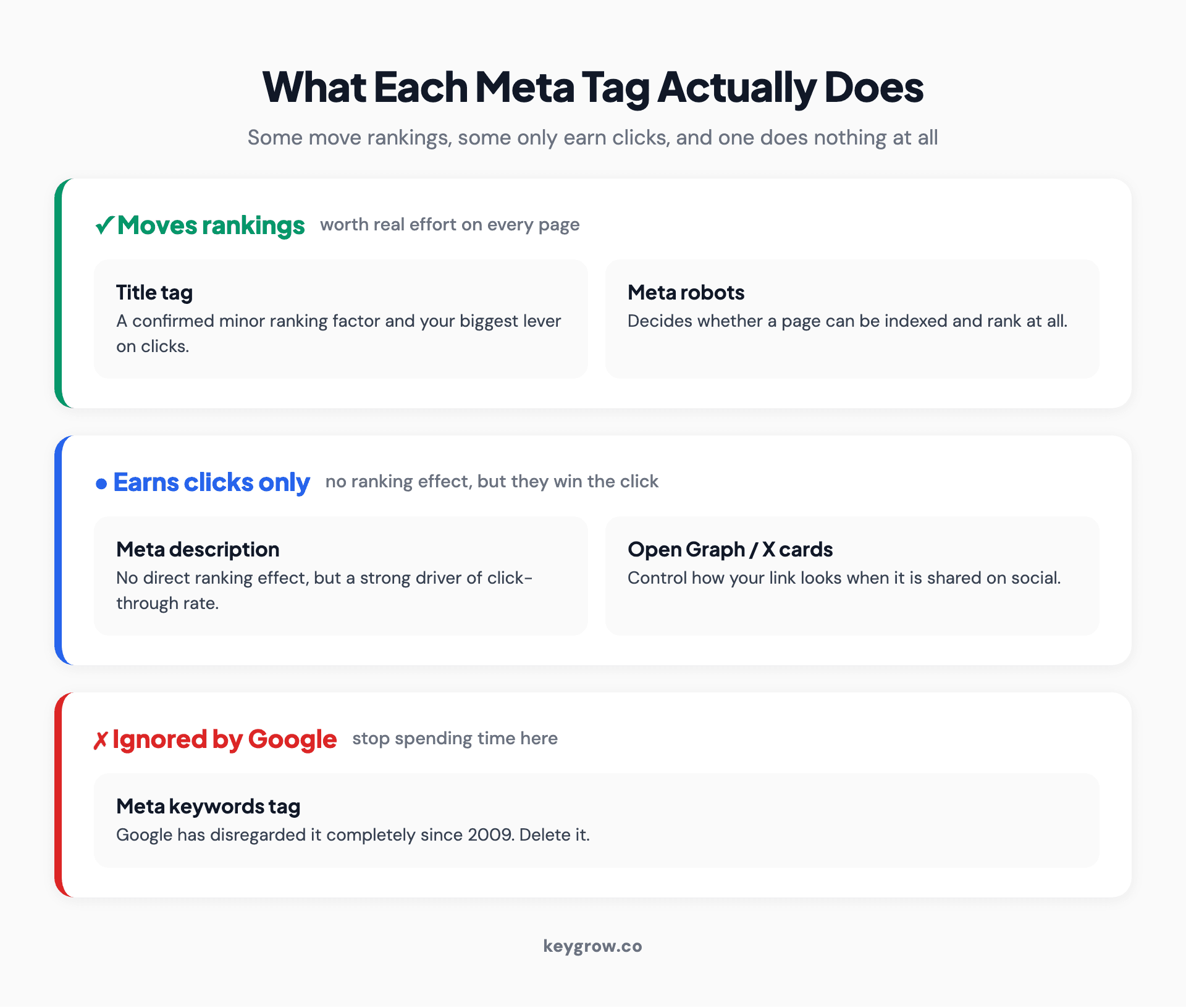
Tiered infographic showing meta tags grouped into three categories: tags that affect rankings, tags that affect clicks only, and tags Google ignores.
| Meta tag | What it does | Worth your time? |
|---|---|---|
| Title tag | Minor ranking factor and the main thing people click | Yes, the highest-value tag |
| Meta robots | Controls indexing and crawling, can make or break visibility | Yes, critical to get right |
| Meta description | No direct ranking effect, but drives click-through rate | Yes, for clicks not rankings |
| Open Graph / X cards | Controls how links look when shared | Yes, for social and shares |
| Viewport / charset | Technical correctness, mobile rendering | Set once, then forget |
| Canonical | Tells Google the preferred version of a page | Yes, for duplicate control |
| Meta keywords | Nothing. Google ignores it entirely | No, skip it completely |
The single most useful thing you can internalize is that these tags do different jobs. Pouring effort into a meta keywords tag while leaving your title tags as default page names is the SEO equivalent of polishing the spare tyre while the engine light is on. Let me take the ones that matter one at a time.
The title tag is your most important piece of meta data
The title tag is the clickable headline that shows in search results, and it is the one meta tag that is both a confirmed ranking signal and your biggest lever on clicks. Google's John Mueller confirmed that "we do use titles as a tiny factor in our rankings as well." Tiny, but real, and that is rare for a meta tag.
In your HTML it is one short line that sits in the head: a title element wrapping your headline text, like <title>What Is Meta Data in SEO? A Plain-English Guide</title>.
A few rules that hold up:
1. Keep it under about 60 characters or 600 pixels. Per Ahrefs' study of 953,276 pages ranking in the top 10, 600 pixels is the limit search results can display, and Google increasingly rewrites titles that run past it: titles over 600 pixels get rewritten about 46 percent of the time, against a 33 percent rewrite rate overall. Front-load the important words so the part that survives is the part that matters.
2. Put your primary keyword near the front. It helps the tiny ranking signal and, more importantly, it tells a scanning human they are in the right place.
3. Make every title unique. Duplicate titles across pages confuse both Google and searchers about which page answers what.
4. Write for a person, not a robot. A title stuffed with keywords reads like spam and gets fewer clicks than a clear, specific one.
One honest caveat, and it is a big one: Google might rewrite your title anyway. We will get to exactly how often later, because that single fact changes how much energy this deserves.
The meta description will not rank you, but it earns the click
The meta description is the short summary under your title in search results. Here is the part most people get wrong: it is not a ranking factor. Google's own snippet documentation describes the description purely as material for building the search snippet, saying it "sometimes uses the meta description HTML element if it might give users a more accurate description of the page." Google has separately confirmed it does not use the description to decide where you rank, only how your result reads.
So why bother? Because it is one of your best tools for click-through rate. Backlinko's analysis of 4 million search results found that pages with a meta description earned an average of 5.8 percent more clicks than pages missing one. You are not writing it to climb the rankings. You are writing it to win the click once you are already on the page.
In HTML it is a single meta tag: <meta name="description" content="A clear, benefit-led summary of the page in about 155 characters.">.
What works:
1. Aim for roughly 155 characters or about 920 pixels, which is the desktop limit. Conductor notes that descriptions past about 150 characters often get truncated in results. There is no hard character limit, so write to the tighter desktop width and you are safe everywhere.
2. Treat it like ad copy. It is a free advert sitting under your headline. Lead with the benefit, include the search term naturally, and give a reason to click.
3. Match the search intent. If someone searches a question, the description should promise the answer.
4. Write a unique one per page. Auto-generated or duplicated descriptions are a missed opportunity, even though they will not hurt your rankings.

Two monitors showing code in an editor, where a developer sets and edits a page's meta tags.
The meta robots tag controls whether you show up at all
If the title and description are about how you appear, the meta robots tag is about whether you appear. It tells search engines whether to index a page and whether to follow its links. Get it wrong and you can quietly delete your whole site from Google without touching a single word of content. The tag itself is short: <meta name="robots" content="index, follow">.
The values you will actually use:
Most pages want index, follow (which is also the default if you say nothing). You reach for noindex on pages that should exist for users but not in search: thank-you pages, internal search results, thin tag archives, staging pages. The nofollow side is its own topic, and we wrote a full piece on whether nofollow links help SEO if you want the detail.
A quick but important distinction. The robots meta tag, the robots.txt file, and the X-Robots-Tag HTTP header all sound alike and do related jobs, but they are not interchangeable.
| Method | Where it lives | What it controls |
|---|---|---|
| robots.txt | A file at your domain root | Crawling. Asks bots not to fetch a page, but it can still be indexed if linked elsewhere |
| Meta robots tag | The page's HTML head | Indexing of that one HTML page (index/noindex, follow/nofollow) |
| X-Robots-Tag | An HTTP response header | Indexing of any file type, including PDFs and images that have no HTML head |
The trap is using robots.txt when you mean noindex. If you want a page truly out of Google, you need a noindex directive, not just a robots.txt block, because a blocked-but-linked page can still show up. Mixing these up is one of the most common ways businesses accidentally hide pages they wanted ranked, or expose ones they wanted hidden.
The meta tags that run quietly in the background
A handful of tags do not need optimizing so much as setting correctly once. They rarely change your rankings, but a broken one can break your page. Two are pure technical correctness: the charset tag declares your character encoding so text renders without garbled symbols, and the viewport tag makes the page render properly on mobile, which genuinely matters because Google indexes the mobile version of your site first. Almost every modern site ships both by default, so you confirm they are there rather than write them.
Two others handle duplication and language. The canonical tag (technically a link element, but it belongs here) tells Google which version of a page is the original when you have duplicates or near-duplicates, so ranking signals consolidate onto one URL instead of splitting. Hreflang tells Google which language and region a page targets, so a Spanish reader gets your Spanish page and not the English one, and it only matters if you run multilingual or multi-region content.
You do not write these fresh for every page the way you do titles and descriptions. You confirm they are present and correct, usually at the template level, and move on.
Open Graph and X cards: meta data for how your links look
When someone shares your page on social platforms or in a messaging app, Open Graph tags decide what the preview looks like: the headline, the description, and the image. Without them, you get an ugly, random preview that nobody clicks. The three that carry the weight are og:title, og:description, and og:image, written as meta tags in the head, for example: <meta property="og:image" content="https://example.com/preview.jpg">.
X (formerly Twitter) uses its own card tags that work the same way. These do not affect your Google rankings, but they affect whether people click your link when it gets shared, which feeds the kind of traffic and brand signals that do matter over time. If your shared links look broken, you are leaving social clicks on the table for the sake of three lines of code.
The meta keywords tag has been dead since 2009
Let me save you some time. The meta keywords tag, where you list the keywords you want to rank for, does nothing for Google. Nothing. Google's Matt Cutts confirmed back in September 2009 that "Google does not use the keywords meta tag in our web search" and that it "disregards keyword metatags completely."
That was over fifteen years ago, and yet I still open up business websites and find a stuffed keywords tag sitting in the head, sometimes the only meta data anyone bothered to fill in. It does not help. Worse, a public list of every keyword you are chasing is a free competitive gift to anyone who views your source code. Delete it and spend the time on a title tag instead.
This is also the moment to mention: if anyone selling you SEO leans on "we'll optimize your meta keywords" as a deliverable, treat it as a red flag. It tells you their playbook is older than the iPhone.
Does meta data matter for AI Overviews and ChatGPT?
Yes, but differently. Your meta robots tag controls whether AI engines can read your page at all, titles still aid comprehension, and schema does the heavy lifting for whether you get cited.
This is the 2026 question none of the older guides answer, so here is where it stands.
AI Overviews and answer engines like ChatGPT still read your page through the same front door: they need to crawl and understand it, and your meta robots tag still governs whether they are allowed in. If you noindex a page, you are not just hiding from the ten blue links, you may be hiding from the AI answer that increasingly sits above them.
Title tags and descriptions matter less to a generative answer than they do to a classic snippet, because an AI model synthesizes from your page content rather than displaying your description verbatim. But clear, accurate titles still help these systems understand what your page is about and decide whether to cite it. The bigger lever for AI visibility is structured content and schema, which is why we treat AI search optimization as its own discipline rather than a meta-tag tweak.
The short version: meta robots is now even more important, because it is the gate for both classic and AI search. Titles and descriptions still help comprehension. And if AI answers are where you want to show up, your effort shifts toward clear structure and schema, not toward squeezing one more keyword into a description.
In practice that means three things: never noindex a page you actually want cited, keep your titles descriptive and literal so a model can tell what the page is, and put your schema effort into the FAQ and how-to pages you most want pulled into an answer.
Why Google rewrites your titles and descriptions anyway
Here is the uncomfortable truth that should change how much you sweat this. You can write a perfect title and description, and Google can decide to show something else entirely.
It happens constantly. Ahrefs studied 953,276 pages and found Google rewrites title tags 33.4 percent of the time, showing your original only about two-thirds of the time. A separate Zyppy study, covering more than 80,000 titles across 2,370 sites, found Google altered 61.6 percent of titles at least partially. Descriptions are worse: Ahrefs found Google rewrites them 62.78 percent of the time, rising to nearly 66 percent for long-tail queries. It shows your written description only about a third of the time.
So is writing them a waste? No, and here is the nuance. Google rewrites your meta data when it thinks its version serves the searcher better for a specific query, often pulling a more relevant sentence from your page. You still want to write a strong title and description, because they are the starting point Google works from, the version that shows for the queries it does not rewrite, and the preview that appears when your page is shared off-Google. What you should not do is agonize over a single description for a week as if it were carved in stone. Write a clear, accurate one, then spend your remaining energy on the page content Google might pull from instead.
How to find and edit your meta data
You do not need to touch raw HTML for most of this. Where you edit depends on how your site is built.
WordPress: an SEO plugin like Yoast or Rank Math adds title and description fields to every page and post editor. You fill in the boxes, the plugin writes the tags.
Shopify, Wix, Squarespace: each has built-in SEO settings per page, usually labeled "page title" and "meta description" or "SEO settings."
Custom or framework sites (like Next.js, which this blog runs on): meta data is set in code, in a metadata object or head component per page.
Raw HTML: you edit the tags directly in the head of each file.
To check what is currently there on any page, right-click and choose "View Page Source," then search for the title and description tags. A free browser extension like SEO META in 1 Click shows it all in one panel without digging through code. For a whole site at once, a crawler like Screaming Frog or the site audit in Ahrefs or Semrush will flag every missing, duplicate, or too-long tag in one report.
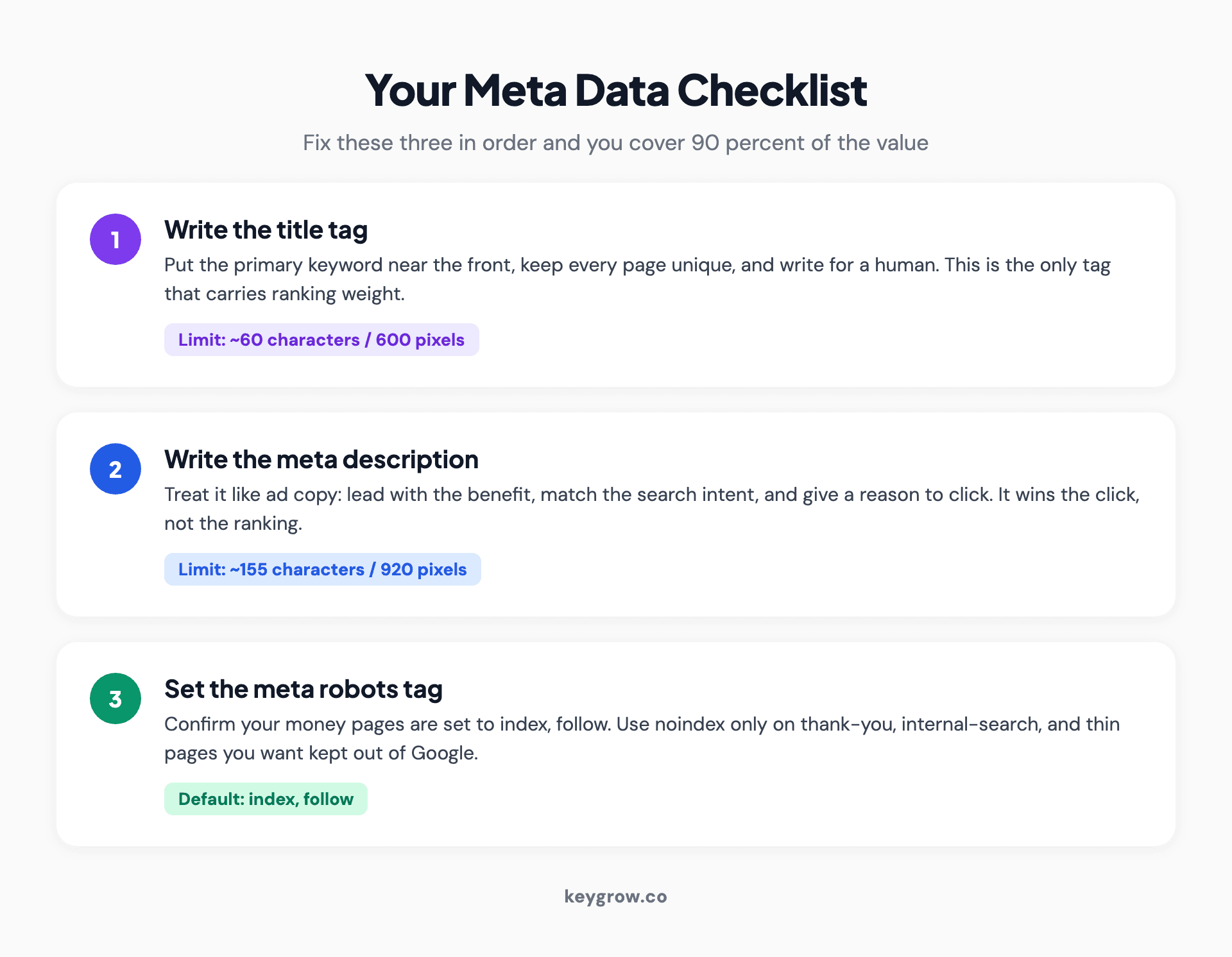
Three-step checklist infographic for optimizing meta data: write a title tag under 60 characters, write a meta description around 155 characters, and set the meta robots tag correctly.
If you are a small business doing this yourself, here is the honest order of operations. Fix your title tags first, because they carry the only ranking weight and the most clicks. Then write real descriptions for your money pages. Then confirm nothing important is accidentally set to noindex. That covers 90 percent of the value. You do not need to hire anyone for that part, and frankly you should not pay an agency to fill in boxes you can fill in yourself in an afternoon.
We saw how much the basics matter with FastCellRepair, a local phone repair shop in Canada that came to us with almost no organic visibility. Optimizing the on-page elements, titles, meta descriptions, and headers among them, was part of a full SEO push that took them from around 50 organic visitors a month to 2,500, and from zero to more than 115 phone calls a month from search, inside seven months. Meta data alone did not do that. But meta data done badly would have capped everything else we built.
FAQs
What is meta data in SEO?
Meta data in SEO is information about a web page that lives in the page's code rather than on the visible page. It tells search engines what the page is about, how to display it in search results, and whether to index it. The key pieces are the title tag, meta description, and meta robots tag.
Is meta data a Google ranking factor?
Some of it is, most of it is not. The title tag is a confirmed minor ranking factor, and the meta robots tag controls whether a page can rank at all. The meta description is not a direct ranking factor, but it strongly affects click-through rate. The meta keywords tag has no effect whatsoever.
What is the ideal length for a title tag and meta description?
Keep title tags to about 60 characters or 600 pixels, since Google is more likely to rewrite or truncate titles that run past that. Aim for meta descriptions around 155 characters or roughly 920 pixels. There is no hard character limit on descriptions, so the pixel width is what actually decides whether yours gets truncated.
Why does Google rewrite my title and meta description?
Google rewrites them when it believes its own version better matches a specific search query, often pulling a more relevant line from your page content. Studies show it rewrites about a third of titles and nearly two-thirds of descriptions. You should still write strong ones, because they are the starting point and the version shown when your page is shared.
Does the meta keywords tag still matter?
No. Google confirmed in 2009 that it ignores the meta keywords tag completely, and that has not changed. It provides no ranking benefit and only hands competitors a list of the terms you are targeting. You can safely delete it.
What is the difference between the meta robots tag and robots.txt?
The robots.txt file asks crawlers not to crawl a page, but the page can still be indexed if other sites link to it. The meta robots tag (and the X-Robots-Tag header) tells search engines not to index the page. To keep a page out of search results entirely, you need a noindex directive, not just a robots.txt block.
Do meta tags affect AI Overviews and ChatGPT?
Indirectly. The meta robots tag still controls whether AI search engines can access your page, so it matters more than ever. Title tags help these systems understand your content, but descriptions matter less because AI answers synthesize from your page rather than showing your description. Structured content and schema are the bigger levers for AI visibility.
How do I check the meta data on my website?
Right-click any page and choose "View Page Source," then search for the title and meta description tags. A free browser extension like SEO META in 1 Click shows everything in one panel. To audit an entire site, use a crawler like Screaming Frog or the site audit feature in Ahrefs or Semrush.
The short version
The honest punchline is that Google rewrites most of what you put here, so your page content matters more than any single tag you agonize over. Write a clear title, a description worth clicking, and double-check nothing important is quietly set to noindex. Then stop. That handful of moves is most of the value, and the time you save by not polishing a keywords tag is better spent on the page itself, which is what Google reads when it decides whether you are worth showing at all.
If you would rather have a team handle the on-page work and the strategy behind it, our SEO service does exactly that. Tell us about your site and we will show you what your meta data is doing for you, and what it is not.


