


You run a crawl, tick the box marked orphan pages, and the tool hands you 340 URLs.
Here is the part nobody puts in the summary: most of them are not orphans. Some are paginated URLs the crawler counts separately. Some are links sitting inside a tab the crawler never opened. Some are landing pages you deliberately kept out of the navigation because they exist for ad traffic.
Orphan pages SEO work is therefore two jobs, not one. The first is triage, deciding which entries on that list are real. The second is fixing the ones that are. Skip the first and you will spend a week adding internal links to pages that never needed them, and miss the twelve that did.
What an orphan page actually is
An orphan page is a page on your site with no internal links pointing at it from anywhere else on the site.
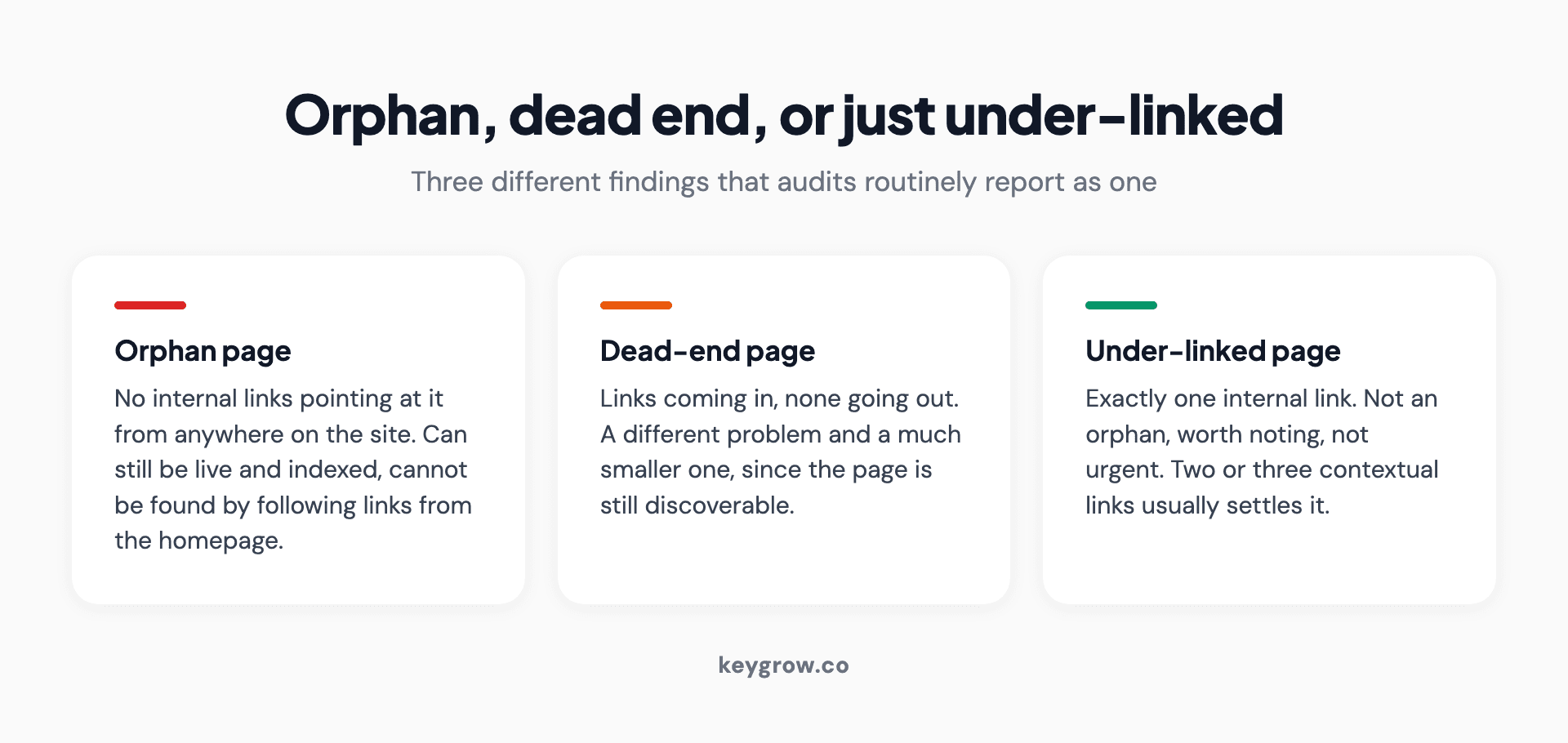
Three-card comparison distinguishing an orphan page from a dead-end page and an under-linked page.
It can still exist. It can still be live, still be indexed, still take traffic from a bookmark or an ad. What it cannot do is be discovered by following links from your homepage, which is how both crawlers and most humans move through a site.
Two things people confuse with it:
A dead-end page has links coming in but none going out. Different problem, much smaller one.
A page with only one internal link is not an orphan. It is under-linked, which is worth noting and is not urgent.
Why a missing link costs more than it sounds like
Three effects, in descending order of how much they should worry you.
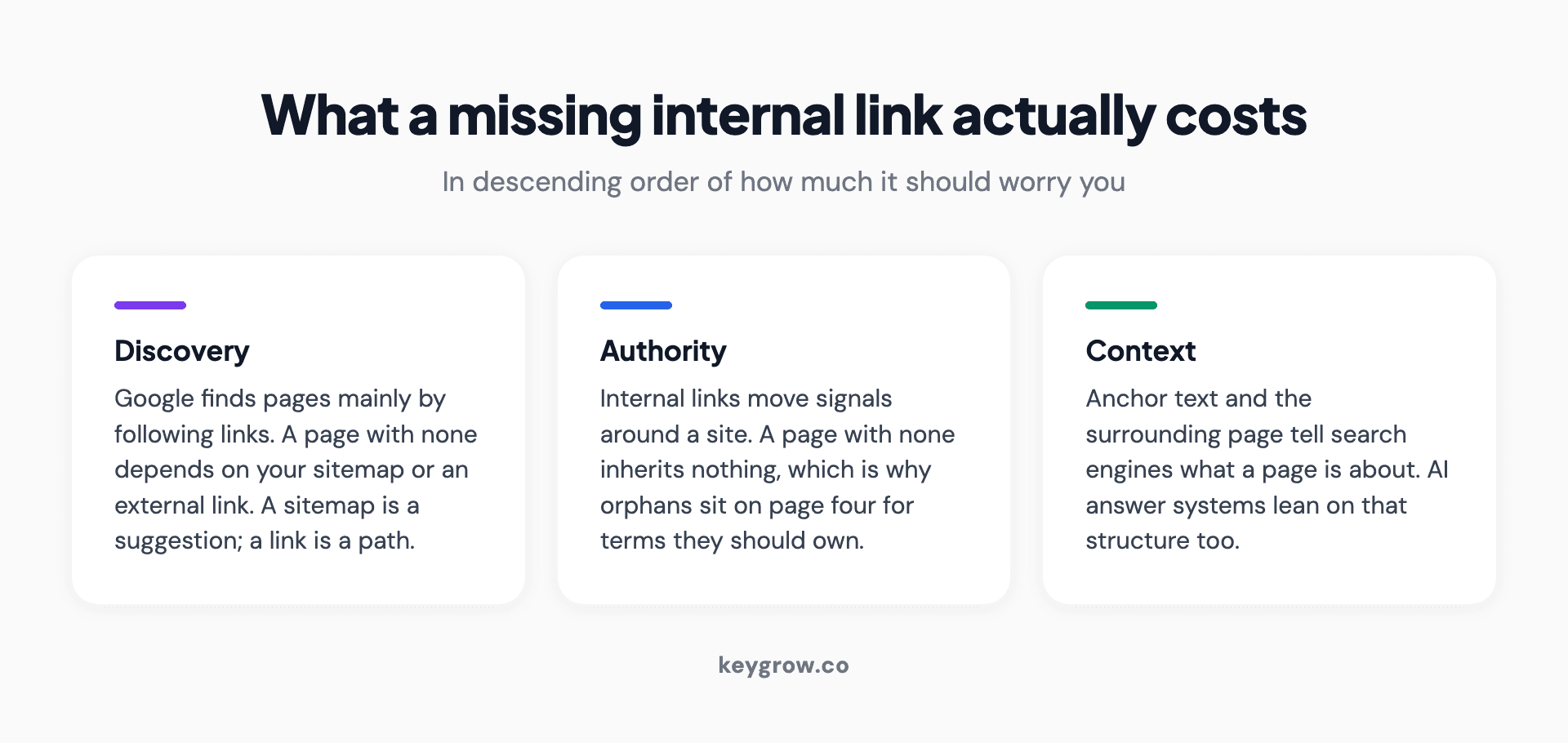
Three-card breakdown of what a missing internal link costs a page: discovery, authority, and topical context.
Discovery. Google finds pages mainly by following links. A page with none is reliant on your sitemap, on external links, or on Google having seen it before. Google's documentation on crawling is direct about it: a page needs a crawlable link from somewhere to be found reliably. A sitemap entry helps, but a sitemap is a suggestion and a link is a path.
Authority. Internal links pass signals around your site. A page with none inherits nothing from the rest of your domain, which is why orphaned pages so often sit on page four for terms they should own. They are not being penalized. They are starting from nothing.
Context. Links tell a search engine what a page is about, using the words in the anchor and the topic of the page the link sits on. An orphan has no such context, which is a bigger problem now than it used to be, because AI answer systems lean on site structure to work out what a site is authoritative about.
Where orphan pages come from
Almost never on purpose. The common origins:
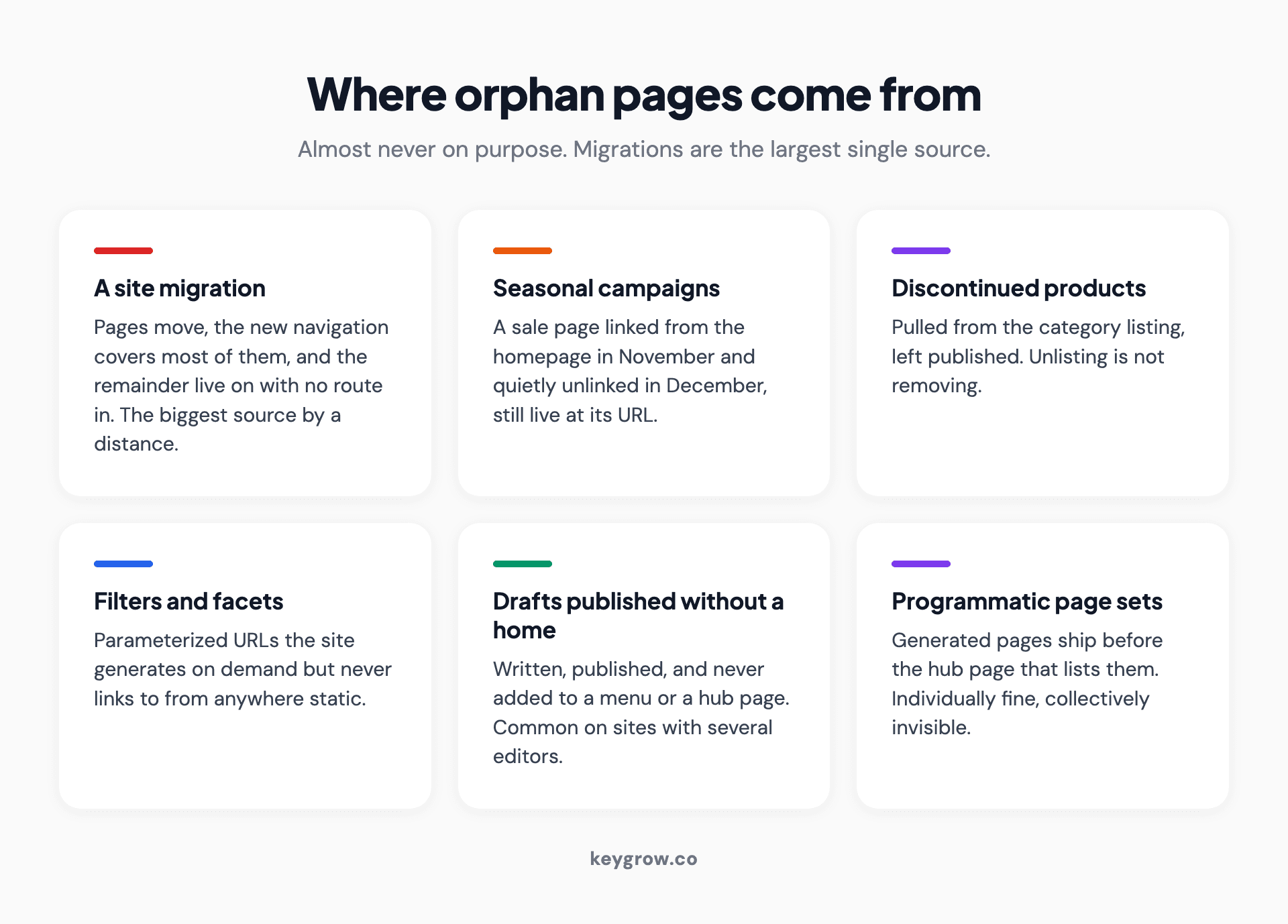
Six-card grid of the common sources of orphan pages, from site migrations and seasonal campaigns to programmatic page sets.
- A migration. The single biggest source. Pages get moved, the new navigation covers 90 percent of them, and the rest live on with no route in.
- Seasonal and campaign pages. A Black Friday page linked from the homepage in November and unlinked in December.
- Discontinued products. Removed from the category listing, left live at their URL.
- Filters and facets. Parameterized URLs generated by the site but never linked from anywhere static.
- CMS drafts published without placement. Written, published, and never added to a menu or a hub.
- Test pages. Built to check something, forgotten immediately.
- Programmatic page sets. The one that catches growing sites, covered further down.
How to find them: the cross-reference method
There is no report that simply lists orphan pages, because no single source knows about every page. Finding them means comparing two lists.
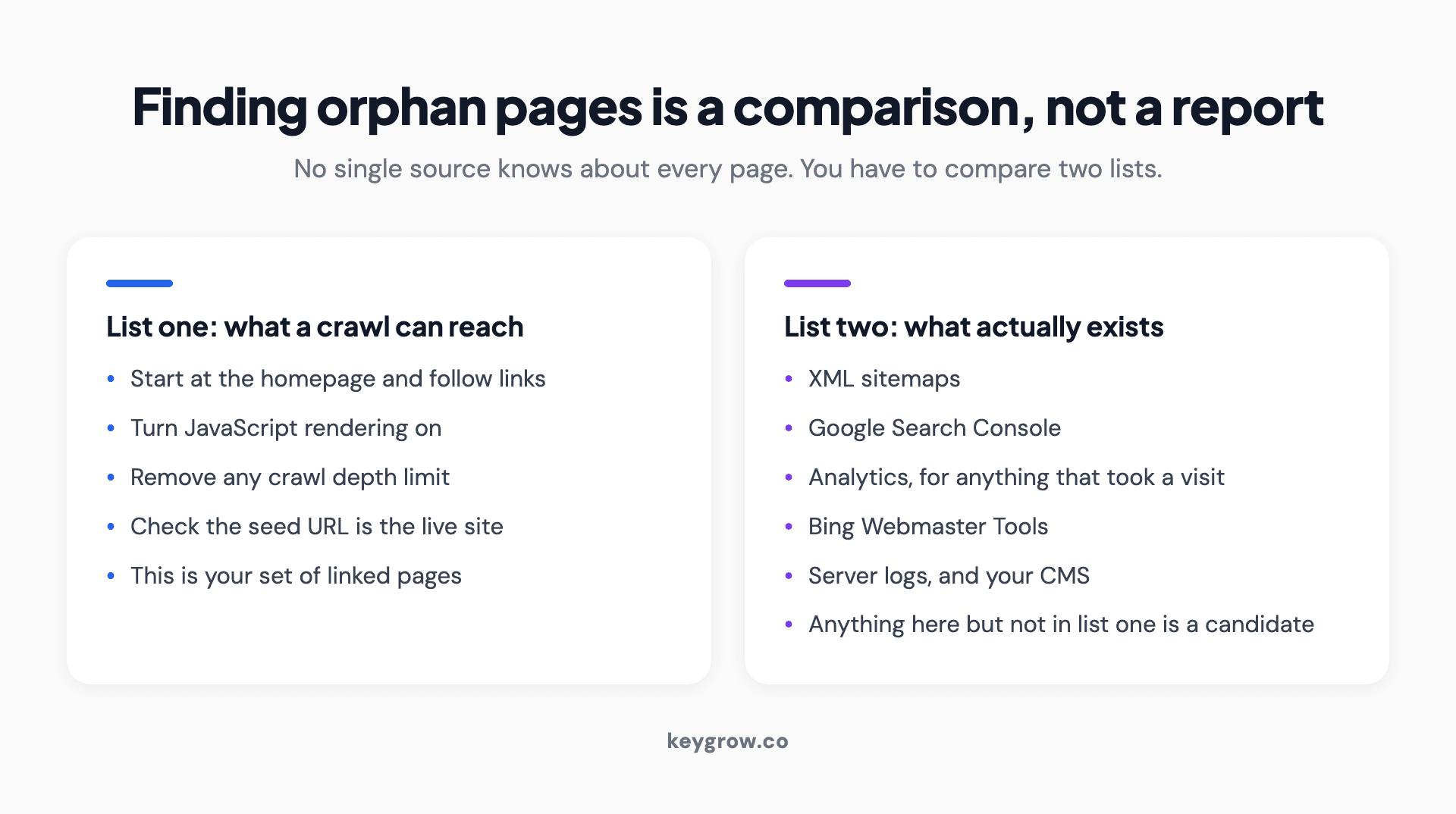
Two-column method for finding orphan pages by comparing the pages a crawl can reach against every page that actually exists.
List one: what a crawl can reach. Run a crawler from your homepage. It follows links and produces the set of pages reachable by link.
List two: what exists. This comes from several places, and the more you combine the better the answer:
| Source | What it adds |
|---|---|
| XML sitemaps | Pages you told search engines about, whether linked or not |
| Google Search Console | Pages Google has seen, including ones it found elsewhere |
| Analytics | Pages that received a visit, which proves they exist and are reachable somehow |
| Bing Webmaster Tools | A second index with a different view of your site |
| Server logs | The most complete list available, and the most work to read |
| Your CMS | The definitive list of what you published |
Anything in list two that is absent from list one is a candidate. Screaming Frog's orphan page tutorial walks through wiring the API connections so the tool does the comparison for you, which is worth the setup time if you are going to do this more than once.
First pass: most of your orphan report is not orphaned
Doing this badly is how a week disappears into linking pages that were never lost. Before fixing anything, sort the list into four piles.
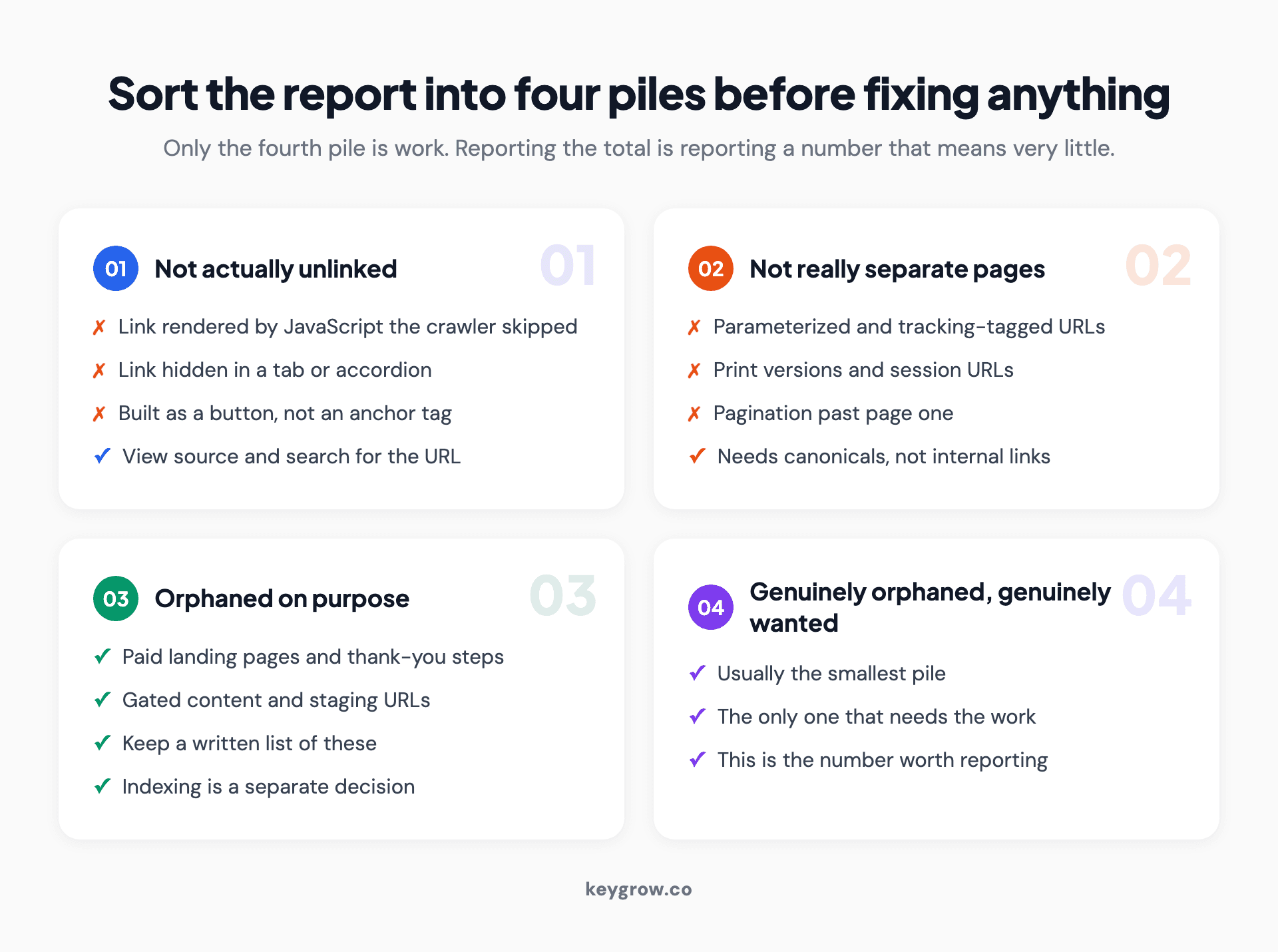
Four-pile triage system for an orphan page report, separating false positives and intentional orphans from pages that genuinely need fixing.
Not actually unlinked. The crawler missed the link. This happens when links are rendered by JavaScript the crawler did not execute, hidden inside tabs or accordions that load on interaction, or built as buttons with click handlers rather than anchor tags. Test one: open the page that should link to it, view the source, and search for the URL. If it is there in an anchor tag, it is not an orphan, and you have found a crawlability problem worth more than the orphan report.
Not really separate pages. Parameterized URLs, print versions, tracking-tagged links, pagination beyond page one, and session URLs all show up as distinct entries. They need canonical tags or parameter handling, not internal links.
Orphaned on purpose. Paid landing pages, thank-you pages, gated content, staging URLs. These should be orphans. Some of them should also be noindexed, which is a separate question from whether they should be linked.
Genuinely orphaned and genuinely wanted. Usually the smallest pile, and the only one that needs the work.
A number like "340 orphan pages found" makes a good line in an audit and means very little on its own. The number worth reporting is the size of the fourth pile.
The four things you can do with a real orphan
Once a page is confirmed orphaned and confirmed yours, there are four outcomes and the decision is not usually hard.
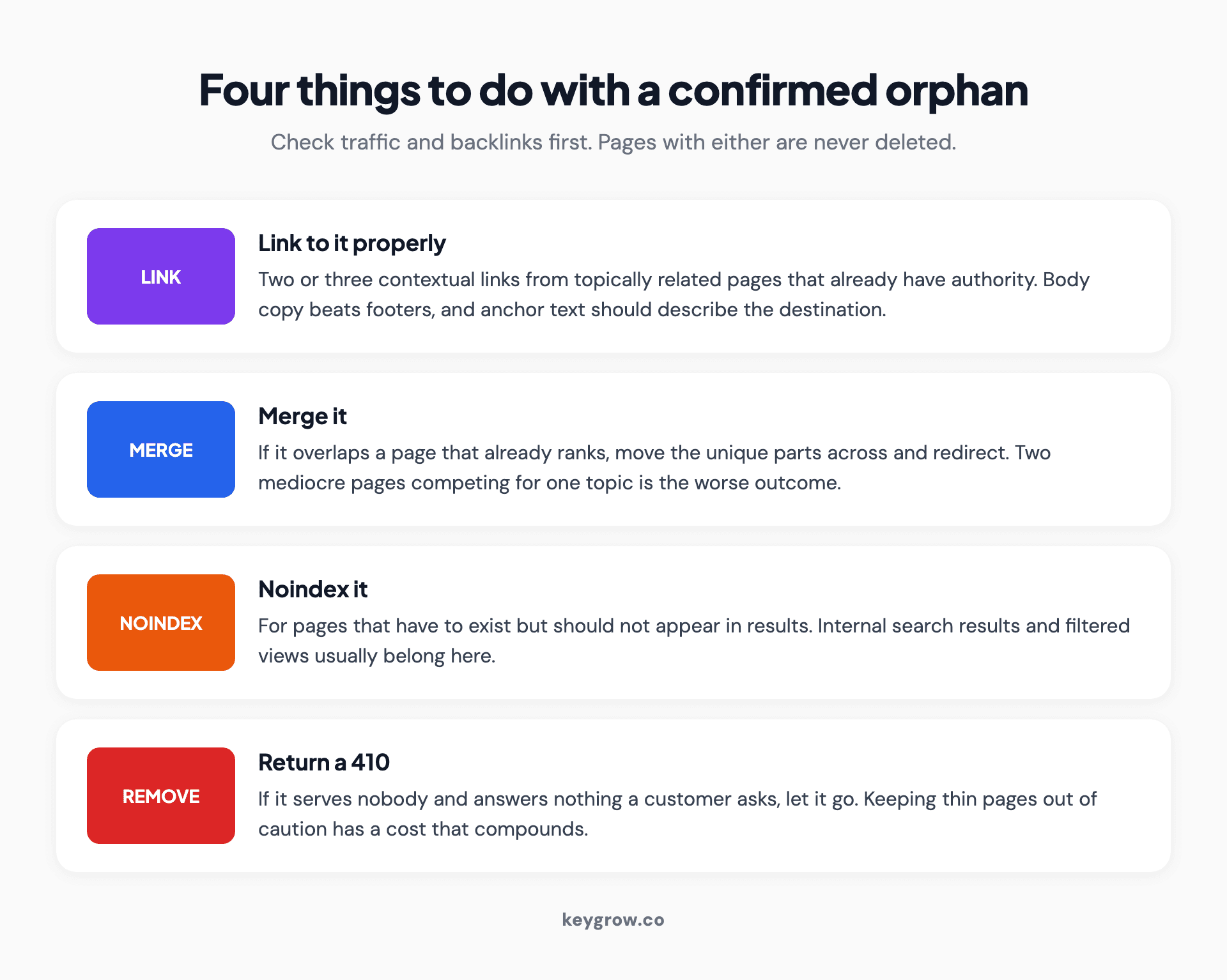
Four outcomes for a confirmed orphan page: link to it, merge it, noindex it, or return a 410.
Link to it. If the page is good and you want it found, give it links from pages that are topically related and already have authority. Two or three contextual links from relevant body copy beat one link in a footer.
Merge it. If it overlaps heavily with a page that already ranks, move the unique parts across and redirect the orphan. Two mediocre pages competing for one topic is a worse outcome than one good page.
Noindex it. If it has to exist but should not be in search results, noindex is the honest answer. Internal search results and filtered views usually belong here.
Remove it. If it serves nobody, return a 410 and let it go. Keeping thin pages alive out of caution has a cost that compounds across a large site.
A rough decision order: does it have backlinks or traffic? If yes, link or merge, never delete. If no, does it answer a question a customer actually asks? If yes, link it. If no, remove it.
Crawler settings that manufacture orphans
Before you trust the report, check the crawl that produced it. Four settings routinely invent orphan pages that do not exist.
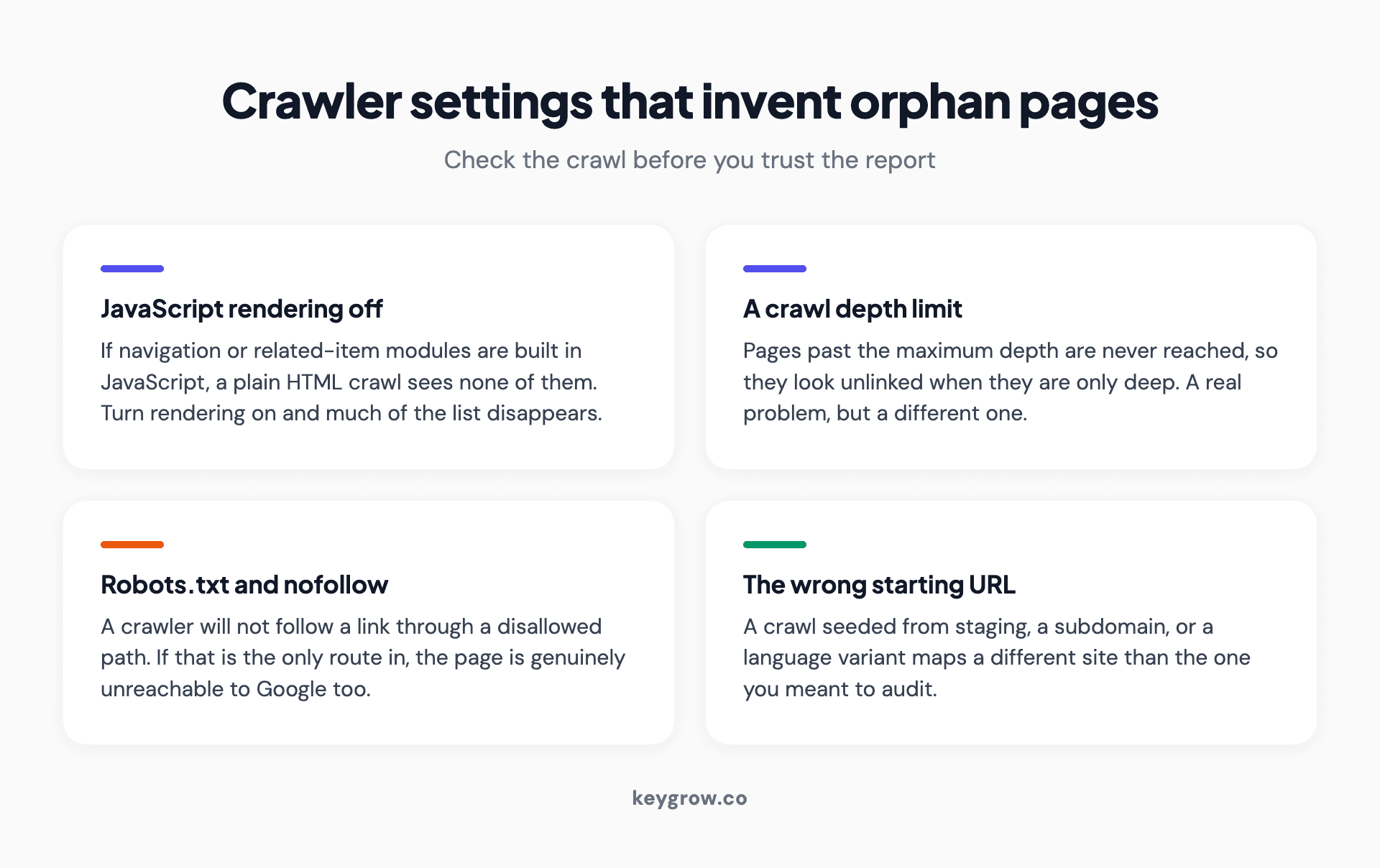
Four crawler settings that invent orphan pages that do not exist, including JavaScript rendering, crawl depth limits, and the wrong starting URL.
JavaScript rendering off. If your navigation, related-product modules, or breadcrumb links are built by JavaScript, a crawler in plain HTML mode sees none of them. Turn rendering on and a large share of the list usually disappears. If the list does not shrink, you have learned something more valuable: search engines may be struggling with those links too.
Crawl depth limits. Many tools default to a maximum depth. Pages beyond it are never reached, so they look unlinked when they are simply deep. A page ten clicks from the homepage has a real problem, but it is a depth problem with a different fix.
Robots.txt and nofollow. A crawler respecting robots.txt will not follow a link through a disallowed path. If your only route to a page runs through a blocked section, the page is unreachable to the crawler and to Google, which makes it a genuine finding rather than a false positive.
Starting URL. A crawl begun from a staging URL, a subdomain, or a language variant maps a different site than the one you meant. Check the seed URL before reading anything else in the report.
Intentional orphans, and how to keep them that way
Some pages should have no internal links, and treating them as errors is how you end up with a paid landing page linked from your main navigation.

A library interior with tall shelves, standing in for a site archive where some pages are deliberately kept off the main routes.
The category includes campaign landing pages, checkout and thank-you steps, gated downloads, and anything built for a specific ad audience. The whole design of a landing page is that it removes choices, and adding site navigation to it defeats the point.
Two habits keep this tidy. Keep a written list of the URLs that are orphaned deliberately, so the next audit does not rediscover them as problems. And decide separately whether each should be indexed, because "not linked" and "not in search results" are different settings that people collapse into one.
The programmatic page set problem
This one catches growing sites, and we have run into it on our own.
When you generate a set of pages from a template, for services by city or products by category, the pages exist the moment they are published. The links to them usually do not, because the hub page listing them is a separate piece of work that gets scheduled after the pages themselves.
The result is a batch of pages that are individually fine, collectively invisible, and sitting in the sitemap looking published. If you are building programmatic page sets, the rule worth adopting is that a page does not ship until the link to it ships, in the same release. The hub page is not a follow-up task. It is part of the page.
The related failure is the hub that lists only some of its children, usually because the list was hand-written and the set grew. Drive those lists from the same data that generates the pages and they cannot fall out of sync.
Where to put the links you add
Adding a link is easy. Adding one that does anything takes thirty more seconds of thought.

Rows of white archive boxes on wooden shelves, representing stored pages waiting to be linked back into a site.
Link from pages that already have authority. A link from a page nothing points to passes on very little. Your homepage, your main service pages, and your best-performing posts are where the signal lives.
Link from topically related pages. A link to a page about commercial roof repair means more coming from a page about roofing than from your about page. Relevance is part of what the link communicates.
Use the anchor text properly. Describe the destination in the words someone would use to search for it. Not "click here", and not the raw URL. This is the cheapest relevance signal available and most sites waste it.
Prefer body copy to footers. A link inside a sentence a reader might follow carries more weight, and more actual traffic, than one in a list of forty footer links.
Two or three well-placed links usually settle the matter. A page still invisible after that has a content problem, not a linking problem.
How to stop creating them
Prevention is mostly process, and four habits cover the majority of cases.
- Treat migrations as link audits. Before a migration, export every URL. After it, crawl and compare. The gap is your orphan list, and it is cheapest to fix in the first week.
- Give every page a parent when it is created. If you cannot name the page that will link to a new page, the new page does not have a place in the site yet.
- Remove products and pages properly. Unlisting a product from a category is not removing it. Decide on redirect, noindex, or 410 at the moment you retire it.
- Crawl on a schedule. Quarterly for most sites, monthly if you publish a lot. This is one check inside a wider technical SEO audit rather than a job of its own.
When orphan pages are not worth your time
If your site has 30 pages, this is a ten minute check and not a project. Open your navigation, list what it reaches, compare against your CMS, done.
If you have orphan pages but your main service pages are not ranking, the orphans are not your constraint. Fix what is meant to be working before you rescue what was forgotten.
And if the orphaned pages are genuinely low value, thin category pages, old test URLs, duplicates of things that already rank, then removing them is finishing the job rather than avoiding it. Not every page deserves rescuing, and a smaller site that is entirely deliberate beats a larger one carrying pages nobody chose to keep.
FAQs
What is an orphan page in SEO?
A page on your website with no internal links pointing to it from any other page. It can still be live and indexed, but it cannot be discovered by following links from your homepage, which is how search engines primarily find content.
Are orphan pages bad for SEO?
They are usually a missed opportunity rather than a penalty. An orphan page is harder for search engines to discover, receives no internal link signals from the rest of your site, and lacks the context that surrounding links provide, so it tends to underperform pages of the same quality that are properly linked.
How do I find orphan pages on my site?
Compare two lists. Crawl your site from the homepage to get every page reachable by link, then pull every page that exists from your sitemap, Search Console, analytics, and CMS. Anything in the second list that is missing from the first is a candidate for review.
Does an XML sitemap fix an orphan page?
Not really. A sitemap helps search engines discover a URL, but it passes no authority and gives no context. A page listed in a sitemap with no internal links is still starting from nothing when it comes to ranking.
Should I delete orphan pages?
Only after checking whether they have traffic or backlinks. Pages with either should be linked or merged, never deleted. Pages with neither, that answer no question a customer asks, can be removed with a 410.
Can a page be orphaned on purpose?
Yes, and several kinds should be. Paid landing pages, thank-you pages, gated content, and staging URLs are all better without internal links. Keep a written list of these so each audit does not flag them again as problems.
How often should I check for orphan pages?
Quarterly for most sites, monthly if you publish frequently, and always immediately after a migration or a large content release. Migrations are the single largest source of orphan pages.
What to do with the list you just made
Sort before you fix. Four piles: crawler missed the link, not really a separate page, orphaned on purpose, genuinely orphaned. Only the last pile is work.
For that pile, ask two questions per page. Does it have traffic or links? Does it answer something a customer asks? Two yeses mean link it properly. Two noes mean remove it. One of each usually means merge.
Then write down the intentional orphans so the next crawl does not send you round the same loop. If you would rather have the triage done for you, our SEO team does this as part of a technical audit, and you can ask for one.



