

A lot of advice on content pillar strategy starts in a meeting room, with the team deciding how the brand wants to be seen and picking three to five themes. SEO guides add two rules: pillar pages of 3,000 to 10,000 words, and 8 to 20 supporting posts before a cluster does anything. The meeting room is the wrong place to start, and both rules are folklore.
The working version is smaller. Pick a few themes from what you sell and what customers already ask you, rotate your posts through them, and keep the ones that bring in calls. When a theme earns a place on your website, it gets one page for the broad question and a few linked posts for narrower ones.
Most guides mean the first part, the themes a business posts about on social, in email and on its blog. That comes first here, and the website version follows.
Two different things are called content pillars
Content pillars are the three to five themes all your content comes back to. On a website, the term also means a pillar page linked to narrower posts.
| Content pillars as themes | SEO content pillars | |
|---|---|---|
| What a pillar is | A recurring theme you post about | A page that answers a broad topic and links to narrower posts |
| What you make | A weekly mix of posts across three to five themes | One pillar page plus a handful of cluster posts |
| How you judge it | Saves, shares and comments per theme, then the calls they bring | Impressions, rankings and calls across the cluster |
Without pillars, every week starts from a blank page and the posts drift away from what the business sells.
Myth: you find your pillars in a brainstorm
Pick pillars from what you sell and what customers already ask. A brainstorm about brand image tends to produce themes nobody asked about.
Start from revenue instead. List your services by what a job is worth and how many more of them you want. The top two or three are your shortlist.
Then look for proof that people care. Keyword tools report zero volume for a large share of city-level phrases, as our guide to local keyword research explains, so use evidence that costs nothing:
Favor questions from people about to hire over people trying not to. "How to relight a pilot light" brings readers who will never call. "Repair or replace" brings readers deciding how to spend real money.
Three to five themes is plenty, and a small team does fine with three. Not all of them earn a pillar page on your website. That takes four checks: the theme sells, people search for it, the results fit your kind of page, and at least four real questions sit behind it.
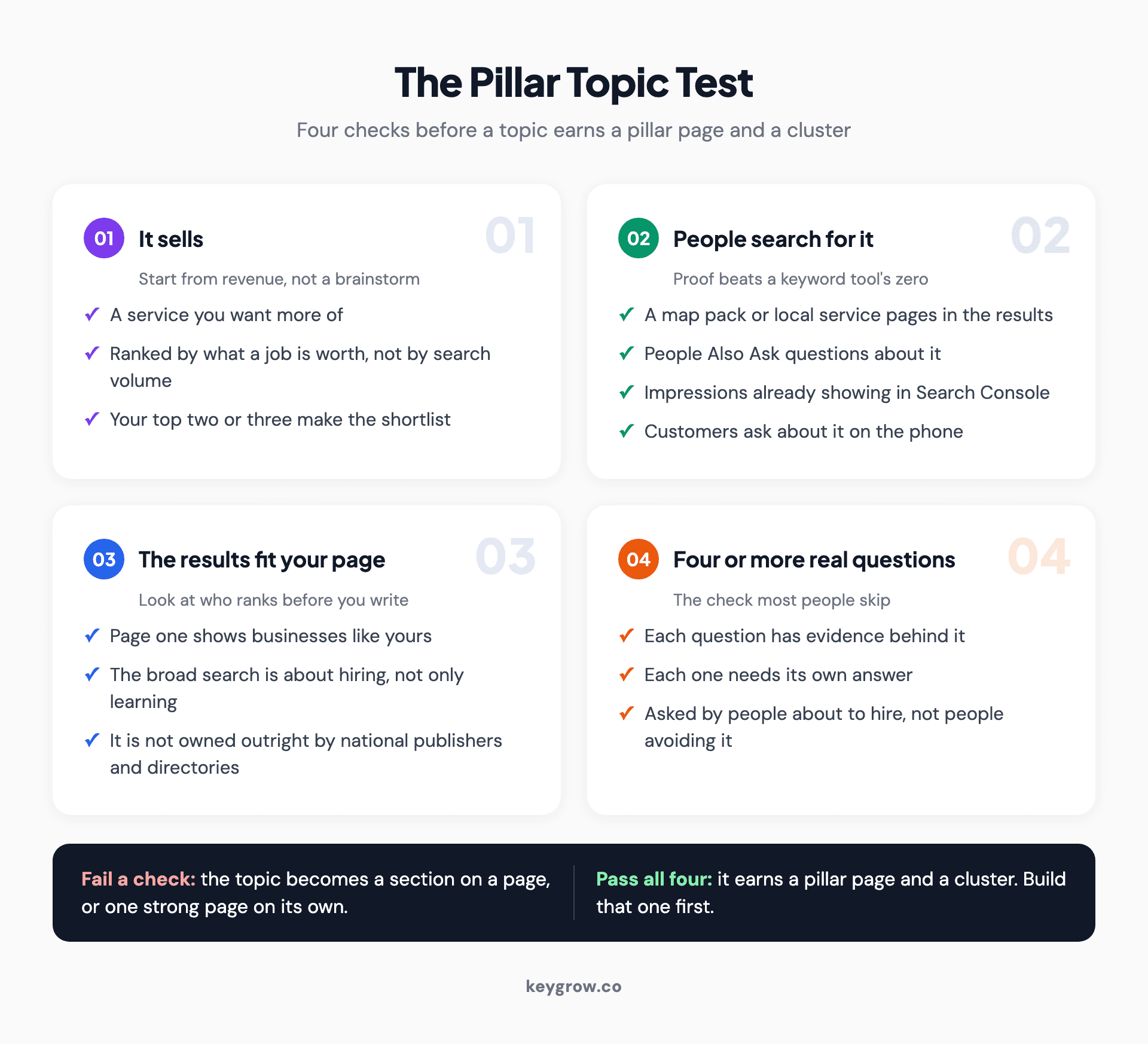
Four-check pillar topic test for choosing a content pillar: the service sells, people search for it, the search results fit your page type, and the topic has at least four real questions behind it.
The fourth check is the one people skip: with fewer than four questions, you have a good service page, and that is fine.
Content pillar examples for a local service business
Good pillars for a local business mix the jobs you want more of with proof that you do them well and a little personality.
Here is an illustrative set for a plumbing company, close to what we would sketch before anyone posts.
| Pillar | Type | What you post | What it is for |
|---|---|---|---|
| Water heaters | Educational | Repair or replace, what a leak from the bottom means, sizing for a bigger household | The highest-value calls |
| Drains and leaks | Educational | Quick checks before you call, what never to pour down a sink | Steady everyday work |
| Proof | Social proof | Before-and-after photos, reviews, price ranges from real jobs | Shows the work is real |
| The crew | Behind the scenes | A day on the job, a new hire's first week | Puts faces to the name |
| Offers | Promotional | Seasonal tune-ups, booking reminders | Turns attention into calls |

A wall-mounted tankless water heater above a utility sink in a basement.
Two of those pillars are services and three are kinds of post. Most guides list one or the other, but a local business needs both: the service themes bring the leads, and the rest give people a reason to pick you for the job. Entertaining and community posts can ride inside any of them.
Rotate through them so the feed is not all promotion. Plan a month at a time and tag each post with its pillar, which makes it easy to spot one theme crowding out the rest. Let the format follow the pillar: proof suits photos, quick checks suit short video.
Myth: likes tell you which pillars work
Rank your pillars by the calls and form fills they bring. Likes and comments still count, but they only show which pillars people enjoy.
Use the tags from your calendar and read saves, shares and comments per pillar once a month. Put a tracked link on any post that points to your site, and ask new customers where they found you.
A theme that brings calls stays, whatever its likes. One that goes two months without a call, a save or a comment goes.
How one pillar becomes a pillar page and a cluster
On your website, a pillar becomes a cluster: one pillar page answering the broad question, a few posts each answering one narrow question, and the links joining them.
Here is the water heater theme moved onto the plumbing company's site.
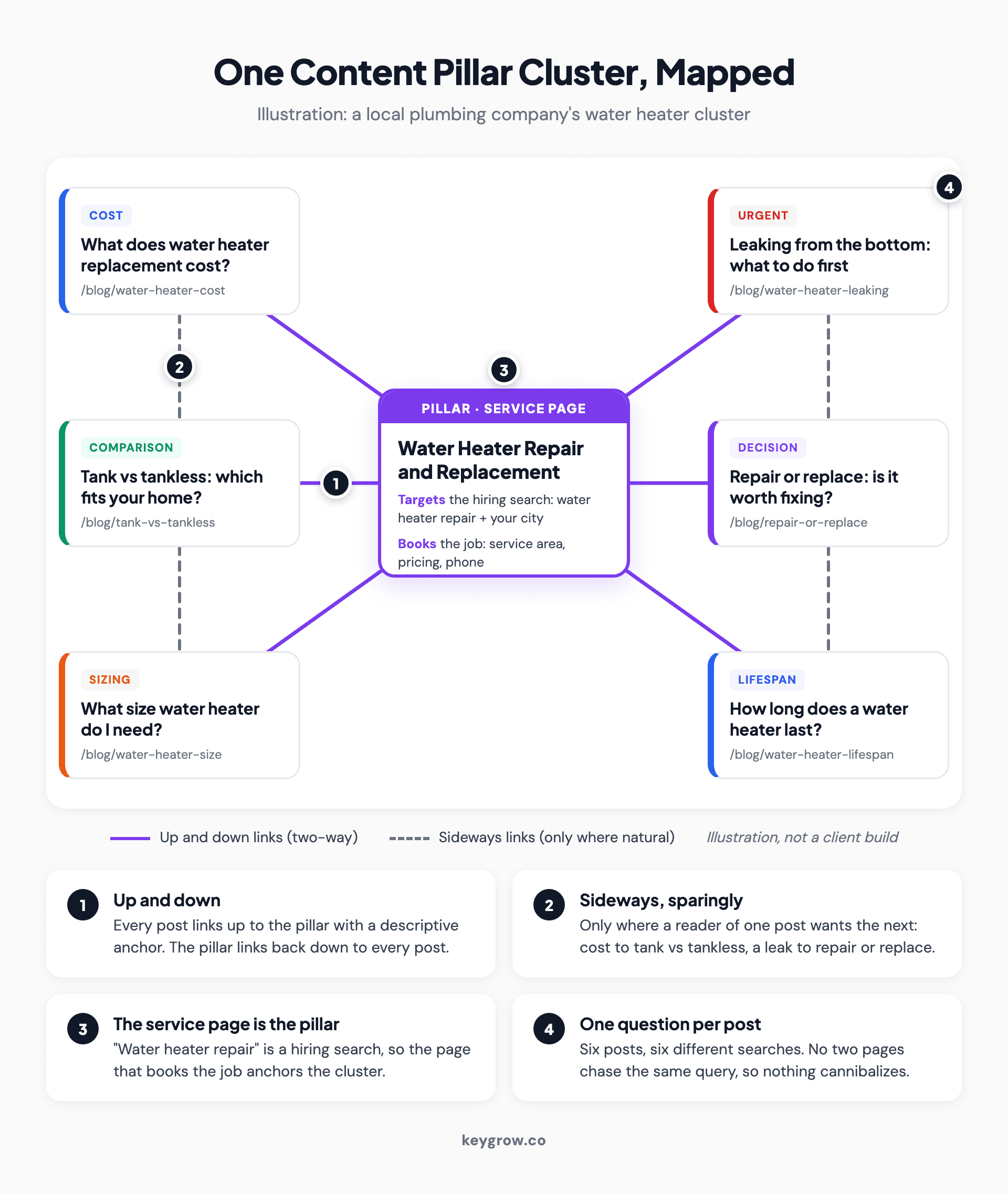
Annotated cluster map of a content pillar strategy for a local plumbing company: a water heater repair service page as the pillar in the center, six cluster posts around it covering cost, tank versus tankless, sizing, a leak, repair or replace, and lifespan, with solid links running up and down and dashed sideways links between related posts.
The pillar is the service page. Someone searching "water heater repair" wants to hire a plumber, so the right page is the one that books the job, with your service area and phone number on it. A 6,000-word guide would be the wrong kind of page for that search.
Each cluster post answers one question, and no two answer the same one. Cost, tank versus tankless, sizing, a leak, repair or replace, lifespan: six different searches, all from homeowners who may need a plumber soon.
Myth: more pages on a topic means more authority. Two pages answering the same query split the signal, and often both rank worse. To check, filter the Search Console Performance report by the query and open the Pages tab. If two of your URLs keep trading places, they are competing. A spreadsheet prevents it: one row per page, with the URL, the single question it answers, its main search phrase and its pillar.
A full topical map is several of these clusters side by side, which we covered in what an SEO topical map is.
Myth: a pillar page has to be very long
A pillar page is defined by its job, not its length. It answers the broad question, then routes each reader to the detail they came for.
One self-assessment question in Google's helpful content guidance asks whether you are writing to a particular word count because you heard Google prefers one. Google answers its own question: "(No, we don't.)"
Myth: a cluster needs 8 to 20 posts. That range describes a mature cluster. Four to six posts on real questions make a working start.
Padding the count is the risk. Google's spam policies call it scaled content abuse when "many pages are generated for the primary purpose of manipulating search rankings and not helping users," and that holds "no matter how it's created." Twenty posts written to fill a diagram is close to the textbook case.
Link up, link down, and only sometimes sideways
Every cluster post links up to the pillar, the pillar links down to every post, and posts link sideways only where the next question is natural.
Myth: every post should link to every other. With six posts that means thirty links, most of them useless to the reader, and the plan starts to look like the wall in a detective film.

A corkboard covered in documents and photos, all connected by red string running in every direction.
Measure the cluster as one unit
The pillar's ranking for the head term is the slowest number in Search Console to move, so read the whole cluster together. In the Performance report, add a Pages filter set to Custom (regex) and enter the cluster's slugs, for example (water-heater-repair|water-heater-cost|tank-vs-tankless). Then use Compare to set the last three months against the three before. Indexing and impressions move first, then the number of queries, then positions and clicks.
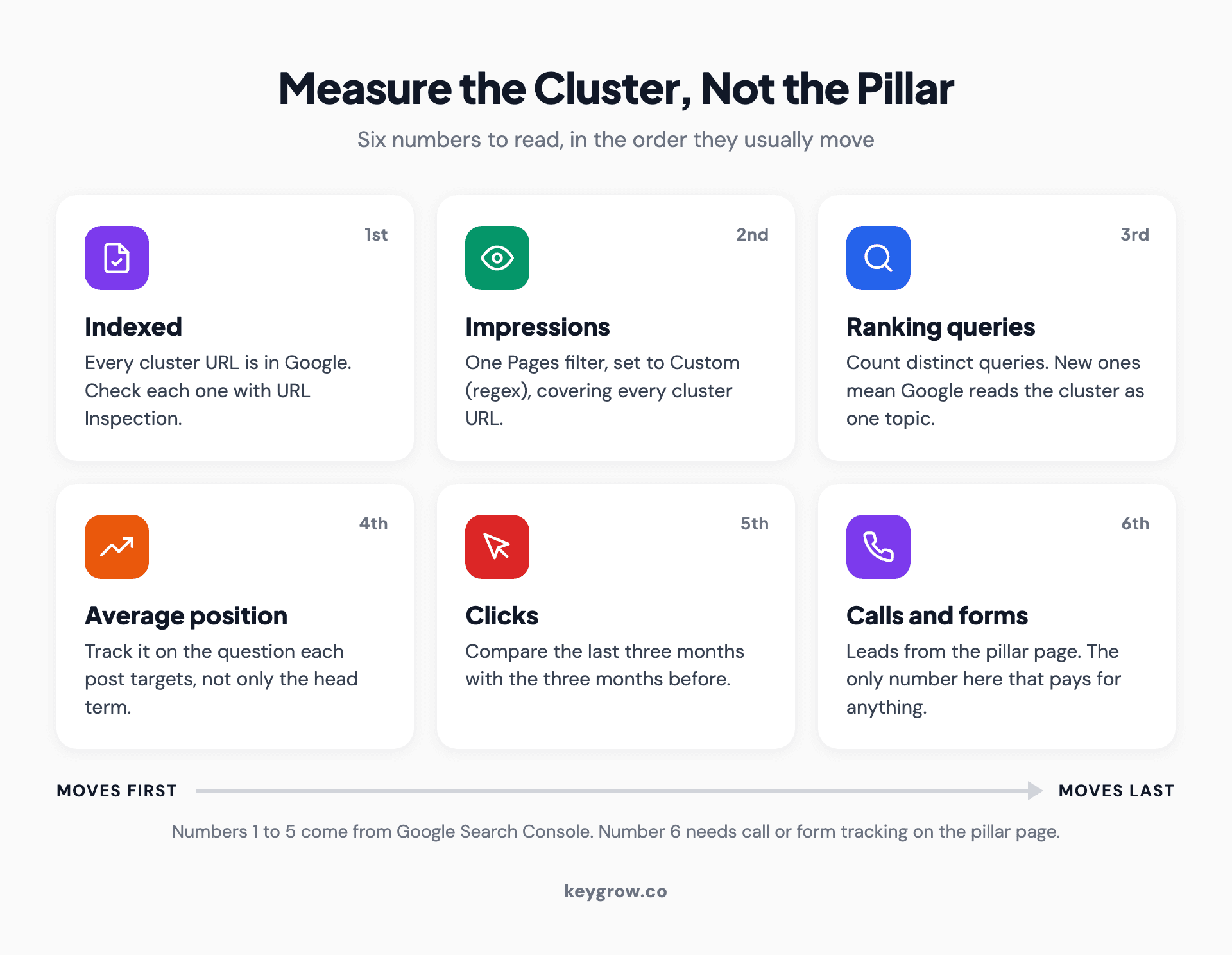
Icon grid of six numbers for measuring a content cluster in the order they move: indexed pages, impressions, ranking queries, average position, clicks, and calls and form fills from the pillar page.
Calls and form fills move last, and you only see them with call or form tracking on the pillar. They are the only numbers that pay for anything.
How long does a content pillar strategy take?
A website cluster shows impressions within weeks, clicks over months and its real payoff closer to a year. Give a posting theme two months before you judge it.
Google's own documentation says crawling alone "can take anywhere from a few days to a few weeks." Months of impressions with few clicks follow, and that stretch is where most people quit.
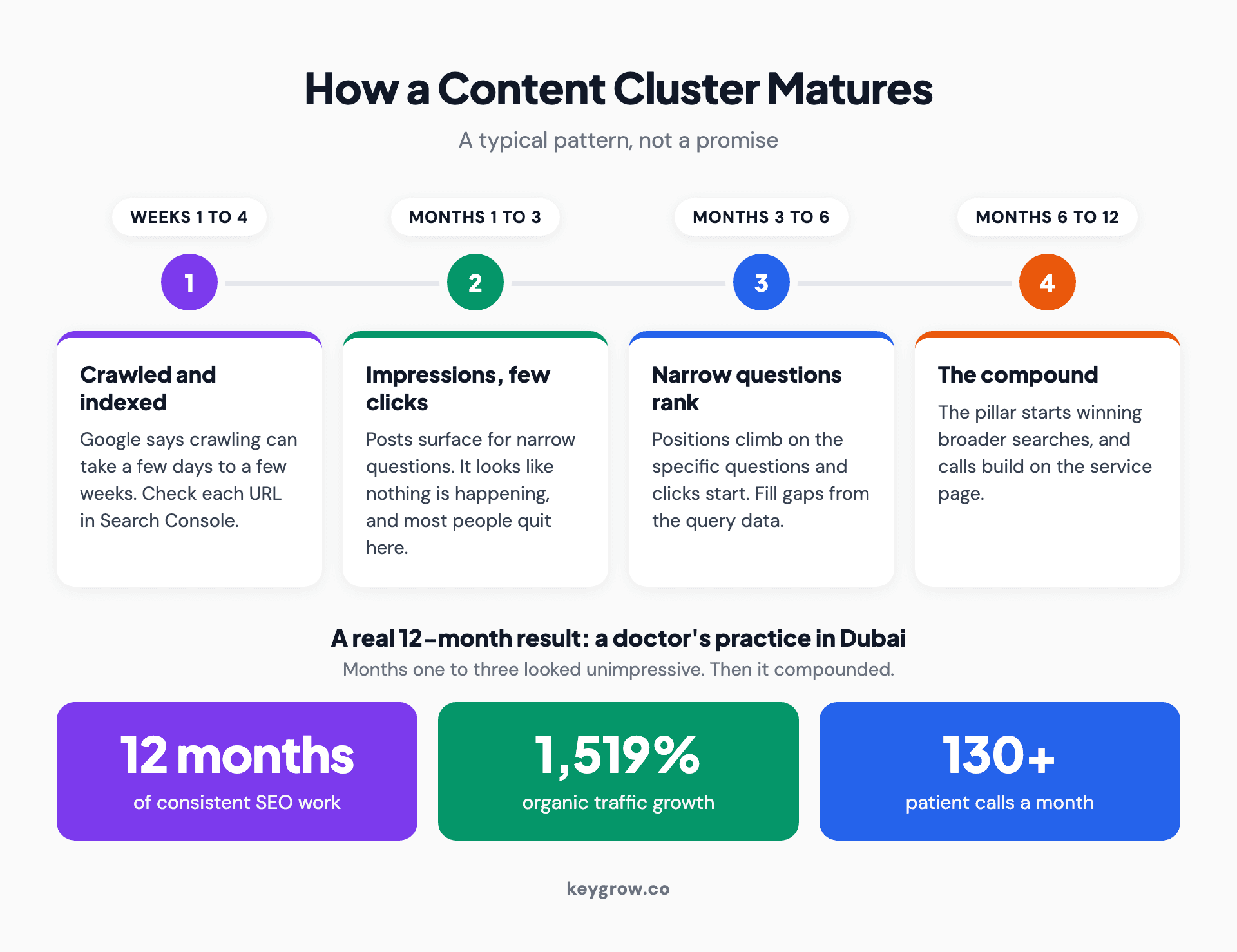
Timeline of how a content cluster matures: crawled and indexed in the first weeks, impressions with few clicks in months one to three, rankings and first clicks on narrow questions in months three to six, and compounding traffic and calls by month twelve, with a real 12-month client result of 1,519 percent organic traffic growth and 130+ patient calls a month.
Our strongest organic result shows the shape. A doctor's practice in Dubai committed to SEO for a full year. Months one through three looked unimpressive on the surface. By month twelve, organic traffic had grown 1,519% and the practice was taking 130+ patient calls a month.
That is why we treat SEO as a compounding asset, not a campaign, and we expect the same curve from one cluster on a smaller scale. Our guide to why SEO takes so long explains the wait.
When a pillar strategy is overkill
Plenty of local businesses do not need a cluster. If most of your demand comes through map pack searches, your Google Business Profile and service pages matter more. Keep the posting themes either way, since a short list costs almost nothing.
Skip the cluster, or put it off, when:
If you do want one, you can probably build the first cluster yourself. The planning fits in a spreadsheet and the linking takes an afternoon. The writing is the real work. Outside help makes sense when you have several services or locations to map and nobody with the hours to write.
FAQs
How many content pillars should a small business have?
Three to five themes, and three is enough for a small team. Give only one of them a pillar page and cluster until that one brings in impressions and leads.
What are examples of content pillars?
A plumbing company might run water heaters, drains and leaks, proof of past jobs, the crew, and seasonal offers. A dental office could use implants, whitening, patient reviews, its team and new-patient offers.
What is the difference between a content pillar and a topic cluster?
A topic cluster is the set of website pages built around one pillar: a pillar page for the broad question and linked posts for narrower ones. On social media, a pillar needs no cluster.
What are the three E's of content pillars?
Engage, entertain and educate, a social media shorthand for the jobs a post can do. Use them to check each post, and tie the pillars themselves to your services.
Build one cluster before the next
Pick the service that pays best and has real questions behind it, and make it one of your posting themes. Then turn its service page into the pillar and add four to six posts answering what customers ask on the phone. Give that group a few months before a second service gets the same.
If you would rather have someone map the first cluster with you, that is part of how our SEO service works, month to month. We will also tell you when the right number of clusters for your business this year is zero.


