


Here is how to create content for local landing pages for SEO, in one paragraph: lead with the service and the city in the headline, answer what a local customer needs to know in the first screen, then fill the page with things only a local business could say. If you are generating these from a template across many towns, read what programmatic SEO is first, because the volume check comes before the build. Real neighborhoods, real jobs completed nearby, reviews from people in that city, and answers to the questions that city keeps asking. Add accurate business details, a map, and schema, and you have a page that can rank in both the map pack and organic results.
The rest of this guide is the practical version: what goes on the page, how to localize the content without writing doorway spam, how many pages you need, and how long it takes before the phone rings.
What is a local landing page?
A local landing page targets searches for a service in a specific place: "emergency plumber in Mesa" or "junk removal near me." It exists to convert one local searcher, not to explain your whole company.
Two types get lumped together, and the difference changes what you write:
| Type | Built for | Example |
|---|---|---|
| Location page | A physical place customers visit | A dental office's page for its Scottsdale clinic |
| Service-area page | A city you serve without an address there | A mobile detailer's page for the suburb they drive to |
Location pages center on the place itself: directions, parking, hours, the team inside. Service-area pages have to work harder, because there is no building to point at. The content carries the local relevance on its own.
Why are local landing pages worth the effort?
They catch searches at the exact moment someone needs the service nearby, and those searches convert fast. Google's research puts numbers on it:

Open sign in a local business storefront window, the moment a nearby search turns into a visit.
76 percent of people who search for something nearby on their phone visit a business within a day, and 28 percent of those searches end in a purchase.
A homepage rarely captures this demand. It has to speak to every customer, so it speaks to no city in particular. A page built for one service in one place can match the query word for word, show up in organic results under the map pack, and greet the visitor with exactly what they searched for.
Google's own documentation on how local ranking works weighs relevance, distance, and prominence. The landing page is where you control relevance. The other two are earned elsewhere.
What does every local landing page need?
Eight elements cover the baseline: a service-plus-city headline, business name and contact details, hours, an embedded map, reviews, real photos, a visible call to action, and LocalBusiness schema.
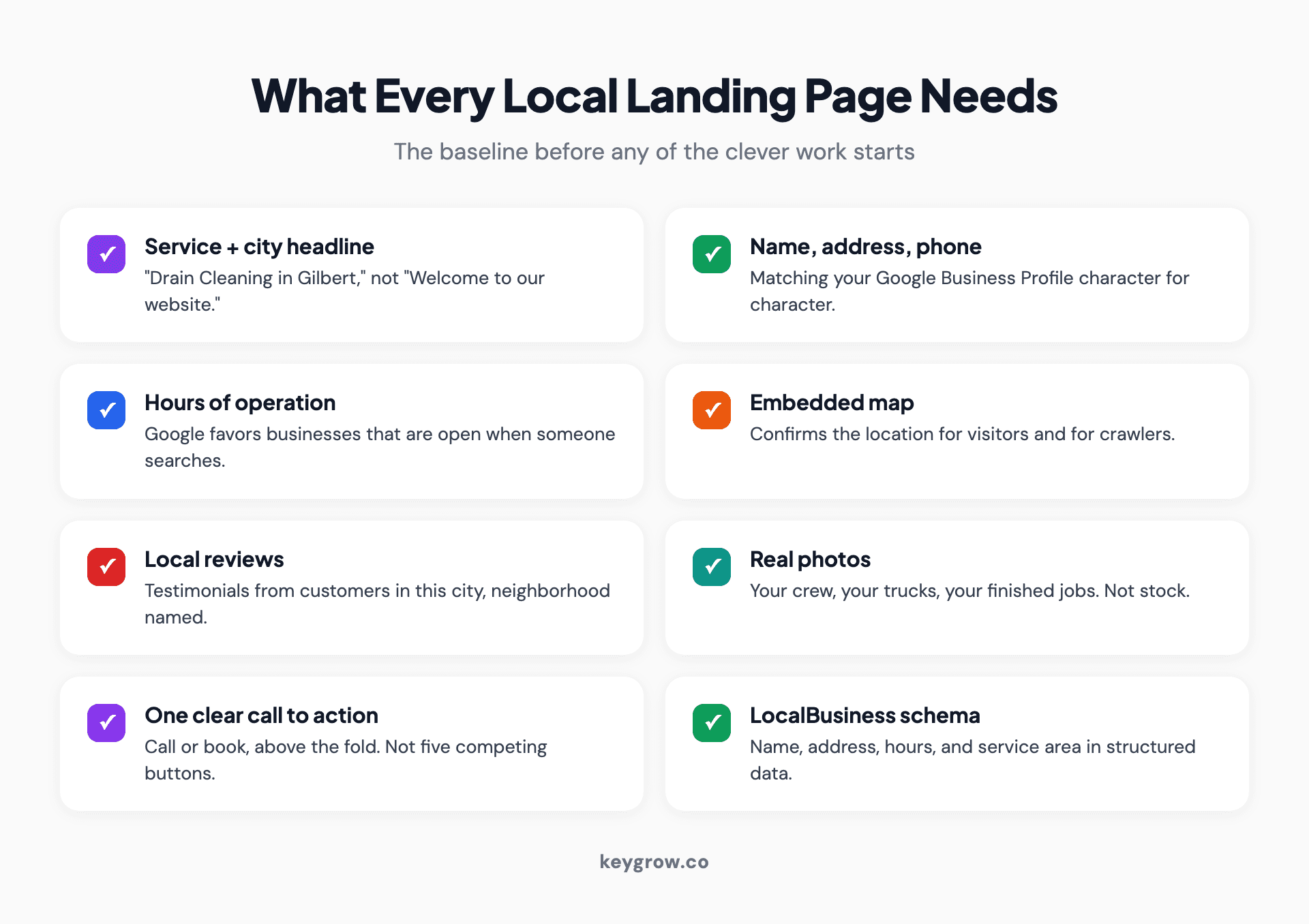
Eight-item checklist infographic of what every local landing page needs: headline with city, contact details, hours, map embed, local reviews, real photos, call to action, and schema markup.
None of this is exotic, which is the point. The baseline is hygiene. Name, address, and phone number should match your Google Business Profile exactly, down to the suite number, because mismatched details split your ranking signals across what Google thinks are different businesses.
The call to action deserves more thought than it usually gets. Someone searching "water heater replacement Chandler" at 7 AM has a cold shower and a deadline. One clear action above the fold, call or book, beats a row of competing buttons.
For the schema, you don't need a developer: our free schema markup generator outputs LocalBusiness JSON-LD you can paste in.
How do you make the content actually local?
This is the part that separates a page that ranks from a template with a city name swapped in. Localize six things: the opening, the problems, the proof, the reviews, the questions, and the photos.
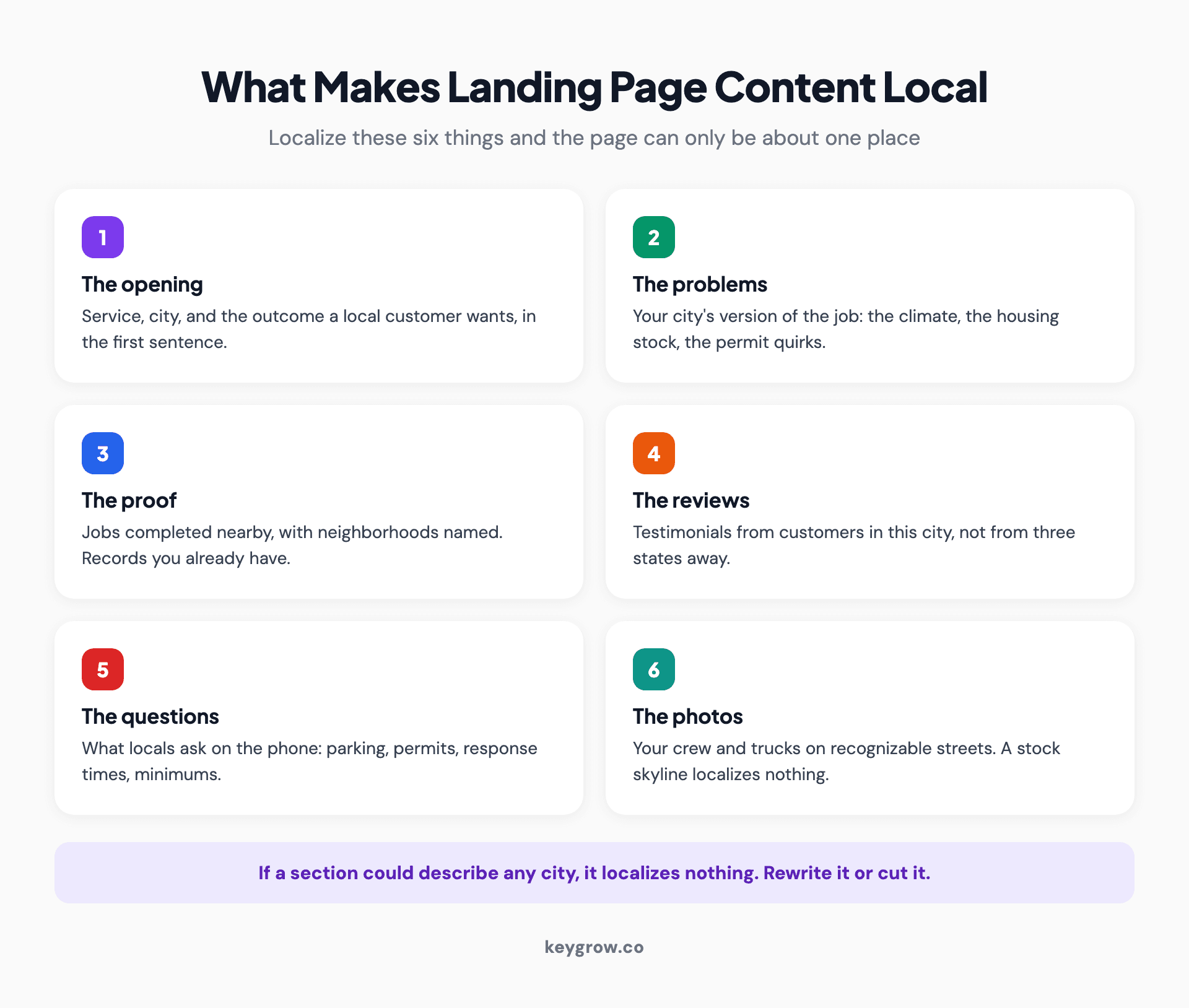
Six-card infographic of what makes landing page content genuinely local: localized opening, local problems, nearby proof of work, local reviews, city-specific questions, and real photos.
The opening. First sentence: the service, the city, and the outcome a local customer wants. Skip the throat-clearing. Google has read "proudly serving the greater metro area for over 20 years" a few million times. It is not impressed, and neither is anyone who lives there.
The problems. Every market has its own version of the job. Hard water in Phoenix, ice dams in Minneapolis, HOA rules in master-planned suburbs, permit quirks in older city cores. Write about the version of the problem your city has. This is the cheapest authenticity available, because competitors using templates cannot fake it.
The proof. Name the work you have done nearby: "we replaced 40-gallon units in Eastmark and Queen Creek last month" reads differently than "we serve the East Valley." If you track jobs by area, you already have this content sitting in your records.
The reviews. Pull testimonials from customers in that city, with the neighborhood named when the customer allows it. A review from the reader's own zip code is social proof; a review from three states away is filler.
The questions. Each city asks its own questions: parking, permits, response times to specific areas, service minimums for the far suburbs. Answer them on the page in a short FAQ. These match voice searches and the long-tail queries AI assistants now answer, and they are exactly the questions your competitors' template pages ignore.
The photos. Your actual trucks, your actual crew, recognizable local streets or landmarks in the background. A stock skyline localizes nothing, and customers can tell. We covered why original photos beat stock for rankings in our guide to images and SEO.
Here is the difference in practice, using one paragraph of a junk removal page:
Template version: "We are the leading junk removal company in Mesa. Our professional team provides fast, reliable service for all your junk removal needs in Mesa and surrounding areas."
Localized version: "We run two trucks out of east Mesa and clear most same-day requests between Dobson Ranch and Eastmark. HOA cleanout notices are common here; we photograph the cleared space so you have proof for the deadline."
The first paragraph could be about any company in any city, and 30 of its near-identical siblings are already ranking nowhere. The second can only be about one business. That is the standard each section has to clear.
Do those six things and the "how much unique content is enough" question answers itself. The page is unique because the place is.
How do you find local keywords worth targeting?
Start from four search patterns and fill in your services and areas. You will find more volume than you expect, and clearer intent than national terms ever show.
| Pattern | Example | Intent |
|---|---|---|
| Service + city | "drain cleaning Gilbert" | Ready to compare and call |
| Service + near me | "drain cleaning near me" | Same, with location left to Google |
| Problem + city | "sewage smell in backyard Gilbert" | Diagnosing, close to hiring |
| Neighborhood or landmark | "plumber near Val Vista Lakes" | Hyperlocal, low volume, low competition |
Autocomplete, the People Also Ask box, and your own Google Business Profile performance report (the queries section) are free and cover most of it. A paid keyword tool adds volume estimates, which matter when you are choosing between thirty possible pages and can only write six good ones.
One note on "near me": you don't put the phrase on the page so much as you earn it. Google resolves "near me" using the searcher's location against your address and service area, so accurate business details and a tight service-area definition do the targeting for you.
On-page SEO for local landing pages
The mechanics are standard SEO with a city attached. Title tag under 60 characters with the service and city near the front. Meta description under 150 with the service, the area, and a reason to click. One H1, matching the search. A clean URL like /plumbing/mesa rather than /page?id=394.
| Element | Pattern | Example |
|---|---|---|
| Title tag | Service in City: Differentiator | Drain Cleaning in Gilbert: Same-Day, Licensed |
| Meta description | Service + area + proof + action | Licensed drain cleaning across Gilbert and Queen Creek. 200+ local reviews. Call for a same-day slot. |
| URL | /service/city | /drain-cleaning/gilbert |
| H1 | Matches the search, reads naturally | Drain Cleaning in Gilbert |
Two local-specific points are worth pulling out:
Internal links decide whether the page gets found at all. Link every local page from your main service page, and link related local pages to each other. Pages floating free of your site structure rarely rank, a problem we covered in our content marketing guide: content that supports nothing earns nothing.
Answer-first structure now serves two readers. The human skimming on a phone, and the AI systems answering "best junk removal in Mesa" conversationally. Both reward a page that states the answer, the area, and the price logic plainly in the first screen instead of burying them under a brand story.
Connect the page to your Google Business Profile
The landing page and the profile are one system. The profile wins the map pack; the page converts the click and feeds the profile's relevance.

Smartphone in a car mount running map navigation, how customers travel from a local search result to a business.
Three connections matter. Point the profile's website link at the matching local page, not the homepage, so the searcher lands on content about their own area. Match the page's service descriptions to the categories and services listed on the profile, because consistency between the two is exactly what Google's relevance scoring reads. And keep name, address, and phone identical in both places, character for character.
For service-area businesses, define the service area honestly in the profile and mirror it on the page. A profile claiming a 100-mile radius attached to a page with proof from one suburb sends a mixed signal, and mixed signals lose to competitors who pick a lane.
When do city pages become doorway pages?
When the only thing that changes between them is the city name. Google's spam policies name doorway pages explicitly: pages created for specific searches that funnel users to the same destination without offering distinct value.
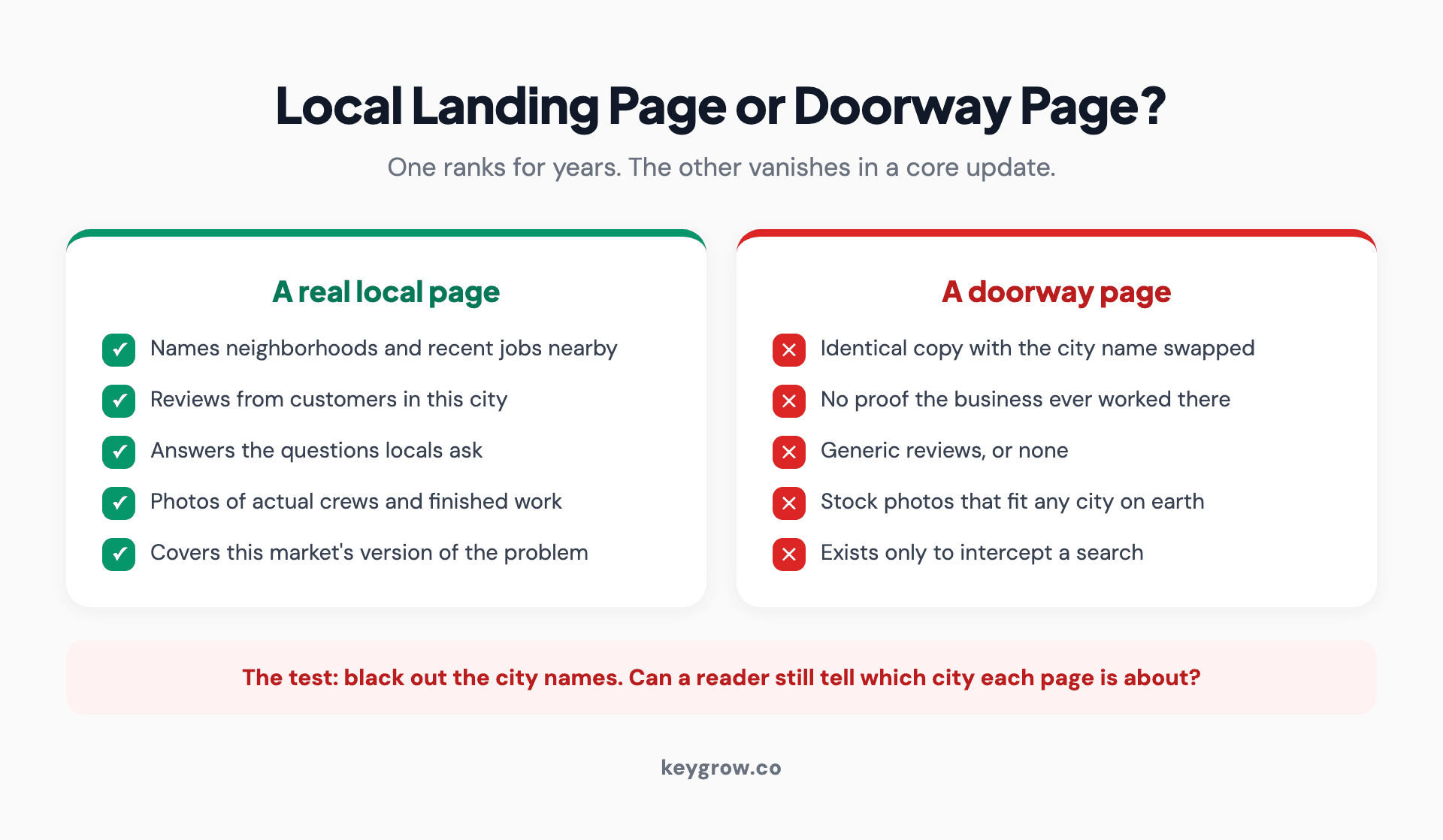
Two-column infographic comparing a genuine local landing page against a doorway page: local proof, real reviews, and specific answers versus swapped city names, identical copy, and no local signals.
The test is simple. Put two of your city pages side by side. If a reader could not tell which city either page is about with the names blacked out, they are doorway pages, and you are one core update away from losing all of them at once.
Here is our position on this, and it has cost us projects: an agency that quotes you thirty city pages for a one-crew service business is selling, not consulting. Thirty thin pages lose to six real ones, and the six real ones are all most local businesses can honestly support with proof, reviews, and photos. We would rather build fewer pages that hold.
How many local pages do you need?
One per place you genuinely serve and can prove it. For most single-location businesses that means one excellent page per core service, plus a handful of service-area pages for the towns that generate real work.
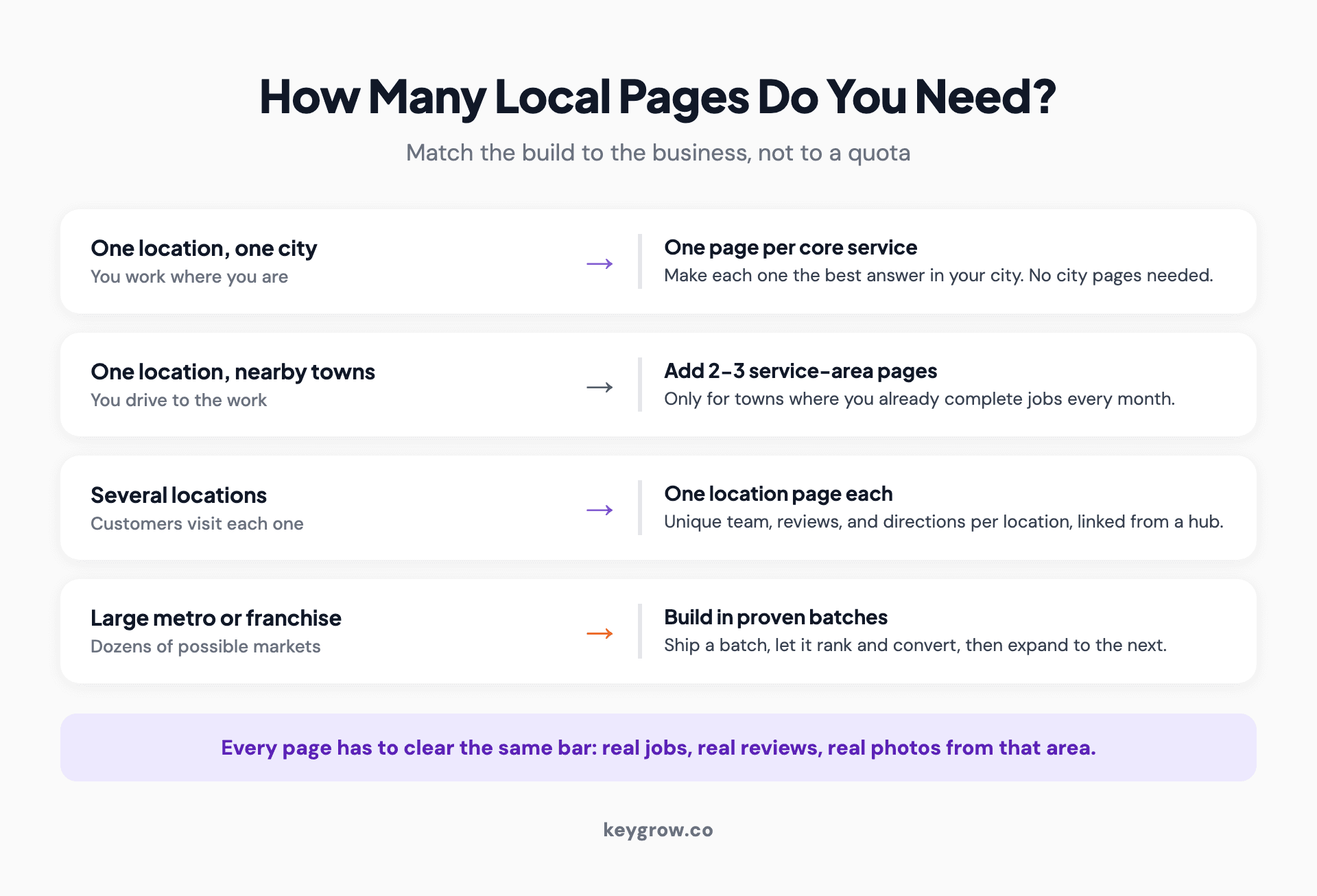
Decision-path infographic for how many local landing pages a business needs: one location serving one city, one location serving surrounding towns, multiple locations, and large service areas.
A reasonable build order:
- One page per core service in your home city.
- Service-area pages for the two or three towns where you already complete jobs every month.
- Expansion pages only when the first batch ranks and converts.
If you run a single-location business serving one city, you may not need an agency for any of this. Write the page yourself using the six-element recipe above; you know the neighborhoods and the problems better than any writer we could assign. Where it gets hard is multi-location consistency, service-area sprawl, and competitive metros, which is the work our SEO service exists for. If the page also needs to be designed and built, that's a web project, and it pairs with the content work.
How long until local pages rank and ring the phone?
Weeks for low-competition suburbs, months for contested city terms. Plan on a quarter before judging the results, longer in big metros.

Business owner at the front counter of a local shop, where ranking local pages eventually show up as phone calls.
A phone repair shop we work with is the honest benchmark: by month seven their local pages and profile work had them taking 115+ phone calls a month, starting from almost none. The first weeks looked like nothing was happening. The pages were indexing, reviews were accumulating, and the compounding hadn't kicked in yet. By month seven the phone was the bottleneck.
If a vendor promises the map pack in two weeks, ask what happens in week three. Rankings that arrive that fast are either in markets with no competition or built on tactics that won't survive a core update.
Keep the page alive after it ranks
A local page is not a brochure you print once. The businesses that hold rankings treat their pages like a storefront window and change what's in it.
A light quarterly pass covers it: add the two or three best new reviews, update the proof line with recent jobs and areas, answer one new question that customers started asking on the phone, and swap photos when the old ones stop matching reality. Seasonal markets get a bonus from timing the content to the season, since search behavior moves with it: gutter cleaning before the rains, AC tune-ups before June.
Stale signals work against you in both directions. Google sees a page nobody maintains, and a customer sees reviews that stop two years ago and wonders what happened to the business since.
FAQs
Should every city you serve have its own landing page?
Only the cities where you do real work and can show proof: completed jobs and local reviews. A page for every town on the map dilutes your site into doorway territory. Start with the two or three areas that already generate revenue.
Can you reuse the same content across local pages?
The structure yes, the content no. Keep the same layout and section order, but localize the opening, problems, proof, reviews, questions, and photos for each area. If two pages are identical except the city name, expect neither to rank well.
How long should a local landing page be?
Long enough to answer a local customer's questions, usually 500 to 1,000 words plus reviews and FAQs. Length is not the ranking lever; local specificity is. A 600-word page with real local proof beats a 2,000-word template.
Can you rank a local page without a physical address in that city?
Yes, with a service-area page, though the map pack is harder without a local address. Organic rankings respond to locally specific content, reviews from that area, and a defined service area in your Google Business Profile.
Should local pages target city names or neighborhoods?
Cities first, since they carry most of the volume. Add neighborhood and landmark terms inside the page copy and FAQs rather than building separate pages, unless a neighborhood is a market of its own in size.
Do local landing pages need schema markup?
Yes. LocalBusiness schema with your name, address, phone, hours, and service area helps search engines connect the page to your business entity. It takes minutes with a generator tool and removes ambiguity that costs rankings.
The short version
Create content for local landing pages the way you would brief a new employee about the area: this is what we do here, these are the problems this city has, here is the work we have done nearby, and here is what locals ask us. Put the checklist items on every page, localize the six elements that matter, stop before the pages go thin, and give it a quarter to compound.
If you would rather hand it off, tell us about your business and we will say plainly whether local pages are your bottleneck, and how many your business can support.