


Can adding more pictures increase SEO? Not by themselves. Google doesn't count images and award rankings for volume. But the right images, optimized properly, lift the signals Google does reward: engagement, time on page, image search visibility, accessibility, and the originality that separates your page from the template version of it. The same images, unoptimized, will slow your site and push rankings the other way.
So the honest answer is: more pictures can increase SEO, more pictures can decrease SEO, and the difference is entirely in the execution.
This guide covers when images help, when they hurt, how many a page needs, and the checklist that decides which side of the line you land on.
Do more pictures directly increase SEO?

Laptop on a desk used for preparing and optimizing website images.
No. Image count is not a ranking factor. A page with twelve pictures doesn't outrank a page with four because of the arithmetic.
What Google evaluates is the page as a whole: does it answer the query, does it load fast, do people stay on it, does it look like firsthand work or a reassembled template. Images influence every one of those judgments, which is why they matter, and why "add more pictures" is the wrong instruction. The right instruction is "add the pictures that do a job."
Think of each image as a claim on the reader's bandwidth. It either pays rent, by explaining, proving, or breaking up a wall of text at the right moment, or it freeloads, adding kilobytes and pushing your real content below the fold.
How do images improve SEO when you do them right?
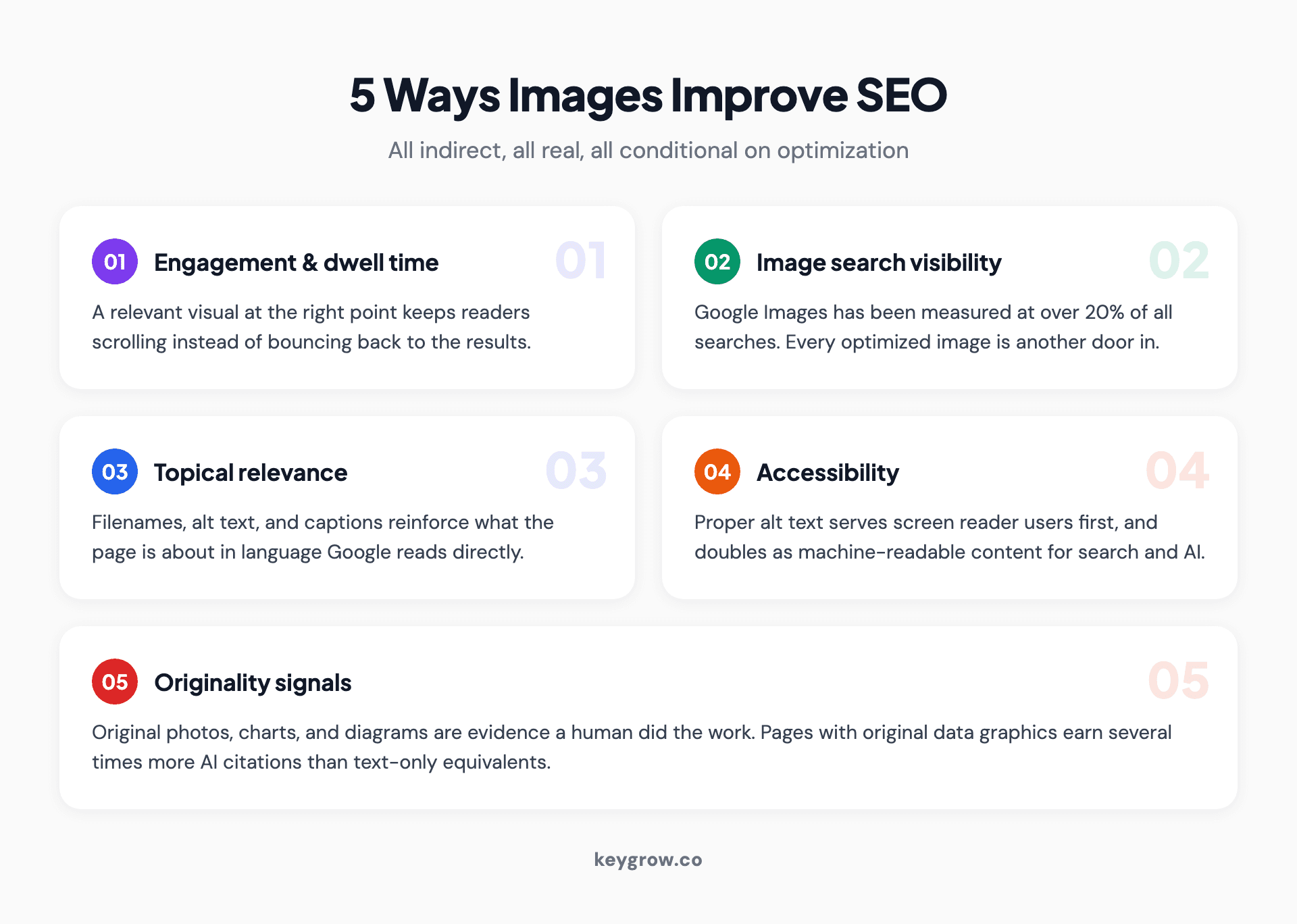
Five-card layout of the ways optimized images improve SEO: engagement, image search visibility, topical relevance, accessibility, and originality signals.
Five mechanisms, all indirect, all real:
1. Engagement and dwell time. Readers decide in seconds whether a page is worth the scroll. A relevant diagram at the right point keeps them moving through the content instead of bouncing back to the results, and Google notices how visits behave.
2. Image search is its own surface. A 2018 Jumpshot analysis put Google Images at over 20 percent of all searches in the US. Product photos, infographics, and how-to visuals rank there independently of your page, and each one is another door into your site.
3. Topical relevance. Filenames, alt text, captions, and the text around an image all reinforce what the page is about. Google's own image SEO documentation is blunt about it: context and descriptive markup are how images get understood.
4. Accessibility. Alt text exists for screen readers first. Pages that handle it properly serve more users, and the same attribute doubles as machine-readable content for search engines and AI systems.
5. Originality signals. Original photos, charts, and diagrams are evidence a human did the work. In the citation research we track for AEO work, pages with original data tables and graphics earned several times more AI citations than text-only equivalents. Generic visuals prove nothing; original ones quietly carry your E-E-A-T case.
When do more images hurt your SEO?
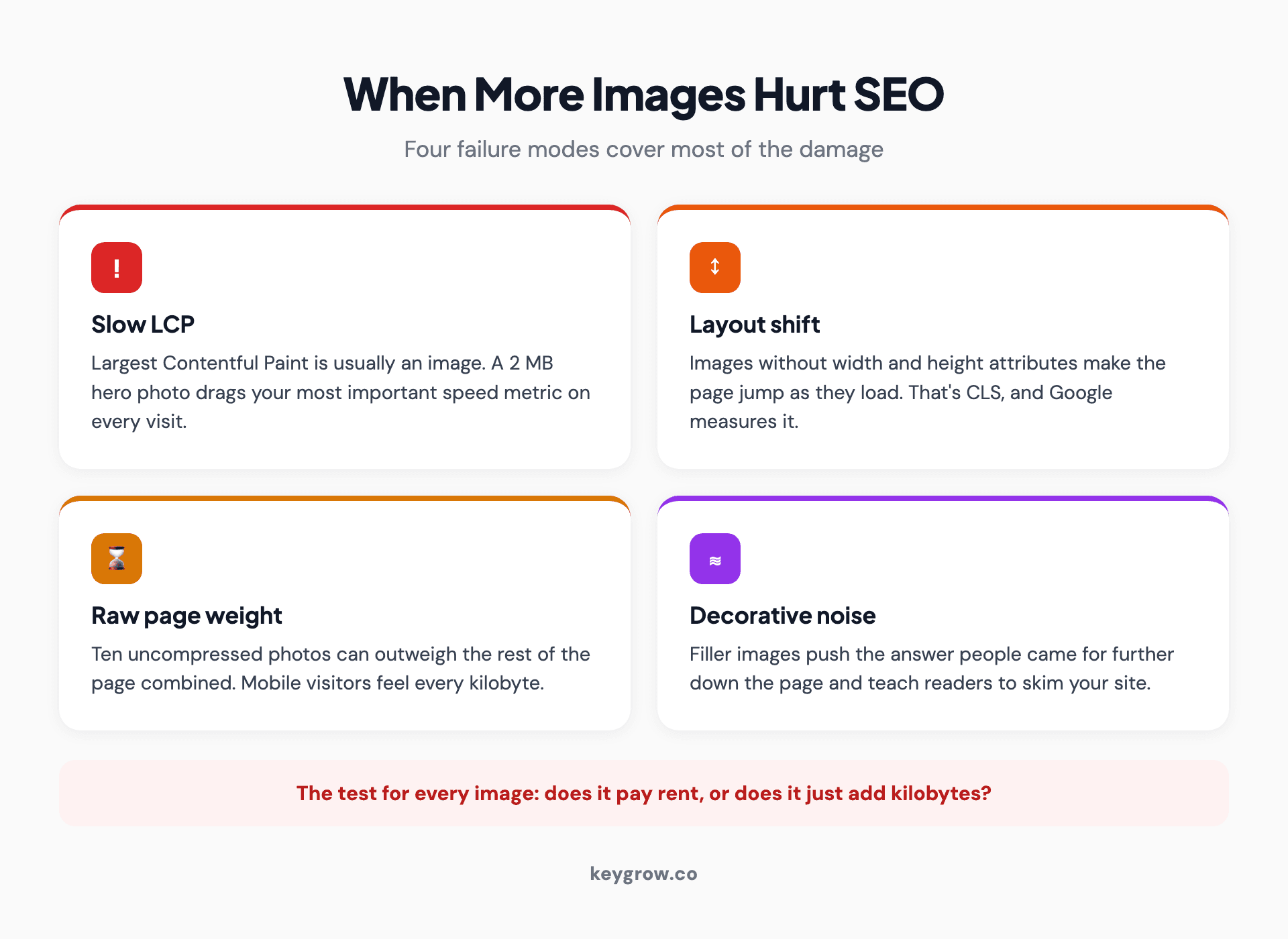
Four-card layout of the ways images damage SEO: slow LCP, layout shift, page weight, and decorative noise.
Images hurt your SEO when they cost more in speed and clarity than they return in value. Four failure modes cover most of it:
- Slow LCP. Largest Contentful Paint, the Core Web Vitals metric, is usually an image. A 2 MB hero photo makes your most important speed number worse on every single visit.
- Layout shift. Images without width and height attributes make the page jump as they load. That's Cumulative Layout Shift, it's measured, and it's one of the most common image mistakes on small business sites. None of the guides ranking for this topic even mention it.
- Raw page weight. Ten uncompressed photos can outweigh the rest of the page combined, and mobile visitors on average connections feel every kilobyte.
- Decorative noise. Stock photos that say nothing push the content people came for further down the page. A reader scrolling past three filler images to reach the answer is a reader learning to skim your site.
If your pages already feel heavy, that's a build problem before it's a content problem; it's the kind of thing our web development service fixes at the template level so every future image inherits the right behavior.
How many images should a page have?
There's no magic number, and anyone giving you one is guessing. The useful rule: every image earns its place, and the page type sets the budget.
| Page type | Typical range | What earns a spot |
|---|---|---|
| Blog post | 1 visual per major section | Diagrams, comparisons, annotated examples, one contextual photo |
| Service page | 3-6 | Real work, real team, results proof |
| Product page | 4-8 | Angles, scale, context of use, detail shots |
| Landing page | 2-4 | One strong hero, proof images, nothing decorative |
A 2,000-word post with a visual after every H2 reads as well-supported. The same post with three stock photos jammed between every paragraph reads as padding. Volume follows structure, not the other way around.
The image SEO checklist
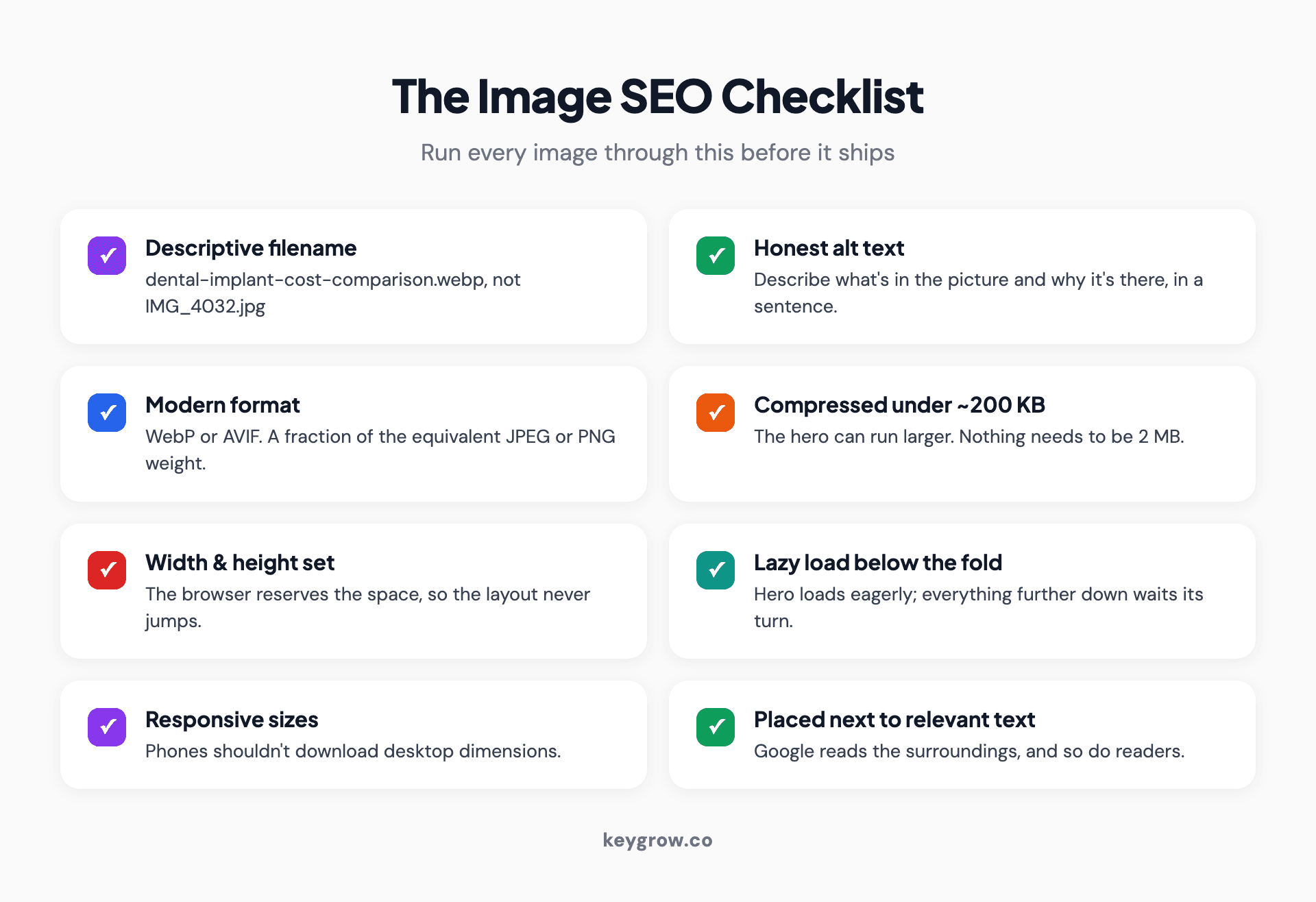
Two-column checklist of image SEO basics: descriptive filenames, alt text, modern formats, compression, lazy loading, dimensions, responsive sizes, and contextual placement.
Run every image through this before it ships:
- Descriptive filename. "dental-implant-cost-comparison.webp", not "IMG_4032.jpg". Hyphens between words, keyword where natural.
- Alt text that describes the image. Write what's in the picture and why it's there, in a sentence. Keyword included only when it's honestly part of the description.
- Modern format. WebP or AVIF for photos and graphics; they're a fraction of the equivalent JPEG or PNG weight.
- Compressed under roughly 200 KB for most content images. The hero can run larger; nothing needs to be 2 MB.
- Width and height attributes set, so the browser reserves the space and the layout never jumps.
- Lazy loading below the fold. The hero loads eagerly; everything further down waits until it's needed.
- Responsive sizes, so phones aren't downloading desktop dimensions. Google's image guide on web.dev covers the srcset mechanics.
- Placed next to relevant text. Google reads the surroundings, and so do readers.
None of this requires an agency. It's an afternoon with a checklist and an image compressor, and it's some of the highest-return DIY work in SEO. If you'd rather have it audited properly alongside everything else, that's what our SEO service does, but image basics shouldn't be what you pay anyone for.
How does AI search read your images?
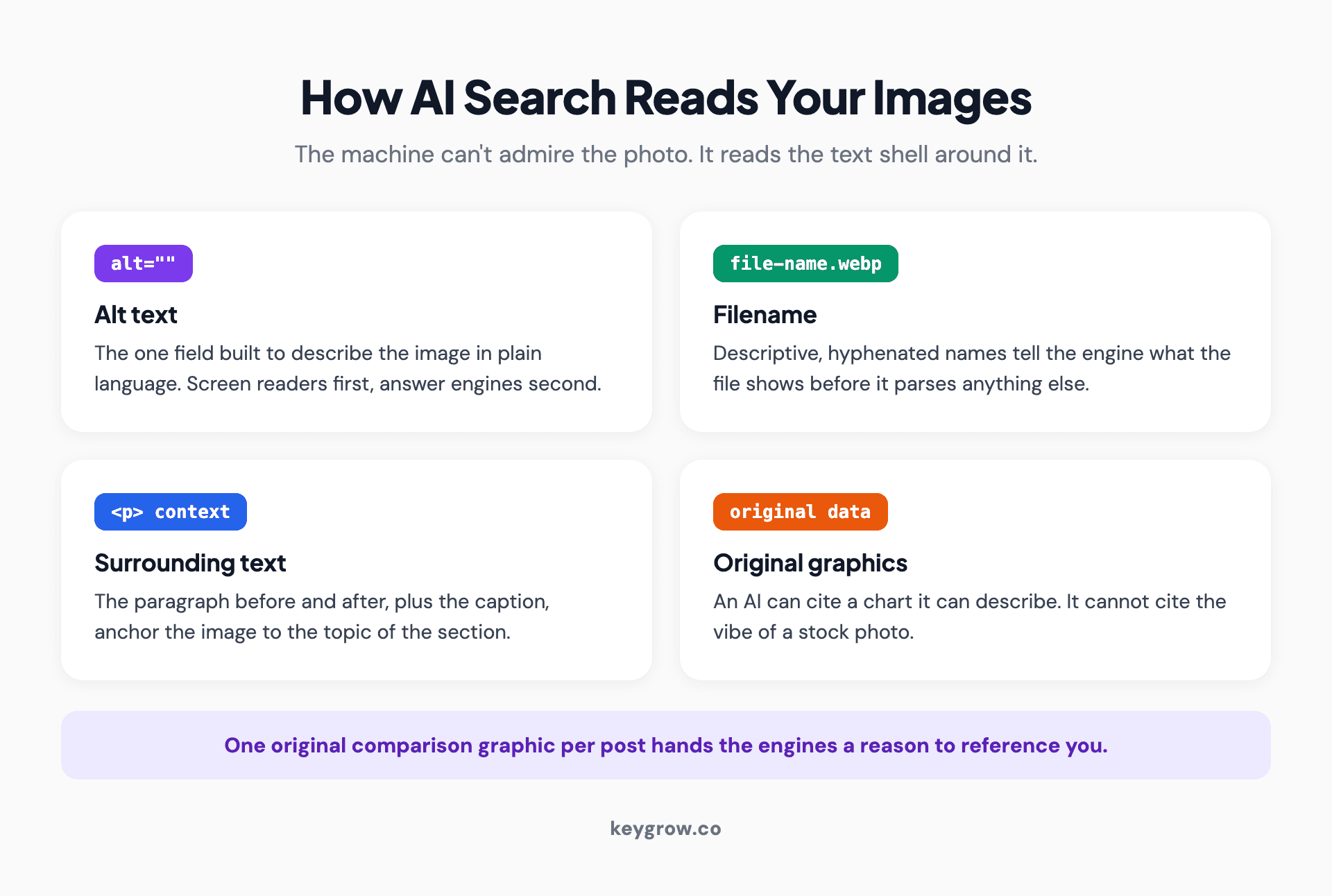
Diagram of the signals AI search engines extract from images: alt text, filenames, surrounding context, and original data graphics.
AI engines can't admire your photography. They read the text shell around it: the alt attribute, the filename, the caption, the paragraph before and after. That text either tells the machine something quotable or it doesn't exist.
This blog is its own worked example. Every infographic we publish ships with a descriptive Title-Case filename and a full-sentence alt text describing exactly what the graphic shows, because those two fields are what an answer engine can lift. The image gets us the human reader; the description gets us the machine.
Original data graphics matter most here. An AI assembling an answer about your topic can cite a chart it can describe; it cannot cite the vibe of a stock photo. If you publish one original comparison graphic per post, you're handing the engines a reason to reference you that your competitors' text walls don't offer. We cover the structural side of this in our guide to optimizing your website for ChatGPT, and how to track whether it's working in our piece on AI search monitoring.
Should you use original photos or stock images?

Person taking a photo of their work with a phone, the kind of original image that outperforms stock photography for SEO.
Original wins everywhere it's practical. A phone photo of your actual crew on an actual job beats a stock photo of models in hard hats, for trust, for E-E-A-T, and for the simple reason that Google has seen that exact handshake photo on forty thousand consulting websites. So have your customers.
Stock still has a job: pacing. A relevant, well-chosen stock image can break up a long section without pretending to be proof of anything. Use it the way we use it, as rhythm between the visuals that carry information, not as a substitute for them.
The hierarchy, in order of SEO value: original data graphics and diagrams, original photos of real work, then quality stock for pacing. We rebuilt a junk removal client's landing page around that hierarchy as part of a larger overhaul, real before-and-after job photos replacing generic clipart, and lead form submissions rose 180 percent over 8 weeks. The images weren't the whole story, but they're the part visitors mentioned.
FAQs
Can adding more pictures increase SEO for blog posts?
Yes, when each image supports a section: diagrams, comparisons, annotated examples. A visual per major section is a sensible ceiling. Adding photos purely to raise the count adds weight without adding value, and weight is a ranking cost.
Do images directly affect Google rankings?
Not as a counted factor. They affect rankings through what they change: engagement, load speed, image search visibility, accessibility, and how original the page looks. Optimized images move those levers up; heavy ones move speed down.
Can too many images hurt my rankings?
Yes, through speed. Images are usually the heaviest thing on a page, and Largest Contentful Paint, a Core Web Vitals metric, is typically an image. Uncompressed photos and missing width/height attributes are the two most common self-inflicted wounds.
Is image optimization more important than image count?
By a wide margin. Three compressed, well-named, well-described images beat ten raw uploads every time. Count is a content decision; optimization is a ranking one.
Should I use original photos or stock images for SEO?
Original where it proves something: your work, your team, your data. Stock only for pacing. Original visuals support E-E-A-T and give image search and AI engines something unique to surface; stock gives them nothing they haven't already seen everywhere else.
What's the ideal image file size for SEO?
Under roughly 200 KB for standard content images, in WebP or AVIF format. Heroes can run larger if they're the one image loading eagerly. If a photo ships at 2 MB, that's a compression step skipped, not a quality choice.
The bottom line on images and SEO
More pictures increase SEO the way more employees increase revenue: only if each one has a job. Give every image a purpose, a descriptive filename, honest alt text, and a file size that respects your visitors' connection, and images become one of the cheapest SEO wins available. Skip those steps and every upload is a small tax on your rankings.
Run the checklist on your top five pages this week; it costs nothing. And if you'd rather know how your whole site stacks up, speed, structure, and content together, tell us where to look at keygrow.co/get-started and we'll give you the straight version.