


A plumbing company's website gets a routine theme update in March. The update quietly adds a noindex tag to every service page. Nothing looks different to the owner. The phone just rings a little less each week, and by June organic traffic is down by half. Someone finally runs an SEO health check, and the cause has been sitting in Search Console, flagged, for three months.
That company is made up. The failure is not. Once Google recrawls a page carrying a noindex rule, it drops that page from search results entirely, per Google Search Central.
One line of code, and your best pages are gone.
An SEO health check is a short, scheduled look at the signals that show whether Google can find, index and display your site, and whether that traffic still turns into leads. Think of it as the smoke alarm; a full audit is the building inspection. The version below has 14 checks, takes about 30 minutes with free tools, and ends with a score that tells you whether to relax, fix a short list, or book a full audit.
What you need before you start
You need three free tools and a spreadsheet: Google Search Console, PageSpeed Insights, and a browser for a site: search. Whatever records your leads (GA4, call tracking, your form inbox) covers the last check.
No Search Console yet? Stop here. Verifying it is today's whole job, and the data takes a few days to fill in anyway. Once it is live, give each check a row in the spreadsheet and score it 2 for green, 1 for amber, 0 for red. Amber means "not broken, not right", like a sitemap that works but lists 40 pages when you have 25.
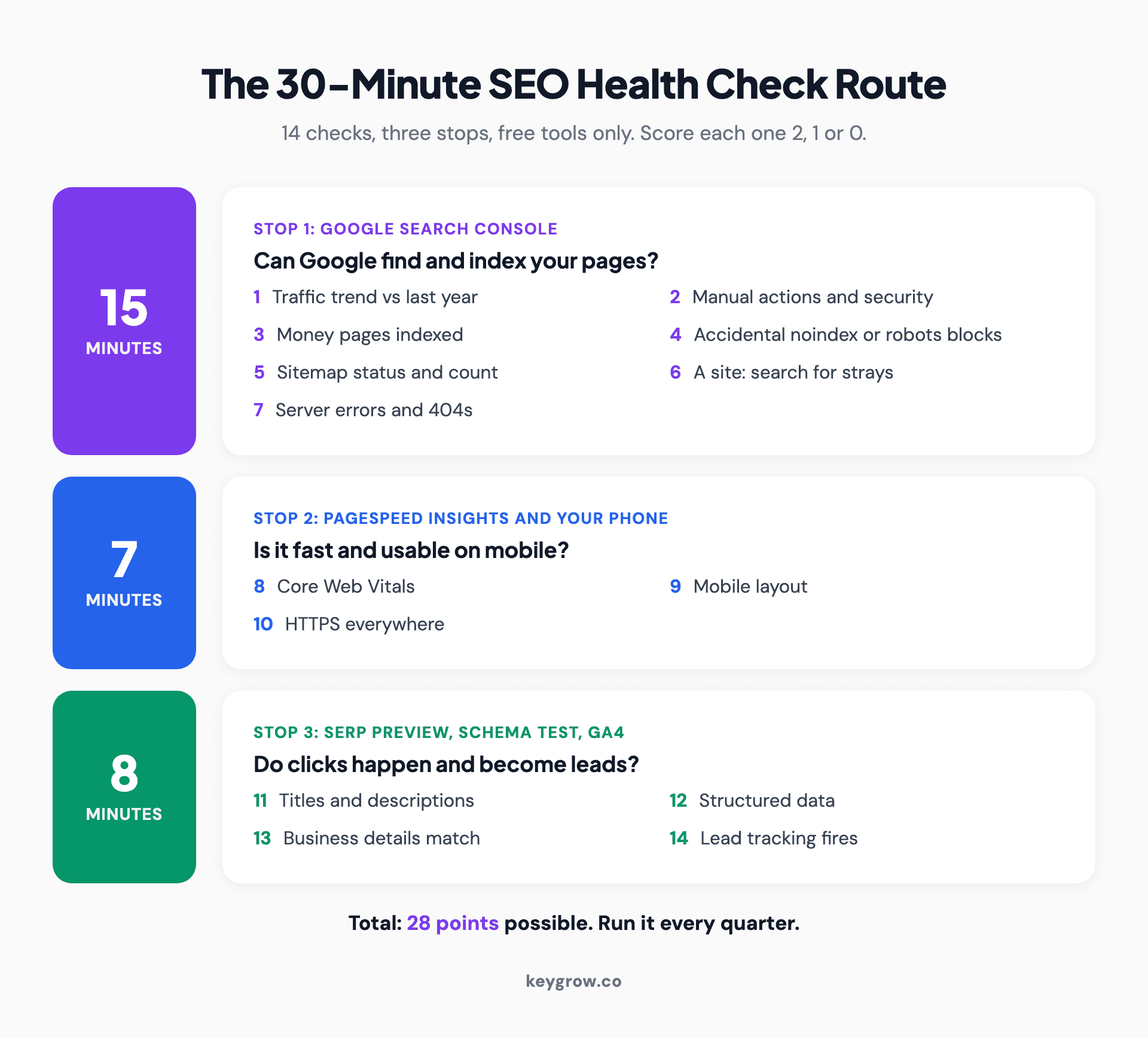
Timeline of a 30-minute SEO health check: 15 minutes in Google Search Console for traffic, indexing and errors, 7 minutes in PageSpeed Insights for speed and mobile layout, and 8 minutes on titles, schema, business details and lead tracking.
Part 1: Can Google find and index your pages?
This is the part that catches disasters. Seven checks, about 15 minutes, almost all inside Search Console. A red here can remove pages from Google entirely, which is why three of them sit in the override rule further down.
| # | Check | Where to look | Green (2 points) | Red (0 points) | What a fail costs |
|---|---|---|---|---|---|
| 1 | Traffic trend | Search Console, Performance, last 3 months vs the same 3 months last year | Clicks flat or up | Clicks down 20% or more with no seasonal reason | The slow leak nobody notices until the phone goes quiet |
| 2 | Manual actions and security | Security and Manual Actions section | "No issues detected" on both reports | Any manual action or hacked-content warning | Pages demoted or removed until you fix it and request a review |
| 3 | Money pages indexed | URL Inspection on your homepage and top 5 service pages | All five say the URL is on Google | Any money page not indexed | That page earns zero organic leads |
| 4 | Accidental blocks | Page indexing report, "URL marked noindex" and "Blocked by robots.txt" | Only pages you meant to hide | A service, location or product page in either list | The cold open above |
| 5 | Sitemap | Sitemaps report | Status "Success", URL count close to your real page count | "Couldn't fetch", or a count far off | New pages take longer to get found |
| 6 | site: search | Type site:yourdomain.com into Google | Results look like your site | Pages you never made, a staging copy, odd languages | Spam or duplicate pages competing with the real ones |
| 7 | Server errors and 404s | Settings, Crawl stats, "By response" | Server errors near zero, 404s only on pages you deleted | Rising 5xx errors, or 404s on pages your menu still links to | Google crawls less, visitors hit dead ends |
The 20 percent line on check 1 is our working rule, not a Google number. Compare against the same months last year so seasonality does not fool you: a pool builder's November will always look bad next to July.
On check 3, do not chase every unindexed URL. Tag pages, filtered views and old thank-you pages are usually fine left out. You only care about the pages that sell something.
On check 6, ignore the result count, which is a rough estimate. Scroll two or three pages and look at what shows up.
A pharmacy spam page in Japanese means a hacked site.

A hand ticking off items on a handwritten checklist in an open notebook.
Part 2: Speed, mobile layout and HTTPS
Three checks, about seven minutes. Speed and layout rarely cause a traffic cliff, but they decide whether a visitor stays long enough to call.
| # | Check | Where to look | Green (2 points) | Red (0 points) | What a fail costs |
|---|---|---|---|---|---|
| 8 | Core Web Vitals | Search Console, Core Web Vitals report, or PageSpeed Insights for a low-traffic site | LCP 2.5 seconds or less, INP 200 ms or less, CLS 0.1 or less | Any metric rated "Poor" on mobile | Visitors leave before the page settles |
| 9 | Mobile layout | PageSpeed Insights mobile screenshot, then your own phone | Readable without zooming, buttons easy to tap, phone number tappable | Sideways scrolling, overlapping text, a pop-up covering the page | The lead you lose at the moment they were ready to call |
| 10 | HTTPS | Search Console HTTPS report, then type the http:// version of your domain | Every indexed URL on HTTPS, http redirects in one hop | HTTP pages indexed, or a certificate warning | A "Not secure" label next to your contact form |
The Core Web Vitals thresholds come from Google's web.dev guidance, measured at the 75th percentile of page loads. INP replaced the old First Input Delay metric in 2024, so any checklist still asking for FID is out of date.
So is one that sends you to the Mobile-Friendly Test or the Mobile Usability report. Google retired both in December 2023, as Search Engine Land reported. Use Lighthouse in PageSpeed Insights, and your own phone.
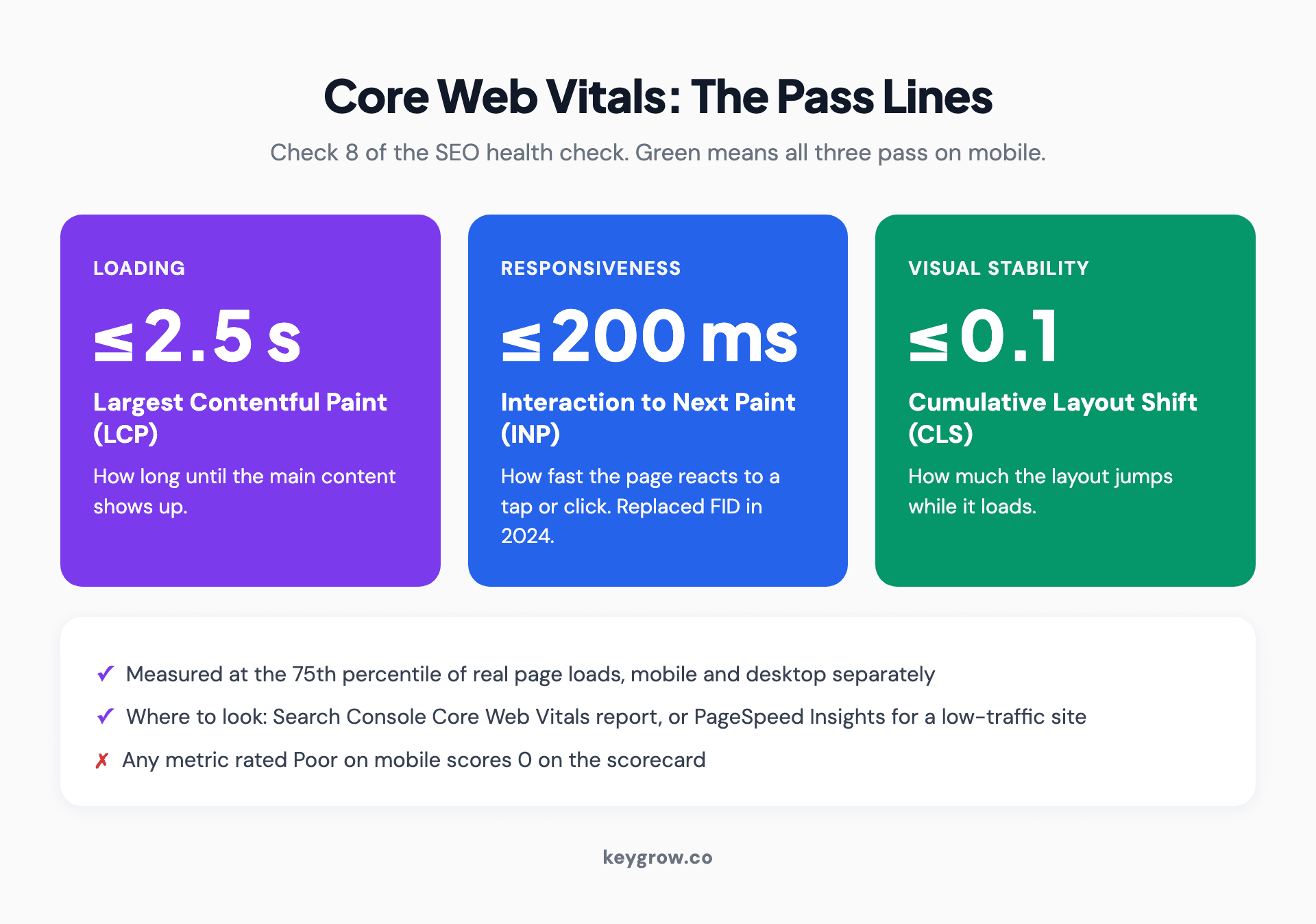
Three Core Web Vitals thresholds for an SEO health check: Largest Contentful Paint 2.5 seconds or less, Interaction to Next Paint 200 milliseconds or less, Cumulative Layout Shift 0.1 or less, all measured at the 75th percentile on mobile.
Part 3: Do searchers click, and do clicks become leads?
Four checks, about eight minutes. Indexed and fast is not the finish line.
| # | Check | Where to look | Green (2 points) | Red (0 points) | What a fail costs |
|---|---|---|---|---|---|
| 11 | Titles and descriptions | Search Console, Performance, Pages tab sorted by impressions, top 10 pages | Unique title per page, main service near the front, nothing cut off | Duplicate titles, a page called "Home", high impressions with almost no clicks | You rank and still lose the click |
| 12 | Structured data | Search Console enhancement reports, or the Rich Results Test on your homepage | Valid Organization or LocalBusiness markup, no errors | Invalid items, or no markup at all | Google has to guess your business details |
| 13 | Business details | Site footer, contact page, Google Business Profile | Name, address and phone identical everywhere | An old number or address anywhere | Calls going to a dead line |
| 14 | Lead tracking | GA4 key events, call tracking, or your form inbox | Form fills and calls from organic search are recorded | No tracking, or it last fired weeks ago | You cannot tell a healthy site from a busy one |
For check 11, paste each title and description into our free SERP preview tool to see where Google is likely to cut it off. When you need to rewrite one, the meta title and description generator checks length and pixel width as you type.
No markup on the homepage? The schema markup generator builds LocalBusiness or Organization JSON-LD you can paste in. Online-only businesses score check 13 as green.
Check 14 is the one most health checks skip, and the one we would keep if we could run only one.
If you cannot see which organic visits became calls or forms, every other green on the sheet is a guess.

A laptop on a desk showing an analytics dashboard with traffic charts.
Add up the score
Add the 14 scores for a total out of 28, then check one override rule before you read your band.
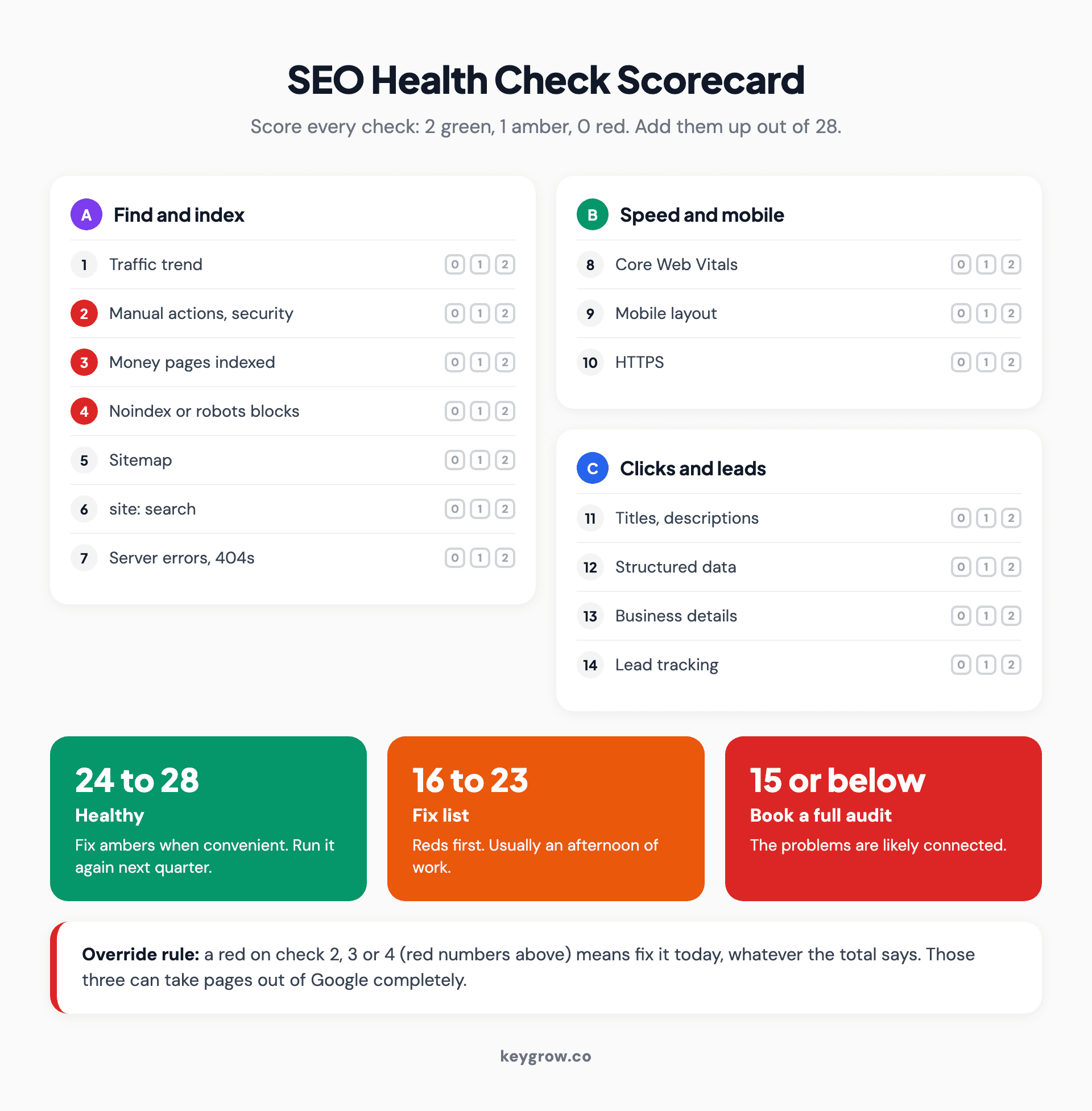
SEO health check scorecard: 14 checks grouped into indexing, speed and mobile, and clicks and leads, each scored 2 for green, 1 for amber or 0 for red, with three bands: 24 to 28 healthy, 16 to 23 fix list, 15 or below book a full audit, and a red on checks 2, 3 or 4 overrides the total.
| Score | What it means | What to do |
|---|---|---|
| 24 to 28 | Healthy | Fix the ambers when you get to them, run it again next quarter |
| 16 to 23 | A fix list | Reds first. Most are an afternoon of work for whoever manages your site |
| 15 or below | Connected problems | Book a full audit. Fixing items one at a time wastes effort here |
The override: a red on check 2, 3 or 4 means fix it today, whatever the total says. Those three can take pages out of Google completely. The rest only slow you down.
A worked example, with made-up numbers to show the arithmetic: A site scores 2 on eleven checks, 1 on titles, and 0 on both Core Web Vitals and lead tracking. That is 23: a fix list, not an audit. Lead tracking goes first, because without it you cannot measure whether the speed fix did anything.
When do you need a full SEO audit instead?
Book a full audit when the score is 15 or below, when a red will not clear after you fix it, after a redesign or migration, or when traffic fell and none of the 14 checks explains why.
A health check tells you something is wrong. An audit tells you why. It crawls every URL instead of sampling five, and covers content gaps, internal links, backlinks and competitors. We walk through it in our guide on how to run a technical SEO audit, and the right rhythm for each type is in how often to audit your site for SEO.
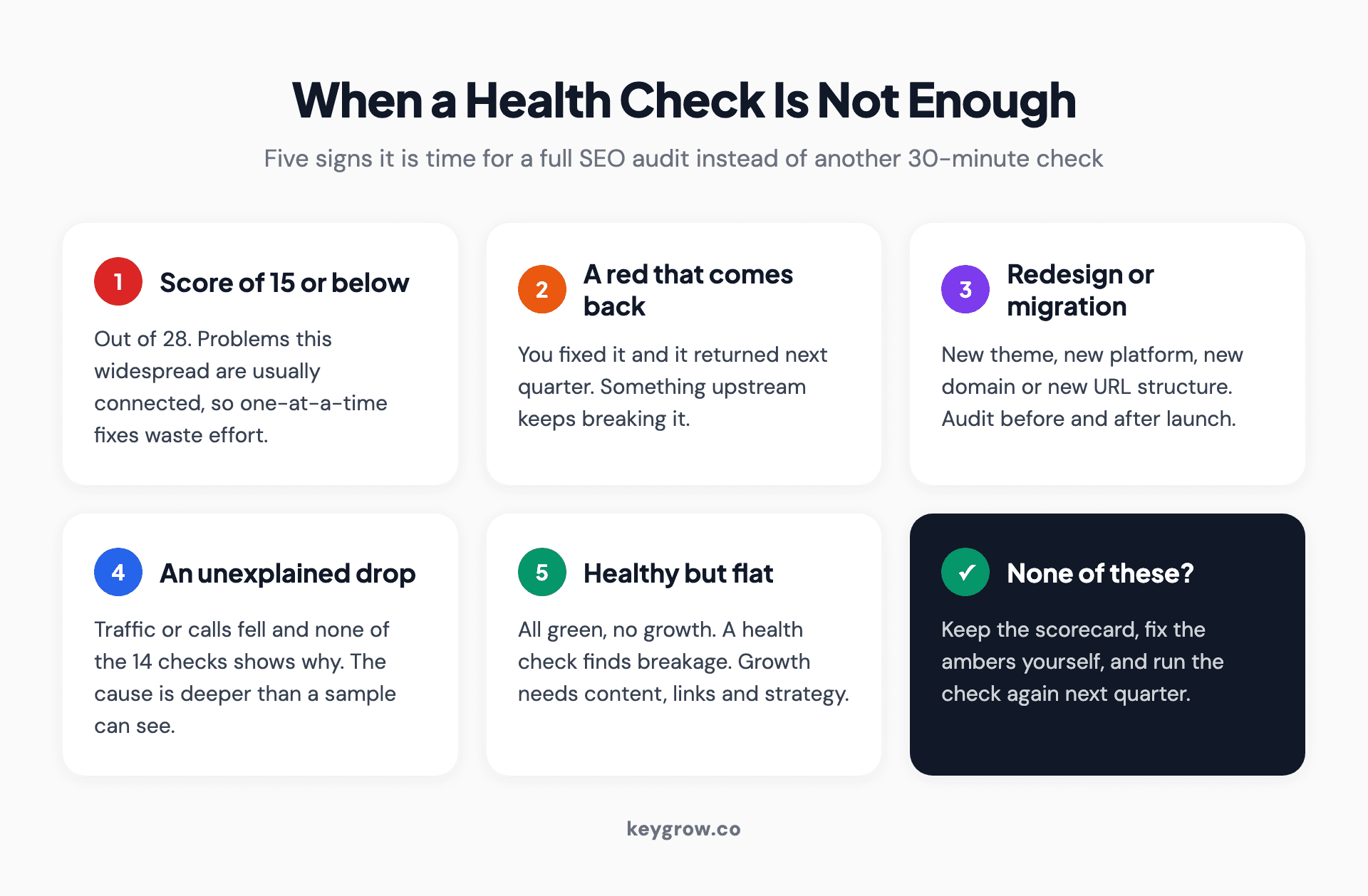
Five signs an SEO health check is not enough and a full audit is due: a score of 15 or below, a red that returns after fixing, a redesign or migration, a traffic drop the checks cannot explain, and a site that is healthy but not growing.
One more limit: a health check keeps a site from slipping, and growth needs different work. When a doctor's practice in Dubai grew organic traffic 1,519% and reached 130+ patient calls a month, it took 12 months of technical fixes, content and authority building. A green scorecard would have said nothing was broken, which was true and beside the point.
If you scored 24 or more, you do not need an agency for this. A single-location business with more time than money should run these 14 checks every quarter, fix the ambers, and spend nothing. Bring in help when the reds keep coming back or the site is healthy but flat. If you would rather hand the fix list to someone, our technical SEO services start with a complete technical audit and work through what it finds.
FAQs
What is an SEO health check?
An SEO health check is a quick review of the signals that show whether search engines can find, index and display your site, and whether that traffic produces leads. It covers indexing, errors, speed, mobile layout, titles, structured data and tracking. It is shorter than an audit and meant to run on a schedule.
How long does an SEO health check take?
About 30 minutes for the 14 checks in this guide, once Search Console is set up. The first run takes longer because you are building the spreadsheet.
Is a free SEO health checker tool enough on its own?
A free SEO health checker is useful for on-page items like titles, headings and broken links, but most scan one page at a time and cannot see your Search Console data. They miss manual actions, indexing status and real-user speed data. Use one alongside Search Console, not instead of it.
How often should you run an SEO health check?
Run the full scorecard every quarter, and check traffic and indexing (checks 1 to 4) monthly, which takes about ten minutes. Run it immediately after a redesign, a hosting move, a theme update or any sudden drop in calls or forms.
What is the difference between an SEO health check and an SEO audit?
A health check samples a site to confirm nothing is broken, using a fixed list of checks and free tools. An audit crawls every URL and goes into content, links, competitors and strategy, then produces a prioritized plan. The health check tells you when you need the audit.
Run it again next quarter
Three months is how long the site in the opening went without anyone noticing. A quarterly scorecard caps that kind of damage at one quarter, and the monthly ten-minute pass on checks 1 to 4 caps it at about four weeks.
Keep the spreadsheet and add a new score column each time. A score that drops from 26 to 21 between quarters tells you more than either number alone. If the reds keep returning, request a free SEO audit and we will tell you honestly whether you need us.