


Every local advertiser eventually files the same complaint: the campaign is targeted to one city and the calls are coming from four states away.
That is not a bug, and it is not fraud. It is the default. Google Ads location targeting ships with a setting that includes people who are merely interested in your area, not only people standing in it, and the exclusion controls do not mirror that setting. Understanding those two facts fixes most wasted local budget without touching a keyword.
Here is how the system actually works, what to change, and which parts of it are not worth your time.
How Google works out where someone is
Before the settings matter, it is worth knowing what they operate on, because location is inferred rather than known.
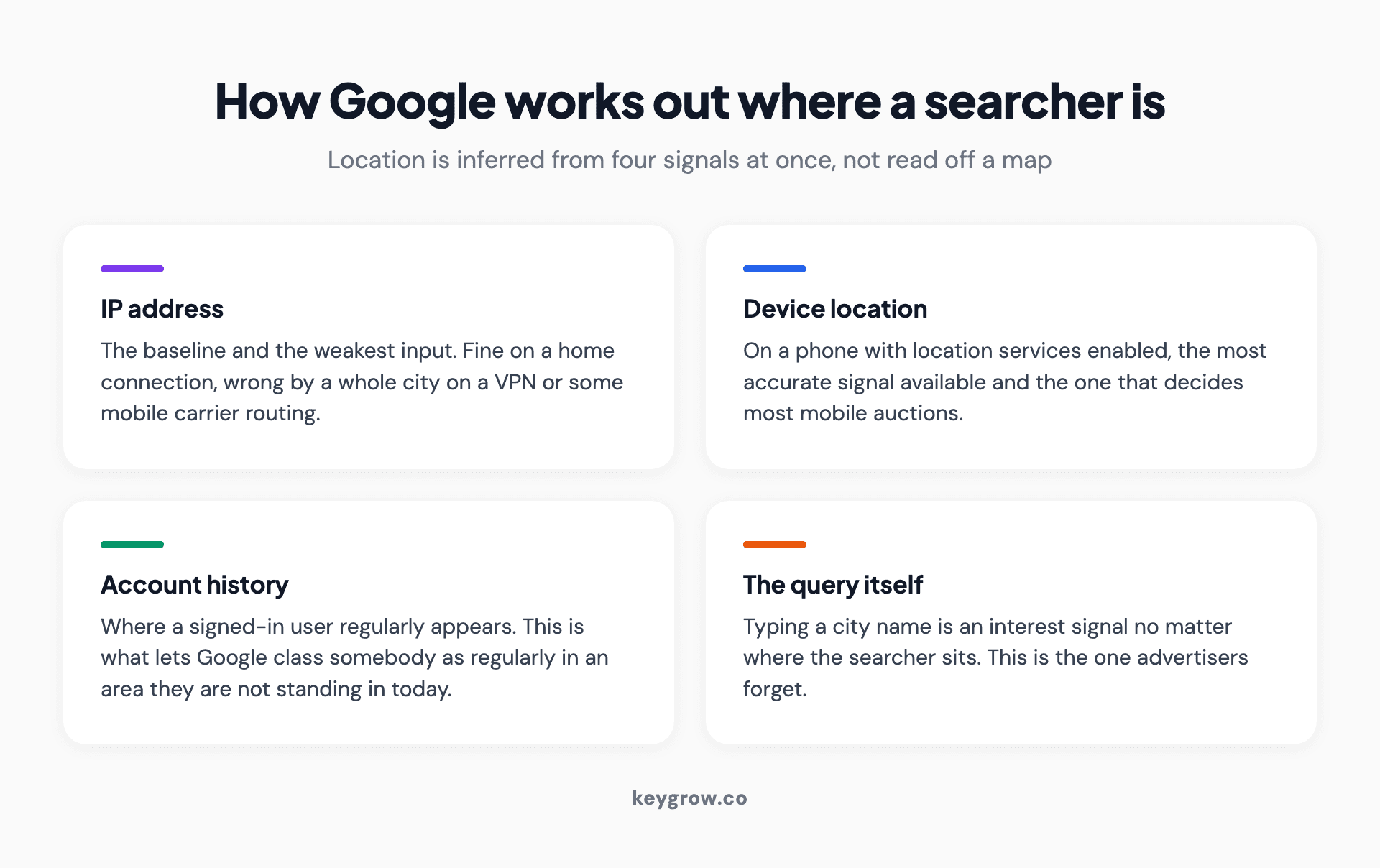
Four-panel breakdown of how Google infers a searcher's location: IP address, device location, account history, and the query itself.
Google assembles a guess from several signals at once. IP address is the baseline and the weakest link: it identifies the network, which on a home connection is close enough and on a corporate VPN or a mobile carrier can be a different city entirely. Device location comes next, and on a phone with location services on it is the most accurate input available. Then there is account history, meaning the places a signed-in user regularly appears, which is what lets Google class someone as "regularly in" an area they are not currently standing in.
The query itself is the fourth signal, and the one people forget. Typing a city name into the search box is an interest signal regardless of where the searcher is sitting. That is how a person in another state ends up matched to your city under the default setting.
None of this is precise at the boundary. A searcher two blocks outside your postal code may be read as inside it, and someone on a train may be placed where their carrier routes traffic. Plan for a few percent of spill in any tightly drawn area, and do not attempt to engineer it away with ever smaller radii. The Google Ads API documentation describes these as targeting constants rather than precise coordinates, and the interface behaves the same way.
The setting behind most of the complaints
Google gives you two ways to define who counts as being in your target area, and the one it recommends is the wider one.
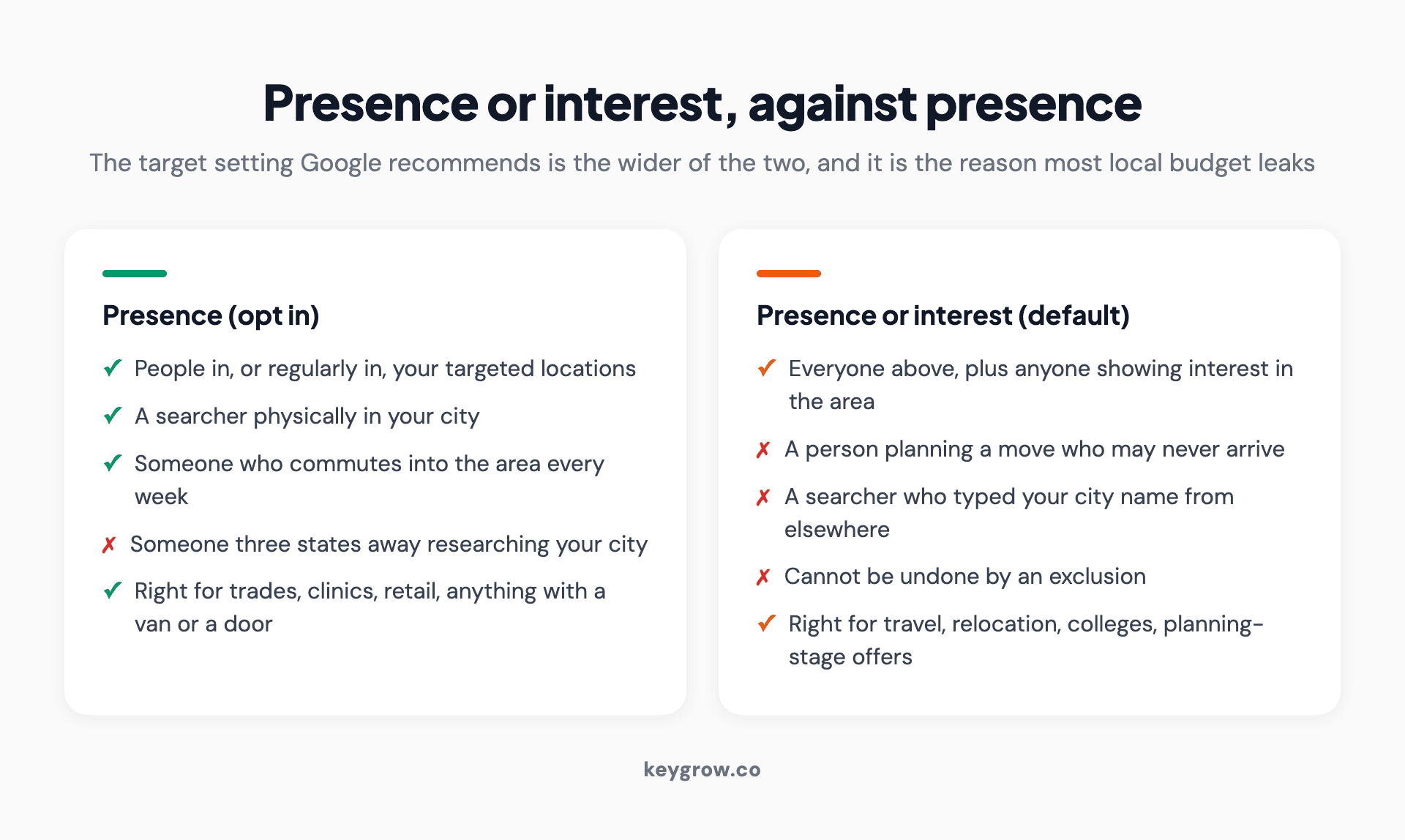
Side-by-side comparison of the Presence and Presence or interest target settings in Google Ads and who each one reaches.
In advanced location options, the target settings read:
| Setting | Who sees your ads | Google's stance |
|---|---|---|
| Presence or interest | People in, regularly in, or who have shown interest in your targeted locations | Default, labeled as recommended |
| Presence | People in or regularly in your targeted locations | Opt-in |
"Shown interest" means search behavior, browsing history, and past location signals. Someone in Denver researching a move to Austin qualifies as interested in Austin. If you sell emergency drain clearing in Austin, that person is worth nothing to you, and under the default setting you are paying for them.
For a business that physically sends a van or expects a customer through the door, switch to Presence. For travel, relocation services, colleges, and businesses selling to people planning to be somewhere, the default is genuinely the right call and switching would cost you volume.
Why your exclusions do not stop what you think they stop
This is the part almost nobody explains, and it is the reason leakage survives after people think they have fixed it.
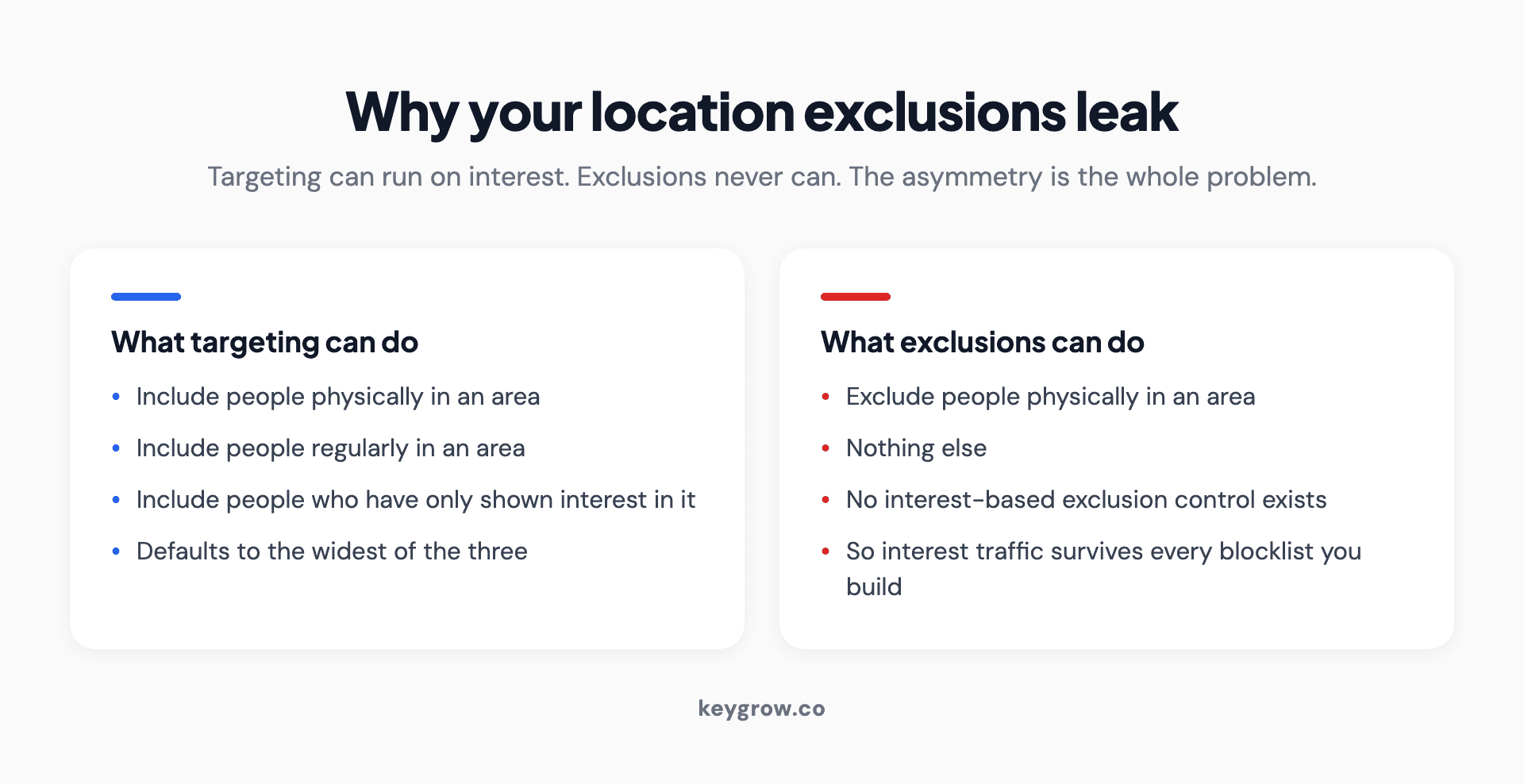
Two-column diagram showing that Google Ads targeting can run on interest while exclusions only ever work on physical presence.
Targeting can be set to presence or interest. Exclusions only ever work on presence. Google labels the exclusion control "Location exclusion (Presence)" and there is no interest-based equivalent.
Read that asymmetry carefully, because it produces a specific and confusing outcome. If your targeting is left on presence or interest, and you exclude a neighboring state, someone sitting in that excluded state who searches in a way that signals interest in your city can still see your ad. You excluded their body. You did not exclude their intent, and there is no control that does.
The fix is not a longer exclusion list. The fix is switching the target setting to Presence, after which exclusions behave the way you always assumed they did.
The four ways to draw a target area
| Method | Best for | Watch out for |
|---|---|---|
| Country | National ecommerce, remote services | Almost always too broad for a local business |
| Region, state, or city | Service businesses covering recognized areas | City boundaries rarely match how locals describe their area |
| Postal or ZIP code | Tight control, uneven service areas, high-value jobs | Tedious to build, but the most precise option available |
| Radius around a point | Multi-location businesses, quick setup | A circle is rarely the shape of a real service area |

A detailed street map showing buildings and road networks across a neighborhood, used to plan an advertising service area.
You can combine them. Target a metro area, exclude three postal codes inside it where the jobs do not pay, and add a radius around a second branch. Google allows up to 1,000 locations added at once, and more in additional batches, so list length is not the constraint. Judgment is.
Radius targeting is the wrong shape for most service businesses
Radius targeting is the most used option and the least examined one. It draws a circle. Almost nothing about how customers reach you is circular.
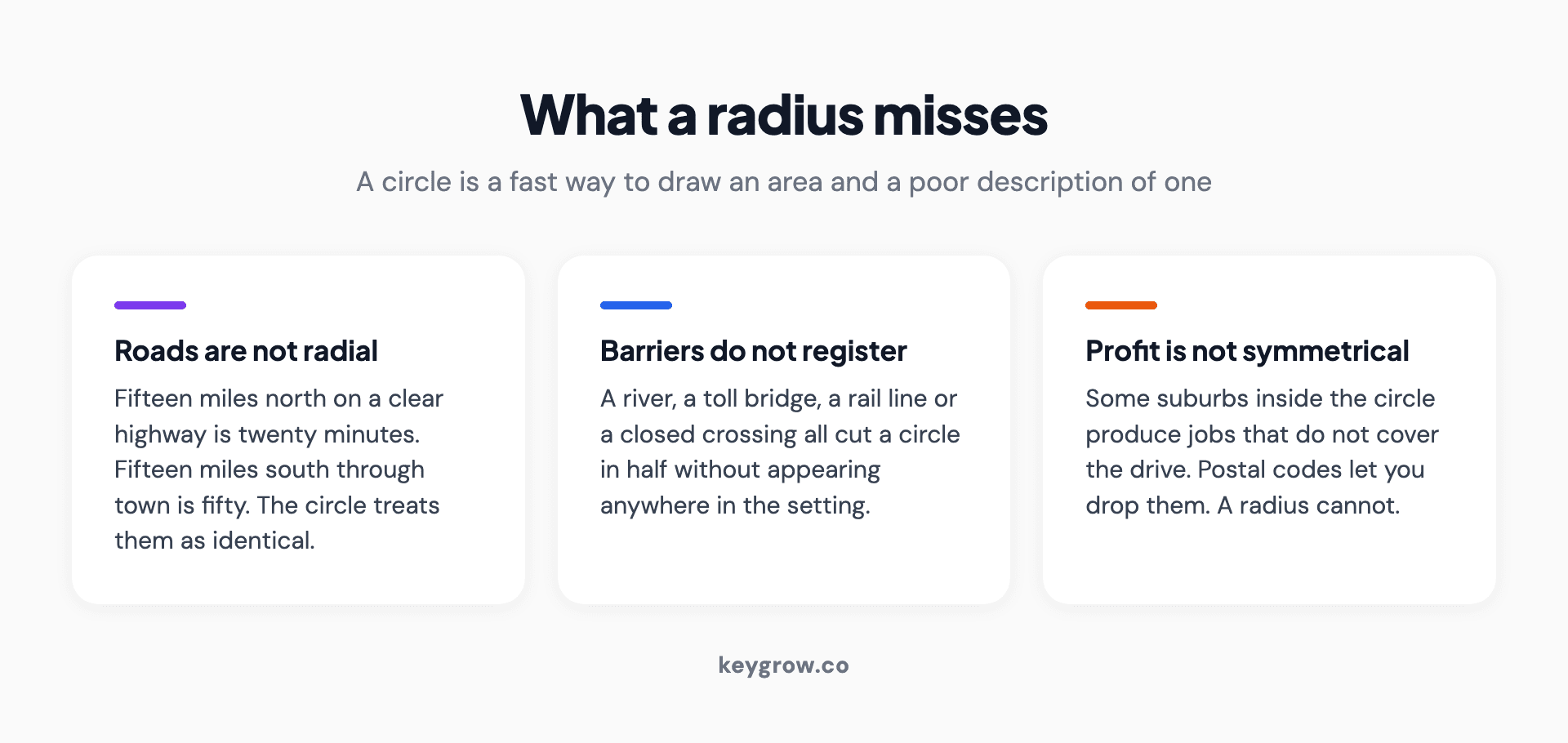
Three-card explanation of what a radius misses: roads are not radial, physical barriers do not register, and profit is not symmetrical.
A river, a bridge with a toll, a highway that only runs north, a neighborhood your crews refuse to work in after dark: all of these cut across a circle and none of them are visible in it. A 15 mile radius around a shop can include an area 40 minutes away through traffic and exclude a suburb 12 minutes away on a clear road.
Postal codes are slower to set up and match reality better, because they tend to follow the roads and boundaries people actually live along. For any business where a technician's drive time determines whether a job is profitable, that difference shows up in the margin, not just the click.
Two practical constraints worth knowing. The minimum radius Google accepts is one kilometer, and very small radii can deliver so inconsistently that the campaign looks broken. Hotel campaigns cannot use radius targeting at all.
Setting it up, in the order that avoids rework
- Pick the campaign, not the account. Location targeting is set per campaign. If your service areas differ by service, they need to be separate campaigns, not one campaign with a blended area.
- Open Audiences, keywords, and content, then Locations. That is where the controls live in the current interface.
- Enter your areas. Type a city, a postal code, or a radius. The estimate panel on the right updates as you add them.
- Open the advanced location options before you save. This is the step people skip. Presence is the right choice for any business that serves its customers in person.
- Add exclusions. Places you will not travel to, states you are not licensed in, the postal codes with jobs too small to be worth the drive.
- Save, then check it in a week. Not the conversions, the geographic report. You are looking for places you did not intend to reach.
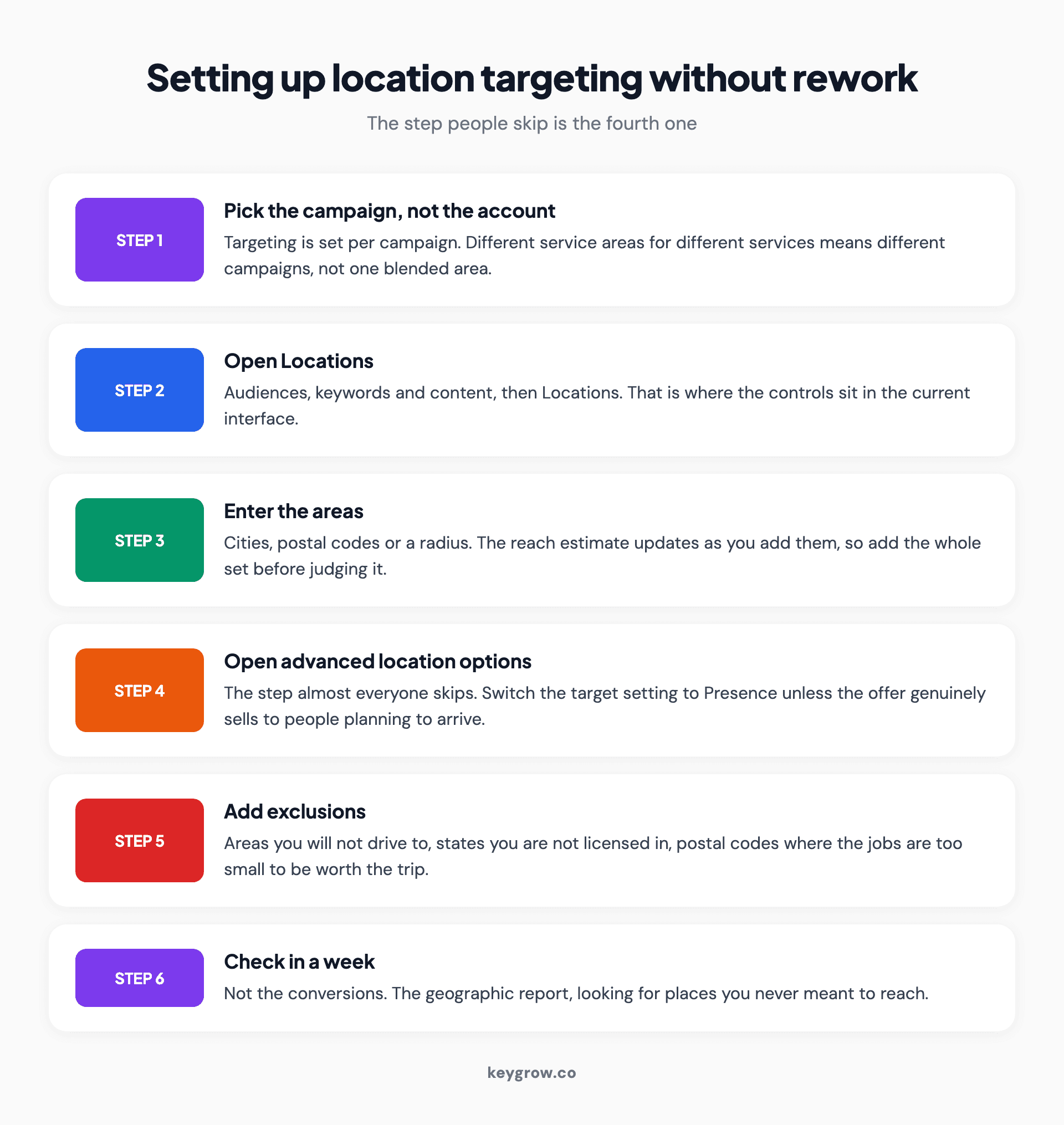
Six-step walkthrough for setting up Google Ads location targeting, from choosing the campaign to checking the geographic report a week later.
Reading the location reports without fooling yourself
The geographic report offers two different dimensions and they answer different questions.
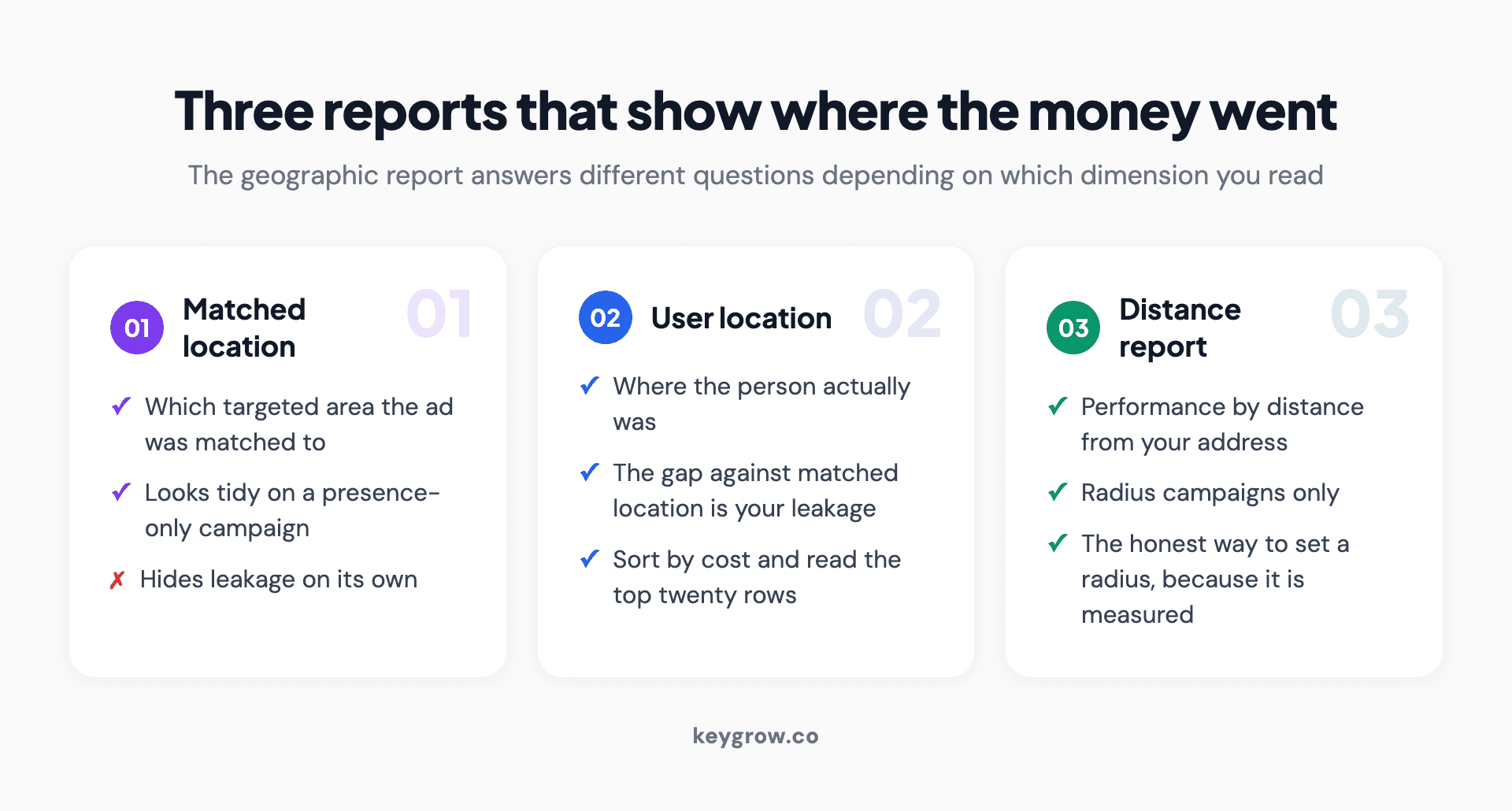
Three-card guide to the Google Ads geographic report dimensions: matched location, user location, and the distance report.
Matched location tells you which of your targeted areas the ad was matched to. User location tells you where the person actually was. On a clean, presence-only campaign these two look similar. On a presence-or-interest campaign they diverge, and the gap between them is your leakage, quantified.
If you have never opened it, sort by cost descending and read the first twenty rows. Most local accounts have at least one line in there that makes the owner wince.
Two more things worth pulling: performance by city inside your target area, which usually reveals that two or three areas carry the account, and the distance report for radius campaigns, which shows performance by how far the searcher was from your address. That second one is the honest way to decide a radius, because it is measured rather than guessed.
What changes in Performance Max and the automated campaign types
The location controls are the same controls. Performance Max, Demand Gen, and Shopping campaigns all carry the standard location targeting panel with the same presence or interest choice underneath, and the same exclusion behavior.

Driving through a city street lined with historic buildings, illustrating the drive time that defines a real service area.
What changes is how much else the campaign decides on its own. In Performance Max you are handing over placement, audience, and creative combination, so geography is one of the few hard boundaries you still control directly. That makes it more important, not less. A Performance Max campaign left on the default target setting will find interested people outside your area with the same enthusiasm it finds everything else.
If you run Performance Max for a business with physical locations, connect the Business Profile and set a store visit or local action goal rather than trying to approximate it with a tight radius. And keep the campaign's area no wider than the area you can actually serve, because the asset combinations it generates will speak to whoever it reaches.
One caution on splitting. Two Performance Max campaigns covering overlapping areas will compete with each other, and the one with stronger signals wins the auction internally. If you need separate budgets by region, make the regions genuinely separate with exclusions on both sides rather than relying on the system to sort it out.
Location bid adjustments, and whether they still do anything
A location bid adjustment raises or lowers your bid for a specific area. It was one of the sharpest tools in manual bidding.
On Smart Bidding, most of it is gone. With Target CPA or Target ROAS running, location bid adjustments are ignored, because the bidding system is already modeling location as one of its signals, along with device, time, and query. The only adjustment that still applies universally is setting an area to minus 100 percent, which is functionally an exclusion.
So if you are on Smart Bidding and you want less spend in an area, exclude it or split it into its own campaign with its own budget. Fiddling with percentage modifiers there is motion without movement.
How tight should the radius be?
There is no correct number, but there are ranges that stop being sensible.

A color-coded map marking different building locations across a service area.
| Business type | Typical working radius | The limiting factor |
|---|---|---|
| Emergency trades, plumbing, locksmith | 10 to 20 minutes drive | Response time is the product |
| Scheduled trades, HVAC, landscaping | 20 to 40 minutes | Crew hours lost to travel |
| Dental, medical, legal | 15 to 30 minutes | Patients travel further for specialists than generalists |
| Retail or showroom | 10 to 25 minutes | Nobody drives an hour to browse |
| Remote or shipped services | Not applicable | Use demographics and intent, not geography |
Think in minutes, then convert to a shape. If you are setting the number from a map without knowing your average drive time to a job, that is the number to go find first.
Put the location in the ad, not only in the settings
Targeting decides who sees the ad. The ad decides whether they believe you are local.
A headline naming the suburb outperforms a headline naming the metro area, because the first one sounds like a neighbor and the second sounds like a call center. Where you have the character budget, name the area, the neighboring area, or the landmark people use to describe where they live.
Location assets are the other half of this. Linking your Business Profile lets the ad carry an address and distance, and on mobile it gives the searcher a directions link without a page load. For a business with a real premises this is close to free credibility.
The same argument applies one click further down. If the ad says one suburb and the landing page mentions no service area at all, the visitor has to work out whether you cover them. Many will not bother. Pages built for a specific area, with the area named in the heading and the service area listed in text rather than only on a map, hold that traffic much better. Our post on local SEO for multiple locations covers how to build those without ending up with near-identical pages.
Work out your real service area before you draw it
Most advertisers pick a number because it sounds right. There is a better method and it takes about twenty minutes.
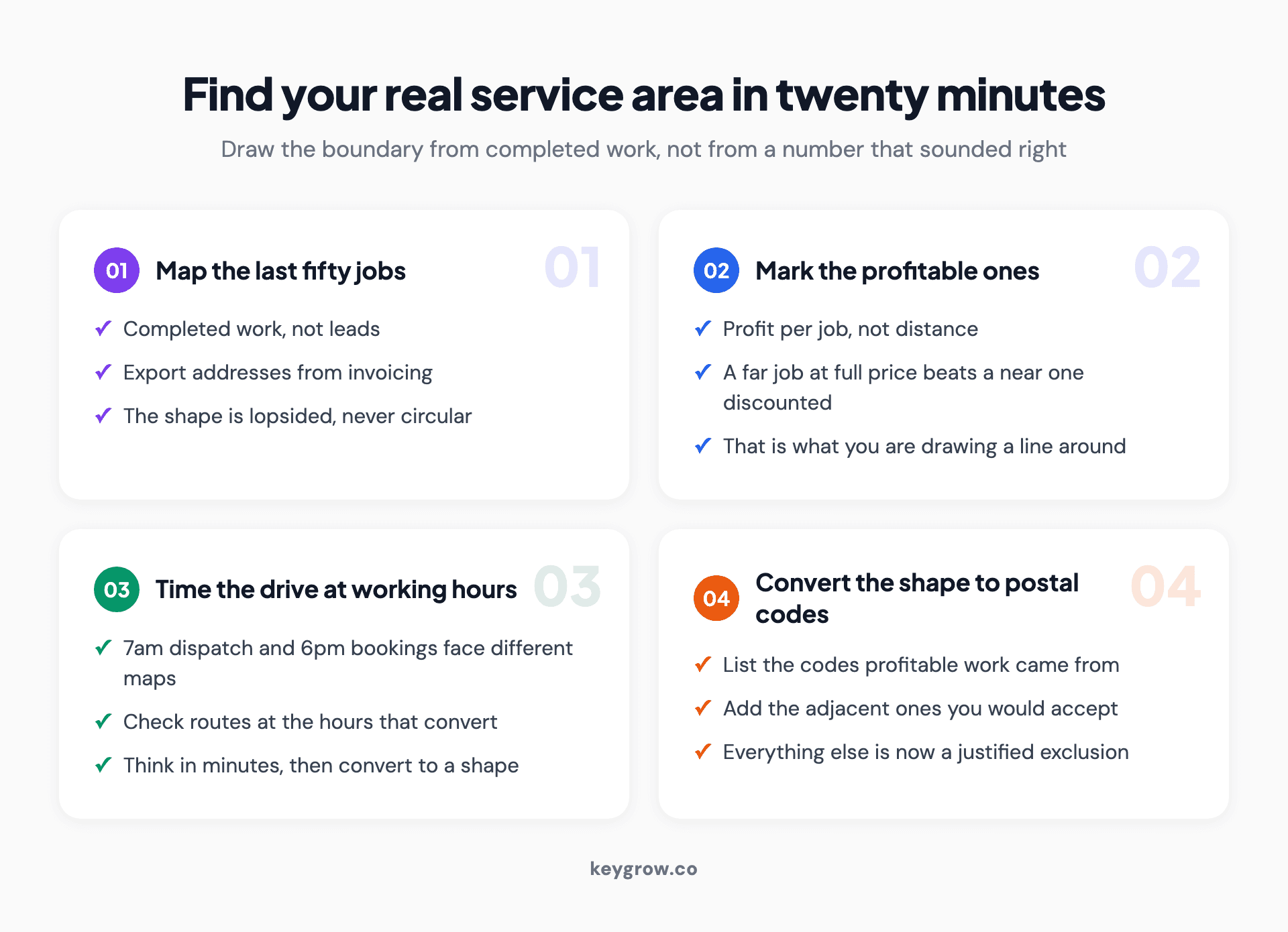
Four numbered steps for finding a real service area: map completed jobs, mark the profitable ones, time the drive, and convert the shape to postal codes.
Pull your last fifty jobs and map them. Completed jobs, not leads. Export the addresses from your invoicing system and drop them on a map. The shape that appears is your actual market, and it is usually lopsided rather than circular.
Mark the ones that made money. A job forty minutes out at full price may be worth more than one ten minutes away discounted. Profit per job, not distance, is the thing you are drawing a boundary around.
Find the drive time at the hours you work. A trades business dispatching at 7am and a restaurant taking bookings at 6pm face different maps. Check the route at the time of day your customers actually convert.
Convert the shape into postal codes. List the codes your profitable work came from, add the adjacent ones you would accept, and stop there. That list is your target. Everything outside it is an exclusion you now have a reason for.
For a business with two or more premises, run this per location, then check for overlap. Where two areas overlap, decide which branch should win and exclude the contested codes from the other campaign. Leaving both to bid on the same postal code means paying twice for the same auction.
Mistakes that quietly waste local budget
- Leaving the default in place and blaming the keywords. The single most common cause of out-of-area clicks is the target setting, not broad match.
- Targeting the city you are in rather than the cities you serve. Your address is not your market. A shop on the edge of town may draw most of its work from the next town over.
- Excluding by name and missing the surrounding areas. Excluding a city does not exclude the townships around it that people also call by that city's name.
- Running one campaign for a 90 minute service area. The near half and the far half have different economics and should not share a budget or a bid strategy.
- Never checking the report. Most accounts we audit have never had the geographic report opened. It takes two minutes and it is where the wasted money is visible.
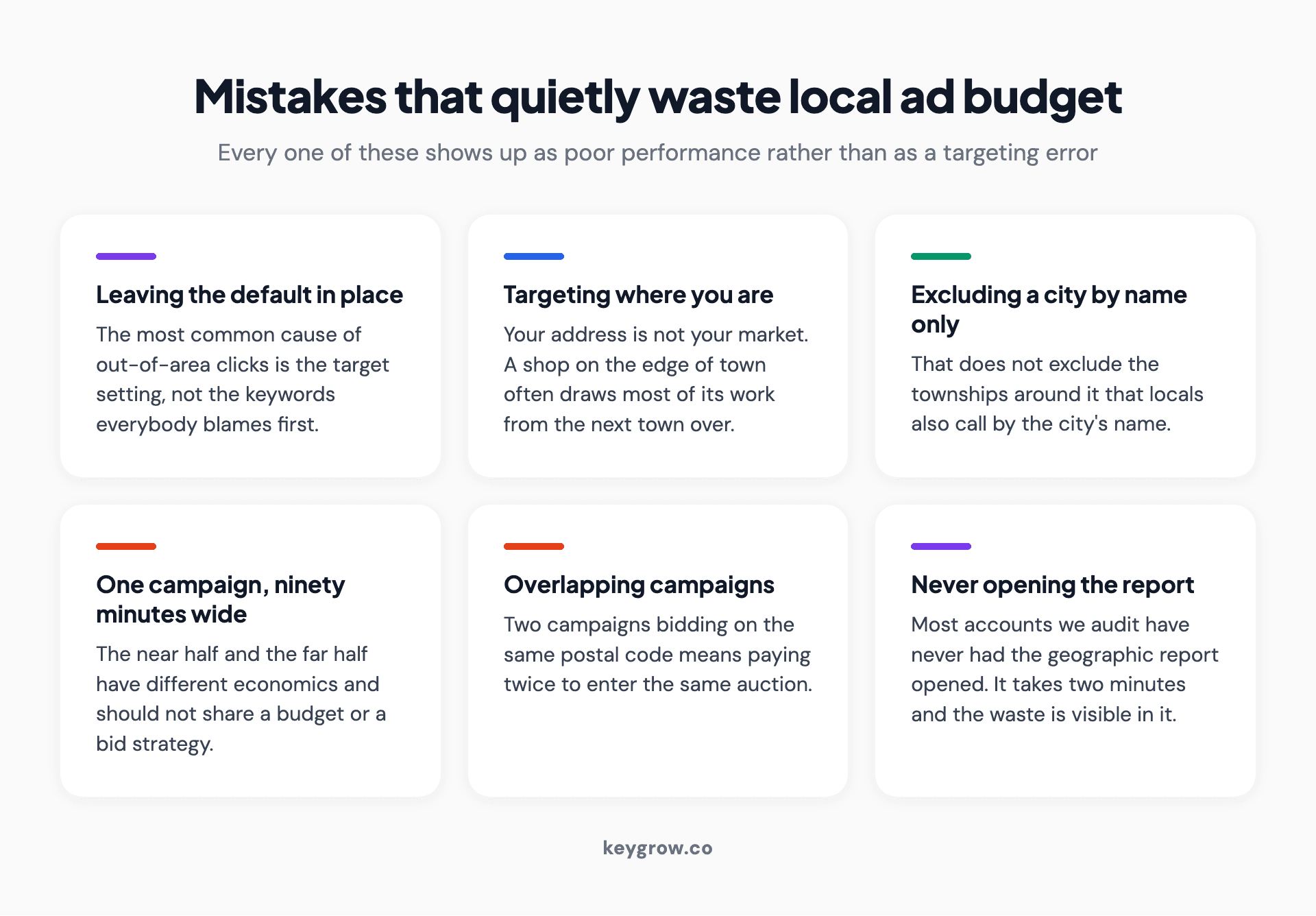
Six-card grid of mistakes that waste local Google Ads budget, from leaving the default target setting to never opening the geographic report.
When location targeting is not your problem
If your clicks are from the right area and still not converting, geography is not your issue. Look at the query report and then at the page.
Location targeting also cannot fix an offer that is not competitive locally, or a page that does not name the area it serves. A visitor from three suburbs away who lands on a page with no service area listed anywhere will assume you are not local, and leave.
There is also a reflex worth naming here. When the phone goes quiet, most businesses buy more traffic, and lead quality is not a volume problem. A cash home buying client of ours had the opposite complaint: plenty of clicks, almost nothing worth calling back. The work we did was subtractive. Tighter match types, a real negative list, and ad copy that said plainly who the offer was not for. The measured change was 600 percent more serious leads across December and January. The budget line never moved, and neither did the geography.
FAQs
Why am I still getting clicks from outside my targeted area?
Almost always the target setting. The default is presence or interest, which includes people who have shown interest in your area from somewhere else. Exclusions only work on physical presence, so they cannot remove interest-based traffic. Switch the target setting to Presence and the leakage largely stops.
What is the difference between presence and interest in Google Ads?
Presence means Google believes the person is in, or regularly in, your targeted location. Interest means they have shown signals about that location, such as searching for it, while being somewhere else. Presence is the right setting for businesses that serve customers physically.
How accurate is Google Ads location targeting?
Accurate enough for most local advertising and imperfect at the edges. Google infers location from IP address, device settings, and past behavior, so VPNs, corporate networks, and mobile routing all introduce noise. Expect some spill at your boundaries and check the user location dimension rather than assuming precision.
Can I target a specific ZIP or postal code?
Yes, and for most local service businesses it is the most precise option available. Enter the codes individually or in bulk, and combine them with exclusions for the areas inside your city that are not worth serving.
Should I use radius targeting or city targeting?
City or postal code targeting matches real service areas better, because roads, rivers, and boundaries do not form circles. Radius targeting is a fast, reasonable default for multi-location businesses and for anyone who has not yet worked out their drive-time economics.
Do location bid adjustments work with Smart Bidding?
Mostly no. Target CPA and Target ROAS ignore location bid adjustments, because location is already a signal in the model. The exception is minus 100 percent, which works as an exclusion. Use campaign splits and exclusions instead.
How many locations can I target in one campaign?
Up to 1,000 at a time, and you can add further batches beyond that. The practical limit is your ability to manage them, not the interface.
The three settings worth your attention
Most of this article is optional. Three parts of it are not.
Set the target option to Presence if you serve people physically. Open the geographic report and read the user location column, not just the matched location column. Split any service area wide enough that the near and far halves have different economics.
That is a half hour of work and it is where the recoverable waste in most local accounts sits. If you would rather have someone go through the account with you, our PPC management team does this as part of every audit, and you can start here. If the clicks are landing in the right place and still not converting, the next thing to read is our guide to landing page conversion rate optimization.



