


Google Shopping feed optimization used to be housekeeping. Then Performance Max removed the keywords, and the feed quietly became the targeting.
There is no keyword list in a Shopping or Performance Max campaign. What decides which searches your products appear for is the text in your product data: the title, the product type, the category, the attributes. Write "Blue Shirt" and you have told Google almost nothing. Write "Ashford Lane Men's Slim Fit Oxford Shirt, Blue, Cotton, 16 inch Collar" and you have written a keyword list that happens to look like a product name.
That is the whole idea. Everything below is how to act on it, in the order that matters, with an honest section near the end about the point at which none of this is your problem.
What the feed actually controls
Your product feed is a structured file of product data sitting in Merchant Center. It decides four things:
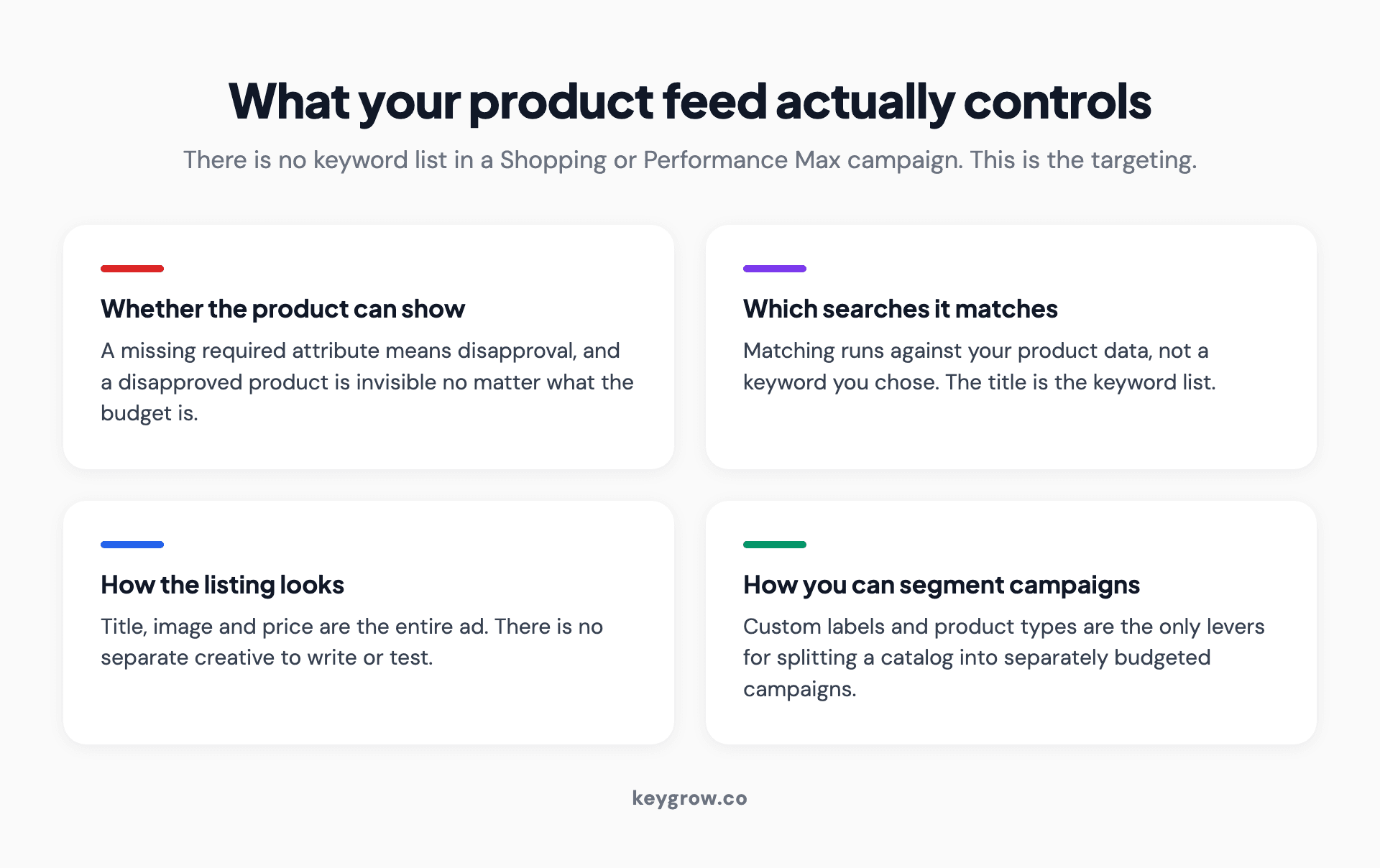
Four-card breakdown of what a Google Shopping product feed controls: eligibility, search matching, listing appearance, and campaign segmentation.
Whether the product can show at all. Missing a required attribute means disapproval, and a disapproved product is invisible regardless of budget.
Which searches it can appear for. The matching happens against your product data, not against a keyword you chose.
How the listing looks. Title, image, and price are the whole ad. There is no separate creative to write.
How you can segment campaigns. Custom labels and product types are the only levers for splitting a catalog into campaigns that can be budgeted separately.
The last one is the one most merchants discover late. You cannot structure a Shopping account around something your feed does not describe.
The attributes Google requires, and the ones that decide whether you show
There are two different lists here and conflating them is a common mistake. Required means the product is rejected without it. Recommended means the product is accepted and then quietly underperforms.
| Attribute | Status | Limit | What it decides |
|---|---|---|---|
| id | Required | 50 characters | Must be unique and stable. Changing it creates a new product with no history |
| title | Required | 150 characters | The single biggest factor in what you match to |
| description | Required | 5,000 characters | Secondary matching signal, read more by systems than people |
| link | Required | Product page URL | Must match the product, not a category page |
| image_link | Required | Main image URL | The ad creative, effectively |
| availability | Required | Fixed values | In stock, out of stock, preorder, backorder |
| price | Required | With currency code | Must match the landing page exactly |
| brand | Required for most new products | Exceptions for books, movies, music | Matching and buyer trust |
| gtin | Recommended, strongly | 50 numeric characters | Category matching and price comparison eligibility |
| mpn | Recommended when no GTIN | 70 characters | Fallback identifier |
| item_group_id | Recommended for variants | 50 characters | Groups sizes and colors as one product |
| color, size, age_group, gender | Conditional by category | Varies | Required for apparel in several countries |
The exact list and every edge case sits in Google's product data specification, which is worth having open the first time you build a feed.
Getting the feed into Merchant Center in the first place
Before any of this is editable, the data has to arrive. There are four routes and the one you pick determines how much of the rest is easy.

Four routes for sending a product feed to Google Merchant Center: platform integration, scheduled fetch, a Google Sheet, and the Content API.
A platform app or native integration. Most ecommerce platforms push a feed to Merchant Center directly. Fastest to set up, least control over what gets sent. Fine as a starting point, and almost always something you will layer rules on top of later.
A scheduled fetch. You host a file at a URL and Merchant Center collects it on a schedule you set. Good control, and the schedule is the thing people get wrong: set it to run more often than your prices change, not less.
A Google Sheet. Underrated for small catalogs. The sheet is the feed, you edit cells, and Merchant Center reads it on a schedule. For 40 products this is genuinely the right answer and you will never outgrow it until you do.
The Content API. Real-time updates, developer required. Worth it for high-volume merchants whose stock and prices move during the day, overkill for everyone else.
Whichever you choose, keep one primary feed as the source of truth and do your editing in rules and supplemental feeds on top of it. Two primary feeds fighting over the same product IDs is a problem that takes longer to diagnose than it took to create.
Product titles do the work keywords used to do
If you only change one thing, change the titles. In our experience auditing Shopping accounts, titles are where the difference between a feed that performs and one that does not usually lives.
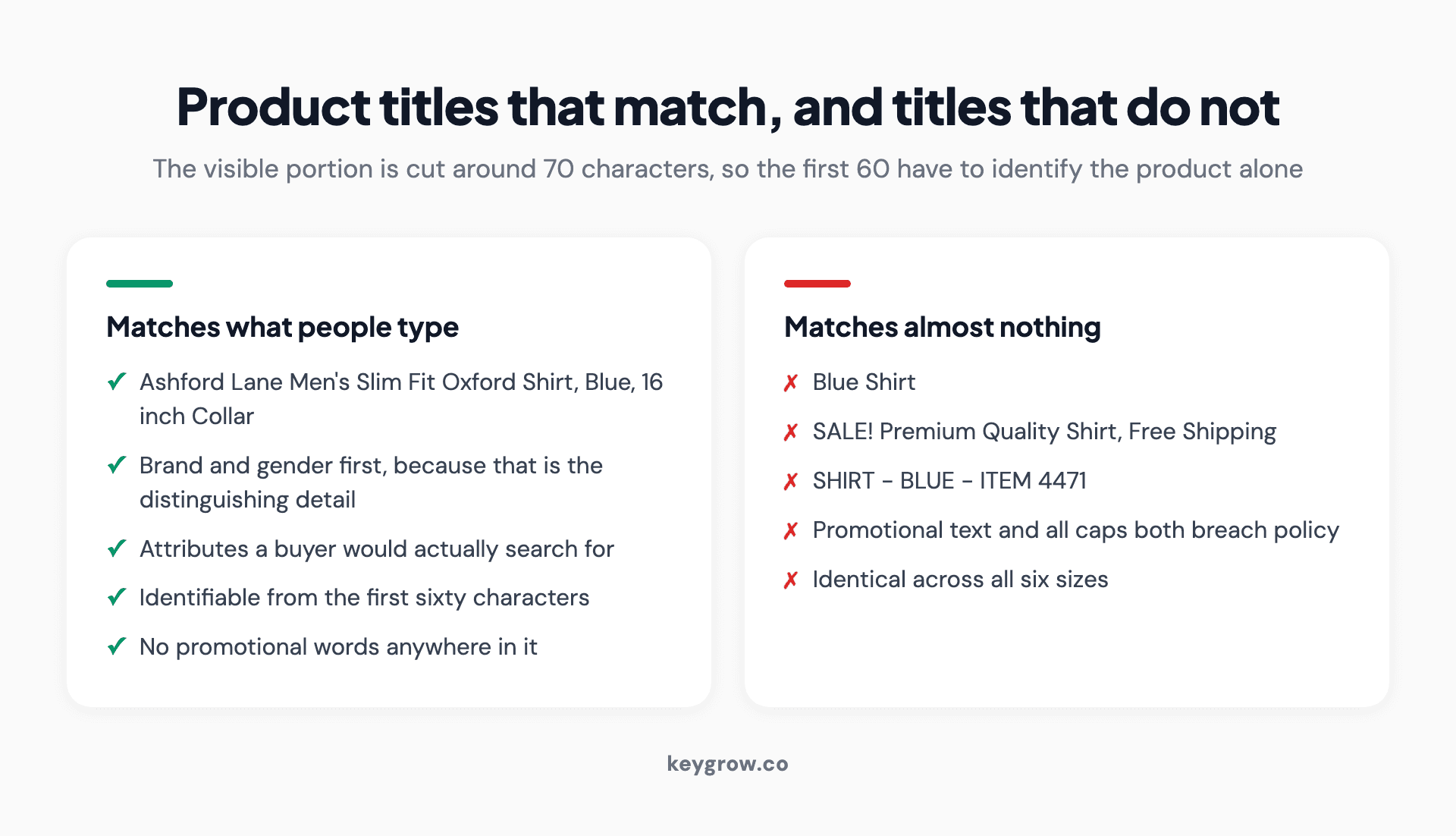
Side-by-side comparison of Google Shopping product titles that match buyer searches against titles that match almost nothing.
The rule is simple to state and annoying to apply at scale: put the words a buyer would type, in the order they would read them, starting with the most distinguishing.
A title has 150 characters, but the practical budget is smaller, because the visible portion in most placements cuts off around 70. Front-load accordingly.
Here are the structures that work by category:
| Category | Title structure | Example |
|---|---|---|
| Apparel | Brand, Gender, Product, Attributes, Size, Color | Nomad Men's Merino Base Layer, Long Sleeve, Large, Charcoal |
| Hard goods | Brand, Product, Model, Key Spec | Ridgeline Cordless Impact Driver 18V, 2 Battery Kit |
| Consumables | Brand, Product, Variant, Size or Count | Harvest Lane Cold Brew Concentrate, Unsweetened, 32 oz |
| Parts and accessories | Brand, Product, Compatible With | Northline Cabin Air Filter, Fits 2018 to 2024 Mid-Size Sedans |
| Furniture | Brand, Product, Material, Dimension, Color | Fielding Oak Dining Table, Solid Wood, 72 inch, Natural |
Two constraints from Google's own guidance. Do not put promotional text in the title, so no "free shipping" and no "sale". And do not use excessive capitalization, which includes writing your brand in all caps if that is not how it appears elsewhere.
The order inside the title is not cosmetic
Front-loading matters more than most merchants expect, because titles are truncated on the display side and weighted on the matching side.
Work out the most distinguishing detail for your product and put it early. For apparel that is usually the brand and gender. For replacement parts it is compatibility, because nobody searches for a cabin air filter without saying what car it goes in. For consumables it is often the variant, since the flavor or strength is what separates two otherwise identical items.
A quick test: cover everything after the first 60 characters of your title and read what is left. If a buyer could not tell which product it is, the order is wrong.
Descriptions: written for machines, read by few
The description rarely gets read by a human before the click. It still matters, because it is a matching signal and because it is where the specifications live.

A large warehouse filled with shelving, representing the product catalog behind a Google Shopping feed.
Keep it to the product. Google's guidance is explicit that a description should not carry links to your store, sales information, competitor comparisons, or details about other products. Descriptions doing any of that are a common cause of disapproval.
Put the same terms a buyer would use, written as sentences rather than a keyword list. Include materials, dimensions, compatibility, care instructions, and what is in the box. If your product page already has that content written properly, the description can often be pulled from it directly.
Length: the limit is 5,000 characters and the useful range is 500 to 1,000. Beyond that you are writing for nobody.
Google product category and product type are different fields
These get confused constantly and they do different jobs.
Google product category is Google's own taxonomy, a fixed list you pick from. Getting it right helps Google understand what you sell and affects which comparison surfaces you are eligible for. Be as specific as the taxonomy allows. "Apparel & Accessories" tells Google very little; "Apparel & Accessories > Clothing > Shirts & Tops" tells it a lot.
Product type is your taxonomy, free text, and it is the more useful of the two for campaign management. Because you control it, you can encode your own structure: "Mens > Outerwear > Rain Jackets". That structure is what lets you build campaigns around a product group later.
Use both. Category for Google's benefit, product type for yours.
The variant problem: one listing or six?
If you sell a shirt in six sizes and four colors, that is 24 sellable things and one product in the buyer's mind. What you submit decides how the account behaves.
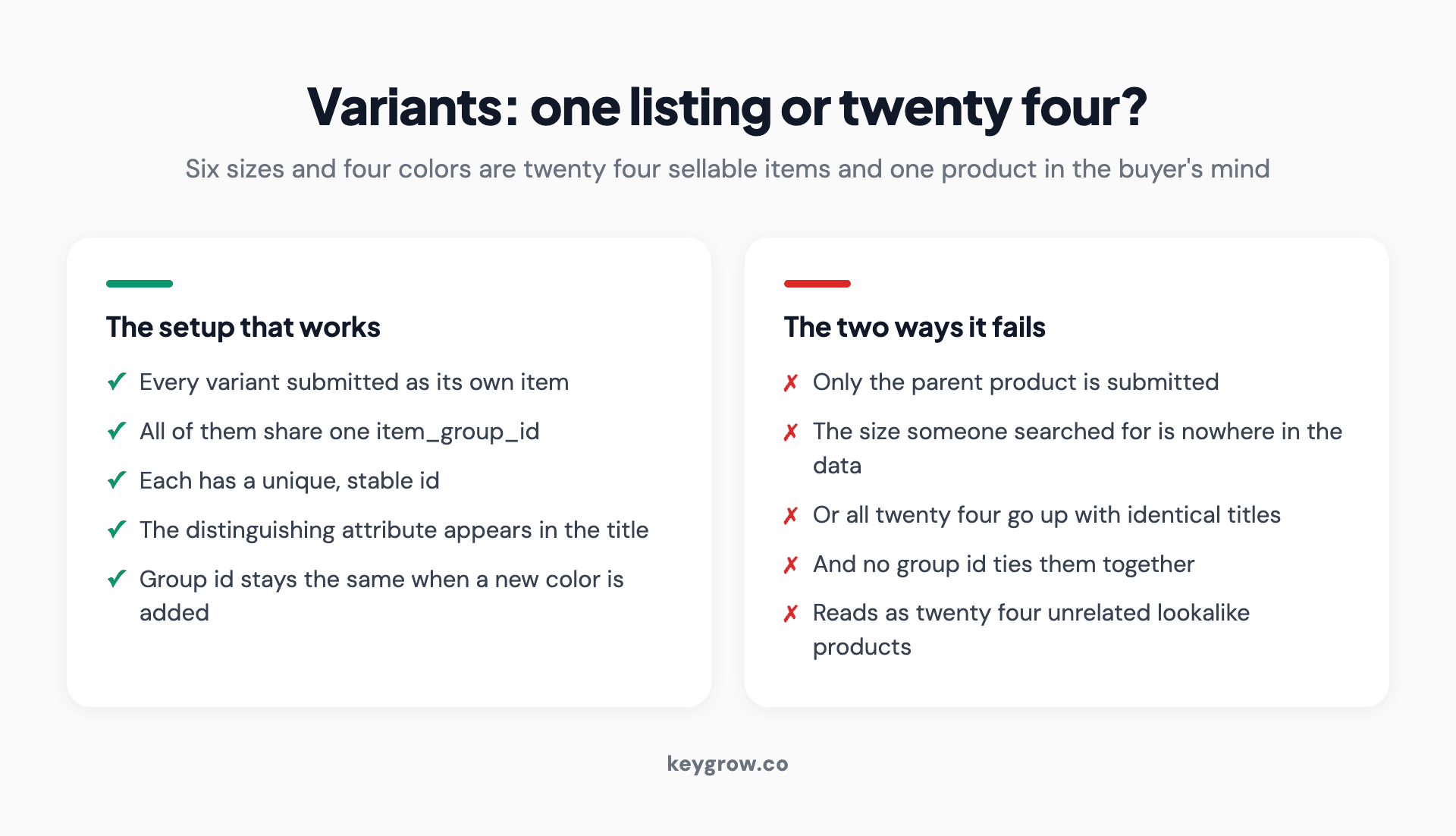
Comparison of the correct variant setup using a shared item group ID against the two ways merchants usually get variants wrong.
Submit every variant as its own item, linked by a shared item_group_id. Google then knows they belong together and will usually show one representative listing rather than flooding the results with near-identical entries. This is the correct setup and the one Google's own guidance assumes.
What goes wrong is the middle ground. Merchants either submit only the parent product, which means the size and color a buyer searched for is nowhere in the data, or they submit all 24 with identical titles and no group ID, which reads as 24 unrelated products that happen to look the same.
Three practical rules. Give each variant a unique, stable ID. Put the distinguishing attribute in the title, not only in the color or size field, because the title is what matches. And keep the group ID stable across the whole set, including when you add a new color next season.
One caveat for apparel sellers: in several countries, age_group, gender, size, and color are required rather than recommended for clothing, and an incomplete variant set is a disapproval rather than an underperformance. Check the requirements for each country you sell into rather than assuming your home market's rules travel.
Custom labels: the field that makes structure possible
Custom labels are five free-text attributes that do nothing for matching and everything for management.
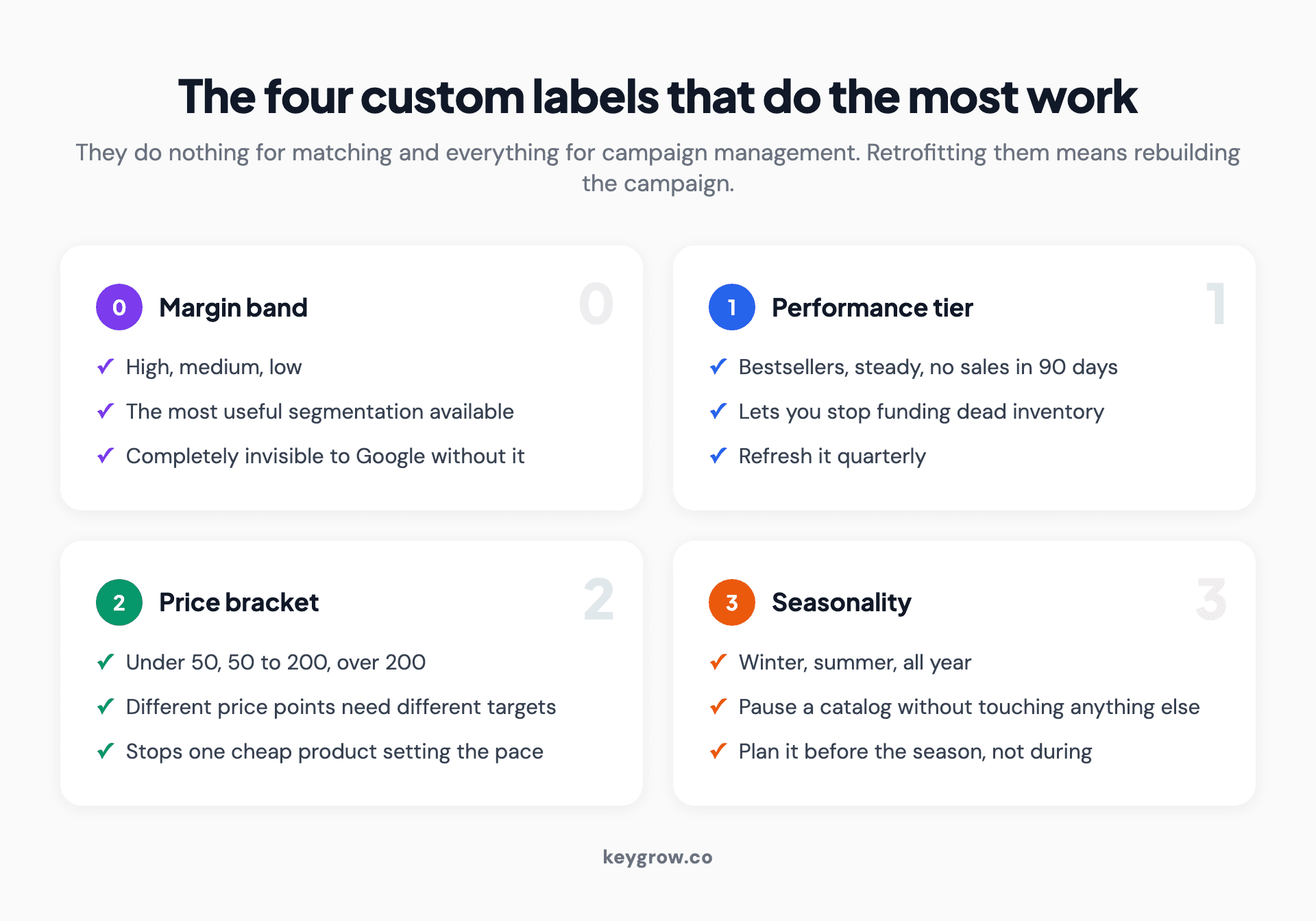
Four custom labels worth setting in a Google Shopping feed: margin band, performance tier, price bracket, and seasonality.
They are how you tag products with information that only your business knows: margin band, seasonality, bestseller status, clearance, price bracket, supplier. Once tagged, you can build campaigns or asset groups around those tags and budget them separately.
The set we use most often on client accounts:
- custom_label_0: margin band. High, medium, low. The most useful segmentation available, and invisible to Google without it.
- custom_label_1: performance tier. Bestsellers, steady, no sales in 90 days. Lets you stop funding dead inventory.
- custom_label_2: price bracket. Under 50, 50 to 200, over 200. Different price points need different targets.
- custom_label_3: seasonality. So the winter catalog can be paused without touching anything else.
- custom_label_4: clearance flag. For when you want to move stock and do not care about the usual return target.
Fill these in before you need them. Retrofitting labels to a live campaign means rebuilding the campaign.
Images, and the rule that changes in 2027
The image is the ad. It carries more weight than the title in whether someone clicks.
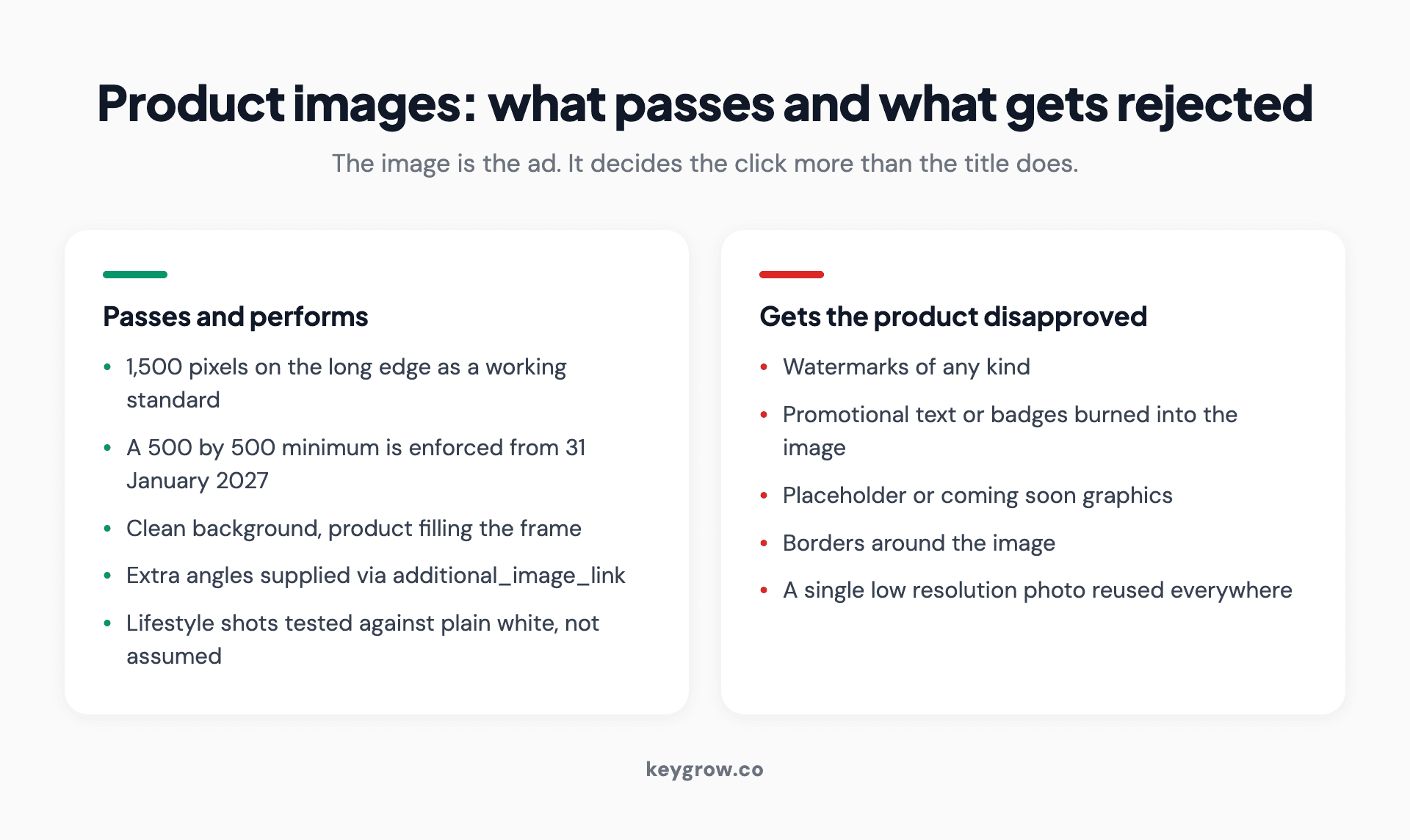
Two-column list of Google Shopping product image rules, separating images that pass review from the ones that get a product disapproved.
Use the largest clean image you have. Google's stated minimum for non-apparel is 100 by 100 pixels today, with a 500 by 500 minimum being enforced from 31 January 2027, so anything you upload now should comfortably clear that. Larger is better: 1,500 pixels on the long edge is a reasonable working standard.
The image_link rules name what gets a product disapproved: watermarks, promotional text or badges burned into the image, placeholder or "coming soon" graphics, and borders. Google reads these as violations rather than design choices.
Two things worth testing rather than assuming. A plain white background is the safe default and often the right one, but lifestyle images outperform it in some categories. And additional images, supplied through the additional_image_link attribute, give the buyer a second angle without costing anything.
Identifiers: GTIN, MPN, and what happens without them
A GTIN is the barcode number. If your product has one, supply it.
Without it, Google has a harder time working out what your product actually is, which affects how confidently it matches you to searches and whether you appear in price comparison contexts at all. For resellers of branded goods, missing GTINs are one of the more expensive omissions in a feed.
If you manufacture your own products and have no GTIN, supply the MPN and set the identifier_exists attribute correctly rather than leaving the fields blank. Handmade and custom goods are a legitimate exception; an unexplained blank is not.
Price, availability, and the trust problem
Price in the feed must match the price on the landing page. Not approximately. Exactly, including currency and any tax display rules for the country.
Mismatches are the most common cause of item disapproval we see, and they are usually not deliberate. They come from a sale price that updated on the site but not in the feed, or from a feed that refreshes once a day against a store that changes prices hourly.
The same applies to availability. Advertising something out of stock wastes the click and damages the account's standing over time. If your stock moves fast, the fix is more frequent feed fetches or a supplemental feed handling inventory, not a manual process.
Feed rules and supplemental feeds: editing without touching your store
You do not need developer time to change your feed. Merchant Center has two mechanisms for it.
Feed rules transform data on the way in. Prepend the brand to every title, map your category names to Google's taxonomy, strip a string that keeps triggering disapproval, set a default value where one is missing. Rules run on the primary feed and do not touch your source data.
Supplemental feeds add or override specific fields for specific products, matched by id. This is how you add custom labels from a spreadsheet, patch titles for your 50 bestsellers by hand, or fix a batch of categories without regenerating the whole file.
The workflow this enables is the one we recommend to most merchants: leave the platform feed alone, and do all optimization in rules and supplemental feeds where it is visible, reversible, and does not break when the store updates.
If you have 40 products, not 40,000
Almost every guide on this subject is written for catalog-scale merchants, and the advice changes completely below a few hundred SKUs.
With 40 products, skip the feed management software. You do not have a data problem, you have a writing problem, and the answer is to write 40 good titles by hand in an afternoon. A rule that prepends a brand name is a poor substitute for a human reading the product page and deciding what distinguishes it.
Hand-writing also lets you do something no rule can: check each title against what the product page actually says and against what people search for in that category. On a small catalog, that is a day of work with a compounding return, and it puts you ahead of larger competitors relying entirely on automated rules.
What still applies at small scale: identifiers, accurate price and stock, correct categories, good images, and custom labels for margin. What does not: supplemental feed workflows, automated rules, and most of the tooling.
Free listings and local inventory, which the same feed powers
The feed you built for ads is not only for ads, and this is the part small merchants most often miss.

Lighting equipment set up inside a store entrance for shooting product photography.
Free product listings. Merchant Center will show your products in unpaid placements across the Shopping tab and other surfaces at no media cost, a program Google documents separately from Shopping ads. The same product data governs eligibility, so a feed cleaned up for ads becomes eligible for free traffic as a side effect. There is nothing extra to write. Check that the free listings destination is enabled and that your products are approved for it, because a product can be approved for ads and rejected for free listings separately.
Local inventory. If you have a physical store, you can show what is in stock at that store to people searching nearby. This requires a second feed carrying store-level availability, and it is more setup than most of what is on this page. It also produces the highest-intent traffic available to a local retailer, because someone checking whether an item is in stock two miles away is not browsing.
The honest caveat: local inventory only pays off if your in-store stock data is accurate and current. If your point of sale and your website already disagree about what is on the shelf, fix that before connecting it to an advertising surface where the disagreement becomes public.
How to tell whether any of this worked
Impressions move first, and impressions are the metric most likely to mislead you.
A feed change reliably lifts impressions within a few days, because you have become eligible for more queries. That is not a result. It is the precondition for one. Revenue, if it moves, moves later and needs enough conversions behind it to be readable, which for most product groups means waiting for at least 30 conversions in the segment before drawing a conclusion.
This is why a report that opens with impressions is worth questioning. Impressions and clicks are the easiest numbers to grow and the least connected to whether the business made money. Ask for revenue and return on ad spend by product group, and look at the products that moved rather than the account average, which hides everything.
The specific things worth watching after a feed change: impression share by product group, click-through rate on the products you edited, the search terms report to see whether you matched to better queries, and the disapproval count.
Mistakes that get products disapproved or buried
- Promotional text in the title. "Free Shipping", "Best Seller", "50% Off" all violate policy and all show up in feeds weekly.
- Changing product IDs. A new ID is a new product with no performance history. Do this across a catalog and you reset the account's learning.
- One image, low resolution, watermarked. Any one of these is a disapproval risk and all three together are common.
- Leaving identifiers blank without setting identifier_exists. Google reads the silence as an error rather than an exception.
- Category left at the top level. "Home & Garden" for a specific product is a wasted signal.
- Titles that duplicate across variants. If all six sizes share one title, you have made them indistinguishable to the matching system.
- Letting the feed go stale. A feed that has not been fetched in a week is advertising last week's prices and last week's stock.
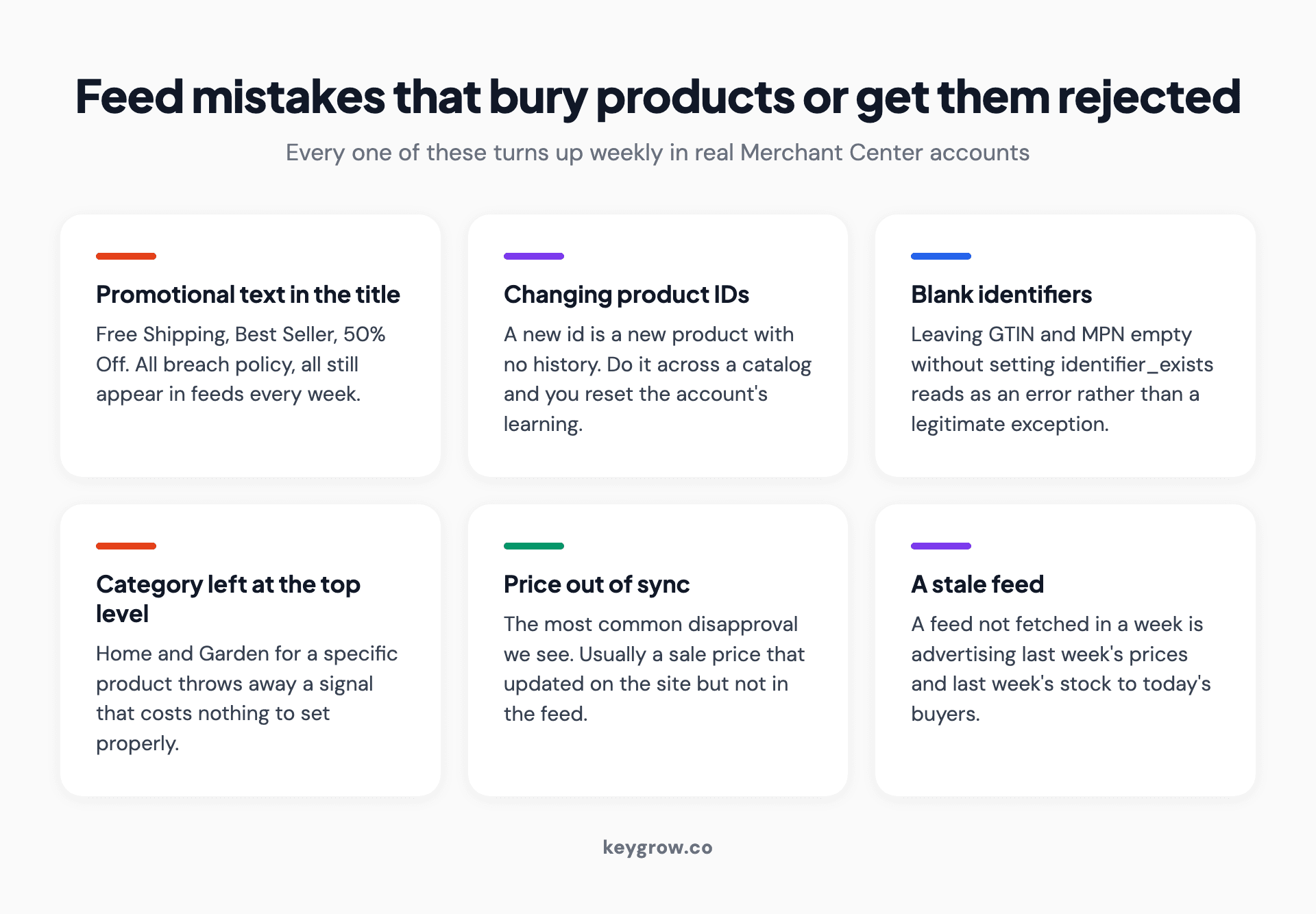
Six-card grid of Google Shopping feed mistakes, from promotional text in product titles to letting the feed go stale.
When feed optimization is not your problem
If your products are disapproved, fix that first. Optimization on an invisible catalog achieves nothing.
If your margins do not support paid traffic at your category's typical cost per click, no feed work will change the arithmetic. Work out your break-even return on ad spend before spending a day on titles, because some products should not be advertised at all.
And if your product pages are slow, thin, or missing the information buyers need to decide, the feed is not your constraint. You will buy better-matched traffic and lose it at the same rate. Our guide to ecommerce product page SEO covers that side, and how much Shopping ads cost will help you sanity check the arithmetic before you commit.
FAQs
What is Google Shopping feed optimization?
It is the work of improving the product data you send to Merchant Center so your products match more of the right searches and are presented better when they do. Since Shopping and Performance Max campaigns have no keyword lists, the feed is doing the job keywords used to do.
What is the most important field in a product feed?
The title. It carries the most weight in deciding which searches your product can appear for, and it is the only field where a rewrite regularly changes performance on its own. Images come second, because they decide whether the impression becomes a click.
How long should a product title be?
The limit is 150 characters, but the visible portion is usually cut around 70, so put the distinguishing information first. Write the full detail out to roughly 100 characters and make sure the first 60 identify the product on their own.
How often should I update my product feed?
At least daily for price and availability, and more often if your stock moves quickly. Content changes like titles and categories can be done in batches, but a feed that has not been fetched in a week is advertising information that may no longer be true.
Do I need a feed management tool?
Not below a few hundred products. At that scale you can write titles by hand and handle the rest with Merchant Center feed rules and supplemental feeds. Tools earn their cost when the catalog is large enough that manual work stops being possible.
What is the difference between product type and Google product category?
Google product category is Google's fixed taxonomy and helps Google classify your product. Product type is your own free-text taxonomy and is what you use to organize campaigns. Fill in both, with the category as specific as the list allows.
Why are my products disapproved?
Most often a price mismatch between the feed and the landing page, a missing required attribute, promotional text in the title or image, or an identifier problem. Merchant Center names the reason per item, and working through that list in order is faster than guessing.
Does feed optimization help SEO as well as ads?
Indirectly. The same discipline that produces a good feed, accurate titles, real specifications, correct structured data, also improves the product pages themselves. The feed does not feed organic rankings directly, but the underlying product data usually powers both.
The first hour, and the first month
In the first hour: open Merchant Center, sort by disapprovals, and fix whatever is blocking products from showing. Then check that your price and availability match the site. Nothing else counts until those two are true.
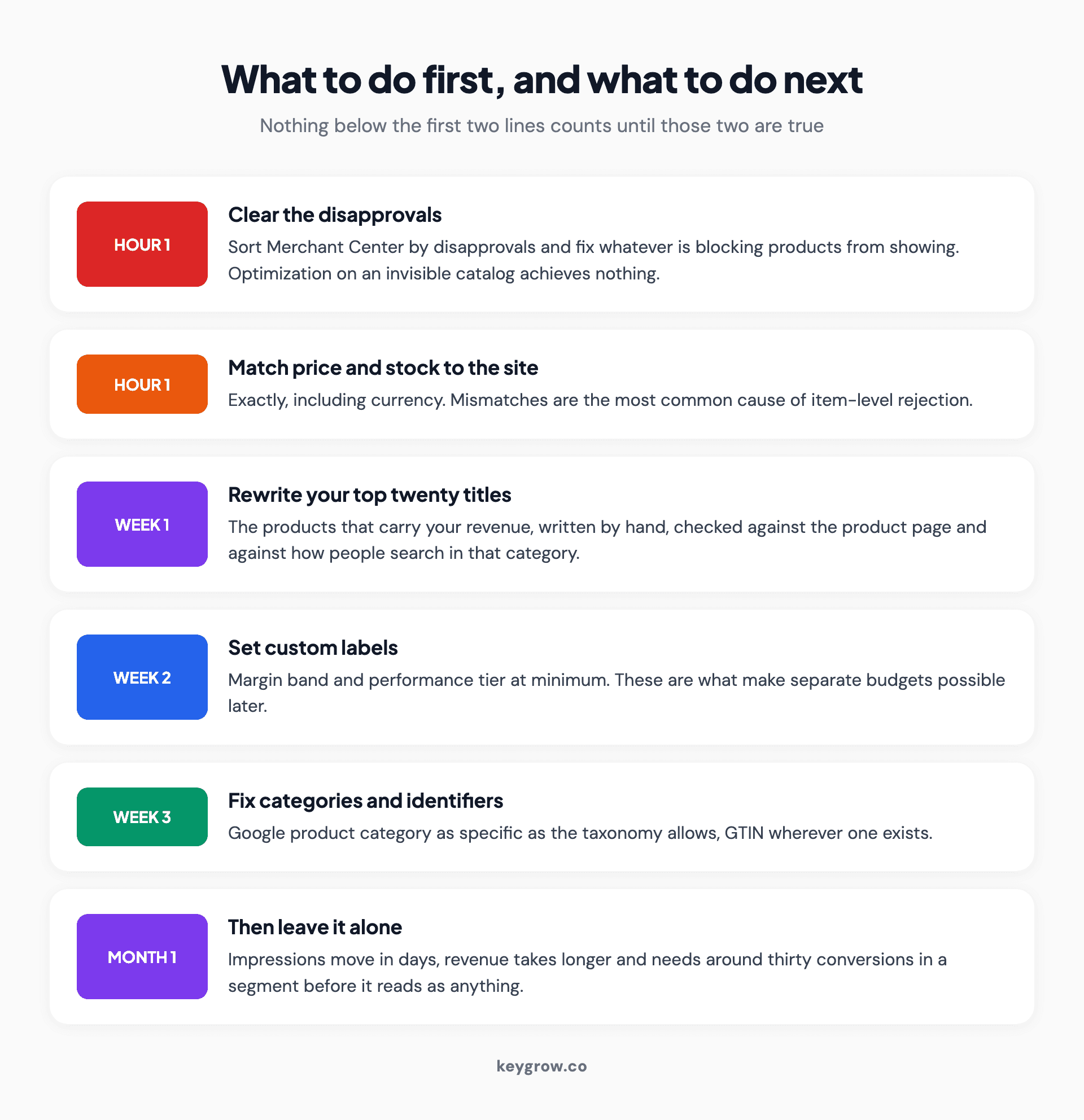
Priority order for Google Shopping feed optimization, running from clearing disapprovals in the first hour to leaving the feed alone after a month.
In the first month: rewrite the titles for the products that carry your revenue, starting with the top twenty. Set your custom labels for margin and performance tier. Get the categories to their most specific level. Then leave it alone long enough to read the result properly.
If you would rather have someone go through the feed and the campaign structure together, that is a standard part of what our PPC team does on ecommerce accounts, and you can ask for a look. If the campaign side is the part you are unsure about, our write-up on Performance Max campaigns covers how the feed and the asset groups interact.



