

A product page can look completely finished and still pull almost no search traffic. Good photos, a working add-to-cart button, the manufacturer's blurb pasted straight in, and yet the page sits on page four of Google. If you want to know how to optimize an ecommerce product page for SEO, the honest starting point is that "finished-looking" and "optimized" are two different things, and the gap between them is mostly text Google can read and trust.
Here is the direct answer. You optimize a product page by writing a unique description that answers buyer questions, fitting a real title tag and meta description inside their character limits, marking the page up with accurate product schema that matches your live inventory, compressing images and writing useful alt text, pointing internal links at the page with short descriptive anchors, and handling the two cases everyone skips: variants and out-of-stock. That is the whole job. The rest of this post rebuilds one ordinary product page element by element so you can copy each move.
This is the how-to companion to our piece on why SEO is important for ecommerce. That one runs the margin math for the channel. This one gets your hands dirty on a single page.
Why a finished-looking product page still gets no traffic
The page looks done to you because it looks done to a shopper. It looks empty to Google because the one part a search engine actually reads, the words, are either missing, duplicated from the manufacturer, or stuffed with the same phrase fourteen times.
There is also a quieter problem: most product pages are mediocre by default, so clearing the bar matters more than you would think. Baymard Institute, after manually scoring more than 30,000 usability ratings across 155-plus benchmarked sites, found that only 48 percent of desktop and 38 percent of mobile ecommerce sites hit a "decent" or "good" product-page performance. That means roughly 52 percent of desktop and 62 percent of mobile product pages are mediocre or worse, per Baymard Institute. The competition is not as polished as the panic suggests.
So we are not chasing perfection. We are taking one real page that "looks finished" and fixing the parts that decide whether it ranks. Let's get practical.

An ecommerce store owner reviewing product listings in an online marketplace on a laptop
The description fix: turning manufacturer boilerplate into copy that ranks
The change that moves the most on most product pages is replacing the manufacturer's description with one you wrote. Every store selling that SKU pastes in the same supplier paragraph, so Google sees hundreds of identical pages and has no reason to rank yours over anyone else's.
Here is the before. A manufacturer blurb for a stainless steel water bottle:
"Premium 750ml double-wall vacuum insulated stainless steel water bottle. Keeps drinks cold for 24 hours and hot for 12. BPA-free. Powder-coated finish. Leak-proof lid."
It is accurate. It is also on 400 other product pages word for word, it answers none of the questions a buyer actually types, and it earns zero long-tail terms.
Here is the after, rewritten to hold the search intent:
"This 750ml insulated water bottle holds three standard cups and fits most car cup holders and gym bottle cages, so you are not stuck carrying it. The double-wall vacuum keeps cold drinks cold for a full work or school day (about 24 hours) and hot drinks hot for 12, which is enough for a morning commute and a top-up at lunch. The powder-coated finish does not sweat in a bag, the lid seals tight enough to throw in with a laptop, and at 340 grams empty it is light enough for a daypack. Hand wash the lid; the body is dishwasher safe on the top rack."
Look at what the rewrite does. It answers real buyer questions (does it fit my cup holder, will it leak on my laptop, can I put it in the dishwasher). It naturally earns long-tail phrases like "insulated water bottle fits cup holder" and "leak-proof bottle for gym bag" without stuffing. And it clears a sensible floor of around 150 to 300 words for a simple product, more for anything technical.
The reason this works is the same reason it works everywhere on a site, which is exactly why unique content is so important in SEO: duplicated text gives a search engine nothing to choose between. A 90-second rewrite per SKU is the cheapest ranking win you own.
One honest note on workflow. Plenty of guides say "never use AI for descriptions" and stop there, which is not useful when you have 2,000 SKUs. A workable middle path: feed the AI your real product specs and the buyer questions, generate a rough draft, then edit every one for accuracy and the details only you know (the cup-holder fit, the dishwasher caveat). The danger is not the tool, it is shipping the raw output unchecked across your whole catalog, because then you have just manufactured a new flavor of duplicate, generic text.
Title tag and meta description: a fill-in template for the 60 and 150 character limits
A title tag should sit at roughly 60 characters or fewer, and a meta description at roughly 150 characters or fewer, so they show in full instead of getting cut off in results. You do not need a pixel-measuring tool. Count the characters.
Here is a fill-in title template:
"[Product Name] [Key Attribute] | [Brand]"
Worked example, at 54 characters: "750ml Insulated Water Bottle, Leak-Proof | NorthFill".
And a meta description template:
"[What it is] that [main benefit]. [Trust or detail signal]. [Soft CTA]."
Worked example, at 143 characters: "Insulated 750ml bottle that keeps drinks cold 24 hours and hot 12. Leak-proof lid, dishwasher safe. Free shipping over fifty dollars."
The meta description does not directly move rankings, but it moves clicks, and ignoring it is a mistake some guides actively encourage by waving it off as "Google rewrites them anyway." Google does sometimes rewrite them, usually when yours is weak or missing. Write a good one and it gets used more often than not. If you want the longer version of how these tags work, we covered what meta data is in SEO separately.
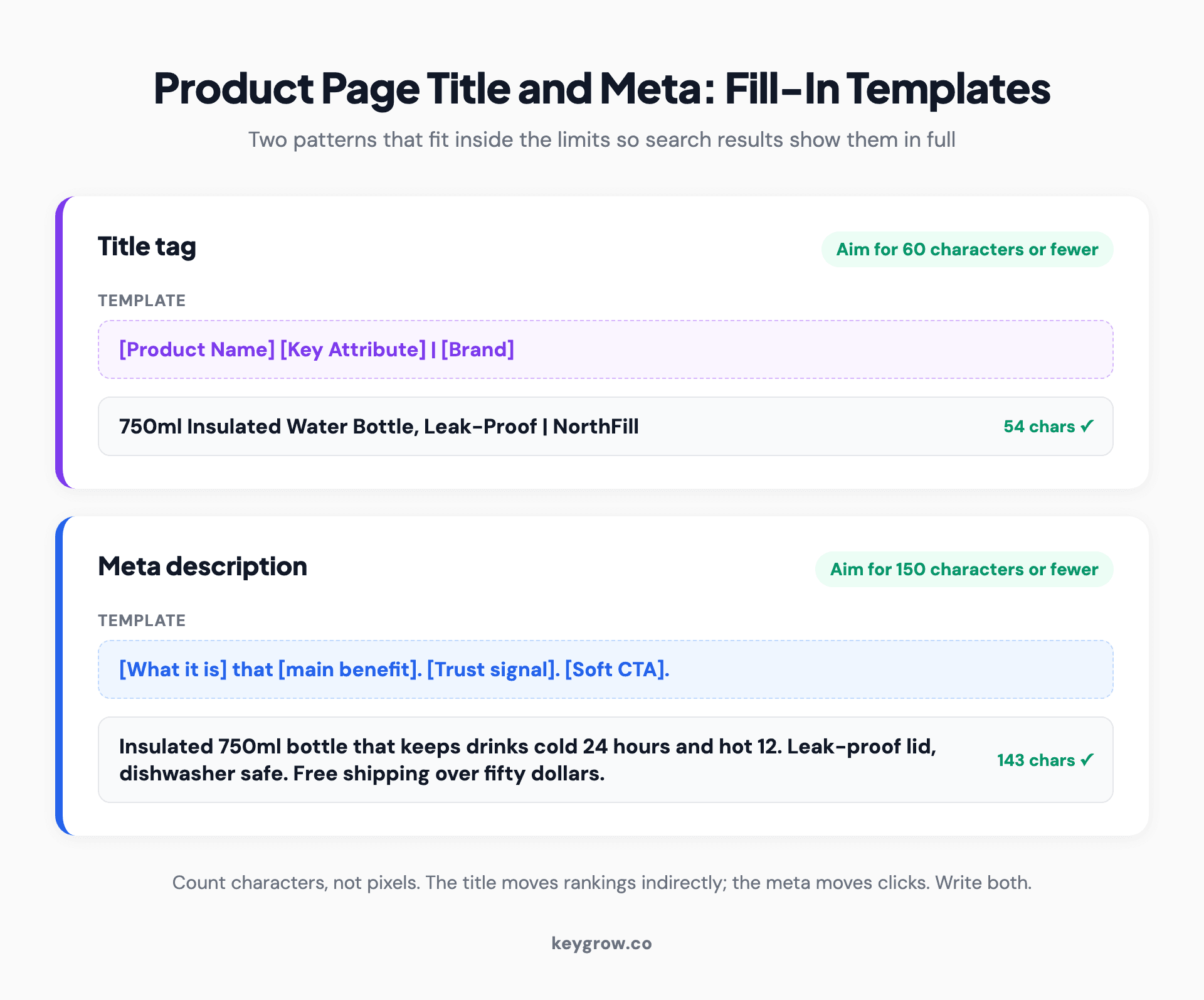
Two title tag and meta description fill-in templates with worked examples showing character counts under the 60 and 150 character limits for an ecommerce product page
Product schema without the guesswork: the exact fields Google needs
Product structured data tells Google your price, availability, and rating in a format it can drop straight into a rich result. The fields that matter most are the ones Google requires for automatic item updates: name, image, and an offers block holding price, priceCurrency, and availability, plus condition. Skip those and you forfeit the price-and-stars treatment in search.
Here is copy-paste Product JSON-LD for a single, in-stock product. Replace the placeholder values and drop it in your page head:
<script type="application/ld+json">
{
"@context": "https://schema.org",
"@type": "Product",
"name": "750ml Insulated Water Bottle",
"image": "https://example.com/bottle.jpg",
"description": "Insulated 750ml bottle, leak-proof lid, dishwasher safe.",
"sku": "NF-750-BLK",
"brand": { "@type": "Brand", "name": "NorthFill" },
"offers": {
"@type": "Offer",
"url": "https://example.com/bottle",
"priceCurrency": "USD",
"price": "29.00",
"availability": "https://schema.org/InStock",
"itemCondition": "https://schema.org/NewCondition"
}
}
</script>
The exact field requirements live in Google Search Central's product structured data docs, and that is the page to bookmark, because the required list does change.
The honest framing nobody states clearly: schema is a live data layer, not a one-time task. Google cross-references your markup against the visible page content and your product feed. If your markup says InStock on a page that shows "sold out," you do not get a quiet win, you get a mismatch warning. We dug into where these rich results actually show up in our post on whether rich snippets help SEO, and the short version is that accurate markup earns them and inaccurate markup gets them suppressed.
Variants and out-of-stock: the two schema cases every guide skips
Most schema tutorials stop at the simple in-stock single product. The two cases that actually trip stores up are variants and out-of-stock, so here is the copy-paste markup for both.
For product variants (size, color, material), Google wants a ProductGroup that uses hasVariant, variesBy, and productGroupID so the SKUs read as one product family instead of unrelated listings. The structure looks like this:
<script type="application/ld+json">
{
"@context": "https://schema.org",
"@type": "ProductGroup",
"name": "Insulated Water Bottle",
"productGroupID": "NF-750",
"variesBy": ["https://schema.org/color", "https://schema.org/size"],
"hasVariant": [
{
"@type": "Product",
"sku": "NF-750-BLK",
"color": "Black",
"offers": {
"@type": "Offer",
"price": "29.00",
"priceCurrency": "USD",
"availability": "https://schema.org/InStock"
}
},
{
"@type": "Product",
"sku": "NF-750-BLU",
"color": "Blue",
"offers": {
"@type": "Offer",
"price": "29.00",
"priceCurrency": "USD",
"availability": "https://schema.org/OutOfStock"
}
}
]
}
</script>
The full field list for this pattern lives in Google's product variant documentation.
For an out-of-stock product, the only change is the availability value, and it must use a defined schema.org enum: InStock, OutOfStock, PreOrder, BackOrder, or Discontinued. Use the one that matches reality:
"offers": {
"@type": "Offer",
"price": "29.00",
"priceCurrency": "USD",
"availability": "https://schema.org/OutOfStock"
}
This is where the live-data-layer point bites hardest. Set it to BackOrder if you are still taking orders for later fulfillment, PreOrder for something not released yet, and OutOfStock for genuinely unavailable. Then keep it synced with your real inventory, because a mismatch between your markup, your page, and your product feed surfaces as a warning in Google Search Console and Google Merchant Center, not as extra visibility.
Should an out-of-stock page stay live, redirect, or be removed?
Default to keeping a temporarily out-of-stock page live at a 200 status and updating its availability in the schema. Do not noindex it, and do not 404 it, because that throws away the rankings and links the page already earned. The decision only changes when the product is gone for good.
Here is the decision rule in plain terms:
The single signal that drives the whole tree is whether the URL has anything worth keeping. If it does, you keep it live or redirect it. If it does not, you let it go.
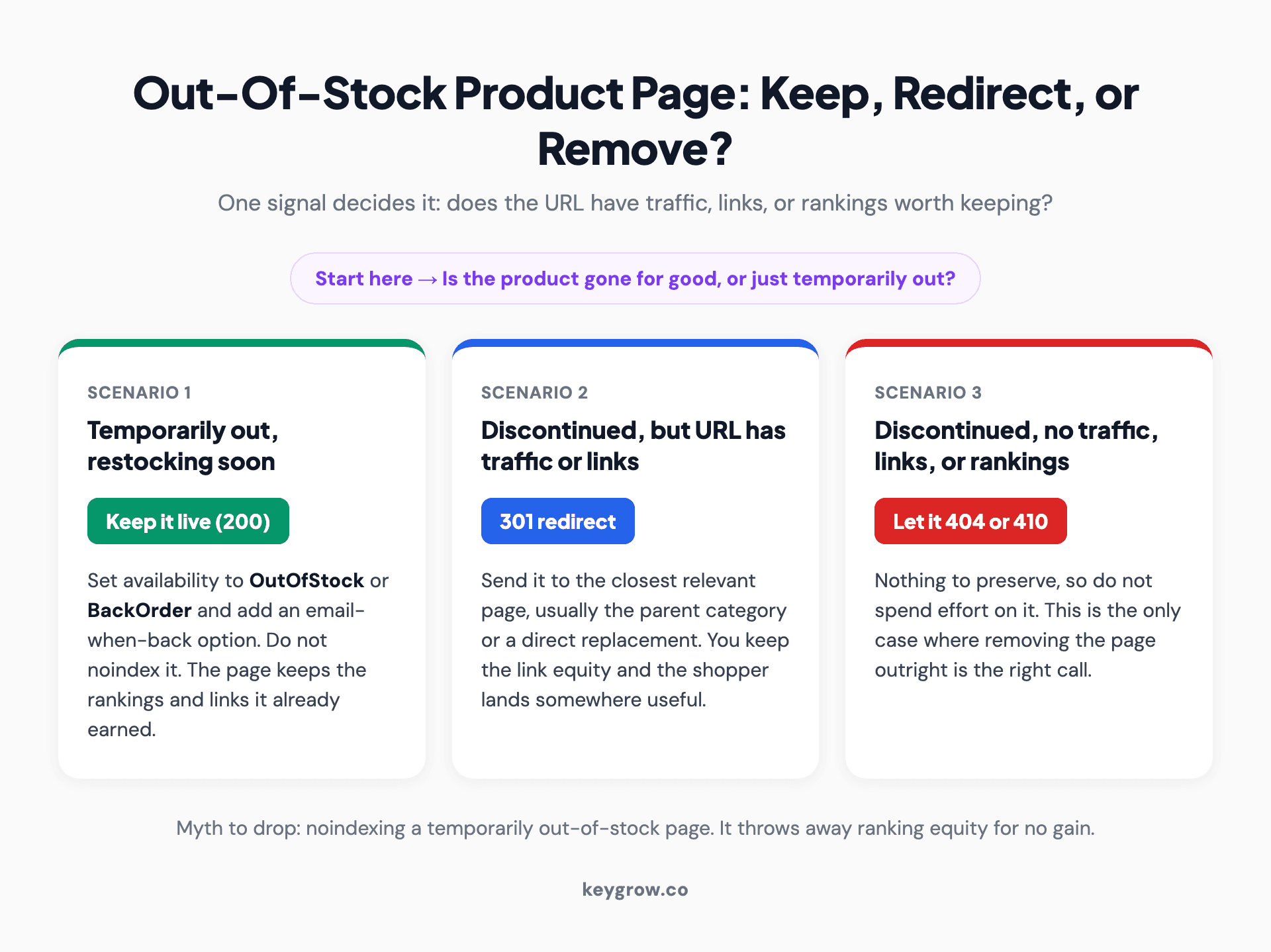
Decision flow for an out-of-stock ecommerce product page showing keep live at 200 for temporary stockouts, 301 redirect for discontinued pages with traffic or links, and 404 or 410 only for discontinued pages with nothing worth keeping
Images that load fast and earn alt text that actually helps
Compress every product image and write alt text that describes what is in the shot. Those are two separate jobs and both are easy to get lazy about.
On speed: aim to keep each product image well under 200 KB by exporting to a modern format like WebP and sizing the file to the largest box it actually displays in. A 4,000-pixel-wide hero on a 600-pixel slot is dead weight that slows your largest contentful paint, one of the Core Web Vitals Google measures. Page speed is mostly a theme-and-app discipline, not a platform sentence: in HTTP Archive data from late 2025, 75 percent of Shopify sites passed Core Web Vitals against about 46 percent of WordPress sites, per Digital Applied, which tells you a managed platform handles a lot of the speed floor for you and the rest is on your theme and apps.
On alt text: describe the image for someone who cannot see it, and let the keyword appear only where it is true. Skip "alt text" that is just your target phrase repeated.
The good version reads naturally, helps screen-reader users, and still contains the words a shopper would search, because they are genuinely in the picture.
Internal links: pointing the right pages at this product
A product page should receive internal links from its category page, from related or complementary products, and from any blog post that naturally mentions it. Those links tell Google the page exists, what it is about, and that it matters enough for other pages to point at it.
Be concrete about which pages link in:
Keep the anchor text short and descriptive, 2 to 4 words: "insulated water bottle," "750ml leak-proof bottle," "matching cleaning brush." Not "click here," and not a full sentence crammed with keywords. The anchor is a label, not a paragraph.
Reviews and Q and A: real content the page generates for free
Customer reviews and a question-and-answer section add unique, keyword-rich text to a product page without you writing a word. Shoppers describe the product in the exact language other shoppers search, and that language lands on your page for free.
Reviews matter for two reasons at once. They feed the page fresh, unique content that no competitor selling the same SKU can copy, and they can earn the star rating in search results when you mark them up correctly with aggregateRating and review in your Product schema. A question like "does this fit a standard cup holder," answered on the page, can be the exact long-tail query that brings the next buyer in.
The catch, and there is always a catch with schema, is the same live-data-layer rule. Only mark up review data that is genuinely visible on the page. Inventing ratings or marking up reviews that are not shown is exactly the kind of mismatch that gets the rich result pulled.
What actually moves the needle, ranked by impact
Not every tactic on this page pulls the same weight, and pretending they do is how stores waste a month on busywork. Here is the honest ranking, highest impact first.
Biggest impact, do these first:
1. Unique product descriptions that answer buyer questions. This is the biggest single change and the one most stores skip.
2. Accurate product schema that matches your live inventory and feed. Right fields, right enum values, kept in sync.
3. Internal links from category and related products, with short descriptive anchors.
4. Page speed: compressed images, a fast theme, no app bloat.
Medium impact, worth doing after the above:
5. Title tags and meta descriptions inside their limits.
6. Useful alt text and clean, readable URLs.
7. Reviews and Q and A as unique on-page content.
Low impact, mostly cargo cult:
8. Hitting a specific keyword-density number. Write for the buyer; density takes care of itself.
9. FAQ schema added purely for rich results it almost never shows anymore.
10. Stuffing keywords into alt text. It does nothing for ranking and hurts accessibility.

A close-up of an online store cart and product detail page open on a laptop screen showing prices and checkout
If you take one thing from this ranking, it is that the work splits cleanly. The top four items are where rankings actually come from. The bottom three are where well-meaning store owners spend their afternoon while the manufacturer description still sits untouched at the top of the page.
When is this not worth doing yourself? If you have a 5,000-SKU catalog, a thin team, and the descriptions are all supplier boilerplate, hand-fixing pages one at a time will take longer than the products stay in stock. That is the point where templated description systems, bulk schema, and a person who does this full time start to pay for themselves. A 40-product store, on the other hand, can do every step above in a weekend and should, before paying anyone. Our take, backed by the Core Web Vitals pass-rate gap above: the platform is almost never your bottleneck, so do not let "is my platform good enough" become the excuse that keeps the manufacturer blurb on the page. If you are weighing platforms anyway, we wrote about whether Shopify is good for SEO in depth.
FAQs
How long should a product description be for SEO?
There is no magic number, but a sensible floor is around 150 to 300 words for a simple product and more for anything technical. The real target is not word count, it is covering the questions a buyer would ask before purchasing. If you answer fit, materials, care, and use cases honestly, the length sorts itself out and you earn long-tail terms along the way.
Does product schema markup actually improve rankings?
Schema does not directly raise your ranking position, but it makes you eligible for rich results like price and star ratings that lift your click-through rate from the same position. The catch is accuracy: Google cross-references your markup against the page and your product feed, so an InStock tag on a sold-out page becomes a mismatch warning, not a win. Accurate markup earns the rich result; inaccurate markup gets it suppressed.
Should I noindex or delete out-of-stock product pages?
For a temporarily out-of-stock product, do neither. Keep the page live at a 200 status and update the availability in your schema, because noindexing or deleting throws away rankings and links the page already earned. Only redirect (301) or remove a page when the product is permanently discontinued, and even then, redirect rather than delete if the URL has any traffic, links, or rankings worth keeping.
How do I stop product variants from competing with each other in search?
Mark the variants up as a single ProductGroup using hasVariant, variesBy, and productGroupID so Google reads the sizes and colors as one product family rather than rival listings. Where it fits your store, keep one canonical product URL for the family and let variants be selections on that page instead of separate indexed URLs. That stops near-identical pages from splitting their own ranking signals.
Is it bad SEO to use the manufacturers product description?
Yes, because every other store selling that SKU is using the same text, so the manufacturer blurb gives Google hundreds of identical pages and no reason to rank yours. Rewriting it into unique copy that answers buyer questions is the single highest-impact change on most product pages. You can draft with AI to move faster, but edit every description for accuracy before it ships, or you have just made a new kind of duplicate content.
How do I write alt text for product images without keyword stuffing?
Describe what is actually in the image for someone who cannot see it, and let the keyword appear only where it is true. "Black 750ml insulated stainless steel water bottle with leak-proof lid" is useful; the same phrase repeated four times is not. Good alt text helps screen-reader users and still contains the words a shopper would search, because those words genuinely describe the picture.
Fix the one page, then run the playbook across the catalog
Take your worst-performing product page and run it through this in order: rewrite the description, fit the title and meta, add accurate schema, set the right availability enum, compress the images and fix the alt text, then point a few internal links at it with short anchors. That is one page done properly.
Then turn it into a repeatable process and run it across the catalog, highest-traffic and highest-margin products first. The store owners who win at this are not the ones with the fanciest theme. They are the ones who replaced the manufacturer description, kept their schema honest with their inventory, and did it on the pages that actually make money.
If your catalog is large enough that doing this by hand would take longer than the products stay relevant, that is the moment a real system, or a team that runs these every day, earns its keep. We work month-to-month, cancel anytime, so the work has to keep proving itself. You can see the kind of organic results that follow on our case studies, or get started if you want a second set of eyes on your product pages.


