

Google Shopping ads cost nothing to list and you pay only when someone clicks. Most stores pay somewhere between $0.50 and $1.50 per click depending on category and competition, a few dollars at the high end, and the platform itself charges no subscription, no listing fee, and no commission.
That's the direct answer. Now the part the ranking pages won't tell you: the "$0.66 average CPC" number you'll see quoted everywhere, usually under a fresh 2026 headline, is Q2 2019 data. Click costs have risen meaningfully since, and if you budget off that number you'll plan a campaign that runs out of money early. This guide gives you the honest cost stack, where the famous benchmarks actually come from, what to expect today, and the budget math for a new store, worked all the way through.
What you actually pay for, and what's free
Half the searches behind this question are really asking "is Google going to charge me to list my products?" No. Here's the entire cost stack in one table.
| Cost item | What you pay |
|---|---|
| Google Merchant Center account | $0 |
| Free listings (unpaid Shopping tab placement) | $0 |
| Card verification hold | Small temporary hold (typically ~$1), removed automatically |
| Listing products in the feed | $0 |
| Commission on sales | $0 |
| Shopping ad clicks | The real cost: pay per click |
| Feed management tools (optional) | $0 to ~$100+/month |
| Agency management (optional) | Typically flat monthly or a % of spend |
Two things surprise people here. First, the free listings are genuinely free: your products can appear in the Shopping tab without any ad spend at all, which is reason enough to set up Merchant Center even with no budget. Second, that mysterious $1 charge on your card when you sign up is a verification hold, not a fee, and it comes back.
Since the free listings are the only $0 line that does real work, squeeze them properly. They pull from the same product feed as paid ads, so every feed improvement you make for ads (better titles, complete attributes, competitive prices, clean images) also upgrades your free placements. Our guide to Google Shopping feed optimization walks through those changes in priority order. For a store not ready to spend, the right sequence is: set up Merchant Center, perfect the feed, let free listings run for a month, and use what they show you (which products get impressions and clicks organically) as the shortlist for your first paid campaign. Free listings won't replace ads for volume, but they're a working preview of your feed's competitiveness at exactly zero cost.
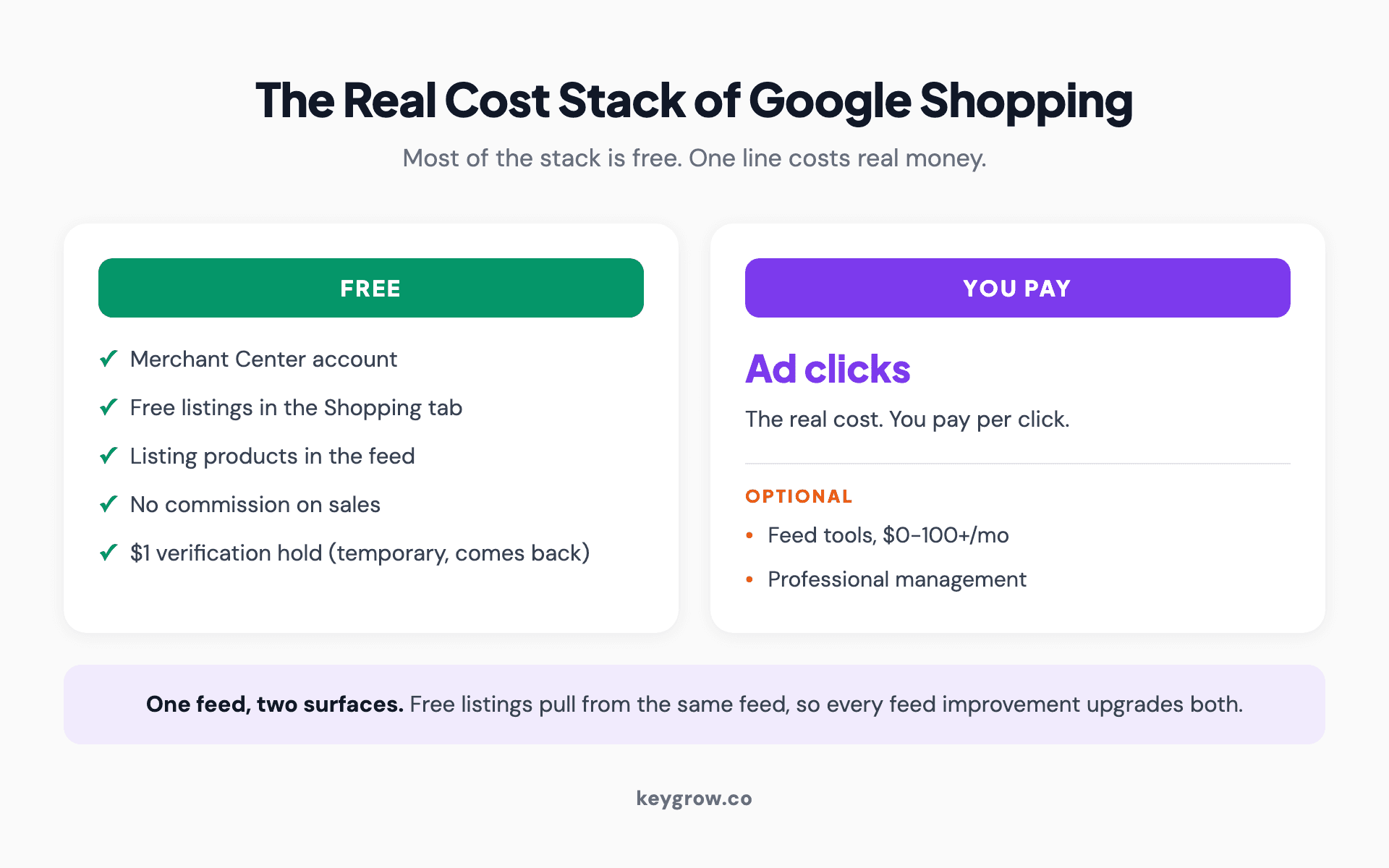
The full Google Shopping cost stack showing what is free (Merchant Center, listings, no commission) versus what you actually pay for (ad clicks, optional tools and management).
Everything below is about the one line that costs real money: the clicks.
The famous $0.66 number, and why you shouldn't budget off it
Almost every page ranking for this question quotes the same benchmarks: $0.66 average CPC, 0.86 percent CTR, 1.91 percent conversion rate, $38.87 cost per action. Those numbers are real. They're from WordStream's Q2 2019 benchmark study, and you can see the original sourcing preserved at Store Growers, one of the few pages honest about the vintage.
That data is old enough to be in first grade. What's happened since: Shopping click costs climbed for years, with Tinuiti's quarterly data showing CPCs still rising 9 percent year over year as recently as late 2024, before cooling slightly in 2025 after a major marketplace pulled out of the Shopping auctions, as compiled by Foundry CRO. Stack the years of drift on a 2019 baseline and the practical picture for 2026 looks like this:
| Category type | Realistic CPC expectation |
|---|---|
| Low-competition, niche products | $0.30 - $0.60 |
| Typical retail categories | $0.60 - $1.20 |
| Competitive categories (health, beauty, office, electronics) | $1.00 - $2.00+ |
Treat any specific decimal you read (including ours) as a planning range, not a promise. Your real CPC emerges in your first weeks of data, and it's the only benchmark that matters.
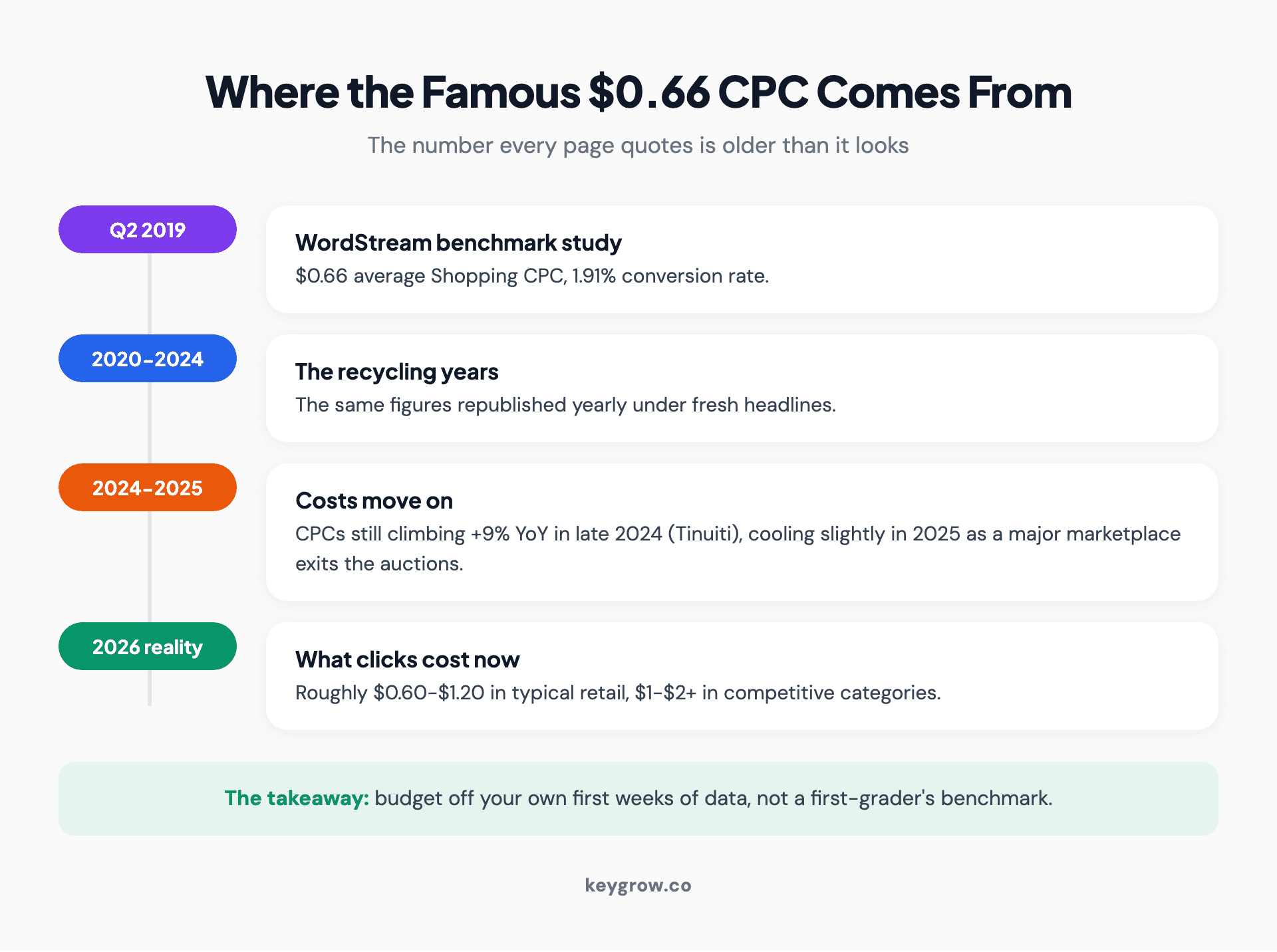
Timeline showing the widely quoted $0.66 Google Shopping CPC originating in Q2 2019 data, with year-over-year increases since pushing realistic 2026 click costs to roughly double in competitive categories.
Why Shopping clicks cost a fraction of Search clicks
The comparison that puts Shopping costs in perspective: regular Google search ads averaged $5.26 per click across 16,446 US search campaigns from April 2024 to March 2025, per WordStream's benchmarks. Shopping clicks routinely come in at a fifth of that or less.
The reason is the format. A Shopping ad shows the product photo, the price, and your store name before anyone clicks. The person who clicks a $89 standing-desk-converter ad has already seen the product and the price and kept going. A search ad click buys you a visitor; a Shopping click buys you a visitor who has pre-screened themselves against your actual offer.
The auction underneath differs from search in one way worth understanding: there are no keywords to bid on. Google reads your product feed (title, description, attributes, price) and decides which searches your products enter. Your "bid" is per product or product group, and your feed quality plays the role Quality Score plays in search, determining which auctions you're even shown in and at what effective price. That's why Shopping optimization is feed work first and bid work second, and why a store with disciplined titles routinely pays less per click than a sloppier competitor bidding higher.

Credit card resting on a laptop keyboard while an online shopper compares product prices.
That pre-screening cuts both ways, and it's the detail that decides whether Shopping works for you at all: your price is in the ad. If your product is priced 30 percent above the identical item from three competitors, you'll either get no clicks or, worse, pay for clicks from people who bounce the moment your page confirms what the ad said. Shopping ads are a price-transparent marketplace, and they reward stores that can stand next to their competition.
Standard Shopping vs Performance Max: the cost difference
You'll run Shopping through one of two campaign types, and the choice moves your costs.
Performance Max now takes about 62 percent of all Google Shopping spend, per Tinuiti's Q4 2025 data. It bundles Shopping placements with Search, Display, YouTube, and Gmail, and hands bidding to Google's automation. Standard Shopping keeps you in control of bids, negatives, and structure.
The observable cost gap is modest: European benchmark data puts Standard Shopping around EUR 0.36 per click against EUR 0.41 for Performance Max. PMax clicks cost a bit more and convert a bit differently, partly because the bundle includes placements with softer intent.
The subtler cost is cannibalization. PMax will happily serve on searches for your own brand name, clicks you might have won organically for free, and report them as wins. If you run PMax, exclude your brand terms and judge the campaign on what's left.
Our working rule: start on Standard Shopping while your account is small, because the control accelerates learning and the click costs run slightly cheaper. Move budget toward PMax once you have conversion volume and product-level revenue data for the automation to chew on. Automation is a scale tool, not a starter kit.
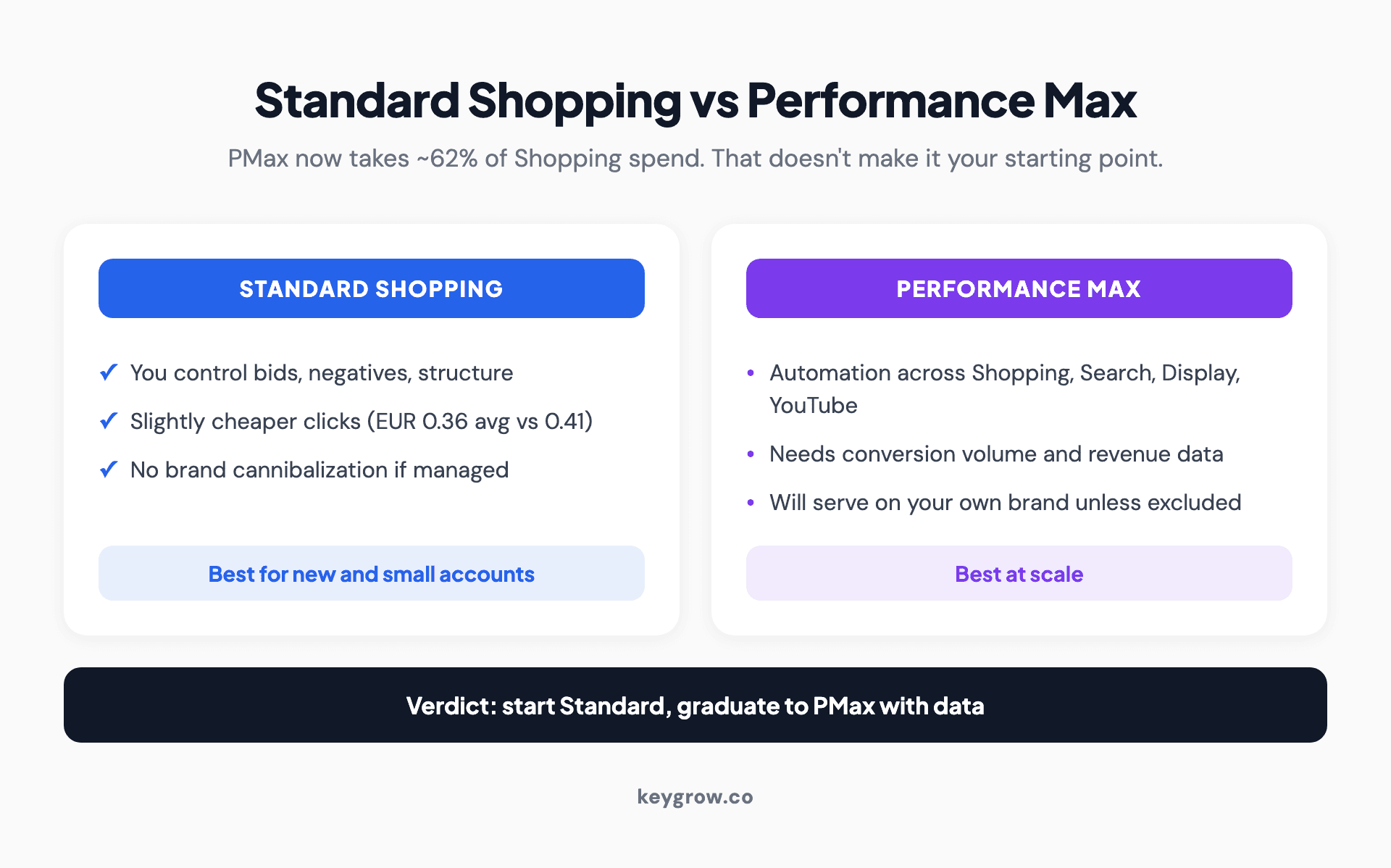
Comparison cards for Standard Shopping versus Performance Max covering control, average click cost, cannibalization risk, and which account stage each fits.
The budget math for a new store, worked through
"Start with what you can afford" is the advice on most ranking pages, and it's useless. Here's the actual arithmetic.
To judge whether a product works in Shopping, you need enough clicks for the conversion data to mean something, roughly 100 to 200 clicks per product you're testing. At a realistic $1 CPC, that's $100 to $200 per product before the results tell you anything trustworthy.
So the minimum viable budget follows from how many products you're testing:
| Testing | Clicks needed | Budget to a verdict | Sensible daily budget | Time to verdict |
|---|---|---|---|---|
| 3-5 products | ~500 | ~$500 | $15-20/day | ~4-6 weeks |
| 10-15 products | ~1,500 | ~$1,500 | $30-40/day | ~6-8 weeks |
| Full catalog (50+) | ~5,000+ | $5,000+ | $75+/day | ~8-12 weeks |
Two rules make this money productive instead of just spent. Test your likely winners first, the products with the best margins and the most competitive prices, not the whole catalog alphabetically. And don't judge anything in week one: early CPCs and conversion rates swing wildly until Google learns where your products belong.
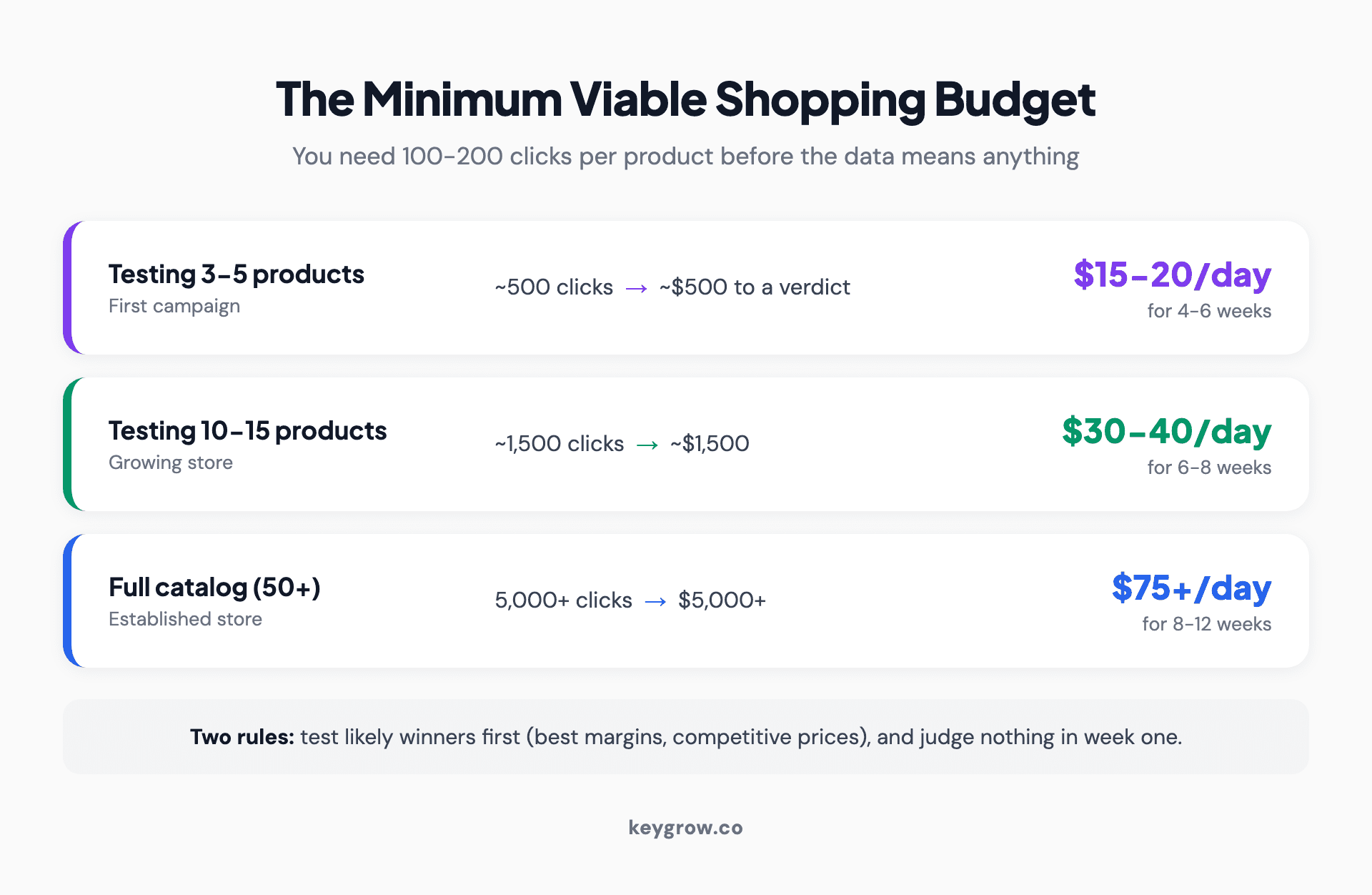
Worked minimum viable budget math for a new Google Shopping store: clicks needed per product tested, dollars to a trustworthy verdict, and realistic daily budgets and timelines.
The other half of the budget question is what return the spend needs to produce, and that's a margin calculation: breakeven ROAS is 1 divided by your profit margin, and we've worked that full ROI math through separately. A store on 25 percent margins needs 4x just to break even, which at a $50 average order means every $12.50 of ad spend must produce a sale. Run that number before you fund anything.
Worked all the way through for one store, so the abstractions turn into dollars: say you sell home goods at a $64 average order and 35 percent margin, so each sale carries $22.40 of gross profit and your breakeven ROAS is about 2.9x. At $0.90 clicks and a 2 percent conversion rate, a sale costs 50 clicks, or $45 of ad spend, against $22.40 of margin. That campaign loses $22.60 per sale, and no bid tweak fixes arithmetic. The escape routes are specific: raise conversion rate toward 4 percent (product page work), raise average order toward $90 (bundles), or cut CPC toward $0.50 (feed quality, cheaper categories). Two of those three usually have to move before Shopping turns profitable, and knowing which two is the entire game.
What actually moves your CPC up or down
Shopping has no keywords to bid on. Google reads your product feed and decides which searches you enter, which changes where optimization effort goes. Six levers move your click costs:

Hands sealing an ecommerce shipping box with packing tape as online orders come in.
The smart seasonal play runs opposite to instinct: build your feed quality and conversion history in the cheap quarters, Q2 and Q3, so the algorithm already trusts your products when the expensive-but-lucrative Q4 auctions arrive. Stores that launch Shopping in early November pay tuition at the year's highest prices.
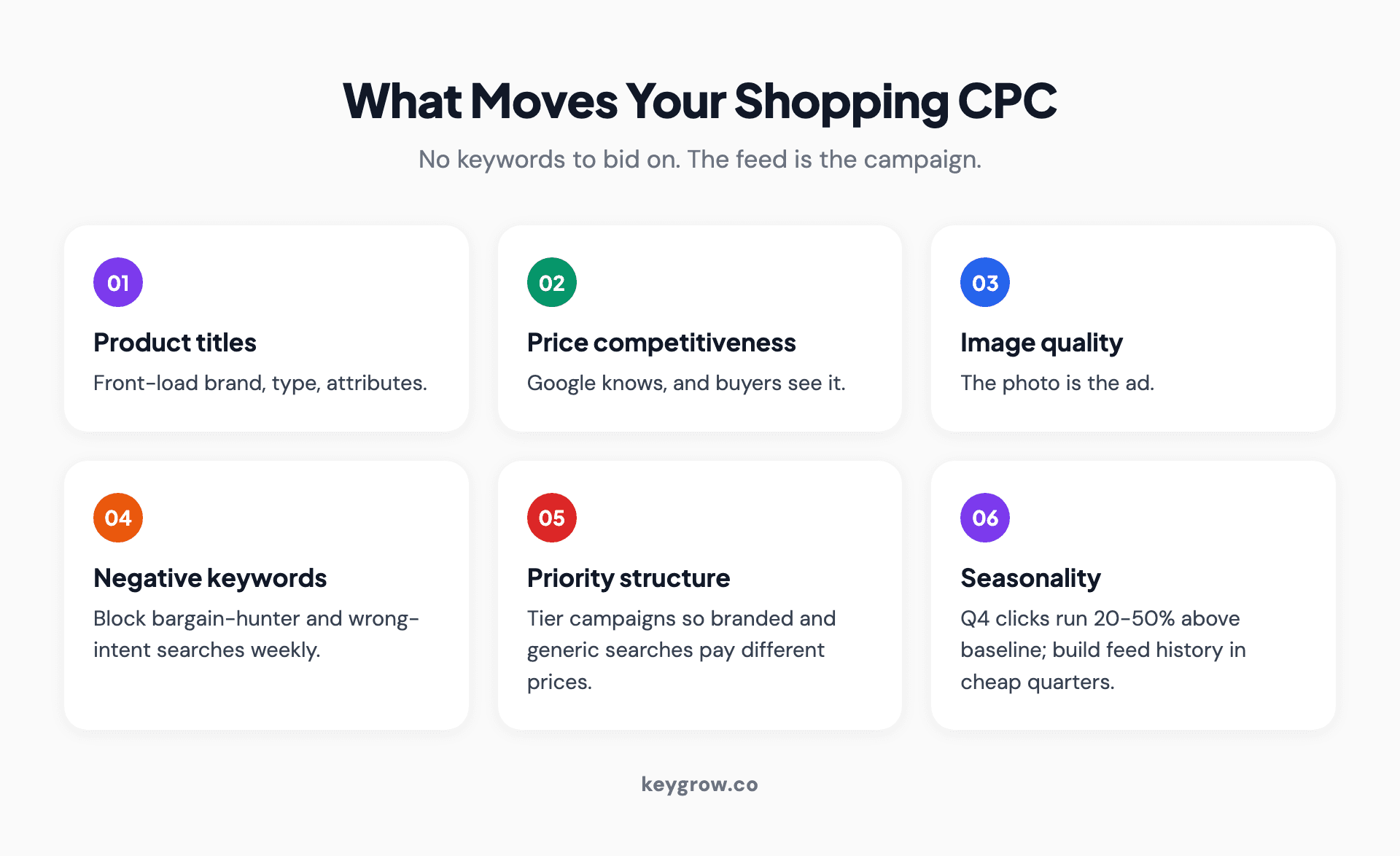
Six levers that move Google Shopping click costs: product titles, price competitiveness, image quality, negative keywords, campaign priority tiers, and seasonality.
How to read your first month's numbers
Once the campaign runs, four checks tell you whether the spend is buying knowledge or just leaving.
Split products into converters and passengers. After a few hundred clicks, a familiar shape emerges: a minority of products produce most sales while the rest absorb clicks. Passengers with real spend and no sales get their bids cut or their tier demoted; the converters get the freed budget.
Read CTR as feed feedback. A product with impressions and almost no clicks is usually mispriced against the shelf next to it or wearing a weak title and image. Fix the feed before touching bids, because a bid raise on an unclickable listing just pays more for the same silence.
Check search terms, even in Shopping. The queries Google matched you into reveal how it understands your feed. Bathrobe traffic landing on your bath mats means title work, and every irrelevant query is a negative keyword waiting to be added.
Compare against your own week-two, not a benchmark. Public averages blend fashion with electronics with supplements and tell you little. The trend line that matters is yours: cost per conversion falling week over week as negatives accumulate and bids settle is a campaign learning; flat-lining spend with no conversion movement by week six is the math telling you something the benchmarks can't.
When Shopping ads aren't worth the money
An honest cost guide has to include the cases where the answer is "don't spend it."
Skip Shopping ads if your margins can't clear the breakeven math above. A 15 percent margin store needs 6.7x ROAS just to stop losing money, and very few accounts sustain that.
Skip them, or fix pricing first, if you're meaningfully more expensive than competitors on identical products. The format shows your price next to theirs; advertising an uncompetitive price is paying to demonstrate it.
And think twice if your average order is tiny with no repeat purchase behind it. A $12 product at 2 percent conversion and $1 clicks costs $50 of traffic per sale. That math only works if the customer comes back.
On the DIY question: setting up Merchant Center, a product feed, and a first Standard Shopping campaign is genuinely doable yourself, and for a small catalog we'd encourage it, the free listings alone justify the afternoon. Paid management earns its fee when spend grows past the point where feed optimization, negatives, and structure work returns more than it costs, which for most stores is somewhere past $2,000 to $3,000 a month in ad spend. Below that, keep the fee in your margin. If you're an online store weighing the whole channel mix, our breakdown of how PPC drives ecommerce sales and our ecommerce PPC service pages cover the wider picture.
FAQs
How does Google Shopping work?
You upload a product feed (titles, images, prices, attributes) to Google Merchant Center, and Google matches your products to relevant shopping searches, no keywords involved. Products appear as image-price cards at the top of results; you bid per product or product group and pay only for clicks. Feed quality largely determines which searches you enter and what you pay.
Is Google Shopping free?
Listing products is free. A Google Merchant Center account costs nothing, free listings can show your products in the Shopping tab without any ad spend, and Google charges no commission on sales. You pay only when you run Shopping ads and someone clicks one.
Why did Google charge me $1?
That's a temporary card verification hold, not a fee. Google places it to confirm the payment method is real, and it's removed automatically, typically within about a week. If you see it during Merchant Center or Google Ads signup, nothing is wrong.
How much do Google Shopping ads cost per click?
Expect roughly $0.50 to $1.50 per click in most retail categories in 2026, with niche products sometimes under $0.50 and competitive categories like health and beauty running $1 to $2 or more. The widely quoted $0.66 average comes from 2019 data, so treat it as a historical floor rather than a current expectation.
How much should I budget per day for Shopping ads?
For a new store testing a handful of products, $15 to $25 a day for four to six weeks produces enough clicks to judge the results. The controlling math is clicks per product: you need 100 to 200 clicks on a product before its conversion data means much, so smaller daily budgets simply take longer to reach a verdict.
Does Google Shopping charge commission on sales?
No. Unlike marketplaces, Google Shopping takes no percentage of your sales. Your costs are ad clicks plus whatever you optionally spend on feed tools or management. The economics are entirely between your click costs and your conversion rate.
Are Google Shopping ads worth it?
For stores whose margins clear the breakeven math, yes: Shopping clicks cost a fraction of search clicks and arrive pre-screened by photo and price, which is why retailers put the bulk of their Google budgets there. They're not worth it for thin-margin stores, uncompetitive prices, or tiny average orders with no repeat purchases. The channel is a price-transparent marketplace, and it pays the stores built to compete in one.
What is a good ROAS for Google Shopping?
Whatever clears your breakeven, which is 1 divided by your profit margin. A 30 percent margin store breaks even at 3.3x and should target 4x or higher; a 50 percent margin store profits at anything above 2x. Category ROAS benchmarks make interesting reading, but your margin sets the only target that matters.
Should I start with Standard Shopping or Performance Max?
Start with Standard Shopping if your account is new: clicks run slightly cheaper, you keep control of negatives and structure, and you'll learn faster. Performance Max earns its keep once you have conversion volume and revenue data for its automation to optimize toward. Whichever you run, exclude your own brand terms so the reporting stays honest.
Before you spend a dollar
The costs, one more time, without the mythology: listing is free, the $1 hold comes back to your card, nobody takes commission, and the clicks that constitute your real spend will land somewhere between fifty cents and two dollars depending on how competitive your shelf is. Budget $100 to $200 per product to reach a verdict, and let your margin, not a 2019 benchmark, set the return you demand.
If you'd rather have your feed, structure, and budget math handled by people who do it daily, our PPC team works month-to-month and will tell you upfront if your margins make Shopping a bad idea. Get a straight answer here.


