

Google Ads conversion tracking setup has two halves. First you install the tag and create a conversion action, which takes about twenty minutes. Then you configure that action, which takes ten minutes and decides whether your bidding works.
Almost every guide on this keyword covers the first half in exhaustive detail and skips the second. That is backwards. Installation is the part Google has spent a decade making foolproof. Configuration is the part that quietly wrecks accounts.
The install is the easy half
The short version, so you have it: create a conversion action in Google Ads under Goals, put the Google tag on your site through Tag Manager or directly, fire the conversion tag on the event you care about, then test it.
Google's own setup documentation will walk you through most of that, and if you get stuck on which numbers go where, where to find your conversion ID covers the click path.
What Google does not walk you through is any of the following: whether that action should be primary or secondary, whether it should count once or every time, how long the conversion window should be, and whether the thing you just started tracking is a conversion at all.
Those four decisions are the post.
Decide what a conversion is before you create one
Write the list down before you touch the interface. Three columns.
| What the visitor did | Track it as | Why |
|---|---|---|
| Submitted a lead form | Primary | This is the outcome you buy |
| Called and stayed on the line past your threshold | Primary | Same outcome, different channel |
| Booked a consultation | Primary | Further down the funnel than a form |
| Completed a purchase | Primary, with value | Value matters more than count |
| Started a form and abandoned it | Secondary | Useful signal, not an outcome |
| Clicked to call without connecting | Secondary | A tap is not a conversation |
| Viewed the pricing page | Secondary | Interest, not intent |
| Downloaded a PDF | Secondary, usually | Depends entirely on your funnel |
| Visited any page | Do not track | This is a session, not a conversion |
| Spent 30 seconds on site | Do not track | You are measuring patience |
| Scrolled 75 percent | Do not track | Same |
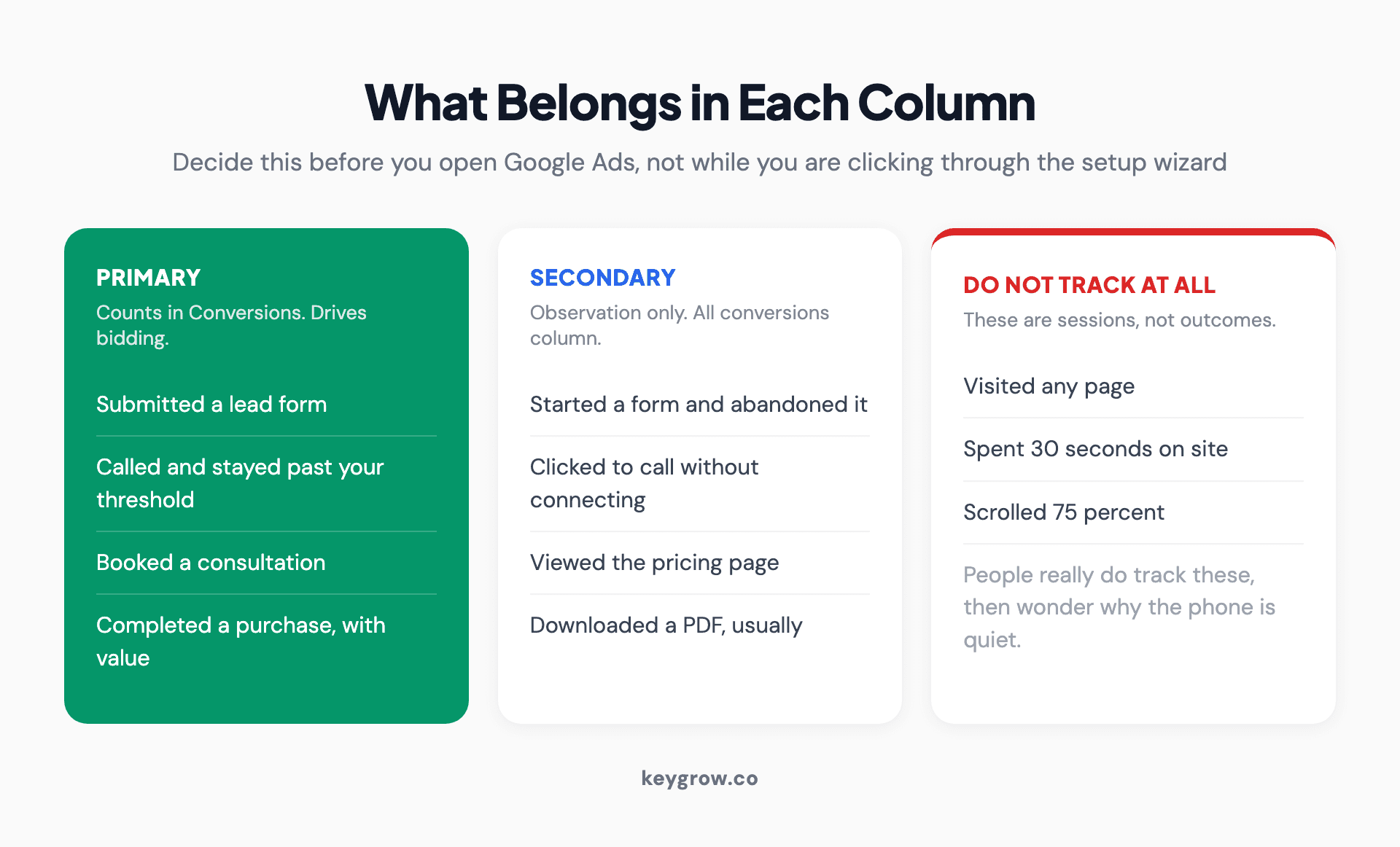
Three columns sorting visitor actions into primary conversions that drive bidding, secondary conversions for observation only, and actions that should not be tracked at all such as page views, time on site, and scroll depth.
The bottom three exist because people do track them, and then wonder why their cost per conversion looks great while the phone stays quiet. Counting page views and time on site as conversions is vanity-metric reporting wearing a different hat. It also poisons the bidding, which is worse than merely being useless.
Primary, secondary, or not at all
This is the setting that matters most and the one that the tutorials skip.
Per Google Ads Help, primary conversion actions are reported in the Conversions column and are used for bidding when the goal they belong to is used for bidding. Secondary actions are observation only: they appear in the All conversions column and do not drive bidding, unless the secondary action sits inside a custom goal, in which case it is used for bidding regardless.

Scattered black numbers on a white paper background.
That last clause catches people out. A secondary action that someone dropped into a custom goal is bidding, whatever the label says.
The practical consequence: Smart Bidding optimizes toward whatever is primary in the campaign's goal set. If you have marked eight things primary, including a newsletter signup and a PDF download, the algorithm is buying you newsletter signups and PDF downloads. It is doing exactly what you asked.
Most lead generation accounts should have one to three primary actions. Not eight. If you cannot say which single number you would judge the account on, you are not ready to set this up.
The count setting quietly doubles your numbers
Two options, one word of difference, and a large effect.
Every conversion counts every conversion that happens after an ad interaction. One conversion counts only one per ad click. Google's guidance is straightforward: use Every for sales, because each purchase genuinely adds revenue, and use One for leads, because the same person filling in your form twice is one prospect, not two.
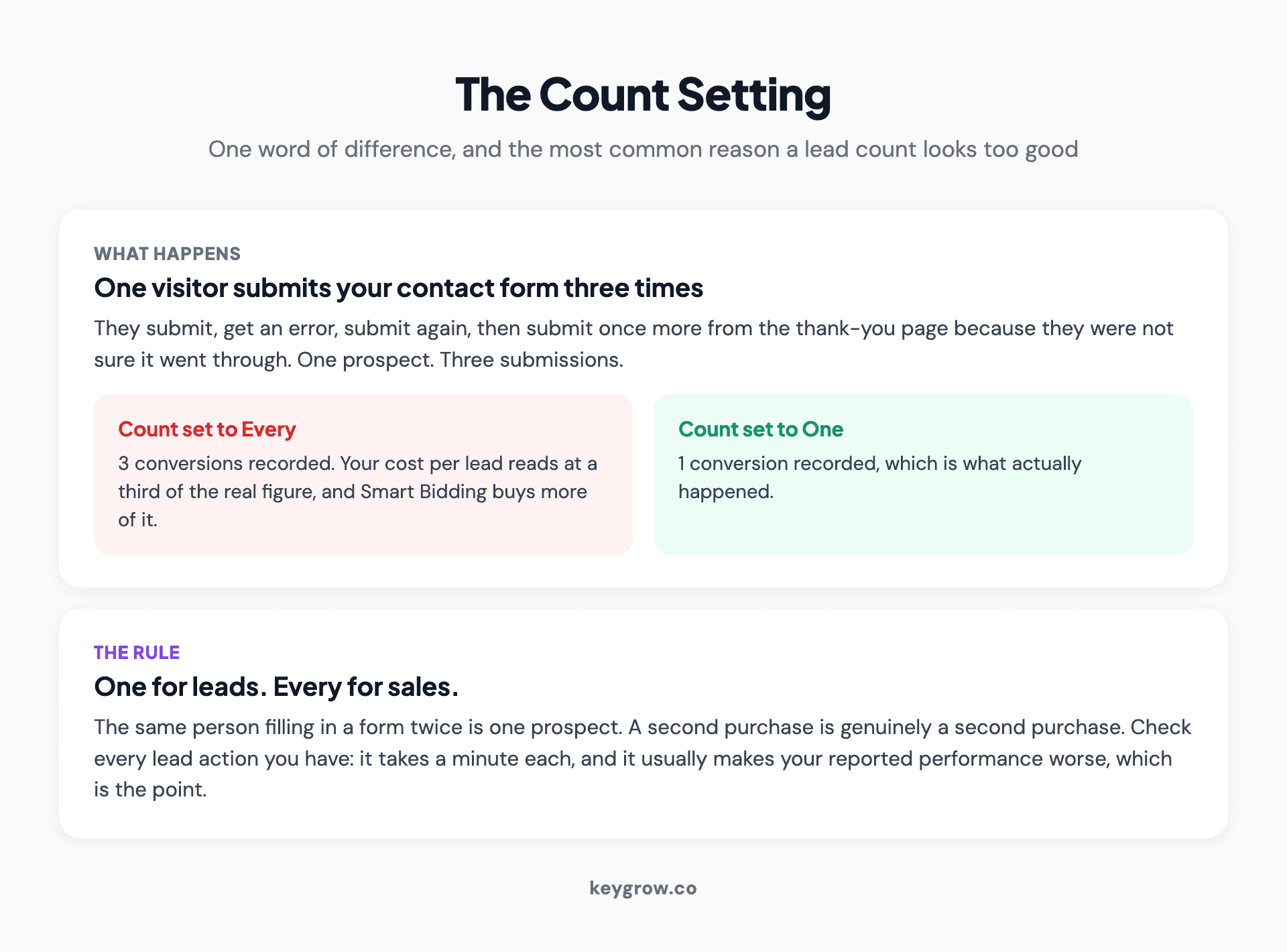
Diagram of one visitor submitting a contact form three times, showing three conversions recorded when the count is set to Every against one conversion when it is set to One, with the rule that leads use One and sales use Every.
The default is not always the right one for the action you just created, and this is the single most common cause of a lead count that looks too good. Someone submits a form, gets an error, submits again, then submits a third time from the thank-you page because they were not sure it worked. Set to Every, that is three conversions and a cost per lead a third of the real one. Set to One, it is one lead, which is what it is.
Check this on every lead action you have. It takes a minute per action and it is the fastest way to find out your cost per lead is worse than you thought, which is better than not knowing.
The build order that saves you redoing it
1. Write the conversion list first, using the three columns above. Do this before opening Google Ads.
2. Install the Google tag sitewide, through Tag Manager if you have it. One tag, on every page, firing on initialization.
3. Create the conversion actions, one per real outcome. Name them so a stranger could tell what they are: "Contact form submit", not "Conversion 3".
4. Set primary or secondary on each one as you create it, from your list. Do not leave it for later.
5. Set the count to One for leads, Every for sales.
6. Set a value, even a rough one. A lead worth an estimated $200 tells the bidding more than a lead worth nothing, and you can refine it later. If you do not have a number, work backwards from close rate and average job value; our ROI calculator will do the arithmetic.
7. Fire the tags on the real events, through Tag Manager triggers rather than URL rules where you can. A thank-you page URL can be reached by anyone who bookmarks it.
8. Test with Tag Assistant, then wait. Google needs an actual ad click followed by a conversion before the status turns Active, and that can take up to 24 hours.
9. Check the numbers against reality a week later. Your CRM count and your Conversions column should be in the same neighborhood.
Step nine is the one people skip and the only one that catches the errors the other eight created.
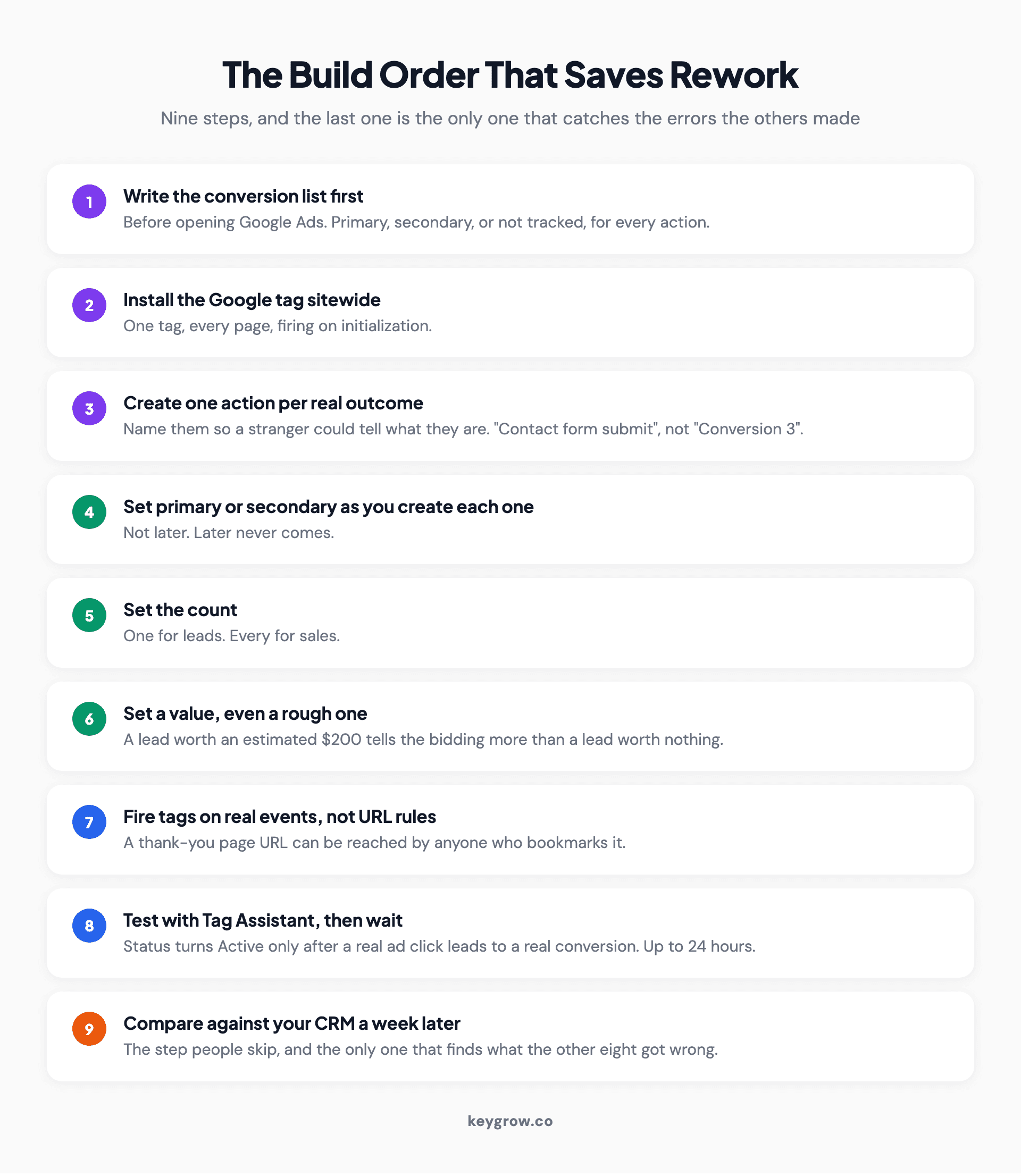
Nine numbered steps for setting up Google Ads conversion tracking, from writing the conversion list before opening Google Ads through to comparing the Conversions column against your CRM a week later.
Conversion windows, and why the default is often wrong
The click-through conversion window is how long after an ad click a conversion still gets attributed to that click. The default is 30 days.
Whether 30 days is right for you comes down to one thing: how long your customers actually take to decide. An emergency plumber has a decision cycle measured in minutes; a 30-day window means a click in week one gets credit for a job booked in week four, which was probably driven by something else entirely. A commercial roofing company with a six-week sales cycle has the opposite problem, and a short window would hide most of their real conversions.

Close-up of a calculator on a desk.
Set it to match your actual sales cycle. If you do not know your sales cycle, that is worth finding out before you spend another month optimizing toward a number built on a guess.
The same applies to the view-through window, which attributes conversions to people who saw a display or video impression and never clicked. Be skeptical of what it reports. It is the most generous form of attribution Google offers.
Verifying it actually works
Three checks, in increasing order of how much they tell you.
Tag Assistant fires. Confirms the tag exists and triggers. Confirms nothing about whether the data is right.
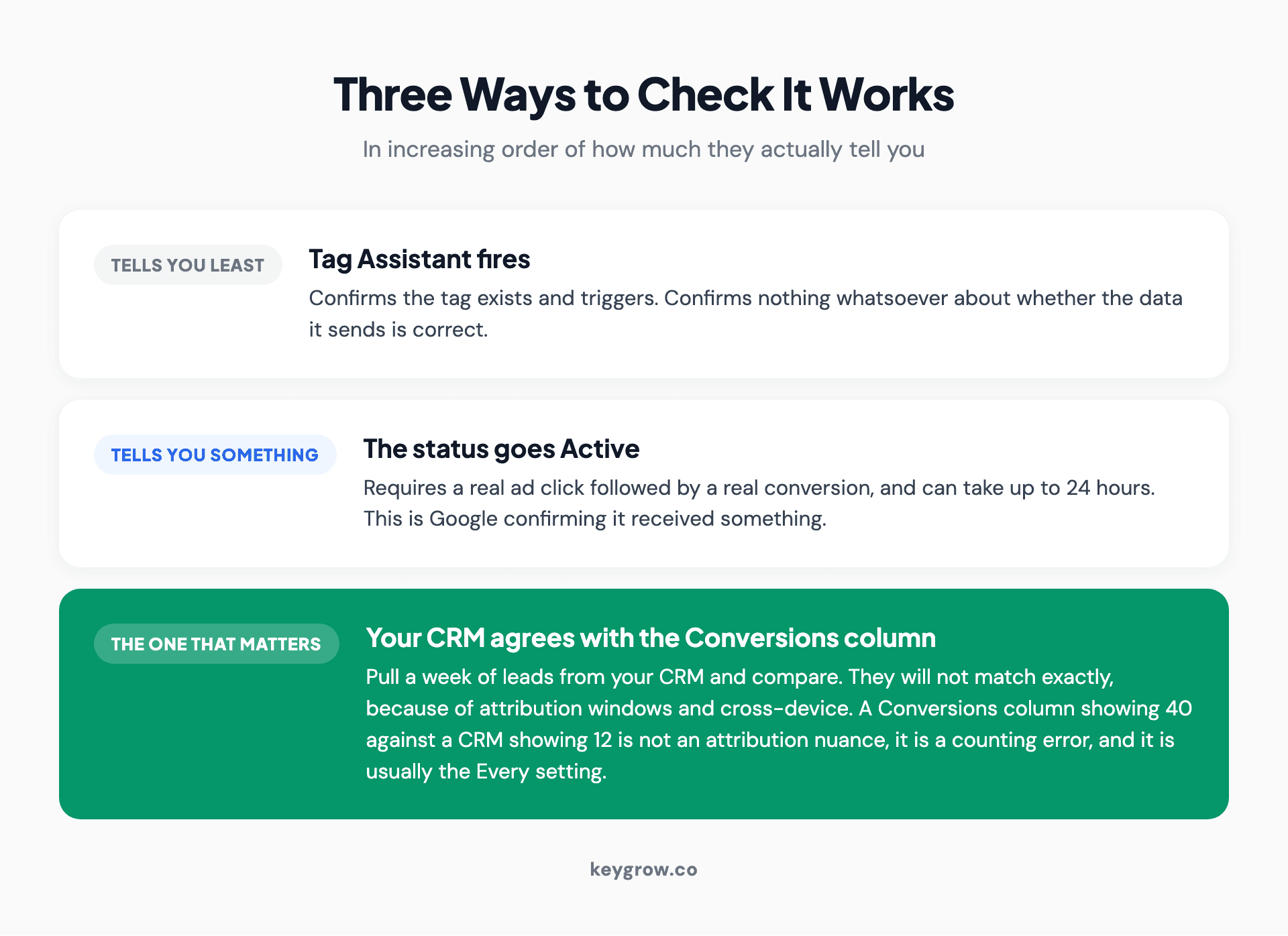
Three ways to check Google Ads conversion tracking ranked by usefulness: Tag Assistant firing tells you least, the status turning Active tells you something, and your CRM agreeing with the Conversions column is the check that matters.
The status goes Active. Requires a real ad click followed by a real conversion. This is Google confirming it received something.
Your CRM agrees with the Conversions column. The only check that matters. Pull a week of leads from your CRM and compare the count to Google Ads for the same week. They will not match exactly, because of attribution windows and cross-device, but they should be close. A Conversions column showing 40 against a CRM showing 12 is not an attribution nuance. It is a counting error, and it is usually the Every setting.
Do that comparison monthly for the first quarter. It is twenty minutes and it is the difference between a number you can bid on and a number you cannot.
The failure that looks like success
Worth naming the specific shape this goes wrong in, because it is common and it is invisible from inside the account.
Tracking gets set up. Conversions appear. Cost per conversion looks acceptable, so budget goes up. More conversions appear, at a similar cost. Everyone is pleased. Six months later someone finally compares the total against booked work and finds the account has been reporting three times the leads that ever reached the business.
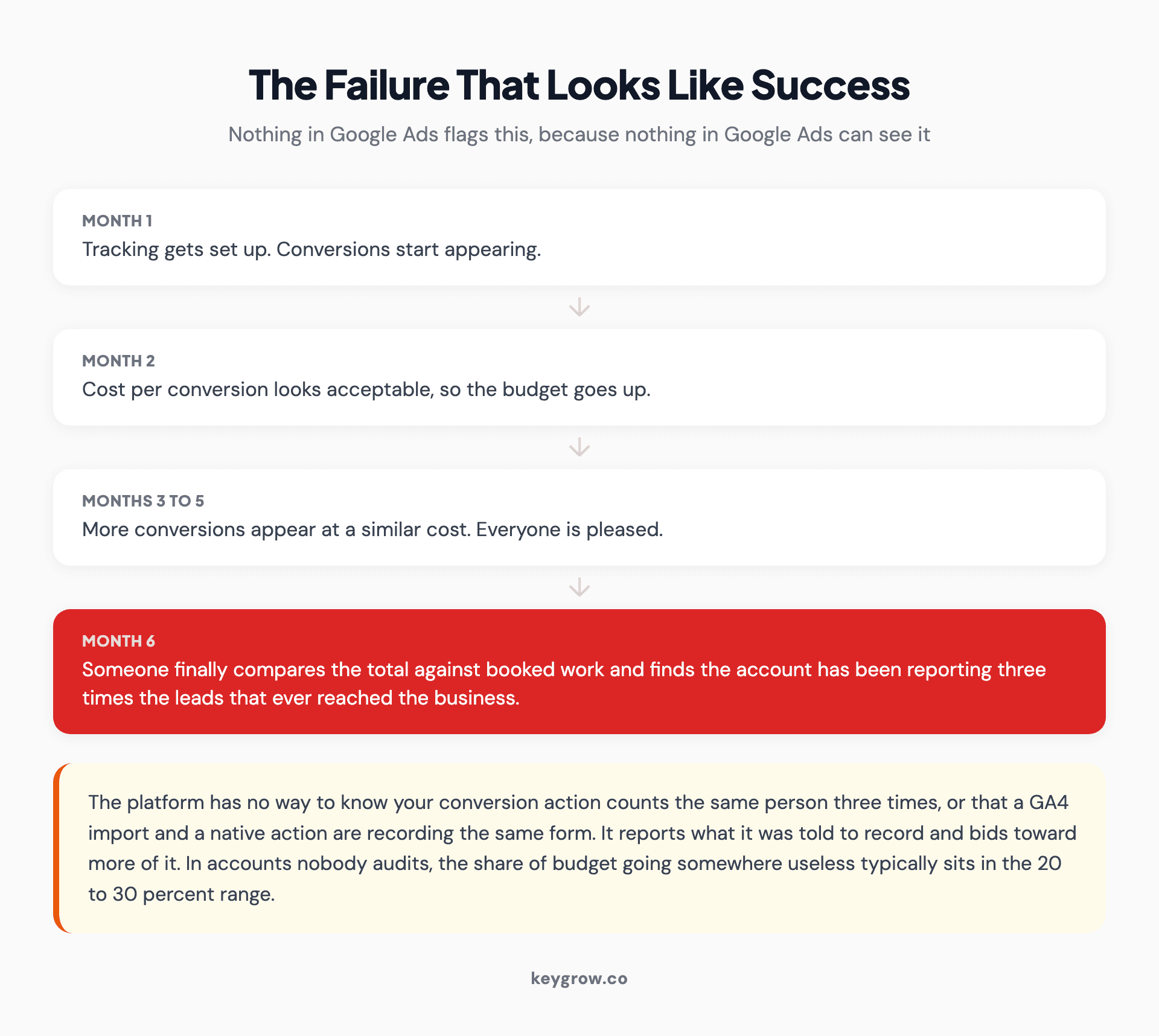
Six month timeline showing conversion tracking appearing to succeed while over-reporting: tracking is set up, cost per conversion looks acceptable, budget rises, and in month six someone finds the account reported three times the leads that reached the business.
Nothing in Google Ads flags this. The platform has no way to know that your conversion action counts the same person three times, or that a GA4 import and a native action are both recording the same form. It reports what it was told to record, and it bids toward more of it. The waste compounds quietly: in accounts nobody is auditing, the share of budget going somewhere useless typically sits in the 20 to 30 percent range, and bad conversion data is one of the larger contributors.
The only thing that catches it is the comparison against your own records. That is why step nine exists, and why it is worth putting a recurring calendar entry on it rather than trusting yourself to remember.
Auditing a setup you inherited
Most people reading this already have tracking that half works. Here is the twenty minute version of checking it.
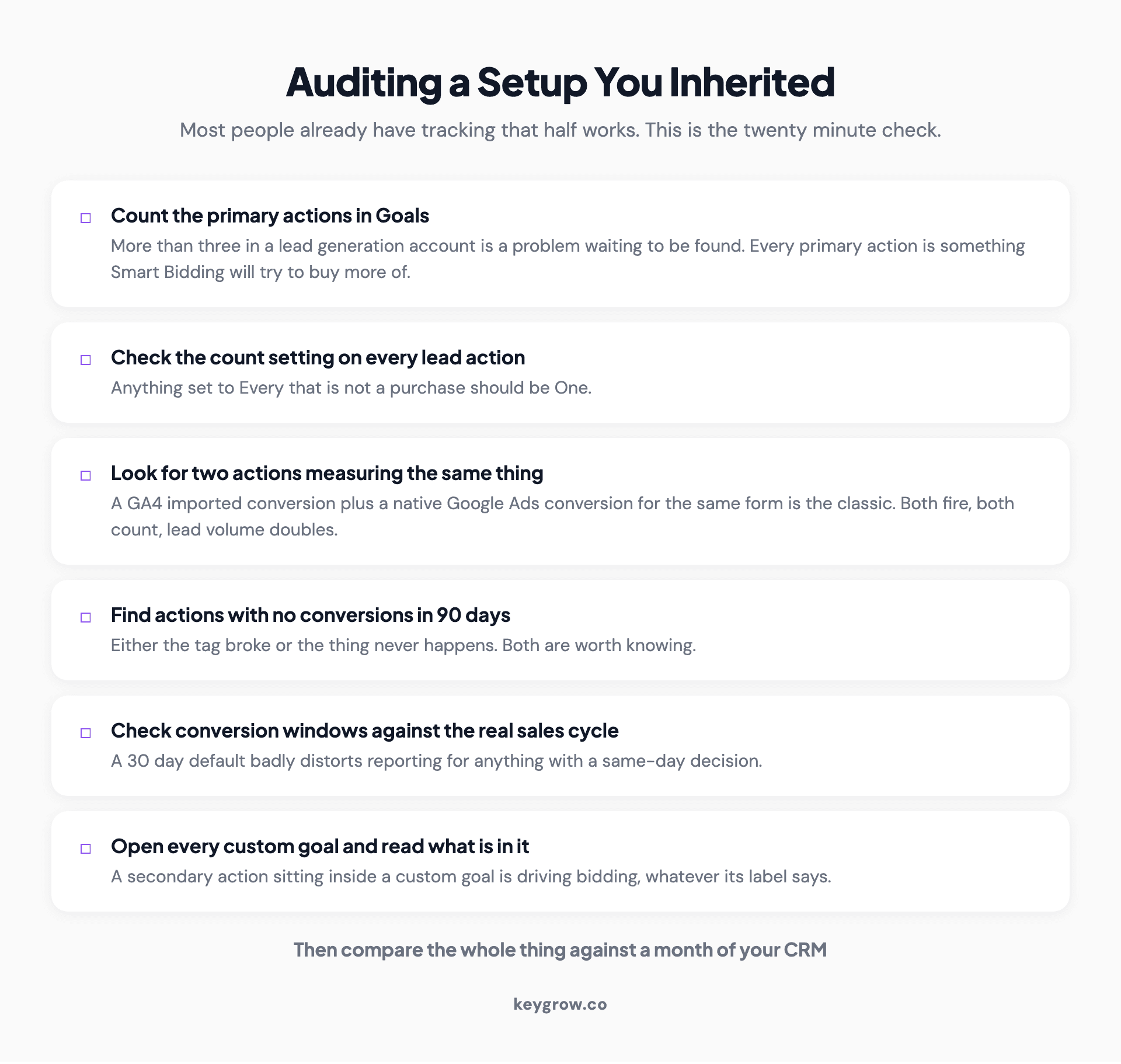
Six-item audit checklist for inherited Google Ads conversion tracking: count the primary actions, check the count setting on lead actions, look for duplicate actions, find actions with no conversions in 90 days, check conversion windows, and read what is inside each custom goal.
Then compare the whole thing against your CRM for a month. If phone calls are a meaningful share of your leads, call tracking for PPC covers the same discipline applied to the phone.
What tracking well actually buys you
A cleaner number to bid on, and the ability to notice when something changes.
An eviction law firm came to us with an account that was already running and already tracked. The numbers were bleak and, more importantly, they were believable: 22 clicks a week producing a single conversion, each one costing $240. Honest tracking made the diagnosis obvious. People were landing and leaving. We rebuilt the page around one action and restructured the campaigns behind it. Inside a week the account was turning 189 clicks into 21 conversions at $31.79 each.

A hand holding a pen over a blue clipboard.
None of that improvement came from the tracking. All of it was made findable by the tracking. That is the actual value: not the number itself, but being able to trust the number enough to act on what it tells you.
If any of this is running alongside enhanced conversions, the enhanced conversions setup has its own set of ways to break quietly, and it is worth reading after this rather than before.
When to leave this alone
If you are spending under a few hundred dollars a month, set up one primary conversion action for your main lead form, set it to One, and stop. The elaborate version of this earns its time at spend levels where a 20 percent misallocation is real money. Below that, the simplest possible setup that is honest beats a sophisticated one that is wrong.
And if you are paying someone to manage the account, this is a fair thing to ask them about. Which actions are primary, what is the count setting on each, and how does the Conversions column compare to the CRM. Those three answers tell you most of what you need to know about whether the account is being managed or just watched. Our own PPC management starts with that audit before anything gets changed, and it is month-to-month.
FAQs
How do I set up conversion tracking in Google Ads?
Create a conversion action under Goals in Google Ads, install the Google tag sitewide, fire a conversion tag on the event you want to measure, then test it with Tag Assistant. The status turns Active only after a real ad click leads to a real conversion, which can take up to 24 hours.
What is the difference between primary and secondary conversion actions?
Primary actions appear in the Conversions column and drive Smart Bidding when their goal is used for bidding. Secondary actions appear only in the All conversions column and do not drive bidding, with one exception: a secondary action inside a custom goal is used for bidding regardless of its label.
Should I count every conversion or one conversion?
Use One for leads and Every for sales. A person submitting your contact form three times is one prospect, so counting all three inflates your lead volume and understates your cost per lead. Each purchase, by contrast, genuinely adds revenue and should be counted.
Why do my Google Ads conversions not match my CRM?
Some difference is normal because of attribution windows and cross-device tracking. A large gap usually means duplicate conversion actions measuring the same event, or a lead action set to count Every instead of One. Compare a full week of both and look for a consistent multiple, which points at double counting.
How many conversion actions should be primary?
One to three in most lead generation accounts. Every primary action is something Smart Bidding will try to buy more of, so marking eight things primary tells the algorithm to optimize toward an average of eight different outcomes, including the ones that do not pay you.
How long does Google Ads conversion tracking take to start working?
The tag can fire immediately, but the conversion action status stays Unverified until someone clicks a live ad and then converts, which can take up to 24 hours to register. Conversions themselves appear in reporting within a few hours of being recorded.
What conversion window should I use?
Match it to how long your customers actually take to decide. The 30 day default suits considered purchases and badly distorts reporting for emergency services, where the decision takes minutes. If your sales cycle is six weeks, a short window hides most of your real conversions.
Can I track phone calls as conversions?
Yes, and you should if calls are a meaningful share of your leads. Google's free call reporting handles the basics, with a minimum call length setting that decides what counts. The main risk is double counting when a third party call tool and Google's own reporting both record the same call.
The setting that pays for the afternoon
If you only do one thing from this post, open Goals, look at the count setting on every lead conversion action you have, and change anything set to Every that is not a purchase.
That single change is the most common fix we make in inherited accounts, it takes a minute per action, and it usually makes your reported performance worse. Which is the point. A cost per lead you can believe is worth more than a good one you cannot.
Then go and compare a month of your Conversions column against your CRM. Everything else in this post is downstream of those two numbers agreeing.


