

Enhanced conversions is a Google Ads feature that takes the customer data you already collect at conversion, such as an email address, scrambles it into an irreversible hash in the browser, and sends that to Google so it can match the conversion to an ad click it would otherwise have lost. You get a more complete conversion count, and Smart Bidding gets better data to bid on.
That is the whole idea. The complications are that there are two different features sharing the name, the setup fails in a handful of predictable ways, and the reported improvement is easy to misread.
Worth saying early: turning this on will make your conversion numbers go up without your business selling anything more. Those conversions were always happening. You just were not seeing them.

Fiber optic network cables in a data rack.
The gap it closes
Conversion tracking has been leaking for years. Cookie restrictions in browsers, users switching between a phone and a laptop, ad blockers, and privacy settings all break the chain between the click Google recorded and the sale you recorded.
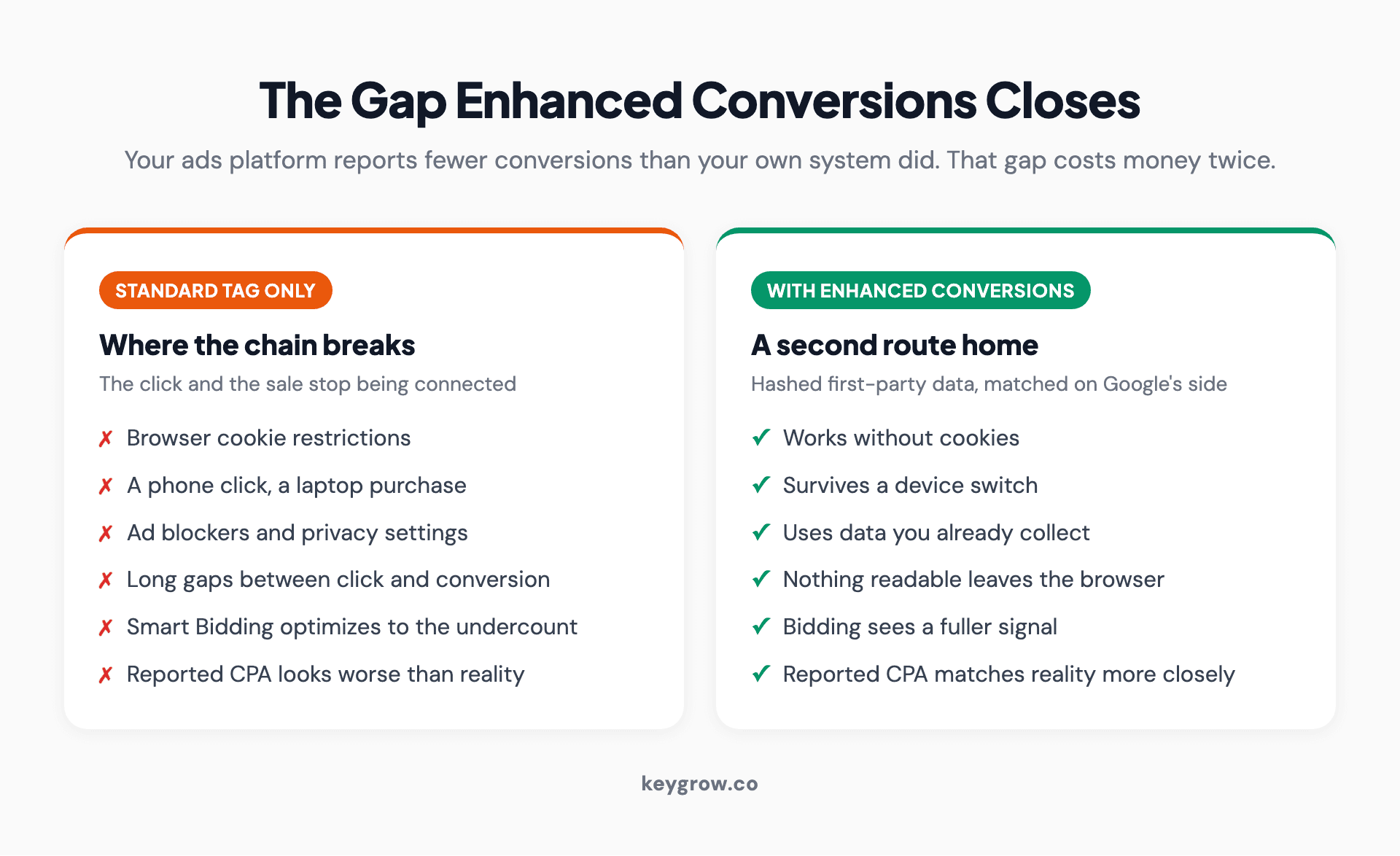
Two-column comparison of conversion measurement without enhanced conversions and with it, showing where the standard tag loses the connection between a click and a sale.
The result is an account where the ads platform reports fewer conversions than your own system did. Most advertisers notice this as a mismatch between Google Ads and their CRM or checkout, shrug, and carry on bidding on the smaller number.
Bidding on the smaller number is the expensive part. Smart Bidding optimizes toward what it can see, so an incomplete conversion signal produces worse decisions across the whole account, not just a worse-looking report.
Enhanced conversions recovers some of that connection using data you already have, without cookies and without you sending Google anything readable. Google's overview of the feature frames it as supplementing existing conversion tracking rather than replacing it, which is the right way to think about it: the tag you already have keeps doing its job, and this adds a second route home for the conversions it drops.
Two features share this name, and they are not the same thing
This is the single biggest source of confusion, and it wastes a lot of implementation time. There are two products here.
| Enhanced conversions for web | Enhanced conversions for leads | |
|---|---|---|
| What it measures | An online conversion completed on your site | An offline outcome that started as a web lead |
| Typical case | Ecommerce purchase, paid signup, booking | A form fill that becomes a sale weeks later |
| Where the data comes from | The conversion page or form, in the browser | Your CRM, uploaded back to Google |
| What you send | Hashed email, name, address or phone at conversion | Hashed lead data plus the outcome and value |
| Who needs it | Anyone with a transactional conversion page | Any business with a sales cycle longer than a session |
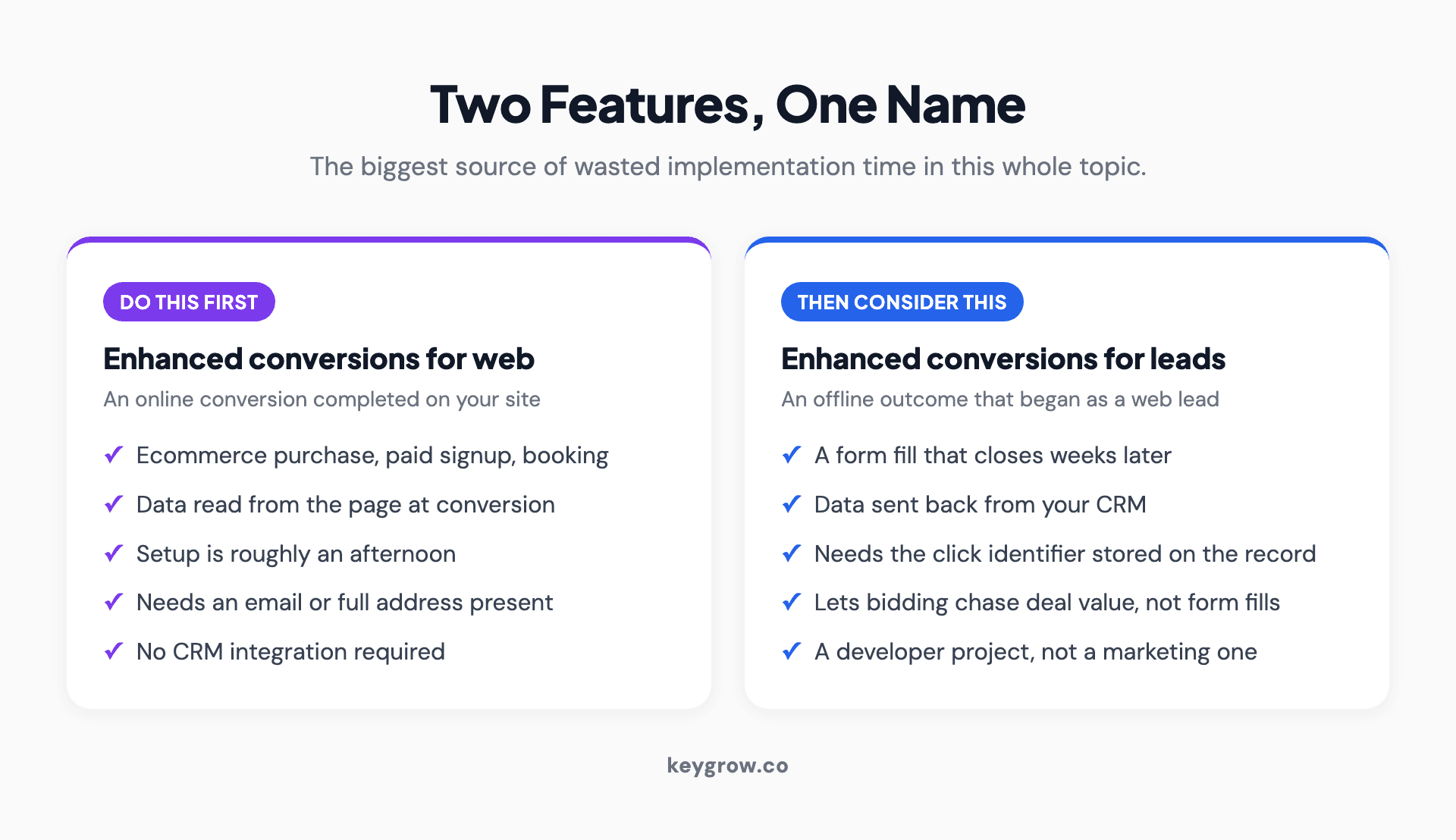
Two-column comparison of enhanced conversions for web and enhanced conversions for leads, with what each one measures, where the data comes from and who needs it.
If you run lead generation and you only set up the web version, you have improved the measurement of a form fill and done nothing about the fact that some of those form fills are worth $50 and some are worth $12,000. The leads version is the one that eventually lets Google bid toward the second kind. It is also more work, because it needs your CRM to keep the click identifier and send outcomes back.
Most accounts should do the web version first because it is an afternoon, then decide whether the leads version is worth the integration.
The prerequisite for the leads version is unglamorous and it is where these projects die: your CRM has to capture and store the Google click identifier when the lead comes in, and keep it attached to that record until the deal closes months later. If your forms do not capture it today, that is the first ticket, and it is a developer task rather than a marketing one.
What actually gets sent
Nothing readable leaves the browser. The data is normalized and hashed first, and the hash is one way.
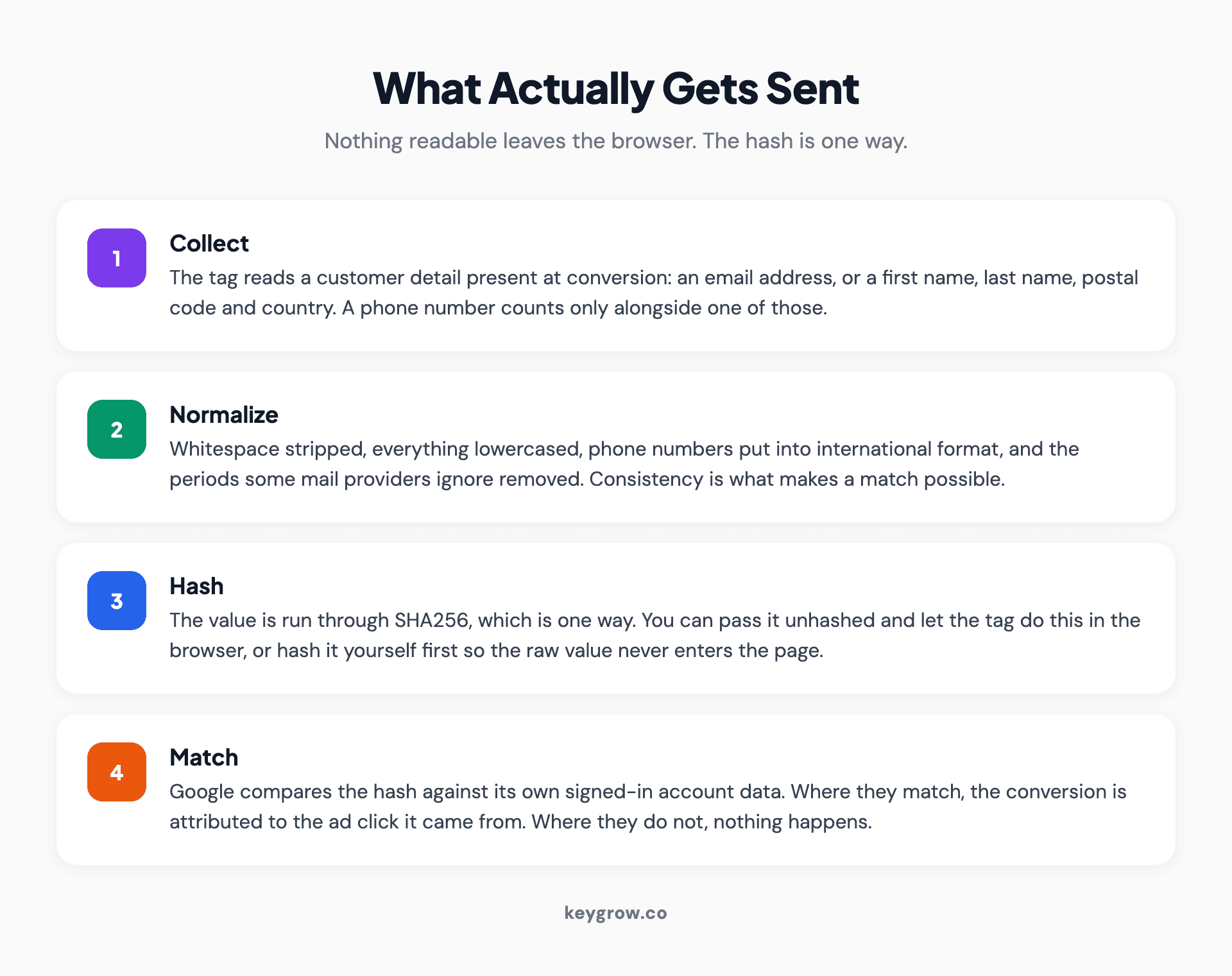
Four-step flow of enhanced conversions data: collect the customer detail at conversion, normalize it, hash it with SHA256, then match it against signed-in Google accounts.
Normalizing means stripping whitespace, lowercasing everything, putting phone numbers into international format, and removing the periods some mail providers ignore. Then the value is hashed with SHA256 and sent. Google compares that hash against hashes of its own signed-in account data, and where they match, the conversion gets attributed to the click.
Google's documentation is specific about what qualifies. At least one of these must be present: an email address, which is preferred, or a full address consisting of first name, last name, postal code and country. A phone number counts only alongside an email or a full name and address, never on its own.
The accepted fields are email, phone number, first name, last name, street address, city, region, postal code and country code. You can pass them unhashed and let the tag hash them in the browser, or hash them yourself first if your team would rather the raw values never enter the page at all.
Three ways to set it up
The right method depends on where your conversion data already lives and who is available to do the work.
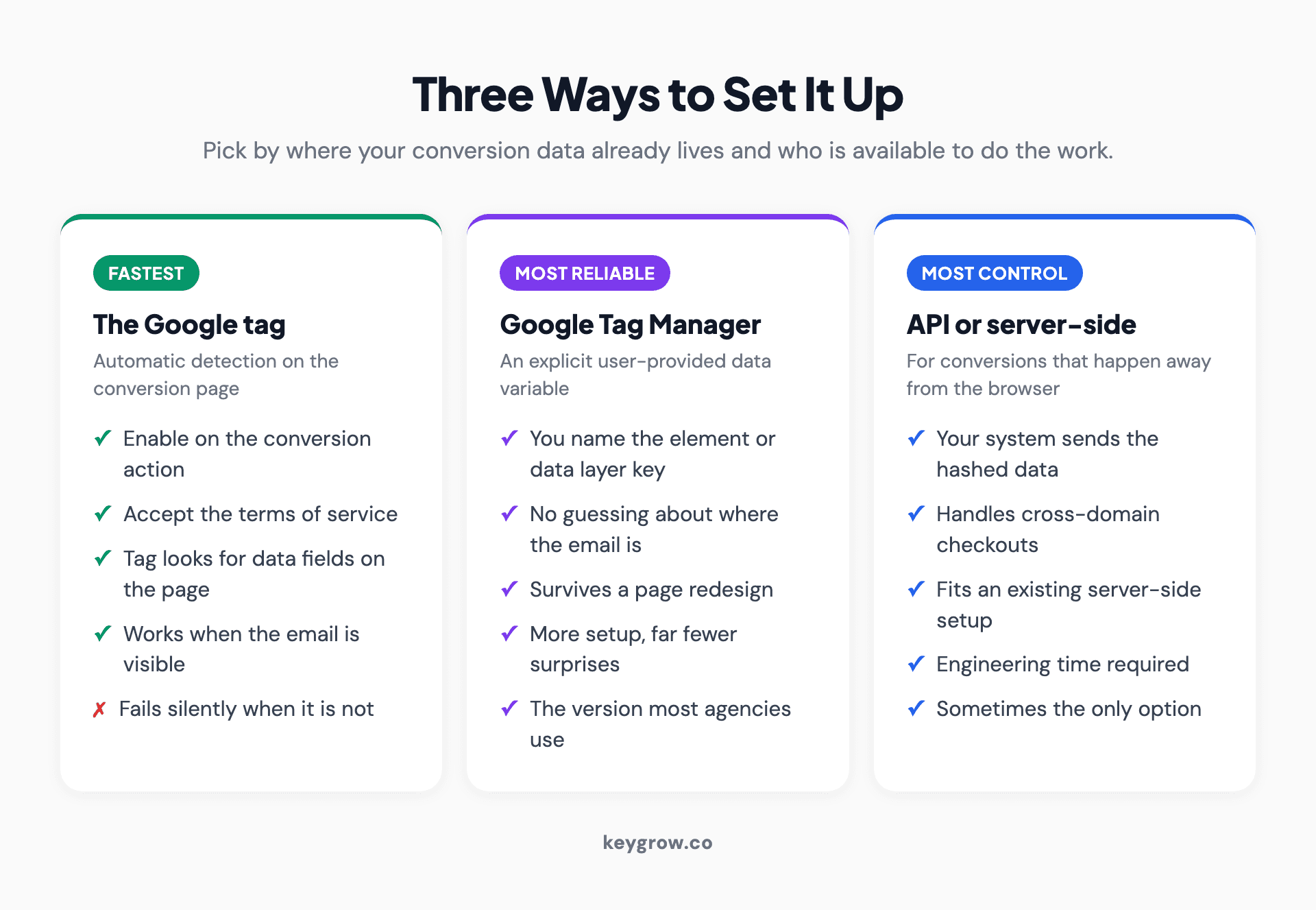
Three-column comparison of the setup methods for enhanced conversions: the Google tag with automatic detection, Google Tag Manager with a user-provided data variable, and the API for server-side implementations.
The Google tag, with automatic collection. The fastest path. You enable enhanced conversions on the conversion action, accept the terms, and let the tag look for customer data fields on the page. It works when your confirmation page displays the email or the form sits on the same page as the tag. It fails silently when it does not.
Google Tag Manager with a user-provided data variable. The version most agencies use, because it is explicit. You define exactly which element or data layer value holds the email, and the tag reads from there. More setup, far fewer surprises, and it survives a page redesign better than automatic detection does.
The API, or a server-side setup. For businesses whose conversion happens away from the browser, or who already run server-side tagging. Your system sends the hashed data along with the click identifier. More engineering, most control, and the only realistic option for some checkout architectures.
Whichever you pick, the feature does not begin collecting anything until you have accepted the terms of service inside Google Ads or Analytics. Skipping that step is a common reason an apparently finished setup reports nothing.
Where setups quietly break
Enhanced conversions rarely throws an error. It just matches nothing, which looks identical to a feature that is working badly.

Mechanical keyboard lit in blue beside a coffee mug on a desk.
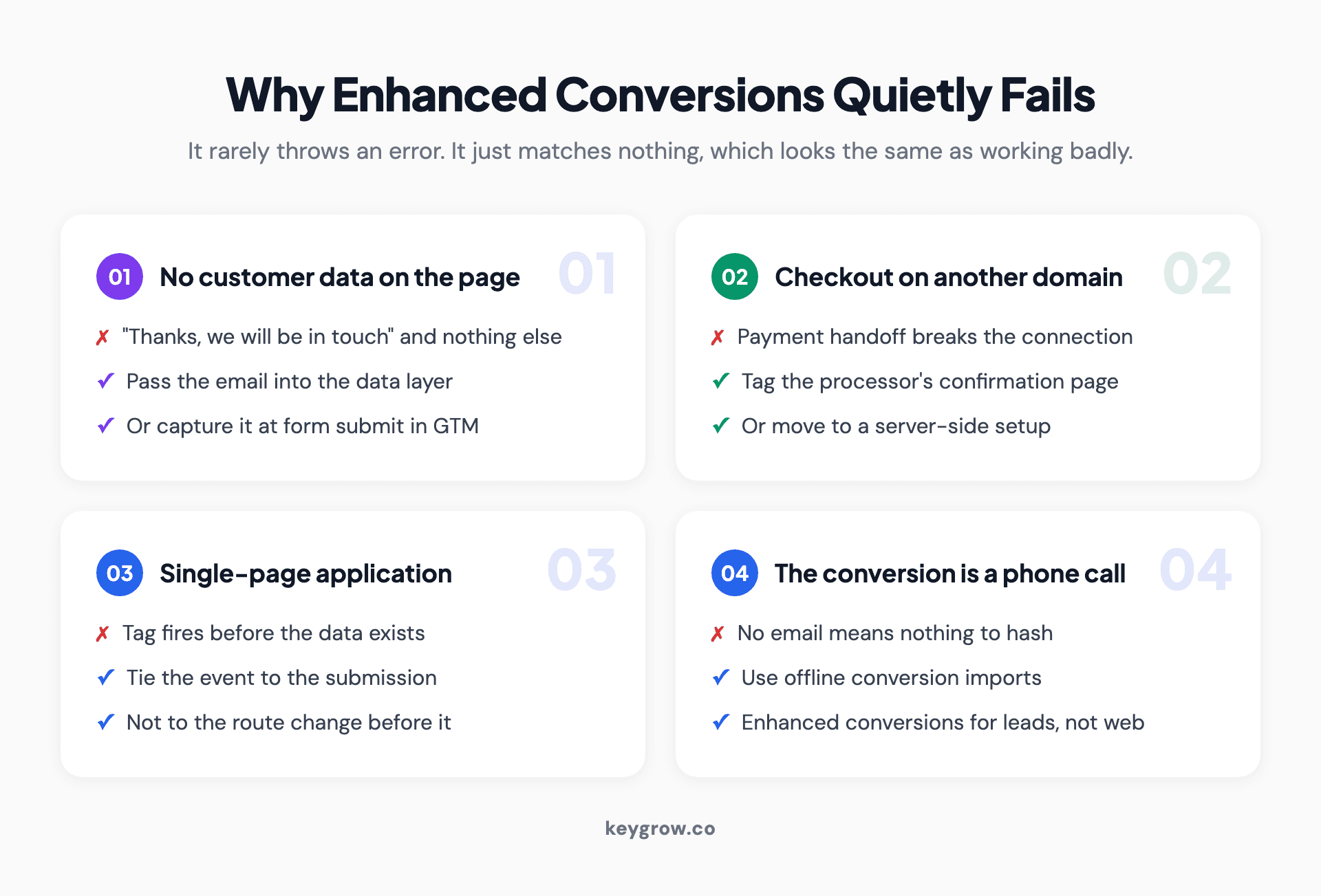
Four-card grid of the common reasons enhanced conversions fails: no customer data on the conversion page, a cross-domain checkout, a single-page application, and phone call conversions.
The conversion page has no customer data on it. A thank-you page that says "thanks, we will be in touch" and nothing else gives the tag nothing to read. Either pass the email through to the page in the data layer, or move to a Tag Manager setup that captures it at form submit.
The checkout sits on another domain. Payment processors and booking systems that hand off to their own domain break the connection unless you tag the processor's confirmation page or use a server-side approach.
It is a single-page application. No page load means the tag may fire before the data exists, or not at all. The event needs to be tied to the actual submission, not to a route change that happens first.
The conversion is a phone call. Call conversions have no email to hash. Enhanced conversions for leads and offline conversion imports are the route here, not the web version.
One more that catches people: a form that collects a phone number and nothing else. Phone on its own does not qualify. Add an email field or accept that this conversion action will not benefit.
Consent, and the part you have to agree to
Two things are required and neither is optional.
You have to accept Google's customer data terms in the account before collection starts. And you have to be allowed to send that data in the first place, which means your privacy policy needs to disclose the practice and, for users in regions that require it, you need consent before the tag fires.
If you serve EU or UK traffic, this sits inside your consent mode setup rather than beside it. A consent banner that blocks marketing tags until a user accepts is doing exactly the right thing, and enhanced conversions should respect it like every other tag.
The awkward consequence is that a strict consent setup lowers your match rate, because a share of visitors never allow the data to be sent. That is the correct outcome and not a bug to engineer around. If someone proposes firing the tag before consent to improve matching, that is the point to end the conversation.
This is not a reason to avoid the feature. It is a reason to do the tagging properly, and to have whoever owns your privacy policy read the paragraph before you go live.
What to expect, honestly
Here is the part that most guides skip. Enhanced conversions does not create sales. It recovers the record of sales that already happened, which means your reported conversions rise and your reported cost per conversion falls on exactly the same spend.

Server rack with green status lights in a dim room.
That has two practical consequences. First, do not compare the month after implementation with the month before and conclude the campaigns improved. They did not; the measurement did. Second, any target you set by cost per acquisition is now calibrated against a different number, so a target CPA that was correct last month is now too loose.
The genuine benefit is downstream. A more complete conversion signal makes Smart Bidding's decisions better, and that improvement shows up over weeks as slightly better allocation rather than as a jump in the report. It is a compounding fix to an input, not a lever you pull.
Expect the size of the recovery to vary enormously by business. Sites whose customers are mostly signed in to Google accounts on the device they convert on will see more matches than sites whose audience skews toward business desktop users on managed devices.
Which also means you should ignore any specific uplift percentage quoted in a case study, including the ones on agency websites. The number is a function of your audience's sign-in behavior and your consent rate, not of how well the feature was implemented. The only honest answer to "how much will we recover" is that you will find out in a fortnight.
How to check it is actually working
Do not trust the setup wizard's green checkmark. Verify it three ways.
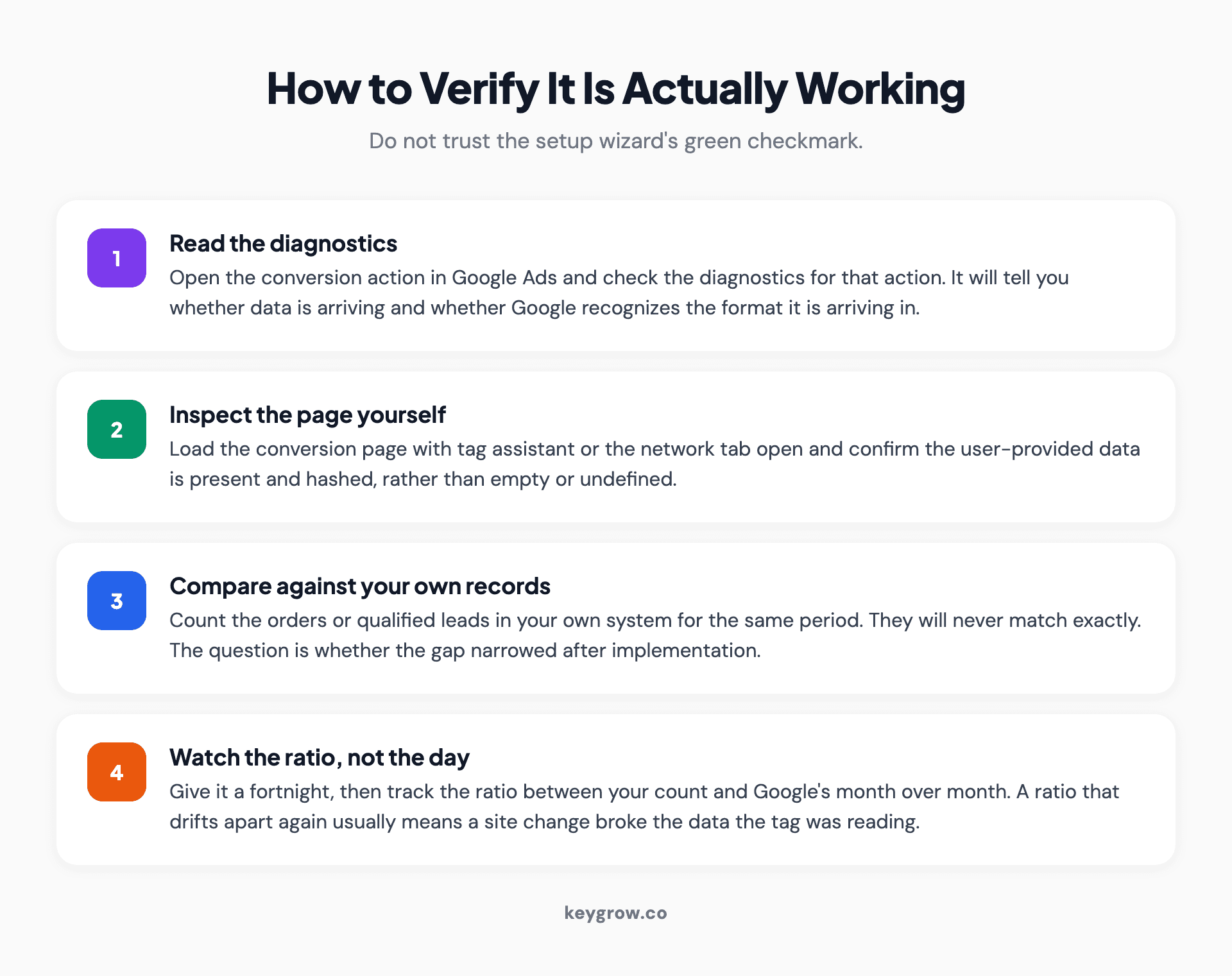
Four-step verification process for enhanced conversions: check the diagnostics tab, inspect the tag in the browser, compare against your own records, then watch the trend over a fortnight.
Start with the diagnostics available on the conversion action inside Google Ads, which will tell you whether data is arriving and whether it is being recognized. Then open the conversion page in a browser with the tag assistant or your developer tools network tab and confirm the user-provided data is present and hashed rather than empty.
Then do the check that actually matters: compare the conversions Google reports for a period against the orders or qualified leads in your own system for the same period. Not to make them equal, because they will never be, but to see whether the gap narrowed after implementation.
Give it two weeks. Matching is not instantaneous and a three-day read tells you nothing.
One diagnostic worth adding to the routine: watch the gap between your own record count and the Google-reported count month over month, as a ratio rather than a difference. A ratio that improved once and then held steady means the feature is working and stable. A ratio that drifts back apart usually means a site change broke the data the tag was reading, which is the most common way a working setup quietly stops working.
When this is not worth your time
If your account spends a few hundred dollars a month, the measurement gain is real but tiny, and your effort is better spent on the landing page. Enhanced conversions matters in proportion to spend.
If you have no conversion tracking worth improving, fix that first, starting with Google Ads conversion tracking setup. We see accounts running enhanced conversions on top of a conversion action that fires on every page load, which improves the accuracy of a number that was never meaningful. Our guide to running a PPC audit starts with the tracking layer for this reason, and our post on finding your conversion ID covers the basics underneath all of this.
If your conversion genuinely captures no customer data, such as a pure phone-call business with no forms, the web version has nothing to work with. Look at offline conversion imports instead.
And if nobody in the business can tell you what a lead is worth, do that before the tagging. Better measurement of an unknown value is still an unknown value. Our post on measuring the lifetime value of PPC leads is the prerequisite, not the follow-up.
FAQs
Is enhanced conversions safe from a privacy standpoint?
The data is normalized and hashed with SHA256 before it leaves the browser, and a hash cannot be reversed into the original email or phone number. You still need to disclose the practice in your privacy policy, accept Google's customer data terms in the account, and respect consent requirements in regions that have them.
Does enhanced conversions increase actual conversions?
No. It improves how many of your existing conversions get recorded and attributed. Your reported conversion count rises and your reported cost per conversion falls on the same spend, because the measurement improved rather than the campaigns.
What is the difference between enhanced conversions for web and for leads?
The web version measures a conversion completed on your site by reading customer data from the page at conversion time. The leads version measures an offline outcome that began as a website lead, by sending data back from your CRM when the deal closes. Lead generation businesses eventually want both.
What customer data does enhanced conversions need?
At least an email address, which Google prefers, or a full address consisting of first name, last name, postal code and country. A phone number qualifies only when it accompanies an email or a complete name and address, not on its own.
Will enhanced conversions work if my checkout is on another domain?
Not with a standard on-page setup, because the tag needs to see the customer data on the conversion page. You either tag the processor's confirmation page, pass the data back to a page you control, or move to a server-side implementation.
How long before I see a difference after turning it on?
Matching starts within days, but give it two weeks before drawing conclusions, and longer before adjusting bid targets. Smart Bidding needs time to respond to the fuller signal, and the first few days of data are too noisy to read.
Do I need Google Tag Manager to set this up?
No. The Google tag can collect the data automatically if the required fields are visible on the conversion page. Tag Manager is worth using when you want to specify exactly where the email comes from, which is more reliable and survives site changes better.
Turn it on, then change how you read the account
Set up the web version this week, accept the terms, verify with your own records rather than the wizard, and wait a fortnight before touching anything. Then reset your CPA targets against the new numbers, because the old ones were calibrated to an undercount.
If you run lead generation, put the leads version on the roadmap for the quarter after, once your CRM is reliably storing the click identifier. If you want a second pair of eyes on a tracking setup before you build anything on top of it, our PPC management team does that as the first week of any engagement, and occasionally concludes that the account does not need us yet.



