


Your conversion ID in Google Ads lives under the Goals icon, in Conversions, under Summary. Click into the conversion action you care about, open the Tag setup section, and choose "Use Google Tag Manager" to see the Conversion ID and Conversion label as two separate fields. That is the whole answer. The rest of this guide is about not pasting the wrong number into the wrong box, which is where most people lose an afternoon.
One thing to know before you start hunting: the conversion ID does not exist until you have created a conversion action. If you have never set up conversion tracking, there is nothing to find yet. You make the action first, then the ID appears.
The click path, step by step
The fastest route in the current Google Ads interface is four clicks once you are logged in.
- Click the Goals icon in the left navigation.
- Open Conversions, then Summary.
- Click the specific conversion action you want to track (a form submit, a call, a purchase).
- Expand Tag setup, and choose either "Use Google Tag Manager" or "Install the tag yourself".
Choose "Use Google Tag Manager" and Google hands you the Conversion ID (it starts with AW-) and the Conversion label as two clean, separate values. Choose "Install the tag yourself" and you get the full Google tag snippet instead, with the ID and label bundled together inside it.
Google moves these menus around more often than it should. If you do not see Goals, look under Tools or the newer Admin menu. The labels drift, but conversion actions have lived under some version of Goals or Measurement for years, so keep clicking until you find Conversions.
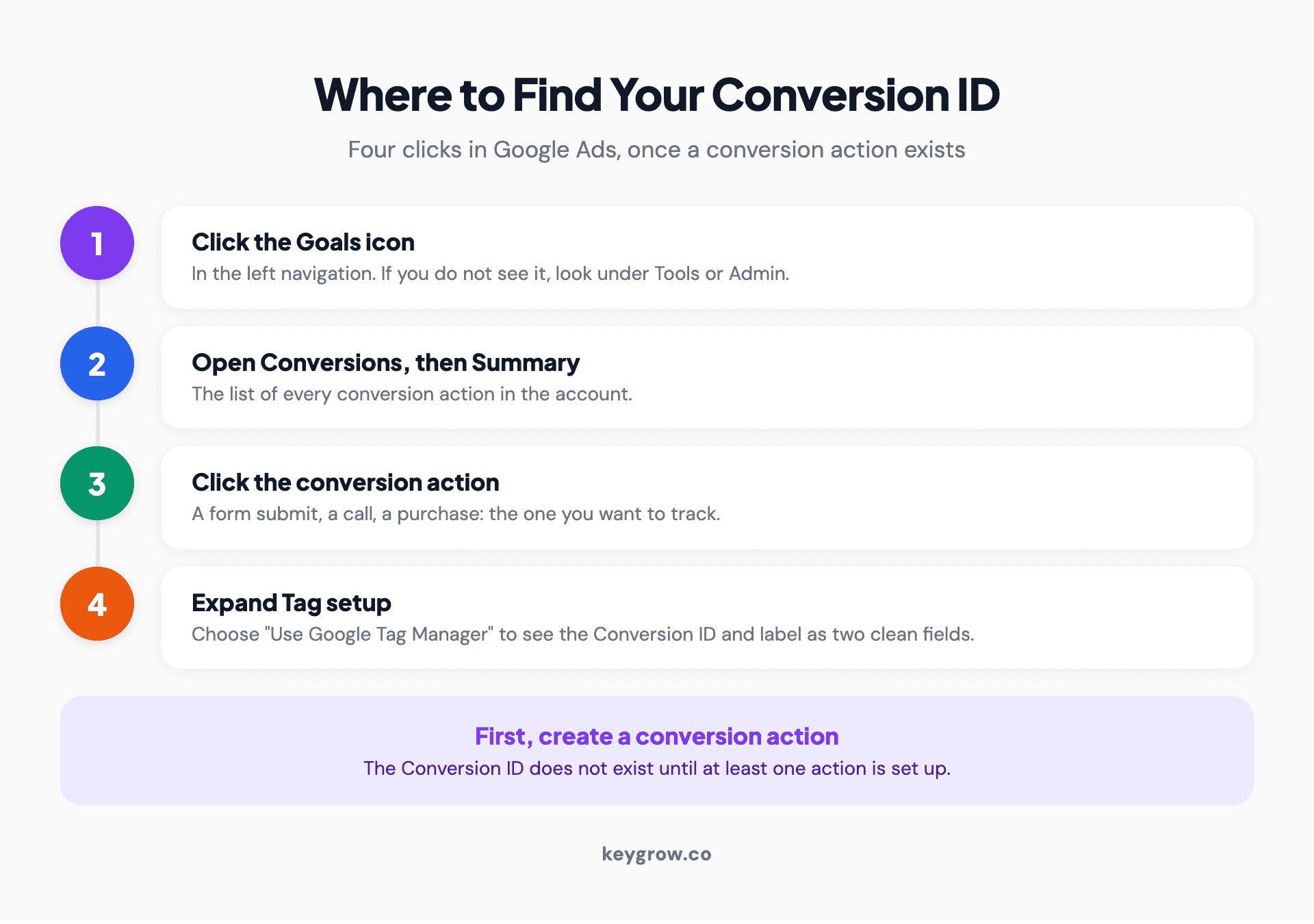
Numbered click-path in Google Ads to find your conversion ID: the Goals icon, then Conversions, then Summary, then the conversion action, then Tag setup.
Conversion ID, Conversion label, Customer ID: which is which
These four numbers get confused constantly, and the confusion is the single biggest reason tracking breaks. Here is what each one is.
| Number | What it looks like | What it identifies |
|---|---|---|
| Conversion ID | AW- followed by 9 to 10 digits | Your Google Ads account's conversion tracking, one ID for the whole account |
| Conversion label | A short string of letters, numbers, dashes, and underscores | One specific conversion action inside that account |
| Customer ID | A 10-digit number, shown top right (123-456-7890) | Your Google Ads account itself, for billing and access, not tracking |
| Google tag ID | Also AW-, or a G- or GT- prefix | The tag that fires on your site; the Ads version is the same AW- number as your Conversion ID |
The short version: one Conversion ID for the account, one Conversion label per thing you want to track. The Customer ID is a different number entirely, and pasting it into a conversion field is the classic mistake that makes conversions quietly stop recording.
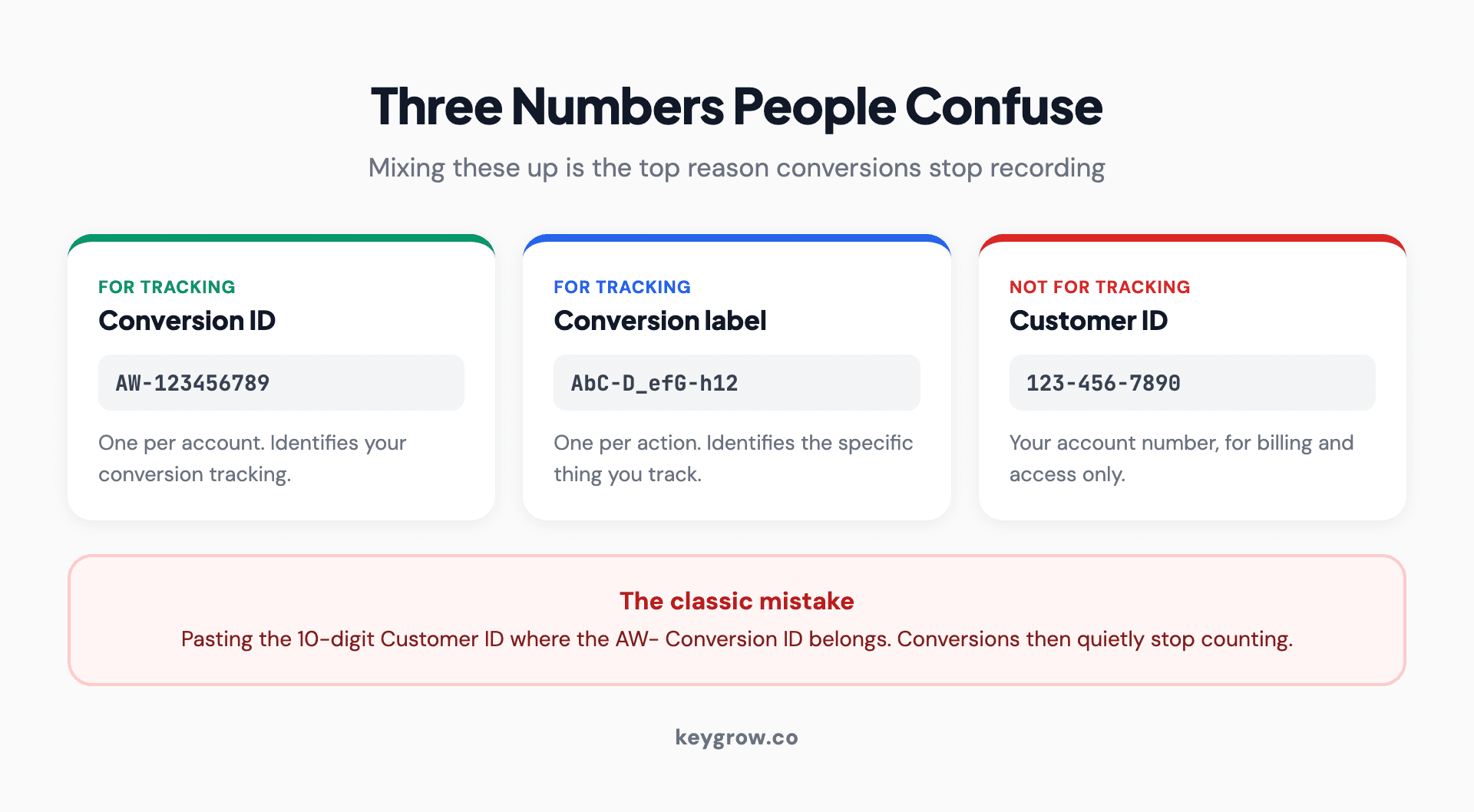
Three cards clarifying the conversion ID, conversion label, and customer ID in Google Ads, and how confusing the customer ID for the conversion ID stops conversions recording.
How to read the tracking string
When you choose "Install the tag yourself", the ID and label show up together inside a line that looks like this: `send_to: 'AW-123456789/AbC-D_efG-h12_34-567'`. That single string is two values with a slash between them.
Everything before the slash, `AW-123456789`, is your Conversion ID. Everything after it, `AbC-D_efG-h12_34-567`, is the Conversion label for this one action. Split them at the slash and you have the two values a tag manager asks for separately. Google shows the exact same format in its conversion tracking setup documentation, so you can check your string against the pattern if a character looks off.
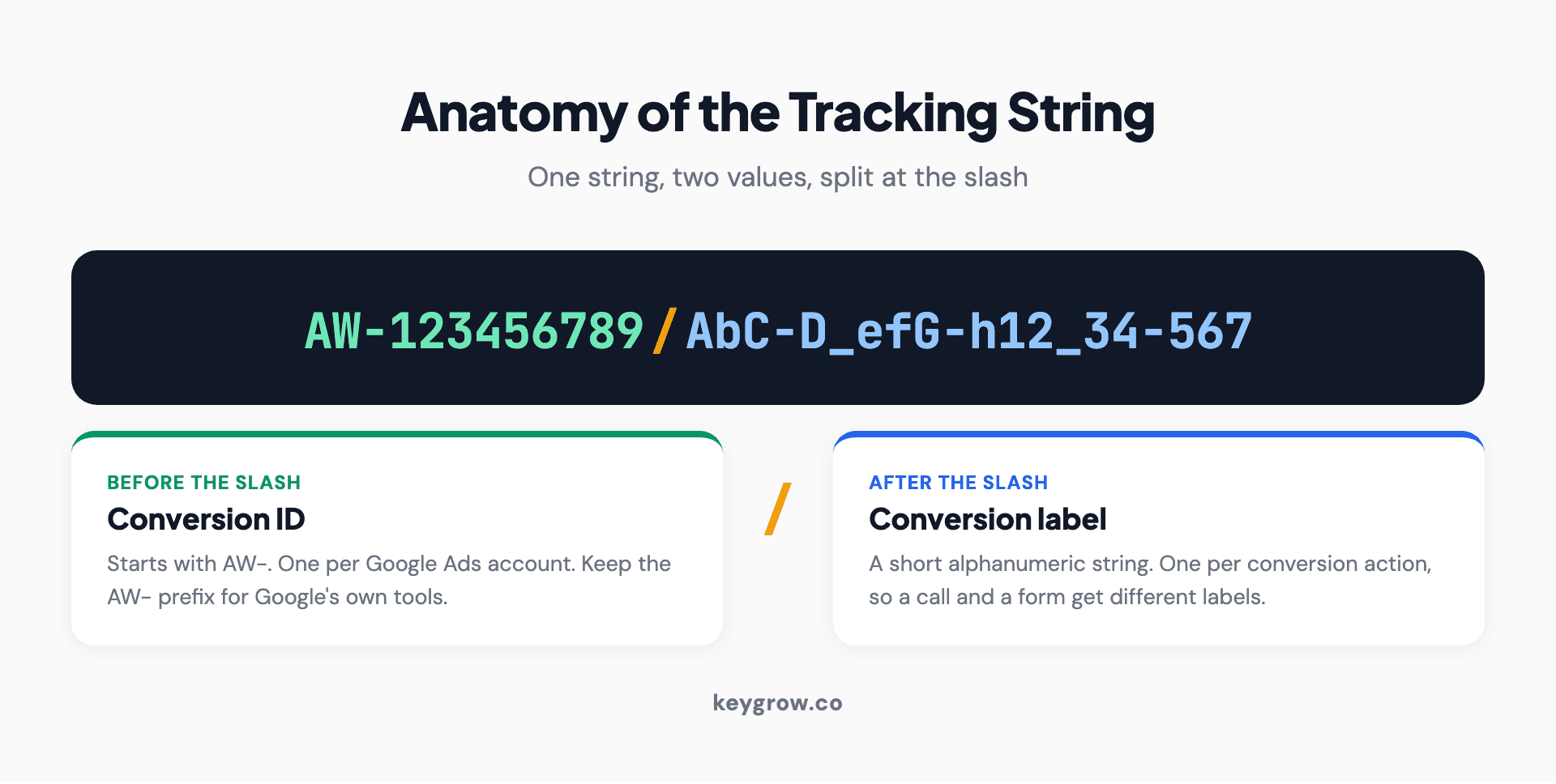
Diagram decoding a Google Ads tracking string, showing the conversion ID before the slash and the conversion label after it.
Where the ID actually goes
Finding the ID is half the job. Putting it in the right place is the other half, and it depends on how your site fires tags.
If you use Google Tag Manager, create a Google Ads Conversion Tracking tag, and paste the Conversion ID into the Conversion ID field and the Conversion label into the Conversion label field. Two boxes, two values, and you keep the AW- prefix on the ID. Google's Tag Manager Help walks the tag through if you want the screenshots. Pair it with a Conversion Linker tag so the tracking survives across pages.
If you install the tag by hand, the whole `AW-123456789/AbC...` string goes into the gtag event as the send_to value, exactly as Google gives it to you. Nothing to split in that case.
One trap worth naming: some third-party pixel fields want the digits only, without the AW-. Google's own tools want the AW- kept on. When conversions will not fire, this prefix mismatch is one of the first things to check.
When you entered the ID and conversions still will not record
This is the frustrating part, and it is almost always one of a handful of causes. Before you rebuild anything, run down this list.
| Symptom | Usual cause | Fix |
|---|---|---|
| No conversions at all | Customer ID pasted where the Conversion ID belongs | Swap in the AW- number from Tag setup |
| Tag fires, nothing counts | Conversion label missing or wrong | Copy the label again, the part after the slash |
| Works on some pages | No Conversion Linker tag | Add one in Tag Manager so clicks carry across pages |
| Number rejected by a field | AW- prefix kept where digits-only was wanted | Strip or keep the prefix to match the destination |
| Delayed by a day or two | Normal reporting lag, not a bug | Wait 24 to 48 hours before assuming it broke |
If you have checked all five and it still shows nothing after two days, the conversion action itself may be paused or set to a status that stops counting. That is a separate rabbit hole, and it is usually where a PPC audit starts, because broken conversion tracking makes every other number in the account a guess.
Do you even need to touch this yourself?
Honestly, for a lot of small accounts, this is a job you can do once and forget. If you run a handful of campaigns, set your conversion actions up through Tag Manager, confirm they record for a week, and leave them alone. You do not need an agency to find a Conversion ID, and anyone who makes it sound like dark magic is selling something.
Where it stops being a five-minute task is when you have many conversion actions, offline conversions from a CRM, or values that feed lifetime value math back into bidding. At that point the wiring gets easy to break and worth a second set of eyes. Correct conversion IDs are also the foundation under UTM tracking and any serious paid search work, because none of the reporting means anything if the tag underneath is pointed at the wrong number.
FAQs
What is a conversion ID in Google Ads?
A conversion ID is the AW- number that identifies your Google Ads account's conversion tracking. There is one conversion ID per account, and it pairs with a conversion label that identifies each specific action you track, like a form submit or a phone call. Together they tell Google which of your ads drove which result.
Is the conversion ID the same as my customer ID?
No, and mixing them up is the most common tracking mistake. The customer ID is the 10-digit number in the top right of your account, formatted like 123-456-7890, used for billing and access. The conversion ID starts with AW- and is used only for tracking. They are different numbers with different jobs.
Where do I find the conversion label?
In the same place as the conversion ID. Go to Goals, then Conversions, then Summary, click a conversion action, and open Tag setup. Choosing "Use Google Tag Manager" shows the label as its own field. If you install the tag yourself, the label is the part of the send_to string that comes after the slash.
Do I include the AW- prefix when I enter the ID?
For Google's own tools, including Google Tag Manager, keep the AW- prefix on the conversion ID. Some third-party or pixel fields ask for the digits only. When conversions are not recording, a mismatched prefix is one of the first things to check.
Can I track more than one conversion with a single conversion ID?
Yes. One conversion ID covers the whole account, and each thing you track gets its own conversion label under it. So a form submit, a call, and a purchase all share the same AW- conversion ID but carry three different labels. If the call side is what you are setting up, our guide to call tracking for PPC covers the free Google option and when paid software earns its cost.
If you remember one thing
One account, one conversion ID, one label per action. Get those three straight and most tracking problems never happen. The number you are looking for starts with AW- and lives under Goals, Conversions, Summary, in the Tag setup of each conversion action.
If your tracking is a tangle of half-firing tags and you are not sure which numbers are even correct anymore, that is worth fixing before you spend another dollar on ads. Tell us what you are seeing on the get started page and we will help you sort out what is pointed where.



