

Google Business Profile posts are short updates that appear on your profile in Search and Maps, and the honest summary is that they are a conversion tool, not a ranking tool. Publishing them will not move you up the map pack. What they do is take space on a screen where a customer is already deciding between you and two competitors, and give them a reason to pick you.
That distinction matters because most advice about Google Business Profile posts is written as if a weekly post is a ranking lever. It is not, and treating it as one leads to a year of "we are open Monday to Friday" updates that nobody reads.
Used properly, posts are worth about twenty minutes a week. Here is what they actually do, what the rules are, and when to stop bothering.

Shop window sign reading come in we are open.
Where a post actually shows up
Before deciding what to write, look at where it lands, because desktop and mobile treat posts differently and most people have only ever seen one of them.
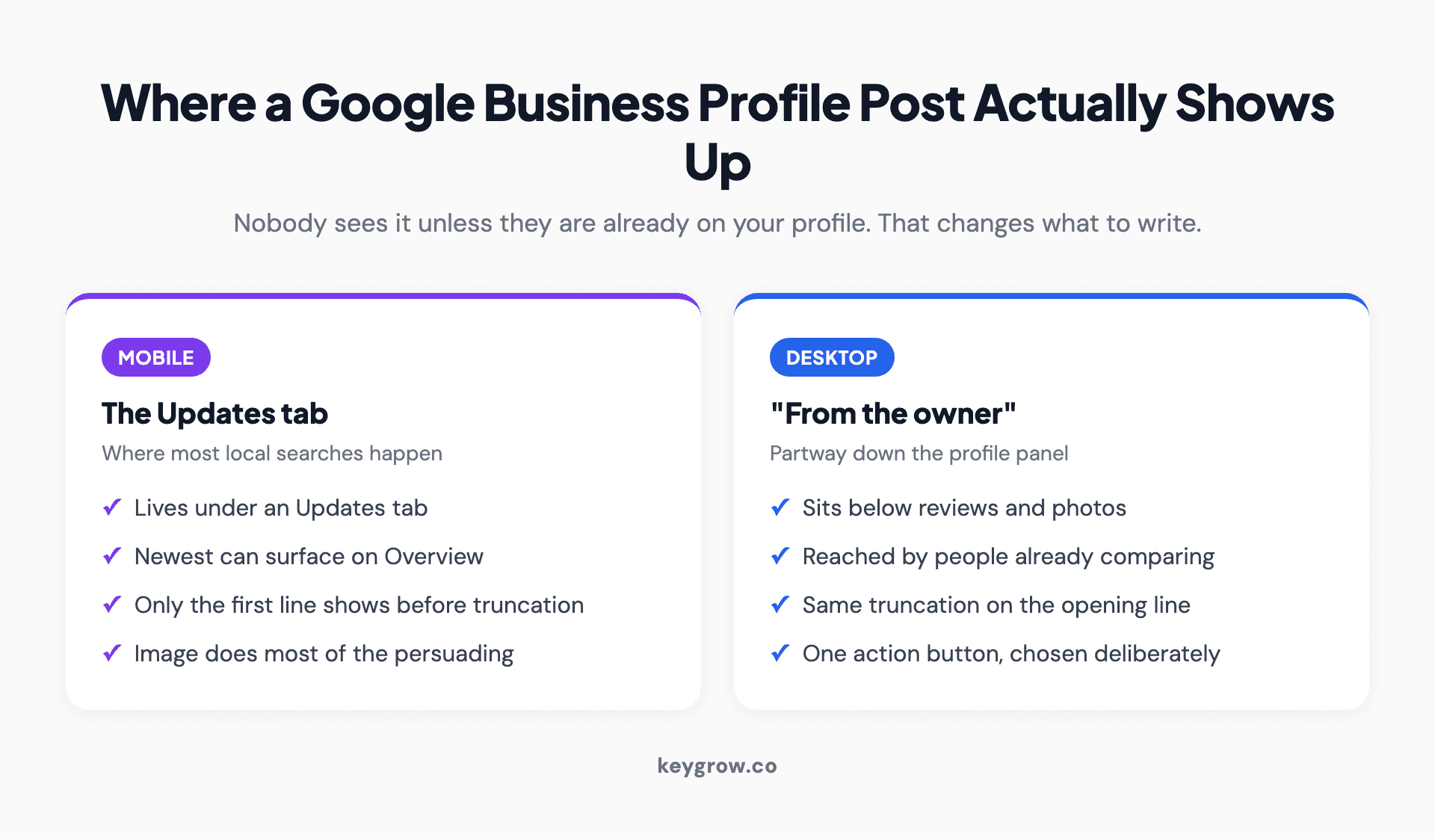
Two-column comparison of where Google Business Profile posts appear on mobile and on desktop, and how much of each post a customer sees before tapping.
On mobile, posts live under an Updates tab, and the most recent one can also surface on the Overview tab where a customer actually lands. On desktop, they appear in a "From the owner" block partway down the profile panel.
Two consequences follow. First, nobody sees your post unless they are already looking at your profile, which means the audience is people who are deciding, not people who are discovering. Second, only the first line or so shows before the post is truncated, so the opening words do all the work.
That reframes the whole exercise. A post is not a broadcast. It is the last thing somebody reads before they call you.
Do posts help you rank? The honest answer
No, not directly. Posts are not a local ranking factor, and any agency reporting weekly posting as an SEO deliverable is selling activity rather than results.
Read Google's local ranking guidance and you will find no mention of publishing frequency anywhere in it. The inputs are how well the profile matches the query, how far away you are, and how well known the business is. Posting changes none of those. The indirect effects are real but small: a profile with recent activity looks alive, the post occupies screen space a competitor could have had, and the text gives search and AI systems something current to read about you.
This is our one strong opinion in this post and it saves people money. If your profile is not appearing in the map pack, posting three times a week will not fix it. Your primary category, your review count and your proximity to the searcher will. We wrote about that in detail in our guide to Google Business Profile optimization, and posts sit near the bottom of that priority list on purpose.
Post because it converts the traffic you already have. Do not post because you think it ranks.
There is a version of this that is worth the effort, though, and it is not the version most agencies sell. If your profile already shows up and the problem is that people look and then call somebody else, a post is one of the very few levers you have on that screen. You cannot change your distance from the searcher and you cannot manufacture reviews overnight. You can put a current, specific, useful sentence where a hesitating customer will read it.
The three post types, and when each one earns its place
Google's documentation lists three: updates, offers and events. Product listings moved into their own section of the profile and are no longer a post type, which trips up anyone following an older guide.
| Type | Best for | Needs | Lifespan |
|---|---|---|---|
| Update | News, changes, a new service, seasonal notes | Text, photo, optional button | Archived after six months |
| Offer | A discount or promotion with a deadline | Title, start and end date, optional coupon code | Ends on the date you set |
| Event | Open days, classes, sales, anything with a date | Title, start and end date, optional detail | Ends after the event |
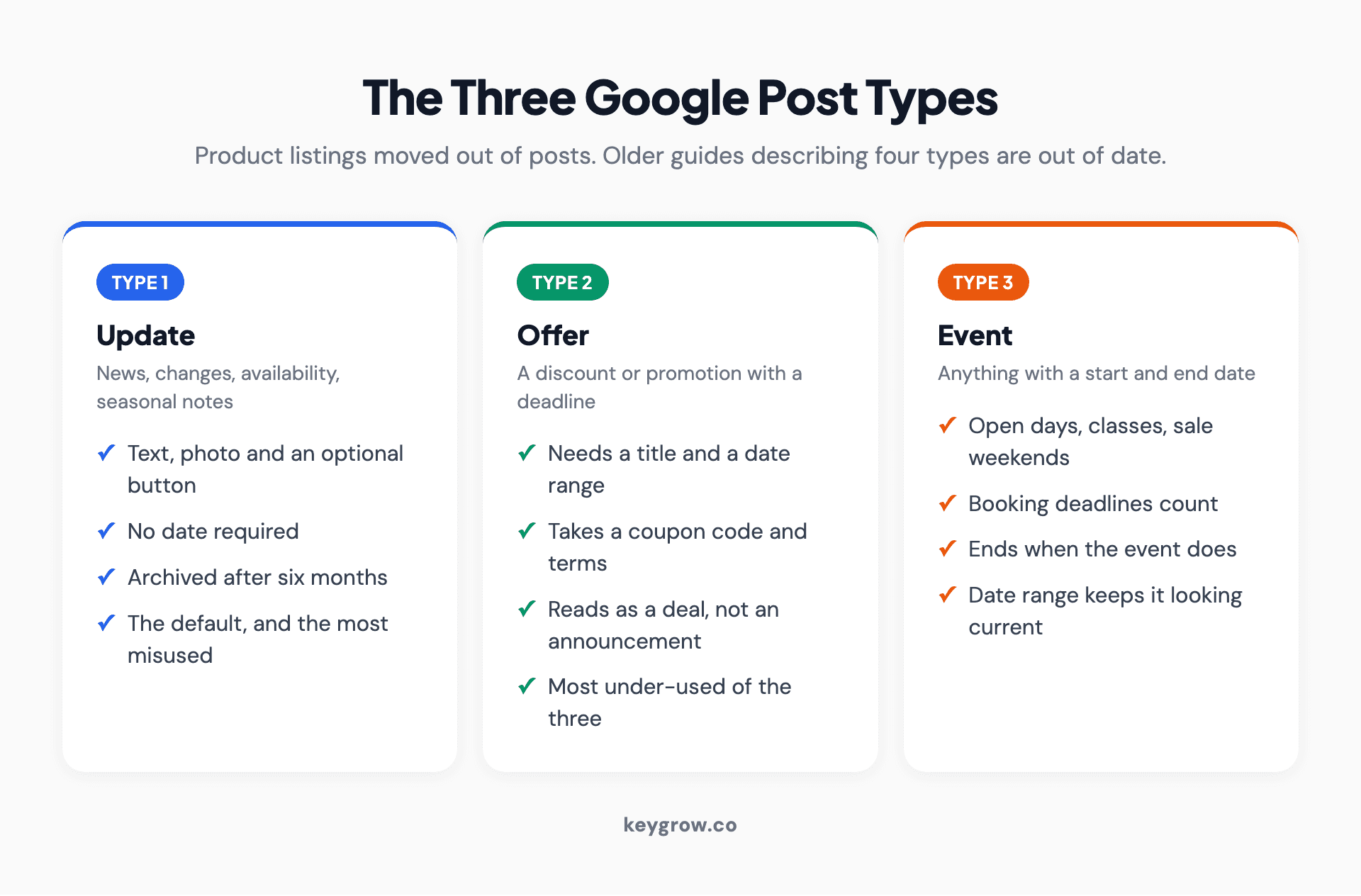
Three-column breakdown of Google Business Profile post types: updates, offers and events, with what each is best for and how long it lasts.
Offers are the most under-used of the three, and they behave differently on the profile: they carry a "View offer" treatment with the dates attached, which reads as a deal rather than an announcement. If you run any kind of promotion, put it here rather than writing an update about it.
Events are worth using loosely. Anything with a start and end date qualifies, which covers a seasonal service window, a clinic day, a sale weekend, a booking deadline. The date range keeps the post current-looking, which an update cannot do.
Offers take a coupon code and a terms field as well, and both are worth filling. The code gives you attribution you would not otherwise get, because someone who mentions it at the counter has told you the profile produced the visit. That is the only clean offline measurement available on this surface, and almost nobody uses it.
The rules that get posts rejected, and the six month clock
Posts go through a content review before they appear, and a handful of rules catch people out repeatedly.
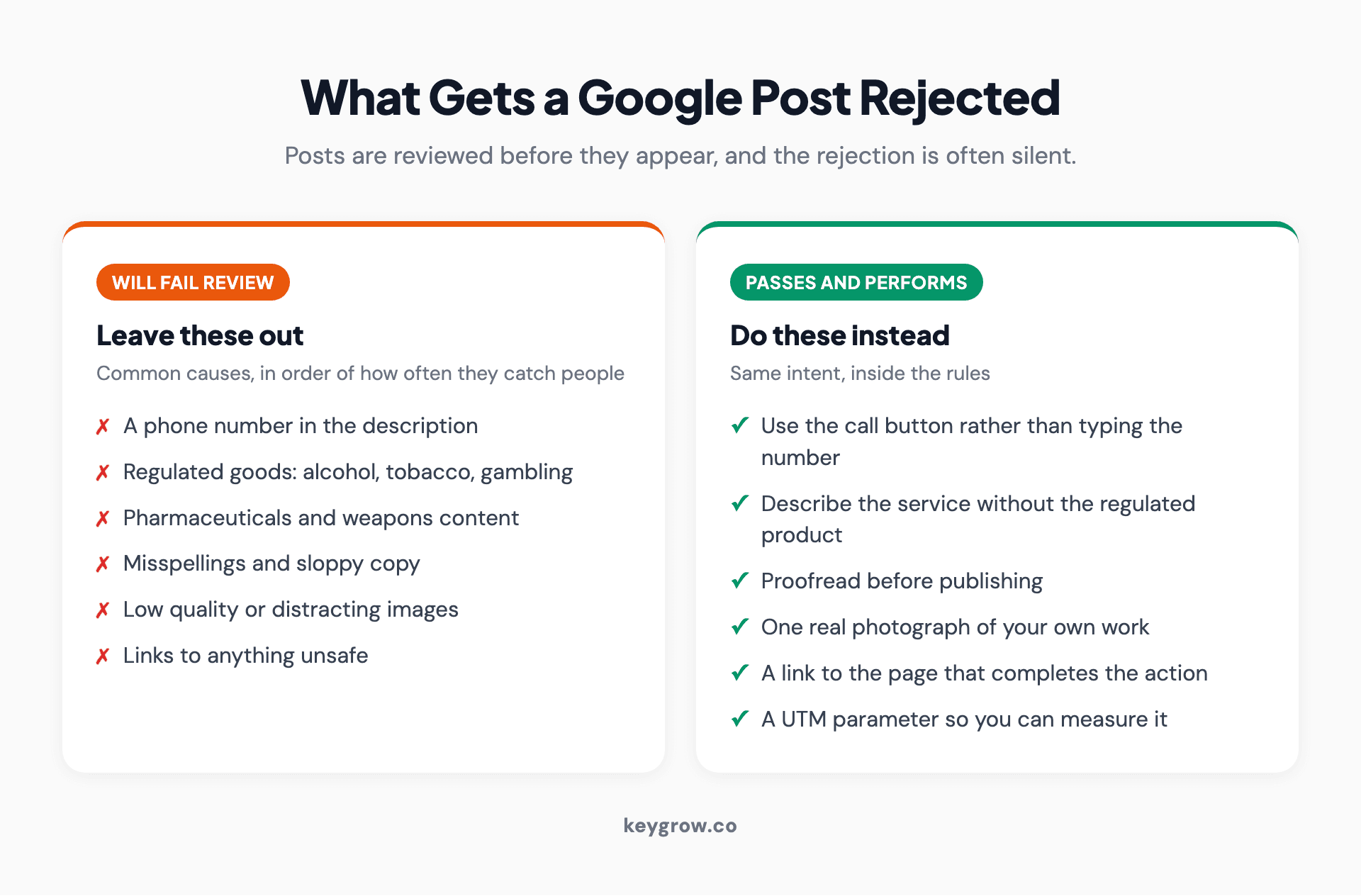
Two-column list of what is not allowed in a Google Business Profile post and the practices that keep posts approved.
The one that surprises almost everybody: phone numbers are not allowed in the post description. If you want someone to call, use the call action button rather than typing the number into the text. Posts with numbers in the body get rejected, and the rejection is usually silent enough that people assume the post simply did not save.
Regulated goods are the other common cause. Alcohol, tobacco, pharmaceuticals, gambling and weapons content will not pass review, which catches out bars, dispensaries, vape retailers and some clinics. Sloppiness also counts against you; misspellings and low-quality or distracting images can fail review on their own.
Then the clock. Google archives posts older than six months unless a date range is set. That is a longer life than the seven days posts used to get, and it changes the math on effort. A well-written update is visible for half a year, which means a small number of good posts beats a weekly stream of filler.
What to actually post
The test is whether the post helps someone who is currently deciding. Nothing else qualifies.

Small business interior with a sign reading come in we are open and awesome.
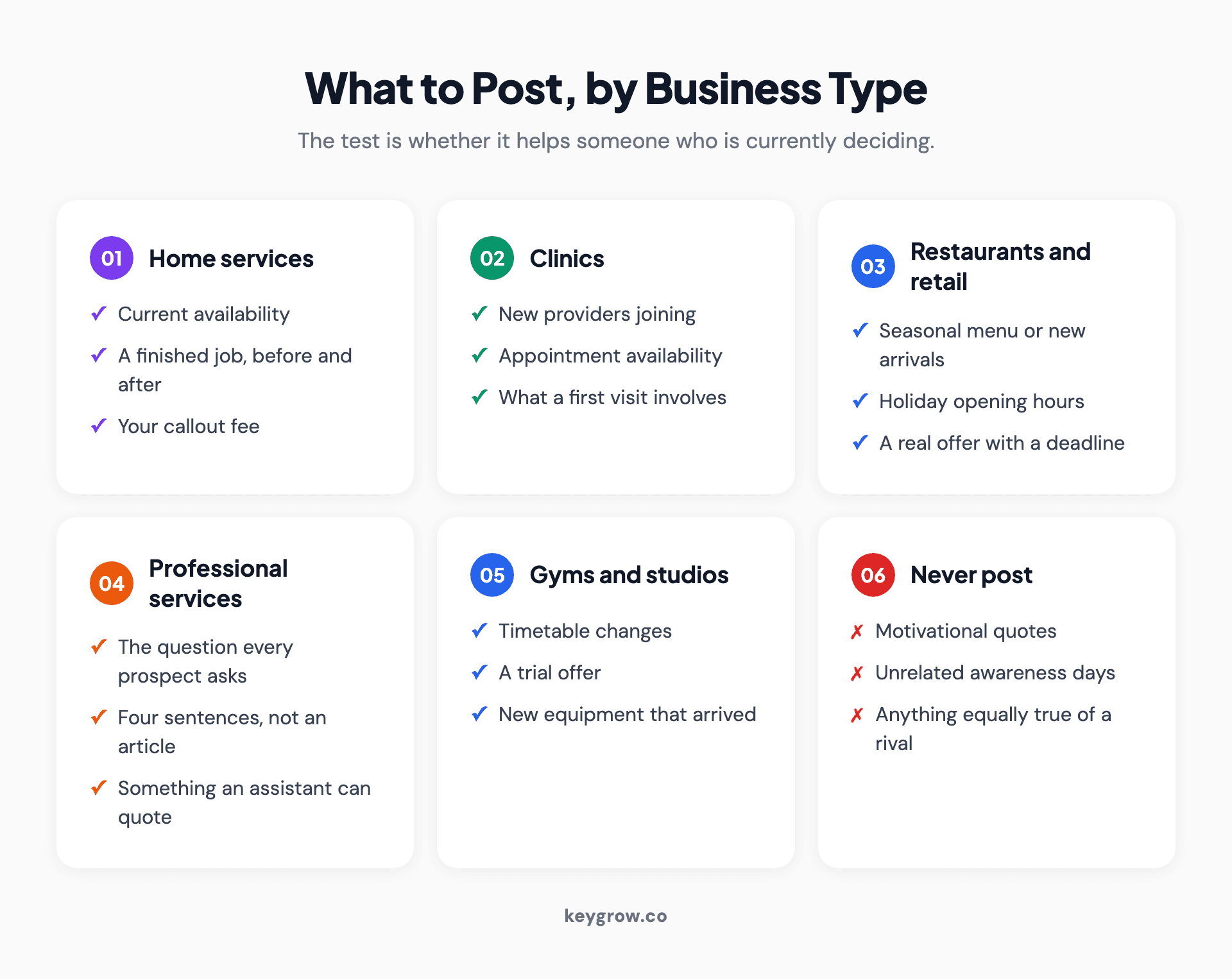
Card grid of what to post on a Google Business Profile by business type, covering home services, clinics, restaurants and retail, professional services and gyms.
For home services: current availability, the jobs you are booking this month, a finished project with a before and after, and your callout fee. Availability is the single most useful thing a service business can publish, because the person reading it is trying to work out whether you can come out this week.
For clinics and practices: new providers joining, appointment availability, insurance changes, what a first visit involves. Skip anything that reads as a health claim.
For restaurants and retail: the seasonal menu, opening hours over holidays, a new arrival, a genuine offer with a deadline. Holiday hours as a post, on top of the special hours field, catches the people who do not scroll.
For professional services: a short answer to the question every prospect asks on the first call. Not an article, four sentences. It doubles as something a search or AI system can quote.
For gyms and studios: class timetable changes, a trial offer, the new equipment that arrived. Anything a member or prospect would otherwise have to phone to ask.
What to skip: motivational quotes, national awareness days unrelated to your work, generic industry news, and anything that would be equally true of your competitor.
Here is the comparison that makes the point. "Happy Friday from the team, we hope you have a great weekend" tells a reader nothing and takes the slot. "Two same-week slots left for gutter clearing before the storms, $180 for a standard two-story house" answers the exact question the reader opened your profile with. The second one took no longer to write.
If you run more than one location, write per location rather than broadcasting one post everywhere. The availability, the staff and the offer are usually different, and identical posts across ten profiles is a pattern worth avoiding for the same reason identical location pages are.
Writing one that gets clicked
Posts have an unusual shape. The first line is nearly everything, the image carries the rest, and there is one button.
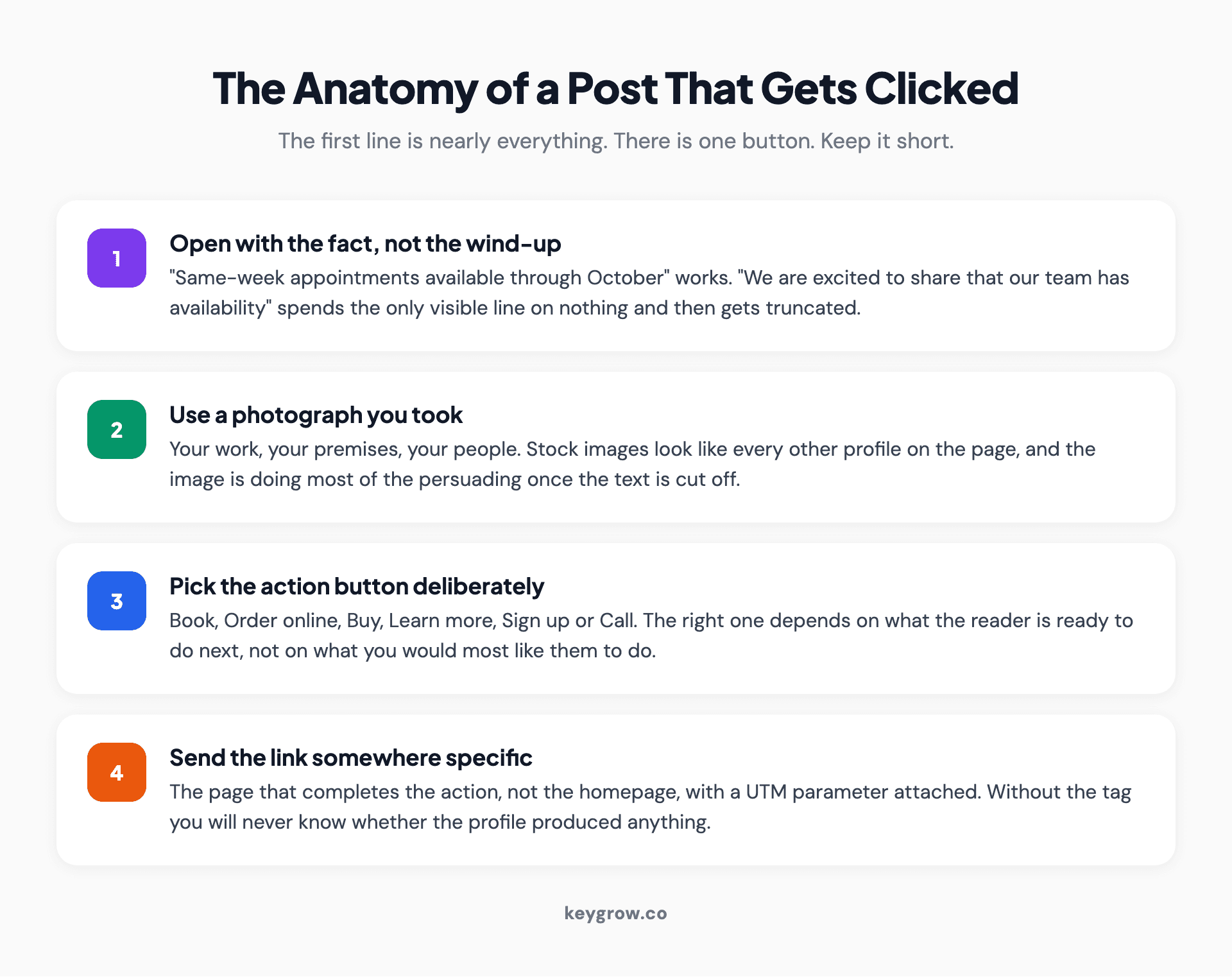
Four-step anatomy of an effective Google Business Profile post: the opening line, the image, the action button and the link destination.
Start with the offer or the fact, not the wind-up. "Same-week appointments available through October" works. "We are excited to share that our team has availability" wastes the visible line and then gets truncated.
Use a real photograph of your business, your work or your people. Stock images perform worse and look like every other profile. If you have a genuinely good photo of a finished job, that is the post.
Pick the action button deliberately. Book, Order online, Buy, Learn more, Sign up, and Call are the options, and the right one depends on what the reader is ready to do. Send the link to the page that completes that action rather than to your homepage, and add a UTM parameter so you can tell in analytics that the visit came from the profile rather than from organic search.
Keep it short. There is a 1,500 character limit and almost nothing benefits from using it. Three or four sentences, a clear number or date, one action.
There is a second reason to write plainly here, which is that this text is now read by more than customers. Assistants summarizing a local business pull from the profile, and a post that states a fact in plain words, such as current availability or a price, is exactly the kind of thing that gets quoted back. A post written as marketing atmosphere gives them nothing to work with.
How often is enough
Weekly is the usual recommendation and it is more than most businesses need. With a six month archive window, a realistic cadence is one good post a month, plus an offer or event whenever you genuinely have one.
The exception is businesses where availability changes constantly. A home service business in a busy season, a clinic with cancellations, a restaurant with a rotating menu: those genuinely benefit from something more frequent, because the information itself is perishable.
Everyone else should write four solid posts a quarter rather than twelve thin ones. The thin ones are visible for six months too, which is exactly the problem.
A practical rhythm that survives a busy month: one standing post that states what you are currently booking or stocking, refreshed when it stops being true, plus a dated offer or event whenever you have a real one. That is closer to maintaining a sign in the window than running a content calendar, and it is the right mental model for this surface. If you also post on Facebook or Instagram, reuse the same photos; our weekly social media routine for local businesses fits this monthly Google post into 90 minutes a week.
What you can measure, and what you cannot
Profile performance reporting will show you views and interactions, and the post-level detail is thinner than you would like. Treat it as directional.
The number that actually answers the question lives in your own analytics, and only if you tagged the link. Add a UTM to every post link, then look at sessions and conversions from that source. If two months of posts produced eleven visits and no bookings, you have your answer and you can stop.
Also watch the profile-level actions over the same period: calls, direction requests, website clicks. Posts should nudge those. If the profile numbers are flat across a quarter of posting, the posts are not the lever for your business, which is a legitimate finding rather than a failure.
Be careful comparing month to month without accounting for season and for any profile change you made at the same time. Local businesses swing on weather, holidays and school terms far more than on marketing, and a category change or a run of new reviews will move the same numbers posts are supposed to move. If you want a clean read, change one thing at a time and give it a full month.
When posting is a waste of your time
If your profile is not ranking, posting is the wrong job. Fix the category, the service list and the review count first, and come back to this later. A post on a profile nobody sees is a diary entry.
If you have nothing genuine to say, say nothing. A stale profile with six real posts over two years looks better than one with forty updates that all read like a calendar reminder, because a customer reads the top one and forms an opinion.
If you are a business that runs on proximity and reviews alone, and your customers decide in under a minute, this is genuinely optional. A single-location takeaway with 400 reviews does not need a content program. Spend the twenty minutes on photos instead, which get seen more.
And if an agency is billing you for weekly posting as an SEO line item, ask what it produced. Our local SEO work treats posts as a small conversion task rather than a deliverable to fill a report, because the time is better spent on the parts of a profile that actually decide position. For a fuller picture of how the map pack is scored, our post on Google Maps SEO covers the ranking mechanics.
FAQs
Are posts a local ranking factor?
Not directly. Posts are not one of the inputs Google names for local ranking, which rest on relevance, distance and prominence. They can help indirectly by increasing engagement and giving search and AI systems fresh text about your business, but a profile that is not ranking will not start ranking because you posted.
How long do Google Business Profile posts stay visible?
Google archives posts older than six months unless the post has a date range set. Offers and events end on the dates you specify. This is much longer than the seven-day window posts had in earlier years, so a small number of well-written posts stays useful for a long time.
Can you put a phone number in a Google post?
No. Phone numbers are not permitted in the post description and including one can get the post rejected during review. Use the call action button instead, which places your listed number behind a tap without putting it in the text.
How often should a business post on Google?
One good post a month plus offers and events as they come up is enough for most businesses. Weekly posting only pays where the information is genuinely perishable, such as a service business publishing current availability or a restaurant with a rotating menu.
What types of posts can you create?
Updates, offers and events. Product listings used to be a fourth post type and now live in a separate section of the profile, so older guides describing four types are out of date.
Do posts show up in Google Search results?
They appear on your Business Profile in Search and Maps, not in the ordinary blue-link results. On mobile they sit in an Updates tab with the newest sometimes surfacing on the Overview tab, and on desktop they appear in a "From the owner" section of the profile panel.
Can you schedule Google Business Profile posts in advance?
Not natively in the Google interface, which only publishes immediately. Third-party tools that connect to the profile can schedule them, and for offers and events you can set a future start date, which achieves much the same thing for dated content.
Twenty minutes a month, honestly spent
Write one post that answers the question your customers actually ask, use a real photo, pick the right button, tag the link so you can measure it, and then leave it alone for a month. Add an offer when you have one and an event when there is one.
If that produces nothing over a quarter, stop and put the effort into reviews and photos. If it produces calls, it was the cheapest thing you did all year. Either way you will know, which is more than most businesses posting weekly can say. If you want someone to look at whether your profile is losing on position rather than on presentation, send us the listing.



