


The best job you booked this month came from a conversation you never saw. A woman three streets over asked her neighborhood group who to call about a leaking water heater. Two neighbors named you, and she phoned the next morning.
Meanwhile you have posted every weekday since spring. Tips on Mondays, a team photo midweek. Nobody has mentioned a single one of them.
That gap is how social media for local business usually works. The posts you schedule matter less than the conversations about you and the ones aimed at you: a neighbor passing your name along, a customer checking your page after reading a review, a message at 8 p.m. asking about Thursday.
So here is the short answer. Social media works for a local business when it turns people within driving distance into calls, messages and bookings. That takes one or two platforms that suit your trade, a current Google Business Profile, fast replies and steady proof of real work. Follower counts barely come into it.
The local social media checklist
Ten jobs, in order. The first four are an afternoon of setup. The rest are habits, and the habits are where the calls come from.
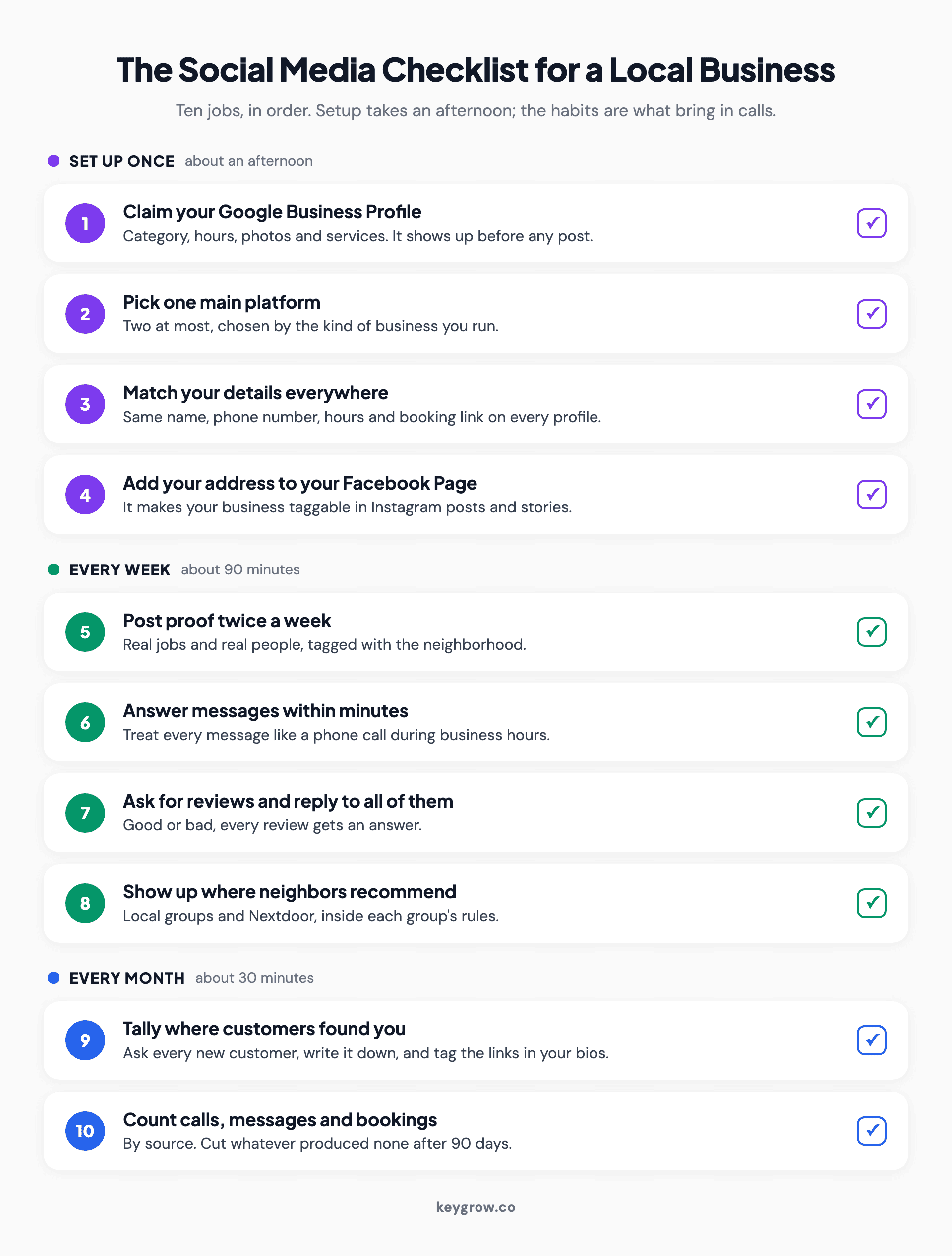
Numbered checklist of ten social media jobs for a local business, grouped into one-time setup, weekly habits and a monthly count, from claiming a Google Business Profile to counting calls, messages and bookings.
- Claim and complete your Google Business Profile.
- Pick one main platform for your type of business, two at most.
- Use the same name, phone number, hours and booking link everywhere.
- Add your address to your Facebook Page so posts can carry a location tag.
- Post proof of real work twice a week, tagged with the neighborhood.
- Answer messages within minutes during business hours.
- Ask every happy customer for a review, and reply to all of them.
- Show up where neighbors ask for recommendations.
- Ask every new customer how they found you, and tag your links.
- Count calls, messages and bookings each month, and cut whatever produces none.
Most owners start at number five. Start at number one.
Which platforms fit which kind of local business?
Facebook suits almost every local business. Add Instagram if your work photographs well, Nextdoor if you serve homeowners, and LinkedIn if your customers are businesses.
Reach is not the issue. In its 2025 report, Pew Research Center found that 84 percent of U.S. adults use YouTube, 71 percent use Facebook and half use Instagram, with 37 percent opening Facebook several times a day. What matters is which app your customers open when they need what you sell, and how many hours you can give it.
| Type of business | Start with | Add if you have time | Usually skip |
|---|---|---|---|
| Restaurant, cafe, shop | Instagram and Facebook | TikTok | |
| Salon, barber, spa, studio | Facebook, TikTok | LinkedIn, X | |
| Home services (plumbing, HVAC, roofing, cleaning, lawn care) | Facebook and Nextdoor | Instagram for before-and-afters | X, Pinterest |
| Emergency trades (locksmith, towing, 24-hour plumbing) | A complete Facebook page that proves you are real | Nothing, until Google is sorted | Daily posting anywhere |
| Dentist, chiropractor, med spa | Facebook and Instagram | Short YouTube explainers | X |
| Lawyer, accountant, financial advisor | Facebook and LinkedIn | YouTube answers to common questions | TikTok, unless someone on staff enjoys it |
| Auto repair, detailing | Facebook and Instagram | YouTube | LinkedIn, X |
| Office cleaning, IT support, other services sold to businesses | TikTok, Pinterest |
Google Business Profile sits above every row. It is not a social network, but it is what people see when they search for your trade nearby, so it comes first.
If two platforms feel like a stretch, run one properly. A single Facebook page that answers within the hour will out-earn four accounts that went quiet in March.
Set up Google Business Profile before any social account
Search your trade in your town and Google shows a map of business profiles, not social posts. Fix yours first. It has the call button.

A man walking past a storefront while checking his phone, which is where a lot of local searches start.
Google's own help page says local results are mainly based on relevance, distance and how well known a business is, which includes how many reviews it has. Posting frequency is not on that list. So the profile work comes first: the right primary category, real photos, accurate hours, your services and a steady flow of reviews. Our guide to ranking for near me searches covers what moves those rankings.
The profile also gives you numbers worth having. Its Performance report counts calls, website clicks and direction requests from your listing, plus bookings if you take them through a booking provider. That is your baseline before you spend an hour on posting.
Then reuse your best social photos there. Google Business Profile posts appear to people already looking at your profile, which makes them a conversion tool rather than a ranking one. One good post a month is plenty.
Where your neighbors find you
Local reach comes from features generic guides skip: location tags, neighborhood groups, Nextdoor recommendations and local events. Each puts you in front of people nearby.
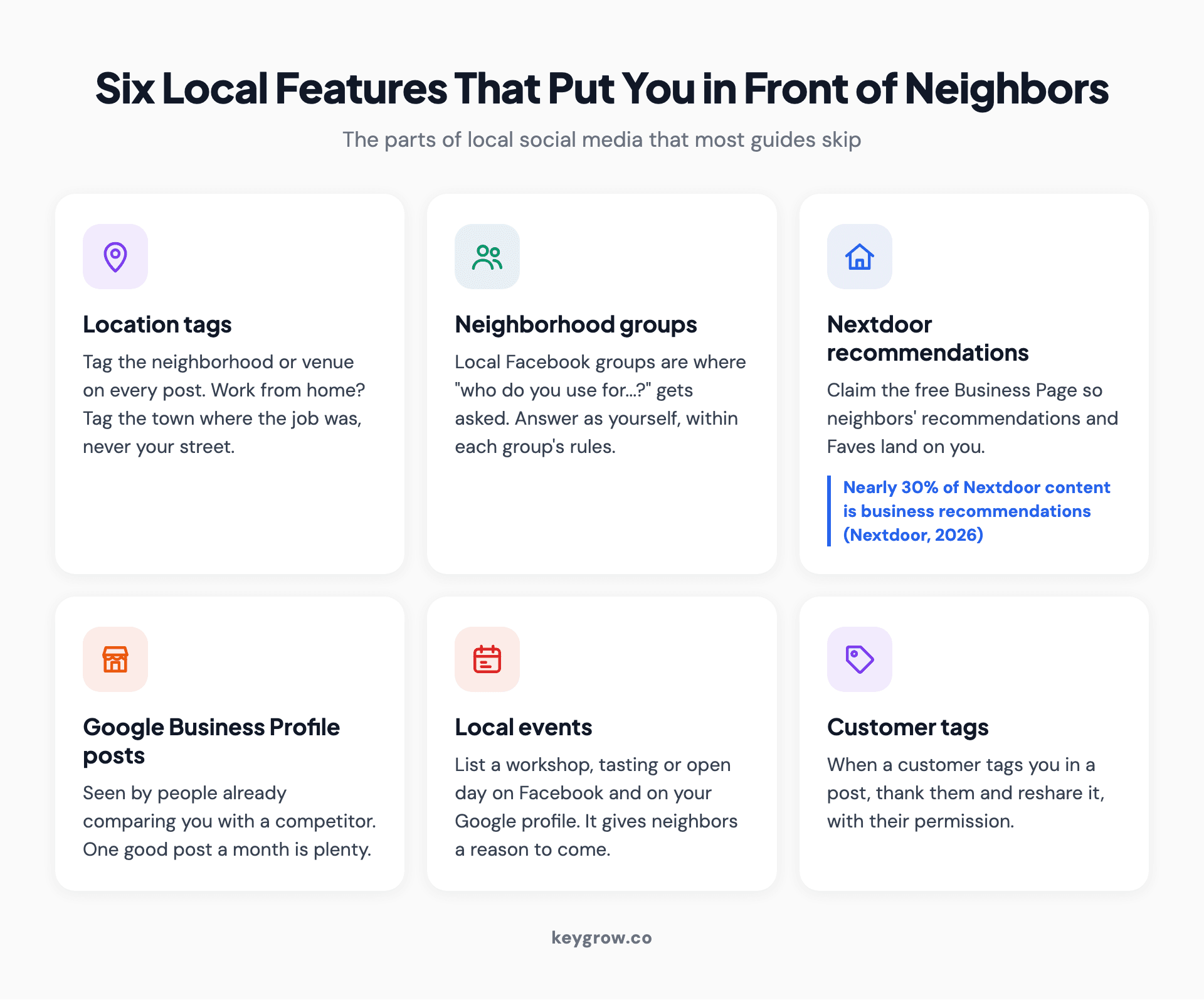
Icon grid of six local social media features for neighborhood reach: location tags, neighborhood groups, Nextdoor recommendations, Google Business Profile posts, local events and customer tags.
Location tags
Instagram's help center says that once your Facebook Page has your address and is connected to your Instagram account, your business shows on the Instagram map and becomes taggable in posts and stories within 48 hours. Tag the neighborhood or venue on every post. If you work from home, tag the town where the job was, never your street.
Neighborhood groups
Local Facebook groups are where "who do you use for gutters?" gets asked. Read each group's rules first, since many ban promotion. Answer as yourself when someone asks, and let your customers do the recommending.
Nextdoor
Nextdoor says organic business recommendations already make up nearly 30 percent of all content there, and neighbors have left nearly 75 million Faves across nearly 6.6 million businesses worldwide. Claim the free Business Page so those recommendations land on you. Nextdoor also says U.S. businesses will soon be able to post and comment in the neighborhood feed. Until then, the page and the recommendations are the main event.
Events
A workshop, tasting or open day listed on Facebook and on your Google profile gives neighbors a reason to show up, which a regular post rarely does.
What should a local business post?
Post real work in a real place: the finished job, the person who did it and the street it happened on. Plain beats polished.

A baker photographing a fresh tray of tarts with a phone, the kind of real-work photo that does better locally than stock images.
The formats that earn messages are ordinary ones. A before-and-after from this week. A 20-second video answering a question you get on the phone. The crew at a job, with the neighborhood tagged. A reminder tied to local weather. A customer's review, shared with their permission.
A stock photo of a smiling plumber has never once made a phone ring.
Two good posts a week on one platform is plenty for most local businesses, and a steady two beats a daily schedule that collapses in week six.
When a post brings in messages on its own, that is the one to boost. Pay to show it only in the area you serve, keep the budget small and fixed, and judge it on the calls and messages it produces. Real estate agents have extra ad rules to work around, covered in our Instagram playbook for real estate agents.
A weekly routine that fits in 90 minutes
Ten minutes each weekday on messages and reviews, plus 40 minutes a week for two posts, review requests and the neighborhood. Then a monthly count.
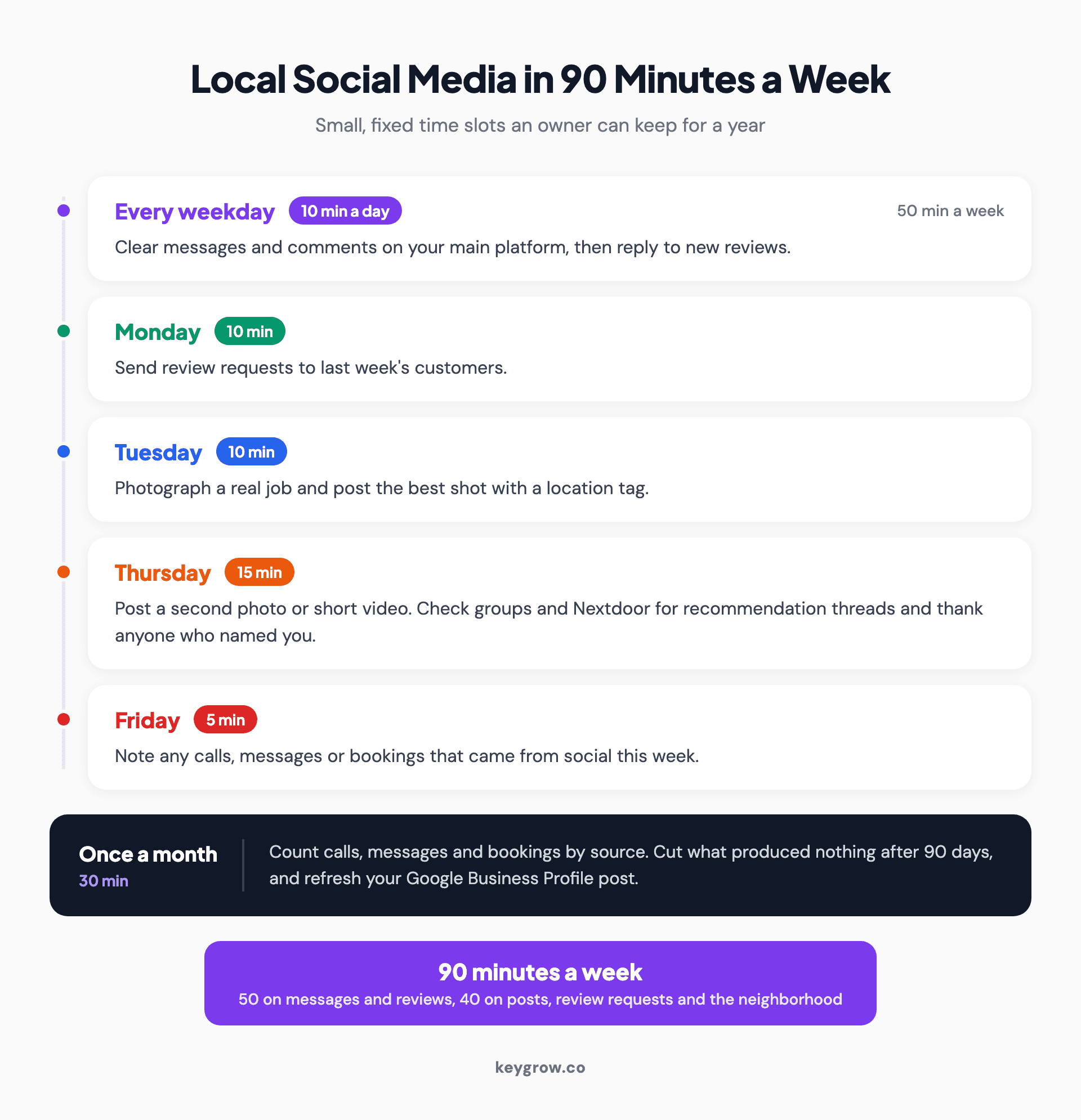
Timeline of a 90-minute weekly social media routine for a local business: 10 minutes each weekday on messages and reviews, review requests on Monday, proof posts on Tuesday and Thursday, a Friday tally and a monthly review.
- Every weekday, 10 minutes: clear messages and comments on your main platform, then reply to new reviews.
- Monday, 10 minutes: send review requests to last week's customers.
- Tuesday, 10 minutes: take photos on a real job and post the best one with a location tag.
- Thursday, 15 minutes: post a second photo or short video, then check neighborhood groups and Nextdoor for recommendation threads and thank anyone who named you.
- Friday, 5 minutes: note any calls, messages or bookings that came from social this week.
Once a month, take 30 minutes for the count described below and refresh your Google post. That is the whole job.
Answer messages and reviews like phone calls
A message is a phone call that happens to be typed. Answer within minutes during business hours, and reply to every review, good or bad.
Facebook rewards this in public.
Meta's help center says a Page earns the "very responsive" badge with a Messenger response rate of 90 percent or higher and a response time under 15 minutes. Away messages and instant replies do not count toward either number. Set an instant reply anyway, with your hours and a booking link, so nobody waits in silence, then follow it with a real answer.

A cafe owner taking a phone call behind the counter, which is how a customer's social media message deserves to be treated.
Reviews work the same way. In BrightLocal's 2026 survey of 1,002 U.S. consumers, 80 percent said they are likely to use a business that responds to all of its reviews, and 42 percent said they are unlikely to use one that never replies. Speed counts there too: 32 percent want a response by the next day.
The same survey found that after reading positive reviews, 24 percent of people go on to visit the business's social media. That is the main job your page does for a local business. It is the proof check, and a visible reply from yesterday reassures people more than a post from yesterday.
Measure it in calls, messages and bookings
Likes measure attention. Calls, messages and bookings measure money. Count those three every month, by source, and leave the rest out.
Follower counts are what an agency shows you when the phone is not ringing. We report local work by the result an owner can bank. When a phone repair shop's local SEO reached 115+ phone calls a month within 7 months, that was the headline, not rankings or impressions. Social deserves the same standard.
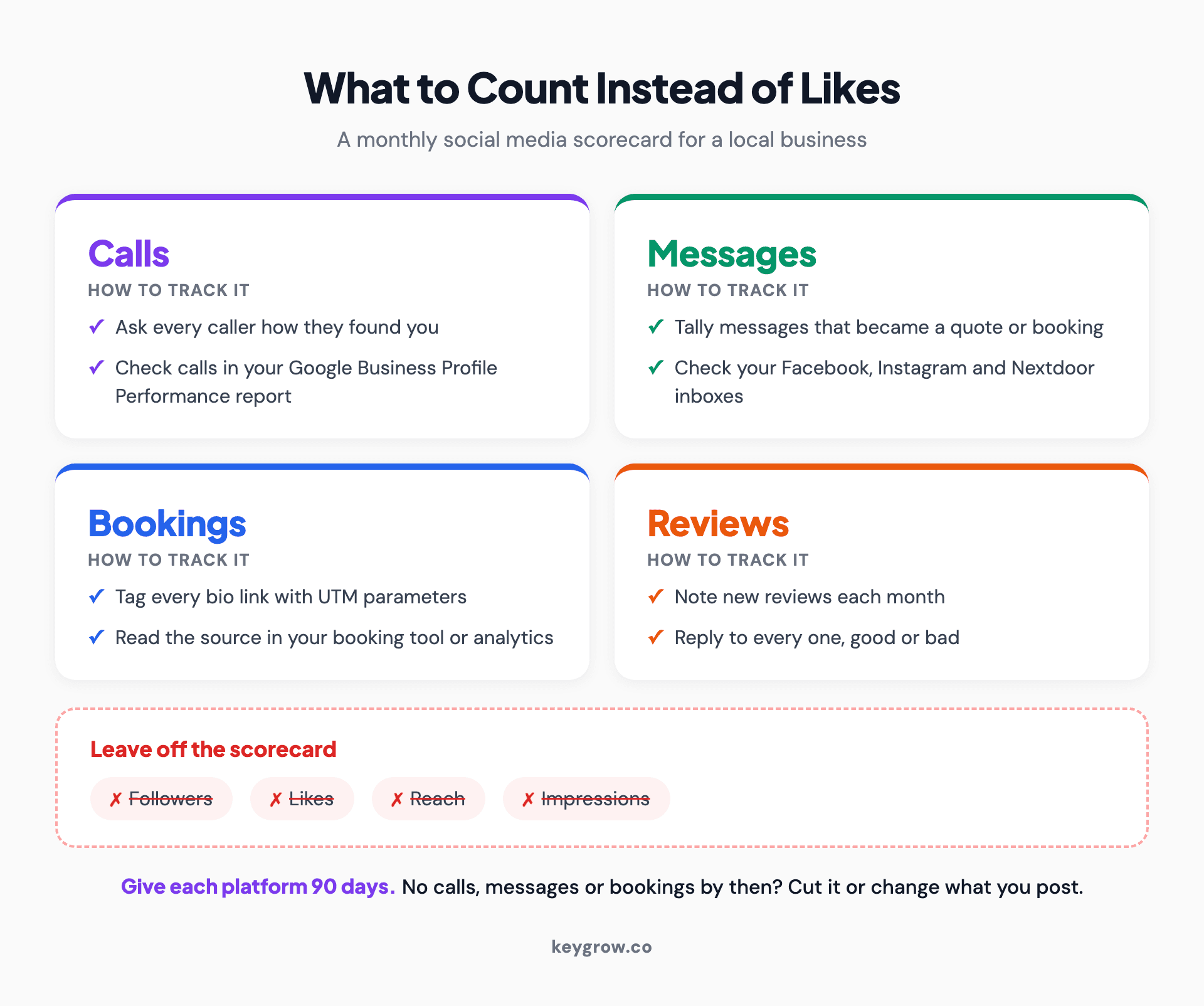
Scorecard of what a local business should count from social media each month: calls, messages, bookings and reviews, with likes, followers, reach and impressions left off.
Four habits make the count possible:
- Ask every new customer how they found you, and write the answer down. It is crude, and it works.
- Tag the links in your bios with UTM parameters, so bookings show which platform sent them.
- Keep a monthly tally of messages that turned into a quote or a booking.
- Watch your Google Business Profile calls, plus branded searches in Google Search Console. A good month on social often shows up as more people searching your name, the branded-search lift we break down in how social ads improve PPC performance.
Give each platform 90 days of the routine. If you cannot point to a single call, message or booking it produced, cut it or change what you post there.
When social media is not worth your time
If customers find you in a panic, or you have under an hour a week, skip posting and spend that time on Google and reviews.
A locked-out driver at 2 a.m. does not scroll Instagram. Locksmiths, towing companies and emergency plumbers win on their Google profile, their reviews and whoever answers the phone. A complete Facebook page that proves you exist is enough social for them.
The same goes for any owner with less than an hour a week. Claim your Google Business Profile, keep one Facebook page accurate with an instant reply, ask for reviews and stop there.
You may not need an agency, either. Most single-location businesses can run everything in this checklist themselves. Paying for help makes sense when your hours are worth more than the fee, or when you want paid social run with proper tracking.
FAQs
What is the best social media platform for a local business?
Facebook, for most of them: Pew Research Center found 71 percent of U.S. adults use it, and its neighborhood groups are where people trade recommendations. Add Instagram if your work photographs well, Nextdoor if you serve homeowners and LinkedIn if you sell to other businesses. Set up your Google Business Profile first.
How often should a local business post on social media?
Two good posts a week on your main platform is enough for most local businesses, as long as you keep it up. A steady post that shows real work does more than a daily one nobody reads. Answering messages quickly matters more than posting often.
Is Nextdoor worth it for a local business?
For home services and neighborhood businesses, usually yes, because the free Business Page is where neighbors' recommendations attach to you. Nextdoor says organic business recommendations make up nearly 30 percent of everything posted there. Paid ads are optional, so claim the page and ask happy customers to recommend you first.
Does social media help local SEO?
Not directly. Google says local results mainly depend on relevance, distance and how well known a business is, including its reviews, and social activity is not named among them. Social helps indirectly when it brings in reviews and sends people to search for your business by name.
How do I track leads from social media?
Ask every new customer how they found you and write it down. Tag the links in your bios so bookings show their source, and keep a monthly tally of messages that became quotes. Your Google Business Profile Performance report adds calls, website clicks and direction requests.
Post less, answer more
Most local businesses would earn more from social media by posting less and answering faster. If you change one thing this week, turn on message notifications for your main platform and set an instant reply with your hours. Then count what comes in for a month before you decide anything else.
If you would like a team to run the routine, or a second opinion before you pay anyone, our social media management is month-to-month and you can cancel anytime.



