


$150. That's what a 30-day Nextdoor ad test costs at $5 a day, the lowest daily budget in Nextdoor's Quick Create guide. Above that floor, Nextdoor advertising costs whatever budget you set. There's no rate card, and a Pay as You Go campaign stops adding charges when you pause it.
Most prices you'll find quoted online are stale. One guide updated in April 2026 still prices Local Deals at a $75 average, and others sell neighborhood sponsorships by the ZIP code. Nextdoor folded the first into its Ads tab and no longer lists the second. Every Nextdoor price below comes from Nextdoor's own help center and business pages, checked in October 2026.
Is it worth it? For a home service business that sells to homeowners in a few ZIP codes and has someone to pick up the phone, a $300 test is a fair bet. Emergency trades and anyone who can't count calls yet should wait. Healthcare and financial services businesses can't buy Nextdoor ads self-serve at all.
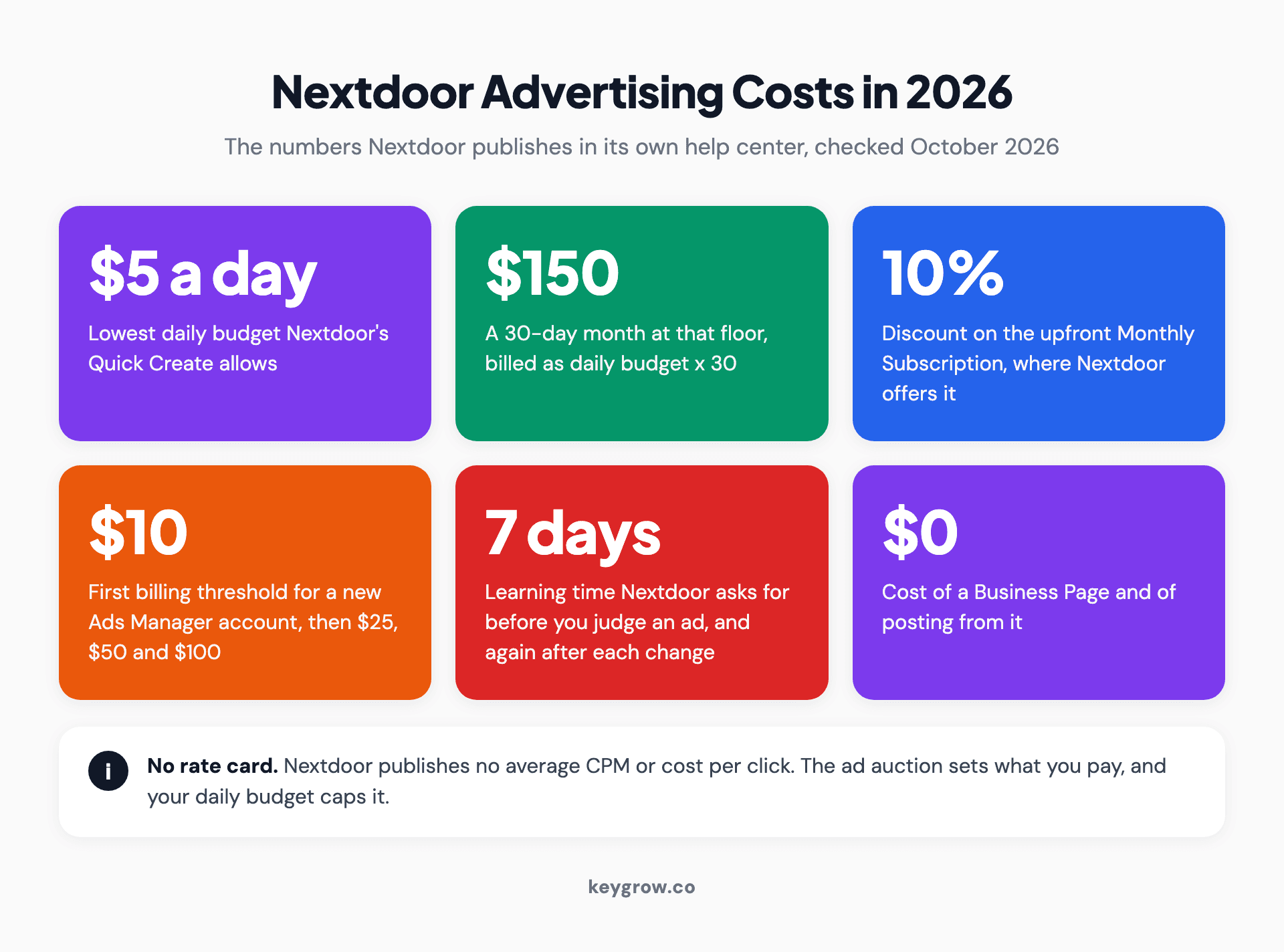
Stat strip of Nextdoor advertising costs in 2026 from Nextdoor's help center: a $5 daily minimum in Quick Create, $150 for a 30-day month at that floor, a 10 percent discount on the upfront monthly subscription, a $10 first billing threshold rising to $25, $50 and $100, a 7-day learning period and $0 for a Business Page, plus a note that Nextdoor publishes no average CPM or cost per click.
What each Nextdoor ad option costs in 2026
Nextdoor sells four paid options: Business Page ads, Ads Manager, Opportunity Alerts and managed brand campaigns. Only the first two publish how pricing works.
| Option | How the money works | Smallest spend Nextdoor documents | Best for |
|---|---|---|---|
| Business Page and posts | Free | $0 | Every local business, before any ad |
| Business Page ads | Daily budget. Pay as You Go bills after the ads run; a Monthly Subscription bills daily budget x 30 upfront, with a 10% discount where offered | $5 a day in Nextdoor's billing example, so $150 a month | A simple test, or always-on local ads |
| Ads Manager | Daily or lifetime budget, fixed CPM or optimized bids, billed after the ads run | $5 a day, the Quick Create minimum | Pixel tracking, lead forms, video, finer targeting |
| Opportunity Alerts | Monthly subscription priced by trade, area and number of categories | Shown to you before you subscribe | Eligible home service trades |
| Managed brand campaigns | Sold by Nextdoor's ads team | No published U.S. minimum; the UK sales form asks for £5,000 a month | Regional brands, plus healthcare, financial and local issue advertisers |
| Local Deals | Folded into the Ads tab | Retired | A sale or discount ad does the job now |
| Neighborhood Sponsorships | Missing from Nextdoor's current list of business tools | Old quotes are history | Nothing new to buy |
Business Page ads are the simple version, built into the Ads tab of your free page. You pick a goal (promote your business, drive website visits or get new leads), write the ad or let Nextdoor's AI assistant draft it, choose cities, ZIP codes or states, and set a daily budget. Nextdoor reviews every ad, and most go live within 24 hours of submission.
Your button can open your Nextdoor page or your website, start a message or place a call.
Ads Manager is the same auction with the hood up. Its Advanced Create mode adds the full set of demographic filters (age, gender, household income, home ownership and interests), customer lists, lead forms, video, the Nextdoor Pixel for conversion tracking and a choice of bids. The simpler Quick Create mode inside it is where the $5-a-day minimum lives.

A young woman on a couch scrolling her phone, the kind of neighbor a Nextdoor newsfeed ad reaches between posts about her street.
Opportunity Alerts, the cost most guides miss
Opportunity Alerts aren't ads. They're a monthly subscription that pings a home service business when a neighbor within 20 miles posts asking for what it does. Nextdoor's list of eligible categories runs to about 30, from plumbers and roofers to auto detailing and pet sitting, and you can choose up to three. The price depends on your trade, your area and how many categories you pick. Nextdoor shows it to you before you subscribe and doesn't publish a price list.
Budget for it on its own line. Running ads doesn't include it, and it doesn't include ads.
It also explains a surprise some owners hit. Nextdoor's FAQ now answers people who tried to comment on a neighbor's post and got asked to pay: replying to posts or messaging neighbors from a business page can require the subscription. The page is free. Answering a neighbor's "who do you recommend?" thread may not be.
The free side still carries most local businesses on Nextdoor. Claiming the page, collecting recommendations and posting from it cost nothing, and since August 19, 2026, Nextdoor has required business promotion in the feed to come from a Business Page rather than a personal account. Our local social media checklist covers that groundwork.
How Nextdoor charges you: bids, budgets and billing
You set a daily or lifetime budget and choose a bid. Ads Manager bills after the ads run, starting at a $10 threshold for new accounts.
The budget is a ceiling. Nextdoor's billing guide says you won't be charged for anything spent beyond your daily or lifetime goal. A lifetime budget needs a start and end date.
The bid is where Ads Manager gets technical. Nextdoor's budget guide lists four delivery preferences, and your campaign objective decides which ones you get:
| Delivery preference | What Nextdoor optimizes for | Bid options | Objectives that offer it |
|---|---|---|---|
| Fixed CPM | Nothing; you pay your set price per 1,000 impressions | Fixed | All four |
| Optimize for impressions (CPM) | The most impressions for your budget | Autobid or Max Bid | Brand awareness |
| Optimize for clicks (CPC) | Neighbors most likely to click | Autobid or Max Bid | Website visits, lead generation, website conversions |
| Optimize for conversions (CPA) | Neighbors most likely to convert | A target bid Nextdoor tries to stay under | Website conversions, with the Nextdoor Pixel |
Nextdoor's worked examples use round numbers. $100 a day at a $10 fixed CPM buys about 10,000 impressions a day, and $100 a day with a $5 maximum cost per click aims for about 20 clicks. Treat those as arithmetic. Nextdoor doesn't publish an average CPM or cost per click, and the auction decides what you really pay.
Choose the bid type with care, because Nextdoor won't let you change it on an existing ad group. A Max Bid set too low can leave part of your budget unspent. A fixed CPM makes impressions predictable, but it won't hunt for the neighbors who are likely to click.
Billing works in steps. Ads Manager charges your card when your balance hits the threshold: $10 for a new account, then $25, $50 and $100 on the next charges, after which it's the higher of $100 or seven times your daily budget. Whatever is left over gets charged on the 1st of the month.
Business Page subscriptions work differently. You pay the full month upfront on the day the ad is approved, and Nextdoor may place a $10 card authorization that drops off within a few business days.
Then there's time, which costs money too. Nextdoor asks you to give its model about seven days before you judge an ad, and another seven days after every change. A test shorter than two weeks mostly measures the learning period.
What does $300 a month buy on Nextdoor?
At Nextdoor's own $10 example CPM, $300 buys about 30,000 impressions. Under our assumptions, that becomes 150 clicks and seven or eight leads.
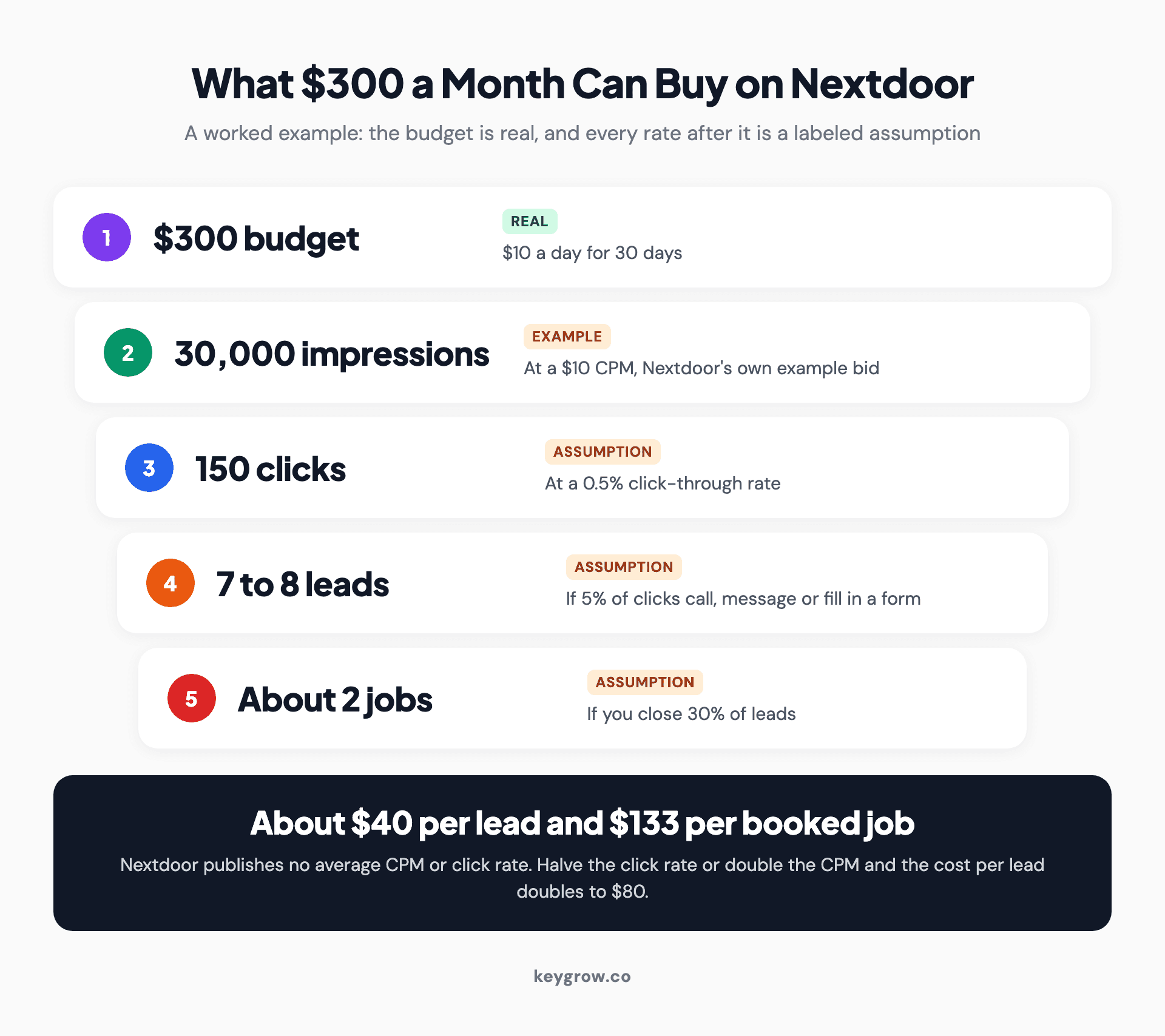
Process diagram of a Nextdoor ads worked example: a $300 monthly budget at a $10 CPM buys 30,000 impressions, a 0.5 percent click-through rate gives 150 clicks, 5 percent of clicks become 7 to 8 leads and a 30 percent close rate gives about 2 booked jobs, roughly $40 per lead and $133 per job, with each rate labeled as an assumption and a note that halving the click rate or doubling the CPM doubles cost per lead to $80.
Every number after the budget is an assumption, so here they are in plain sight. The $10 CPM is Nextdoor's example bid, which makes it a starting point for the math and nothing more. The 0.5 percent click-through rate is our guess for a decent local ad, since Nextdoor publishes no average. The 5 percent lead rate assumes one in twenty people who click goes on to call, message or fill in a form.
Change any one of them and the cost per lead swings hard:
| Scenario, $300 over 30 days | Impressions | Clicks | Leads | Cost per lead |
|---|---|---|---|---|
| Base case: $10 CPM, 0.5% click rate, 5% of clicks become leads | 30,000 | 150 | 7.5 | $40 |
| The auction charges a $20 CPM | 15,000 | 75 | 3.75 | $80 |
| The ad earns half the clicks (0.25%) | 30,000 | 75 | 3.75 | $80 |
| The landing page converts 10% of clicks | 30,000 | 150 | 15 | $20 |
To judge your own result, compare it with what a lead costs you elsewhere. LocaliQ's 2026 benchmarks put the average Google search lead at $66.69 across industries and $90.92 in home and home improvement. A Nextdoor test that beats your search cost per lead, with leads that close, has earned a second month. Cost per customer is the comparison that counts, the same argument we make in Google Ads vs Facebook Ads.
The last row is the one you control. A mobile detailing client came to us paying around $100 per booking from Google Ads, with every click landing on the homepage. A dedicated booking page and a rebuilt campaign took that to $22 between August and December 2022. That was Google Ads, but the lesson carries straight over: send Nextdoor clicks to a page built for the one offer in the ad, or skip the page and use Call Now or Message Me.
Six things that push your price up or down
Audience size, frequency, placements, the ad itself, your bid setting and your business category decide what a lead costs, often more than the budget does.

Aerial view of a residential intersection lined with houses and trees, the scale of area a small Nextdoor ad budget targets by ZIP code.
- How big your target area is. Nextdoor says one in three U.S. households is on the platform. For a small budget, the number that matters is who opens it in a given week, and across every market Nextdoor serves that was 22.9 million weekly active users in Q2 2026. Target two or three ZIP codes and you can run out of new neighbors quickly.
- How often the same person sees you. Ads Manager's default frequency cap is typically 25 views per neighbor per week, which is a lot of one ad on a small audience. Advanced Create lets you lower it. Quick Create doesn't.
- Where the ads run. Business Page ads can show in the newsfeed, For Sale & Free, the desktop right-hand rail, Search and Neighbor Conversations, and Nextdoor splits the budget between them. A setting called Delivery Extension also sends your ad to other websites when it's on. If you're paying for Nextdoor's neighborhood audience, check that toggle.
- How good the ad is. A clear offer and a real photo earn more clicks per thousand impressions, so each click costs less. Typing {{neighborhood}} or {{city}} into the copy shows every neighbor their own area's name. Leave out the all caps, which Nextdoor's reviewers reject.
- Your bid setting. In figures released in November 2025, Nextdoor said its click optimization lifted click-through rates by an average of 134 percent and its conversion optimization improved cost per acquisition by a median of 35 percent. That's Nextdoor grading its own product, so take it as a reason to try optimized bidding and judge the result yourself. Conversion bidding also needs the Nextdoor Pixel and a daily budget that covers one or two conversions at your bid.
- What you sell. Housing, credit and employment ads lose some targeting options in Ads Manager, as the law requires, which catches real estate agents along with home loan and home insurance offers. Local issue ads go through managed service only, and candidate ads aren't allowed. Some categories can't advertise at all, including guns, cannabis and CBD, payday loans, bail bonds and vapes.
Where did Local Deals and Neighborhood Sponsorships go?
Local Deals became ordinary Nextdoor ads with daily budgets and ZIP code targeting. Neighborhood Sponsorships are missing from the tools Nextdoor's help center lists.
Local Deals were priced by the neighborhood and the day, which is where the $75 average and the $3 minimum in older guides come from. Nextdoor's transition page says existing deals moved into the new Ads tab. Their neighborhood targeting was converted to the ZIP codes those neighborhoods sat in, and their price per neighborhood became a daily budget. A sale or discount ad is what's left of them.
Neighborhood Sponsorships were sold by ZIP code, mostly to real estate agents and other local pros, with two posts a month in each ZIP. Older reviews quote anything from about $30 a month to well over $1,000, depending on the ZIP. Nextdoor's help center now lists three business tools (free Business Posts, Business Page ads and Opportunity Alerts), and sponsorships aren't one of them. A few sponsorship pages are still online, one with a 2019 copyright line, which is how the old prices keep getting copied.
Don't expect the old prices back, either. In its Q1 2026 letter, Nextdoor told shareholders that self-serve revenue grew 28 percent year over year and reached 68 percent of its total. It put that down to "strong self-serve advertiser demand and better yields," and its average revenue per user rose 12 percent. More small businesses are bidding for the same neighbors.
Who should buy Nextdoor ads, and who should skip them
Buy if you sell to homeowners in a tight area and answer fast. Skip if customers find you in emergencies or your category is managed-only.
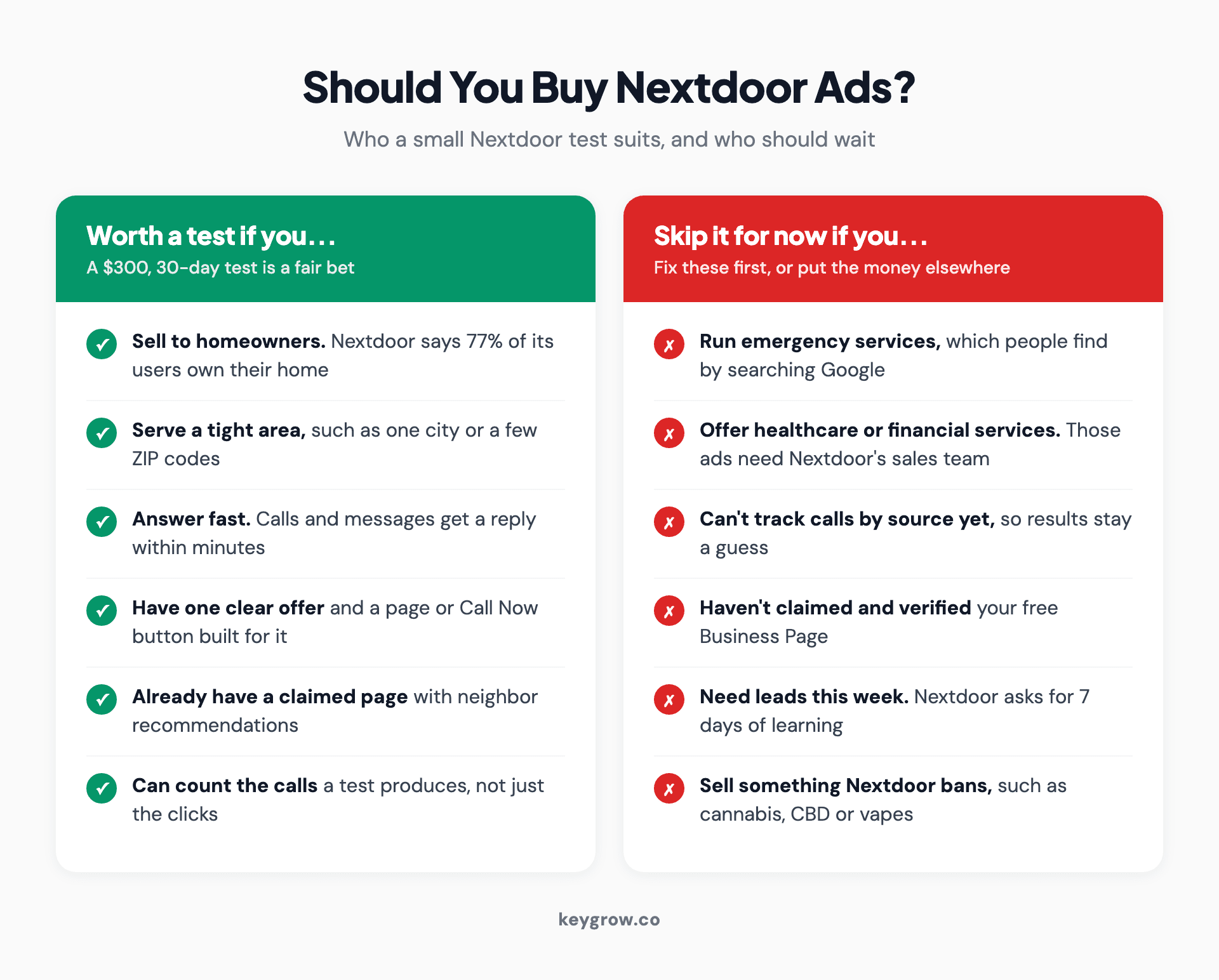
Comparison cards on whether to buy Nextdoor ads: worth a test for businesses that sell to homeowners, serve a tight area, answer fast, have one clear offer, a claimed page with recommendations and a way to count calls; skip for now for emergency services, healthcare and financial services, owners who cannot track calls by source, unclaimed pages, anyone needing leads this week and banned categories such as cannabis, CBD or vapes.
Nextdoor's audience leans toward the customers home service businesses want. On its Ads Manager page, Nextdoor says 77 percent of its users are homeowners. Painters, roofers, landscapers, cleaners, pest control and remodelers fit that well. So do local shops and restaurants with an offer worth sharing, and real estate agents can still farm a neighborhood under the housing rules above.
Three groups should hold off.
Emergency trades. Someone locked out at 2 a.m. searches Google. They don't scroll a neighborhood feed. Channels that reach people who aren't searching come after the ones that catch people who are, the same reasoning behind our YouTube ads review for small businesses.
Healthcare and financial businesses. Nextdoor's ad review guide says ads in regulated categories, including healthcare and financial services, can only be bought through its managed sales team. They won't pass in the self-serve tools. Dentists and med spas also lose before-and-after photos, which Nextdoor bans in health, beauty and wellness ads. A $5 test is off the table.
Anyone who can't count calls yet. If you can't tell a Nextdoor call from a Google call, you'll finish the month with a dashboard and no answer.
You don't need an agency for a first test, either. The Business Page flow takes a few minutes and nothing in it needs a specialist. Paying for help makes sense once the budget is big enough that better tracking or a better landing page pays for itself, or when Nextdoor is one channel among several and someone has to compare them honestly.
Judge it on calls, not impressions
Nextdoor's ads dashboard reports impressions, reach, clicks and messages. What pays for the test is calls, booked jobs and the cost of each job.
Vanity-metric reporting is the biggest scam in our industry, and an ads dashboard makes it effortless. Take Nextdoor's own example: $100 a day at a $10 CPM buys about 10,000 impressions a day. That's 300,000 impressions a month, a figure that looks wonderful in a report and says nothing about whether the phone rang.
Count these instead:
- Calls, through the Call Now button where it fits or a tracking number on your landing page.
- Messages that turned into a quote. The dashboard counts every message, so you have to note which ones went somewhere.
- Form fills, by tagging the ad's link with UTM parameters so they show up as Nextdoor in your analytics.
- The answer to "How did you hear about us?" at the end of every job. It's crude, and it catches what tracking misses.
- Opportunity Alerts replies and the jobs they win. Nextdoor says the product has no dedicated metrics yet, so the only log is yours.
Divide the month's spend by booked jobs. That's the number to put next to your other channels.

A man standing at the front door of a house talking on his phone, the call a Nextdoor ad should be judged on.
FAQs
Is it free to advertise on Nextdoor?
Partly. Claiming a Business Page and posting from it costs nothing, and since August 2026 Nextdoor has required business promotion in the feed to come from that page. Ads and Opportunity Alerts are paid, and each is a separate purchase.
How much do Nextdoor ads cost per month?
Your daily budget times the days it runs. At the $5-a-day minimum in Nextdoor's Quick Create flow, that's $150 for 30 days, and a monthly subscription bills your daily budget times 30 upfront. For a test you can learn something from, we'd budget $300 to $600.
Does Nextdoor charge per click or per impression?
Either, depending on how you bid. In Ads Manager you can pay a fixed price per 1,000 impressions, or use optimized bidding that goes after impressions, clicks or conversions. Pay as You Go campaigns are billed after the ads run, once your balance hits a threshold or on the 1st of the month.
Are Nextdoor ads worth it for a small business?
They can be for home service businesses that sell to homeowners in a tight area and answer the phone fast. They're a poor fit for emergency trades, and healthcare and financial businesses can't buy them self-serve at all. Judge a test on cost per booked job against what your search leads cost.
Can you cancel Nextdoor ads anytime?
Yes. Pay as You Go campaigns can be paused at any time, and you still pay for what already ran. A monthly subscription stops renewing when you cancel but stays live until the end of the billing cycle, and Opportunity Alerts can be cancelled from your settings.
What happened to Nextdoor Local Deals?
They became regular Nextdoor ads. Nextdoor converted existing deals to daily budgets and swapped neighborhood targeting for the ZIP codes those neighborhoods sat in, so the old per-neighborhood prices no longer apply.
Spend a little, count the calls
Here's the test we'd run with our own money.
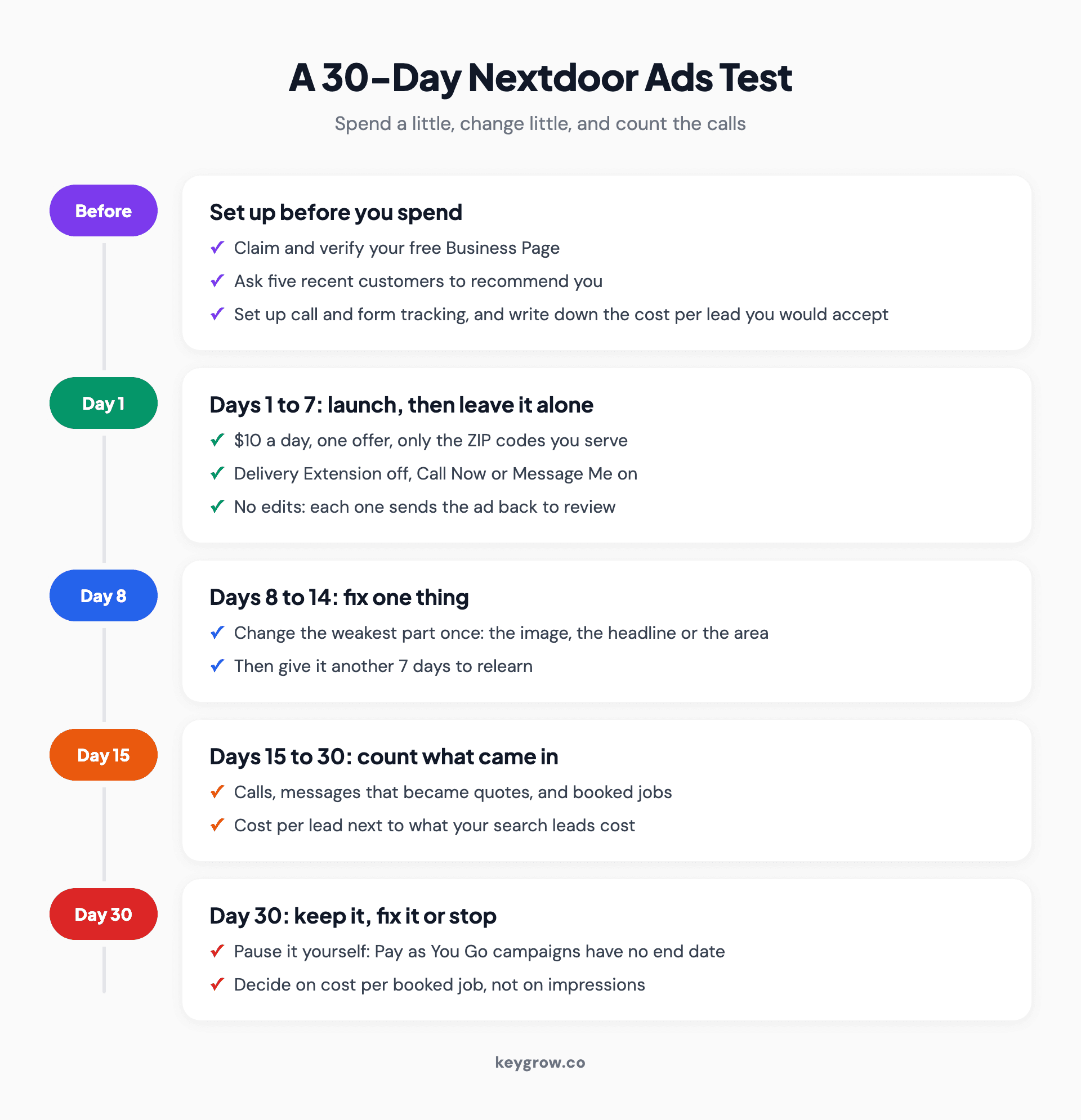
Timeline of a 30-day Nextdoor ads test: before launch, claim the Business Page, gather recommendations, set up tracking and a target cost per lead; days 1 to 7 at $10 a day with one offer and no edits; days 8 to 14 fix one weak spot; days 15 to 30 count calls, messages and booked jobs; on day 30 pause it yourself, since Pay as You Go campaigns have no end date, and keep, fix or stop.
Before you spend anything, claim and verify your Business Page, ask five recent customers to recommend you, set up call and form tracking, and write down the cost per lead you'd accept. Your search cost per lead is a fair yardstick.
Then launch at $10 a day with one offer, the ZIP codes you serve, Delivery Extension off and a Call Now or Message Me button. Leave it alone for seven days, since every creative edit sends the ad back to review and can pause it for up to 24 hours. In week two, fix the weakest number once (the image, the headline or the area) and give it another seven days.
Put day 30 in your calendar. A Pay as You Go campaign from your Business Page has no end date, so it keeps running until you pause it. By then you'll have spent about $300 and you'll know your cost per booked job. Keep it, fix it or stop.
If you'd like a second pair of eyes on the numbers, or someone to run paid social with tracking that counts calls, our social media team works month-to-month. Or tell us about your business, and we'll tell you honestly whether Nextdoor belongs in your plan.



