


Open your profile and read what it's asking for. That screen tells you where you are in Google Business Profile verification, the check Google runs before anyone can manage a listing on Search and Maps. If you know it as Google My Business verification, it's the same check under the product's old name.
- A Get verified button. Google hasn't confirmed you yet. Pick from the methods it offers.
- A request to record a video. That's the method Google recommends. Use the shot list below.
- Pending. Your proof is in review for up to 5 business days, so don't change anything big.
- Review issues, or Get verified came back. The attempt didn't pass, and the fix list below covers each case.
- "Someone else may manage this Business Profile." Another account verified it first, so you'll request ownership.
Every method, wait and rule below comes from Google's help pages as of October 2026. The flow changes faster than the guides written about it.
Which Google Business Profile verification method will you get?
Google decides. Your options depend on your business type, public info, region and business hours, and Google says they "can't be changed."
If several options appear, any of them will do. If only one appears, that's your method. Google's verification page also warns that some businesses have to pass more than one.
| Method | Who gets it | What you need | How long it takes |
|---|---|---|---|
| Video recording | Storefront, hybrid and service-area businesses. Google recommends it when offered | A phone, and one unbroken take of 30 seconds or more filmed through the profile | Up to 5 business days of review |
| Live video call | Some businesses, and only during your listed business hours | To be at the business with a device that handles video calls | Up to 5 business days of review |
| Phone or text | Google doesn't say who | A listed number a person answers, or one that takes texts | Up to 5 business days of review after you enter the code |
| Google doesn't say who | Access to the address shown on the verification screen | Up to 5 business days of review | |
| Postcard | Some businesses. Google says it isn't available to all | A correct mailing address. Most codes arrive within 14 days and expire after 30 | Up to 5 business days of review after you enter the code |
| Instant | Some profiles whose website is verified in Google Search Console | Your website verified in Search Console | Instant |
| Bulk | Businesses with 10 or more locations of the same business | Business Profile Manager and a spreadsheet of every location | No published time. Google emails you when it's done |
The flow may first ask "What option best describes your business?" Search Engine Roundtable reported the question in February 2026, with answers running from a shop customers visit to "My business is online only." Answer by Google's rules. Online-only businesses aren't eligible, and if customers never visit your address, you're a service-area business with the address hidden.
Bulk verification shuts out two groups: service-area businesses without customer-facing locations, and agencies with several businesses in one account. Chains that qualify apply in Business Profile Manager, under Verifications, then Chain.
Record the verification video in one take
Film one unbroken phone take of 30 seconds or more, through the profile, showing where you are, the business and proof you run it.
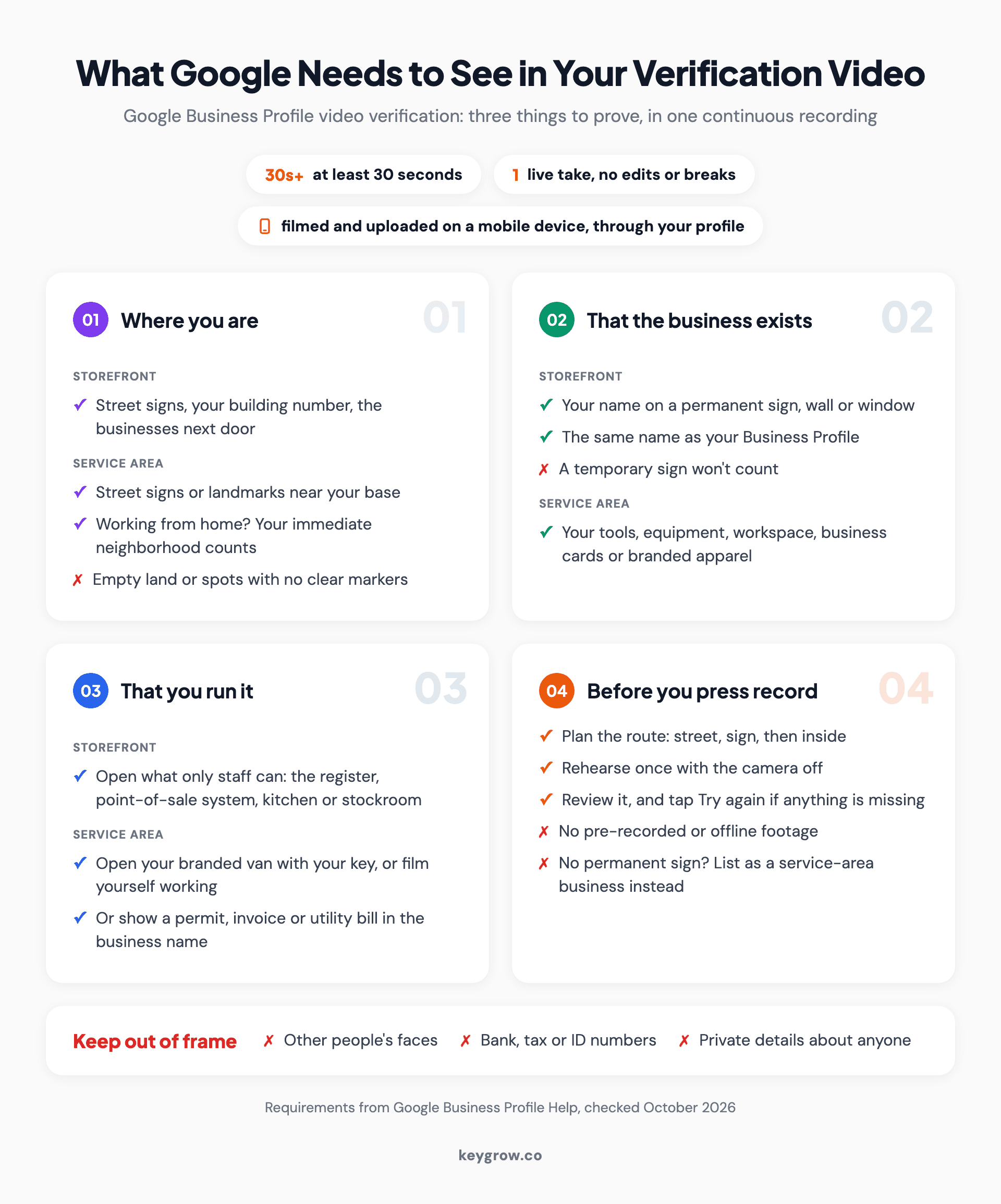
Checklist of what Google needs to see in one continuous Google Business Profile verification video: where you are, that the business exists and that you run it, for storefront and service-area businesses, plus the rules for the take (at least 30 seconds, one live unedited recording on a phone through the profile) and what to keep out of frame.
For Google Business Profile video verification, Google's video requirements rule out pre-recorded clips, cuts and footage shot offline to upload later. On your phone, open the profile, tap Get verified, then Business video. For a storefront, film in this order:
- The street: a street sign, your building number, the shop next door.
- Your sign. The name has to be on a permanent fixture, like a signboard, wall or window, and match the name on your profile.
- The inside, and something only staff can reach: open the register, log in to the point-of-sale system, or show the kitchen or stockroom.
A service-area business films something different:
- Street signs or landmarks near your base. If you work from home, your immediate neighborhood counts. Empty land doesn't.
- Your tools, equipment, workspace or branded apparel.
- Proof you run it: open your branded van with your key, do part of a job, or show a permit, invoice or utility bill in the business name.
Keep other people's faces, bank, tax and ID numbers, and anyone's private details out of frame. No permanent sign at your door? Then Google wants the business listed as service-area, not storefront.
Rehearse once with the camera off and film when the street is quiet. If the upload fails, Google's advice is to try again, and you can delete the video afterward.
Offered a live video call instead? It starts as a text chat with a Google support representative, then moves to video, where you show the same three things.
What can a pending profile do?
Not much. Review takes up to 5 business days, rarely longer, and a profile you created won't appear on Maps or Search until it passes.

A shop door with a hanging sign that reads Yes, we are open, the kind of storefront that stays off Google Maps until its new Business Profile passes verification.
| While unverified or pending | Once verified |
|---|---|
| Edit your name, category, address, hours, phone and website, though some edits may not appear | Edit everything |
| A profile you created stays off Maps and Search | Eligible to show, though rankings for a new business can take up to a month |
| No text or WhatsApp chat with customers | Chat, in the regions where Google offers it |
Two rules while you wait. Leave the name, address and category alone, since with a postcard, an edit to any of them voids the code in the mail. And don't request a second postcard, because Google cancels the first code when you do.
Google confirms by email when you pass. If you're verified and still can't find yourself, work through why your business isn't showing on Google Maps.
Verification failed? Match the message to the fix
Google usually tells you what went wrong. Match the message, fix that one thing, and resubmit on the same profile instead of creating a new one.
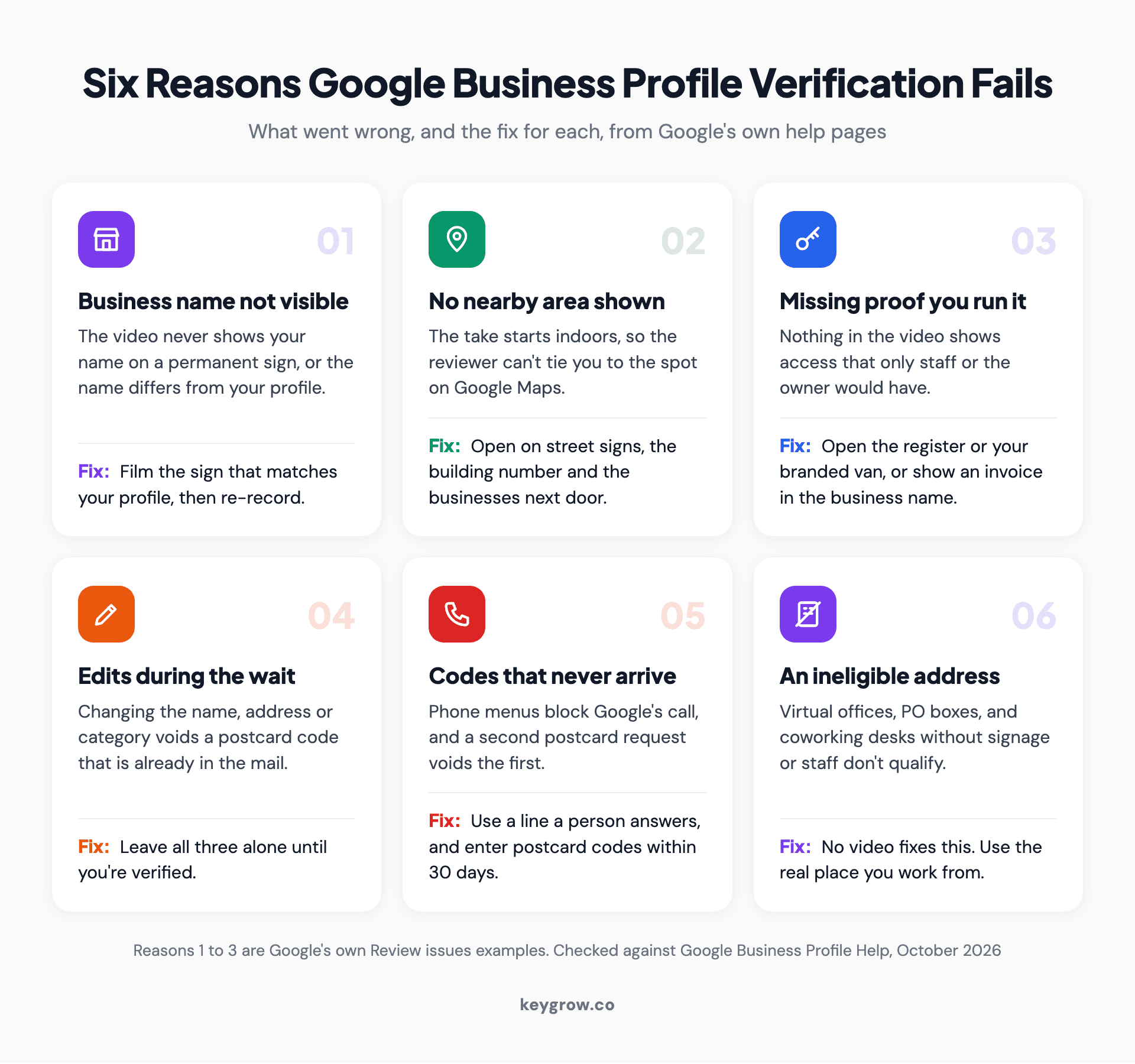
Icon grid of six reasons Google Business Profile verification fails, each with its fix: business name not visible, no nearby area shown, missing proof you run the business, edits made mid-review, codes that never arrive, and an ineligible address such as a virtual office or PO box.
- If you see Review issues on a video, Google lists why, with reasons like "Business name not visible on storefront" or "No nearby area shown." Record a new take with everything from the first one plus what was missing.
- If Get verified comes back, Google couldn't fully verify you. Try again, or try another method if more than one shows.
- If Google asks for more info, a recent change to your details likely set it off. Select Get verified and go through it again.
- If the phone code never comes, check for a phone menu. Google's call can't get past one, so use a number a person answers, or pick text.
- If the postcard code won't work, find out whether anyone edited the name, address or category, or asked for a second card. Codes also expire after 30 days.
- If your address is a virtual office, a PO box or a coworking desk with no signage or staff, no video will fix it, because Google's guidelines don't accept those addresses. If the profile is already suspended, start with our suspension guide.
- If nothing works, contact Google Business Profile support. Google asks you to try every method on offer first, and says that makes it easier for them to help.
Someone else already verified your business
You request ownership, and Google emails the current owner, who gets 3 days to answer. If they stay silent, you may be able to claim it.

A hand holding up a ring of keys, like the access you get back when a Google Business Profile ownership request goes through.
Go to business.google.com/add, enter your business name and address, and pick your listing. When Google says "Someone else may manage this Business Profile," select Request Access, fill in the form and submit. If the owner says no, you can appeal or suggest an edit. If they never answer, open the confirmation email, select View request, then Verify, and pass verification yourself. Google notes that option isn't always available.
A service-area business with no shop or office uses Google's contact form instead, with Transfer ownership of listing as the issue. The same two routes apply when a former agency or employee verified the profile under their own login. Our duplicate Google Business Profile guide covers the cases where a second listing is involved.
What sends a verified profile back to the queue
A move always sends you back. A new name or category might, and so can losing ownership when Google can't reach you.
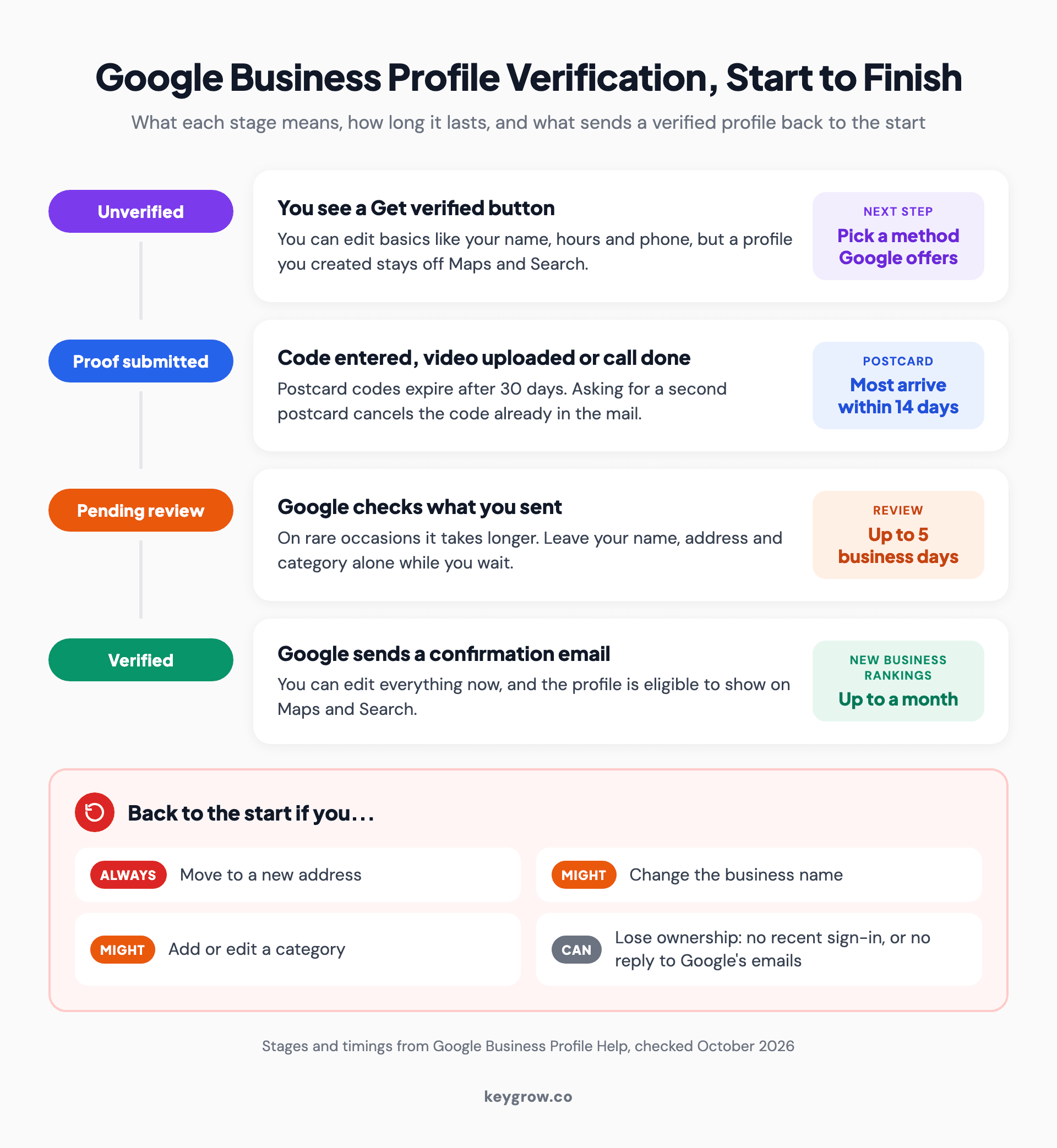
Process diagram of the four stages of Google Business Profile verification (unverified, proof submitted, pending review for up to 5 business days, and verified) with the changes that send a verified profile back to the start: moving address, changing the name or a category, or losing ownership.
Google's help pages spell out the difference: "If you move your business to a new address after it's verified, you must verify your business again." A new name "might" mean doing it again, and so might adding or editing a category.
Ownership is the other trigger. Google can revoke it if you haven't signed in recently, or if it can't reach you by email after several tries. Then you re-verify or request ownership back. Chains get one more warning: Google may de-verify bulk accounts that don't actively manage their profiles.
Should you pay someone to verify your profile?
Usually not. Verification is free, Google picks the method, and the review takes up to 5 business days no matter who submits.
DIY is the right call more often than agencies admit, and verification is the clearest case. Google calls Business Profile "a tool that can be used at no charge." The method can't be changed, and Google documents no paid or priority review. Storefront proof also means someone on site opening the register, and Google's rules tell agencies to "always work directly with the business owner to complete verification."
Nobody can buy a faster lane, whatever a cold caller promises.
Google says it will never ask for your verification code, and a caller who wants money to keep you on Google isn't calling from Google. Don't share the code with anyone, even people who manage your profile.
Paying for help makes sense in narrower cases: 10 or more locations headed for bulk verification, an ownership standoff with a former agency, a suspension, or a profile that keeps failing for reasons the Review issues screen doesn't explain.
FAQs
How long does Google Business Profile verification take?
Google's review takes up to 5 business days after you finish the steps, and occasionally longer. A postcard adds mail time, since most codes arrive within 14 days. Instant verification can happen when your website is already verified in Google Search Console.
Can you verify a Google Business Profile without a video?
Only if Google offers you another method. The options depend on your business type, public info, region and hours, and you can't change them. If more than one method appears, you can use any of them.
Is Google Business Profile verification free?
Yes. Google charges nothing to add, claim or verify a profile. It says it will never ask for payment to keep your business on Google, so treat any caller who does as a scam.
Why does Google keep asking me to verify my business again?
Usually because something changed. A move always triggers re-verification, and a new name or category can. If Get verified reappears with no edit, Google couldn't fully verify the first attempt, so try again or use another method.
What happens if you don't verify your Google Business Profile?
A profile you created stays off Google Maps and Search, and you can edit only basics like your name, category, address, hours, phone and website. An unverified listing may still show on Maps, but you won't control it until you claim and verify it.
Verify once, then leave the address alone
The easiest verification is the one you only do once. After you pass, change the name, address and categories only when the business itself changes. Before a move, get the new sign up and your documents switched to the new address, so the next video has something to show. Keep signing in, and give staff or an agency their own manager access instead of sharing your login.
If you've worked through Google's fixes and the profile still won't verify, or you have a chain of locations to verify in bulk, our local SEO team can take it from there, month-to-month.



