

What is a service area business? In Google's words, one that "visits or delivers to customers directly, but doesn't serve customers at its business address".
Google's own examples are plumbers, cleaning services, pet walkers and locksmiths. The label (SAB for short) sounds like admin, but it decides which Google Business Profile rules you live under: whether your address shows, how your coverage is described, what verification asks you to prove, and which mistakes get a profile suspended.
The rules below come from Google's help pages as they read in October 2026. Where practitioners disagree, we say so.
Storefront, service area or hybrid: the three labels
Google sorts every profile into one of three types. Storefronts serve customers at a signed address, service area businesses travel to them, hybrids do both.
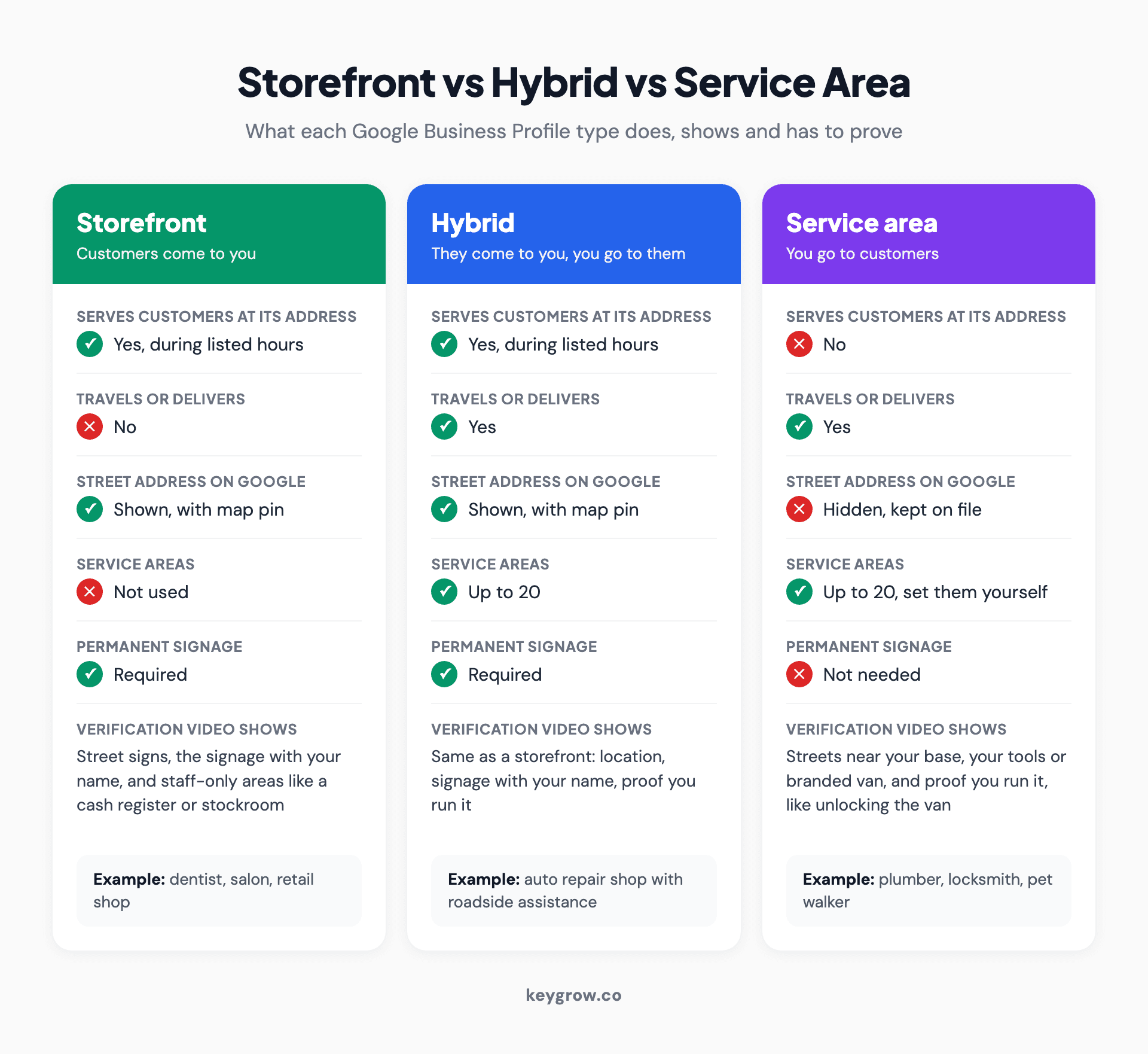
Comparison cards for storefront, hybrid and service area businesses, showing which ones serve customers at their address, show the address on Google, can set service areas, need permanent signage, and what each must film for verification.
What separates them is whether customers come to you. Owning premises has nothing to do with it: a roofer with a yard and a warehouse is still a service area business if no customer ever walks in to buy a roof.
For a hybrid, Google's guidelines want the address staffed by your team and able to receive customers during the hours you list. So a remodeler whose showroom is locked in those hours runs a service area business with an office.
Here is where common businesses usually land:
| Business | Usual type | Why |
|---|---|---|
| Plumber, electrician, HVAC technician | Service area | The work happens at the customer's property |
| House cleaner, pet walker, mobile groomer | Service area | Google names cleaners and pet walkers as examples |
| Locksmith, mobile mechanic, mobile detailer | Service area | Google's verification example is a locksmith |
| Junk removal, landscaping, pool cleaning | Service area | The truck goes to the job |
| Auto repair shop with roadside assistance | Hybrid | Google's own hybrid example |
| Restaurant with dine-in and delivery | Hybrid | Google's other hybrid example |
| Dentist, salon, retail shop | Storefront | Customers come to a signed, staffed address |
| Liquor or cannabis delivery | Storefront required | Age-restricted products cannot be service area only |
| Online shop with no in-person contact | Not eligible | Google requires in-person contact during stated hours |
Which one are you? Six questions, in order
Answer in order and stop at the first that settles it. The questions mirror the tests in Google's own guidelines.
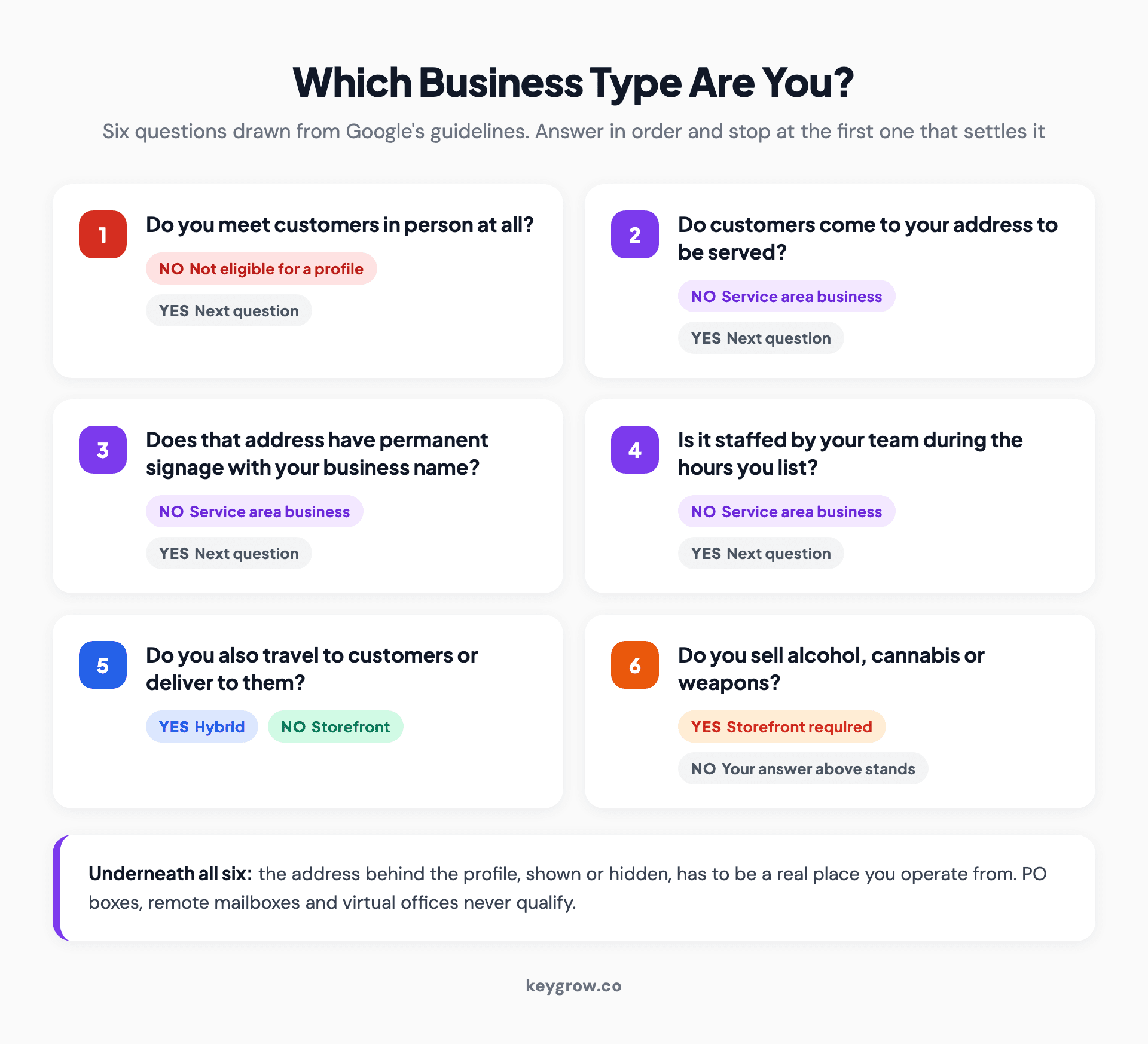
Decision checklist with six questions that determine a Google Business Profile type, from whether you meet customers in person to whether you sell age-restricted products, each with the outcome it leads to.
1. Do you meet customers in person at all? If not, you are not eligible for a Business Profile.
2. Do customers come to your address to be served? If not, you are a service area business and can stop here.
3. Does that address have permanent signage with your business name? If not, Google says you are not eligible as a storefront.
4. Is it staffed by your team during the hours you list? If not, service area business. A door nobody answers is not a storefront.
5. Do you also travel to customers or deliver to them? Yes makes you a hybrid. No makes you a storefront.
6. Do you sell alcohol, cannabis or weapons? Then you need a storefront, whatever else you answered.
Hiding your address: what changes and what Google keeps
If customers never come to you, Google says hide your address. It vanishes from the profile but stays on file for verification and distance.

A small home office desk under a window, with a plant and a stack of books, the kind of setup many service area businesses run from.
Google's representation guidelines tell a plumber running the business from home to clear the address from the profile. In Edit profile, then Location, then Business location, turn off "Show business address to customers" and save. You lose the map pin and the directions button, which is the point.
Verification still works. Google's video route asks a service area business to film the streets near its base (from home, your immediate neighborhood counts), the tools or branded van it works with, and something only the operator could do, like unlocking that van. It has to be one live, unedited take of at least 30 seconds, recorded on a phone through the profile, and Google says review takes up to five business days.
If you are switching from a storefront, edit the profile you already have and be ready to re-verify. A second profile breaks Google's one-profile rule and splits your reviews. Our guide to a duplicate Google Business Profile covers the cleanup.
Service areas: up to 20 places, about two hours out
List up to 20 service areas by city, postal code or region. No radius, and keep the whole area within about two hours' drive.
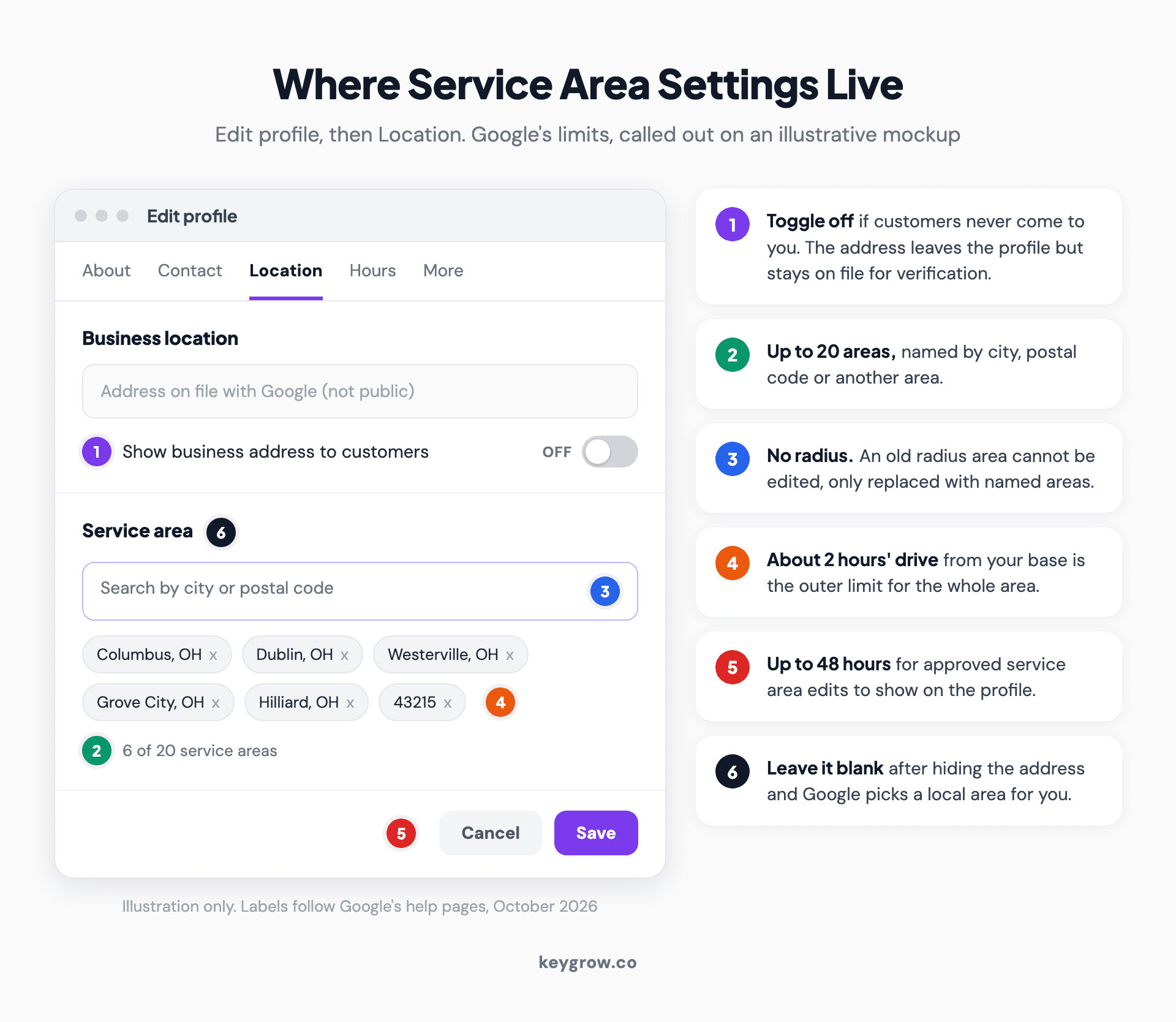
Annotated mockup of the Location settings in a Google Business Profile, showing the Show business address to customers toggle switched off and a service area list of towns and postal codes, with callouts for the 20-area limit, the end of radius settings, the two-hour driving guideline and the 48-hour wait for edits.
Add them under Edit profile, then Location, then Service area. Google's help page adds that an old radius cannot be edited, only replaced with named areas, and that approved edits can take up to 48 hours to show.
Pick the 20 from last year's jobs, not this year's ambitions: rank the towns or ZIP codes by job count and take the top ones. A whole state is out of step with the two-hour guidance for almost any trade.
Your hidden address still decides where you rank
Google measures distance from the address you verified, hidden or not. Service areas tell customers where you travel. They do not widen where you rank.
Distance is one of Google's three local ranking factors, with relevance and prominence. Sterling Sky's tracking of its own profile, which keeps the address hidden, found that rankings follow the address the listing was verified at, and that the service area's only effect is visual, an outline on the map. Listing Toronto as a service area did not make that profile rank in Toronto. Our guide to ranking for near me searches covers what to do about a base on the edge of town.
Whether hiding costs rankings is still argued. Sterling Sky tested a home services listing that lost rankings and calls after the address was hidden, then got them back when it was shown again. Whitespark says hiding has no effect unless the verified address differs from the displayed one, as it can after a move. If that is you, Whitespark's fix is to ask Google support to update the verification address and leave rankings out of the request.
Either way, if customers come to a signed, staffed address, show it. If they do not, a possible ranking dip costs less than a suspension.
The setups that get service area profiles suspended
Six setups put a service area profile at risk. The address is behind the worst of them, and hiding it does not lower the bar.
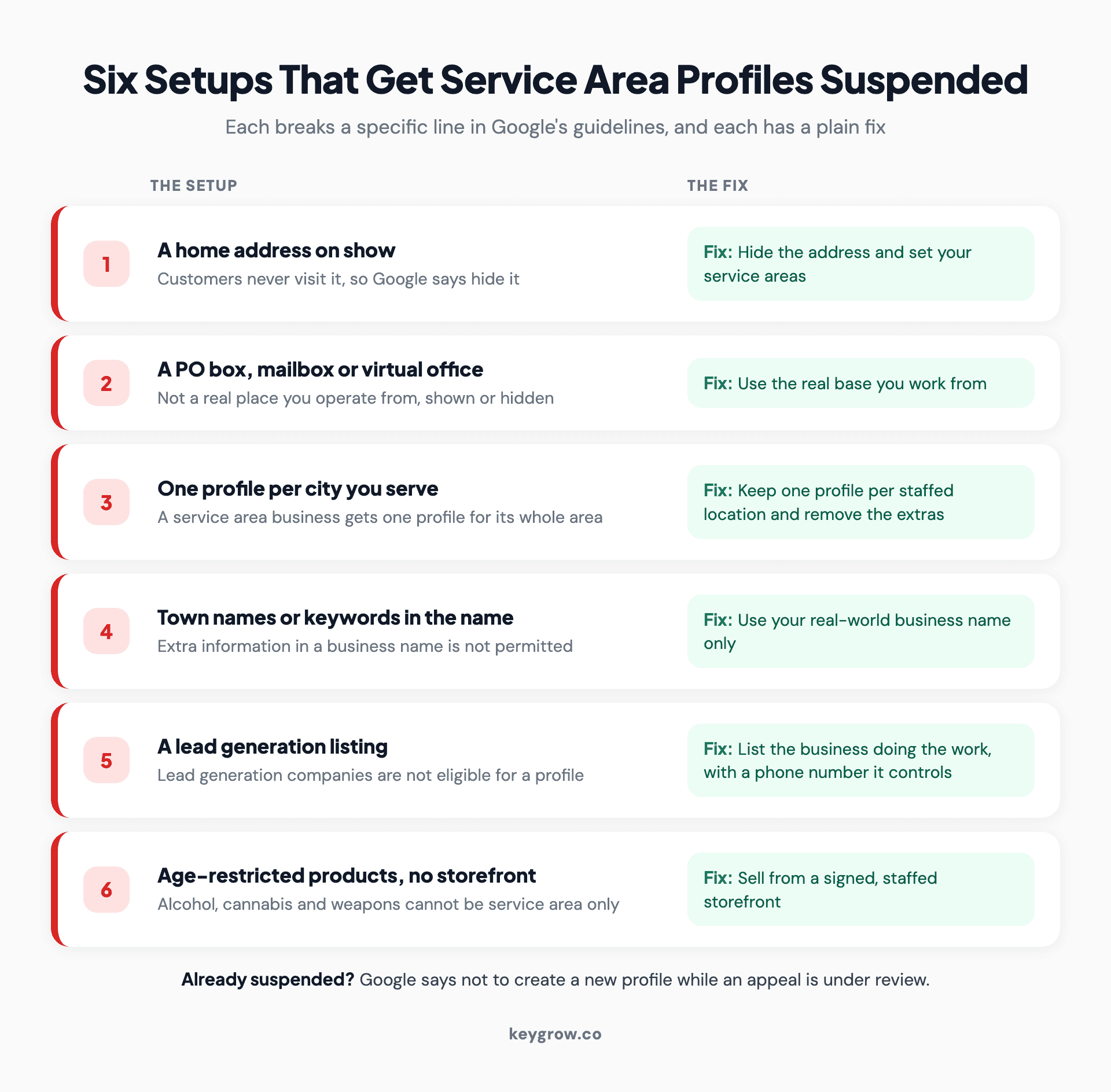
Six setups that put a service area business profile at risk of suspension, each paired with its fix: a home address on show, a fake address, one profile per city, keywords in the business name, lead generation listings, and age-restricted products without a storefront.
Google's guidelines rule out PO boxes, mailboxes at remote locations and virtual offices, meaning a mailing address you rent but do not work from. A coworking desk works as a hidden base only if your own staff work there during business hours. Your home qualifies if you run the business from it. Renting a virtual office in the city you want to rank in, because the hidden address controls distance, is exactly what the rule exists to stop.
The other five:
A suspended profile vanishes from public view, reviews included, and Google's appeal pages say not to create a new one while an appeal is under review. Our guide to a suspended Google Business Profile walks through the appeal.
What your website and listings need without a public address
Without a visible address, your website and listings prove you work where you say. Match the profile's areas, and build city pages only where you have substance.

Old furniture, chairs and household junk piled up outside a garage door, waiting for a junk removal pickup.
Here's the pattern in practice. One of our clients, a junk removal company in Missouri, went from 8 phone calls a month to 50+ in six months. We aimed the search optimization at what people in its real service area type, from "junk removal near me" down to "hoarder cleanout springfield mo", and added a review generation system and a mobile site with click-to-call buttons.
Directories are trickier. Some will not let you hide an address, but plenty work fine without one. On those, copy the name and phone number from your profile exactly, and list the same service areas.
A page for every town with only the name swapped is what Google's doorway abuse policy describes. Our guide to local SEO for multiple locations has a three-question test for when a city page earns its place.
You can probably set this up yourself
DIY is the right call more often than agencies admit, and this is one of the clearest cases. For a service area business with one location, the whole job is one toggle, up to 20 place names and a verification video of at least 30 seconds that Google reviews within five business days.
Paying for help makes sense in narrower cases, like several depots with separate crews or a suspension to untangle.
FAQs
Can a service area business have a physical address?
Yes. Every Business Profile needs a real address for verification, and a service area business hides it. If customers visit that address during staffed hours and it has permanent signage, you are a hybrid or a storefront and should show it.
Do service area businesses show up on Google Maps?
Yes. Like other local businesses, they can appear on Google Maps and in the local pack, but with an outline of their service area in place of a map pin. Where they rank still depends on distance from the address they verified.
Does adding more service areas help me rank in more places?
No. Google calculates rankings from the address you verified, and testing by local SEO practitioners has found the service area mainly changes what the profile displays. Reach further out comes from relevance and prominence: reviews, links and a website that proves you work there.
How do you verify a service area business on Google?
By video, which Google recommends whenever your business is eligible. Film one live, unedited take of at least 30 seconds on a phone, through the profile, showing the streets near your base, your tools and proof you run the business. Google says review takes up to five business days.
Get the label right first
Every other setting follows from the type, so settle it with Google's tests, not by picking whichever type you suspect would rank better.
If the phone still is not ringing from the towns you serve after that, the gap is usually prominence, which is where outside help tends to pay for itself. Send us your business name and we will tell you which part needs work, including when the honest answer is that you can handle it yourself.


