


A Google Business Profile for contractors is won or lost on two things: the primary category, and a steady run of reviews from recent jobs. Pick the category for the trade that pays your bills, hide your address if homeowners never come to you, put your license number where people can read it, and ask every finished client for a review before the crew leaves. Everything else on the profile is upkeep.
That ranking logic is Google's, not ours. Google's local ranking page says results weigh relevance, distance and prominence. The category carries most of the relevance. Reviews feed prominence. Distance is wherever the homeowner happens to be standing, and the same page is blunt that there is no way to request or pay for a better local ranking.
What follows is the setup in the order you will meet it, plus the parts general guides skip for contractors: which category each trade should pick, what to do when one company runs two trades, where the license goes, and the short list of mistakes that get contractor profiles suspended.
What a homeowner sees before they call
A finished contractor profile shows your real company name, one specific trade category, the towns you serve with no home address, services named as jobs, a license number in the description, photos from real projects, and recent reviews with your replies.
That is the whole target. Each callout on the mockup below maps to a section of this guide.
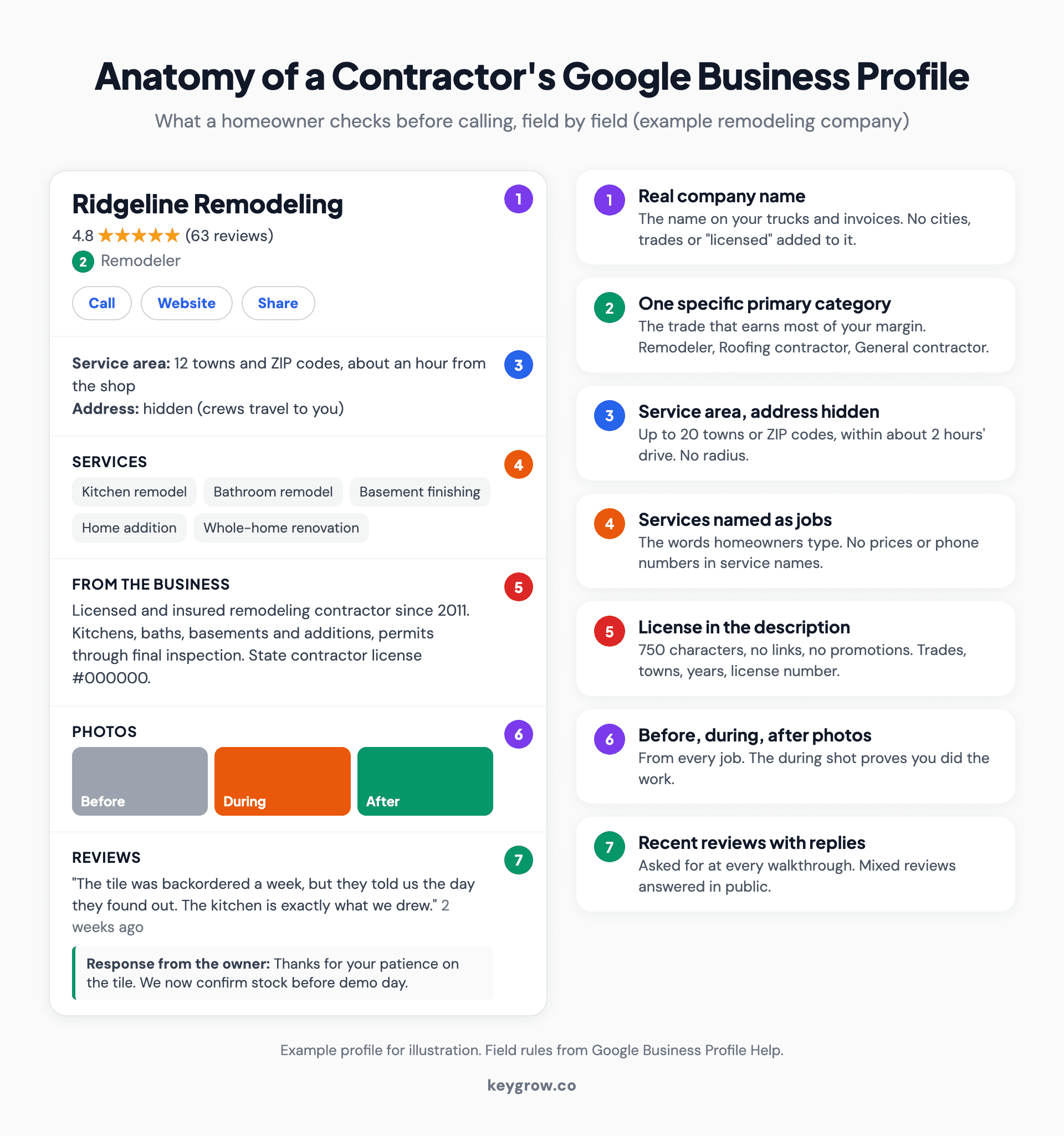
Annotated mockup of a Google Business Profile for a remodeling contractor, with callouts for the real company name with no keywords, Remodeler as the primary category, a service area of named towns with the address hidden, services named as jobs, a description that includes the state license number, before, during and after project photos, and recent reviews with owner replies.
A homeowner planning a forty thousand dollar kitchen does not read your profile the way a pizza customer does. They read it like a background check. Is this company real, does it do my kind of job, has anyone near me hired it lately, and what happened when something went wrong. Every field below answers one of those four questions.
Set it up as a service-area business
If customers never visit your address, you are a service-area business. Hide the address, list the towns you actually send crews to, and do not use a virtual office or mailbox as a workaround.
Search Google Maps for your company name before you create anything. An old employee, a previous owner or a data aggregator may have made a listing years ago, and claiming it beats starting a second one. If you find two, our guide to fixing a duplicate Google Business Profile covers which one to keep.
Then go to business.google.com, add the business, and say that you visit customers. Google's profile guidelines are clear on the address. If you work from home or from a yard nobody visits, hide it. Their own example is a plumber running the business from a residential address.
A showroom or an office with posted hours changes that. You are then a hybrid business, and you can show the address and a service area together.
PO boxes and mailbox store addresses are not accepted, and a service-area business cannot list a virtual office unless someone staffs it during business hours.
For the area itself, Google's service area help page allows up to 20 entries by city, ZIP code or region. You can no longer draw a radius, and the whole area should sit within about two hours of driving from your base.
Treat two hours as the legal edge, not the plan. A roofer will drive ninety minutes for a full tear-off. Nobody drives ninety minutes for a gutter repair. List the towns where you would happily take your smallest profitable job, because that is the job the map will send you.
Verification usually comes next. For contractors it is often a short, unedited video of where you work, your equipment, and something that shows you run the business. If it stalls or fails, our walkthrough of Google Business Profile verification matches each error to its fix.
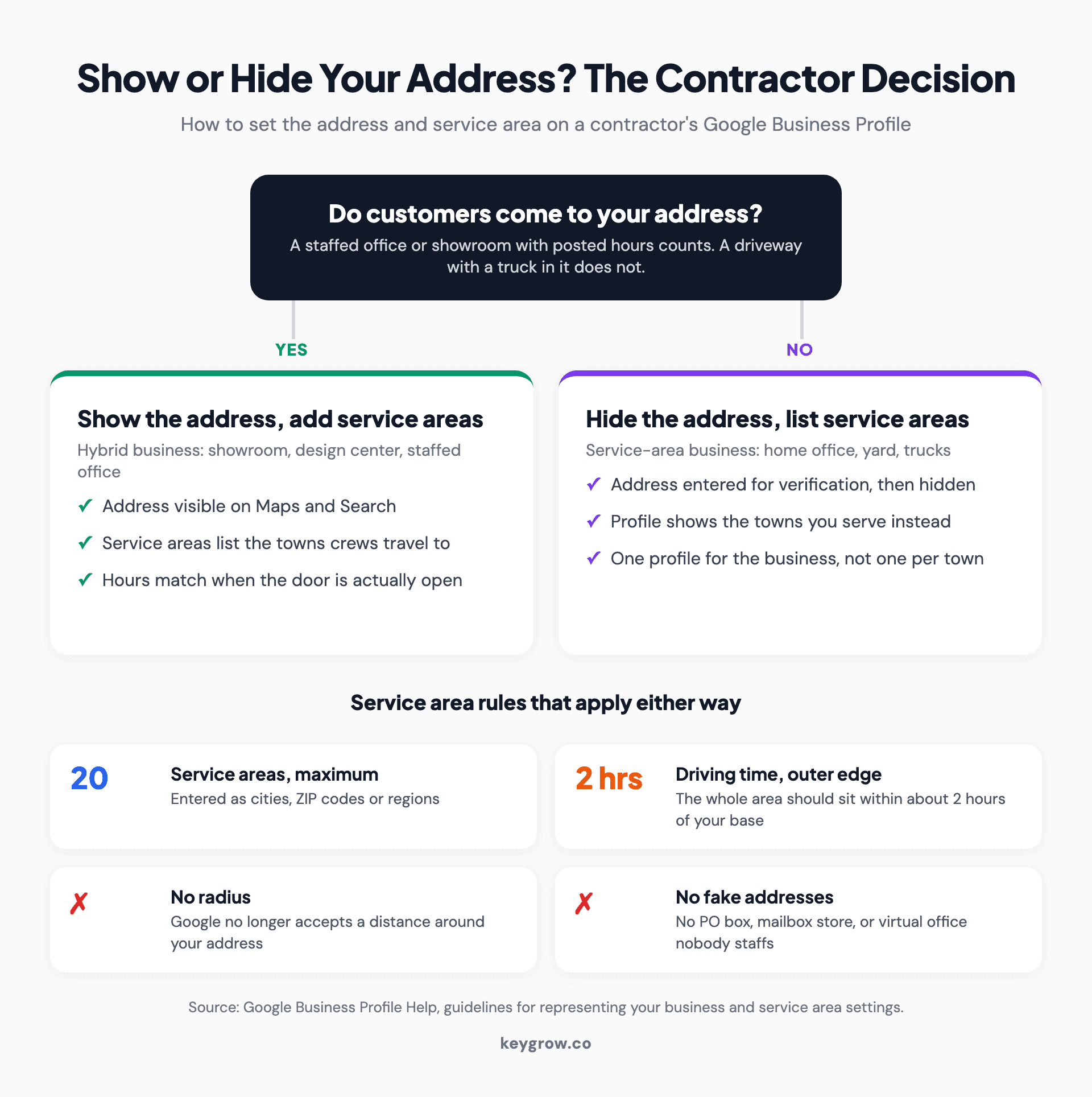
Decision flow for a contractor's Google Business Profile address: if customers visit a staffed office or showroom, show the address and add service areas; if crews work from home or a yard, hide the address and list up to 20 towns or ZIP codes within about two hours' drive, with no radius, PO box or virtual office.
Which primary category should a contractor choose?
Choose the category that names the work producing most of your gross margin, phrased as what the business is, not what it has. A remodeling firm that also builds decks is a Remodeler first.
Google's guidelines put it as a sentence test: the category should complete "this business IS a", not "this business HAS a". They also ask for the fewest categories that describe the core business, and the most specific one that is still accurate.
Here is where most trades should land. Type each one into the category box to confirm the current wording, because Google renames and adds categories without notice.
| Your trade | Primary category | Additional categories worth testing | Avoid as primary |
|---|---|---|---|
| General contracting | General contractor | Construction company, Remodeler | Construction company (too broad to win "contractor near me") |
| Kitchen and bath remodeling | Remodeler | Kitchen remodeler, Bathroom remodeler | General contractor, unless you build additions |
| Roofing | Roofing contractor | Siding contractor | Construction company |
| Decks and outdoor builds | Deck builder | Fence contractor | Carpenter |
| Concrete and flatwork | Concrete contractor | Paving contractor, Masonry contractor | Construction company |
| Custom homes | Custom home builder | Home builder, General contractor | Real estate developer |
| Painting | Painter | Drywall contractor | Painting studio |
The last column is where profiles quietly lose. "Construction company" sounds bigger, so owners pick it. Then the profile competes for commercial and civil searches it will never win and drops out of the residential searches it should.
Additional categories carry your secondary trade. Google allows several, and our post on choosing Google Business Profile categories covers how many to add and how to check what the top three map results use.
If you run a general contracting firm and would rather have the category research, the profile and the project pages handled together, our SEO for general contractors covers all three.
One company, two trades: still one profile
Google's guidelines say there should be one profile per business, and they tell practitioners not to make separate profiles to cover each specialization. A company that does roofing and remodeling out of one yard is one business. Put the bigger trade in the primary category, the other in the additional categories, and list both in services.
The temptation is a second profile called "[Your Name] Roofing" at the same address. It can survive for a while. Then a competitor reports it, or Google connects the two, and the risk is losing both. For roofers who want the roofing side to rank on its own, the place to build that is the website, which is exactly what SEO for roofing companies is for.
Write services as the jobs people search for
List services by the job a homeowner types, not by your trade's internal terms. "Basement finishing" and "roof replacement" get matched to searches. "Interior build-outs" and "envelope solutions" do not.
Google offers a set of predefined services for your category and lets you add custom ones. Its services help page says custom services that break policy are rejected automatically, and custom service names should not contain prices or phone numbers.
A remodeler's list might read:
- Kitchen remodel
- Bathroom remodel
- Basement finishing
- Home addition
- Whole-home renovation
- Aging-in-place bathroom conversion
Add a one-line description under each with the detail a homeowner checks first: typical duration, whether you handle permits, whether you do design in-house. Leave prices out of the name. If you want to publish price ranges, the description or your website is the better place, and only if you are comfortable honoring them.
Put the license number in the description
The description is 750 characters, no links, and no promotions. Use it to answer the background check: what you build, where, how long you have been doing it, and your license number.
Those limits come from Google's help page on editing the profile: no more than 750 characters, no URLs or HTML, and a focus on the business rather than promotions, prices or sales. Most contractor descriptions waste the space on "quality craftsmanship" and "customer satisfaction", which every competitor also claims.
Here is an illustrative version for a remodeler. It runs 569 characters as written, so there is room left for real town names. The company is made up.
> Ridgeline Remodeling is a licensed and insured remodeling contractor serving [Town], [Town] and [Town] since 2011. We do kitchen remodels, bathroom remodels, basement finishing and home additions, from design and permits through final inspection. One project manager runs each job start to finish, and you get a written schedule before demolition starts. Most projects run four weeks to four months. Much of our work is in homes built before 1980, so we plan for what is behind the walls. State contractor license #000000. Certificate of insurance available on request.

A contractor's leather tool belt holding a tape measure and screwdrivers, worn on a job site against a blue sky.
Two cautions. Only write "licensed" if your state licenses your trade and the license is current, because homeowners do look it up. And a license on your profile is not the same as Google checking it. Google can screen license and insurance documents for Local Services Ads, which is a separate paid program covered in our post on Google Ads for contractors.
Photograph every job at three stages
Upload before, during and after photos from each finished job. The during shot matters most, because it proves you did the work rather than downloaded it.

A room mid-renovation with steel support posts holding the ceiling, debris on the floor and shovels against the wall.
Google's photo guidelines are short: JPG or PNG, between 10 KB and 5 MB, 720 by 720 pixels recommended, in focus, well lit, and no heavy filters, because the image should represent reality. Videos can run up to 30 seconds.
What to shoot on each job:
- Before. The rotted fascia, the 1970s bathroom, the cracked driveway. Shoot it wide so the next homeowner recognizes their own house.
- During. Open walls, new framing, the waterproofing membrane before tile goes on. This is the shot competitors cannot fake.
- After. Same angle as the before shot. Then one close-up of the detail you are proudest of.
Ask the homeowner before you post, and keep house numbers, plates and faces out of frame.
Those same photos are the raw material for project pages on your website, which is the core of our approach to SEO for contractors. One shoot, two uses.
Build the review ask into closeout
Ask at the final walkthrough, when the homeowner is relieved and standing in the finished room, then text the link the same day. Do not offer anything for it, and ask every client, not only the happy ones.
Long projects produce complicated reviews. A four-month renovation has a bad week in it somewhere: backordered tile, a rescheduled inspection. The client can love the result and still mention all of it. That is fine. A reply that names the delay and what you changed afterwards does more for the next reader than ten one-line five-star reviews.
Google's review content policy draws three lines that matter on a job site:
- No incentives for reviews, including discounts or free work.
- No selectively asking happy clients while skipping the unhappy ones, and no discouraging negative reviews.
- No requiring or pressuring a review while you are on the premises. Ask at the walkthrough, then let them write it later from the text.
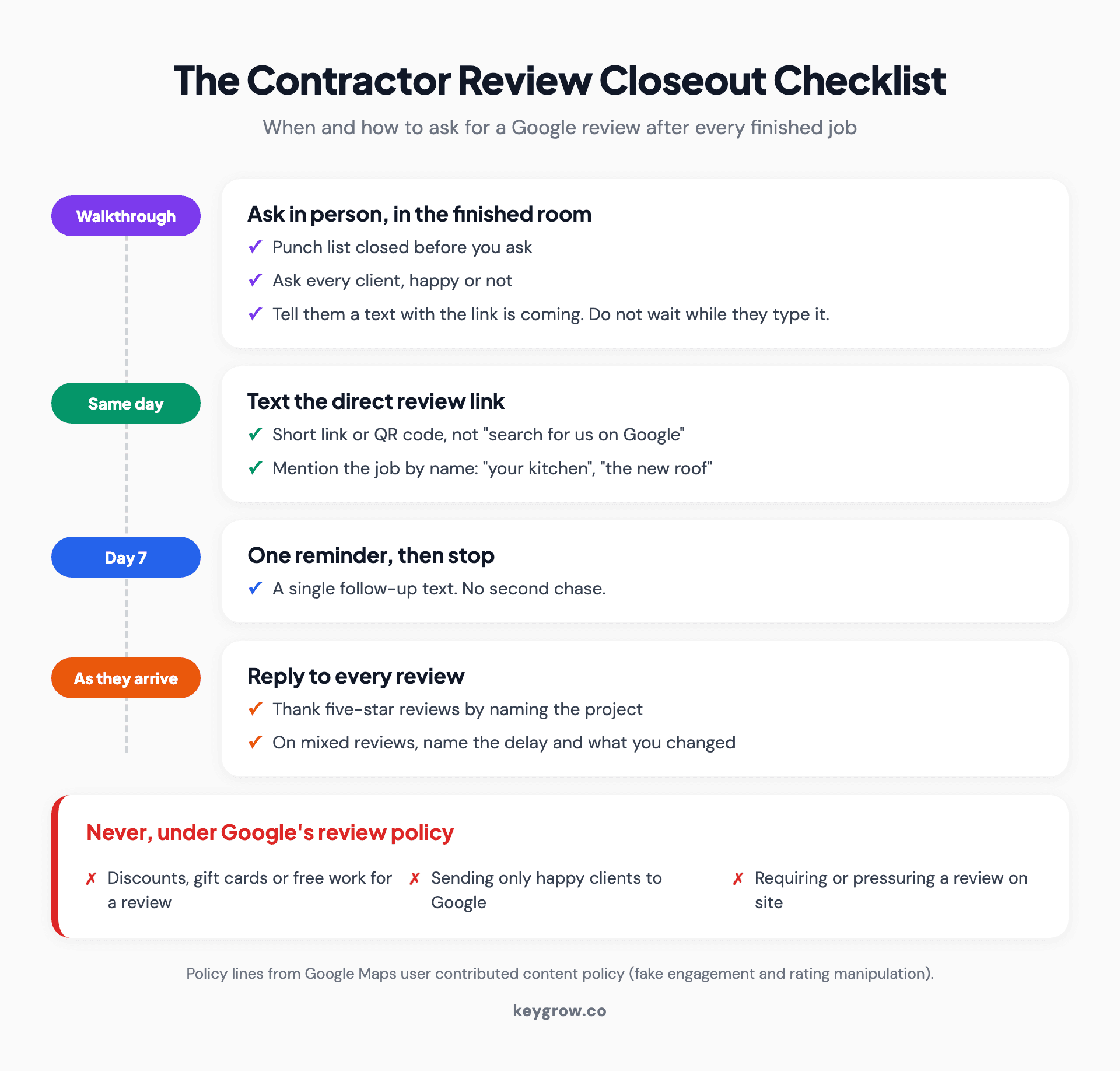
Closeout checklist for contractor Google reviews: confirm the punch list is done, ask in person at the final walkthrough, text the direct review link the same day, send one reminder after a week, reply to every review within a few days, and never offer discounts or ask only happy clients.
Put the request in your closeout paperwork so it does not depend on anyone remembering. Our guide to finding and sharing your Google review link shows how to get the short link and QR code, and when the mixed review arrives, responding to Google reviews walks through replies that read well to the next homeowner.
Posts, and the Q&A section that is gone
Posts are optional. A post when the season turns, a storm hits or a notable project finishes is enough. The old Q&A section has been replaced by an AI answer feature that reads your profile and reviews instead.
Weekly posting gets recommended a lot. For contractors it is mostly busywork. A roofer posting after a hailstorm about inspection availability, or a deck builder posting in early spring about the booking calendar, is useful. A stock photo of a hammer every Monday is not. Our breakdown of what Google Business Profile posts do covers where they show and what they do not change.
Several of the guides ranking for this topic still tell contractors to seed the Q&A section. Search Engine Roundtable reported in December 2025 that Google was replacing it on Maps with an AI-powered Ask button, which answers from the business's details and its reviews. So the description, the services list and the content of your reviews now answer homeowner questions for you. One more reason to ask every client, and to write the services list carefully.
What gets contractor profiles suspended?
Mostly the same handful of shortcuts: keywords in the business name, an address you do not operate from, more than one profile for one business, and reviews you paid for or filtered.
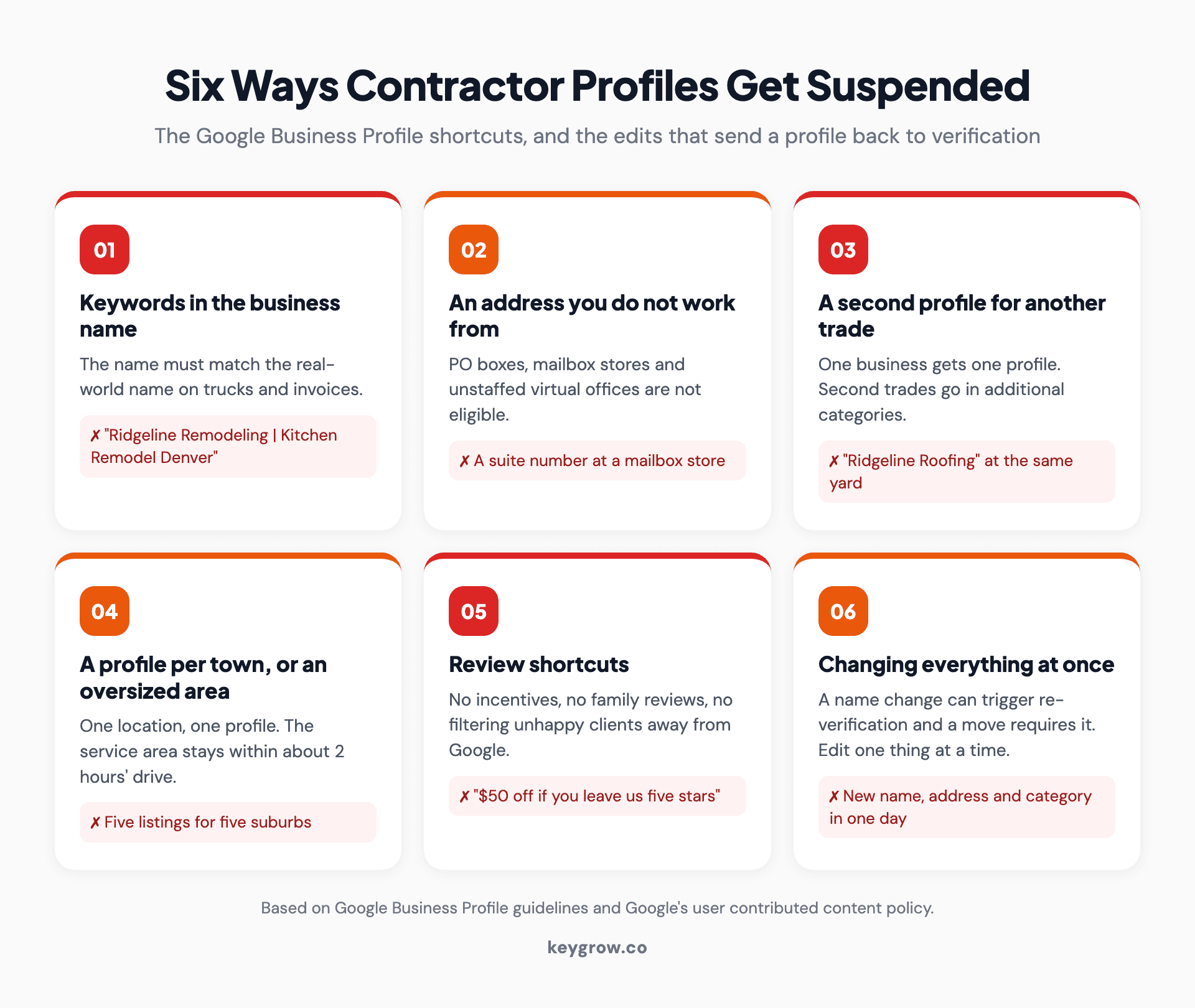
Six ways contractor Google Business Profiles get suspended or sent back to verification: keywords added to the business name, an address the business does not work from such as a PO box or mailbox store, a second profile for another trade, a profile per town or a service area past about two hours' drive, review incentives or filtering unhappy clients, and changing the name, address and category all at once.
The versions that catch contractors:
- Keywords in the name. "Ridgeline Remodeling" is a name. "Ridgeline Remodeling | Kitchen Remodel Denver | Licensed" breaks the guidelines, and competitors report it.
- Fake addresses: a mailbox store, a PO box, or a virtual office nobody staffs.
- A profile per town. Google's guidelines say not to create more than one profile for each location, and a business with one yard has one location.
- A profile per trade, covered above. It is the shortcut a two-trade company is most tempted to try.
- Review shortcuts: discounts for reviews, family reviewing the business, or a "tell us first" filter that only sends happy clients to Google.
- Changing everything at once. Google says a name change after verification may require verifying again, and a move requires it. Change one thing at a time, and only when the business has actually changed.
If it has already happened, do not make a new profile. Our guide to appealing a Google Business Profile suspension covers the documents Google asks for and the order to file them in.
How do you know it is working?
Count calls and booked estimates from the profile, not views. The performance report shows calls and website clicks; your job list shows which of those turned into signed work.
A monthly report that opens with impressions or profile views is a vanity report. Views do not frame a wall. Ask for calls, estimate requests and signed jobs, in that order.
The closest example in our own work is a junk removal company, a service-area business with no storefront, the same setup most contractors have. Over six months of local SEO that included a review generation system, it went from 8 monthly phone calls to 50+, as the Easy Cleanouts case study shows. We measured that in calls because calls are what the owner could take to the bank.
Give a properly built profile time before you judge it. How fast it moves in the map results depends on how many competitors near you have already done the same work, and nobody can honestly give you a date.
For remodelers, where a single signed project is a large ticket, the profile is the one lead source that costs nothing but time. If you would rather hand the profile, the reviews and the project pages to someone else, our remodeling contractor SEO covers that work.
When you do not need anyone to do this
A one-crew contractor in a small market can do everything in this guide in roughly an afternoon, then a few minutes per finished job. For most small outfits, doing it yourself is the right call, and we would tell you so.
Pay for help when the time cost is real: you run several trades or locations, you work a large metro where every remodeler on the first page has already done all of this, the profile has been suspended, or you are booked solid and simply will not keep up the photos and review asks. If you are already booked four months out, more map visibility mostly means more estimates you cannot schedule.
FAQs
Can a contractor have a Google Business Profile without an office?
Yes. Contractors who travel to customers set the profile up as a service-area business, hide the address and list up to 20 towns, ZIP codes or regions. Google still needs a real address to verify the business, but it is not shown publicly.
Should a contractor show their home address on Google?
No, not if customers never visit it. Google's guidelines say service-area businesses should hide the address. Show an address only if you have an office or showroom that customers can visit during posted hours.
What category should a general contractor choose on Google Business Profile?
Use General contractor as the primary category if most of your revenue comes from managing whole projects. If most of it comes from kitchens and baths, Remodeler is usually the stronger primary, with General contractor as an additional category.
Can I have separate Google Business Profiles for roofing and remodeling?
Not if they are the same company working from the same place. Google allows one profile per business, so put the bigger trade in the primary category and the other in the additional categories. A second profile for the same business is a common reason contractor profiles get suspended.
Can I put my contractor license number on my Google Business Profile?
Yes. The business description allows up to 750 characters with no links, and a license number fits easily. Keep it current, because homeowners can check it against your state's license lookup.
How long does it take a contractor's Google Business Profile to show up in the map results?
Searches for your own company name usually find a verified profile first. Ranking for searches like "remodeler near me" takes longer and depends on how many established competitors are near you, so treat any fixed timeline as a guess.
Ask for the review before you load the truck
The category and the service area are one-afternoon fixes. The review habit is the part that compounds, and it lives or dies at the final walkthrough, while the homeowner is still standing in the finished room. Ask there, text the link before you pull out of the driveway, and reply to whatever comes back.
If you would rather have someone build the profile and run the review program with you, tell us about your business and we will say plainly whether it is worth paying for.