


It's 9:40 on a Tuesday night and three reviews are waiting in your Business Profile. A five-star from Saturday that nobody answered. A three-star that loves your technician and hates the invoice. A one-star with no words at all.
Each needs a different reply. None of them needs an essay.
Here is how to respond to Google reviews: open your verified Business Profile, select Read reviews, then Reply, and match the reply to the type of review. Thank the five-star by name and mention what they mentioned. Answer the complaint inside the three-star. Ask the silent one-star to call a named person. If the reviewer was never a customer, say you can't find a record and report it. In healthcare and law, confirm nothing at all.
Whether replies move your rankings is a separate question, and we went through the evidence in whether responding to Google reviews helps SEO. This post is the practical half.
Find the Reply button on a computer or phone
Sign in with an owner or manager account, open your Business Profile, choose Read reviews, then Reply. The profile has to be verified first, or the button never shows up.
- Sign in to the Google account that owns or manages the profile.
- Search your business name on Google, or go to business.google.com.
- Select Read reviews.
- Select Reply next to the review, write your response, and select Reply again.
On a phone, the same steps work in the Google app or a mobile browser. In the Google Maps app, tap Business at the bottom right, then Reviews, then Reply.
The reply then goes through a content policy check, usually within 10 minutes, per Google's help page. Once approved, it posts under the review as the business, without your personal name, and the reviewer gets a notification.
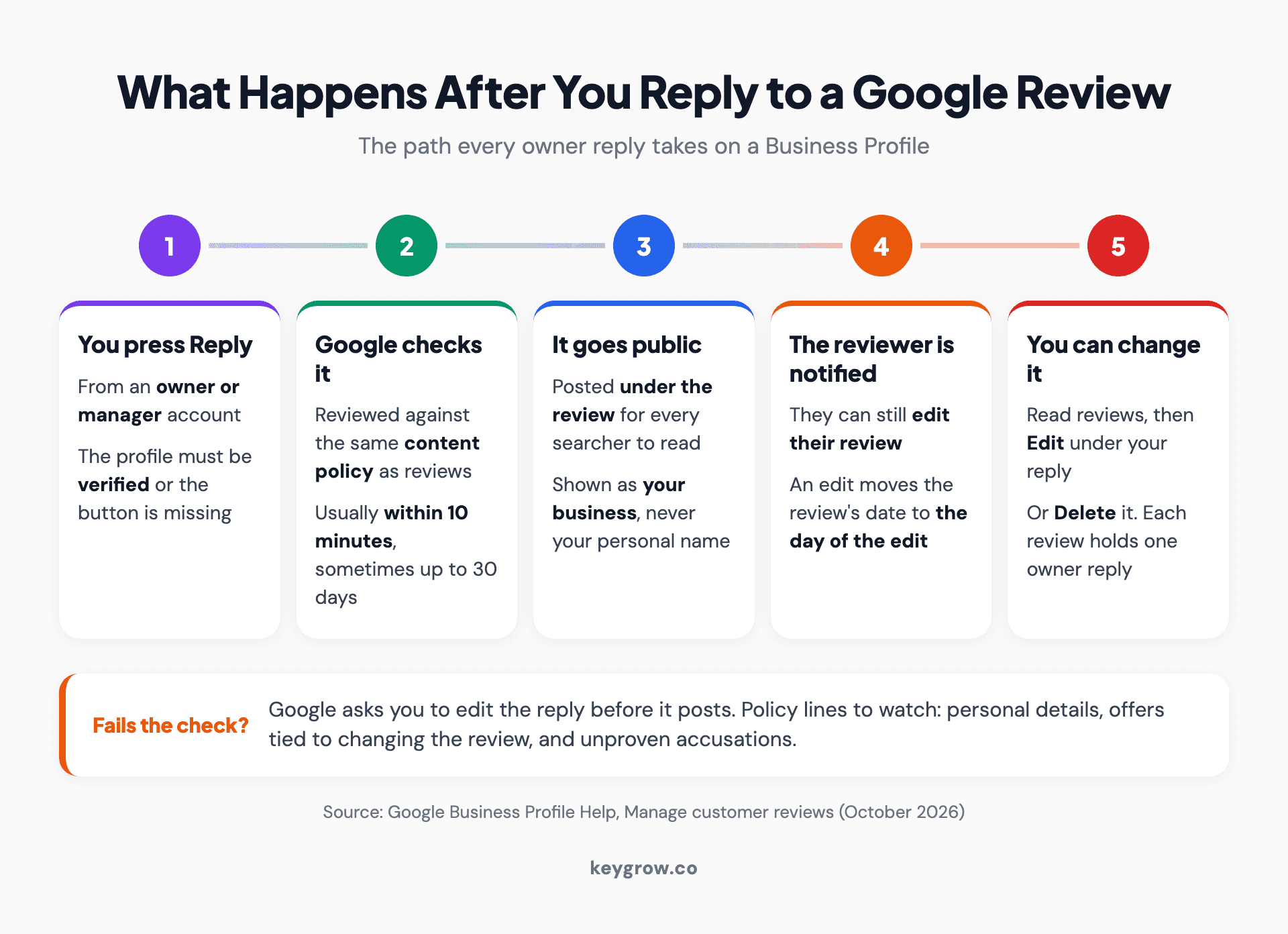
Five-step flow of what happens after you reply to a Google review: Google checks it against content policy, it posts publicly as the business, the reviewer is notified and may edit, and you can edit or delete it later.
The playbook at a glance
Most reviews fall into one of seven types, and each asks the reply to do a different job.
| Review type | What the reply has to do | Length | Report it? |
|---|---|---|---|
| Five stars with a detail | Thank by name, echo the detail, add one useful line | 2 to 3 sentences | No |
| Star rating, no text | Say thanks, or ask what went wrong if it's low | 1 to 2 sentences | No |
| Three stars, "great, but" | Thank the praise, answer the complaint directly | 3 to 4 sentences | No |
| One star, and they're right | Name the failure, say what changed, give a direct contact | 3 to 4 sentences | No |
| One star, facts wrong | Correct one fact once, calmly | 3 to 4 sentences | No |
| Never a customer | Say you can't find a record, invite contact | 2 sentences | Yes |
| Healthcare, legal, confidential | Confirm nothing, offer a phone number | 2 sentences | Only if it breaks policy |
Brackets in the templates are slots, and each template has one only you can fill, usually a detail from the review. Skip it and BrightLocal's 2026 survey says you lose people: generic or templated replies make 50 percent of consumers unlikely to choose a business. Borrow the structure. Write the detail fresh.
1. Five stars and a detail
Thank them by first name, say back the detail they mentioned in your own words, and add one line that helps the next person reading.
Template:
"Thanks, [first name]. Glad we got [their detail in your words, such as the leak fixed before the weekend], and I've passed your note to [staff name]. [One line a future customer can use, such as what to do if the problem comes back.] [Your first name], [role]"
Why each line is there:
- Rephrase the detail. Their own words pasted back read like software.
- If the reviewer named a staff member, name them too.
- The useful line is for the stranger scrolling past. Google's reply tips favor ones that share an update or answer a question.
- Leave out coupons. Google asks for conversational replies, not promotional ones.
- Sign with a first name or initials, the only sign a person wrote it.
2. A star rating with no words
Keep it to a line or two. On a high rating, say thanks. On a low one, ask what happened and give a direct contact.
Four or five stars:
"Thanks for the five stars, [first name]. Good to have you in."
One or two stars:
"[First name], we'd like to know what went wrong. Please call [name] at [number] or email [address]."
There's nothing to personalize, so don't pretend. Write five or six versions of the thank-you and rotate them, as BrightLocal recommends. On a silent low rating, don't guess at the problem in public. If you can match the name to a job, call them.
They still get a reply. The same survey found 80 percent of consumers are likely to use a business that responds to all its reviews, against 45 percent for one that answers only the positive ones.
3. Three stars: "great, but"
Thank them for the specific praise, then answer the specific complaint in the same reply. The next reader skims straight to the "but".
Template:
"Thanks, [first name]. Glad [the praise, specifically] worked out. You're right about [the complaint, named plainly], and [what you did about it, or the honest reason it happens]. If you want to talk it through, [name] is at [contact]. [Sign-off]"
Three things to watch:
- Don't answer their praise with a "but" of your own. "Glad you liked the crew, but our prices are clearly listed" turns a three-star into an argument.
- Explain a real limit honestly. Google's example is a business that cancels for bad weather: say what you monitor and when you warn people, and don't take the blame for the rain.
- If the complaint is price, say what the price includes.
4. One star, and they're right
Name the failure in plain words, apologize once, say what changed, and give a direct line to a named person who can fix it.
Template:
"[First name], you're right, and I'm sorry. [The failure, plainly: we said Tuesday and showed up Thursday without calling.] [What changed: every schedule change now gets a same-day call.] I'd like to make this right. Please call me at [direct number]. [Your name], [role]"
"Sorry for any inconvenience" tells every reader nobody read the review. Naming the failure costs nothing, since the star is already gone. Write the "what changed" line only if something did.
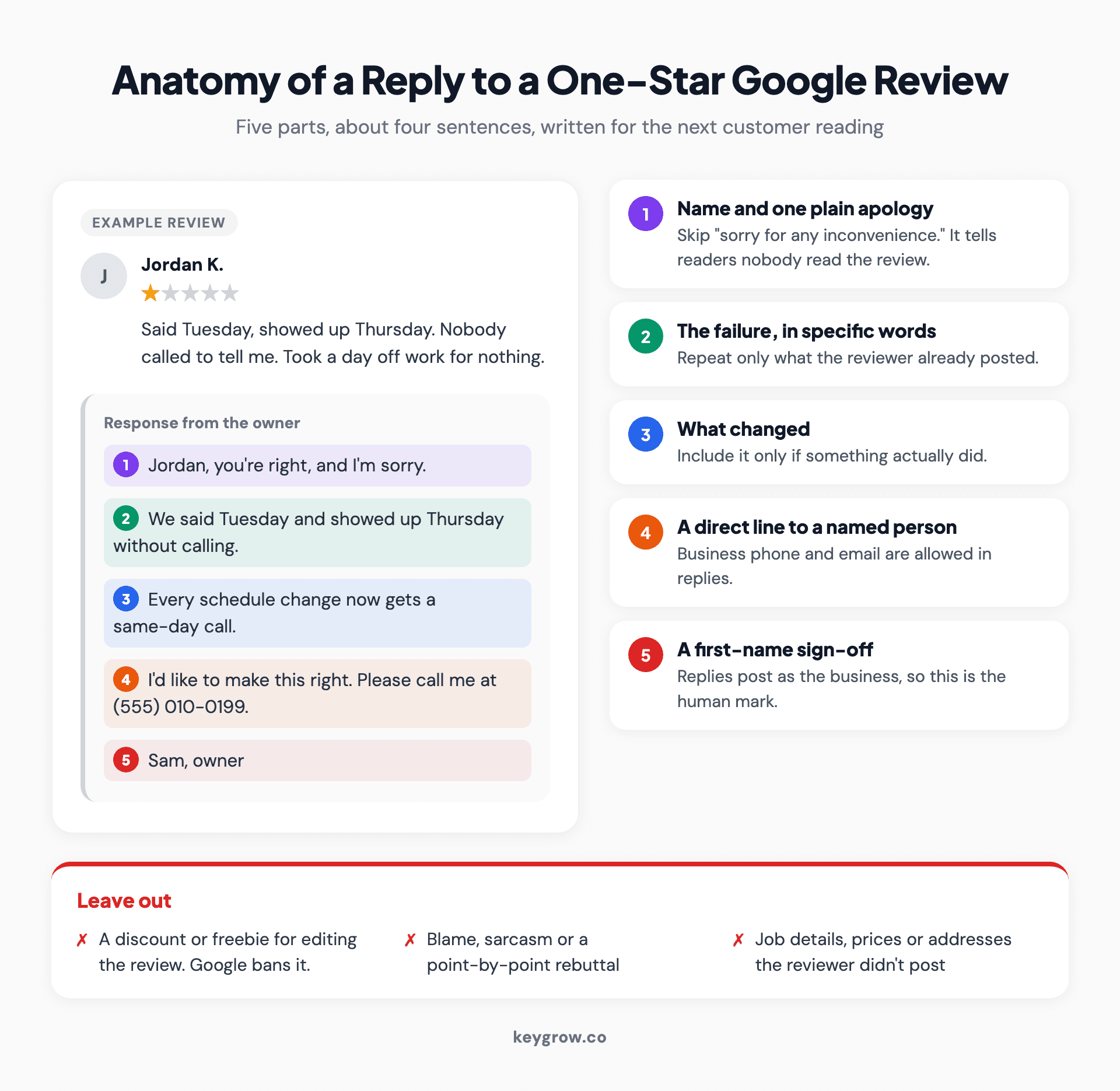
Annotated reply to a one-star Google review, with callouts for the name and apology, the failure named plainly, what changed, a direct line to a named person and the sign-off, plus what to leave out.
You can fix the problem and ask them to call. You can't offer a discount, free service or anything else of value for changing or removing the review, which Google's policy treats as rating manipulation.
5. One star, and the facts are wrong
Correct one fact, once, in a neutral sentence, then offer a conversation. Don't flag it. Google doesn't remove reviews for being unfair.
Template:
"Thanks for posting, [first name]. One fact for anyone reading: [the correction, stated once, such as the disposal fee was on the written estimate we sent before the job]. I can see why it still felt like a surprise, and [the change, such as we now go through fees before we start]. Happy to talk it through at [contact]."
A real customer with a wrong fact is still a real customer. The reporting page tells owners not to flag a review just because they disagree with it, and Google stays out of disputes between businesses and customers. The reply is your only tool, so make it the calmest thing on the page.
Correct only what the reviewer already made public. No invoice amounts, no addresses, nothing from a phone call they didn't mention.

A diner reads reviews on his phone at a restaurant table, the reader every public reply to a Google review is really written for.
6. Someone who was never a customer
Say you can't find a record, invite contact, then report the review. Don't call it fake or name a competitor in the reply.
Template:
"We can't find a [booking, visit or order] matching this name or the details described. If we've missed something, please contact [name] at [number] so we can look into it."
Two sentences and no accusation, even when you're sure. Google's policy counts unsubstantiated allegations of unethical or criminal behavior as offensive content, and your reply has to pass that policy too.
Then select Report next to the review and pick the closest reason. Google says evaluation typically takes several days, the Reviews Management Tool shows the status, and a rejected report gets one appeal. Our guide to removing a fake Google review covers the escalation steps.
A sudden burst of one- and two-star reviews followed by an offer to remove them for money is different: an extortion scam. Google says don't engage, don't pay, screenshot every message and file its merchant extortion report form. We'd hold off on replying to each one while that report is open.
7. Healthcare, law and other confidential work
Confirm nothing. Don't use the name, don't acknowledge they were a patient or client, and don't repeat a detail even if they posted it first.
Healthcare:
"Thank you for posting. Privacy rules mean we can't discuss anyone's care in a public reply, but we read every concern. Please call our office manager, [name], at [number]."
Legal:
"Professional obligations do not allow me to respond as I would wish. Please contact me by telephone so that we can discuss your concerns."
A patient posting their own details doesn't give you permission to repeat them. HHS has resolved at least four HIPAA cases over replies to online reviews, per Nixon Peabody. Three were dental practices: $10,000 in 2019, then $50,000 and $23,000 in 2022. The fourth, for $30,000 in 2023, was a psychiatric practice accused of disclosing four patients' information in replies to negative Google reviews. Even confirming facts a patient posted can raise HIPAA problems, the firm warns.
That includes five-star reviews. "So glad your new crown feels good, Maria" confirms she's a patient and what you treated. "Thank you for the kind words" says enough.
Both legal lines come from the ABA's Formal Opinion 496 (2021), which says a negative review doesn't release a lawyer from confidentiality and that lawyers should seriously consider not responding at all. Check your state's rules or your privacy officer before settling on wording; this isn't legal advice.
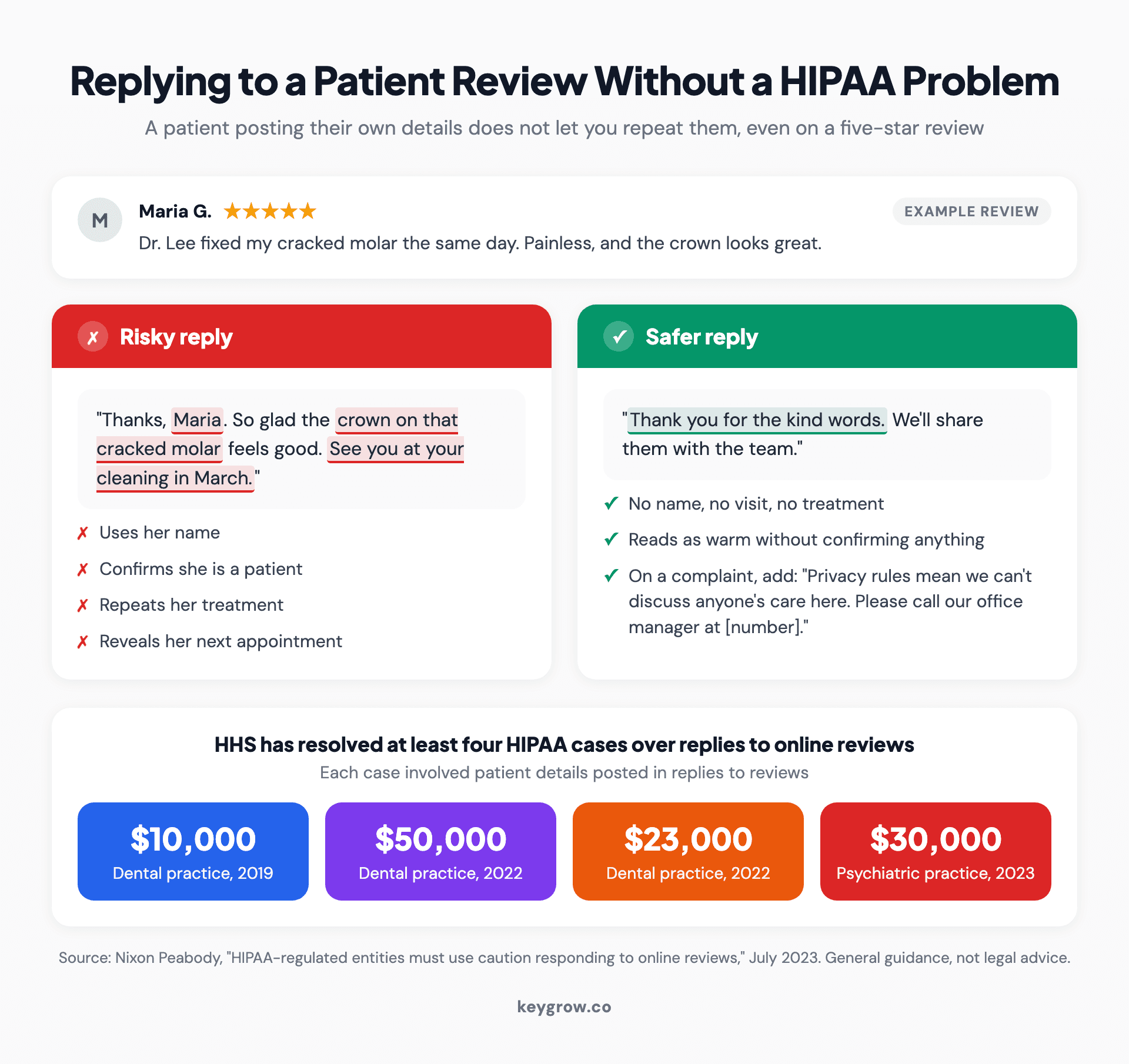
Two replies to the same patient review: a risky one that uses the name, confirms the visit and repeats treatment, and a safer one that confirms nothing, above four HIPAA settlements over review replies.
Rules your reply has to pass
Google checks every reply against the same content policy that governs reviews. These are the lines that matter:
- Keep personal information out: names the customer didn't use, health or financial details, anything from your records. Your business phone, email and social handles are allowed.
- Don't tie anything to the review. Payment, discounts or free services for changing or removing it are banned.
- Don't accuse without evidence. Claims of unethical or criminal behavior count as offensive content.
- No profanity, harassment or personal attacks. Obvious at noon, less obvious at midnight.
- No offers for regulated products such as alcohol, tobacco or medical devices.
Length won't trip you up. Google's API caps a reply at 4,096 bytes, several times longer than any reply should be.
Edit or delete a reply
Each review carries one reply from the business, and you change it where you wrote it.
- Go to your Business Profile and select Read reviews.
- Under your reply, select Edit.
- Change the text and select Update, or select Delete to remove it.
Edit when the reviewer updates their review after a fix, when a fact in your reply turns out wrong, or when the contact you named leaves.
Who should write the replies?
Anyone with owner or manager access can reply, and every reply shows as the business. Pick people you'd let speak for the business in public.
Each person signs in with their own Google account, so nobody shares a password. If you remove someone's access later, their past replies stay on the profile.
A split that suits small teams: whoever did the job writes the positive and star-only replies. Negatives go to whoever can fix the problem, and the owner reads them first. AI drafts are fine as a first pass, as long as a person adds the detail only they know.
You probably don't need review software or an agency for this. If one person can read every review the day it lands, a phone notification and two minutes per reply covers the 32 percent of consumers who want an answer by the next day. Review platforms earn their fee across several locations. For a single shop, paying someone to type thank-you notes is money better spent elsewhere.

A shop employee at the counter with a smiling customer, the kind of front-line staff member best placed to answer a positive Google review.
FAQs
Why can't I reply to a Google review?
Usually because the profile isn't verified, and Google requires verification before you can reply. You may also be signed in to an account that isn't an owner or manager. Reviews pulled in from other websites are handled on those sites.
How long does it take for my reply to show up?
Usually up to 10 minutes. Google checks each reply against its content policies before it posts, and some checks take up to 30 days. If the reply doesn't pass, Google asks you to edit it.
Can the reviewer respond to my reply?
Not directly, because Google reviews have no comment thread. The reviewer is notified when you reply and can edit their review, which changes its date to the day of the edit. Anything longer belongs on the phone.
Can I offer a discount in my reply to a bad review?
Not in exchange for changing or removing the review, since Google bans incentives tied to reviews. You can apologize, fix the problem and invite them to call. Google also advises against deals or promotions in replies generally.
Is it too late to reply to an old review?
No. You can still reply, the reviewer still gets a notification, and the next person reading sees it was answered. Start with the most recent negative reviews and work backwards.
Set a reply rhythm
Expectations moved fast. In BrightLocal's survey, 19 percent of consumers expect a response the same day, up from 6 percent a year earlier. By the next day it's 32 percent, up from 18 percent, and 81 percent expect one within a week.
A rhythm that keeps up without eating your day:
- Every day: notifications on. Answer positive and star-only reviews the same day or the next. Read negative ones when they land, check the job record, and reply within 24 hours, once you can do it calmly.
- Every week: a ten-minute sweep for anything missed, plus any review that was updated and needs an edited reply.
- Every month: read the month's complaints side by side. The same complaint three times is an operations problem, not a wording problem.
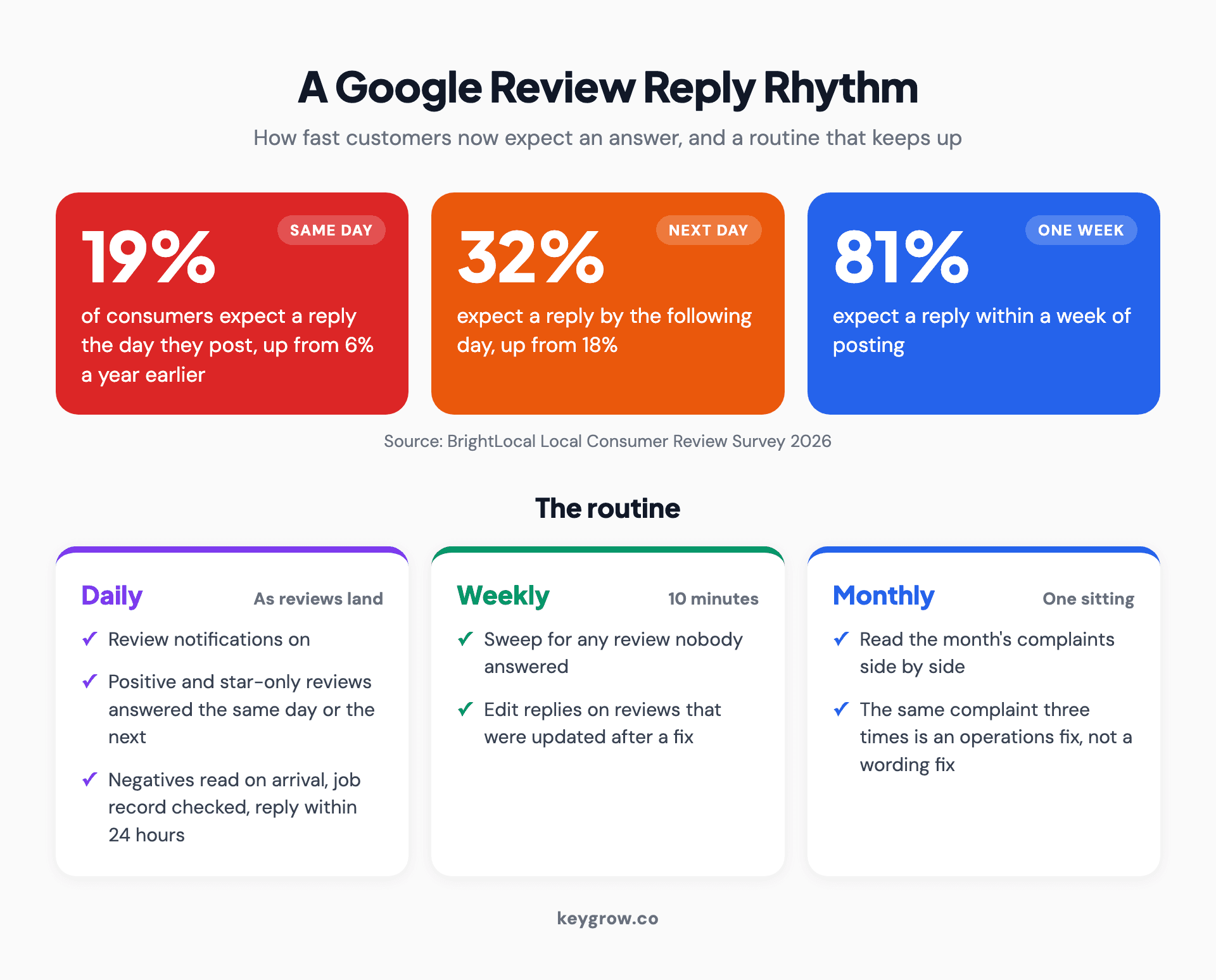
Google review reply rhythm: 19 percent of consumers expect a reply the same day, 32 percent by the next day and 81 percent within a week, with daily, weekly and monthly routines.
Replies are half the loop. The other half is asking the next customer, covered in our guide to getting more Google reviews, along with where to copy your Google review link.
If reviews are the visible part of a bigger local search problem, that's the work our SEO team does, month to month.



