


Open your Business Profile on a computer, click Read reviews, then Get more reviews, and press Copy. That is your Google review link. Right-click the QR code in the same box and choose Save image as to keep that too.
On a phone, search your business name in the Google app, signed in to the account that manages the profile, and tap the same two buttons. Only the QR code needs a computer.
Both are free. Most of the first page for this search is review link generators, and each one builds a version of a link Google already hands you.
Copy the link on a computer or a phone
Sign in with the account that manages the profile, search your business name, then choose Read reviews, Get more reviews and Copy.
- Search your business name on Google, or open business.google.com.
- Click or tap Read reviews, then Get more reviews. Some panels show an Ask for reviews button, which opens the same box.
- Press Copy, or send the link by email, WhatsApp or Facebook post from the same box.
- On a computer, right-click the QR code and choose Save image as. Google's help page says review QR codes only come from a computer browser for now.
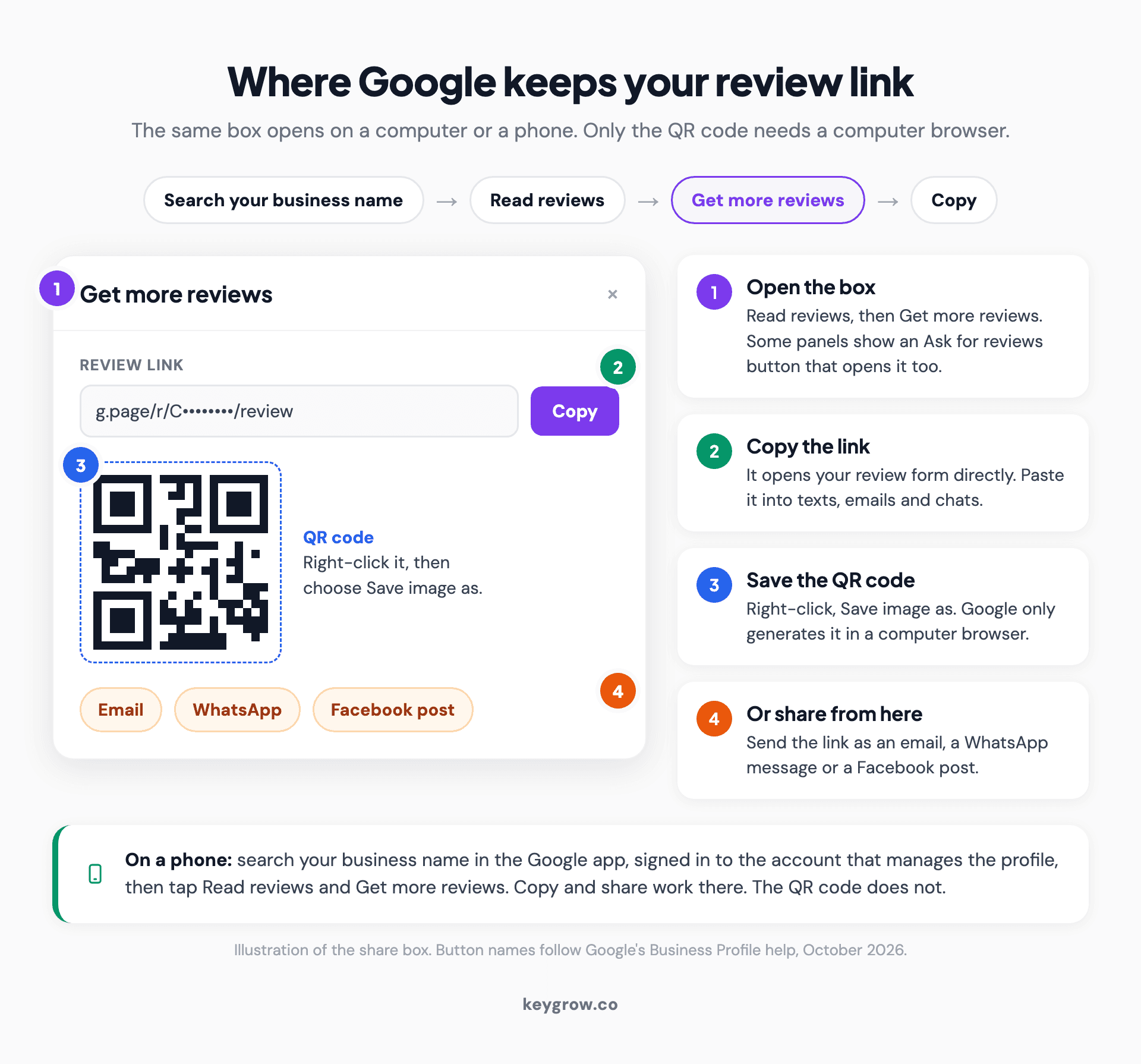
Annotated mockup of the Get more reviews box in a Google Business Profile, showing the review link and its Copy button, the QR code to right-click and save on a computer, and the email, WhatsApp and Facebook share options.
Then open the link on a phone signed in to a personal account. This is the view your customer gets.
Which link should you send?
Send the Get more reviews link, because it opens the review form. A Maps share link stops at your listing, a few taps short.
| Link | What it looks like | Where it lands |
|---|---|---|
| Review link from Get more reviews | g.page/r/ + a code + /review | Your review form |
| Place ID link | search.google.com/local/writereview?placeid= + your ID | Your review form |
| Maps share link | maps.app.goo.gl/ + a code | Your listing, not the form |
| Link to one review | Made with Share review on a single review | That one customer's review |
The last row trips people up. Share review links to an existing review, for showing off a testimonial, and asks nobody for anything.
No profile access? Build it from your Place ID
Look up your Place ID in Google's free Place ID Finder, then paste it after placeid= in the address above. A business ID usually starts with ChIJ, and this is the link most review link generators build.
There are two catches. Google's Place ID documentation says nothing about that write-a-review address, so it could change without notice, though it worked when we tested it in October 2026. And Place IDs change. Some generator pages say yours never will, but Google says IDs can go stale when a business moves or closes, and recommends refreshing any older than 12 months.
Use it as a stopgap, and print Google's own link.
Turn it into a QR code (Google already made one)
The QR code in the Get more reviews box does the same job as the link: scan it and your review form opens.

A phone scanning a QR code shown on a laptop at a small shop counter, the quickest way to test a Google review QR code before you print it.
Put it where people stand still with a phone in reach, like the counter or the bottom of the receipt. Print "Review us on Google" beside it, since a bare square tells nobody what it does, and test the proof on an iPhone and an Android phone.
Skip the "dynamic" codes QR sites sell. They route each scan through the vendor's server, so a code printed on 500 receipts can die with the subscription.
What to send with the link
Two sentences: thank them, then ask for an honest review and paste the link. Don't mention stars, and don't offer anything for it.
Text message, within an hour of finishing:
"Hi [first name], it's [your name] from [business]. Thanks for having us out today. If you have a minute, would you leave us an honest review on Google? [review link]"
Email, same day or the next morning:
Subject: How did we do, [first name]?
"Thanks for choosing [business]. If you can spare two minutes, an honest review on Google helps people nearby decide whether to call us. This link opens the form: [review link]. Thanks, [your name]"
Printed card, receipt or invoice:
"Tell us how we did. Scan to review [business] on Google."
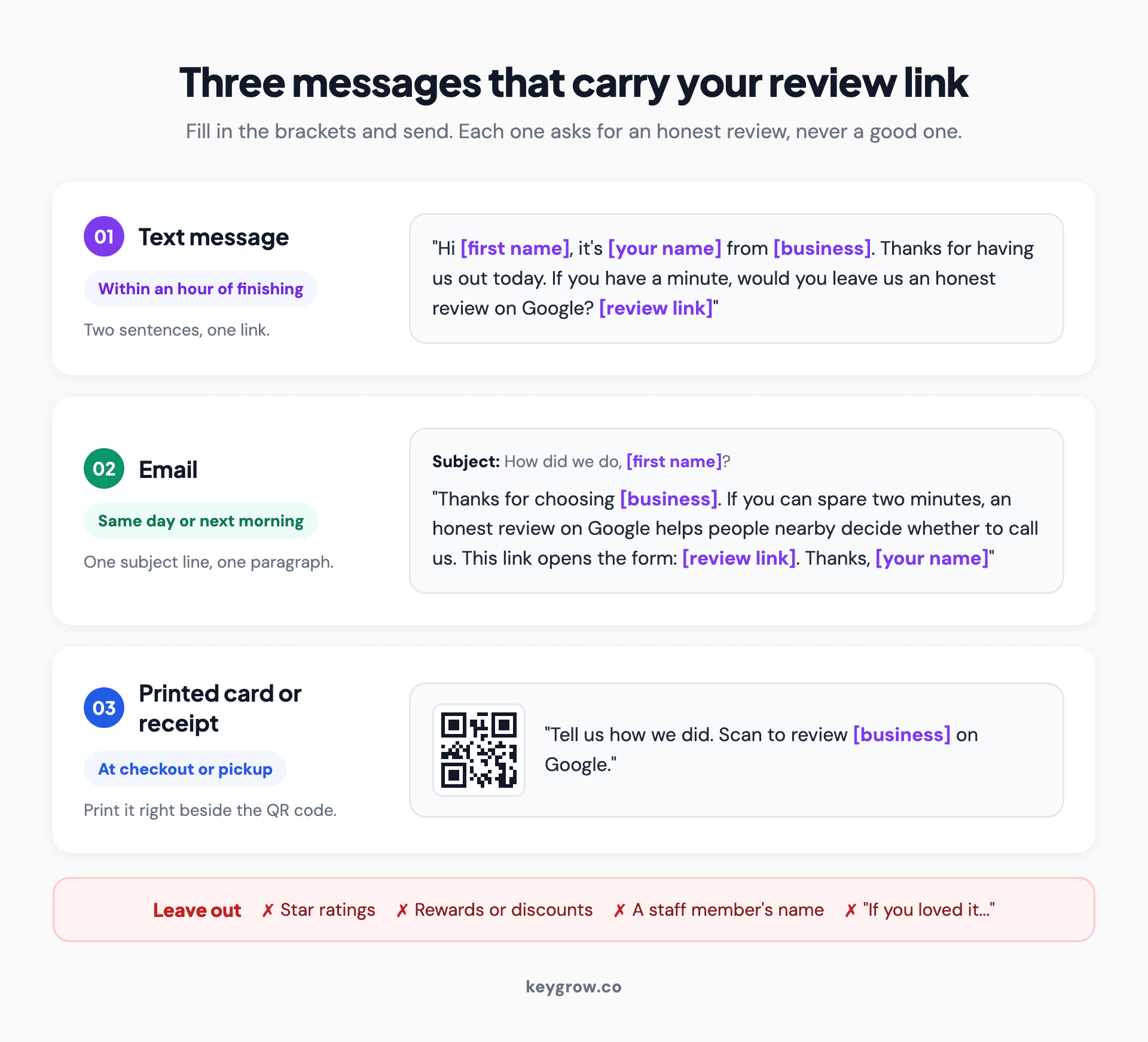
Three ready-to-send Google review request templates: a two-sentence text message sent within an hour of the job, a short email with the subject line How did we do, and the wording for a printed card or receipt beside the QR code.
Where to put the link
Send it where the customer already is, right after the work ends. Text and email carry the link; paper carries the QR code.
| Channel | When to send | What to say |
|---|---|---|
| Text message | Within an hour of finishing | The two-sentence text above |
| Same day or next morning | Subject line, one short paragraph, the link | |
| WhatsApp or website chat | At the end of the chat that closes the job | Same wording as the text |
| Receipt or invoice | At checkout, printed or in the PDF | "Tell us how we did," plus the QR code |
| Counter card | Where people wait to pay or pick up | "Scan to review us on Google" |
| Email signature | Every email | "Worked with us? Review us on Google" |
What Google does not allow
Ask everyone, offer nothing, and don't steer the rating or the words. Google's current policy is more specific than most guides quoting it.
As Google's content policy for Maps read in October 2026, businesses may not:
- offer money, discounts, free goods or services for a review, or for changing or removing a bad one
- discourage negative reviews or selectively ask for positive ones, which is what review gating does
- require or pressure customers to review while they are on the premises
- ask for specific content, including a staff member's name
- ask staff to bring in a set number of reviews
The last three arrived between February and April 2026, so older guides quoting the policy miss them. Reviews from employees, relatives or anyone else with a conflict of interest come down too.
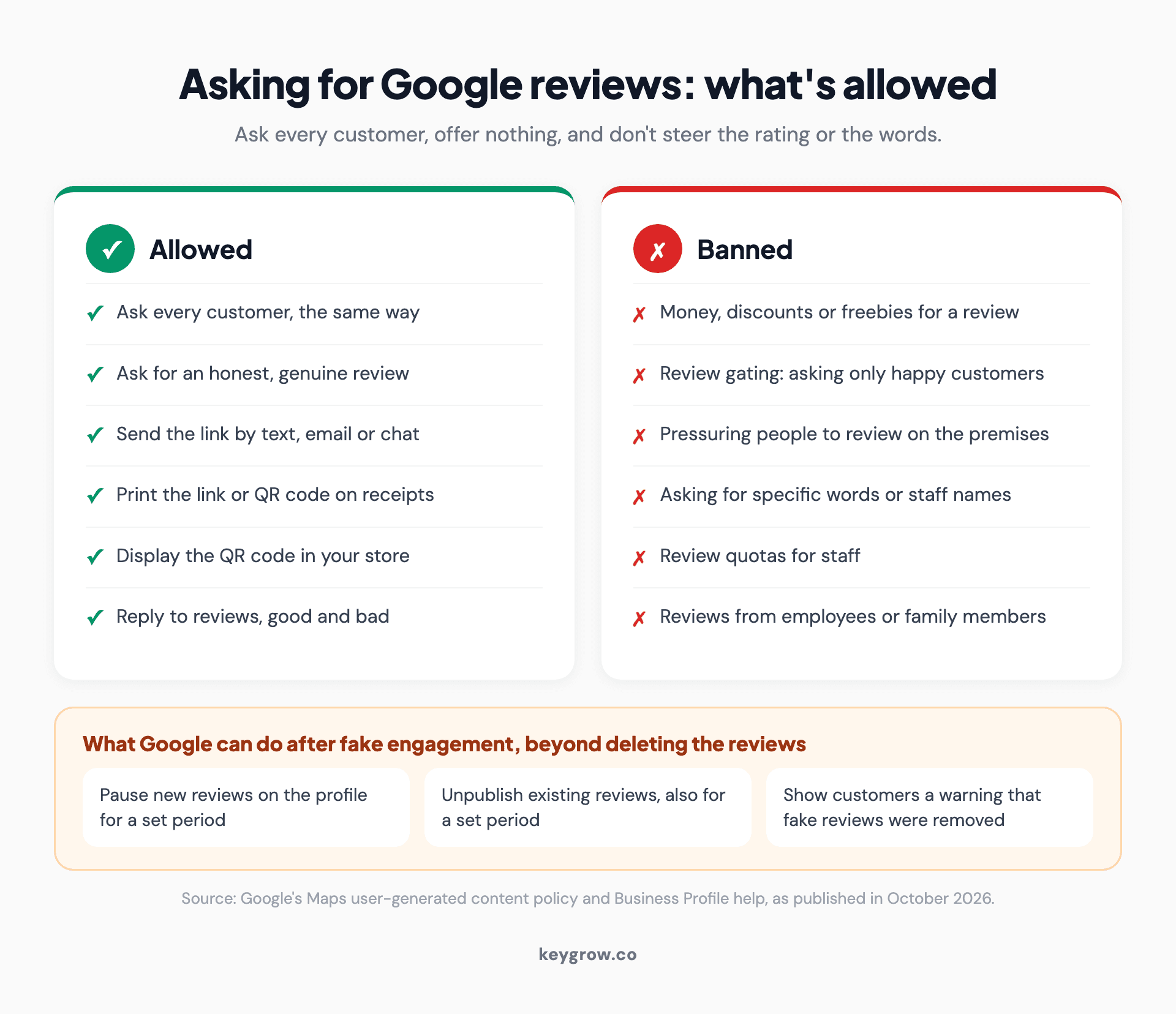
Comparison cards of what Google allows and bans when businesses ask for reviews: asking every customer the same way is fine, while incentives, review gating, pressure on the premises, requests for specific content and staff review quotas are banned.
Get caught buying reviews and Google can also pause new ones, unpublish existing ones for a set period and warn customers on your profile. US federal rules on fake reviews apply on top, and our guide to getting more Google reviews covers that side.
You don't need review software for this
For most single-location businesses this is a do-it-yourself job, and agencies admit that less often than they should.
The ask does the work: in BrightLocal's 2026 survey of 1,002 US adults, 78 percent had been asked for a review in the past year, and 83 percent of those asked wrote one.

A customer talking with staff across a cafe counter, the kind of single-location business that can handle review requests without software.
A saved text and a QR code by the register cover a shop doing a handful of jobs a day. Software starts to earn its fee when you run several locations or need asks to fire automatically from a booking system. If a tool offers to send unhappy customers to a private form first, walk away, because Google bans exactly that kind of gating.
When the link misbehaves
Most failures come from the wrong account or the wrong listing. The rest are phones opening Google Maps.
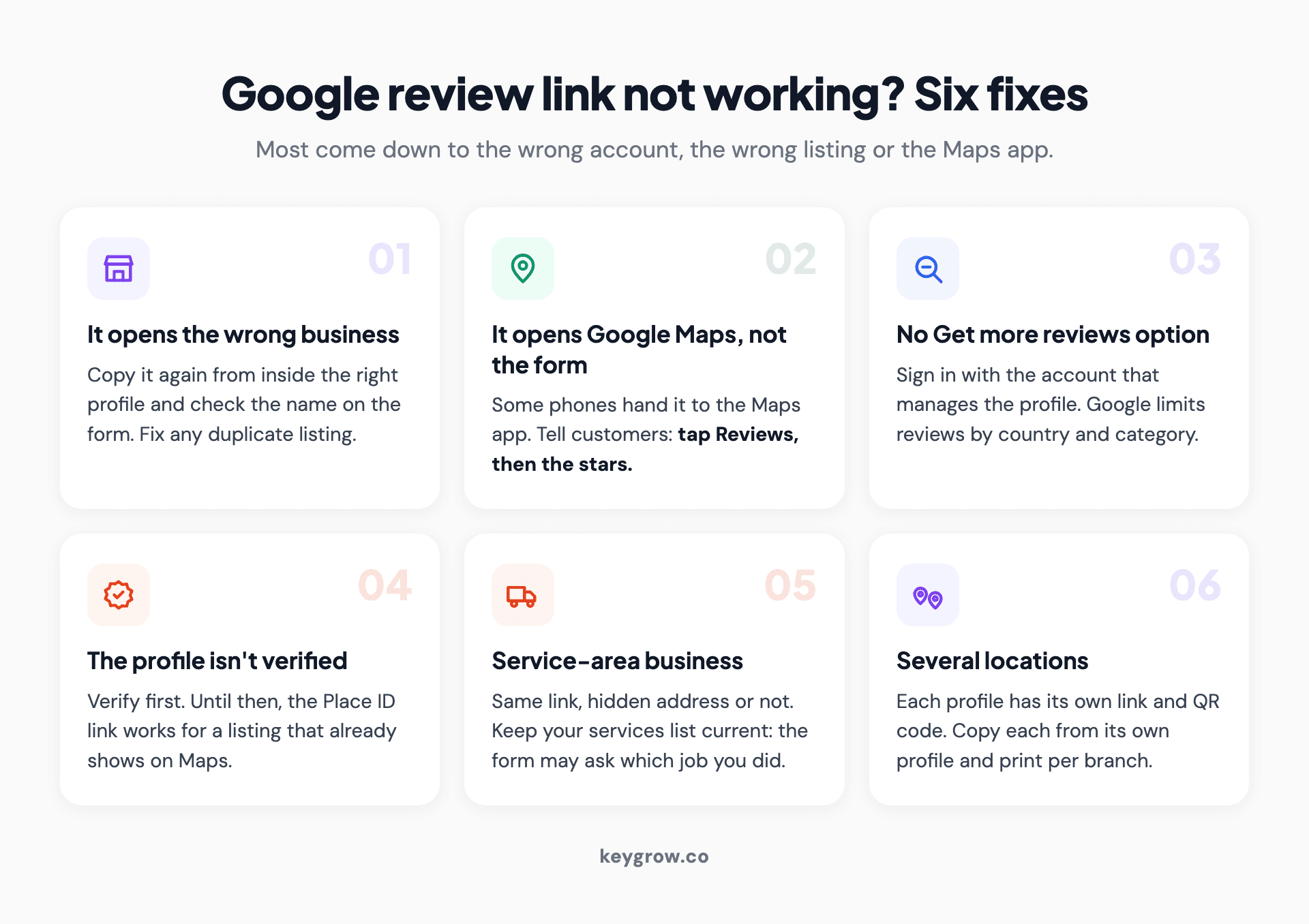
Six fixes for a Google review link that is not working: it opens the wrong business, it opens Google Maps instead of the form, the Get more reviews option is missing, the profile is unverified, the business serves customers at their location, or there are several locations.
It opens the wrong business. Copy it again from inside the right profile and check the name on the form. If a duplicate listing is to blame, our guide to a duplicate Google Business Profile walks through the fix.
It opens Maps, not the form. Some phones hand the link to the Google Maps app, which can open your listing instead of the review box. Add "if Maps opens, tap Reviews, then the stars" to your text.
There is no Get more reviews option. Check that you're in the managing account. Google also limits reviews by country and category, and turns them off for some profiles, such as schools for ages 6 to 18.
The profile isn't verified. Verify first. Until then, the Place ID link works for any listing already on Maps.
You're a service-area business. The link works the same with a hidden address, but the form may ask customers which job you did, using your services list. Our Google Business Profile optimization guide has the field-by-field version.
You have several locations. Each profile has its own link and QR code, so give every branch its own.
FAQs
Does a Google review link expire?
Not on a timer. Google gives no expiry date for the review link or its QR code, but test both again after you move or merge profiles.
Can I make a link that opens with five stars already selected?
No. Google offers no supported way to preset a rating, and its policy bars businesses from trying to influence the rating a customer gives.
Does a customer need a Google account to leave a review?
Yes. Google only accepts reviews from signed-in accounts, and a customer can create one with any email address, not just Gmail.
How do I share my Google review link on WhatsApp or Facebook?
Use the share options in the Get more reviews box, which include both, or paste the copied link into any chat. Keep Facebook posts occasional, since many followers have never been customers.
Can I get a Google review link without a Business Profile?
Only if a public listing for your business already exists on Google Maps, since the Place ID link works for any public listing. With no listing, create and verify a profile first.
Ask while the job is still fresh
Copying the link takes a minute. The habit is the work: save the text on the phone your team carries, and send it within an hour of every job, worded the same way for everyone.
Then reply to what comes in. We looked at whether replies help in responding to Google reviews.
If reviews are arriving and the phone still isn't ringing, the gap is usually elsewhere in local search. Our SEO team works on exactly that, month to month.



