


If your business is not showing on Google Maps, you have one of two problems, and almost every guide on this topic mixes them together.
Either the profile is genuinely invisible, which means it does not exist, was never verified, or Google removed it. Or the profile is perfectly visible and simply ranks below the businesses you were comparing yourself to. Those are not degrees of the same issue. They have different causes, different fixes, and wildly different timelines.
The test that separates them takes thirty seconds and comes further down. Do it before you change a single field on your profile, because the standard advice list (add categories, get reviews, post updates) is the right answer to one of those problems and a waste of a morning on the other.
You are probably checking it wrong
Before diagnosing anything, deal with this, because it produces more false alarms than every real cause combined.

A phone showing the Google search screen held in one hand.
Search results on Maps are personalized to where you are standing, what you have clicked before, and which Google account you are signed into. A business owner searching from inside their own shop, signed into the account that manages the profile, is the one person on earth certain to see that profile sitting at the top. That view tells you nothing about what a customer three suburbs away sees.
Check it like this instead:
Open an incognito window and sign out. No account, no history.
Move your search location. Type your service and a place name rather than relying on where your device thinks you are, for example plumber followed by the suburb you want to win.
Check a real distance. If you want to know whether you show up for customers ten miles away, you have to search as though you are ten miles away. Standing in your own car park does not test that.
Use the profile's own reporting. Inside Google Business Profile, the performance section shows searches and views over time. A profile getting impressions is not invisible, whatever a single search suggests.
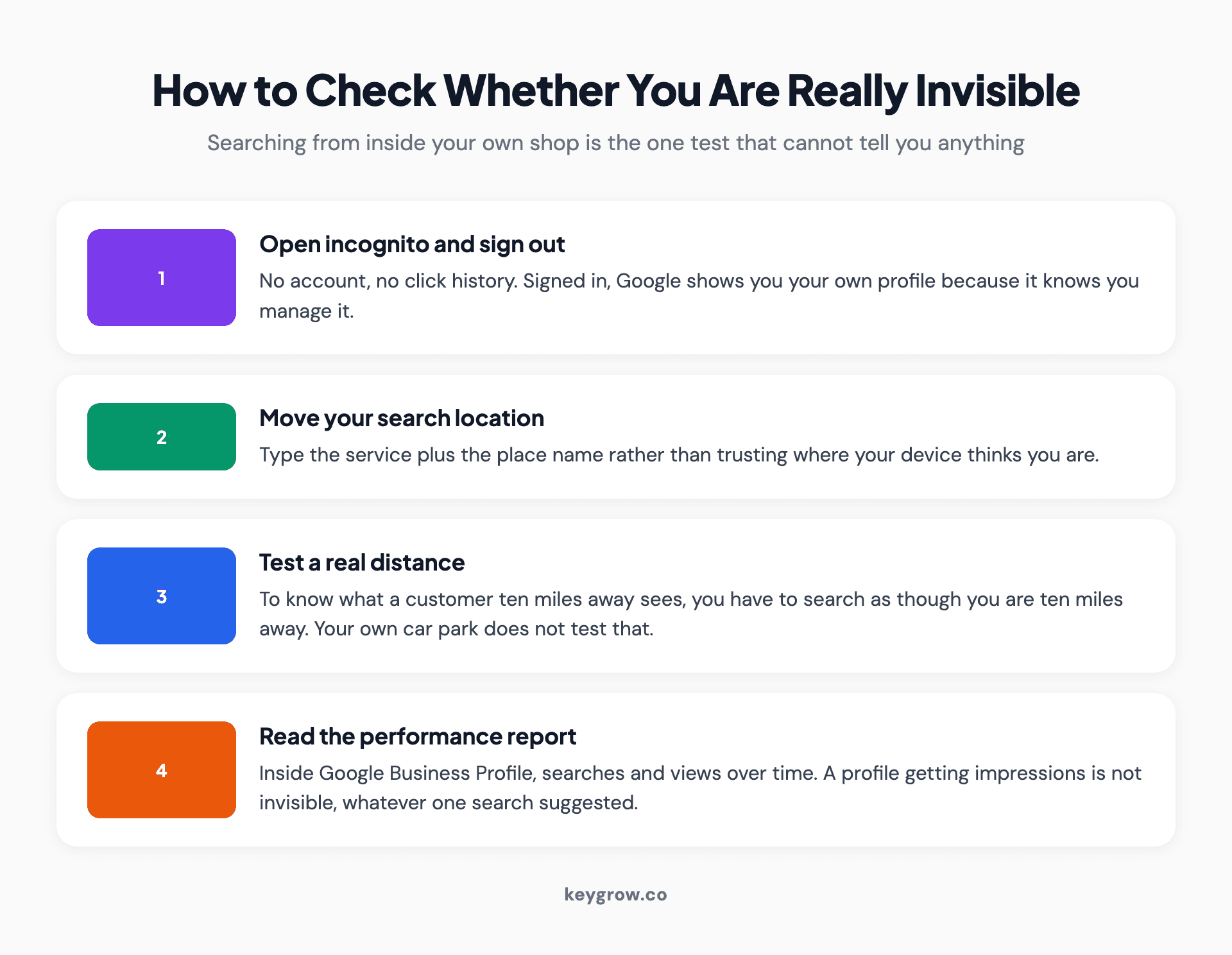
Four-step method for checking whether your business is genuinely missing from Google Maps: search incognito and signed out, move your search location, test a real distance, and read the profile performance report.
Half the businesses that arrive convinced they have vanished are visible and just checking from the one location where the answer is meaningless. The other half have a real problem, and the next section tells you which.
Which of the two problems do you have?
Search your exact business name plus your city. Nothing else. Not your service, not a keyword. The literal name on the sign.
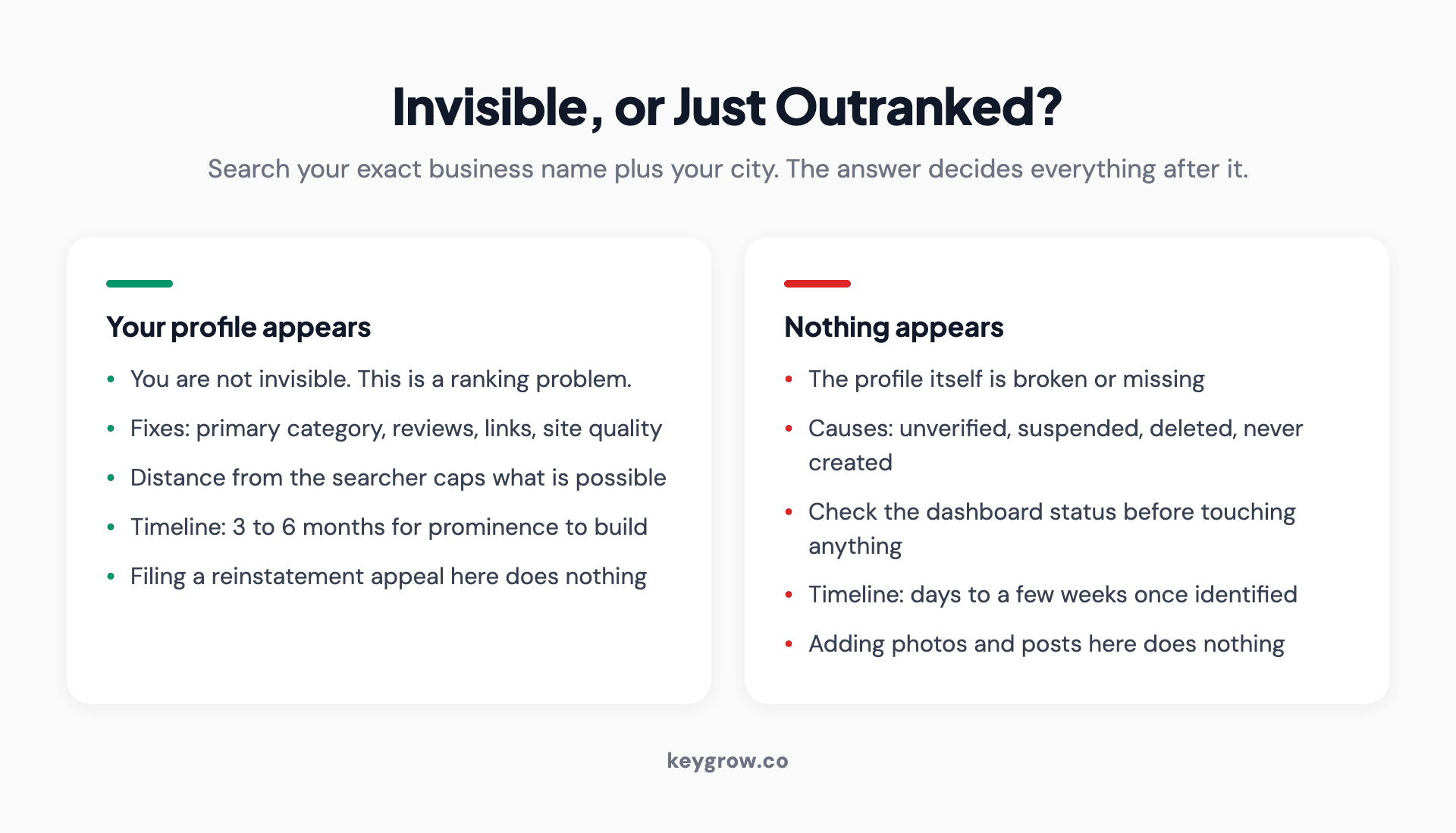
Two-branch diagnostic: searching your exact business name plus city separates a genuinely missing profile from one that exists but ranks poorly, each with different fixes.
If your profile appears, you are not invisible. You have a ranking problem, which is a completely different piece of work and mostly involves categories, reviews, proximity and the strength of your website. Skip to the ranking section below and then go read our guide to Google Maps SEO, which is the long version.
If nothing appears, or a different business appears in your place, the profile itself is broken. Keep reading. One of the next four sections is yours.
That distinction matters because the two problems have almost no overlap in their fixes. Adding photos and posts to a suspended profile does nothing. Filing a reinstatement appeal for a profile that is merely ranking fourth does nothing either, and wastes a week.
The profile does not exist, or Google removed it
Two versions of this, and they look identical from the outside.
It was never created. More common than people expect, especially where a business assumes a listing generated from old directory data counts as theirs. An unclaimed listing Google built automatically can exist without anyone owning it, and it will be thin, wrong and unmanaged. Claiming it is the fix, not creating a second one.
Google deleted it for inactivity. Profiles that sit untouched for years can be removed. If nobody has signed into the account since the last owner left, that is a live possibility, and the account credentials usually left with them.
Before you create anything, search for duplicates. Creating a second profile for a business that already has one is the single most common way people turn a small problem into a suspension. If you find a listing you do not control, use the claim flow on that listing rather than starting fresh.
It exists but was never verified
An unverified profile does not appear on Maps. That is not a ranking penalty, it is a gate, and until you pass it nothing else you do matters.
Google's own documentation puts verification reviews at up to five business days, though Google Business Profile Help notes some take longer. Two things are worth knowing about that window.
The first is that verification can fail quietly. A postcard goes to an address nobody checks, a video call gets scheduled and missed, a document upload is rejected without an obvious notification. Sign in and look at the profile status directly rather than assuming no news is good news. Our Google Business Profile verification guide explains what each status and failure message means.
The second is that verification and visibility are not the same moment. A newly verified profile can take another stretch of days or weeks before it shows up consistently for anything other than its own name. New profiles have no prominence, which is one of the three things Google weighs, so they start at the back of the queue by design.
It was verified and then it vanished
This is the version that generates panic, and it has a short list of causes.
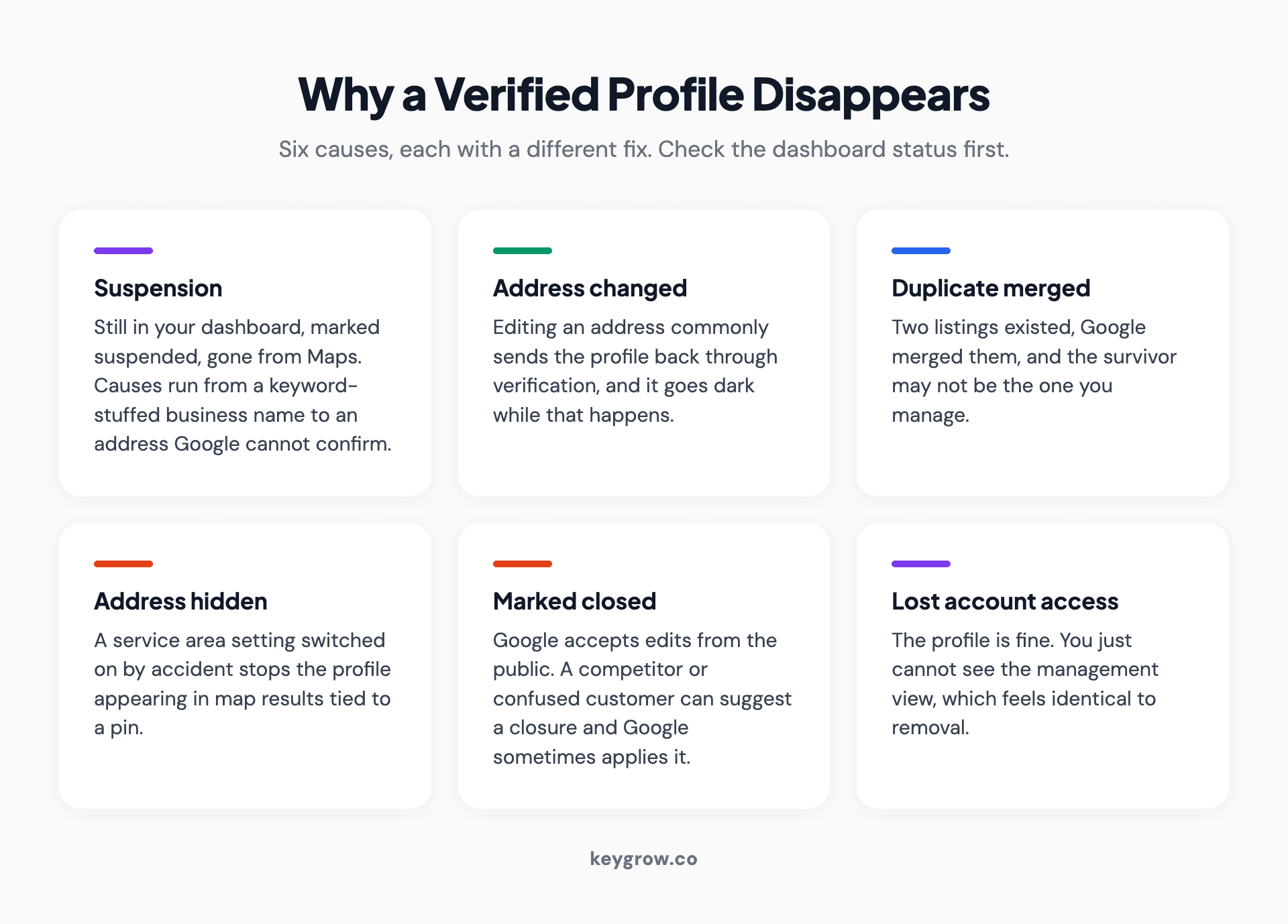
Six reasons a verified Google Business Profile disappears: suspension, an address change triggering re-verification, a duplicate merge, a hidden address, a closed marker, and account access loss.
Suspension. The profile is still in your dashboard but marked suspended, and it is gone from Maps. Causes range from a business name stuffed with keywords to an address Google cannot confirm. This has its own process and its own traps, covered in our guide to a suspended Google Business Profile.
You changed the address. Editing an address commonly sends the profile back through verification, and it goes dark in the meantime. The same happens with significant name or category changes on some profiles.
A duplicate got merged. If two listings existed and Google merged them, the surviving one may not be the one you manage.
The address is hidden. Service area businesses can hide their address deliberately. If that setting got switched on by accident, the profile stops appearing in map results tied to a pin.
Somebody marked it permanently closed. Google accepts edits from the public. A competitor or a confused customer can suggest a closure, and Google sometimes applies it.
You lost account access. The profile is fine. You simply cannot see the management view, which feels identical to being removed.
Check the dashboard status first. It tells you which of these you are in within about ten seconds, and it stops you filing the wrong kind of appeal.
It shows for your name but not for what you sell
If the name search works, your problem is ranking, and Google is unusually direct about what drives that. Three things decide it, according to Google Business Profile Help. Whether the profile matches what was typed. How far your building sits from whoever typed it. And how well known the business is in general.
The same page states plainly that there is no way to request or pay for better local ranking, which is worth remembering the next time somebody promises you a map pack position for a monthly fee. What money can buy is a labeled ad slot, and our guide to Google Maps advertising explains how it works.
Of those three, relevance is the one you control most directly and quickest. That is mostly categories, and the primary category does more work than every other field on the profile combined. A carpet cleaner filed under Cleaning Service and competing against businesses filed under Carpet Cleaning Service is losing on a setting, not on quality. Our post on choosing profile categories covers how to pick one.
Prominence is slower. Reviews, links, mentions, the strength of the site behind the profile. Months, not days.
Distance you cannot change at all, which brings us to the part nobody wants to hear.
The proximity ceiling
Distance is a hard constraint, and a lot of what looks like a visibility failure is just geography doing its job.
Google shows searchers businesses near them. If your competitor sits in the town center and you are eight miles out on an industrial estate, they will beat you for searches made in the town center regardless of how good your profile is. No amount of posting, reviewing or category tuning moves your building.
What this means in practice is that your realistic catchment is smaller than your service area. You can serve a whole county. You will rank in a fraction of it, concentrated around your actual address, fading with every mile.
Two things do help at the edges. Prominence buys you range, because a genuinely well-known business shows up further from its pin than an unknown one does. And the pages on your own website can rank in ordinary organic results for towns where your profile never will, which is a different route to the same customer.
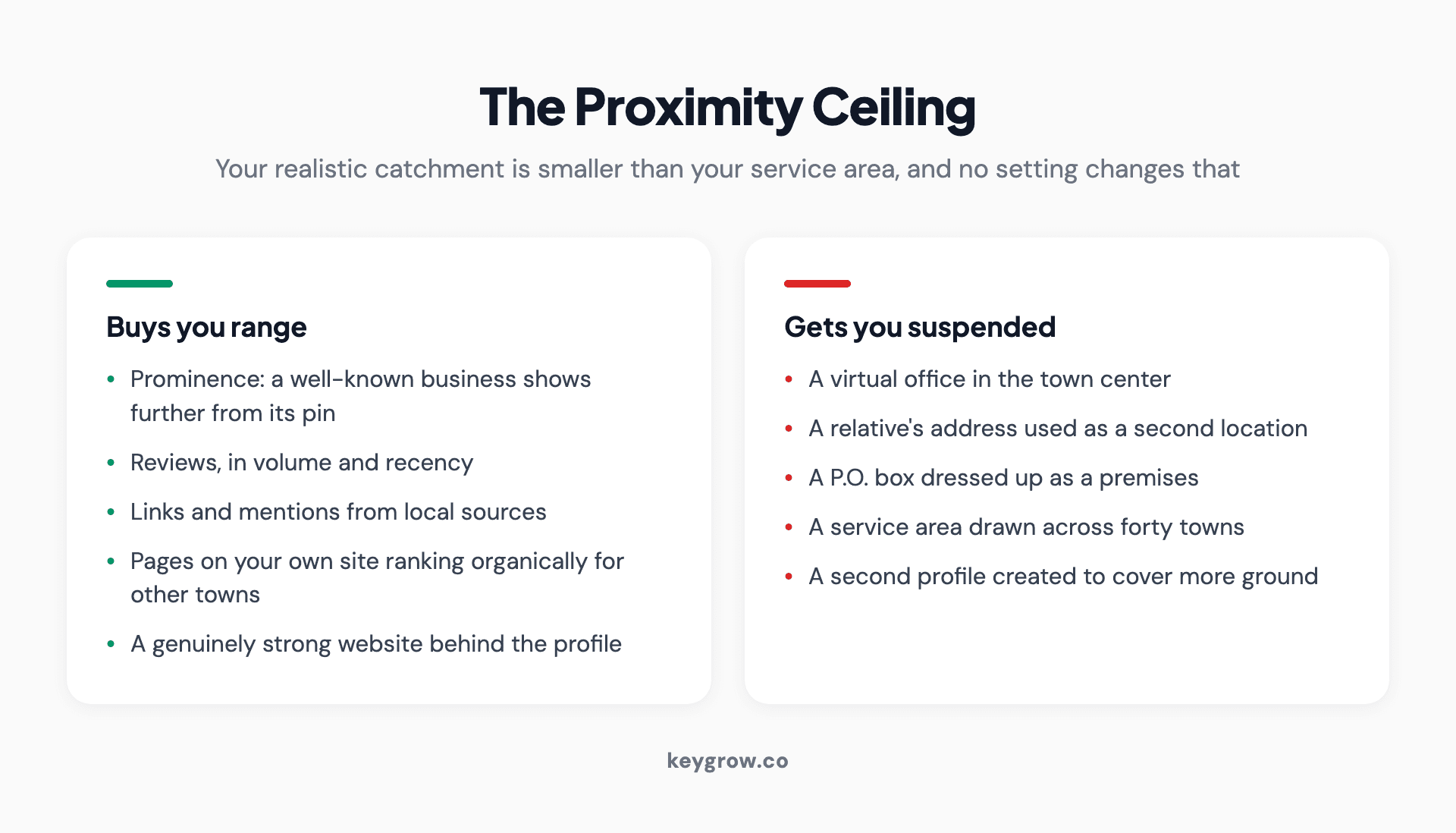
Two columns contrasting what genuinely extends a profile's reach with the address tricks that get a profile suspended.
What does not help is faking it. A virtual office in the town center, a relative's address, a P.O. box dressed up as a location: all of these are suspension causes, and the suspension costs more than the ranking ever earned.
Service area businesses fail differently
If you travel to customers rather than the other way round, several of these rules change and the failure modes are specific to you.
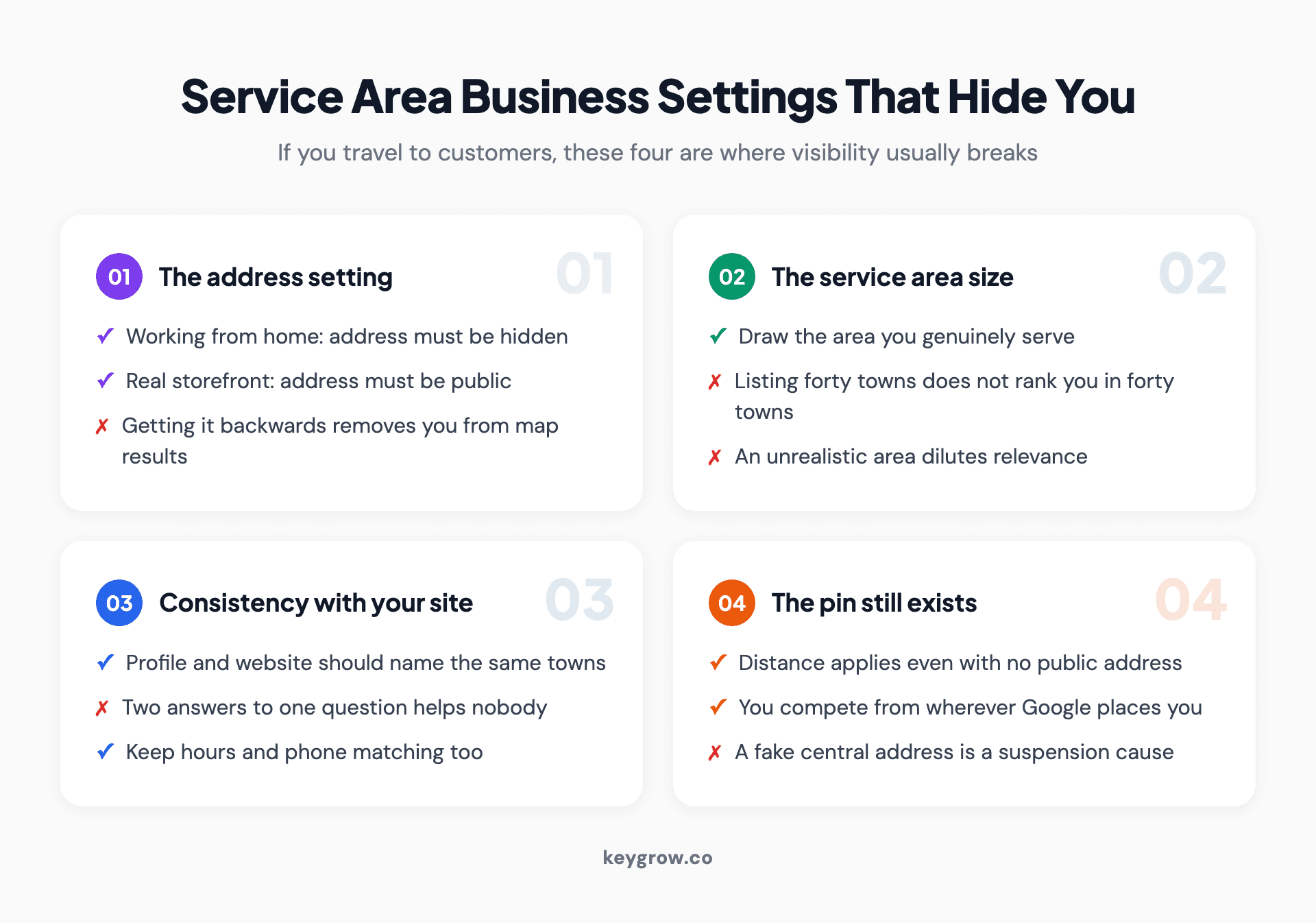
Four service area business settings that cause visibility problems: an unhidden home address, an oversized service radius, a missing address on the profile, and service areas that contradict the website.
The address is showing when it should be hidden. If you work from home, Google expects that address hidden. Leaving it public is a guideline problem.
The address is hidden when you have a real storefront. The reverse error, and it removes you from the map results that a physical location is entitled to.
The service area is drawn far too wide. Listing forty towns does not make you rank in forty towns. It dilutes relevance and, on some profiles, attracts a closer look from Google. Draw the area you genuinely serve.
The website says something different. If your profile claims one service area and your site lists another set of towns, you have given Google two answers to the same question.
A service area business with no verified address at all has the hardest version of this problem, because distance still applies and the pin still exists internally. You are competing from wherever Google believes you are.
Two businesses, one address
Shared offices, coworking spaces and businesses run out of the same building as a relative's company all trip the same wire.

A local shop owner standing behind the counter of their business.
Google allows multiple businesses at one address when they are genuinely distinct: separate legal entities, separate phone numbers, separate signage, and ideally separate suite numbers. It does not allow one business creating several profiles to cover more search terms, and the difference between those two situations is less obvious to an algorithm than it is to you.
If you share an address and your profile has gone quiet, check whether a newer listing at the same address arrived recently. Two similar businesses at one location can end up with one filtered out of results entirely, which looks like a disappearance but is actually a deduplication.
How long each fix takes
Expectation management, because most of the frustration in this topic comes from waiting without knowing what normal looks like.
| What is wrong | Typical time to fix | What you actually do |
|---|---|---|
| Never verified | Up to 5 business days, sometimes longer | Complete verification, then wait |
| Suspended | 1 to 3 weeks | Fix the violation, then appeal once |
| Address changed | Days to a few weeks | Re-verify, do not keep editing |
| Duplicate listing | 1 to 2 weeks | Request a merge, do not delete |
| Marked closed in error | Days | Reopen in the dashboard |
| Wrong primary category | Same day to a few weeks | Change it once, then leave it |
| Ranking too low | 3 to 6 months | Reviews, links, site quality |
The bottom row is the one people underestimate. Prominence compounds slowly. A junk removal client of ours went from no meaningful inbound calls to 50+ a month, and that took six months of steady work rather than a settings change.
How to tell it is actually fixed
Rankings are a poor progress measure here because they vary by the searcher's location. Watch these instead.
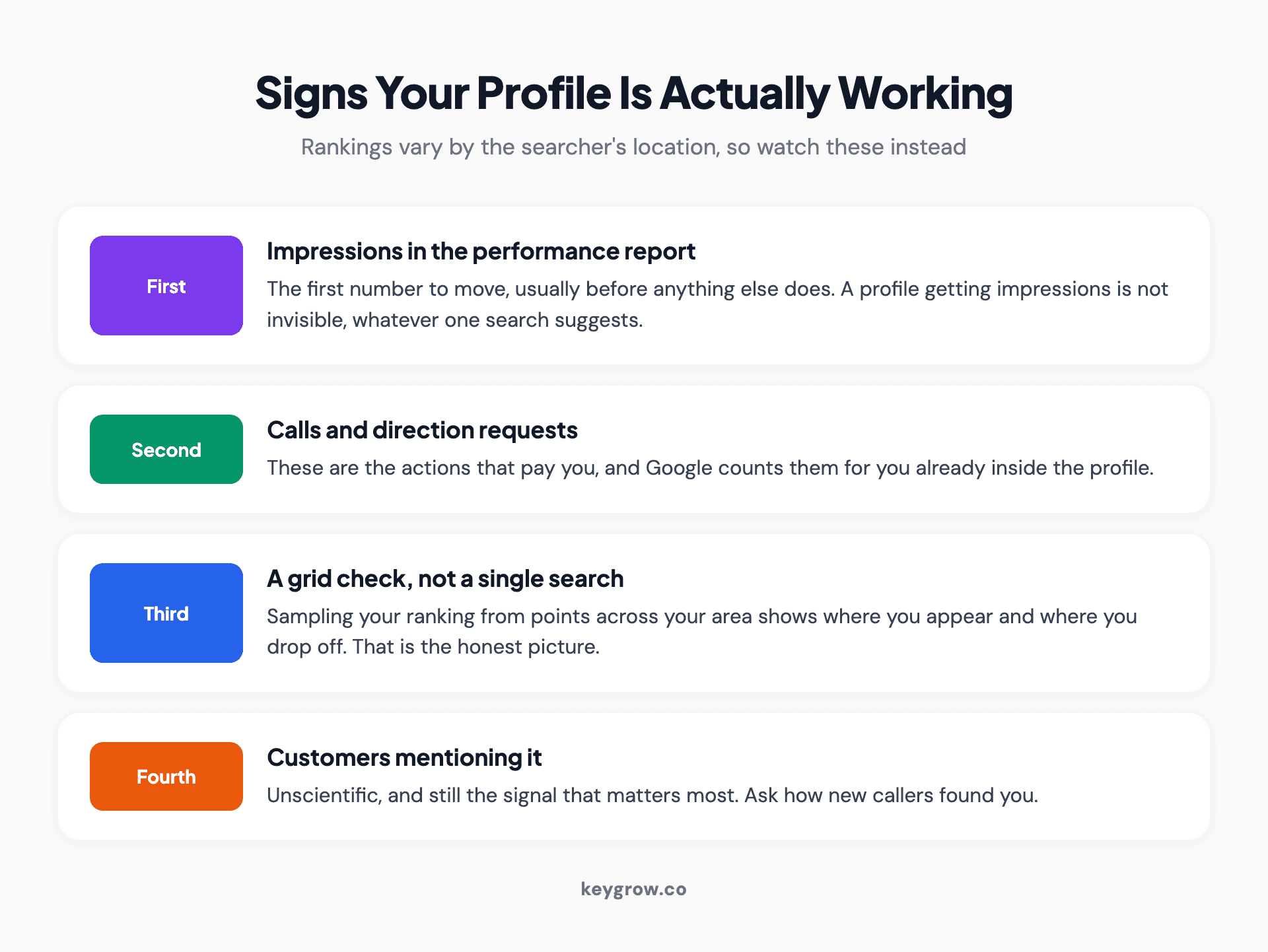
Four signals that a Google Business Profile is working: rising profile impressions, calls and direction requests from the profile, visibility across a grid of locations, and inbound calls that mention finding you on Maps.
Impressions in the profile's performance report. The first number to move, usually before anything else does.
Calls and direction requests attributed to the profile. These are the actions that pay you, and they are counted for you already.
A grid check rather than a single search. Tools that sample your ranking from a grid of points across your area show you a map of where you appear and where you drop off, which is the honest picture.
Customers telling you. Unscientific, and still the signal that matters most.
One thing not to do is check obsessively from your own device. You will see noise, read it as a trend, and change something that was working.
FAQs
Why is my business not showing up on Google Maps?
Either the profile is not verified, is suspended, does not exist, or was removed, in which case it is genuinely invisible. Or it exists and is simply ranking below other businesses for the search you tried. Search your exact business name plus your city to find out which situation you are in.
How long does it take for a new business to appear on Google Maps?
Verification reviews take up to five business days, and the profile usually needs additional time after that before it appears consistently for anything other than its own name. New profiles have no prominence yet, which is one of the three factors Google weighs, so early visibility is limited.
Why can I see my business on Google Maps but my customers cannot?
Because you are searching from inside or near your own premises, usually signed into the account that manages the profile. Both of those push your profile to the top of your personal results. Check in an incognito window, signed out, searching from a different location.
Can I get my business to show up in a city where I am not located?
Not reliably in map results, because distance from the searcher is a ranking factor you cannot change. You can rank in ordinary organic search for those towns with pages on your own website, and a stronger, better-known business does appear further from its address than an unknown one.
Does adding more service areas help me show up in more places?
No. Listing many towns in your service area does not make you rank in them, and an unrealistically wide area can dilute relevance. Set the area you genuinely serve and win range through reviews, links and site quality instead.
My profile was working and now it has vanished. What happened?
Check the profile status in your dashboard first. The usual causes are a suspension, an address edit that triggered re-verification, a duplicate listing being merged, or someone marking the business permanently closed. Each has a different fix, so identify which before acting.
Work out which problem you have, then fix that one
Most of the wasted effort on this topic comes from applying visibility fixes to a ranking problem, or ranking advice to a profile that is suspended. Run the name search first. It costs thirty seconds and it decides everything you do next.
And if it turns out your profile is simply unverified, unclaimed or missing a primary category, do not hire anyone for that. It is free, it takes a morning, and a single-location business with more time than money should always do this part themselves before paying for help. If you get through all of it and still cannot work out what is wrong, our local SEO work starts with exactly this diagnosis, and you can tell us what you are seeing.



