

Every website maintenance checklist you will find is sorted by the calendar. Weekly tasks, monthly tasks, quarterly tasks, annual tasks. It is a tidy way to write an article and a bad way to protect a website, because it treats "moderate the comment spam" and "your payment form stopped working" as items on the same list.
This one is sorted by consequence instead. What actually takes a site down, what quietly costs you money, and what is genuinely optional. If you only have ninety minutes a month, the first section is the ninety minutes.
The four failures that actually take a site offline
Start here, because everything else on any checklist is a distant second.
An expired domain. The site goes dark, email stops, and recovery ranges from instant to impossible depending on how long it has been. Auto-renew plus a card that has not expired is the entire fix, and it takes two minutes.
An expired SSL certificate. Every browser throws a full-page security warning. Most certificates auto-renew now, which is exactly why nobody notices when one does not.
A failed backup you never tested. Discovering your backups are empty during a recovery is the worst possible moment to learn it.
An unpatched vulnerability. The one with real numbers behind it, covered next.
Notice what is not on that list: broken links, image compression, meta descriptions, comment spam. Those matter, and they are not emergencies. Checklists that present twenty tasks in one flat list invite you to spend your hour on the comfortable ones.
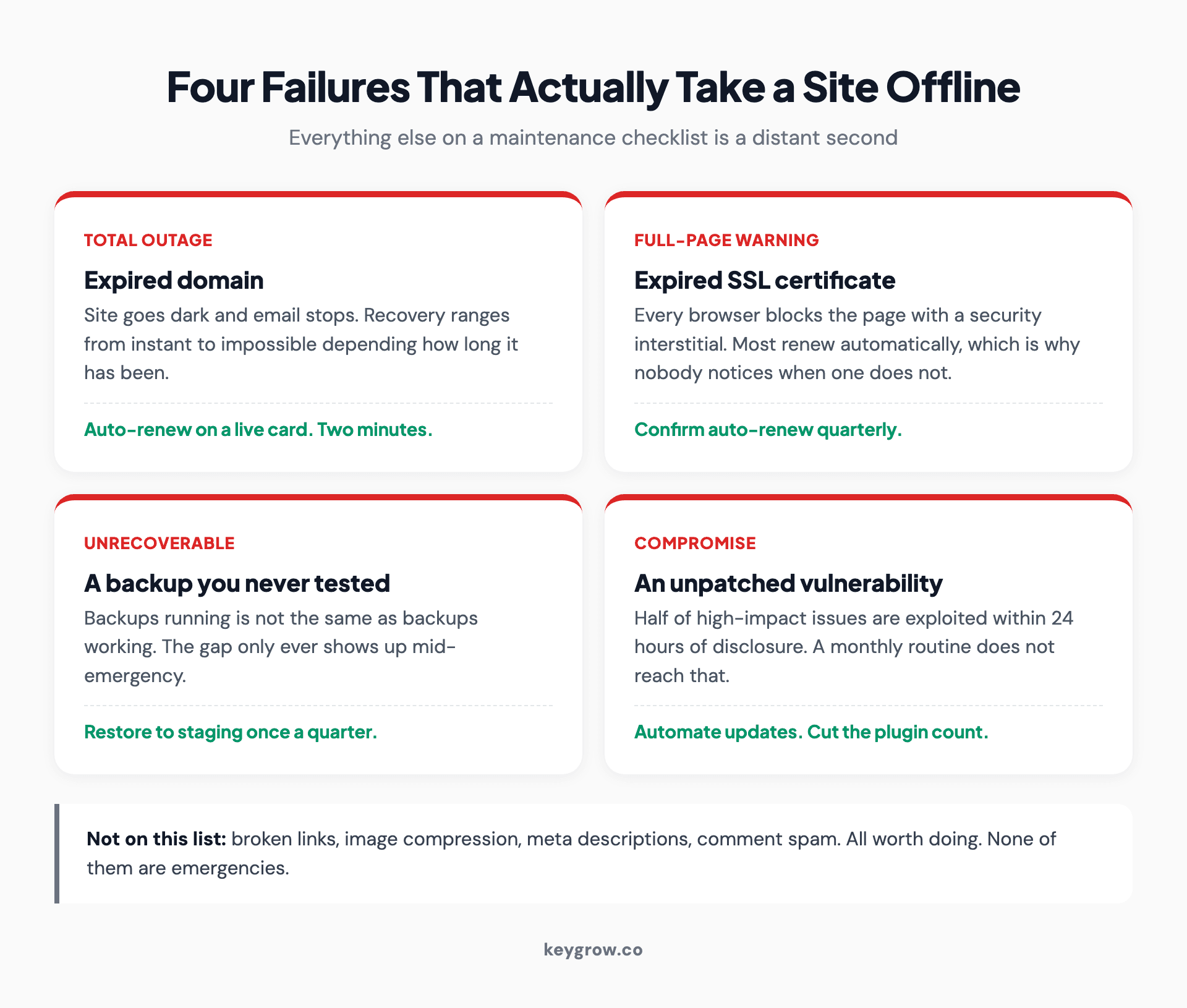
Four failures that take a website offline: an expired domain, an expired SSL certificate, a backup that was never tested, and an unpatched vulnerability, each with the fix that prevents it.
The update advice on every other checklist is too slow
Here is where the standard monthly-cadence advice falls apart, and it is worth being precise because the numbers are public.
Patchstack's 2026 report counted 11,334 new vulnerabilities across the WordPress ecosystem in 2025, a 42 percent jump on the year before. The split is the part that should change your behavior: 91 percent were in plugins, 9 percent in themes, and just six in WordPress core itself.
So "keep WordPress updated" is close to solved. Core is not where the risk is. Your plugin list is.
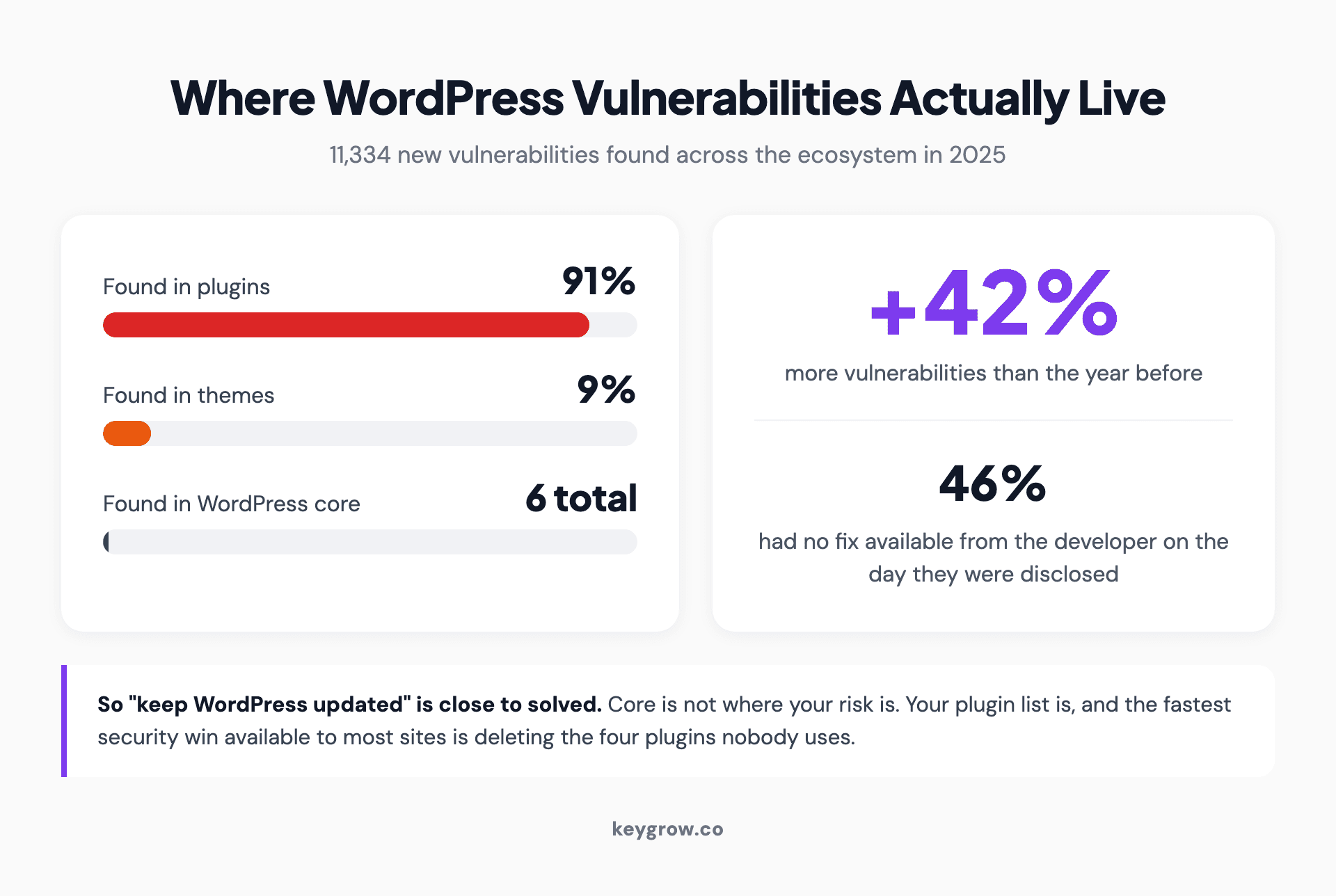
Where WordPress vulnerabilities were found in 2025: 91 percent in plugins, 9 percent in themes and only six in WordPress core, against a 42 percent rise in total vulnerabilities and 46 percent with no fix available at disclosure.
Two figures from the same report make the monthly cadence look optimistic:
Read those together and the conclusion is uncomfortable. A monthly update routine is a reasonable hygiene practice and a poor security control. Five hours is not a monthly cadence. It is not a weekly one either.
What to do instead, in order:
1. Turn on automatic updates for plugins you trust, and accept the small risk of a bad update over the larger risk of a month-old hole.
2. Cut the plugin count. Every plugin is a separate vendor with a separate patching record. The fastest security win available to most sites is deleting four plugins nobody uses.
3. Subscribe to a vulnerability feed for what you actually run, so you hear about the five-hour ones in hours.
4. Keep the monthly review for everything the feeds do not cover.
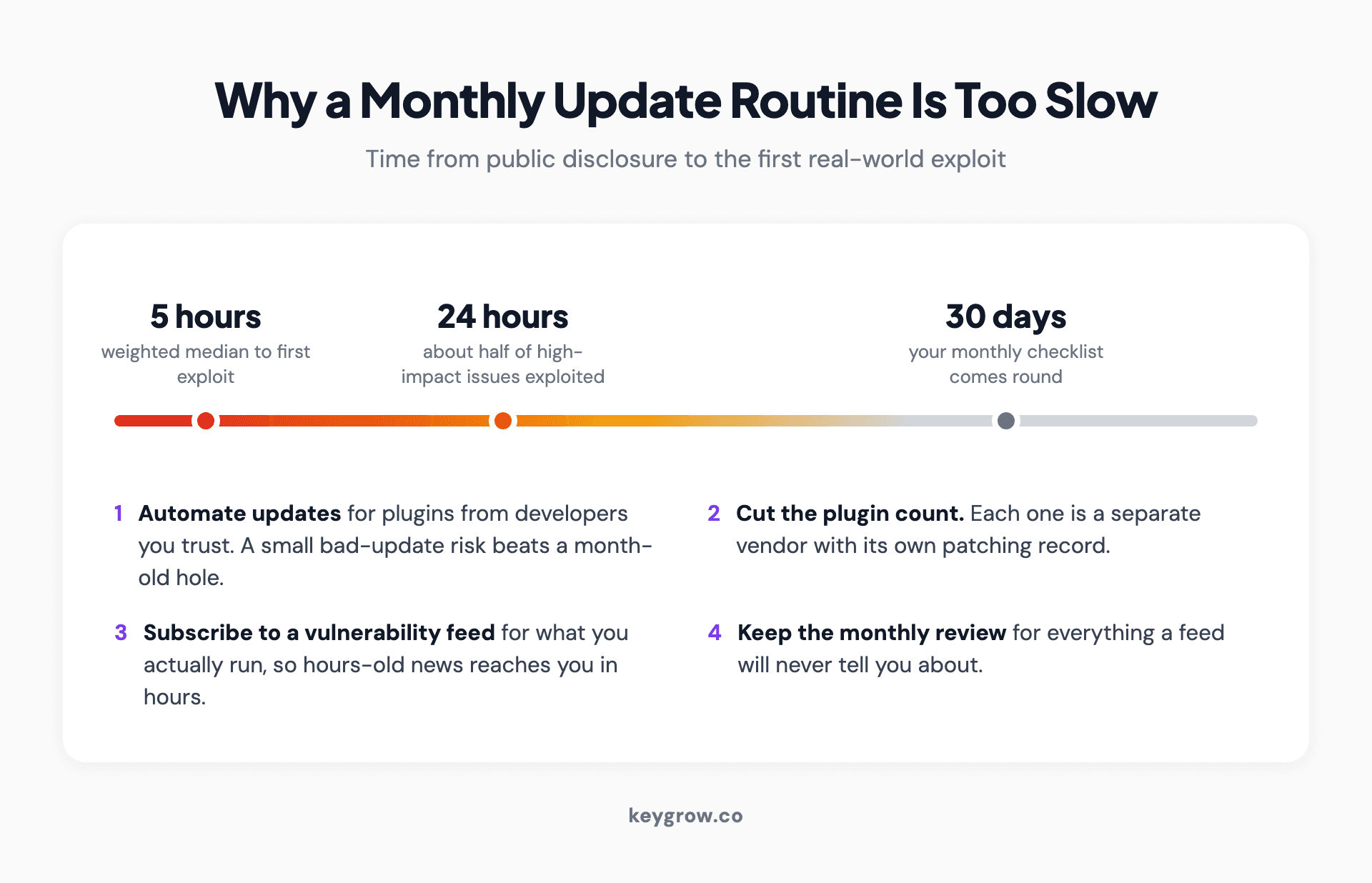
Timeline from public disclosure to first exploit: a weighted median of five hours, about half of high-impact issues exploited within 24 hours, against a monthly checklist that comes round at 30 days.
The checklist, sorted by what breaks
| Task | How often | What breaks if you skip it |
|---|---|---|
| Domain and SSL auto-renew confirmed | Quarterly | Site and email go dark |
| Plugin and theme updates applied | Automatic, reviewed monthly | Known exploit, live for weeks |
| Backup runs verified | Monthly | Nothing, until the day it matters |
| Restore actually tested | Quarterly | You find out backups were empty during a crisis |
| Contact and booking forms submitted end to end | Monthly | Leads vanish silently |
| Payment and checkout tested | Monthly | Revenue vanishes silently |
| Uptime monitoring alerting to a phone | Continuous | You learn about downtime from a customer |
| Core Web Vitals checked | Quarterly | Slow decline in rankings and conversions |
| Search Console errors reviewed | Monthly | Pages quietly drop out of the index |
| Broken links fixed | Quarterly | Small trust and crawl cost |
| Business details and hours current | Quarterly | Wrong information everywhere it is syndicated |
| Staff and contractor logins audited | Quarterly | An ex-developer still has admin |
| Privacy and cookie notices reviewed | Annually | Compliance exposure |
| Full content and design review | Annually | The site slowly stops matching the business |
Two rows on that table are the ones people skip and then regret: testing a restore, and submitting your own forms. Both take ten minutes. Both fail silently, which is why nobody catches them without deliberately looking.
For the Core Web Vitals row, use the thresholds rather than a vendor score out of a hundred. Google publishes them as specific numbers, and a tool that grades you 78 out of 100 is telling you about itself rather than about the standard you are measured against.
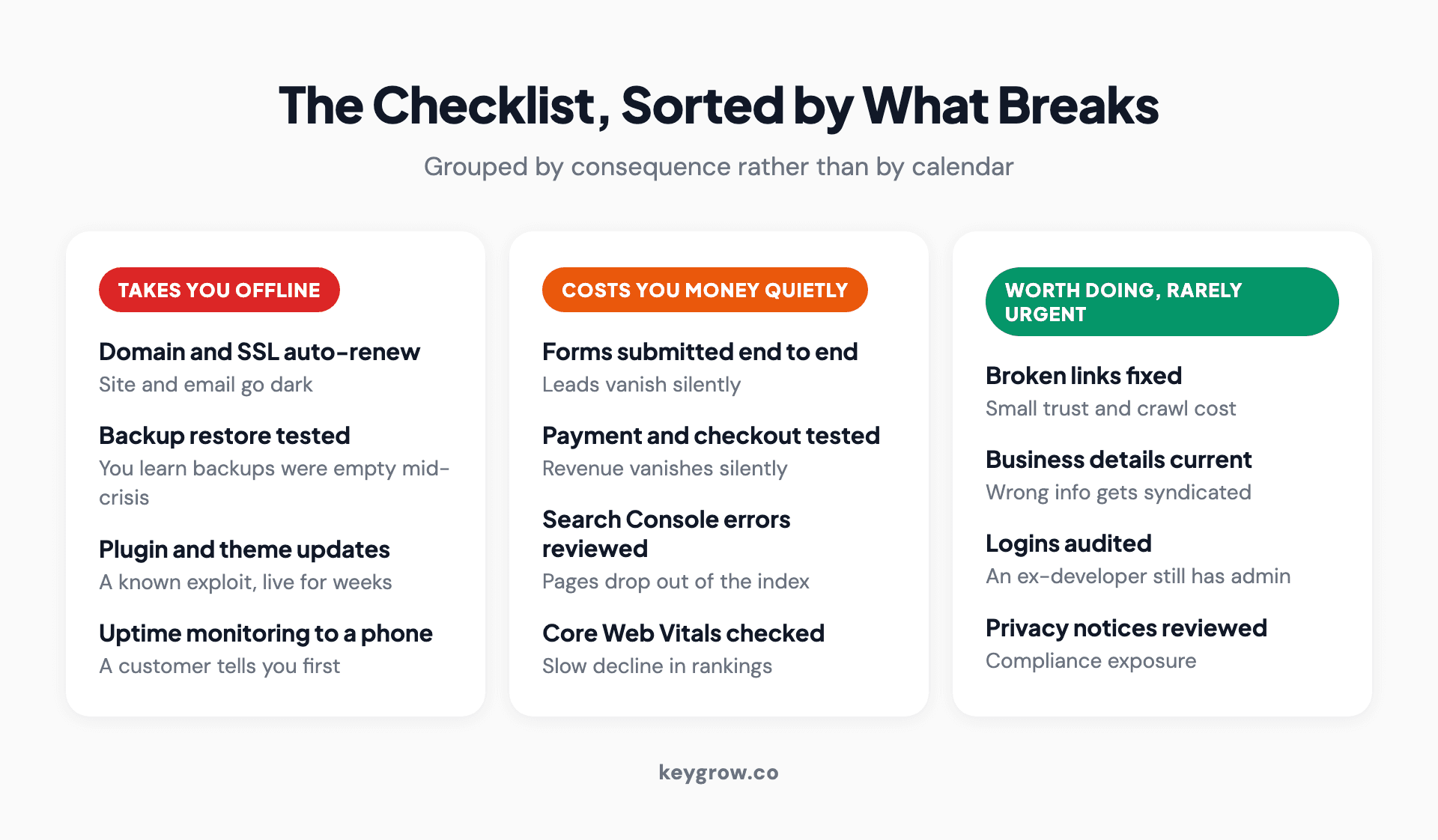
Website maintenance tasks grouped into three columns by consequence: the ones that take you offline, the ones that quietly cost money, and the ones worth doing but rarely urgent.
Submit your own form. Then buy something.
The single highest-value item on this page, and the one least likely to be on a competitor's checklist as anything more than a line item.
Forms break constantly and quietly. A plugin update changes a field name, a spam filter starts eating submissions, a notification email lands in a spam folder nobody checks, a payment gateway certificate expires, an integration silently deauthorizes. In every case the form still looks fine. It just stops delivering.
Do this once a month, properly:

Network cabling running into a rack.
The businesses that discover a broken form after two months do not usually discover it themselves. They notice the phone stopped ringing and assume the marketing stopped working.
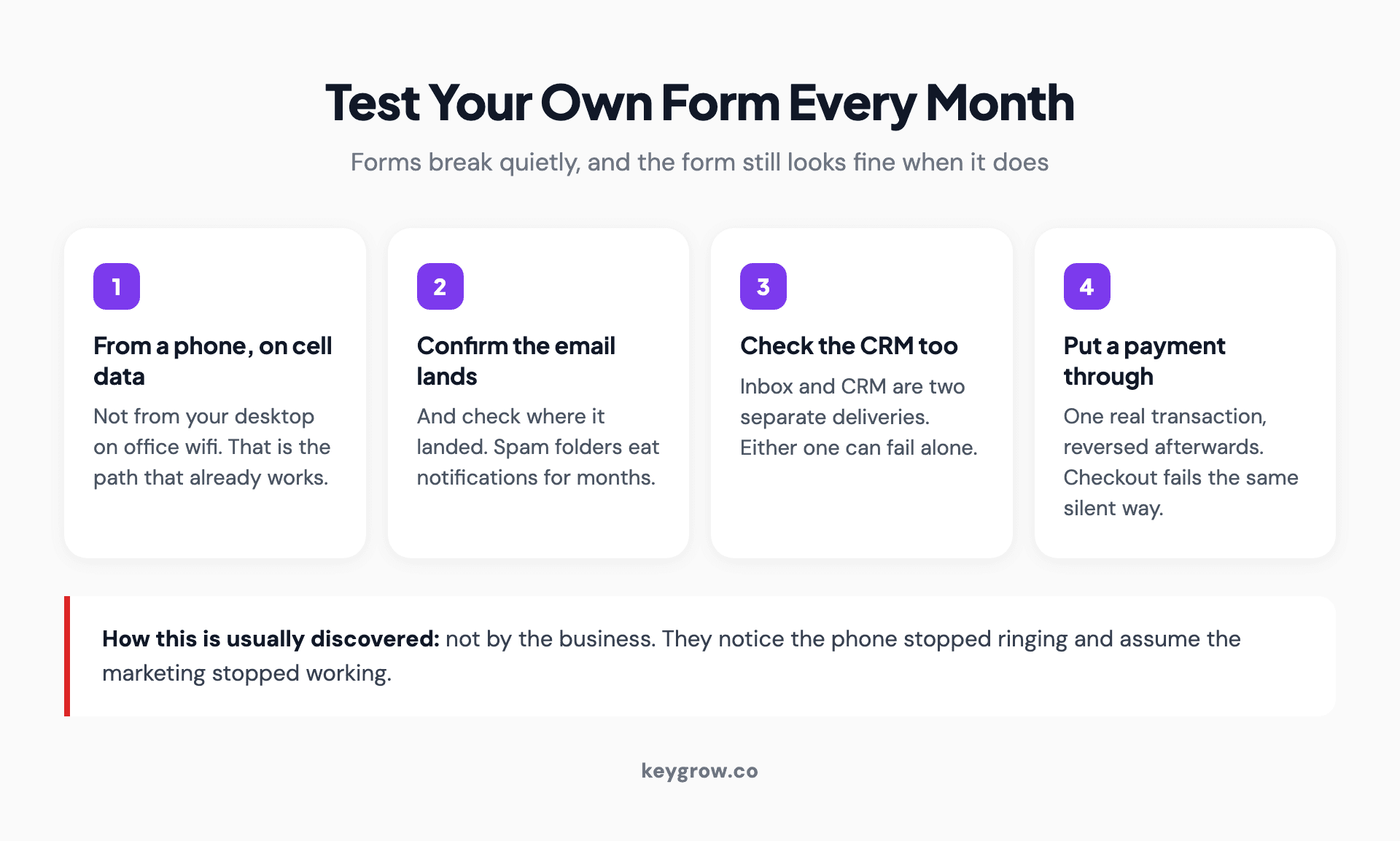
A four-step monthly form test: submit from a phone on cell data, confirm the notification email lands and where, check the CRM separately, and put one real payment through and reverse it.
If you are not on WordPress, most checklists do not apply to you
Here is a gap worth naming, because the standard checklist is really a WordPress checklist wearing a general title.
If your site runs on a hosted platform or a modern framework, there are no plugins to update, no core to patch, no database to optimize, and no PHP version to worry about. Roughly half of the tasks on a typical list are simply not yours.
What replaces them depends on where you are:
If you are weighing one of these against another, we have compared WordPress and Webflow on the points that actually differ.
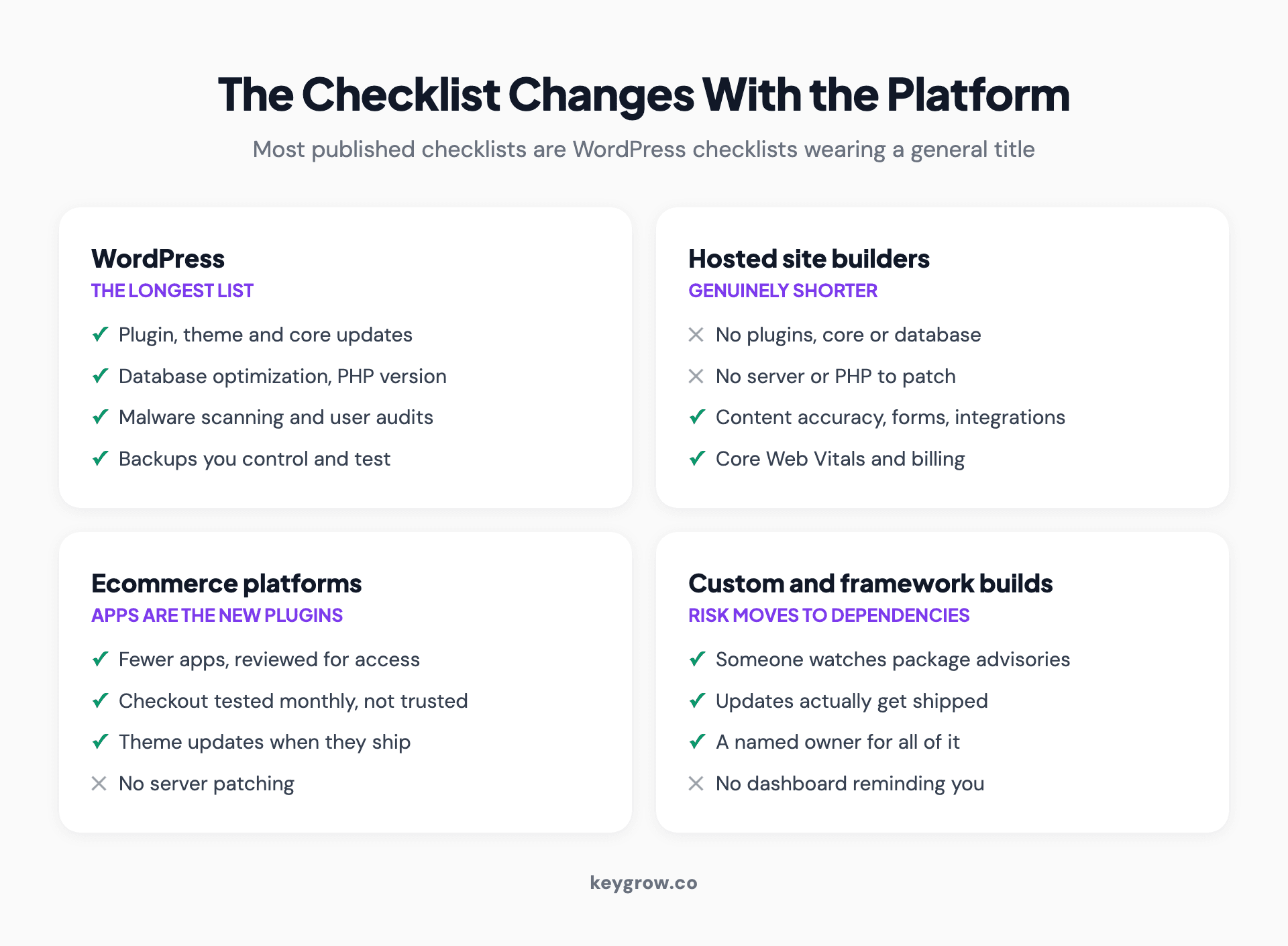
How the maintenance checklist changes across four platforms: WordPress has the longest list, hosted site builders a genuinely shorter one, ecommerce platforms treat apps as the new plugins, and custom builds move the risk into dependencies.
The platform argument gets more attention than it deserves, by the way. Most "is this platform good enough" anxiety is misplaced, because the bottleneck is almost never the platform. It is whether anyone is actually looking at the site. A neglected site on the best stack available loses to a maintained one on a boring stack, every time. When we build sites at KeyGrow the platform decision takes an afternoon and the maintenance question takes longer, because that is the one that determines what the site looks like in two years. That is part of what our web development service covers.
What this costs, in hours and in money
Roughly 1 to 3 hours a month for a small business site, which matches what the maintenance providers quote and our own experience of doing it.
If you pay someone, the market is wide. Published rates run from around $100 a month for basic update-and-backup coverage to several thousand for complex sites with real uptime requirements. The spread is mostly about response time and who carries the risk, not about the task list.
Two questions worth asking anyone quoting you:
Most maintenance plans are a backup plugin and an update run. That is worth something, and it is worth considerably less than the monthly fee on a lot of plans.

A row of servers in a darkened data center.
When you should do this yourself
Often. A single site on a hosted platform, with a handful of pages and one contact form, does not need a retainer. The whole list above is maybe ninety minutes a month and none of it requires a developer.
Do it yourself when the site is simple, the stakes of an hour of downtime are low, and you will genuinely put the ninety minutes in the calendar. That last condition is where most DIY maintenance actually fails, and it is worth being honest with yourself about.
Maintenance is also the wrong tool for some problems. If the site is dated rather than broken, you are looking at a redesign that does not lose your rankings, and if you are budgeting from scratch, what a website actually costs is the more useful starting point.
Pay someone when downtime costs real money per hour, when the site takes payments, when there are more than a handful of plugins or integrations, or when you have already learned that you will not do it. Handing over a task you keep skipping is a legitimate reason to hire, and it is more honest than most of the reasons in the brochure.
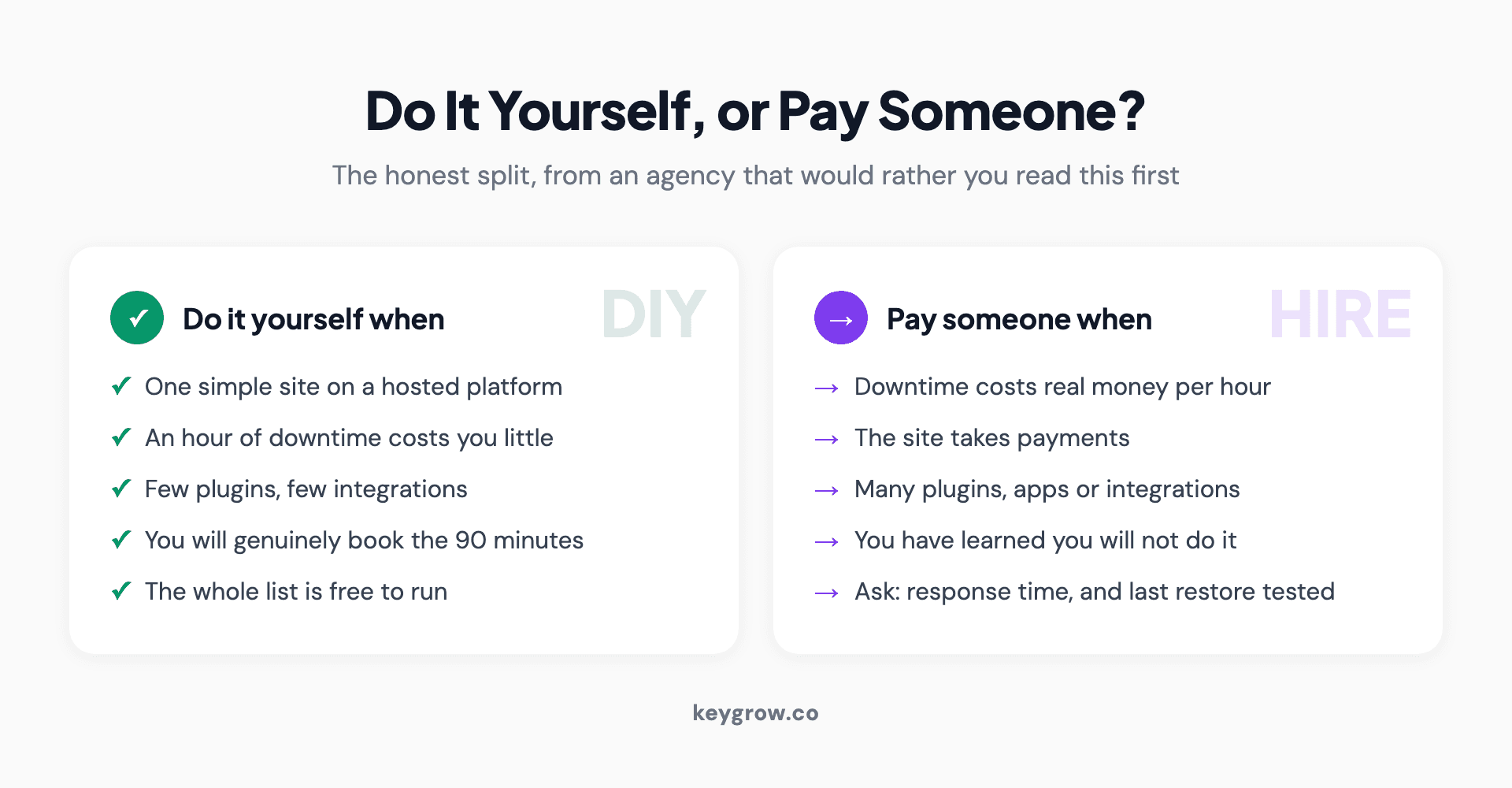
Comparison of when to handle website maintenance yourself against when to pay someone, including the two questions to ask any provider: response time when the site is down, and when they last tested a restore.
FAQs
How often should I update my website?
Security updates should be automatic or same-day, not monthly, because about half of high-impact vulnerabilities are exploited within 24 hours of disclosure. Content and design reviews can run monthly and quarterly. The mistake is treating both categories as one calendar item.
What actually happens if I skip website maintenance?
Four things take a site fully offline: an expired domain, an expired SSL certificate, a failed backup discovered during a recovery, and an unpatched vulnerability. Everything else degrades slowly instead, through broken forms, falling page speed, and pages dropping out of the index.
How long does monthly website maintenance take?
One to three hours for a typical small business site. Most of that is review rather than work, and it drops considerably if updates are automated and you have cut the number of plugins.
Do I need a maintenance plan if my site is on a hosted platform?
Usually not the same one. The platform handles security patching, uptime and the server, so your list shrinks to content accuracy, forms and integrations, page speed, and billing. Paying plugin-era prices for a site with no plugins is common and rarely justified.
How much does website maintenance cost?
Published market rates run from roughly $100 a month for basic coverage to several thousand for complex or high-traffic sites. What you are mostly buying at the higher end is response time and someone carrying the risk, not a longer task list.
What is the most commonly skipped maintenance task?
Testing a restore from backup. Backups running is not the same as backups working, and the gap between the two only ever shows up during an emergency. Restore to a staging environment once a quarter.
Should I update plugins automatically?
For plugins from established developers, yes. The risk of a bad update is real but small, and it is smaller than leaving a known vulnerability live for weeks. Keep a current backup and a staging environment if the site is important enough to worry about.
Does website maintenance affect SEO?
Indirectly and steadily. Downtime, slow pages, broken links and crawl errors all cost you, and Search Console errors left unreviewed can quietly remove pages from the index. None of it is dramatic, which is exactly why it goes unnoticed.
The twenty minutes that matter most
If you do nothing else this month, do these four. Check that your domain and SSL are set to auto-renew on a card that has not expired. Submit your own contact form from your phone and confirm the email arrives. Restore one backup to a staging site to prove the backups are real. Then open your plugin list and delete everything nobody uses.
That is twenty minutes and it covers most of the ways a website actually fails. The rest of the checklist is genuinely useful, and it is maintenance in the ordinary sense: worth doing, rarely urgent.
If your site is past the point where a checklist covers it, or nobody has looked at it in a year, that is a build and maintenance conversation rather than a to-do list, and our web development service is where that sits. If the site is fine and the problem is that nobody visits it, that is a different job entirely, and our SEO service is the honest answer there.


