


"It's a whole second Google profile to build and babysit." That's the line we hear most about Bing Places for Business, and it's mostly wrong.
Bing Places for Business is Microsoft's free tool for controlling how your business shows up in Bing search and Bing Maps. If you already have a verified Google Business Profile, you can import it, skip Bing's verification step, and set the listing to sync from Google from then on. For most local businesses that's a one-sitting job, not a new chore.
The program changed a lot in October 2025, and most of what ranks for it still describes the old version. Below are the six beliefs we see most often, what's actually true now, and an honest answer on whether it deserves a slot on your list.
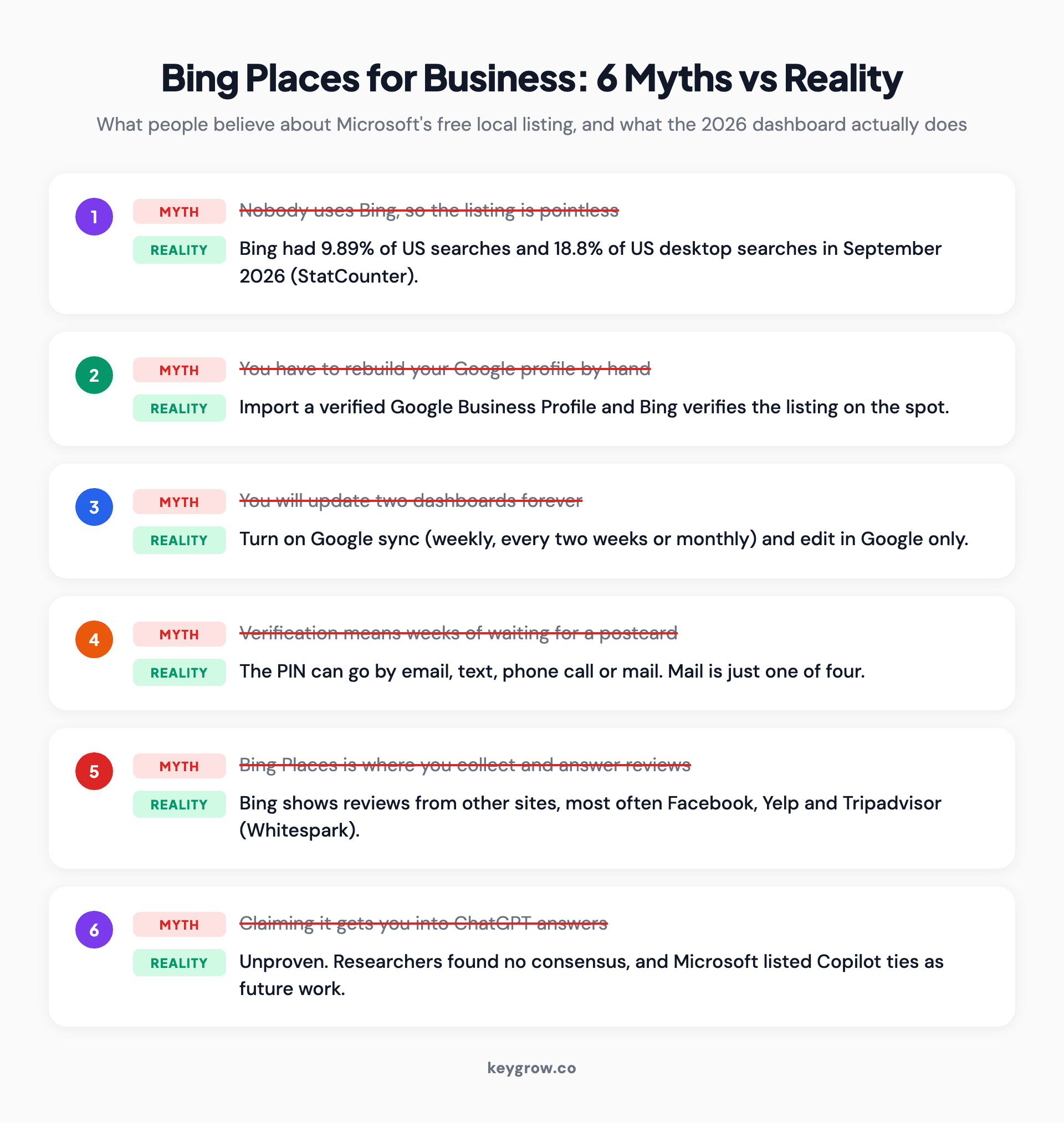
Six myths about Bing Places for Business shown as struck-through cards, each paired with the reality: Bing's US search share, import from Google, auto-sync, four PIN methods, third-party reviews and unproven ChatGPT claims.
What Bing Places for Business is in 2026
It's a free dashboard at bing.com/forbusiness where you claim, verify and edit the listing that appears when someone finds your business on Bing or Bing Maps.
The old bingplaces.com address now redirects there. Microsoft moved the whole program onto Bing.com on October 3, 2025, rebuilt the Google import, and added bulk editing and a Recommendation Tool that flags missing details like hours, a website link or photos. Microsoft's launch post covers the changes, and existing listings were migrated automatically.
One line in the sign-up screen is worth knowing: your listing may appear on Microsoft and Microsoft partner products, not only Bing.
Myth 1: Nobody uses Bing, so the listing is pointless
Bing is small next to Google, but it isn't nothing. In the US it handled close to one search in ten in September 2026, and almost one in five on desktop.
Those numbers come from StatCounter's US data: 9.89 percent of all US searches and 18.8 percent of US desktop searches went to Bing that month. Google took 85.19 percent overall.

A person typing on a keyboard at a desktop computer on a wooden desk, the setting where Bing's share of searches is highest.
The desktop number is the one that matters for a lot of businesses. People researching an accountant, an IT provider or a commercial cleaner from a work computer are desktop searchers, the group where Bing's share runs highest. A free listing that reaches roughly a tenth of searchers is a strange thing to skip.
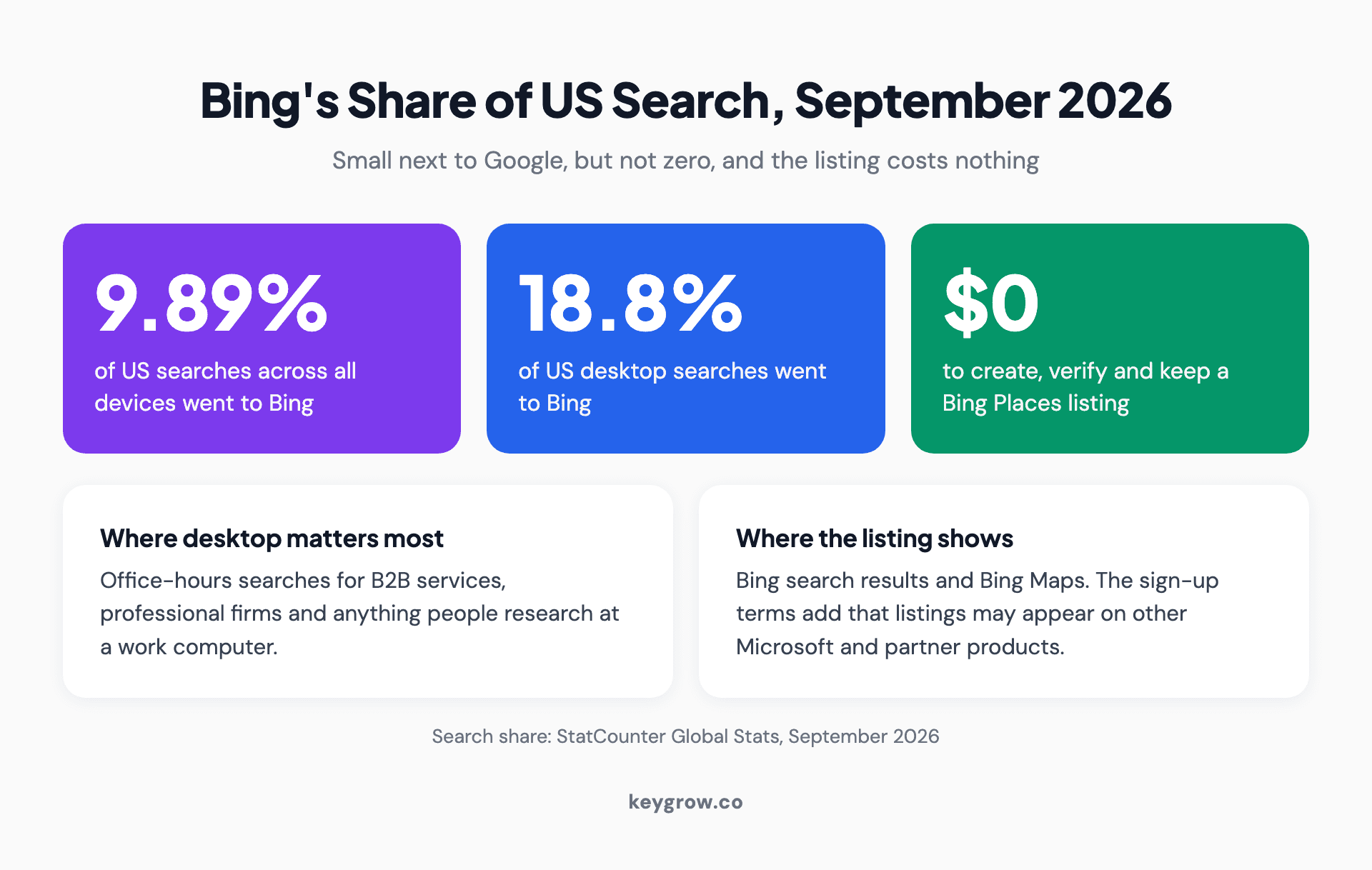
Stat strip of Bing's US search share in September 2026: 9.89 percent of all US searches, 18.8 percent of US desktop searches, and a $0 cost to list on Bing Places, with notes on where desktop search matters and where listings appear.
Myth 2: You have to rebuild your Google profile by hand
You don't.
The current dashboard's first screen offers to import from your Google Business Profile "to get instant verification," and that's the route most businesses should take.
You sign in at bing.com/forbusiness, choose the Google import, sign in to Google and pick the locations. Microsoft says the rebuilt import does a better job keeping the business name, hours and contact details intact. The dashboard warns that publishing time varies, and that several listings can take a few hours.
If you don't have a verified Google profile, you search for your business on Bing and either claim the existing listing or add it by hand. Your business may already be on Bing without you having added it, so search before you create anything. A duplicate is harder to clean up than a claim.
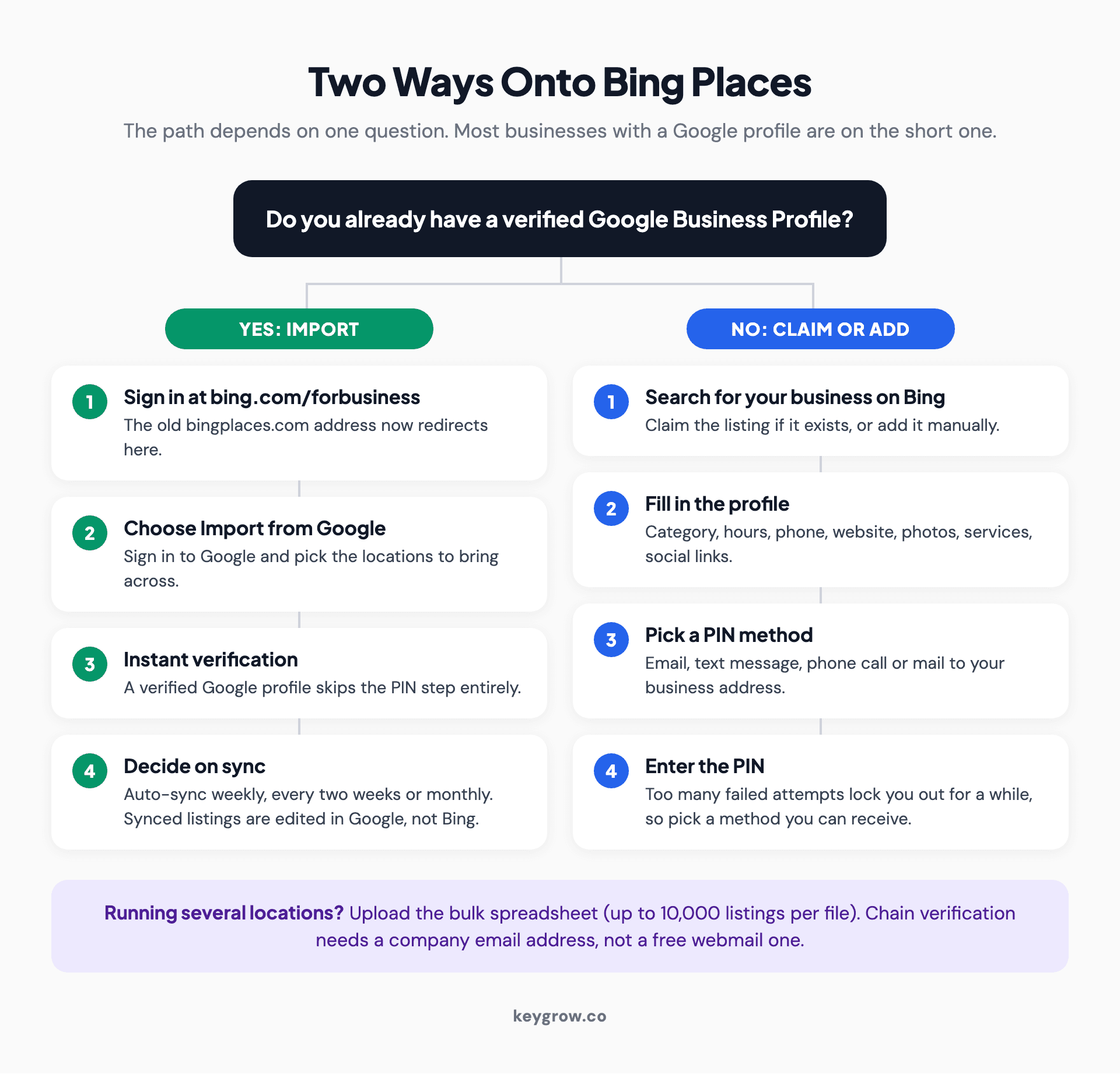
Flow diagram of the two ways onto Bing Places. With a verified Google Business Profile: sign in, import from Google, get instant verification, then choose a sync schedule. Without one: search Bing, claim or add the listing, fill in the profile, and verify with a PIN sent by email, text, phone call or mail.
| Import from Google | Claim or add manually | |
|---|---|---|
| Who it suits | Anyone with a verified Google profile | New businesses, or no Google profile yet |
| Verification | Instant | PIN by email, text, phone call or mail |
| Ongoing edits | In Google, if sync is on | In the Bing dashboard |
| Main risk | Bing lags Google between syncs | Details drift from your other listings |
Myth 3: After the import, you'll be updating two dashboards forever
Only if you choose to. The import has an automatic sync option that pulls changes from Google weekly, every two weeks or monthly.
Older guides say you'll repeat every edit in both places. Now there's a trade-off instead. With sync on, the Bing dashboard locks you out of editing that listing ("You cannot use the dashboard to update a Google synced business," as the error puts it), so Google becomes your single place for changes.
The catch is the gap between syncs.
On a monthly schedule, a holiday closure you add to Google on the 2nd might not reach Bing until the end of the month. If your hours change often, pick weekly. If they almost never change, monthly is fine.
Myth 4: Verification means weeks of waiting for a postcard
Mail is one of four options. The manual verification screen lets you choose where the PIN goes: email, text message, a phone call, or a postcard to your business address.
Pick a method you can receive right now.
After too many failed attempts, the dashboard makes you wait or switch methods. The postcard route also checks your address against length and format rules, so a long suite description can bounce it.
Running several locations changes things. The dashboard takes a bulk spreadsheet of up to 10,000 listings per file, and chain verification won't accept a free webmail address. You'll need an email on your company's own domain. Agencies managing a listing for a client have to give the owner's email, and Bing asks that owner to approve the access.
Myth 5: Bing Places is where you collect and answer reviews
Bing listings mostly show reviews pulled from other sites, so the work happens there, not in the Bing dashboard.
When Whitespark checked 153 local searches across 17 business categories and 9 US cities, Facebook was the review source attached to the most Bing Places listings, followed by Yelp and then Tripadvisor. Whitespark's study found Facebook on nearly 1.5 times as many listings as Yelp.
We also looked through the current dashboard and found sections for hours, photos, services, social profiles, announcements and analytics, but no inbox for replying to reviews. So if your Facebook page has three reviews from 2019, that's what Bing shows people, and the fix is on Facebook. The review habits in our Google Business Profile optimization guide carry straight over.
Myth 6: Claiming Bing Places gets you into ChatGPT answers
This is the claim you'll see in vendor pitches. Nobody has proved it.
Treat it as a maybe.
Here's what the evidence supports. Your listing feeds Bing search and Bing Maps; that part is confirmed. Microsoft's launch post listed deeper Copilot integration as future work, not a live feature. And whether ChatGPT reads Bing Places data at all is disputed. Whitespark's write-up concluded there is "no firm industry consensus on this topic," and noted that ChatGPT gives contradictory answers when asked where its local data comes from.
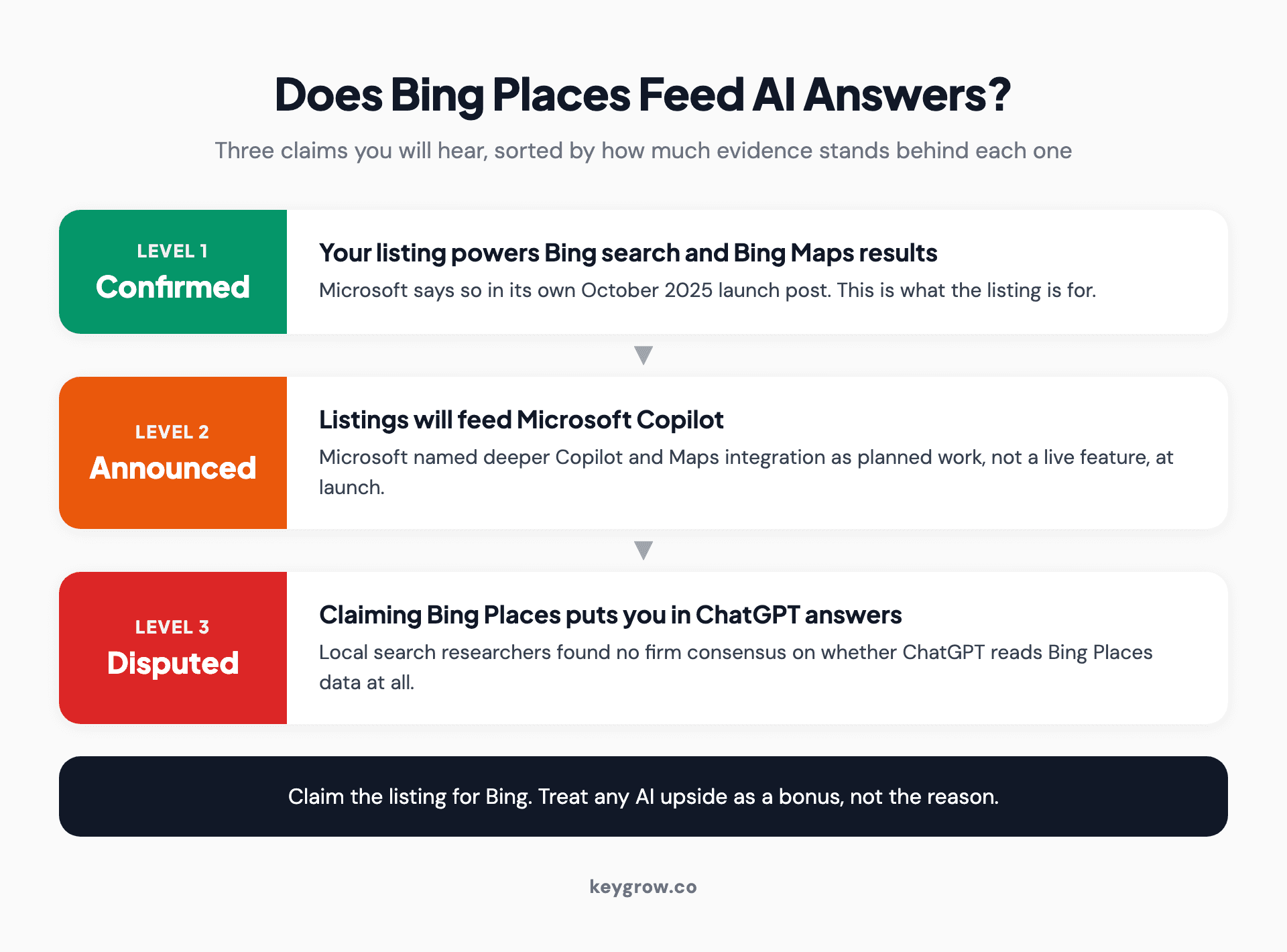
Evidence ladder for Bing Places and AI answers. Confirmed: listings power Bing search and Bing Maps. Announced: Microsoft lists Copilot integration as planned work. Disputed: claiming Bing Places puts you in ChatGPT answers, with no industry consensus.
The link between Bing's web index and AI search is better supported, and we cover it in how SEO works in Bing. That's about your website, a separate job from your map listing. Do both. Just don't pay anyone extra because they promise the listing alone will get you cited.
Worth doing once you're listed
Imported listings come across mostly clean, but spend five minutes checking them.
- Category. Confirm the primary category that came across matches what you actually do.
- Hours. Holiday hours are where listings go stale. If you sync, update Google early.
- Photos and services. The Recommendation Tool flags what's missing. Do what it asks.
- Announcements. Bing's version of Google posts. You get 5 a month, 240 characters each, running up to 30 days, and only on a verified listing.
- Consistency. Your name, address and phone should match everywhere. Our guide to local citations explains why, and adding your business to Apple Maps is the obvious next listing to claim.
When you can skip the help
This is a do-it-yourself job, and we'd say that even if you asked us to quote it. Microsoft charges $0 for the listing, and a single-location business with a verified Google profile can be imported, verified and syncing before the coffee goes cold. Paying a monthly fee to "manage" a listing that updates itself from Google is paying for nothing.
Help earns its keep in messier situations: duplicate listings you can't remove, a chain with dozens of locations and inconsistent data across directories, or a listing that won't verify. That's work where the listings cleanup is part of a wider local SEO problem.

A worker behind the counter of a small bakery with bread on display, the kind of single-location business that can set up Bing Places itself.
FAQs
Is Bing Places for Business free?
Yes. Creating, verifying and editing a listing costs nothing. The dashboard does promote Microsoft Advertising credits, but advertising is a separate, optional product you never have to buy.
How do I import my Google Business Profile into Bing Places?
Sign in at bing.com/forbusiness, choose the option to import from Google, sign in to your Google account and select the locations you want. A verified Google profile gives you instant verification on Bing, and you can turn on automatic sync so later Google changes flow across.
How long does Bing Places verification take?
An imported, verified Google profile verifies instantly. Manual listings verify as soon as you enter the PIN, which Bing can send by email, text message, phone call or postcard. The postcard is the slow option, so choose one of the other three if you can receive it.
Can a service-area business with no storefront use Bing Places?
Yes. The dashboard lets you list the areas you serve, and it asks for at least one when you go that route. If you verify by postcard, you will need an address that can receive mail, so email, text or phone is usually easier.
Why isn't my business showing on Bing?
The usual causes are an unverified listing, a listing still waiting to publish, or a duplicate splitting your information. Check the listing status in the dashboard first. Microsoft says publishing time varies, and an import of several listings can take a few hours.
Does Bing Places help with ChatGPT or Copilot visibility?
Possibly, but it isn't proven. Your listing definitely feeds Bing search and Bing Maps. Microsoft has described deeper Copilot integration as future work, and local search researchers have found no consensus on whether ChatGPT reads Bing Places data.
Is it worth the 20 minutes
Yes, for almost every local business. Bing handles close to one US search in ten, the listing is free, and if you have a verified Google profile the import does most of the work and the sync keeps it current. Budget 20 minutes including a check of what came across, then mostly forget about it.
What it won't do is fix a weak Google presence or win you a spot in AI answers. If your listings are a tangle of duplicates and old addresses, or Bing is fine but nothing is ranking, that's when a local SEO team is worth talking to. Tell us about your business and we'll tell you honestly which of those you're dealing with.



