


Adding your business to Apple Maps is free. The forms take under an hour, and Apple's checks take up to five business days, longer when it's busy. Have three things ready: an email address that has never been used for an Apple Account, your EIN or D-U-N-S number, and a document such as a business license or utility bill.
If you looked up how to add your business to Apple Maps and found steps for Apple Business Connect, they're out of date. On April 14, 2026, Apple folded Business Connect into a free platform called Apple Business and moved every claimed listing across, as Apple's announcement explains. Every screen below was checked against Apple's guide in October 2026.
Add your business to Apple Maps in seven steps
Sign up at business.apple.com, verify your organization with two proofs, then add or claim your location under Brands > Locations and wait for Apple's review.
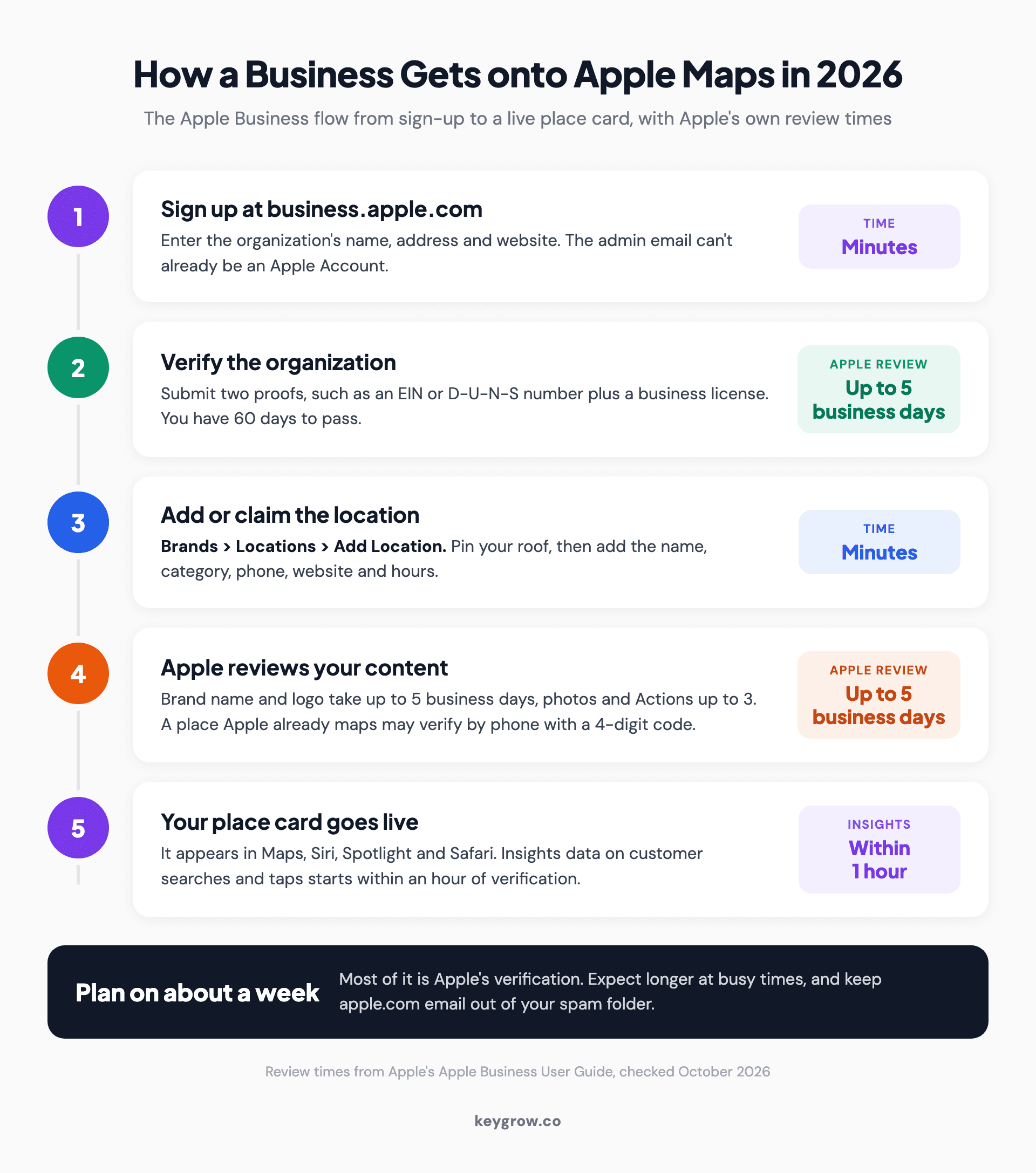
Timeline of the 2026 Apple Business process for getting a business onto Apple Maps: sign up in minutes, verify the organization in up to five business days, add or claim the location, clear photo and logo review, then go live with Insights.
- Sign up with a fresh email. At business.apple.com, select Get started and enter your organization's name, address and website (optional, though Apple says it can speed up verification). The admin email can't already be an Apple Account, so skip your iCloud address and use a work or new webmail address with a real person's legal name.
- Verify your organization. In Settings > Organization, select Verify Now and submit two different proofs, such as your EIN or D-U-N-S number, a TXT record on your domain, or a document like a business license, lease or utility bill. Apple's verification rules put review at up to five business days. Miss the 60-day window and Apple deletes the organization.
- Find or add the location. Choose Brands > Locations > Add Location > Add single location, then type your business name. Select your existing place to claim it, or choose Add a new location with this name.
- Put the pin on your roof. Drag the marker until it's centered on your building, not the street or parking lot. Satellite view helps.
- Enter the basics. Type your display name exactly as it reads on your sign, with no keywords or city added. Then add a primary category, a phone number with country code, your hours and a website. A Facebook, Instagram or TikTok page counts. A directory listing doesn't.
- Pick a brand and submit. Choose or create the brand, add your logo and send it to Apple. For a place Apple already maps, you may get a shortcut: a call to the number on file and a four-digit code.
- Finish the place card. Add a cover photo, more photos, an About section and Good to Know details like parking. Actions and showcases open up after verification.
Claiming your listing is not the same as reporting it
Anyone can suggest a missing place in the Maps app. Only Apple Business gives you verified control over what your listing says and shows.

Storefront of a small lamp shop on a cobblestone street with a bicycle parked by the window, the kind of business any passerby could report to Apple Maps.
Apple's Maps help for business owners now just says to use Apple Business. On an iPhone, though, anyone can still touch and hold the map and tap Report Something Missing. Apple reviews the tip and may add the place.
Nobody gets the keys.
| Report Something Missing (Maps app) | Apple Business (business.apple.com) | |
|---|---|---|
| Who uses it | Any Maps user | The owner, or a partner the owner approves |
| What you get | A suggestion Apple may act on | A verified listing you control |
| Later changes | A new report every time | Edit whenever you like |
| Photos, Actions, showcases, insights | No | Yes |
What can you control on your place card?
After verification you control the name, category, photos, hours, contact details, Actions and showcases. Ratings and customer photos come from Maps users.
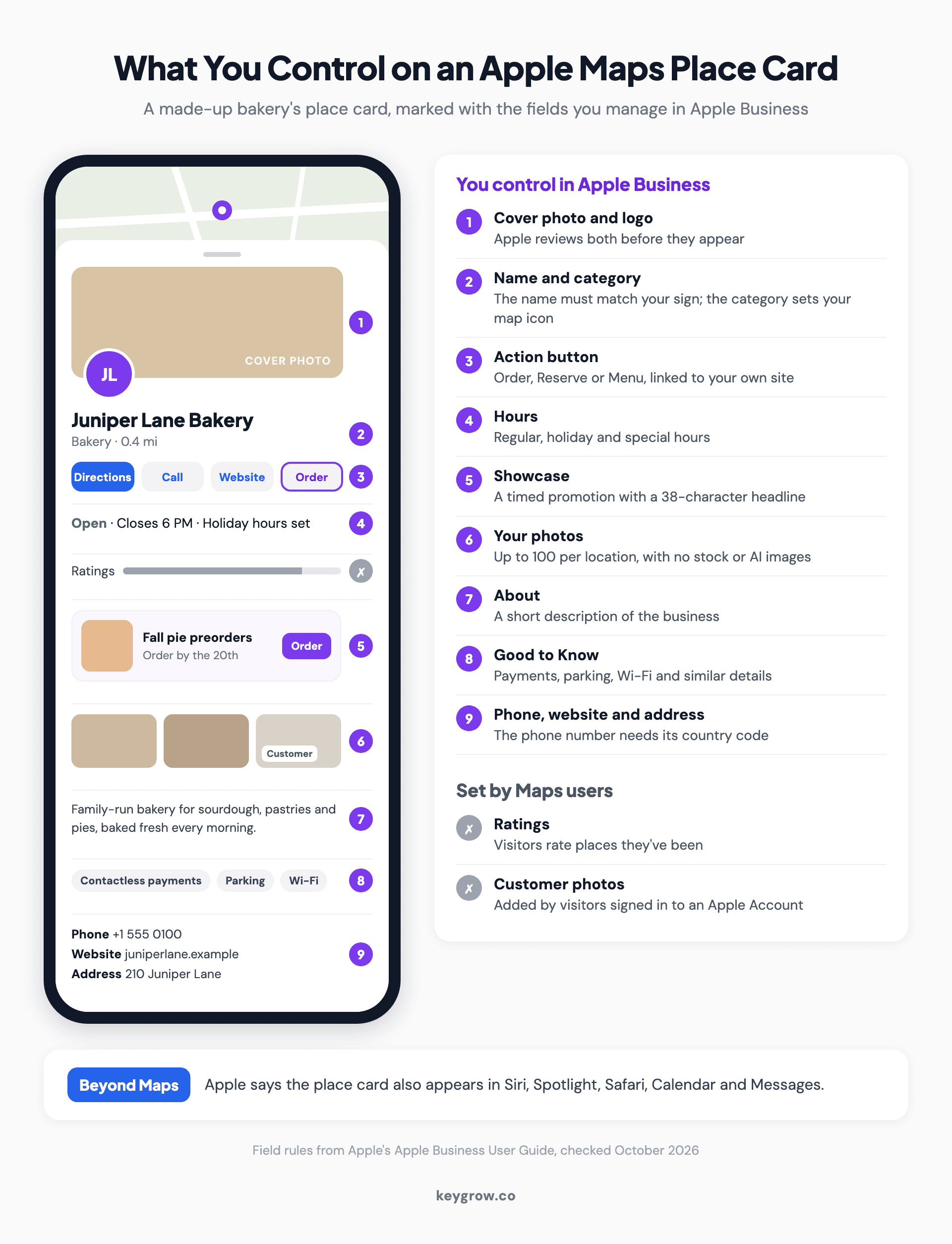
Annotated mockup of an Apple Maps place card for a made-up bakery, marking the fields an owner controls in Apple Business, such as the cover photo, logo, Order button, hours, showcase, photos, About and Good to Know, and the ratings and customer photos the owner cannot edit.
Apple reviews every photo, which takes up to three business days, and rejects stock shots, AI images, added text and QR codes. Each location can hold 100. Pick the most specific primary category, since it sets your map icon, and add up to 19 more. Showcases are short promotions with a 38-character headline, and Insights shows how people found you and what they tapped.
Apple says claimed businesses get 30 percent more views. That's Apple grading its own homework, but the logic holds: real photos and correct hours give people a reason to tap.
Google is not the only map your customers use
iPhones generate more than half of US mobile web traffic, and every one ships with Apple Maps. Those customers see your Apple listing, claimed or not.

Apple Maps turn-by-turn directions on a car dashboard screen during a drive along a tree-lined highway.
We've argued for a while that Bing is no longer optional. Apple is the same argument with more phones behind it: iPhones made up 53.59 percent of US mobile web traffic in September 2026, per StatCounter. Apple says the place card also appears in Siri, Spotlight, Safari, Calendar and Messages, and those pull from Apple's listing, not Google's.
An unclaimed listing still exists, built from Apple's data and partners. If Maps users report it closed, Apple can change its hours or status, and only a verified owner gets an email and a chance to dispute that.
Five snags and how to fix them
Each row pairs a common snag with what to do, using Apple's own process wherever it has one.
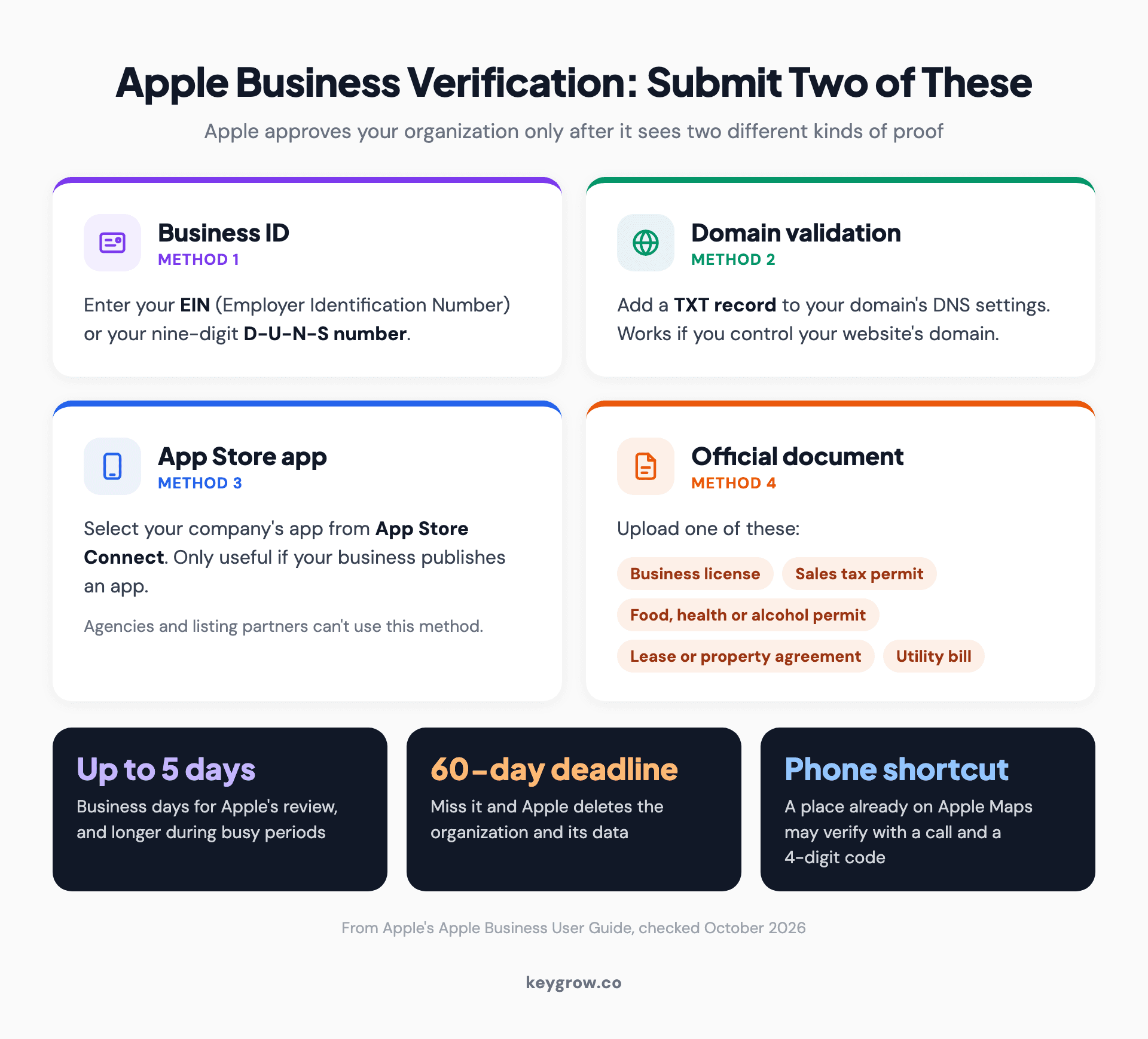
Four cards showing the proofs Apple Business accepts for organization verification, of which owners submit two: an EIN or D-U-N-S number, a domain TXT record, an App Store app, or an official document such as a business license or utility bill, plus the five-business-day review, the 60-day deadline and the phone shortcut for places already on the map.
| Snag | What to do |
|---|---|
| Your business is already on Apple Maps | Claim the existing place in step 3 rather than adding a second one. If phone verification calls a number you no longer have, contact Apple Business support. |
| Someone else manages the listing | Apple shows "This location is already managed." Add it anyway, choose Request Transfer under Status, explain why and attach a business license or utility bill. Review takes up to five business days. |
| Verification failed or stalled | Apple cites high volume or not reaching your contact. Check spam for apple.com mail, make sure both proofs show the same legal name, then contact support from your account icon. |
| You serve customers at their location | Apple has no service-area setting and only maps places customers visit, so register the brand without a pin. Never use a virtual office address. |
| You have many locations | Verify, create a brand, then use Apple's bulk template, up to 10,000 rows per file. Or give an approved listing partner access. |
Not sure if you count as a storefront? Our guide to what a service-area business is explains where Google draws that line. Apple draws it tighter.
Do you need help with this?
For one location, no. It's free, and an owner with an EIN and a business license on hand can finish in one sitting.

A smiling butcher in a white coat checking his phone in his tiled shop.
Help earns its fee with dozens of locations, where a spreadsheet has to pass Apple's checks row by row, or with a franchise, where the brand owner controls the logo. Or when you want every map updated the day your hours change. Apple lets an agency manage your listings through partner access, so you never hand over a password.
FAQs
Is it free to add a business to Apple Maps?
Yes. Apple Business is free, including claiming or creating a listing. Apple charges only for optional extras such as iCloud storage, AppleCare+ for Business and ads on Maps.
How long does it take for a business to show up on Apple Maps?
Plan on about a week. Organization verification takes up to five business days, longer at busy times, and photos take up to three business days to clear review.
What is Apple Business Connect?
It was Apple's free tool for claiming Apple Maps listings. Since April 14, 2026, it has been part of Apple Business, with existing listings, photos and accounts moved over automatically. Sign in at business.apple.com with the same Apple Account.
Can I add my business to Apple Maps from my iPhone?
Yes. Open business.apple.com in Safari or Chrome on iOS 16.6 or later. Report Something Missing in the Maps app only sends Apple a suggestion and gives you no control over the listing.
Make Apple match your Google profile
Your Google Business Profile probably has the right name, category, hours and photos already. Copy them into Apple field by field, then treat the two as one record.
When holiday hours change, update both the same day. A customer who sees two closing times trusts neither, and the systems that cross-check your details read a mismatch the same way. If Google is the map that's missing you, start with why your business isn't showing on Google Maps.
If you'd rather hand off the upkeep, our local SEO team keeps Apple, Google and Bing listings in step, month to month.



