


Deleting your Google Business Profile does not take your business off Google Maps. Several of the guides ranking for this question say it does. Google's own help page says the opposite.
Here is how to delete a Google Business Profile, in Google's current wording: the primary owner signs in at business.google.com, opens More, then Business Profile settings, selects Remove Business Profile, then Remove profile content and managers, and finishes with Continue, Remove and Done. That removes you, every other manager and everything you posted. The listing itself, and every review on it, can stay exactly where it was.
So before you click anything, work out which of five things you want. Each one has a different button.
What deleting a Google Business Profile actually does
Removing a profile deletes your control and your content, and leaves the business on Google. Reviews and anything customers added stay public.
The button says Remove. What it removes is mostly you.
Google's removal guide is specific about the split. Posts, photos, videos and review replies made by owners and managers are permanently deleted. User-generated content and reviews remain. The business "might still show up on Search and Maps", unless Google considers it ineligible. And the removal is permanent for every owner and manager, not only you.
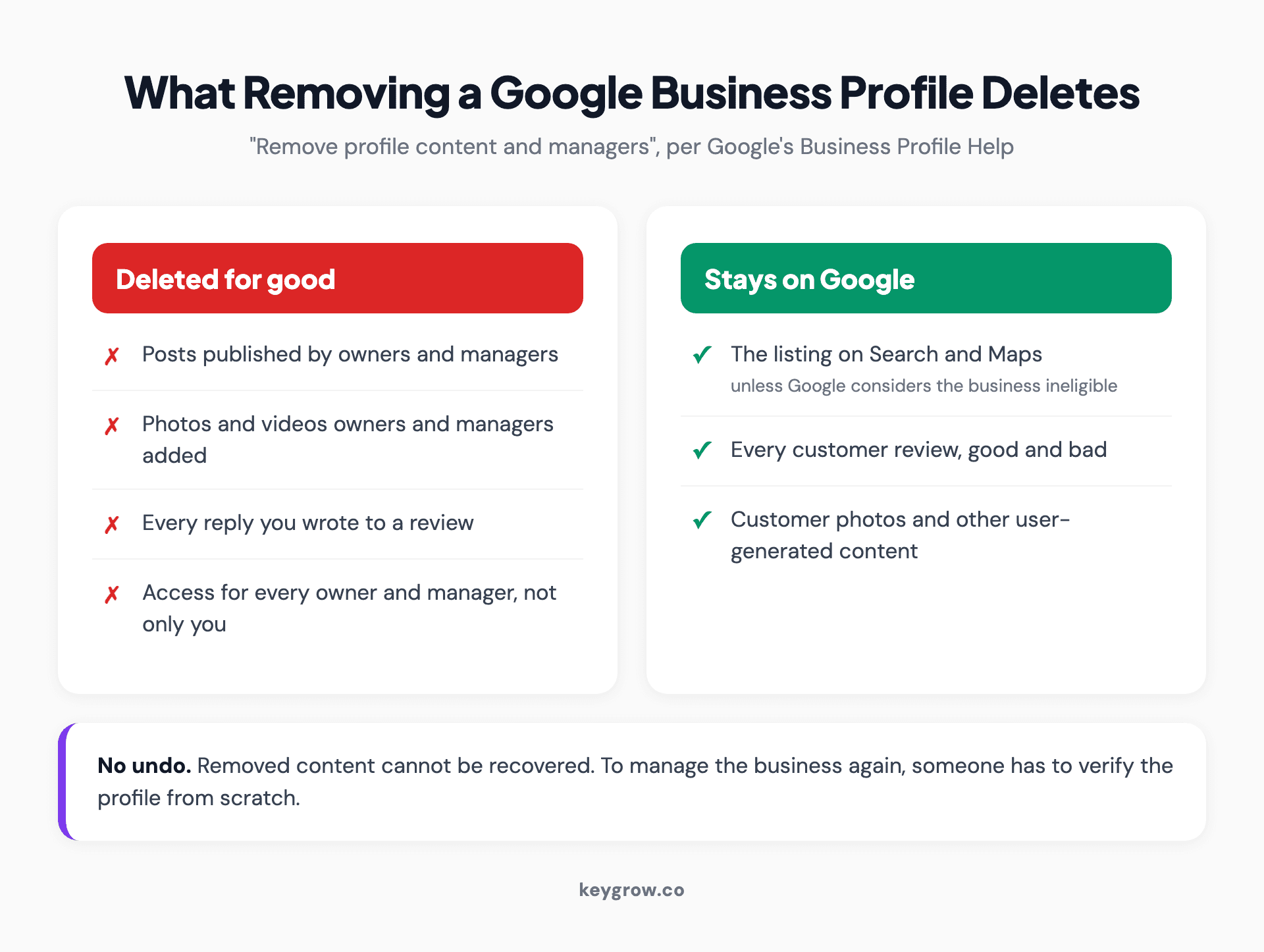
Two cards showing what removing a Google Business Profile does: owner posts, photos, videos, review replies and all owner and manager access are permanently deleted, while customer reviews, customer photos and the public listing on Search and Maps can stay.
| What you might expect to disappear | What happens |
|---|---|
| The listing on Maps and Search | Can stay visible, now unmanaged |
| Customer reviews | Stay on the listing |
| Your replies to those reviews | Deleted permanently |
| Your photos, posts and videos | Deleted permanently |
| Your access and every manager's access | Removed for everyone |
| Getting it back later | Only by verifying the profile again |
That last row matters. Removed content cannot be recovered, and to manage the business again you have to pass Google Business Profile verification from scratch.
Which of the five options do you need?
Pick by what is true about the business, not by the word "delete". There are five real options, and only one of them is the button people mean.
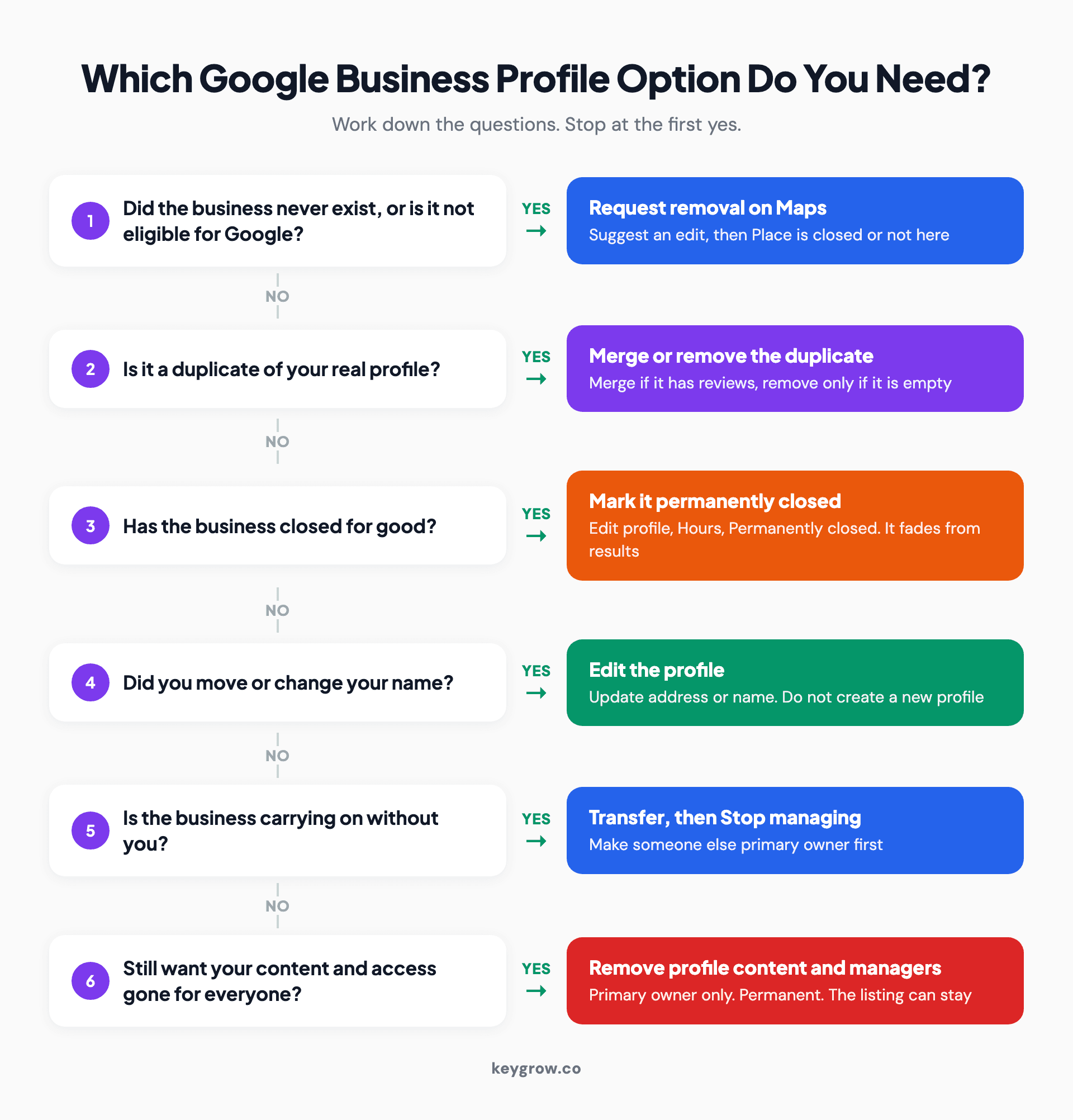
Six-question decision tree for deleting a Google Business Profile: request removal on Maps if the business never existed or is ineligible, merge or remove a duplicate, mark it permanently closed if it shut for good, edit the profile after a move or name change, transfer ownership then stop managing if the business carries on without you, and only then remove profile content and managers.
| Your situation | The option | What happens to the listing |
|---|---|---|
| You are leaving, the business carries on | Transfer primary ownership, then stop managing | Unchanged, reviews and content kept |
| You manage it but do not own it | Stop managing | Unchanged |
| The business closed for good | Mark permanently closed | Stays, labelled closed, fades over time |
| You want your content and access wiped | Remove profile content and managers | Can stay, now unmanaged |
| It never existed, is ineligible, or is a duplicate | Request removal on Maps, or merge | Removed if Google approves |
If you moved or renamed, none of the five applies. You edit the profile, which has its own section further down.
Remove the profile from your account, step by step
Only the primary owner can do this, and not in their first seven days. Back up anything you want to keep first, because nothing comes back.
The owners and managers page sets the limits. Owners can remove a profile; managers cannot. Anyone who became an owner or manager in the last 7 days gets an error if they try to delete a profile, remove other users or transfer primary ownership.

A man smiling at his laptop at a cafe table.
Then follow Google's sequence:
- Back it up. In Business Profile, select the profile, open Actions, and under Download choose Businesses. Tick "Include photos" if you want them. Google's page on downloading your profiles covers the file options.
- Sign in at business.google.com with the Google account linked to the profile.
- Open More, then Business Profile settings.
- Select Remove Business Profile, then Remove profile content and managers. If the business has closed, switch on "Mark your business as permanently closed" here.
- Confirm with Continue, then Remove, then Done.
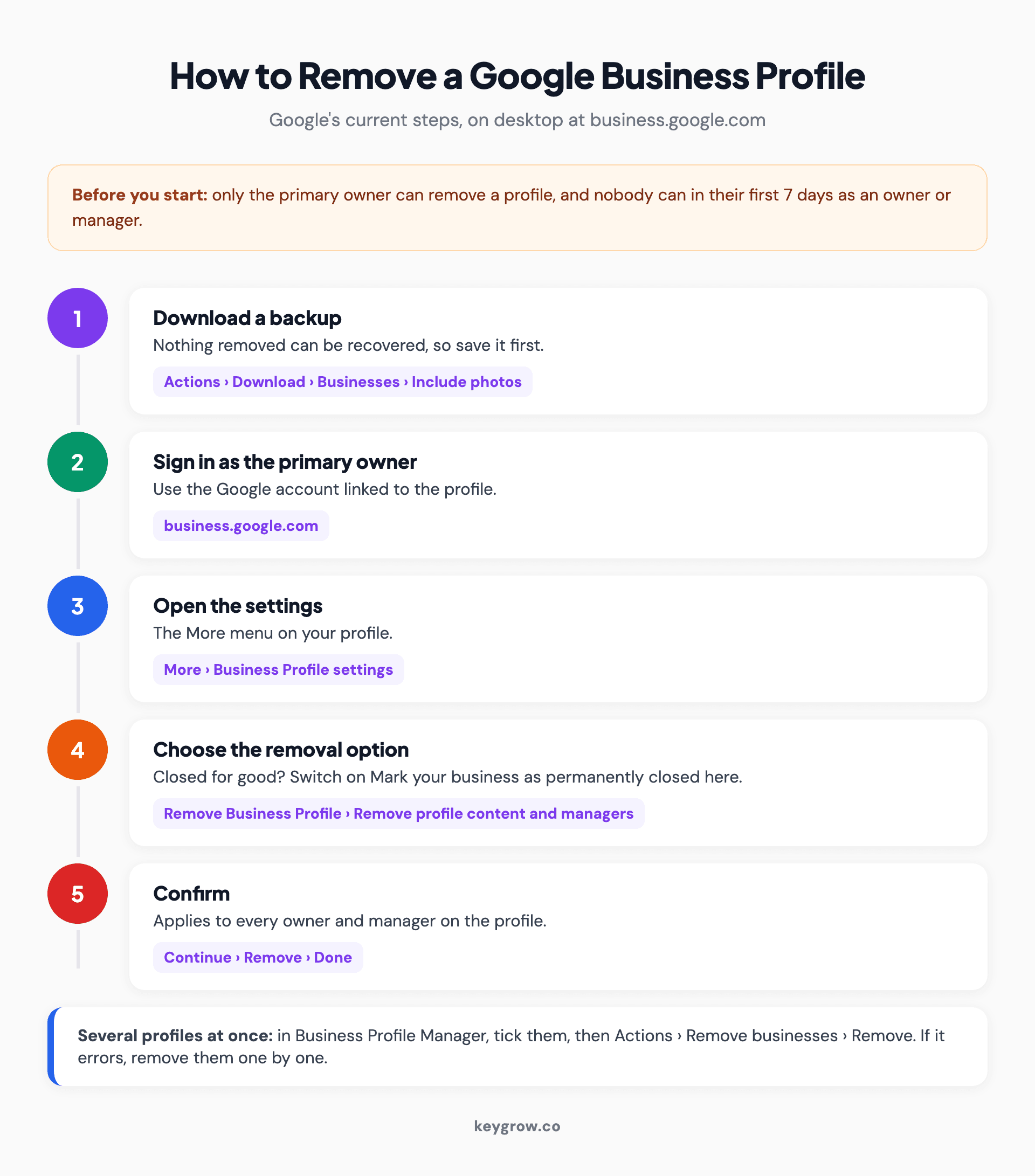
Five numbered steps to remove a Google Business Profile: download a backup, sign in at business.google.com as primary owner, open More and Business Profile settings, choose Remove Business Profile and Remove profile content and managers, then Continue, Remove and Done, with a reminder that new owners must wait 7 days.
For several locations at once, sign in to Business Profile Manager, tick the profiles, then open Actions, Remove businesses, Remove. Google's advice if that throws an error is to remove each profile one by one.
The help page gives no separate phone app steps, so do this on a desktop browser.
Closing for good? Mark it closed instead
If the business has shut, marking it permanently closed is usually the better move. Customers who search for you see the truth, and the listing drops out of results gradually.
Google's closure instructions run like this: open your profile at business.google.com, go to Edit profile, then Hours, select edit next to Hours, choose Permanently closed, and save. The listing can still appear for people who search the name, clearly labelled closed. Per the removal guide, a closed business then gradually drops out of search results before it is removed.
Shutting for a season or a long refit is different. Google wants Temporarily closed for anything longer than 7 days or with no end date, and special hours for 7 days or fewer.
If you reopen, it is the same Hours screen: choose Open with main hours, tick the days, save. There is one trap on Google's reopening page. If Google itself marked you closed because of a name or location change, do not reopen that listing. Add the business as new and ask Google to move the reviews across.
Reviews stay on a closed profile. Customers cannot leave new ones on a permanently closed listing, but they can on a temporarily closed one, according to Google's review transfer rules.
Leaving a business that keeps running
Sold the business, left the job or fired the agency? Do not delete anything. Hand over the ownership, then remove yourself, and the listing carries on untouched.

A set of keys on a table, standing in for handing a Google Business Profile over to its new owner.
The order matters, because a primary owner cannot remove themselves until someone else holds that role:
- In Business Profile settings, open People and access and invite the new owner as an owner or manager. The handover has to go to someone already on the profile.
- Wait out their 7 days. Transfers attempted inside that window fail.
- Select that person, choose Edit next to Access, pick Primary owner and save.
- Select yourself, then Stop managing, then Confirm.
Your past review replies and posts stay on the profile after you leave. That is the point: the next owner inherits years of reviews instead of a blank listing. A buyer who deletes and recreates the profile throws that away for nothing.
Getting a listing off Maps entirely
Only Google can remove a listing from Search and Maps, and only when the business never existed or is not eligible. Anyone signed in to a Google account can ask.
Google's removal request page lays out the route: open the business on Google Maps, select Suggest an edit, then Place is closed or not here, choose the reason that applies, and submit. Google may email you with follow-up questions. If it approves, the listing comes off Search and Maps.
A real business that existed and then shut does not qualify. Mark it closed instead, and the listing stays on the map with a closed label for anyone still looking for it.
A duplicate is the other common case, and the right fix is often a merge rather than a removal, because a merge keeps the reviews. Our guide to fixing a duplicate Google Business Profile covers the five kinds of duplicate and which to merge, which to delete, and which to leave alone.
Bad reviews are the wrong reason to delete
Several of the ranking guides list negative reviews as a good reason to delete a profile. It is the one reason deletion cannot fix.
Reviews are user-generated content, and Google keeps user-generated content after the owner leaves. Delete the profile and the reviews stay public. Your replies, the only part that showed customers your side, are the part that disappears. You end up with the same reviews and no voice under them.
The honest options are slower. Flag the reviews that break Google's policies and answer the rest calmly, then work on getting more recent ones from happy customers. Our guide to removing fake Google reviews covers what Google will take down and what it will not.
The same logic applies to suspensions. Deleting a suspended profile and starting a new one tends to look like what it is. Work through a suspended Google Business Profile properly instead.
Moved or renamed? Edit, do not delete
A new address or a new name is an edit, not a reason to start again. Google says plainly not to create a new profile because of a location or ownership change.
To move, go to Edit profile, then Location, select edit next to Business location, enter the new address and save. Google says changes usually show within about 10 minutes and can take up to 30 days. Keep the same name and Google moves your reviews automatically, though some categories, such as hotels and golf courses, may not transfer.
A full rebrand to a different name is treated as a new business, so reviews do not follow it automatically. That is the one case where starting fresh can be right. If you are setting up a new profile for a service-area business, our walkthrough of Google Business Profile for junk removal shows the setup order, and it works for most trades. Then update your local citations so directories stop sending people to the old name.
Do you need anyone to do this for you?
No. For a single location every option above is free and quick. The only enforced wait is Google's 7-day rule for new owners.
DIY is the right call here more often than agencies admit. Nothing about deleting, closing or transferring a profile is recurring work. Paying someone a monthly fee for a one-off settings change is a bad trade.
Help earns its fee in the messier versions: a brand closing three branches while the rest need to keep ranking, say, or an ex-manager who owns the profile and will not answer the request. If that is where you are, our local SEO services include Google Business Profile optimization alongside the rest of the local work, month-to-month.
FAQs
Can you permanently delete a Google Business Profile?
You can permanently remove your content and every manager's access, and that cannot be undone. You cannot delete the listing itself from Google on your own. It can stay on Search and Maps unless Google considers the business ineligible or approves a removal request.
Do reviews disappear if I delete my Google Business Profile?
No. Google keeps customer reviews and other user-generated content after a profile is removed. What disappears are your replies to those reviews, plus the photos, posts and videos owners and managers added.
Why can't I delete my Google Business Profile?
Usually one of two things. Only the primary owner can remove a profile, so managers do not see the option. And anyone who became an owner or manager in the last 7 days gets an error until that window passes.
How do I remove a business from Google Maps that I don't own?
Open it on Google Maps, select Suggest an edit, then Place is closed or not here, and pick the reason. Google only removes listings for businesses that never existed or are not eligible. A real business that closed gets labelled closed rather than removed.
How long does it take for a closed business to disappear from Google?
Google does not give a fixed number of days. Its help page says a permanently closed business gradually drops out of search results and is then removed, and it can keep appearing for people who search the exact name in the meantime.
Can I delete my Google Business Profile and start over?
You can remove it and verify a new one, but the reviews stay on the old listing, so starting over rarely achieves what people hope. Google also tells businesses not to create a new profile for a move or a change of owner. Edit the existing one instead.
Can I delete a Google Business Profile on my phone?
Google's removal instructions are written for business.google.com in a browser and do not list separate app steps. Use a desktop browser signed in to the primary owner's Google account.
Decide before you click remove
Ask one question first: do you want the business gone, or do you want to be gone from it?
If the business is still trading, transfer the ownership and stop managing. If it closed, mark it permanently closed and let the listing fade. If it never should have existed, request removal on Maps. Use Remove profile content and managers only when you are certain nobody will want those photos, posts and replies again, because nobody will be able to get them back.
If the profile is staying and you want it working harder instead, book a free growth strategy session. We will tell you honestly whether it needs us.