


You can check most of your competitors' Google Ads for free, and you can do it in about half an hour without paying for a single tool. Google's own Ads Transparency Center shows you the live ads any verified advertiser is running. The Auction Insights report shows who you actually compete against. Keyword Planner hints at what they bid. A plain search shows you their copy in the wild. Paid tools like Semrush and SpyFu add scale, history, and spend estimates, but that last number is the least reliable thing they sell.
That is the honest version of an answer most guides bury under a list of products. Start with the free tools, learn what they can and cannot show you, and only pay for software once you know what you are missing.
First, find out who you actually compete with
Before you study anyone, make sure you are studying the right anyone. The businesses you think you compete with are often not the ones you fight in the ad auction.
Your real Google Ads competitors are whoever shows up for the keywords you bid on, which can include national brands, resellers, and businesses you have never heard of. The fastest way to see the true list is the Auction Insights report, which names the advertisers you overlap with on your own terms. A local plumber might assume the shop across town is the rival to beat, then open Auction Insights and find a franchise and two lead-generation sites eating most of the impressions. Build your research list from who actually competes for your clicks, not from who competes for your customers offline. The two lists overlap less than you would expect, and researching the wrong companies is the most common way this work gets wasted.
The free 30-minute workflow, in order
Run these four free methods in sequence before you spend anything. Each one answers a different question, and together they cover most of what a small advertiser needs.
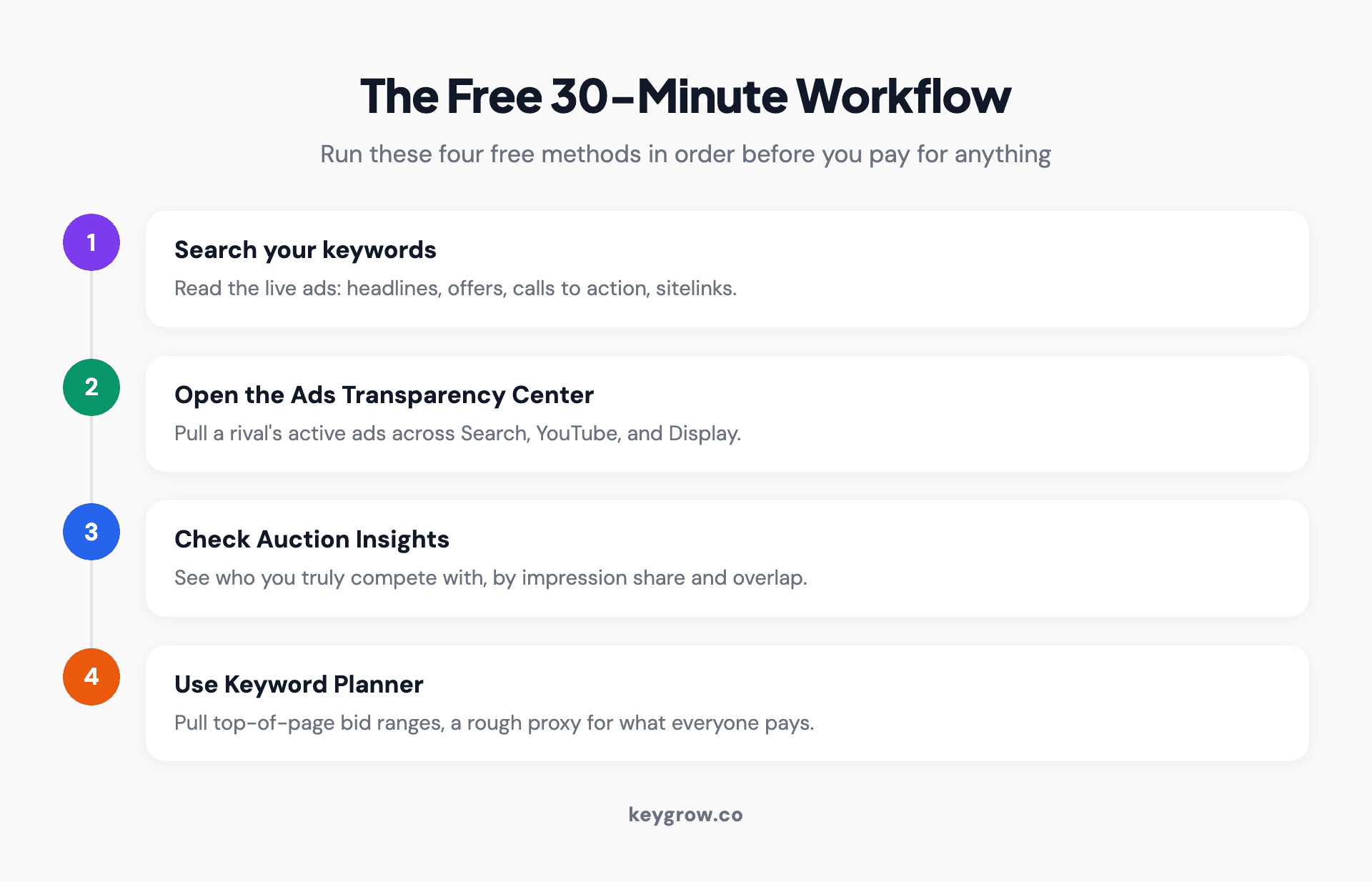
A free four-step workflow to check competitor Google Ads: step one, search your keywords to read live ads; step two, use the Google Ads Transparency Center to pull a rival's full set of active ads; step three, open the Auction Insights report to see who you truly compete with; step four, use Keyword Planner for bid ranges.
Start with a manual search. Type the keywords you care about and read the ads that appear: the headlines, the offers, the calls to action, the sitelinks. This is the fastest way to see how a competitor positions itself right now.
Next, open the Ads Transparency Center, which Google launched in March 2023. Search a company name and you can see the ads that verified advertiser is running or recently ran across Search, YouTube, and Display, the format of each, and the last date it ran. It will not show you their spend, and that limit is deliberate.
Third, open the Auction Insights report inside your own Google Ads account. It names the other advertisers competing for your keywords and shows metrics like impression share and overlap rate. This is the only tool that tells you who you genuinely compete with, rather than who you assume you do. Finally, use Keyword Planner to pull the top-of-page bid ranges for those keywords, a rough proxy for what everyone is paying.
Record what you find as you go, because memory will not hold it. A simple sheet with columns for the competitor, their main headline and offer, the keywords they clearly target, and their landing page is enough. The value is in comparing that snapshot to next month's, since the change is more useful than any single reading.
What each free tool actually reveals
The four free sources do different jobs. Knowing which answers which question keeps you from expecting spend data from a tool that will never show it.
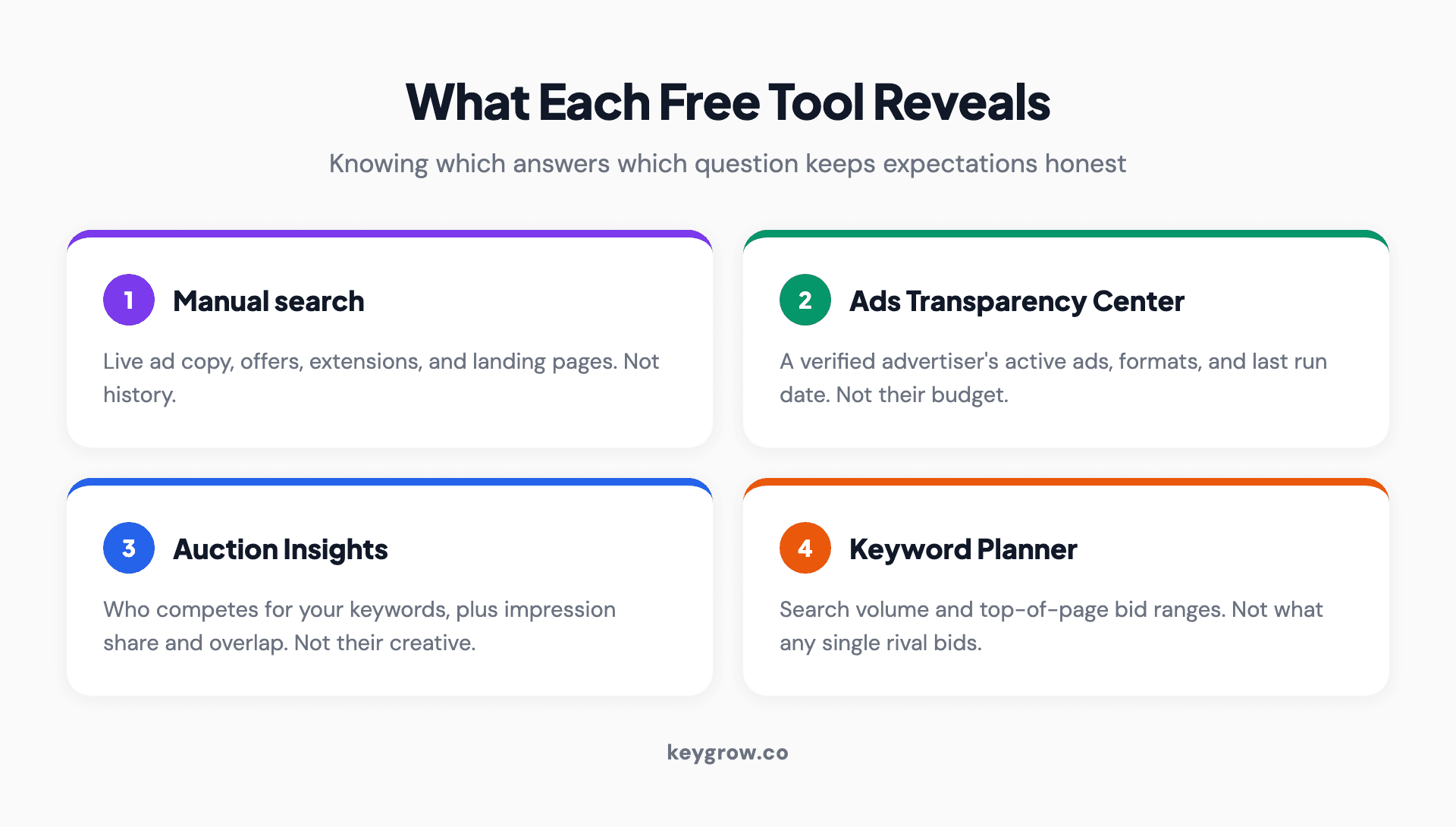
What each free Google Ads competitor tool reveals: manual search shows live ad copy and offers, the Ads Transparency Center shows a rival's active ads and formats, Auction Insights shows who you compete with and impression share, and Keyword Planner shows search volume and top-of-page bid ranges.
| Free tool | What it shows | What it will not show |
|---|---|---|
| Manual search | Live ad copy, offers, extensions, landing pages | History, or ads not showing to you |
| Ads Transparency Center | A verified advertiser's active ads, formats, last run date | Their budget or spend |
| Auction Insights | Who competes for your keywords, impression share, overlap | Their exact keywords or creative |
| Keyword Planner | Search volume and top-of-page bid ranges | What any single rival actually bids |
One honest note on Auction Insights: the numbers are relational, not absolute. Your report can show a competitor at high impression share on your terms while they hold a modest share in their own account, because the report only reflects the auctions you both entered. Read it as "who shows up against me and how often," not as a scoreboard of their whole account.
When paid tools earn their price
Free tools cover the essentials. Paid tools add three things: scale across thousands of keywords, historical trends, and estimated spend. Tools like Semrush, SpyFu, Ahrefs, and Similarweb each reconstruct a competitor's paid keywords and ad copy from their own data, and they are genuinely useful for finding keyword gaps and tracking changes over time.
Each leans a slightly different way. Some are stronger on the keyword and traffic side, surfacing the paid terms a rival ranks for and roughly how much traffic those terms pull. Others keep a deeper archive of ad creative, so you can see which angles a competitor has run long enough to suggest the angle is working for them. For most small advertisers the practical payoff is the same across all of them: a shortlist of keywords a rival bids on that you have missed, and a few proven ad angles worth testing. You rarely need more than one paid tool to get that, so pick the one whose free trial answers your questions and resist stacking subscriptions.
The catch is the spend and traffic estimates. Treat them as directional, never exact, for reasons we get into next. If your budget is tight, the free workflow above plus one paid tool on a trial will tell you almost everything a small account needs. Scale into a paid subscription when you are managing enough spend that a keyword gap worth thousands justifies the fee, the same logic we apply in our PPC management.
Why the spend number is a guess
Every tool that claims to show a competitor's ad spend is estimating, and the estimates are shakier than the confident dashboards suggest. This is the single most important thing to understand before you quote a rival's budget to your boss.
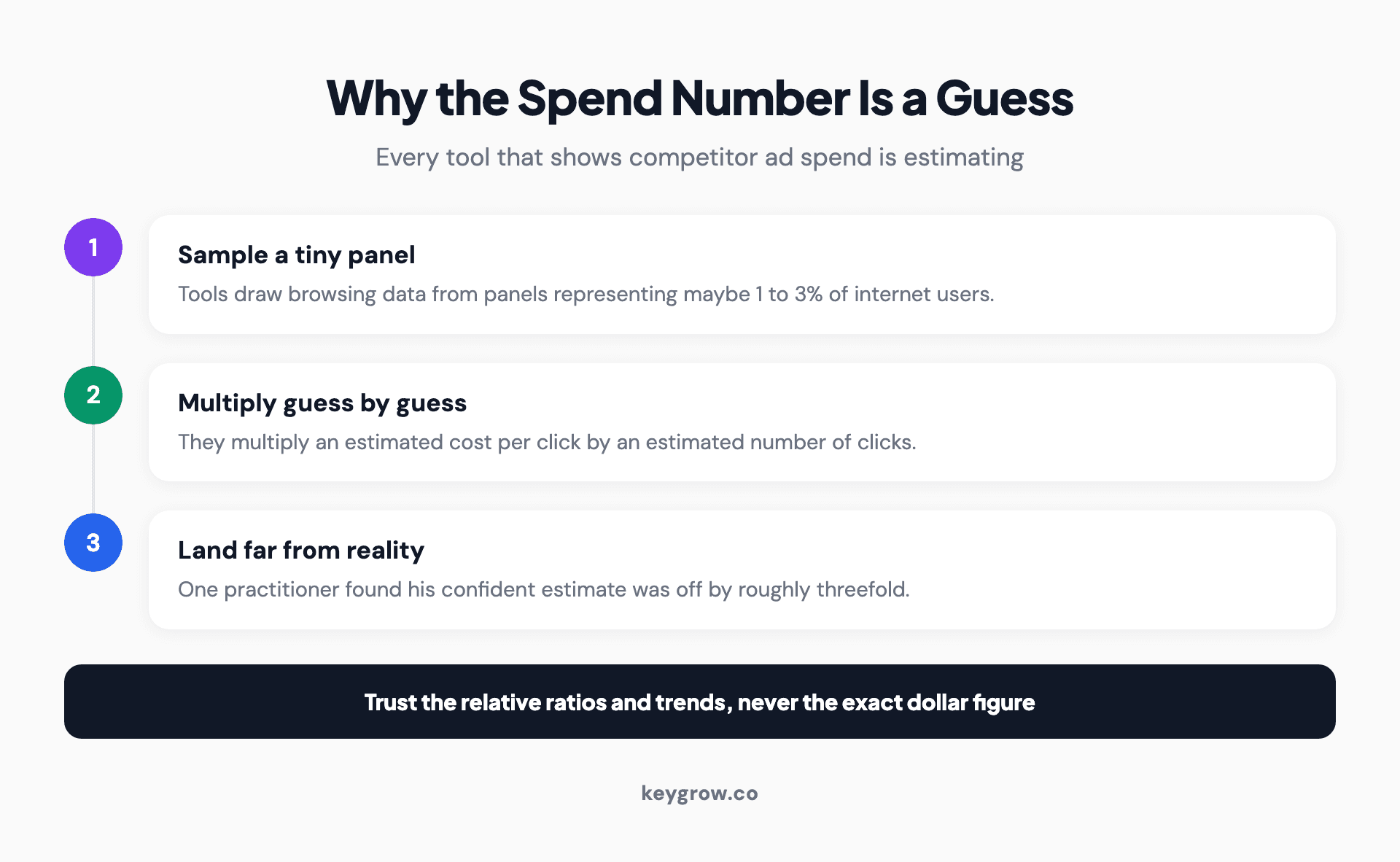
Why competitor ad-spend estimates are unreliable: third-party tools sample clickstream data from a small panel of internet users, then multiply an estimated cost per click by estimated clicks, so two tools can disagree by roughly three times on the same advertiser.
Here is the mechanism. Third-party tools sample browsing data from panels that represent a small slice of internet users, then multiply an estimated cost per click by an estimated number of clicks. That is a guess times a guess, and the miss can be large: one practitioner using these tools found his own confident spend estimate was off from reality by roughly threefold, as Cotera recounts. Similarweb is open about its inputs too: it builds a PPC spend estimate from paid search visits, paid keywords, and cost per click, each measured per country, with the spend itself estimated as paid visits times cost per click.
So what can you trust? Relative comparisons and trends. If a tool says one competitor spends roughly five times another, that ratio is more reliable than either dollar figure. If a rival's estimated activity doubles over three months, the direction is real even if the number is fuzzy. Chase the pattern, not the decimal point. Obsessing over a precise spend figure is how advertisers talk themselves into overreacting to a competitor who may not even be winning.
Is it legal, and what you cannot see
Yes, checking competitor ads is legal and normal. Public ad libraries and your own Auction Insights report are fair game, and using them breaks no Google rule. This is ordinary market research, not espionage.
What you genuinely cannot see matters just as much. You have no legitimate access to a competitor's actual budget, their real-time spend, their Quality Scores, or the inside of their account. The Transparency Center hides commercial spend on purpose and reveals it only for political ads. Anyone promising you a rival's exact budget is selling you a modeled estimate dressed up as fact.
One caution on method: viewing public ad libraries and your own reports is fine, but scraping the Transparency Center at scale with automated tools can bump against Google's terms of service. You do not need to for competitor research, and for a normal business the manual, first-party route stays comfortably on the right side of the line.
Turning intel into action
Research you do not act on is a hobby. The point of all this is to change what you do next, and there are four honest moves worth making.
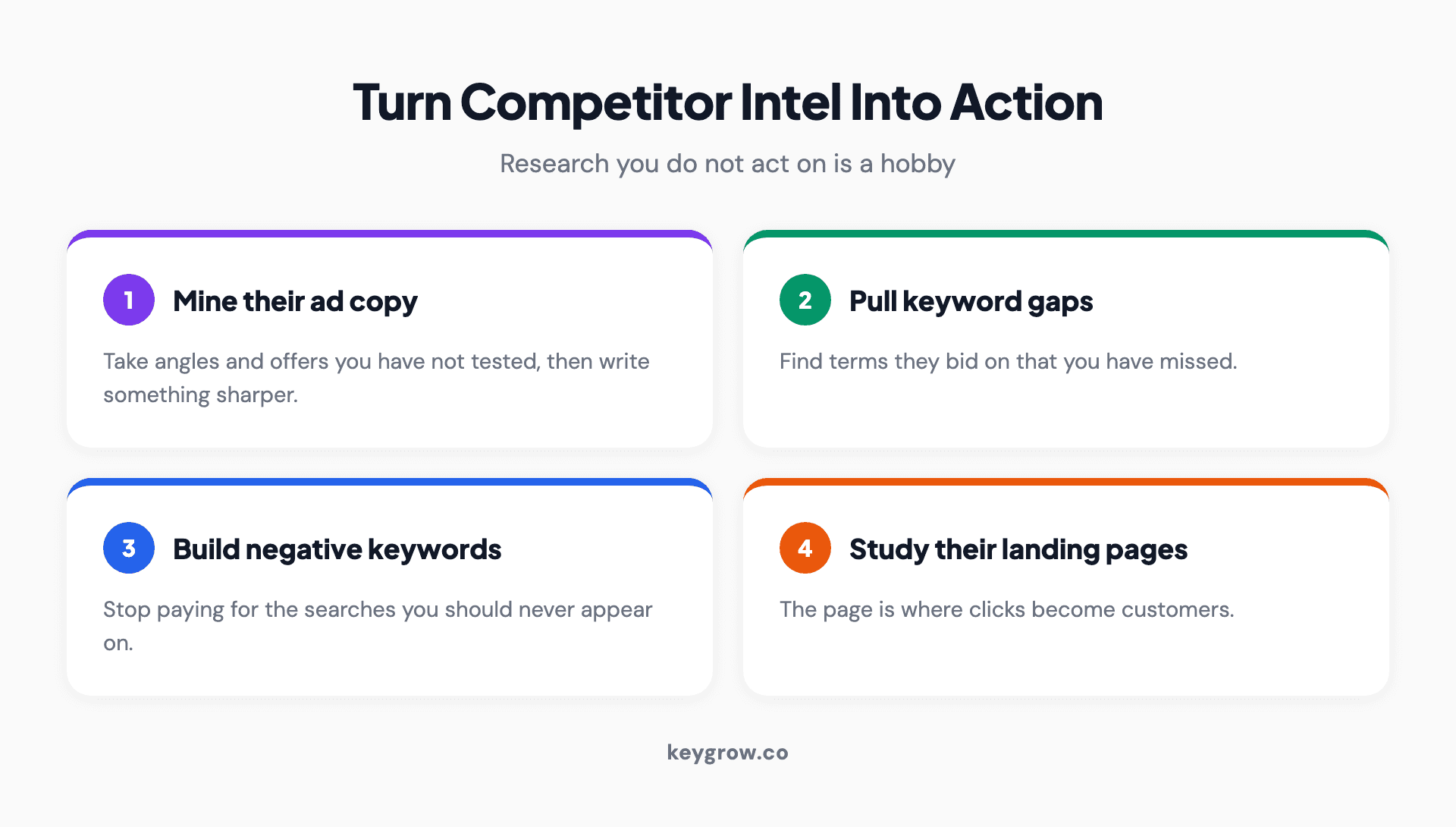
Four ways to turn competitor Google Ads research into action: mine their ad copy for angles and offers to test, pull keyword ideas from the gaps they cover and you miss, build a negative-keyword list from searches you should not pay for, and study their landing pages for structure and offers.
Mine their ad copy for angles and offers you have not tested, then write something sharper rather than copying it. Pull keyword ideas from the gaps, terms they bid on that you have missed. Build a negative-keyword list from the searches you should not be paying for. And study their landing pages for structure and offers, since the page is where clicks become customers. If you are also weighing whether to bid on their brand terms, we covered the rules and risks in competitor brand keywords.
Do this on a schedule, not in a panic. A monthly check is plenty for most accounts. Look more often and you will overreact to noise, chasing a rival's one-week test as if it were a strategy and undoing your own account's momentum. The best competitive advantage is usually not out-copying a rival; it is running your own account better than they run theirs, which is where our PPC vetting questions come in handy.
FAQs
Can you see your competitors' Google Ads?
Yes. The Google Ads Transparency Center shows the live ads any verified advertiser is running across Search, YouTube, and Display, including the format and the last date each ran. A plain Google search shows their current ad copy, and the Auction Insights report inside your account names who competes for your keywords.
What is the best free tool to check competitor Google Ads?
There is no single best tool; use four together. The Ads Transparency Center shows their active ads, Auction Insights shows who you compete with, Keyword Planner shows likely bid ranges, and a manual search shows live copy. That free stack covers most of what a small advertiser needs.
Can I see how much my competitors spend on Google Ads?
Only as a rough estimate, never as a fact. Google does not reveal any advertiser's commercial spend. Third-party tools model it from small browsing panels, and two tools can disagree by around threefold on the same company. Trust the relative comparison, not the exact dollar figure.
How accurate are competitor ad-spend estimates?
Not very, in absolute terms. They are built by multiplying an estimated cost per click by estimated clicks from a small data sample, so the dollar figure can be off substantially. What holds up is the relative picture: who spends more than whom, and whether activity is rising or falling over time.
Is it legal to look at competitors' Google Ads?
Yes. Viewing public ad libraries, running searches, and reading your own Auction Insights report are all legitimate and break no Google policy. What you cannot legitimately access is a competitor's private account, real budget, or Quality Scores.
Can I see which keywords my competitors bid on?
Partly. Paid tools like Semrush and SpyFu estimate a competitor's paid keywords from their own data, which is useful for spotting gaps. For free, Keyword Planner and a careful read of which ads appear on which searches reveal the terms they clearly target, though not their full list.
What to do with what you find
Checking competitor Google Ads is worth doing, free before it is paid, and directional rather than exact. Google's own tools show you their live ads and who you truly compete against, paid tools add scale and history, and every spend estimate is a guess best read as a ratio. The advertisers who win with this information are not the ones who spy hardest. They are the ones who turn a rival's better headline into a test and a rival's wasted keyword into a negative.
If you would rather have someone run that analysis and act on it inside your account, tell us about your business and we will show you what your competitors are doing and, more usefully, what to do about it.



