


Which tool will actually show you how many people in your city search for "water heater repair"?
Fewer than the roundups suggest. A local keyword tool that reports real city-level search volume is a short list: Google Keyword Planner (free, but it shows ranges unless you spend on ads), Semrush's Keyword Overview (one keyword at a time) and KWFinder. Most other local keyword research tools report national numbers, and Google's free tools report demand signals rather than volume.
That split decides which tool you need. This post sorts ten common options by what their number measures, then walks through a 15-minute workflow that pairs one tool with Search Console and autocomplete.
A local keyword tool, for the purposes of this post, is anything that estimates or reveals what people in a specific area type into search: either a volume figure for a city, or proof that real local demand exists.
Which local keyword tools show city-level volume?
Three of the common tools let you set a city and get a volume estimate for it. The rest either stop at the country or show no volume at all.
| Tool | City-level volume? | What the number is | Price band | Best for |
|---|---|---|---|---|
| Google Keyword Planner | Yes (city, region, metro) | A range unless your ad account spends | Free with a Google Ads account | Checking a whole list for one city |
| Semrush Keyword Overview | Yes, one keyword per lookup | Monthly estimate per city | Paid, 7-day trial | Spot-checking a shortlist across cities |
| KWFinder | Yes (city, county, metro, state) | Monthly estimate per location | Paid, free account available | Owners doing their own research |
| Ubersuggest | Yes, city selectable | Monthly estimate | Free tier, paid plans | Quick lookups on a small list |
| Ahrefs Keywords Explorer | No, country only | National estimate | Paid | Competitor and content research |
| Moz Keyword Explorer | No, country only | National estimate | Limited free use, paid plans | Difficulty and SERP checks |
| Google Search Console | No volume | Impressions for your own site | Free | Queries you already show for |
| Business Profile performance | No volume | Searches that showed your profile | Free | Verified demand for your business |
| Google Trends | Relative only | Interest from 0 to 100 by city or metro | Free | Comparing two phrasings |
| Autocomplete and People Also Ask | No numbers | Live suggestions for your location | Free | How locals word the job |
Prices change more often than features, so check each vendor's pricing page before you subscribe.
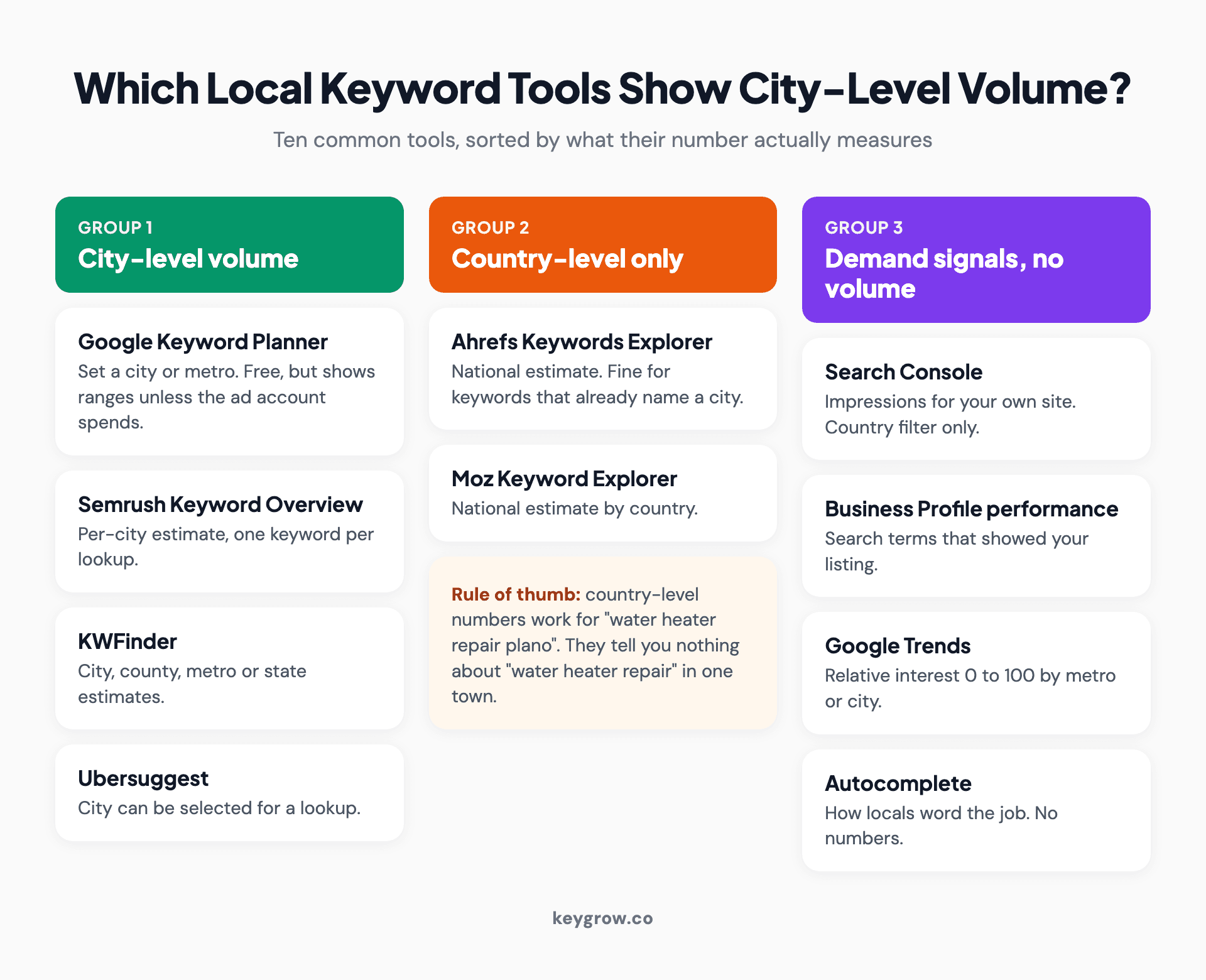
Comparison cards sorting local keyword tools into three groups: tools that show city-level volume (Google Keyword Planner, Semrush Keyword Overview, KWFinder, Ubersuggest), tools that show country-level volume only (Ahrefs, Moz), and free Google tools that show demand signals instead of volume (Search Console, Business Profile performance, Trends, autocomplete).
The column most roundups skip is the third one. Two tools can both say "40 searches a month" and mean very different things.
Why most tools stop at the country line
Commercial keyword tools build their numbers from clickstream samples and national data, and a sample big enough to estimate national demand is far too thin to estimate one suburb.
Ahrefs says so directly: its volume estimates for implicit local keywords cover the entire country, and it notes that pretty much every major SEO tool only shows country-wide and global volumes. For city-level numbers on those terms, it points readers to Keyword Planner.
Here is the part that saves money. Whether you need a city filter at all depends on the shape of the keyword.
- Explicit keywords name the place: "water heater repair plano". A country-level tool counts everyone in the country who typed that phrase, and almost all of them were looking for Plano. The national number is close enough.
- Implicit keywords do not: "water heater repair". Google localizes the results anyway, so the national figure tells you nothing about your town. This is the only case where a city filter earns its keep.
So if most of your list is explicit, the tool you already have is probably fine. If you are trying to size demand for bare service terms in one market, you need one of the first three rows in the table. More on how Google handles the second kind in our guide to near me searches.

A row of historic storefronts on a small-town main street with shop signs and planters along the sidewalk.
Read the number before you trust it
Every local keyword tool measures something slightly different, and treating them as interchangeable is where most bad decisions start.
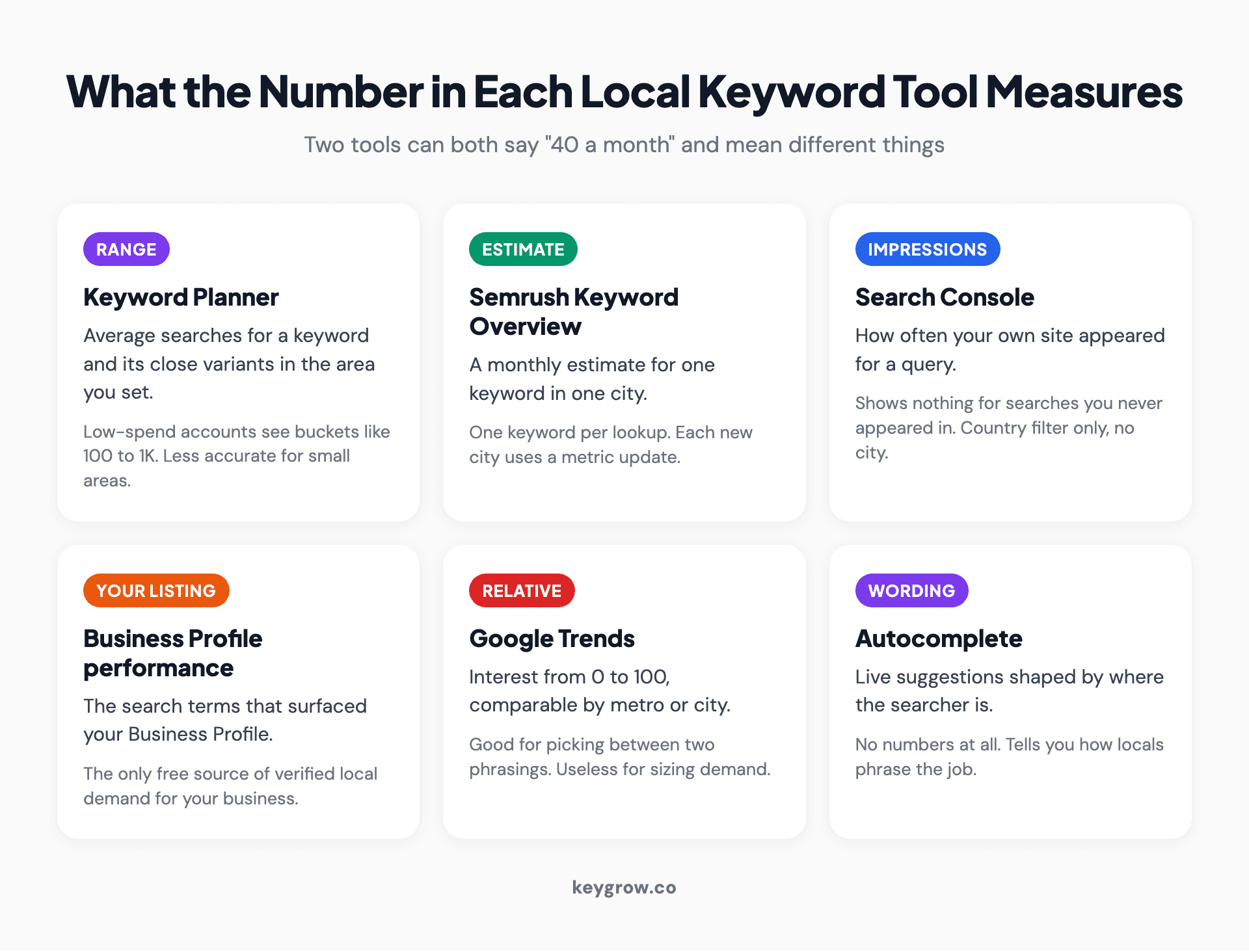
Icon grid explaining what the number in each local keyword tool measures: Keyword Planner shows ranges for low-spend accounts, Semrush gives a per-city estimate one keyword at a time, Search Console shows impressions for your own site with a country filter only, Business Profile performance shows searches that surfaced your listing, Trends shows relative interest from 0 to 100, and autocomplete shows wording with no numbers.
Keyword Planner reports averages for a keyword and its close variants, and Google's own Keyword Planner help warns that results are less accurate when you target a small geographic location. Accounts without meaningful ad spend usually see buckets such as 100 to 1K instead of a figure.
Semrush gives a cleaner per-city estimate, but its help documentation limits local data to single keyword searches, and each new location you view uses up one of your plan's metric updates. Fine for ten keywords. Tedious for a hundred.
Search Console shows impressions, not volume, and only for searches where your site already appeared. Some tool roundups say it filters by city. It does not: the Performance report groups data by query, page, country, device, search appearance and date. Country is as local as it gets.
Business Profile performance lists the searches that surfaced your listing. It is the only free source of verified local demand for your own business, which is why we open it before any paid tool.
Trends compares interest from 0 to 100 by metro or city. Useful for "furnace" versus "heater" in your market, useless for sizing.
Free or paid: when a local keyword research tool is worth it
For a single-location business with a handful of services, the free stack is enough. Pay for a tool once you are covering several markets or need to see what competitors rank for.
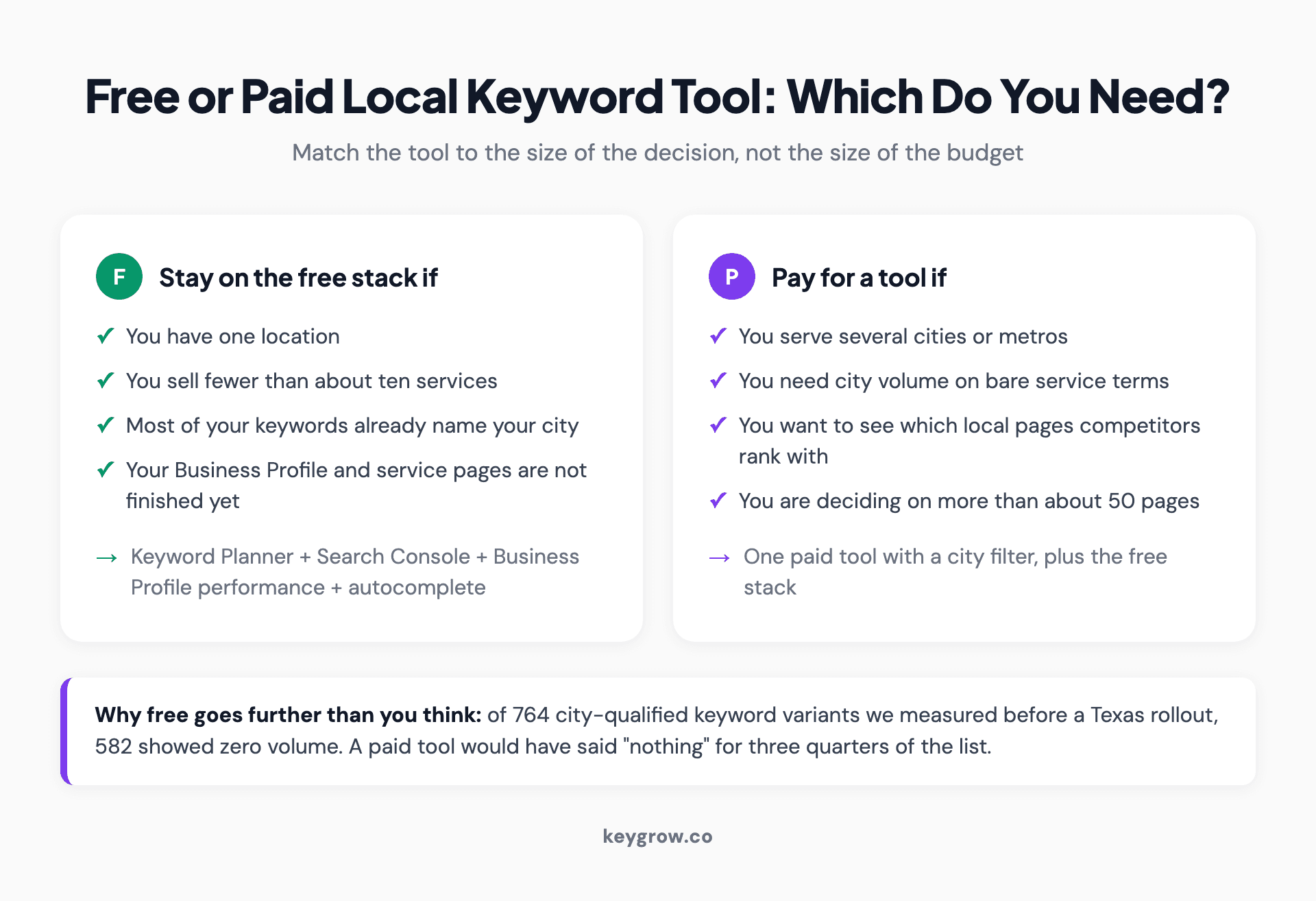
Two comparison cards: stay on free local keyword tools if you have one location, fewer than about ten services and mostly explicit city keywords; pay for a local keyword research tool if you serve several cities, need volume on implicit terms, want competitor keyword gaps or are planning more than about fifty pages.
Our view is that DIY is the right call here more often than agencies admit, and we have the numbers to back it. Before a Texas rollout we pulled volume on 764 city-qualified keyword variants, and 582 came back as zero. A paid subscription would have told us "nothing" for three quarters of the list. The method in our post on how to do local keyword research is built around that problem, and the free tools carried most of the decision.
What a paid tool buys is speed and competitor visibility: seeing which local pages your rivals rank with, and checking difficulty before you commit to fifty pages. That is worth paying for at scale. At one location, it mostly buys a nicer spreadsheet.
The 15-minute local keyword workflow
Pair one volume tool with two free sources of real demand, and log everything in one sheet. Five steps, three minutes each.
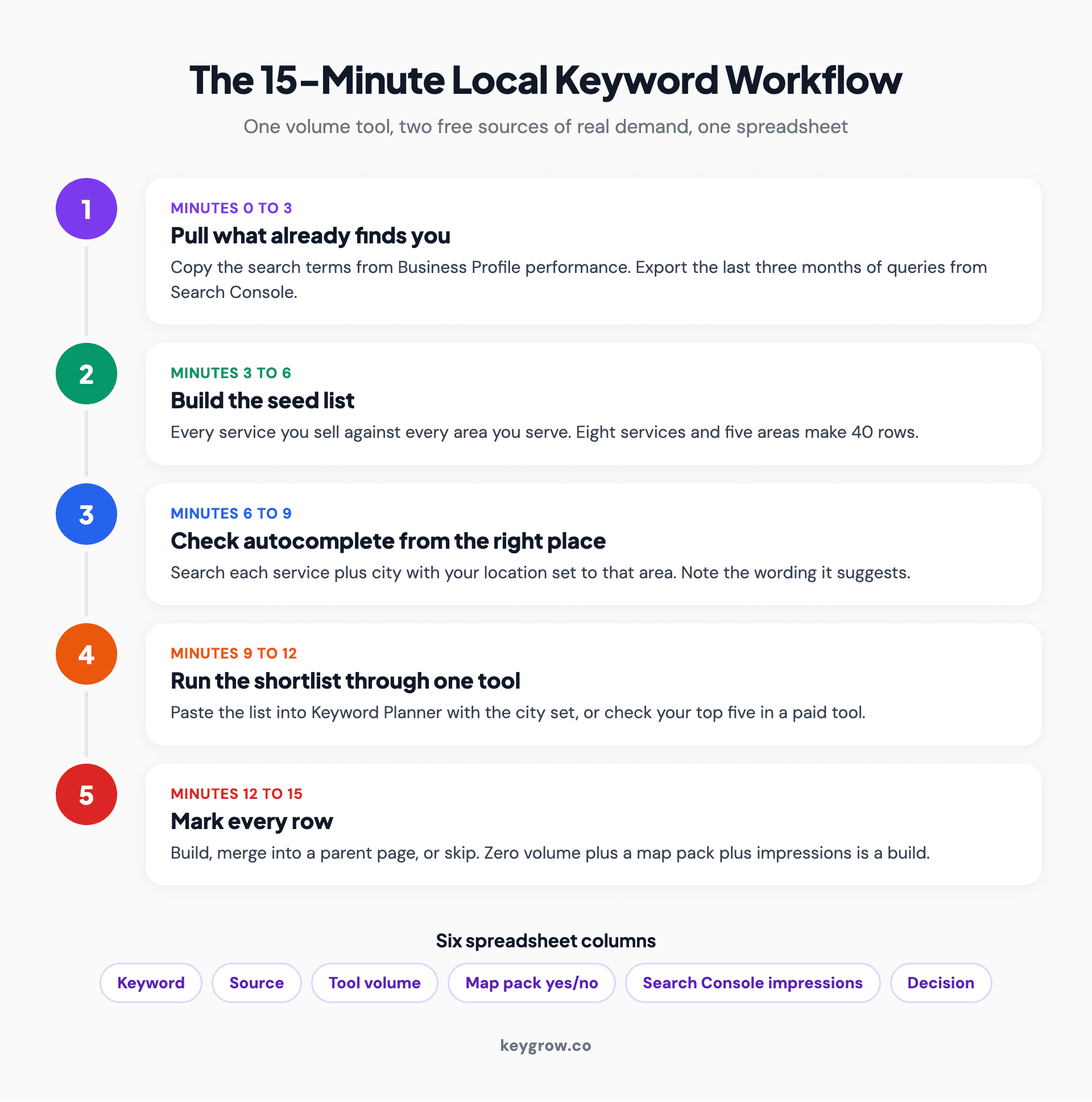
Five-step numbered process for a 15-minute local keyword workflow: pull queries from Business Profile performance and Search Console, build a services by places seed list, check autocomplete from your location, run the shortlist through one volume tool with the city set, then mark each row build, merge or skip.
- Minutes 0 to 3: pull what already finds you. Open your Business Profile performance report and copy the search terms. In Search Console, filter to your country, set the last three months, and export the queries. Real people typed these, so you do not need an estimate to know the demand exists.
- Minutes 3 to 6: build the seed list. Write each service you sell against each area you serve. Eight services and five areas gives you 40 rows.
- Minutes 6 to 9: check autocomplete from the right place. Type each service plus the city into Google with your location set to that area. Note the wording it suggests, because the demand often sits under a slightly different phrase.
- Minutes 9 to 12: run the shortlist through one tool. Paste the whole list into Keyword Planner with the location set to your city, or check your top five in Semrush or KWFinder one at a time.
- Minutes 12 to 15: mark every row. Build, merge into a parent page, or skip.
Your sheet needs six columns: keyword, source, tool volume, map pack (yes or no), Search Console impressions, and decision. A row with zero tool volume but a map pack and some impressions is a build. For why those rows deserve a page, see our breakdown of zero search volume keywords.
If you also run ads, the same sheet feeds your campaigns. Keyword Planner gets sharper once an account spends, and keyword research for PPC covers the match types and negatives that come next.

Hands holding a smartphone showing a satellite map view, with green plants in the background.
Worked example: one plumber, one suburb
This is an illustrative example with assumed numbers, not client data. It shows how the columns combine.
A plumber in a suburb of about 40,000 people runs the workflow on 12 phrases. Five of the rows look like this.
| Phrase | Tool volume | Map pack | Impressions | Decision |
|---|---|---|---|---|
| water heater repair [suburb] | 10 to 100 | Yes | 85 | Build |
| tankless water heater install [suburb] | 0 | Yes | 12 | Build |
| slab leak repair [suburb] | 0 | Yes | 0 | Build, low priority |
| sewer camera inspection [suburb] | 0 | No | 0 | Skip |
| emergency plumber [suburb] | 10 to 100 | Yes | 140 | Merge into homepage |
On volume alone, two of these five survive. The map pack check and Search Console rescued two more and confirmed that the fifth, which looked plausible on paper, is a skip. That is the whole argument for the workflow: no single local keyword tool sees enough of a small market to decide on its own.
When you can skip the tool entirely
If you have one location, an unoptimized Business Profile and no service pages yet, a keyword tool is not your bottleneck. Google Business Profile optimization and a page per core service will move more calls than any volume figure.
Calls are the measure that matters. A phone repair client of ours reached 115+ monthly phone calls in 7 months from local SEO, and the keyword list behind it was small and specific rather than large.
The research stops being a 15-minute job when you serve several cities, run more than about fifty possible pages, or already have location pages and cannot tell which ones work. That is the point where our local SEO services can run the grid and the page decisions for you, and if you are buying clicks in the same markets, our PPC management uses the same sheet to set budgets.
FAQs
What is the best free local keyword tool?
Google Keyword Planner is the best free option for city-level volume, though it shows ranges unless your ad account spends. Pair it with your Business Profile performance report and Search Console, which show real searches rather than estimates. Together they cover most of what a single-location business needs.
Can Google Keyword Planner show search volume by city?
Yes. Set the location filter to a city, region or metro area and the volumes update for that area. Google notes that results are less accurate for small locations, and accounts without ad spend usually see broad ranges instead of exact figures.
Why does my local keyword tool show zero searches?
Usually the real demand sits below the tool's reporting threshold. Small cities and long phrases fall under the floor that sampled data can estimate. Check whether the search produces a map pack and whether Search Console shows impressions before you drop the keyword.
Does Ahrefs show local search volume?
Not at city level. Ahrefs reports volume by country, so for implicit terms like "plumber" the figure covers the whole country. For explicit terms that already name a city, the national number is a reasonable proxy for local demand.
Can Search Console show keywords by city?
No. The Performance report filters by query, page, country, device, search appearance and date, with no city or region option. Use it to see which local phrases already earn impressions, then check the city detail elsewhere.
How accurate is local search volume data?
Treat it as directional. Every tool estimates local volume from samples or ranges, and the smaller the area, the wider the error. Use it to compare similar terms against each other, not as proof that a query does or does not exist.
Pick one tool and one spreadsheet
You do not need five subscriptions. Pick one volume tool that matches your list (Keyword Planner if you want free, Semrush or KWFinder if you want cleaner city numbers), open one spreadsheet, and fill it from Search Console, your Business Profile and autocomplete first.
The tool fills one column. Your customers have already filled most of the others.
If the sheet grows past what you can decide in an afternoon, get in touch. We will tell you whether it needs an agency or just another hour of your time.