


Cheap Facebook leads are often the most expensive leads you will buy. Meta fills in the form from the person's profile, so sending it can take two taps, and plenty of people tap with no plan to hire anyone. Every one of them still counts toward your cost per lead.
Facebook ads for leads pay off when the campaign is built around leads you can close. That means a Leads campaign in Ads Manager, an instant form with a review screen and one or two questions that filter out the merely curious, a phone call within the hour, and a budget judged on cost per booked job. Below is that setup as Ads Manager shows it in October 2026, then the choices that decide whether the leads are worth calling.
Most guides to Facebook lead generation ads were written before Meta's 2026 changes. The quality-focused performance goal has a new name, and since April it needs a Conversions API connection for new campaigns. If you're still choosing a platform, our Google Ads vs Facebook Ads breakdown settles that first.
Instant form, website or chat: where should the lead happen?
Use an instant form for quick quotes, your website when the job needs proof first, and messaging or calls only if someone answers immediately.
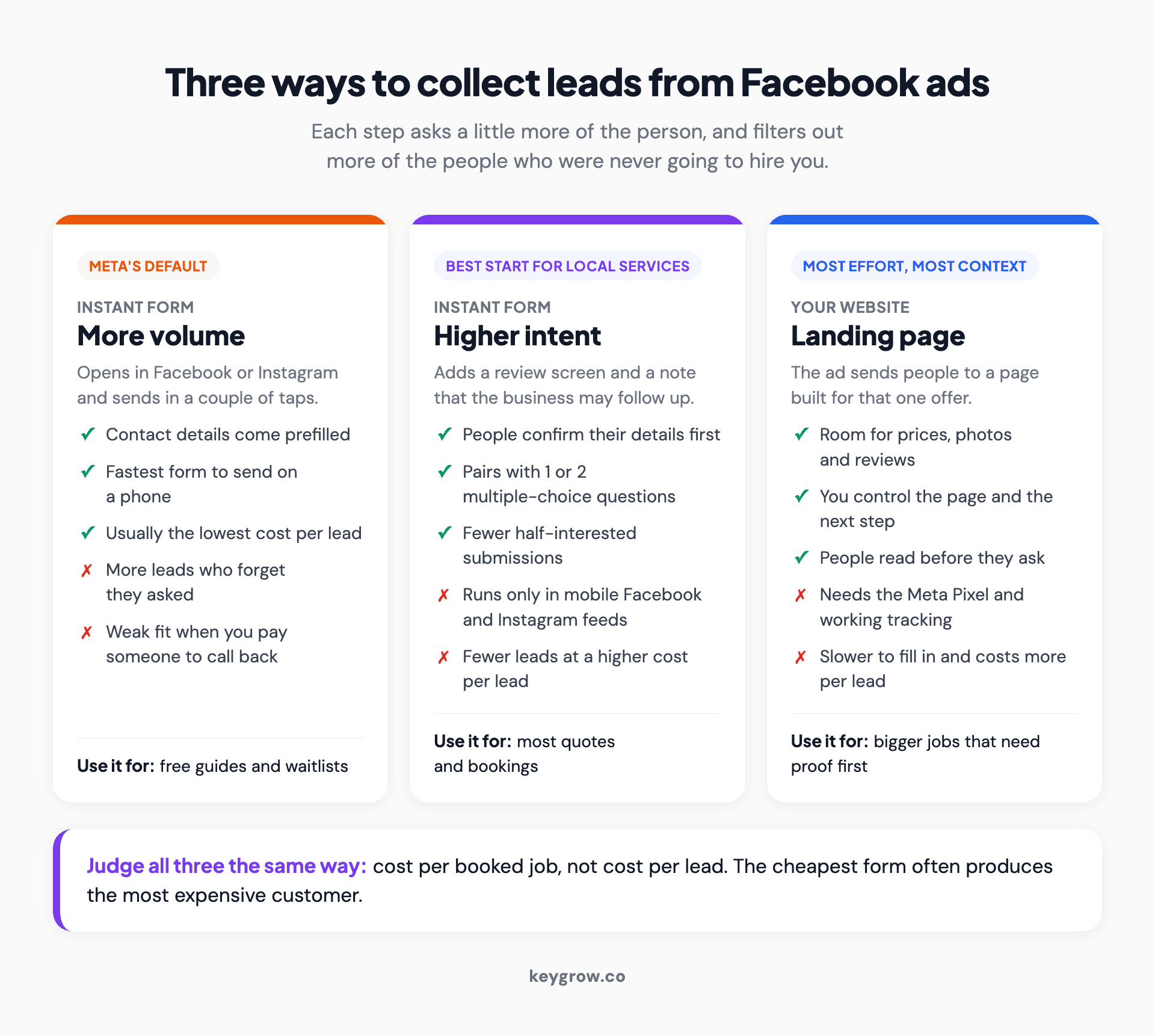
Three cards comparing ways to collect leads from Facebook ads: a More volume instant form that sends in a couple of taps at the lowest cost per lead, a Higher intent instant form that adds a review screen and a follow-up notice, and a website landing page that costs more per lead but shows prices, photos and reviews first, all judged on cost per booked job.
The Leads objective in Ads Manager offers ten conversion locations, from Website to WhatsApp to App. For a local service business it comes down to a form, your website, a chat or a call, and that choice sets how much effort a lead costs the person sending it. Less effort brings more leads. It also brings more people who forget they asked.
| Where the lead happens | Best for | Lead quality | Effort for you |
|---|---|---|---|
| Instant form, More volume | Free guides, giveaways, very low-cost services | Lowest. Two taps and done | Low. No website needed |
| Instant form, Higher intent, with 1 or 2 questions | Most local quotes and bookings | Better. People confirm details and answer a filter | Low to medium |
| Website landing page | Jobs that need photos, prices or reviews first | Usually the best per lead | High. Page, Meta Pixel and tracking |
| Messenger, Instagram or WhatsApp chat | Businesses that reply in minutes | Good if you reply fast, poor if you don't | Medium. Someone has to answer |
| Calls | Urgent jobs and people who'd rather talk | High, but fewer leads | Low setup. Needs a staffed phone |
Meta's own data leans toward forms. On its lead ads page, Meta says advertisers who ran both instant form and website form campaigns saw an average 60% lower cost per lead and 125% more leads than website forms alone. Notice what got measured: cost per lead. Meta doesn't publish how many of those leads became customers, and that's the number your bank account sees.
Start most services on a Higher intent form. Move to a landing page if the leads stop picking up.
How to set up Facebook ads for leads in Ads Manager
Create a campaign with the Leads objective, choose Instant forms at the ad set level, build the form at the ad level, then publish.
Before you start you need a Facebook Page, an ad account with a payment method, and the link to a privacy policy on your site. Meta now marks the privacy link optional but recommends having one.
- Start the campaign. In Ads Manager, click Create, select Leads and click Continue. New Leads campaigns now open as Advantage+ leads campaigns, so Meta no longer asks you to pick a setup.
- Declare a Special Ad Category if one applies. Ads about housing, jobs, credit and other financial products, or social issues get flagged here. The next section covers who that catches.
- Set the budget and schedule. Meta recommends running lead ads during your business hours, so someone can answer while the lead is fresh. Ad scheduling sits in the Advantage+ campaign budget settings, which Meta used to call campaign budget optimization.
- Pick the conversion location and goal. At the ad set level, in the Conversion section, choose Instant forms. Set the performance goal to Maximize number of leads for now. The quality option needs a CRM connection, covered further down.
- Set the audience and placements. Target the area you serve and keep the rest broad. Leave Advantage+ placements on, which covers Facebook, Instagram and WhatsApp.
- Build the ad. At the ad level, choose Single image or video, or Carousel. Write the primary text and headline, then pick a button that matches the offer, such as Get Quote.
- Create the form. Under Destination, click Create form. Pick the form type, write a short intro, add your questions and the contact fields you want prefilled, explain how you'll use the information, add the privacy link, and write the Ending screen with a Call business or View website button. Tick Start conversations on Messenger if you answer chats quickly. If phone number is a required field, you can also tick Require SMS verification to submit form.
- Save, check, publish. Click Save draft while you work. Once an instant form is published, Meta won't let you edit it, so preview every screen on your phone first. Then publish the ad.

A woman typing on a laptop at a desk in her living room, the kind of half hour it takes to build a Facebook lead campaign and its instant form in Ads Manager.
Build forms in Ads Manager even if Meta Business Suite looks quicker. According to Meta, features such as conditional logic and phone number verification only work in forms created in Ads Manager. Business Suite builds the simpler version.
Check Special Ad Categories before you publish
Ads about housing, jobs or financial products must be declared as a Special Ad Category, which removes age, gender and ZIP code targeting.
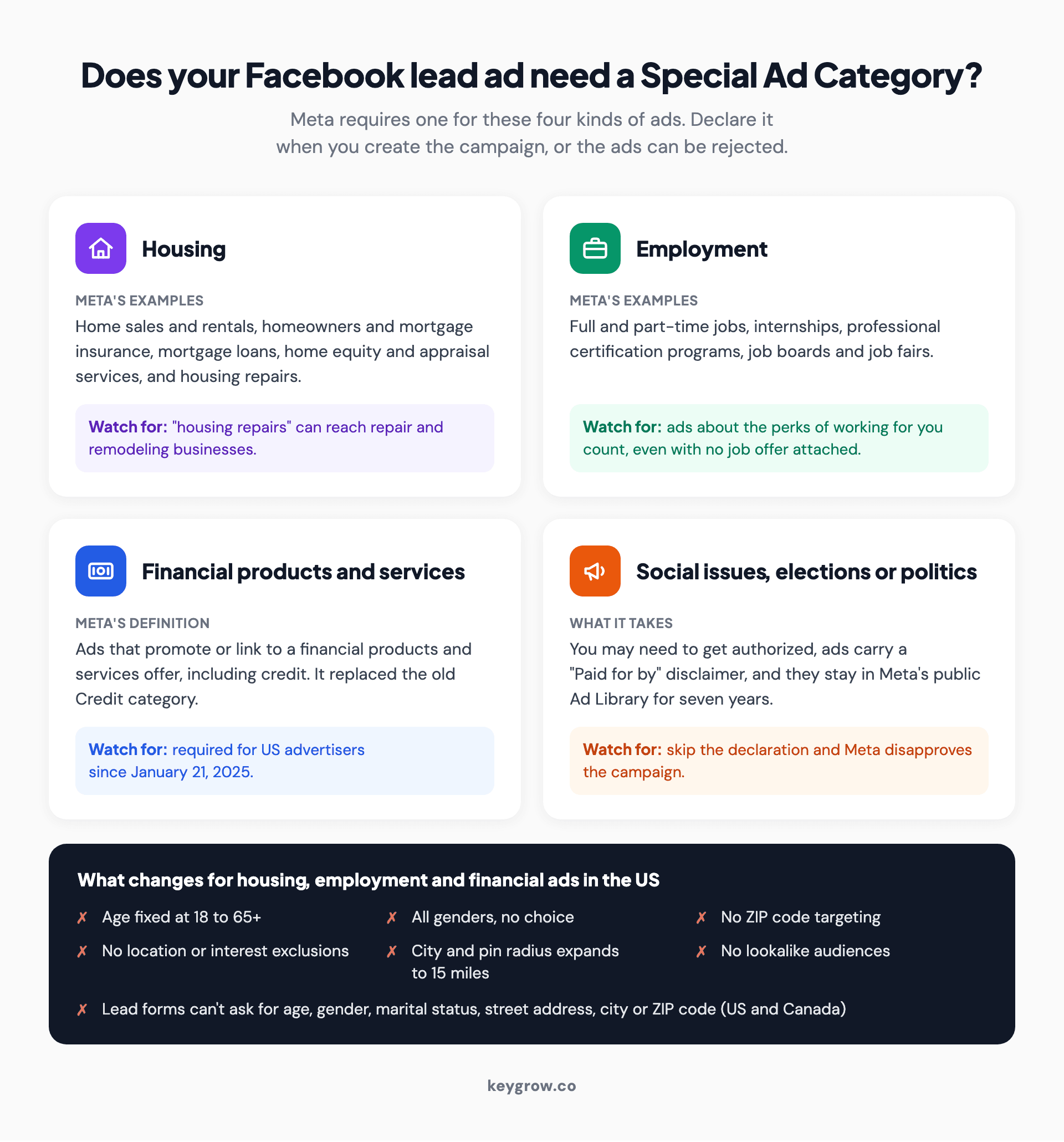
Four cards showing Meta's Special Ad Categories for lead ads, housing, employment, financial products and services, and social issues, elections or politics, with Meta's examples, a watch-for note on each, and the US targeting limits: ages fixed at 18 to 65+, all genders, no ZIP code targeting, a 15-mile radius, no lookalike audiences and no location questions on the form.
The housing category is wider than real estate. Meta's definition covers home sales and rentals, homeowners and mortgage insurance, mortgage loans, home equity and appraisal services, and "housing repairs." That last phrase can reach repair and remodeling businesses, so read it twice if that's your trade. Employment covers any hiring ad, including ads about the perks of working for you. Financial products and services replaced the old Credit category and has been required for US advertisers since January 21, 2025.
Social issues, elections or politics works differently. You may need to get authorized, your ads carry a "Paid for by" disclaimer, and they sit in Meta's public Ad Library for seven years.
For the first three categories, Meta's audience rules change a US campaign like this:
| Setting | Normal campaign | Special Ad Category |
|---|---|---|
| Age | Any range | Fixed at 18 to 65+ |
| Gender | Your choice | All genders |
| ZIP code targeting | Available | Not available |
| Excluding locations or interests | Available | Not available |
| City or pin drop | Your radius | Expanded to 15 miles in the US and Canada |
| Lookalike audiences | Available | Not available |
| Questions on the form | Most allowed | No age, gender, marital status, street address, city or ZIP code |
The form rule is the one almost nobody mentions. In the US and Canada, a lead ad for housing, jobs or financial products can't collect location fields like ZIP code. Meta allows a custom question about where someone wants the service in some cases, as long as it doesn't copy the banned prefill fields. Skip the category when it applies and Meta can reject the ads.
Which instant form type brings better leads?
Higher intent, for most local services. It adds a review screen and a note that you may follow up, which weeds out the half-interested.
Meta offers three form types. More volume, the default, is built to be submitted fast on a phone. Higher intent adds two things: a line under the contact fields saying the business may follow up, and a review screen where people confirm their details before sending. Rich creative lets you change the colors and add images and product details, and it requires an intro section.
Meta's advice here is blunt: "If follow-up or further qualification is required on each lead submitted, using a higher intent instant form may make more sense for your business." Every business that calls its leads back fits that sentence.
The trade-off is reach. Higher intent forms only run in the Facebook and Instagram feeds on mobile, never on desktop, so expect fewer leads and a higher cost per lead. Rich creative forms run only in the Facebook app on mobile. Use one when people need context before they ask, like what a package includes.
More volume still has a job, like a free guide or a waitlist. It's the wrong form for anything where you pay a person to pick up the phone.
Ask one or two questions that sort buyers from browsers
Add one or two multiple-choice questions about the job, timing or area. Use conditional logic to close the form for people you can't serve.

A tradesman in a cap standing on a ladder and hand-painting lettering on an outdoor wall, the kind of job details a Facebook lead form should ask about before a business pays to call back.
Every question costs you some leads. Meta's best-practice guide puts it plainly: "Fewer multiple choice questions results in more form submissions, whereas more multiple choice questions typically results in more quality leads." Its lead ads page adds that advertisers who asked three or fewer questions had a 26% lower cost per lead. So stop at two or three, and make each one earn its place.
Here's a set for a junk removal company:
- What do you need hauled? A few items / A room or garage / A whole property / Just checking prices
- When do you need it done? This week / This month / No rush
Now turn on conditional logic. In the Questions section, toggle Conditional logic on, then give each answer a next step: another question, Submit form or Close form. Point "Just checking prices" at Close form, with an end page that shows your price range and phone number. Meta won't send you that person's details, and it warns the setting may raise your cost per lead.
Good. You were about to pay for a lead who wasn't buying.
Two rules keep the form legal. Meta bans questions about income, credit scores, health, criminal history and insurance details, including the name of someone's insurance company. It also bans custom questions that copy its prefill fields. A dental office can't ask which insurance plan someone has on the form, so that question waits for the call. Keep short-answer questions rare too, since typing is where people quit.
The first hour decides the lead
Meta says faster follow-up improves lead quality. Connect a CRM or use Leads Center, text within minutes, and call within the hour.
Its CRM page goes further: "In general, the longer you wait to follow up with a new lead, the less likely that lead is to convert or become a customer later." Most guides quote speed-to-lead multipliers from studies more than a decade old, often behind a paywall. Meta's help center makes the same point without the drama, and that's enough to act on.
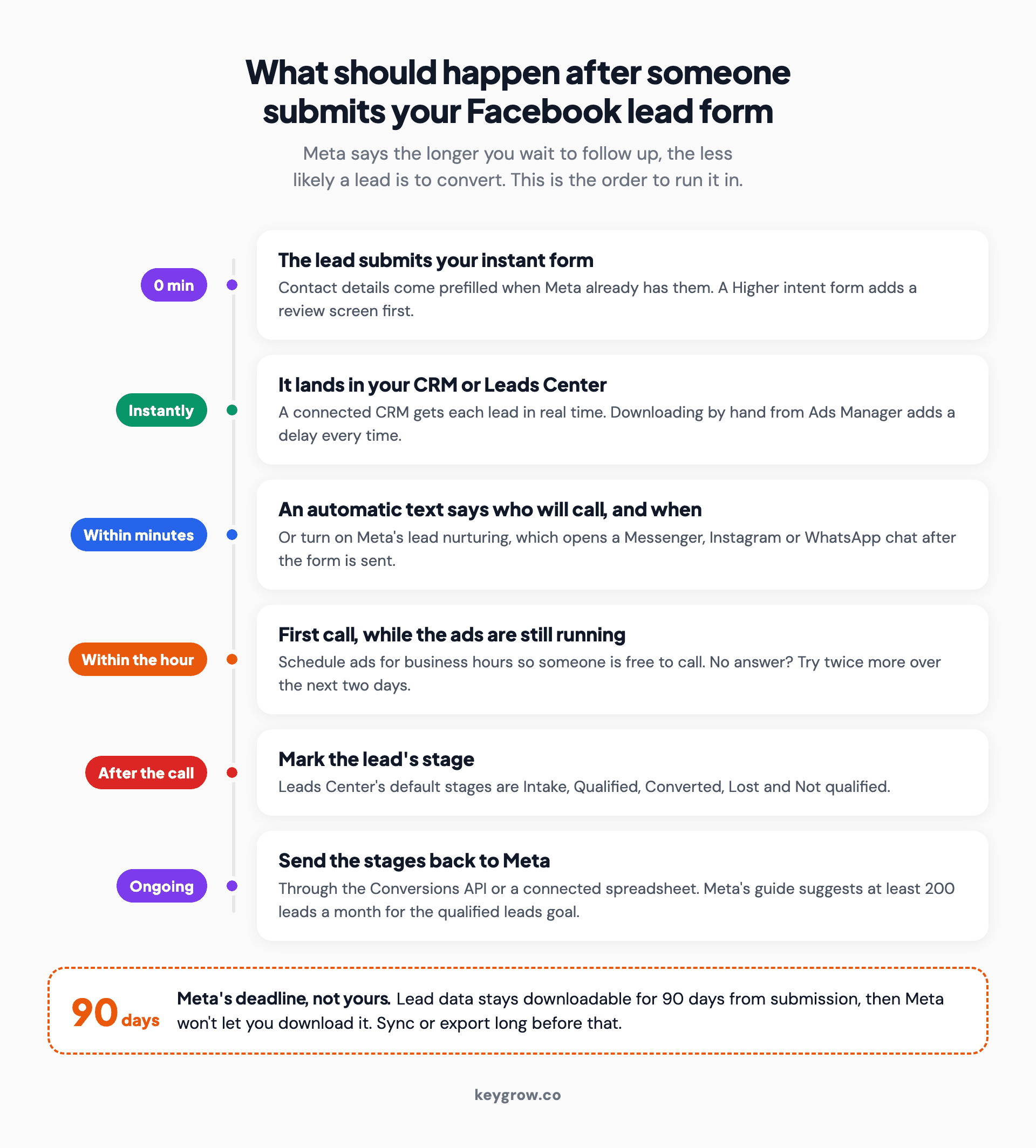
Process flow of a Facebook lead from form submission to first call: the person submits the instant form, the lead lands in Leads Center or a connected CRM, an automatic text confirms who will call, a call happens within the hour, the lead gets a stage such as Qualified or Lost, and the stage goes back to Meta, with a note that Meta keeps lead data downloadable for 90 days.
Your leads land in three places: the Ads tab in Ads Manager (click On-Facebook leads in the results column), the Instant forms page in Business Suite, and Leads Center. Downloading by hand works, but it adds a delay every time. Connect a CRM and new leads arrive in real time, or turn on Meta's lead nurturing to open a Messenger, Instagram or WhatsApp chat as soon as someone submits.
Then there's the clock Meta runs. Lead data can be downloaded for 90 days after someone submits the form. After that, Meta won't let you download it. Meta explains why: holding leads longer "would not be beneficial since customer interest would have diminished." Ninety days is Meta's outer limit. Yours is closer to ninety minutes.
A simple routine covers most local service businesses: an automatic text within minutes that says who will call and when, a call inside the hour while the ads are running, and two more tries over the next two days. After each call, the lead gets a stage in Leads Center, where the defaults are Intake, Qualified, Converted, Lost and Not qualified. Those same five names show up again in the next step.
Send your sales stages back to Meta
The qualified leads goal learns from your CRM stages, not form fills. Meta requires a Conversions API link and suggests 200 leads a month.
Maximize number of leads tells Meta to find people likely to fill in your form. Maximize number of qualified leads tells it to find people "most likely to convert after sharing their contact information," which it can only learn if you report who converted. Older guides, and a few of Meta's own pages, still call it conversion leads.
According to Meta's performance goals page, since April 2026 new campaigns can only use the qualified leads goal with a Conversions API integration, and existing campaigns have been affected since August. Meta also says instant form campaigns using that setup saw 21% lower cost per quality lead than campaigns on Maximize number of leads.

A woman at an office desk checking her phone next to an open laptop and a clipboard, the moment a business owner updates a lead's stage after the first call.
You don't need custom code for it. Meta can connect a spreadsheet straight to your instant forms from Business Suite (All tools, then Instant forms, then + Connect CRM), "without relying on a third-party tool." New leads land in the sheet with a lead_status column. Change a lead from Intake to Qualified, Converted, Lost or Not qualified, and Meta turns each update into a Conversions API event.
Now the honest part. Meta's developer guide says the setup fits businesses that generate at least 200 leads a month, upload data at least daily, and optimize for a stage that happens within 28 days at a conversion rate between 1% and 40%. A single-location business taking 40 leads a month isn't there. Stay on Maximize number of leads, grade every lead by hand, and use the stages for your own reporting.
When you do build lookalike audiences, Meta recommends basing them on customers rather than form submitters. Those customer lists can help your search campaigns too, as we covered in how social advertising improves PPC.
When a landing page beats the form
Send people to your website when the job needs photos, prices or reviews before they commit, or when form leads keep going nowhere.
By Meta's own account, a website form is the better choice when people need to book an appointment, get a quote, or "view the full details of a higher consideration product or service" first. A $9,000 landscaping job fits that. So does any job where reviews and before-and-after photos do the selling. Choose Website as the conversion location, install the Meta Pixel first, and optimize for the event that best represents a qualified lead, such as a booked appointment.
Sending ad traffic to your homepage is the most expensive default in PPC. A mobile detailing client came to us paying about $100 per booking, with every click going to their homepage. We rebuilt the campaign structure and sent the clicks to a dedicated booking page instead. Between August and December 2022, cost per booking fell to $22, bookings grew 650% and monthly revenue went from $1.2K to $5.1K.
That account ran on Google Ads, not Facebook. The lesson carries over anyway, because a paid click lands on your page the same way whichever platform sold it. A homepage built for every visitor converts none of them well, which we unpack in landing page vs homepage.
Torn between the two? The Website and instant forms location runs both in one campaign. Judge it on booked jobs, not on which side produced the cheaper leads.
What's the most you can pay for a lead?
Multiply your close rate by your average job value and your gross margin. Above that number, each new customer loses money on the first job.
Take a junk removal company with these assumptions: an average job of $400, a 50% gross margin after crew, truck and dump fees, and one in five Facebook leads booking. The ceiling is 20% x $400 x 50% = $40 a lead.
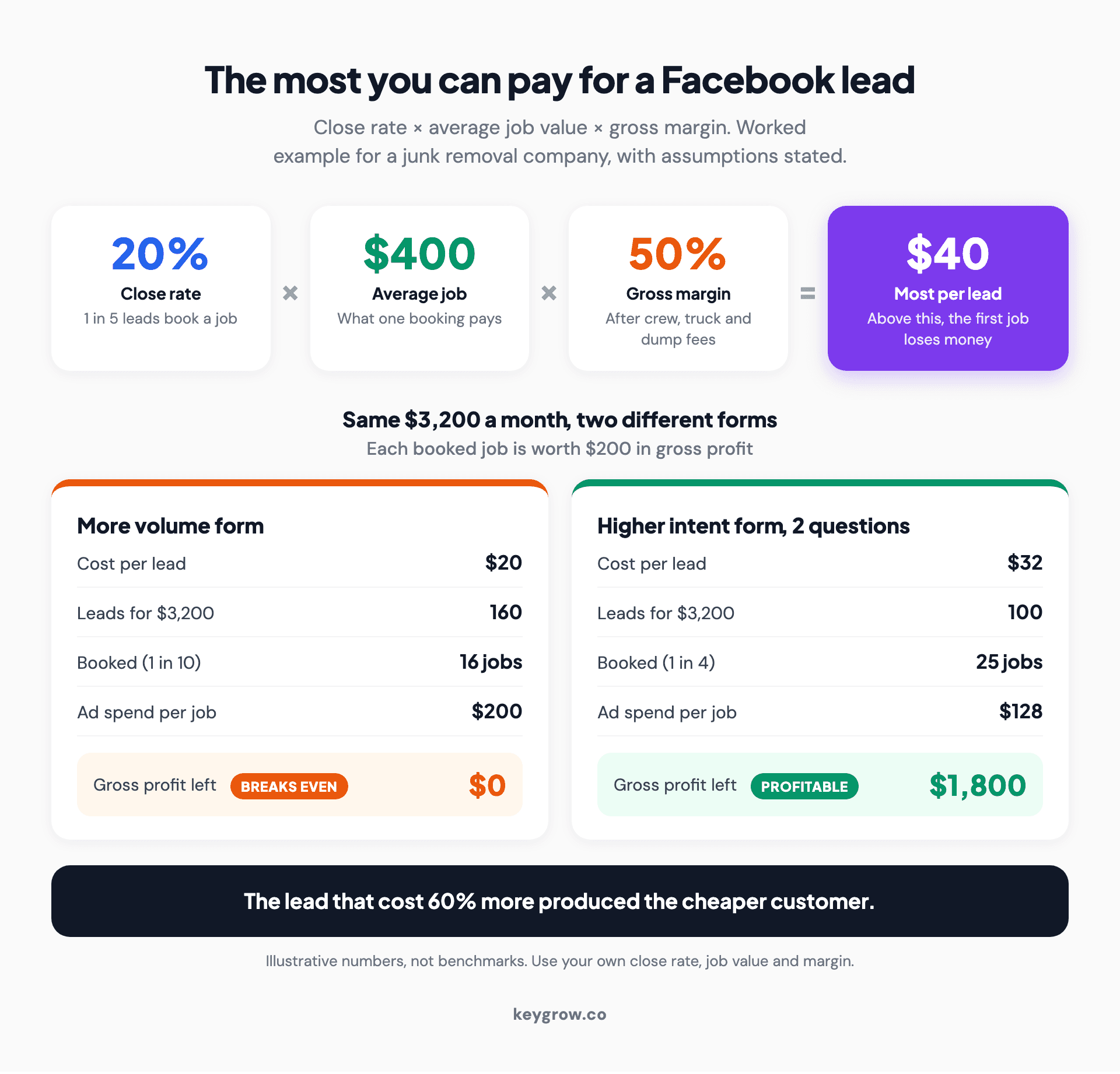
Worked example of the most a local business can pay per Facebook lead: a 20 percent close rate times a $400 average job times a 50 percent gross margin equals a $40 ceiling, then the same $3,200 monthly budget compared across a $20 More volume lead that books one in ten and breaks even, and a $32 Higher intent lead that books one in four and leaves $1,800 in gross profit.
Now put two forms side by side on the same $3,200 a month. These figures are illustrative, not benchmarks:
- A More volume form at $20 a lead brings 160 leads. One in ten books, so you get 16 jobs at $200 of ad spend each, which eats the whole $200 of gross profit per job.
- A Higher intent form with two questions at $32 a lead brings 100 leads. One in four books, so you get 25 jobs at $128 each and keep $1,800 in gross profit.
The lead that cost 60% more produced the cheaper customer.
For outside numbers, LocaliQ's 2026 benchmarks, updated in September 2026, put the average cost per lead for Leads campaigns at $27.39 across industries. The spread by category is wide:
| Category (2026 benchmark) | Average cost per lead | Average conversion rate |
|---|---|---|
| All industries | $27.39 | 8.54% |
| Real Estate | $13.74 | 9.95% |
| Health & Fitness | $27.11 | 7.98% |
| Physicians & Surgeons | $32.14 | 6.41% |
| Personal Services | $38.09 | 6.61% |
| Home & Home Improvement | $42.95 | 5.32% |
| Beauty & Personal Care | $50.91 | 5.63% |
| Dentists & Dental Services | $61.56 | 6.07% |
The closest category for our junk hauler, Home & Home Improvement, averages $42.95. That's already over its $40 line, which is why the close rate is the lever to pull. If customers come back or send referrals, the ceiling rises, and our guide to measuring the lifetime value of PPC leads works through that version.
If your ceiling sits well below what your category pays, don't buy Facebook leads yet. Fix the close rate first, or spend where people are already searching for what you do.
FAQs
How much do Facebook leads cost in 2026?
LocaliQ's 2026 benchmarks put the average at $27.39 per lead for Leads campaigns, down slightly from $27.66 the year before. Real estate averages $13.74 and dental services $61.56, so your industry matters. Your own ceiling, close rate times job value times margin, matters more than any average.
Are Facebook lead ads worth it for a small local business?
They can be, if someone calls new leads within the hour and your ceiling clears your category's average cost per lead. They're a poor fit if leads sit in a spreadsheet for days, because Meta itself says interest fades the longer you wait. Start with one campaign and judge it on booked jobs.
Where do Facebook leads go, and how long does Meta keep them?
Instant form leads show up in Ads Manager, on the Instant forms page in Meta Business Suite and in Leads Center. You can download them for 90 days after someone submits, and after that Meta no longer lets you. A connected CRM or spreadsheet copies each lead as it arrives, so nothing expires.
Can you edit a Facebook instant form after publishing it?
No. Once an instant form is published, Meta doesn't let you change it, so you duplicate it, fix the copy and attach the new form to your ad. Use Save draft while you build, and preview every screen on a phone before you publish.
Why are my Facebook leads fake or unreachable?
Prefilled forms make submitting almost effortless, so accidental and half-interested leads get through. A Higher intent form, one or two multiple-choice questions and SMS verification on the phone field filter out many of them. Calling within the hour catches the real ones while they still remember you.
What's the difference between leads and qualified leads in Ads Manager?
Maximize number of leads finds people likely to submit your form. Maximize number of qualified leads finds people likely to become customers, using stage updates from your CRM sent through the Conversions API. Since April 2026, new campaigns need that connection to use the qualified option.
Grade the leads, not the cost per lead
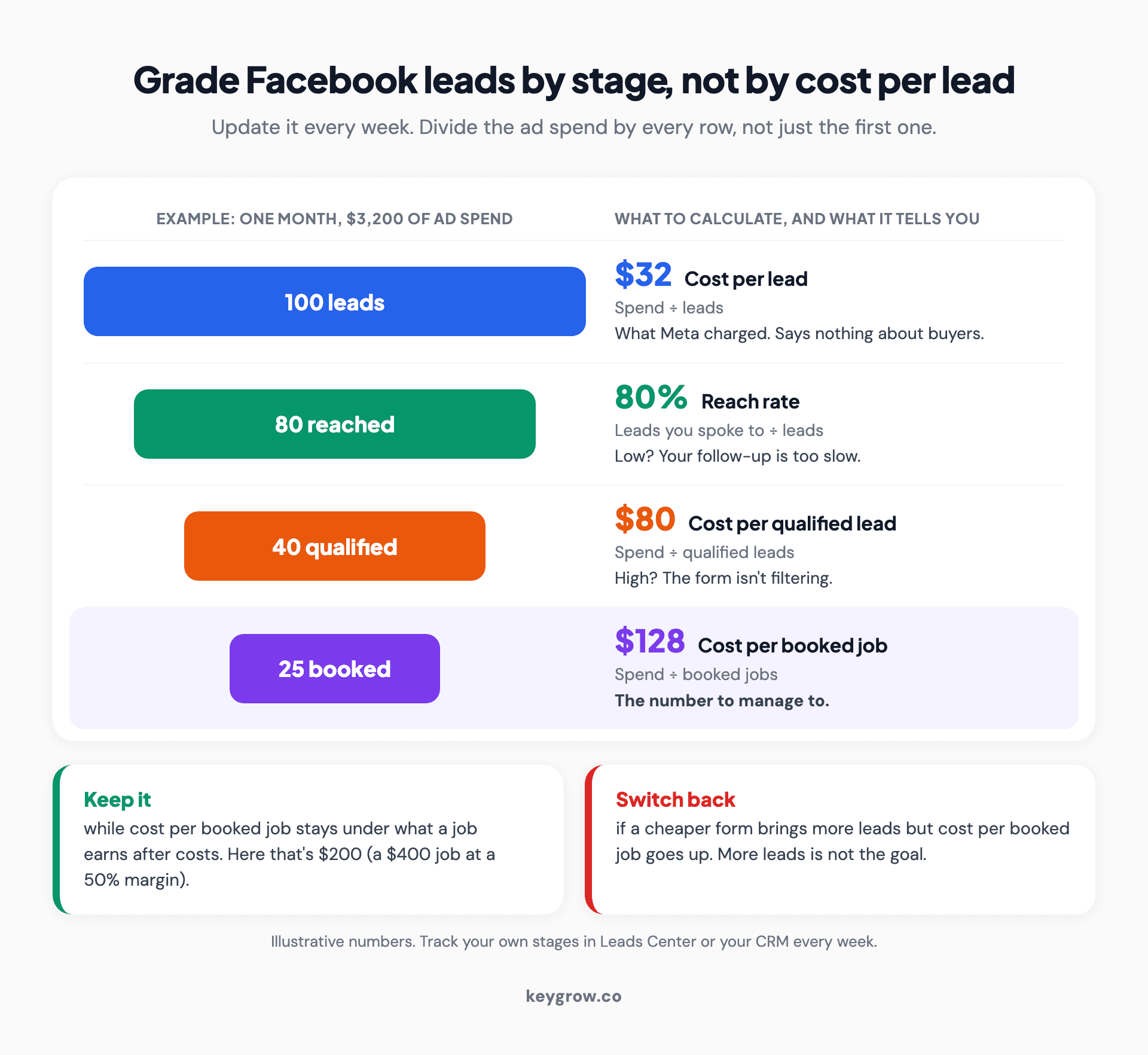
Scorecard for grading Facebook leads by stage instead of cost per lead, using an example month of $3,200 in ad spend: 100 leads at $32 each, 80 reached for an 80 percent reach rate, 40 qualified at $80 each and 25 booked jobs at $128 each, with rules to keep a form while cost per booked job stays under what a job earns after costs and to switch back if a cheaper form raises it.
Once a week, sort every lead into a stage, check how many you reached, and divide your spend three ways: by leads, by qualified leads and by booked jobs. Cost per lead tells you what Meta charged. Cost per booked job tells you whether the campaign worked. If a cheaper form doubles your leads and your cost per booked job goes up, switch back.
You don't need an agency for any of this. One campaign, one Higher intent form and a spreadsheet of stages will carry a single-location business, as long as someone calls fast. When the calls start slipping, or you're ready for a landing page and the Conversions API, our social media team runs Facebook and Instagram lead campaigns on these numbers, month-to-month.



