


Somewhere in most Google Ads accounts sits an ad group with 60 keywords, one tired ad, and a daily budget that could not feed a tenth of them. If you are asking whether adding too many keywords is bad for Google Ads, the answer is yes, but not for the reason most guides give. The problem is not the count. It is that a long, loosely related keyword list forces generic ads and spreads your budget so thin that nothing collects enough clicks to prove anything.
The myth underneath the question is "more keywords means more reach." That was half true a decade ago. Google expanded exact match to cover same-meaning close variants in stages through 2018, then retired modified broad match in 2021, so one well-chosen keyword already matches the plurals, misspellings, reorderings, and same-meaning searches around it. Adding forty variants of the same idea no longer buys reach. It buys clutter.
This post walks through what keyword bloat actually does to an account, the budget math that tells you how many keywords you can afford, and the cleanup workflow we use when we take over a Google Ads account that has quietly grown to 400 keywords. Most of it you can do yourself in an afternoon.
The short answer: structure beats count
A keyword list is too long the moment one ad can no longer honestly answer every keyword in its group, or the moment your daily budget cannot buy each keyword a few clicks a week. Hit either limit and performance drops, whether that happens at 15 keywords or 50.
Those are the two real tests, and they are worth more than any fixed number:
- The one-ad test. Read every keyword in the ad group, then read the ad. If the ad is a natural, specific answer to all of them, the group is fine. If the ad has to stay vague to cover them all, the group is too broad.
- The budget test. Divide your daily budget by your average cost per click. That is how many clicks a day you can buy. If your keyword list is several times larger than that number, most of your keywords are decoration.
Everything below is these two tests with the mechanics attached.
Why more keywords stopped meaning more reach
Google's matching changed underneath the old advice. Exact match now covers same-meaning variations automatically, so the classic move of adding singulars, plurals, misspellings, and word-order variants does nothing except split your own data into smaller piles.
This matters because a chunk of the advice still ranking for this topic was written for the match types of 2015. Back then, you controlled matching tightly and coverage really did come from long lists. Today, Google's documentation describes a system that matches on meaning and then picks which of your eligible keywords serves by rule, not by whichever variant you happened to type in.
The technical ceiling makes the same point from the other direction. A single ad group will accept twenty thousand targeting items before Google objects. Nobody believes twenty thousand keywords in one ad group is a strategy. The cap is capacity, not guidance, and the fact that it is set so absurdly high tells you Google was never going to stop you from hurting yourself.

Google Ads events dashboard on a screen showing activity spiking across a campaign
What keyword bloat actually does to an account
Four things break, and they compound each other.
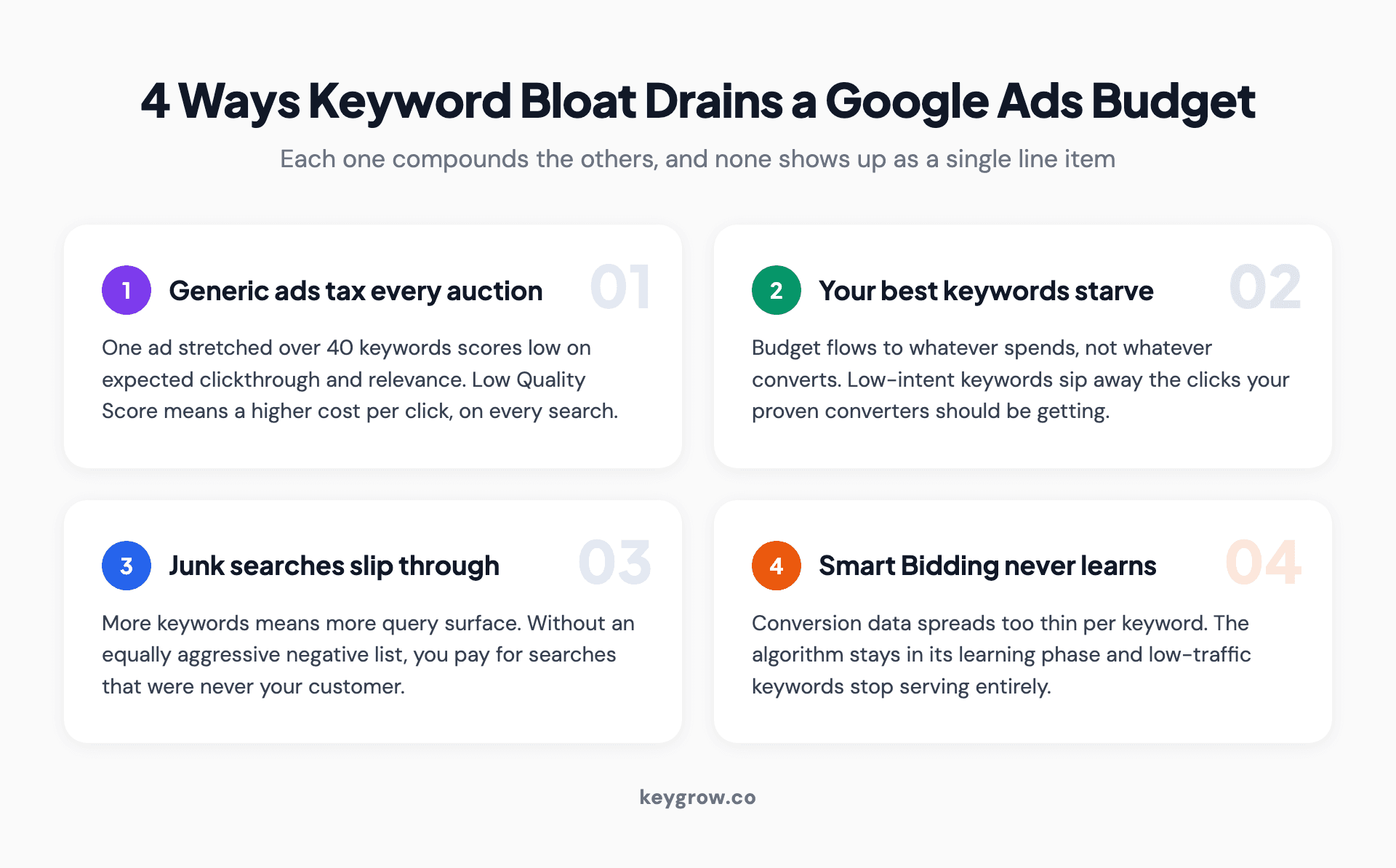
Four ways keyword bloat drains a Google Ads budget: generic ad copy drags Quality Score down and cost per click up, top keywords starve while long tails sip budget, junk searches slip past thin negative lists, and conversion data spreads too thin for Smart Bidding to learn.
Generic ads drag Quality Score down and prices up. Google scores every keyword from 1 to 10 on expected clickthrough rate, ad relevance, and landing page experience. One ad stretched across 40 unrelated keywords scores poorly on all three, and low scores mean you pay more per click for worse positions. This is the quiet tax on bloated accounts, billed on every single auction.
Your best keywords starve. Budget flows to whatever spends, not whatever converts. Every low-intent keyword that picks up a click a day takes that click away from the keyword that actually books jobs.
Junk searches slip through. More keywords means more query surface. Without an equally aggressive negative keyword list, you end up paying for searches that were never your customer. A cash home buyer client came to us drowning in junk leads from exactly this. The fix was filtering: negative keywords, tighter match types, and qualifying ad copy took serious leads up 600 percent between December and January on the same budget.
Smart Bidding never finishes learning. Automated bidding learns from conversion data per keyword and ad group. Spread thin, each keyword collects a conversion a month, the algorithm stays in its learning phase, and keywords with barely any traffic get flagged "Low search volume" and quietly stop serving at all.
The budget math nobody runs
Here is the sizing formula the question deserves, and the part almost every ranking guide skips. Monthly budget divided by 30 is your daily budget. Daily budget divided by your average cost per click is your clicks per day. Your keyword list should be small enough that each keyword can earn meaningful clicks every week out of that total. Our Google Ads budget calculator runs this for you.
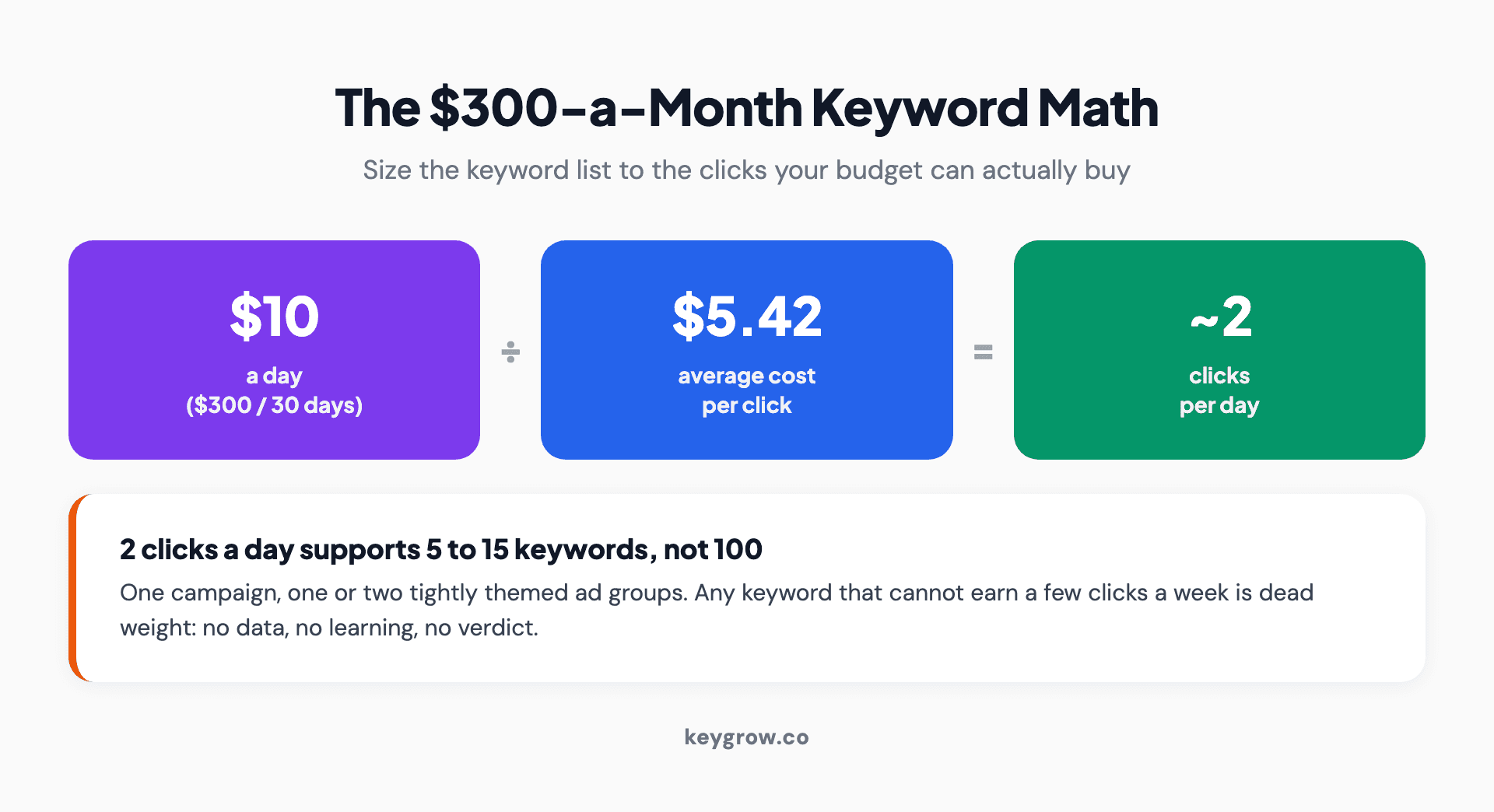
Three-step budget math for sizing a Google Ads keyword list: $300 a month is $10 a day, $10 a day at the $5.42 average cost per click buys about two clicks a day, and two clicks a day supports one tight ad group of 5 to 15 keywords, not 100.
Work the popular example: $300 a month. That is $10 a day. The average search cost per click across industries is $5.42 in 2026, per LocaliQ's benchmarks, so $10 buys just under two clicks a day. Two clicks a day supports one campaign, one or two tight ad groups, and maybe 5 to 15 total keywords. Run 100 keywords on that budget and most of them will not see a click in a given week, which means no data and no way to tell your winners from your dead weight.
Two clicks a day sounds grim, but concentrated on the five searches most likely to become customers, it works. Sprayed across a hundred, it is a rounding error everywhere at once. Keep in mind the average hides a wide industry spread; our breakdown of Google Ads costs for dentists shows how fast the math changes once real CPCs replace the average.
What happens when your own keywords overlap
Overlapping keywords do not confuse Google or trigger some hidden penalty; Google resolves them by documented rules. But they do fragment your reporting and can route searches to the wrong ad, which is its own kind of waste.
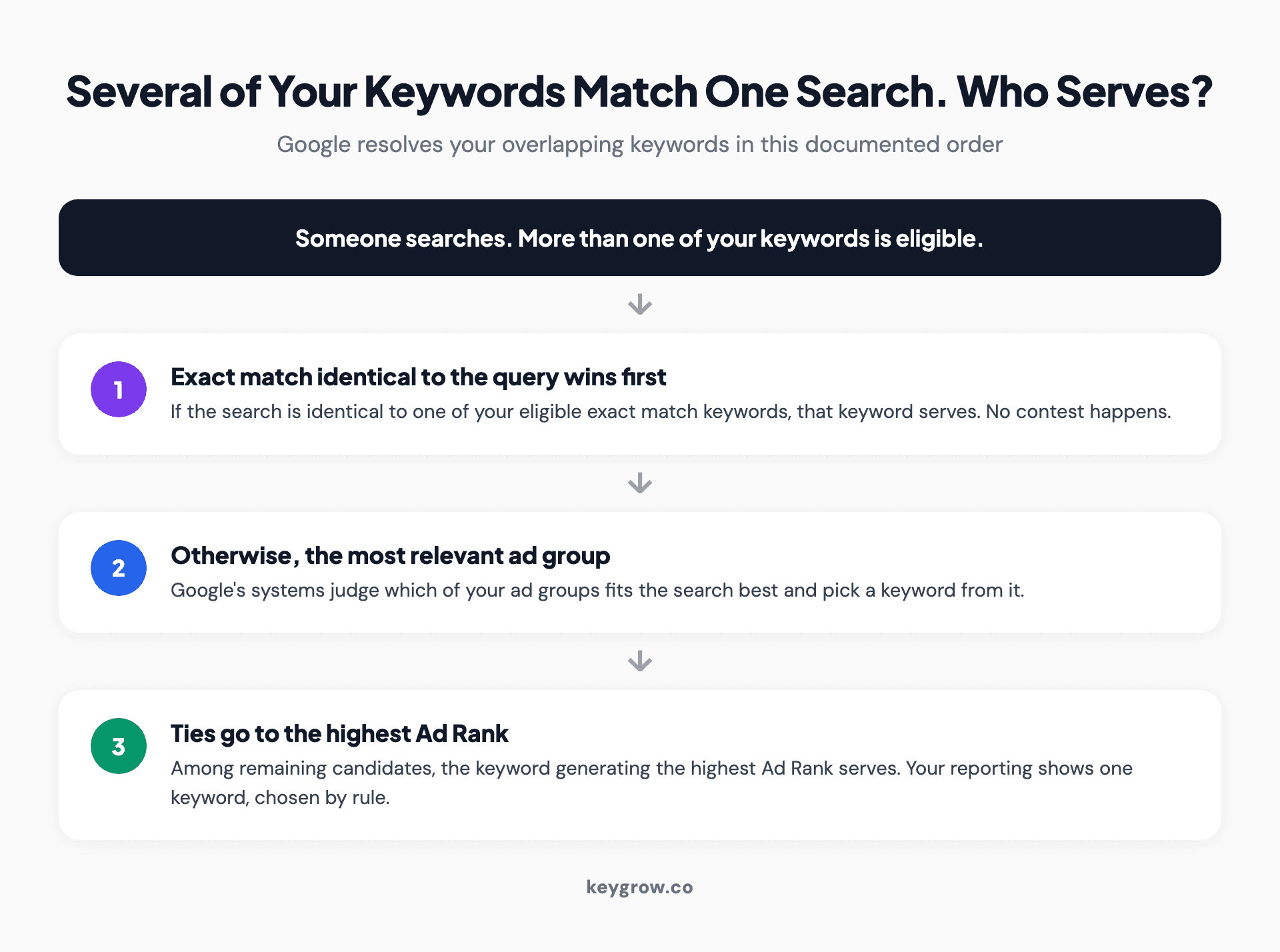
How Google Ads picks one keyword when several could match a search: an exact match keyword identical to the query serves first, then the most relevant ad group as judged by Google AI, then whichever keyword has the highest Ad Rank.
The order works like this. If a search is identical to one of your eligible exact match keywords, that keyword serves, full stop. If not, Google's systems pick the ad group they judge most relevant, and remaining ties go to the keyword with the highest Ad Rank. So when "emergency plumber" lives in three of your ad groups, you do not get three chances to show. You get one, chosen by rules you were not thinking about, showing an ad you might not have picked for that search.
The practical fix is cross-group negative keywords: add each group's core terms as negatives in the other groups, so every search has exactly one home. Your reports become readable again the same day.
So how many keywords should you actually use?
For most small and mid-size accounts, 5 to 20 tightly themed keywords per ad group is the working range, and the total across the account should fit the budget math above. Treat the range as a heuristic, not a law. The one-ad test and the budget test outrank it whenever they disagree. The opposite extreme, one keyword per ad group, carries its own costs in 2026, which we cover in our review of single keyword ad groups.
Rough sizing that holds up in practice:
| Monthly budget | Realistic structure | Total keywords |
|---|---|---|
| $300 to $500 | 1 campaign, 1-2 ad groups | 5 to 15 |
| $1,000 to $3,000 | 1-2 campaigns, 3-6 ad groups | 20 to 60 |
| $5,000 to $10,000 | 2-4 campaigns, structured themes | 60 to 150 |
| $10,000+ | Multiple campaigns by service and geography | Sized per theme, same two tests |
The pattern behind the table: keyword count is earned by budget, not by ambition. Accounts grow keyword lists the way garages grow boxes, and both need the same treatment once a year.
When adding more keywords is fine
Adding keywords works when each new keyword shares intent with its ad group, gets ad copy and a landing page that actually match it, and joins an account where the current winners are already fully funded. Unfunded expansion is the only kind that backfires.
The modern wrinkle is broad match. Google's own guidance now pushes consolidation: fewer, broader keywords paired with Smart Bidding, letting the algorithm find the queries. Sometimes that genuinely replaces dozens of manual variants with one keyword. But Optmyzr's study of 2,637 accounts found exact match still beat broad match on cost per acquisition, return on ad spend, and conversion rate for most accounts. So our position: consolidate your structure, keep your match types deliberate, and only hand broad match the keys when you have solid conversion tracking, Smart Bidding with real conversion volume, and a negative list you review weekly. One more thing broad match can do without asking: drift onto competitor brand terms, which should be a decision, not an accident. Broad match without negative keywords is a donation to Google. In unmanaged accounts, wasted spend hides in the search terms report, typically 20 to 30 percent of budget.

A marketer reviewing account data on a laptop at a tidy desk, partway through a keyword audit
Six signs your account already has keyword bloat
You do not need an audit tool for this. Open your account and look for these.
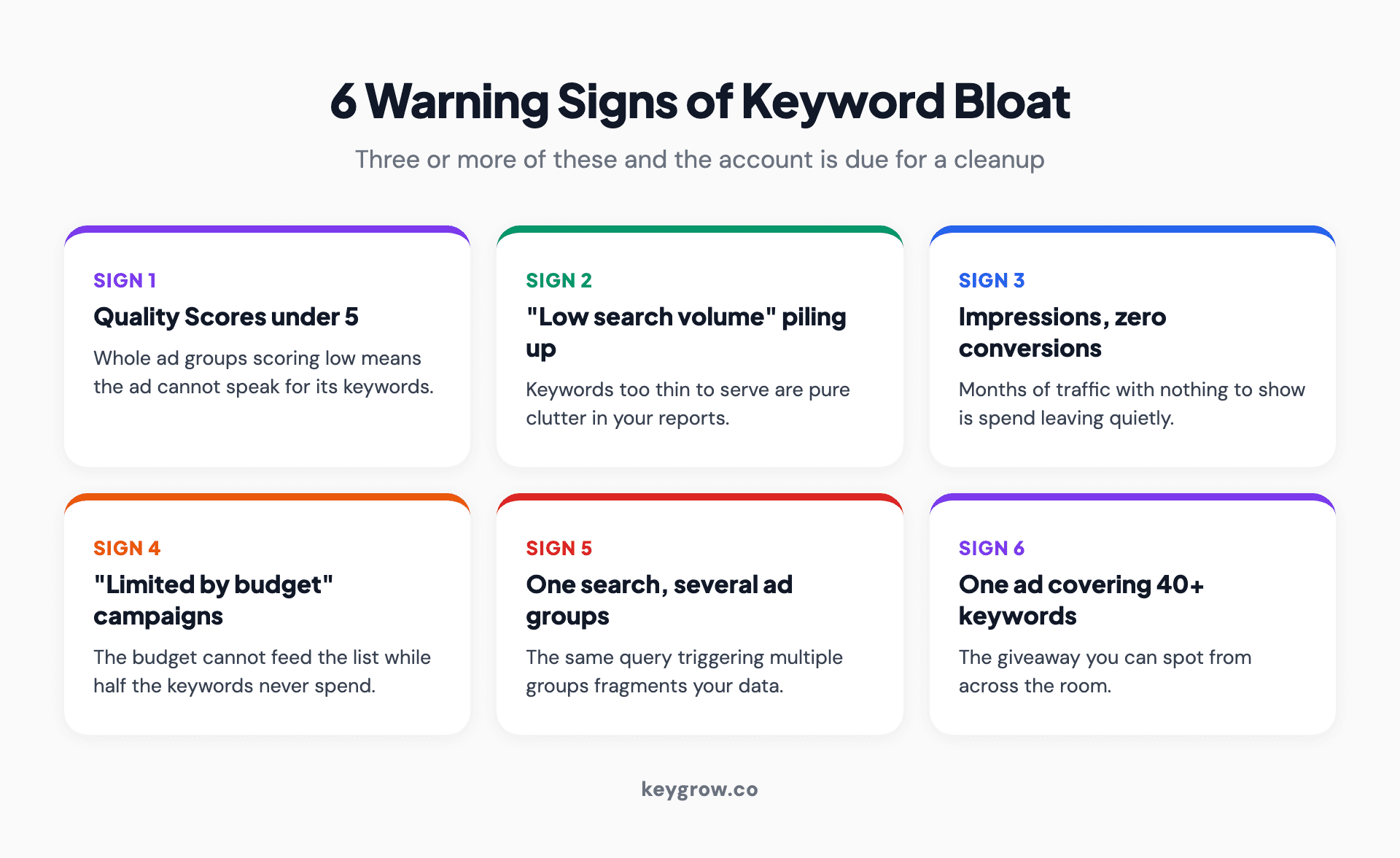
Six warning signs of keyword bloat in a Google Ads account: Quality Scores under 5, Low search volume statuses piling up, keywords with impressions but zero conversions, campaigns stuck at Limited by budget, one search term triggering several ad groups, and one ad covering 40 or more keywords.
Quality Scores sitting under 5 across an ad group. "Low search volume" statuses piling up. Keywords with plenty of impressions and zero conversions after months. Campaigns flagged "Limited by budget" while half the keyword list never spends. The same search term showing up under several ad groups in the search terms report. And the giveaway you can spot from across the room: one ad trying to speak for 40 keywords.
Three or more of those and the account is due for the workflow below.
The cleanup workflow
Pruning a bloated account is mechanical. It needs care, not genius, which also means you do not need to pay an agency to do it if you have an afternoon and the stomach to pause things.
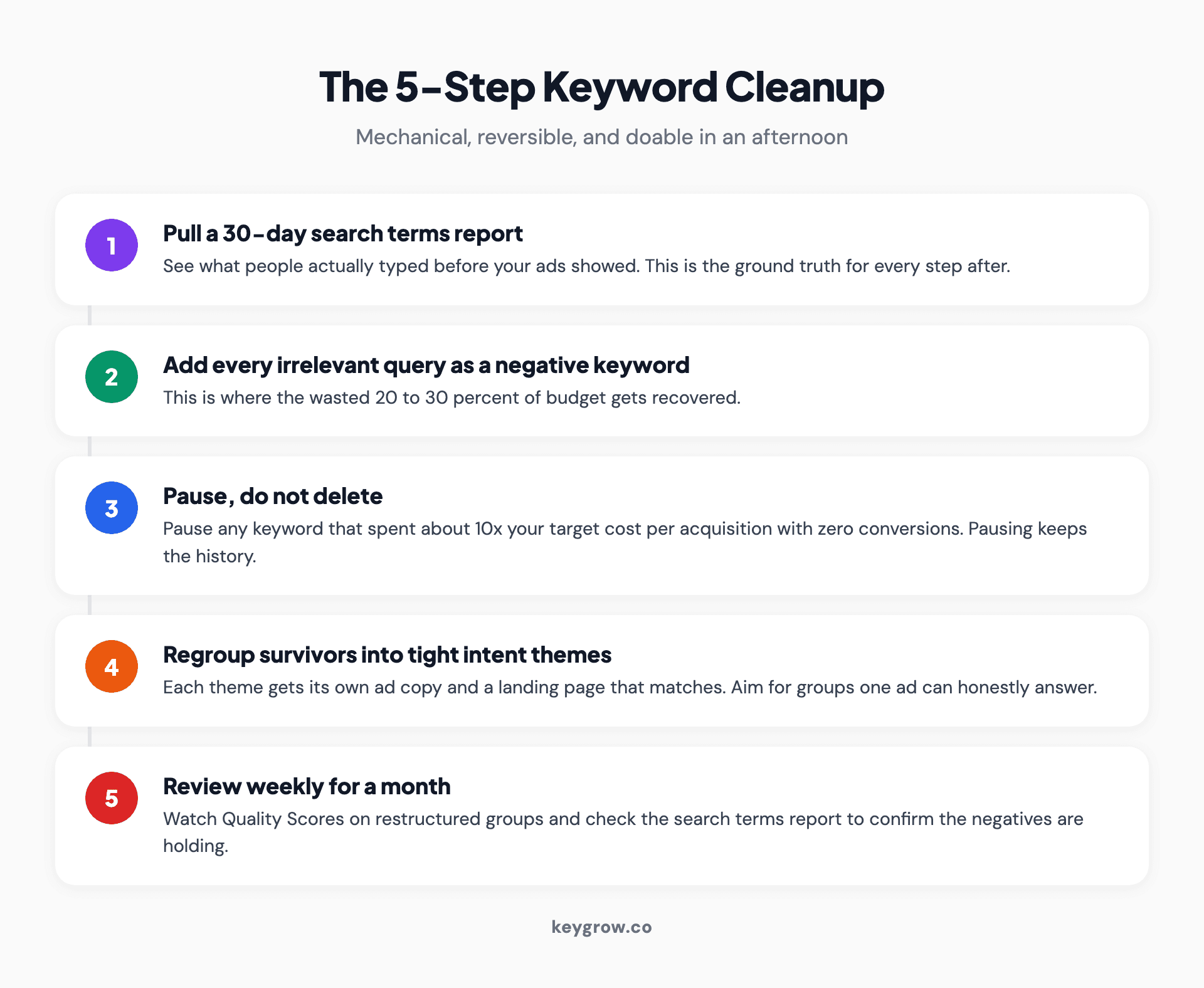
Five-step Google Ads keyword cleanup: pull a 30-day search terms report, add every irrelevant query as a negative keyword, pause keywords that spent ten times your target cost per acquisition with zero conversions, regroup survivors into tight intent themes with dedicated ads, and review weekly for a month.
- Pull a 30-day search terms report. This is what people actually typed. It is usually humbling.
- Add every irrelevant query as a negative keyword. This is where the 20 to 30 percent of wasted spend gets recovered.
- Pause, do not delete. Pause any keyword that has spent about ten times your target cost per acquisition with nothing to show. Pausing preserves the history in case you were wrong.
- Regroup the survivors into tight intent themes, each with ad copy written for that theme and a landing page that matches it.
- Review weekly for a month. Quality Scores on restructured groups typically move within weeks, and the search terms report will tell you if the negatives are holding.
Judge the results over 30 to 60 days, not three. And resist the urge to re-add keywords in week two because impressions dipped. Impressions were never the point.
FAQs
How many keywords is too many in Google Ads?
There is no universal number. A list is too long when one ad can no longer honestly answer every keyword in its group, or when your daily budget cannot buy each keyword a few clicks a week. For most small accounts that means keeping each ad group to 5 to 20 tightly themed keywords.
Does having too many keywords hurt Quality Score?
Indirectly, yes. Too many loosely related keywords force generic ad copy, which lowers expected clickthrough rate and ad relevance, two of the three Quality Score components. Lower Quality Scores mean higher costs per click and worse ad positions across the account.
What is the actual keyword limit in Google Ads?
The technical limits are far beyond anything useful: thousands of campaigns per account and as many as twenty thousand targeting items per ad group. Those caps are system capacity, not a recommendation. Budget and ad relevance run out long before the limits do.
How many keywords should I run on $300 a month?
About 5 to 15, in one or two tightly themed ad groups. At the 2026 average cost per click of $5.42, $10 a day buys just under two clicks, and those clicks need to concentrate on your highest-intent searches to produce enough data to optimize anything.
Do more keywords mean more clicks?
No. Your budget caps your clicks, and modern keyword matching already covers close variants of the keywords you have. Past the point your budget can feed, added keywords just redistribute the same clicks across more line items and thinner data.
Should I pause or delete underperforming keywords?
Pause. Pausing stops the spend immediately but keeps the performance history, so you can revive the keyword if it turns out the ad or landing page was the real problem. Deleting throws away the evidence.
Is one broad match keyword better than dozens of exact match variants?
Sometimes, and only with guardrails. Broad match with Smart Bidding, reliable conversion tracking, and a weekly-reviewed negative list can replace long variant lists. Without those, exact and phrase match remain the safer default; a large 2024 study found exact match outperforming broad on cost per acquisition and conversion rate for most accounts.
Our take
"Is adding too many keywords bad for Google Ads" is really the question "did I structure this account or did it accumulate." Keyword count is the symptom you can see in a screenshot. The disease is ad groups without a single intent and budgets stretched past what they can feed.
Run the two tests, do the cleanup once, and the account gets easier to manage every month afterward. If you would rather have someone who does this weekly handle it, tell us about your business and we will audit the account before we talk about anything else, month-to-month, cancel anytime.



