

Is Squarespace bad for SEO? No. For most small businesses, Squarespace is perfectly capable of ranking on Google, and on some technical measures it now beats WordPress outright. It has real limitations, and there are sites it is genuinely wrong for, but the platform is almost never the thing holding a website back. Content, authority, and crawlability are. Most of the "Squarespace is bad for SEO" anxiety online is fighting a problem that was half-true years ago and is mostly outdated now.
That does not mean Squarespace is flawless. It gives you less technical control than a fully custom setup, and a few of its defaults need fixing. This guide gives you the honest version: what Squarespace does well, where it limits you, when it is the wrong choice, and how to fix its weak spots.
The short answer, with current data
Squarespace is not bad for SEO. It handles the fundamentals well and even leads its category on some Core Web Vitals. Its limits are about advanced control, not basic ranking ability.
The reflexive "Squarespace is slow and bad for SEO" take is mostly out of date. The current speed data says the opposite. As reported by Search Engine Journal in 2025, citing the HTTP Archive Core Web Vitals report, 67.66 percent of Squarespace sites had good Core Web Vitals, ahead of WordPress at 43.44 percent. On Interaction to Next Paint, the responsiveness metric that became a Core Web Vital in 2024, Squarespace ranked first among all CMS platforms, with 95.85 percent of sites scoring well. And the trend is sharply up: the Web Almanac recorded Squarespace jumping from a 33 percent mobile Core Web Vitals pass rate in 2023 to 60 percent in 2024, the biggest year-over-year gain of any CMS platform.
So the speed objection, the loudest one, no longer holds the way it did. Squarespace covers the SEO basics, and on some of them it is now leading. The real conversation is about its ceiling, not its floor.
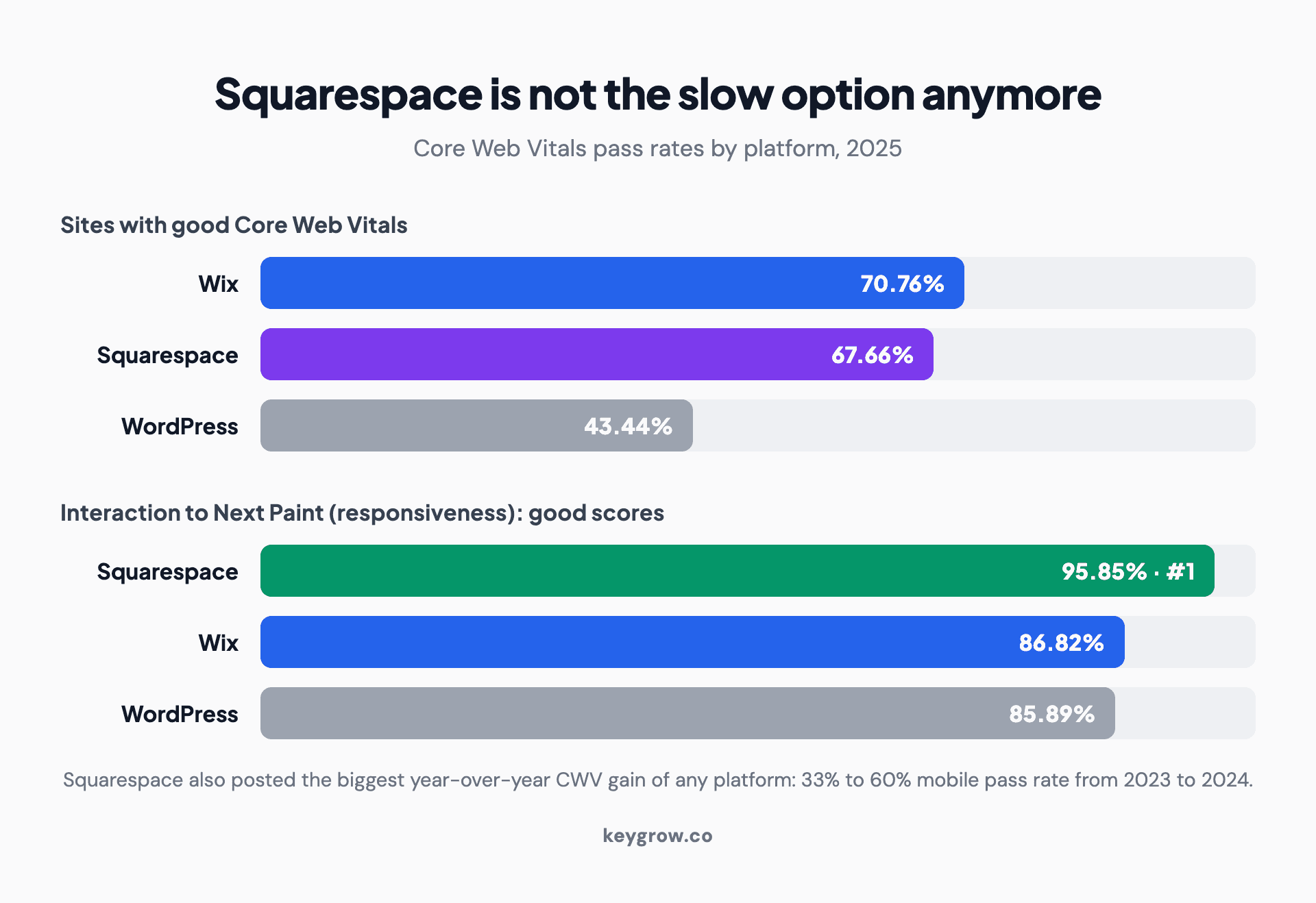
Infographic comparing Core Web Vitals pass rates by website platform in 2025: Wix 70.76 percent of sites with good Core Web Vitals, Squarespace 67.66 percent, and WordPress 43.44 percent, plus Interaction to Next Paint scores where Squarespace ranks first at 95.85 percent ahead of Wix at 86.82 percent and WordPress at 85.89 percent.
What Squarespace does well, and where it limits you
The honest verdict is a split, not a flat yes or no. Squarespace genuinely handles a lot, and it genuinely withholds a few levers a technical SEO would want. Here is both sides in one view.
| What Squarespace does well | Where it limits you |
|---|---|
| Clean, mobile-responsive templates out of the box | Less control over canonical tags (needs code injection) |
| Automatic SSL on every site | Limited robots.txt and noindex control |
| Built-in Google Search Console integration | Schema markup mostly automatic on blog posts, not all pages |
| Strong Core Web Vitals and category-leading INP | Some templates load heavy scripts you cannot fully trim |
| Editable titles, meta descriptions, and URL slugs | No programmatic or templated SEO for thousands of pages |
| Clean heading structure and image alt text fields | Fewer advanced technical levers than a custom build |
Read that table and the pattern is clear. Squarespace nails the things most small business sites need and restricts the things only advanced or large sites tend to need. For a local service business, a portfolio, or a small shop, almost nothing in the right column will ever bite you. For a 5,000-page site, the right column is the whole story.
A few specifics are worth knowing so they do not surprise you. On the on-page side, Squarespace lets you set a custom SEO title and meta description on every page and edit URL slugs, which is most of what matters, but it does not auto-write good ones, so the defaults need replacing. Some templates style the main heading in a way that does not map cleanly to a single H1, so check your heading structure rather than assuming it is correct. Image handling is the other watch-item: Squarespace will happily serve a huge file you uploaded, so the speed wins above depend on you compressing images first. None of these is a dealbreaker, and each has a fix in the checklist below, but they are the real, specific quirks behind the vague "Squarespace is bad for SEO" complaints.
It is also worth saying what is simply handled for you. SSL is automatic, the sitemap is generated for you, the site is mobile-responsive by default, and Google Search Console connects in a few clicks. On a custom build, those are tasks. On Squarespace, they are done. That convenience is exactly why the platform exists, and for a non-technical owner it removes a lot of the ways a site can quietly go wrong.
The platform is rarely the bottleneck
For most sites, the platform is not what limits rankings. Content quality, topical authority, backlinks, and crawlability decide rankings, and those are the same on every CMS.
Here is the opinion worth holding onto: most "is my platform good for SEO" worry is misplaced. The platform is rarely the bottleneck. Google's John Mueller has said plainly that search systems do not look for a particular CMS to treat it differently, that a CMS is just one way of creating webpages, and that the systems focus on the final result, not how the page was made. In a Reddit thread asking whether WordPress beats a hand-coded site, he replied "not for SEO."
The data agrees. Ahrefs found that 96.55 percent of all pages in its index get zero traffic from Google. Those pages are not failing because of their CMS. They are failing because nobody links to them and they answer nothing better than the pages already ranking. Backlinko found, in a study of 11.8 million results, that the number one result has 3.8 times more backlinks than positions two through ten. Backlinks and content quality move rankings. Your website builder does not.
So before you blame Squarespace or plan a painful migration, look at whether the site can even be crawled. Then ask the harder questions: is the content genuinely better than what ranks above you, and does anyone have a reason to link to it? That is where almost every ranking problem lives, and it is the same diagnosis our guide to a technical SEO audit walks through.
Squarespace versus WordPress and Wix
On raw SEO capability the three are close. WordPress offers the most control, Squarespace and Wix offer the most ease, and recent speed data slightly favors the hosted builders.
The platform debate almost always narrows to these three, so here is the honest comparison.
| Squarespace | WordPress | Wix | |
|---|---|---|---|
| Control and flexibility | Moderate | Highest | Moderate |
| Ease of use | High | Lower | High |
| Good Core Web Vitals (2025) | 67.66% | 43.44% | 70.76% |
| Good INP score (2025) | 95.85% (1st) | 85.89% | 86.82% |
| Best for | Small to mid-size sites | Large or complex sites | Small sites, fast setup |
WordPress gives you the most control and the largest plugin ecosystem, which is why large and complex sites favor it. That control comes with a cost: hosting, security updates, plugin conflicts, and enough freedom to break your own SEO if you are not careful. Squarespace and Wix trade that control for simplicity, and for most small sites the trade is worth it. As the table shows, the gap people assume exists on speed has mostly closed; the hosted builders now out-measure self-hosted WordPress on the metrics Google uses, largely because they manage performance for you instead of leaving it to a stack of plugins.
The takeaway is not that one platform wins SEO. It is that platform choice barely moves your ceiling. Pick the one your team can maintain and publish on consistently, because the publishing is what ranks you.
When Squarespace is genuinely the wrong choice
Squarespace is the right call for a lot of businesses, so it is only fair to name when it is not. There are real cases where the platform's ceiling becomes the problem, and switching is the honest answer.
Notice the theme. Every one of these is a scale or control problem, not a basic-SEO problem. If none of them describe you, "should I leave Squarespace for SEO" is the wrong question, and the honest answer is to stay and do the work.
How to fix Squarespace's SEO weak spots
If you are on Squarespace, you can close most of the gaps yourself without leaving. The platform's defaults are decent, and a short checklist takes them from decent to genuinely competitive.

Infographic checklist of how to fix common Squarespace SEO weak spots: compress and resize images before upload, write a custom SEO title and meta description for every page, set clean keyword-based URL slugs, add canonical tags and extra schema with code injection, build internal links between pages, and submit your sitemap in Google Search Console.
One more check sits above all of these: indexing. If a page is not showing up on Google at all, do not assume a ranking problem before you confirm it is even indexed. Open Search Console, inspect the URL, and verify Google has crawled and stored it. New Squarespace sites can also ship with a site-wide setting that discourages search engines while you build, so make sure that switch is turned off before launch. An unindexed page is invisible no matter how good it is, and it is the first thing to rule out.
Work that list and a Squarespace site competes on the fundamentals. None of it requires a developer, and a one-location business with a few spare hours can do the whole checklist alone. That is the whole appeal of the platform, and the honest reason most small sites do not need to pay anyone to handle it.
Does the platform matter for AI search?
No. The same fundamentals that decide classic rankings, crawlable content and genuine authority, decide whether AI engines cite you. Your CMS is not the deciding factor for AI visibility either.
This is the newest version of the platform worry, and the answer is the same. AI Overviews, ChatGPT, and other answer engines pull from pages they can crawl and that genuinely cover a topic. None of them care whether the page came from Squarespace, WordPress, or hand-written HTML. What they care about is whether the content is there in the HTML, loads cleanly, and says something worth quoting. A Squarespace site that publishes clear, original, well-structured content is as eligible to be cited as anything else, which is the whole point of our guide to AI search optimization.
If anything, Squarespace's strong Core Web Vitals help here, since fast, clean pages are easier for every crawler, human-facing or AI, to process. The platform is not the lever. The content is.
FAQs
Is Squarespace bad for SEO, or can a Squarespace site rank on Google?
Squarespace is not bad for SEO, and Squarespace sites rank on Google every day. It covers titles, meta descriptions, slugs, alt text, sitemaps, and SSL out of the box, and recent data even puts it ahead of WordPress on Core Web Vitals. Its limits are around advanced technical control and very large sites, not basic ranking ability, so most small businesses can rank well on it.
Why is my Squarespace site not ranking or showing up on Google?
Usually for the same reasons any site does not rank: thin or unoriginal content, no backlinks, weak internal linking, or a brand-new domain that needs time. Confirm the site is indexed in Google Search Console first. If pages are indexed but not ranking, the problem is almost always content and authority, not Squarespace itself.
Do you need plugins or apps to do SEO on Squarespace?
No. Squarespace has no plugin ecosystem like WordPress, but it does not need one for core SEO. Titles, meta descriptions, slugs, alt text, sitemaps, and SSL are built in, and code injection covers most advanced needs like extra schema and canonical tags. The absence of plugins is a difference, not a dealbreaker.
Is Squarespace or WordPress better for SEO?
Neither is inherently better for ranking; Google has said the CMS does not give a ranking advantage. WordPress offers more control and plugins, which matters for large or complex sites. Squarespace is easier and, on recent Core Web Vitals data, faster out of the box. For most small businesses the choice should come down to ease of use, not SEO.
Can a Squarespace site rank competitively without blogging?
It can rank for its core service and location terms without a blog, especially for a local business with strong pages and reviews. But blogging is how you cover more of what your audience searches and build topical authority, so a site that blogs usually reaches more queries. The platform allows it either way; the strategy is your call.
What are the biggest Squarespace SEO limitations to know about?
The main ones are less control over canonical tags and robots directives, schema that is automatic mostly on blog posts rather than all pages, potential image and script bloat on some templates, and no programmatic SEO for generating large numbers of pages. All but the last are fixable with image compression and code injection, so they are limits rather than blockers for most sites.
How long does Squarespace SEO take to work?
The same as any platform: usually months, not weeks, because SEO timelines are about Google's trust and your content and links, not your website builder. New sites and pages typically take several months to gain traction. If you expected the platform to speed that up, it will not, and no platform does.
Do I need to leave Squarespace if I am serious about SEO?
Most businesses do not. You only need to leave if you have outgrown it: thousands of pages, large-scale e-commerce, programmatic SEO, or deep technical control needs. If you are a small or mid-size business, migrating for SEO alone usually costs more in lost time and risk than it returns. Fix the fundamentals on Squarespace first.
The short version
Squarespace is not bad for SEO. For the small and mid-size businesses that make up most of its users, it ranks fine, and its limits, advanced technical control and very large sites, are narrow and mostly fixable. The bigger truth is that your platform is rarely what decides your rankings. So before you blame the builder or plan a migration, confirm the site is indexed, write content worth ranking, and earn a few links. That is the work that moves the needle on any CMS.
If you are weighing a platform or trying to rank the one you have, that is what our web development and SEO teams do. Tell us about your site and we will tell you whether the platform is really the problem.


