


Before you pick a platform, answer one question: does this site need to win customers from Google, or does it only need to confirm you're real when someone checks you out?
Most guides to building a website for small business skip that question and open with domains and templates. Yet the answer decides how many pages you need and who should build them. A site that only confirms you exist can be four or five pages on a website builder, finished by you over a few evenings. A site that has to win new customers from search needs a page for every service, copy written around what people type, a fast mobile build and months of SEO after launch.
Both kinds follow the five phases below. The second just goes deeper in each, and we cover what most build guides leave out: domain ownership, mobile speed, accessibility and counting the calls a site brings in.
Decide what the site has to do
A proof site confirms you're real to people who already know your name. A lead site has to win searches from strangers. Choose one first.
Picture two customers. One got your name from a neighbor and wants your number, your hours and some sign you're legitimate. The other typed "junk removal near me" and has never heard of you. The first needs a tidy site. The second needs a site built to rank, which is a bigger project.
A proof site fits when most of your work comes from referrals, repeat customers or a small service area. Four or five pages cover it: home, services, about with reviews, and contact.
Build a lead site when you need new customers from search, sell several services, or fight other local businesses for a spot in the map results. Every service gets its own page, and the site keeps needing attention after launch.
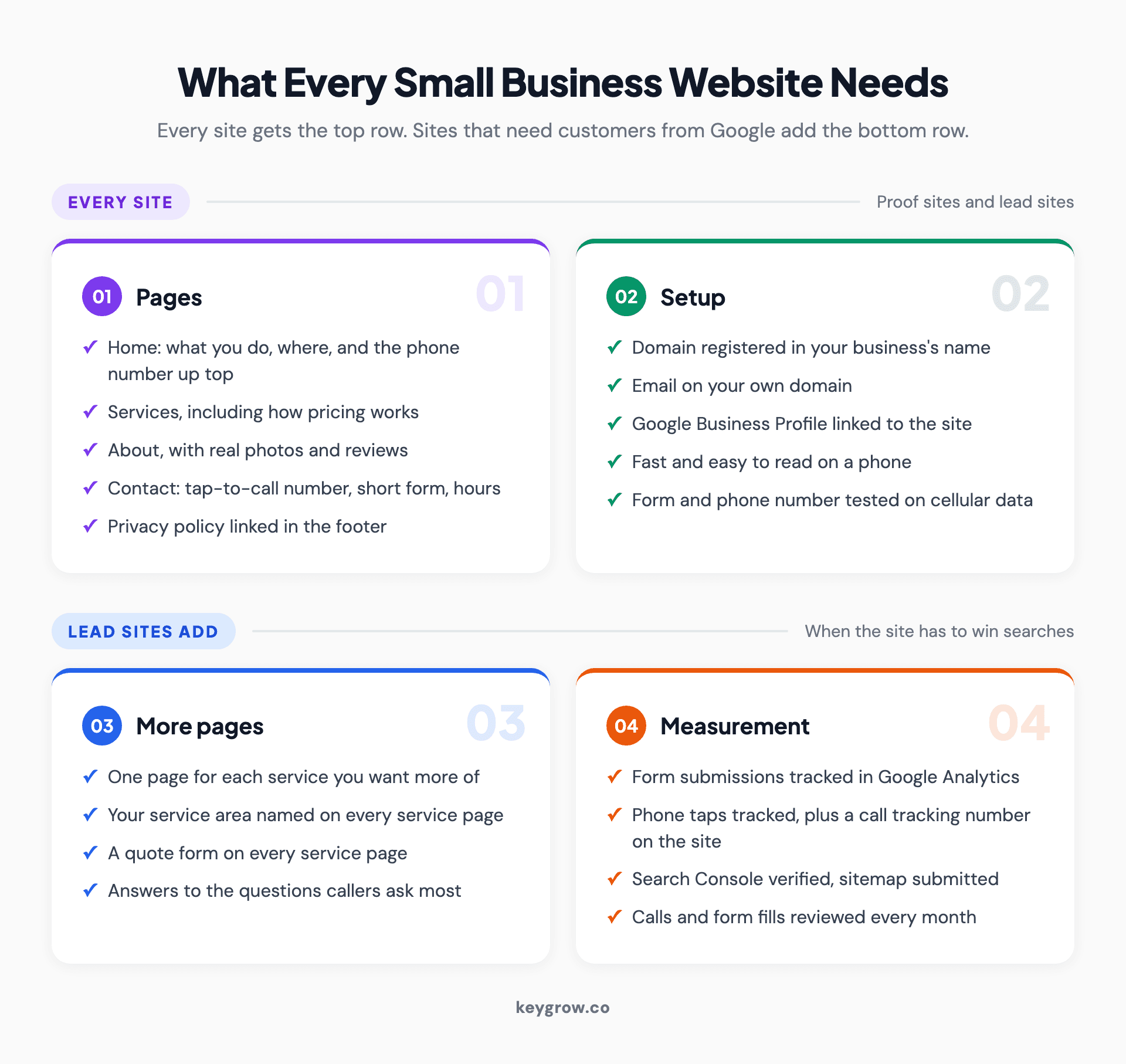
Checklist grid of what every small business website needs: home, services, about with reviews, contact and a privacy policy, a domain in your name, a linked Google Business Profile and a fast mobile build, plus what lead sites add: one page per service, service areas, tracked forms and calls, and Search Console.
If you're in the first group, you probably don't need to hire anyone. A builder plan and a complete Google Business Profile will carry a referral business for years, especially with real photos of your work. Plenty of owners who think they need a lead site would do better with a proof site for another year.
Phase 1: Put the domain and accounts in your name
Register the domain yourself, in the business's name, with a login you control. Then do the same for email, hosting, analytics and your Business Profile.
This is the cheapest step and the one that causes the most grief later. When a designer or a helpful nephew registers the domain for you, they can end up listed as its owner. ICANN's own FAQ warns that a developer may have registered the name with their own contact details "even if you have paid them to register and manage the domain name," and getting it back can mean showing the registrar proof that you paid.
So, before anyone designs anything:
- Buy the domain at a registrar, in your business's name, with auto-renew on. A .com costs about $10 to $30 a year.
- Set up email on it (you@yourbusiness.com).
- Open the builder or hosting account, Google Business Profile, Google Analytics and Search Console yourself, then add whoever builds the site as a user.
- Keep the logins in a password manager, not one person's inbox.
If you part ways with whoever builds the site, those accounts are what you keep. Everything else can be rebuilt.
Phase 2: Builder, freelancer or agency?
Build it yourself when your time costs less than a designer's. Hire a freelancer for a simple site, and an agency when it must win searches.
Anyone working out how to build a website for a small business reaches this fork, and in 2026 the three routes look like this.
| DIY on a website builder | Hire a freelancer | Hire an agency | |
|---|---|---|---|
| Typical cost | $300 to $500 for the first year, plus your hours | $2,000 to $8,000+ for a business site | $5,000 to $20,000 for a mid-sized site |
| Time to launch | Set by your evenings; writing the pages takes longest | 2 to 4 weeks for a basic site | 4 to 8 weeks for a mid-sized site |
| What you own | Your content and domain; the design stays on the platform if you leave | Whatever the contract says, so get logins and files in writing | The same, and watch for "proprietary platform" in the contract |
| Who maintains it | You, while the platform patches the software | You, or the freelancer on a monthly plan | The agency on a care plan, or you |
The DIY and freelance figures come from Upwork's 2026 cost guide. The agency range and both build times come from GoodFirms' 2026 survey of more than 300 web development firms. Treat them as market ranges, not quotes; our breakdown of what a website really costs runs them over three years.
DIY only works if you'll sit down and write the pages, since that's where most DIY sites stall. For a proof site you'd rather not build, a freelancer is plenty. On a lead site the agency earns its fee, because you're paying for page planning, copy and search groundwork as much as design. Before you hire either, our guide to choosing a web design agency covers the vetting and the ownership clauses.
Don't lose a week to the platform debate. Your customers will never ask what the site runs on, and the platform matters far less than how the site is built. HTTP Archive's data for August 2026 shows 48.7 percent of WordPress sites passing Google's Core Web Vitals on mobile. That's about 1.34 million sites passing and 1.41 million failing on the same software. What separates them is the build: the theme, the plugins, the hosting, the image sizes.
Hosted builders pass more often, 81.2 percent of Wix sites and 72.1 percent of Squarespace sites, because the platform makes the hosting and code decisions for you. That's a fair reason to use one if you're building it yourself. It's a poor reason to tear down a WordPress site that already brings in work.
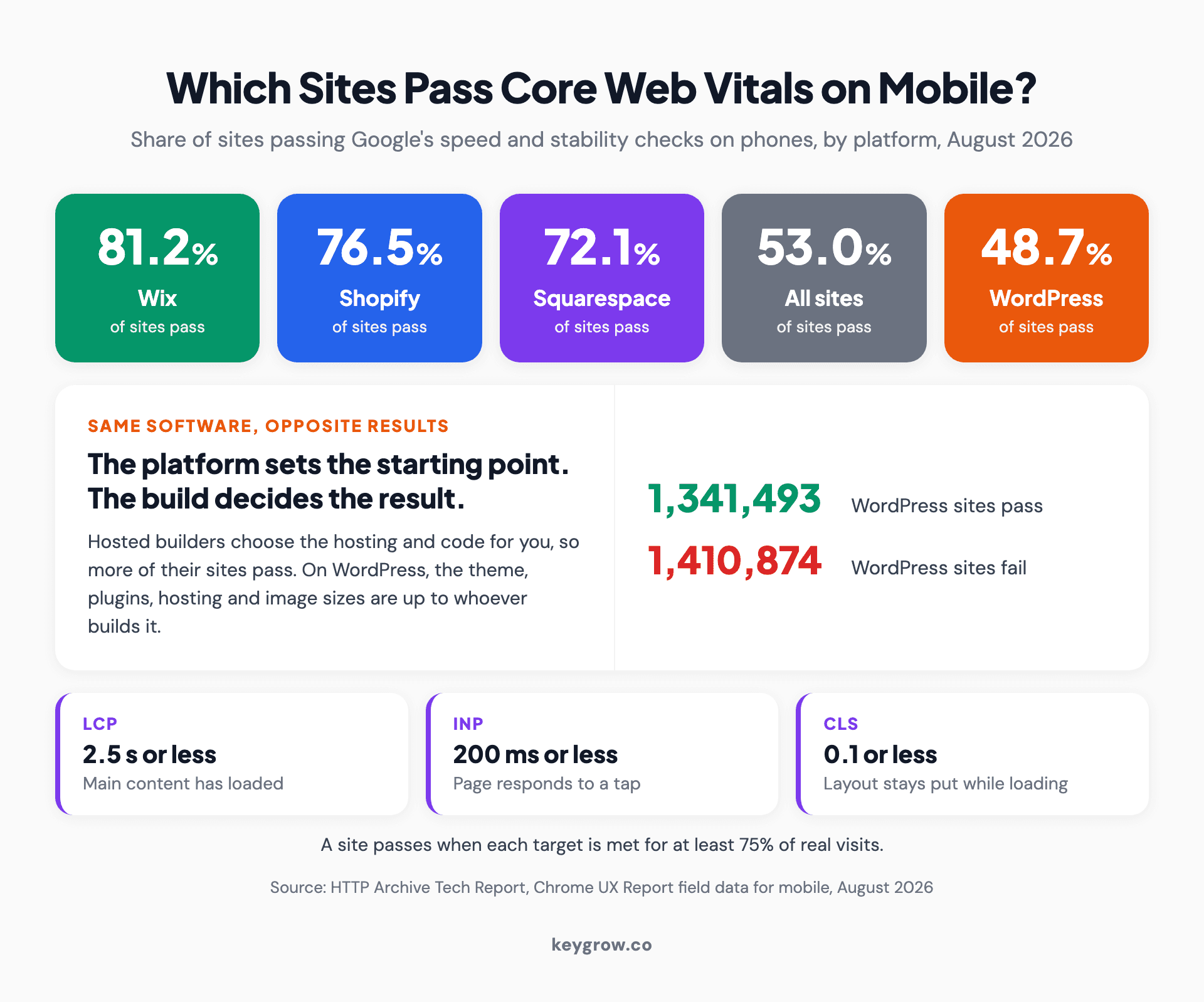
Stat strip of mobile Core Web Vitals pass rates by platform in August 2026: Wix 81.2 percent, Shopify 76.5 percent, Squarespace 72.1 percent, all sites 53.0 percent and WordPress 48.7 percent, with 1,341,493 WordPress sites passing and 1,410,874 failing on the same software.
Phase 3: Map the pages before anyone designs
List the pages before picking a template. Most local service businesses need five to seven: home, one per service, about, contact and a privacy policy.

A pencil resting on grid paper covered in hand-drawn website wireframes, the page map stage of building a small business website.
If you're figuring out how to create a website for a small business, this list is the most useful hour you'll spend. Here's the map we'd sketch for a two-truck junk removal company that wants calls from three nearby towns. It's an illustration, not a client's site.
- Home. What you haul, where you work, and the phone number on the first screen. A short block per service linking to its page, plus three to five reviews.
- Junk removal. The main money page: what you take, how pricing works, the towns you cover and a quote form.
- Estate cleanouts. A different buyer with different worries. Families and executors want discretion and a clear timeline.
- Construction debris removal. A third buyer: contractors, who care about scheduling and invoices.
- About and reviews. Who shows up at the door, photos of the crew and trucks, licensing and insurance.
- Contact. A form with four or five fields, the phone number, hours and the three towns.
- Privacy policy. In the footer of every page. Phase 5 explains why.
Each service gets its own page because each is its own search, with its own buyer and questions. Notice what's missing, too. There are no town pages, since three towns fit on one service-area line until you have something different to say about each. A blog can wait until customers give you real questions to answer.
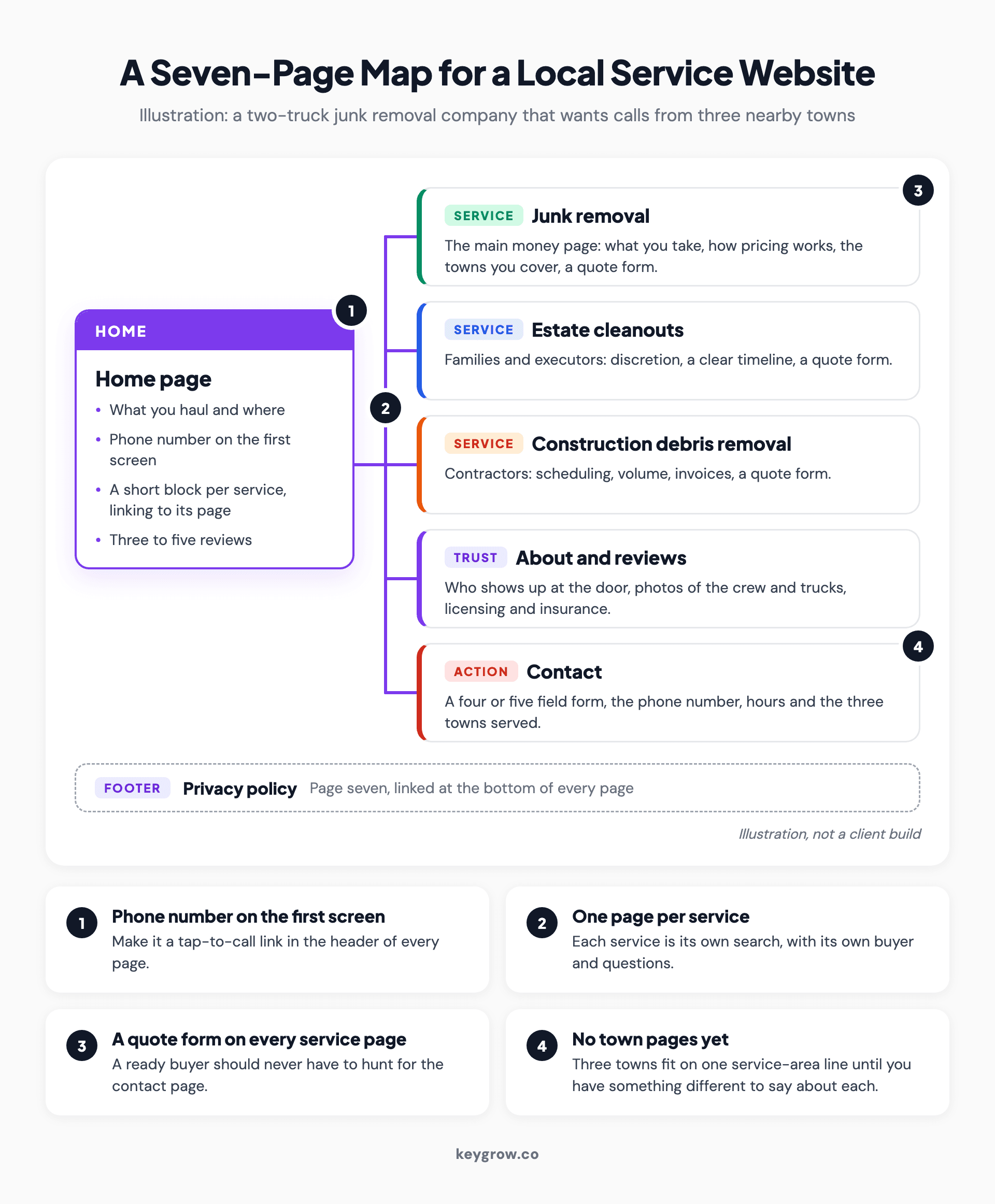
Annotated page map of a seven-page small business website for an illustrative junk removal company: a home page linking to three service pages for junk removal, estate cleanouts and construction debris, plus about and reviews, contact, and a privacy policy in the footer, with notes on phone numbers, quote forms and service areas.
A junk removal client of ours shows why the map matters. Their old site was cluttered, had no dedicated service pages and left visitors unsure what to do next. The rebuild gave junk removal, hoarder property cleanouts and disaster cleanup a page each, with a "Get a Quote" form throughout. Lead form submissions rose 180 percent within 8 weeks.
Phase 4: Build it for phones and screen readers
Build every page for a phone first. Then meet Google's Core Web Vitals targets and fix the six accessibility errors that turn up on most home pages.

A hand holding a smartphone, the screen most customers will use to check out a small business website.
Expect a lot of visitors to arrive on a phone, often from a driveway or a parking lot. Make the number in the header a tap-to-call link and keep the quote form short enough to finish with a thumb.
Speed has published targets. Google counts a page as good when the main content loads within 2.5 seconds, the page responds to a tap within 200 milliseconds, and the layout barely shifts while loading (a CLS score of 0.1 or less). Test the home page and one service page in PageSpeed Insights on mobile before launch. The fix we make most often on small business sites is shrinking photos that went up straight from someone's phone.
Accessibility is the step most build guides skip, and the basics fit on one list. WebAIM's 2026 scan of the top million home pages found detectable WCAG failures on 95.9 percent of them, an average of 56.1 errors a page. Six error types made up 96 percent of everything it found.
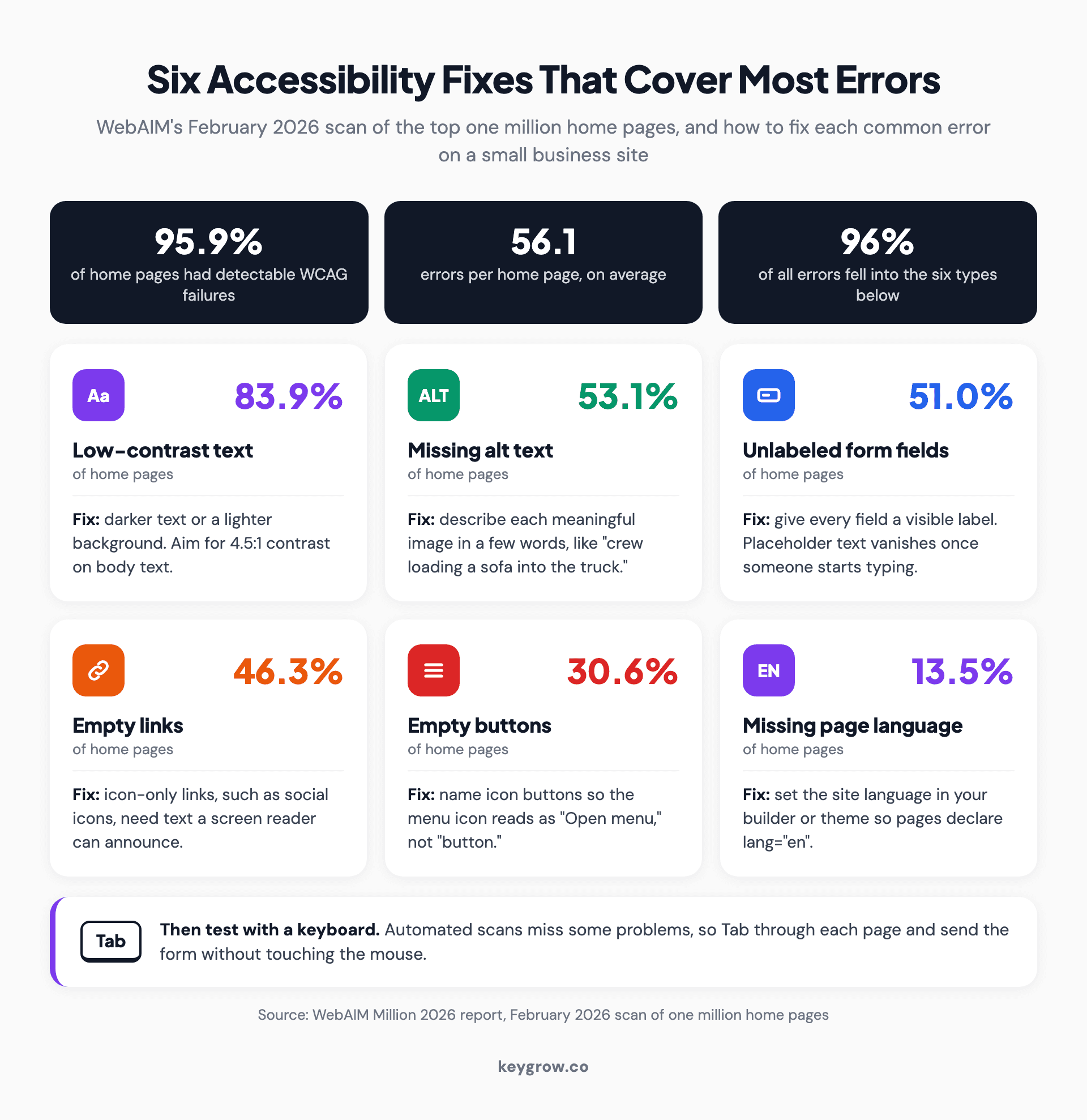
Icon grid of the six most common accessibility errors on home pages in WebAIM's 2026 scan, with the share of pages affected and the fix for each: low-contrast text 83.9 percent, missing alt text 53.1 percent, unlabeled form fields 51 percent, empty links 46.3 percent, empty buttons 30.6 percent and missing page language 13.5 percent.
Whoever builds the site can fix all six on any platform. There's a legal angle too: the Justice Department says the ADA applies to what businesses offer on the web and points to WCAG as the guide, although it hasn't issued a detailed rule for businesses. Automated scans miss some problems, so also try each page with a keyboard alone: Tab through it and send the form without touching the mouse.
Phase 5: Connect Google, forms and calls before launch
Before launch, link your Business Profile, submit a sitemap, track forms and calls, and post a privacy policy. Then test everything from a phone.

A man at an office desk taking a call on a landline and writing the details on a form, the kind of inbound call a small business website should track.
A site nobody can find, sending leads nobody can count, is a brochure. Five jobs before launch day:
- Link your Google Business Profile. Add the site's URL to the profile's website field, and make sure the business name, street address and phone number match the site exactly. Google switched off the free sites it used to build from Business Profiles in 2024, so the profile needs a real website to point to.
- Verify Search Console and submit a sitemap. Google calls a sitemap "merely a hint," but Search Console is where indexing problems show up first. Bing Webmaster Tools can import the same setup.
- Track forms and calls. In Google Analytics, send form submissions to a thank-you page, create an event for visits to it and mark it as a key event, Google's current name for a conversion. Do the same for taps on your phone number.
- Put a call tracking number on the website only. Keep your main local number on your Business Profile and in directories, so the tracking number tells you which calls came from the site.
- Post a privacy policy and link it in the footer. A contact form collects names, emails and phone numbers. California's online privacy law, CalOPPA, requires commercial sites that collect that from California residents to post a privacy policy, wherever the business is based. Google Analytics' terms also require a policy that discloses its cookies.
Then test it the way a customer would. On a phone, over cellular data, send the form, tap the number, and check that the lead lands somewhere a person will see it the same day.
What happens after launch?
Launch starts the clock. Spend the first three months checking that leads arrive and letting customer questions decide what you add next.
Google won't send traffic on day one. Its own documentation says crawling "can take anywhere from a few days to a few weeks," and rankings for a lead site build over months after that. Judge the site on calls and form fills, not visits.
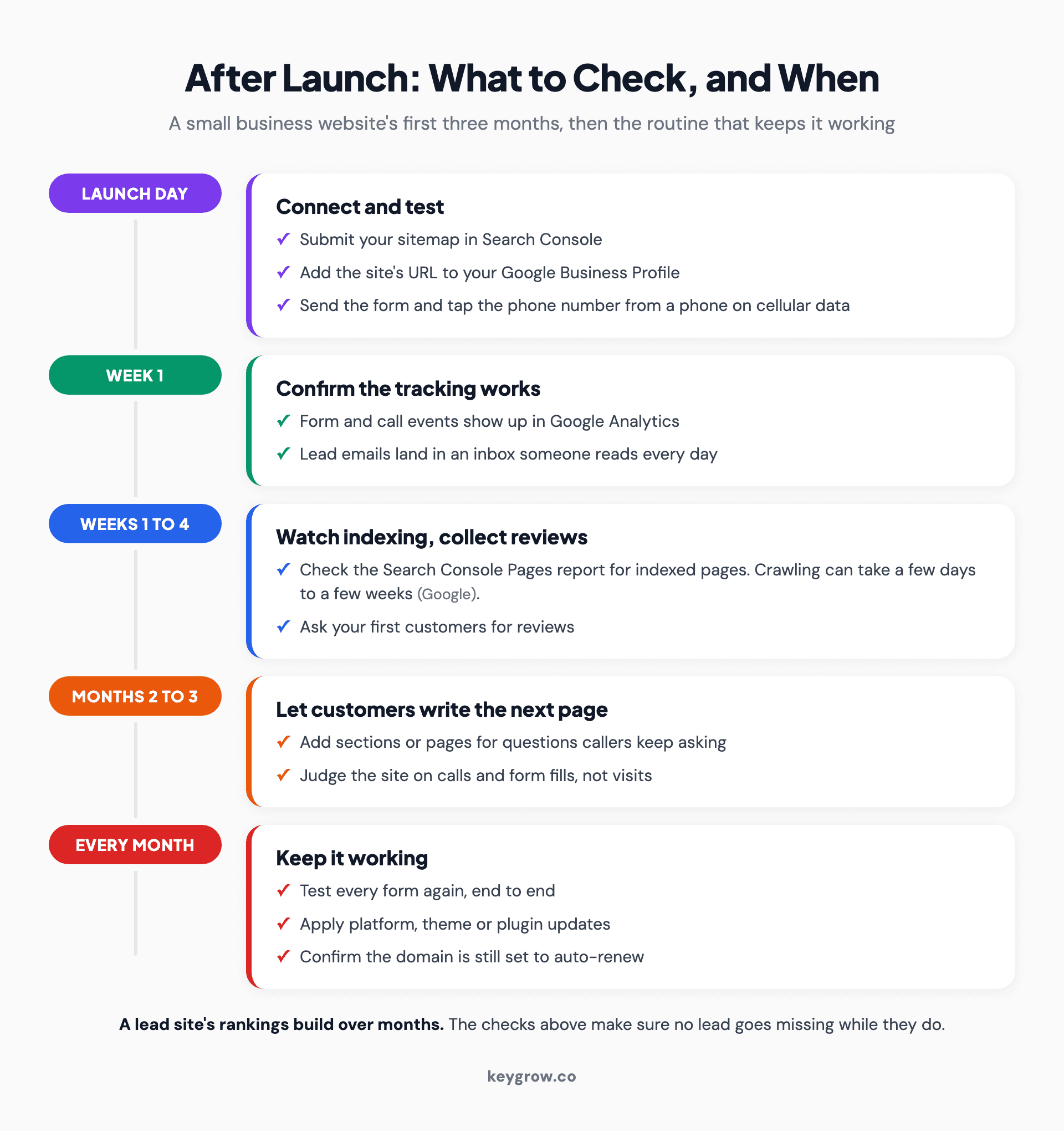
Timeline of what to check after launching a small business website: on launch day submit the sitemap, link the Business Profile and test the form and phone number; in week one confirm tracking; in the first month watch indexing and ask for reviews; by month three add pages for real customer questions; every month retest forms and apply updates.
The first month is mostly checking. Confirm the form and call events fire, read the Search Console Pages report to see what got indexed, and ask your first customers for reviews. After that, your callers write the to-do list. If three of them in a month ask about old hot tubs, that's a new section on the junk removal page.
Keep up the dull work as well: forms tested monthly, the builder plan or plugins updated, the domain renewed. Our website maintenance checklist sorts those jobs by what breaks. For a lead site, launch is also when small business SEO begins.
FAQs
How much does it cost to build a website for a small business?
About $300 to $500 for the first year if you build it yourself on a website builder, according to Upwork's 2026 cost guide. A freelancer-built business site typically runs $2,000 to $8,000 or more, and a mid-sized agency build $5,000 to $20,000. Domain, hosting and upkeep continue after launch.
How long does it take to build a small business website?
In GoodFirms' 2026 survey, 71 percent of firms put a basic site at 2 to 4 weeks, and half put a mid-sized site at 4 to 8 weeks. A builder site can go live faster if the copy and photos are ready. Content is usually what holds a launch up, not the build.
How many pages should a small business website have?
Five to seven covers most local service businesses: a home page, one page per main service, an about page with reviews, a contact page and a privacy policy. Add pages when you add a service or keep hearing the same customer question.
Can I make a website for a small business for free?
You can start on a free builder plan, but free plans usually put the builder's name in your web address and its ads on your pages. For a business, budget for a paid plan and your own domain from the first day.
Can my Google Business Profile be my website?
Not anymore. Google turned off the free websites it built from Business Profiles in March 2024, and their redirects stopped in June 2024. A complete profile can carry a referral business for a while, but it can't hold a page for every service, so build a site on your own domain and add its URL to the profile.
Launch the small version first
Start with the pages you need this month, not the ones you might need next year. Get the domain in your name, make the phone number tappable, test the form, and launch. Then watch which calls come in and what people ask, and build the next page from that. A five-page site that's live and tracked beats a fifteen-page plan still waiting on copy.
If you'd rather have it built, our web development team builds lead sites for local businesses. We'll also tell you when a builder site will do the job for now.



