


It is 7:40 on a Tuesday night and a water heater has just let go in a basement. The homeowner is standing in an inch of water with her phone in one hand, searching for an emergency plumber. She opens three sites. She will call one of them inside two minutes, and on none of them will she read much more than a headline and a button.
That is the whole job of a lead generation website: a site where every page is built to turn that visitor into a call, a form or a booking, and where each of those actions is tracked back to the page and the source that produced it. A brochure site describes the business. A lead generation website makes the phone ring and can tell you which page did it.
Below, the page is taken apart zone by zone, in the order a visitor meets it, with the mistakes we find most often in audits. A 10-point scorecard closes it out.
What makes a website a lead generation website?
A lead generation website gives every page one main action, removes whatever competes with it, and measures each call and form back to its source.
Most small business sites were built to exist. They have a homepage, an about page, a services page that lists eleven things in one paragraph, and a contact page with a form that emails someone who left the company in 2021. That brochure is fine for people who already decided to hire you. It does very little for the stranger with water on the floor.
| Brochure website | Lead generation website | |
|---|---|---|
| Main job | Describe the business | Produce calls, forms and bookings |
| Calls to action | "Contact us" on one page | One clear action on every page |
| Service pages | One page listing everything | One page per service |
| Proof | A testimonials page nobody visits | Reviews and credentials beside the button |
| Phone number | In the footer | Tap-to-call in the header on mobile |
| Measurement | Visits, maybe | Every lead traced to a page and source |
| Judged by | How it looks | Cost per lead and booked jobs |
Zone 1: The first screen does four jobs
Before anyone scrolls, the first screen has to say what you do, where, how to reach you, and why you rather than the next tab.
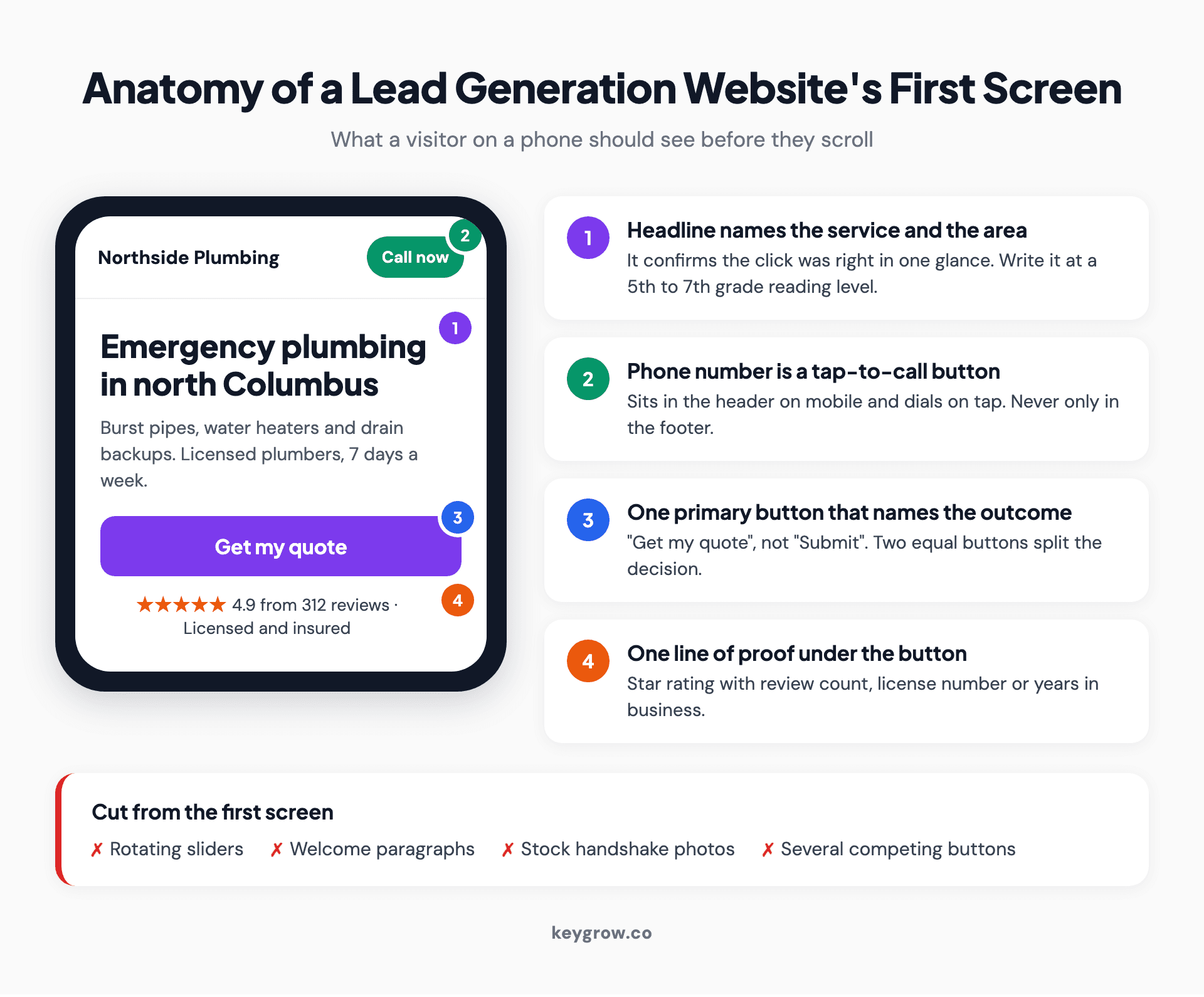
Annotated mockup of a lead generation website's first screen on a phone: a headline naming the service and area, a tap-to-call button in the header, one Get my quote button, and a review proof line, with sliders, welcome paragraphs, stock photos and competing buttons marked as cuts.
The headline names the service and the area. "Emergency plumbing in north Columbus" beats "Quality you can trust" every time, because it confirms the click was right. Write it like a text message. In Unbounce's 2024 benchmark of more than 41,000 landing pages, copy at a 5th to 7th grade reading level converted at 11.1 percent, 56 percent higher than copy at an 8th or 9th grade level. You can check your own copy with our free readability score checker.
The phone number is a button. On mobile it sits in the header and dials on tap.
Then one primary button, with a label that says what happens next: "Get my quote", "Book a cleaning", "Check my eligibility". Two equal buttons split the decision. Five of them cancel it.
Right under the button, one line of proof: a star rating with the review count, a license number, years in business.
Cut the rotating slider and the welcome paragraph. Nobody has ever been moved to call by "Welcome to our website."
Zone 2: Proof goes beside the ask
Trust signals work when they sit next to the decision they support, so place reviews, credentials and real job photos where the visitor is about to act.
The common mistake is a testimonials page. People looking for reassurance do not go hunting for it, so it gets almost no visits.
What counts as proof depends on the trade. For a contractor it is photos of real jobs, the license number and a named review that mentions the neighborhood. For a law firm it is case results phrased within the bar's advertising rules, the attorney's own face and bar admissions, which is most of what personal injury law firm website design comes down to.
In every trade, specific beats glowing. "They came out the same afternoon and fixed the leak under the sink for $180" does more work than "Amazing service, highly recommend," and a review with a first name and a town beats a row of association badges.
Zone 3: One service, one page
Each service you want leads for needs its own page, with its own headline, proof, questions and form, so the visitor and the search engine both see a clear match.
A single "Services" page listing everything you do cannot rank for any of it, and it cannot speak to the person who only needs one thing. This is the core of good plumbing website design: a page for each job people actually search for, each one with its own call to action.
We saw this play out with a junk removal company in Missouri. Their old site was cluttered, had no dedicated service pages and gave visitors no obvious next step. We rebuilt it with separate pages for junk removal, hoarder property cleanouts and disaster cleanup, each carrying a prominent quote form. In 8 weeks, lead form submissions rose 180 percent and pages per session went from 1.2 to 3.8. The full numbers are in the Easy Cleanouts website redesign case study.
It was a WordPress build, nothing exotic. People worry a lot about which platform is "best for leads". The platform is rarely the problem. Structure is.
Zone 4: Speed, on the phone in their hand
Most visitors arrive on a phone, often on a weak signal. A slow mobile page loses them before your headline has even loaded.

A man standing by a window looking at a website on his smartphone.
Mobile made up 83 percent of the visits in the Unbounce data. Desktop still converted about 8 percent better, which tells you the mobile experience is where the leads leak.
Speed has the clearest evidence of any fix here. In a study Google commissioned from Deloitte and 55, covering more than 30 million mobile sessions across 37 brand sites, a 0.1 second improvement in load speed led to a 21.6 percent increase in users who progressed to the form submission page on lead generation sites. The details are in the Milliseconds make millions write-up.
The usual causes are boring: uncompressed photos straight off a phone, a theme loading scripts for features you never used, and a video background. Our build target is a page that loads in under 2 seconds and scores 90 or higher on Google PageSpeed Insights. Test your busiest page on the mobile setting, not desktop.
Zone 5: The form
A lead form should ask for only what you need to make the first contact useful, show what happens after submitting, and make the button say what it does.
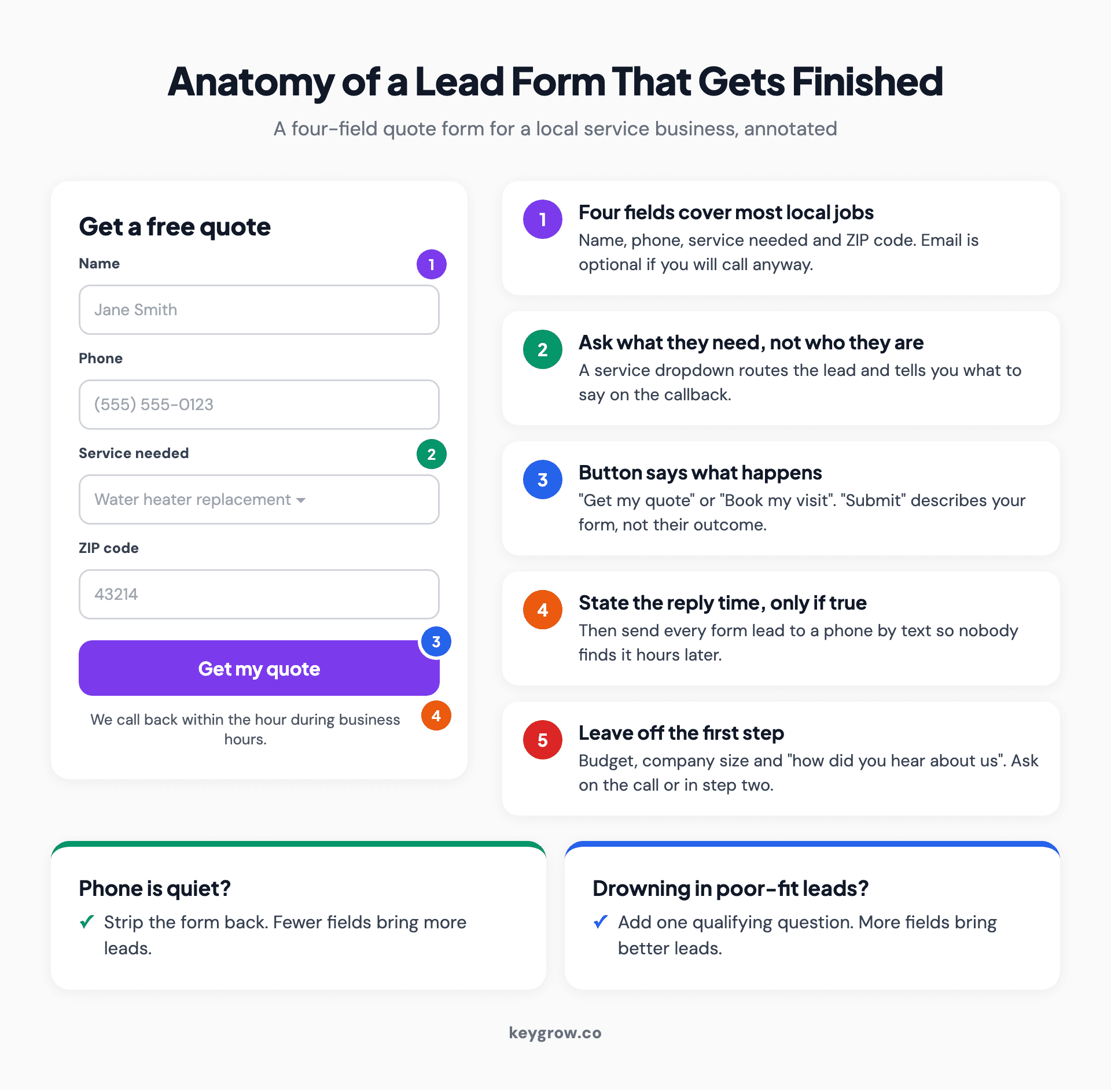
Annotated mockup of a four-field lead capture form (name, phone, service needed, ZIP code) with a Get my quote button and a reply-time line, plus the trade-off that fewer fields bring more leads and more fields bring better leads.
For most local service businesses, four fields cover it: name, phone, the service they need and their ZIP code or address. Email is optional if you will call anyway.
Here is the trade-off most guides skip. Fewer fields bring more leads, and more fields bring better ones. If your team is drowning in tire-kickers, adding one qualifying question (timeline, property type, insurance or self-pay) is a sensible filter. If the phone is quiet, strip the form back. Decide which problem you have before you touch it.
Name the button after the outcome ("Get my quote", not "Submit") and say under it what happens next, but only if it is true. For longer jobs, a multi-step form with easy questions first and contact details last tends to get finished.
Zone 6: What happens after the click
A site has done its job only when the lead reaches a person who replies, and you can only see that if every call and form is tracked.

A man in an office talking on the phone with a customer while working at his computer.
Most sites we audit know how many visitors arrived and nothing about how many became leads. Fixing that takes a thank-you page after every form (so a completed form is a countable event), call tracking so phone leads get counted, and conversions set up in Google Analytics and in any ad account sending traffic. Our guide to conversion tracking setup walks through the Google Ads side of it.
Then there is the human part, which no plugin fixes. Send form leads to a phone by text, not only to an inbox. Someone with water on the floor who submitted a form at 7:40 and heard nothing has called the next plumber by 7:50.
Does a lead generation website still need landing pages?
Yes, for paid traffic. Your site serves people who found you on their own; ads deserve a dedicated page that matches the ad and has one action.
A visitor from a Google ad already told you what they want. A landing page matches that promise, drops the menu and asks for one thing. We covered the routing rule in detail in landing page vs homepage.
For a sense of what "good" looks like: the median landing page in the Unbounce benchmark report converted at 6.6 percent across all industries. If your paid traffic lands on the homepage and converts at 1 percent, you have found the first thing to fix.
What does a lead generation website cost?
Our one-time website plans run from $1,400 for a site of up to 6 pages to $5,600 for sites of 30 or more pages, with copywriting included.
| KeyGrow plan | Price (one time) | Size | Included in every plan |
|---|---|---|---|
| Business Website | $1,400 | Up to 6 pages | Professional copywriting, WordPress build, SEO foundations, speed optimization |
| Premium Website | $2,800 | Bigger sites | Same as above |
| Enterprise Website | $5,600 | 30 or more pages | Same as above |
Most sites take 6 to 8 weeks from discovery to launch, and simple brochure-size sites 4 to 5 weeks. Every project includes 30 days of post-launch support for bug fixes and small changes. Plan details are on our website design and development page, and our guide to how much a website costs covers market ranges if you want to compare.
The other meaning: sites built to sell leads
Some people searching this phrase mean something different: a site built to rank for a trade and a city, whose leads are then sold or rented to a local business.
That model works for some people. If you are the business buying those leads, the catch is ownership: leads from a site you do not control can be shared with competitors or switched off. The same build-or-buy question comes up in insurance lead generation, where agents weigh buying leads against owning a channel. Our answer is the same in both: buy if you need volume this month, and build the asset you own alongside it.
When you do not need a new website
If your site is already fast, works on a phone and tracks leads, a rebuild will not fix a traffic problem; spend the money getting found instead.
A rebuild solves conversion problems, and it does nothing for "nobody visits." A handful of visits a week on a beautiful new site is still a handful of visits. Fill out your Google Business Profile and ask every happy customer for a review first.
If your site is decent but leaky, you can fix a lot yourself in an afternoon. Make the phone number tap-to-call, cut the form to four fields, put three real reviews beside the button, and add a thank-you page so you can count completions. None of that needs an agency. Hire help when the site is slow, everything lives on one page, or you are about to spend real money on ads.
FAQs
What is a lead generation website?
A lead generation website is a site built to turn visitors into contactable prospects through calls, forms or bookings. Every page has one main action, proof sits beside it, and each lead is tracked back to the page and source that produced it.
How is a lead generation website different from a landing page?
A landing page is one page with one goal, usually built for one campaign. A lead generation website is the whole site working toward leads, with a page per service and tracking on every form and call. Businesses that run ads usually need both.
How many form fields should a lead form have?
For most local service businesses, three to four fields is enough: name, phone, service needed and location. Add a qualifying question only if lead quality is the problem, because every extra field trades some volume for better leads.
What is a good conversion rate for a lead generation website?
Unbounce's 2024 benchmark put the median landing page conversion rate at 6.6 percent across industries. A full website usually converts lower, so compare each page against its own past numbers.
How long does it take to build a lead generation website?
Most small business sites take 6 to 8 weeks from discovery to launch. Simple sites of a few pages take 4 to 5 weeks.
Can I build a lead generation website myself?
Yes, if you have the time and a clear list of services. The zones in this guide apply to any builder or theme. The parts people most often get wrong on their own are page speed and conversion tracking.
Score your own site
Open your site on your phone, on mobile data, and score one point for each item you can tick honestly.
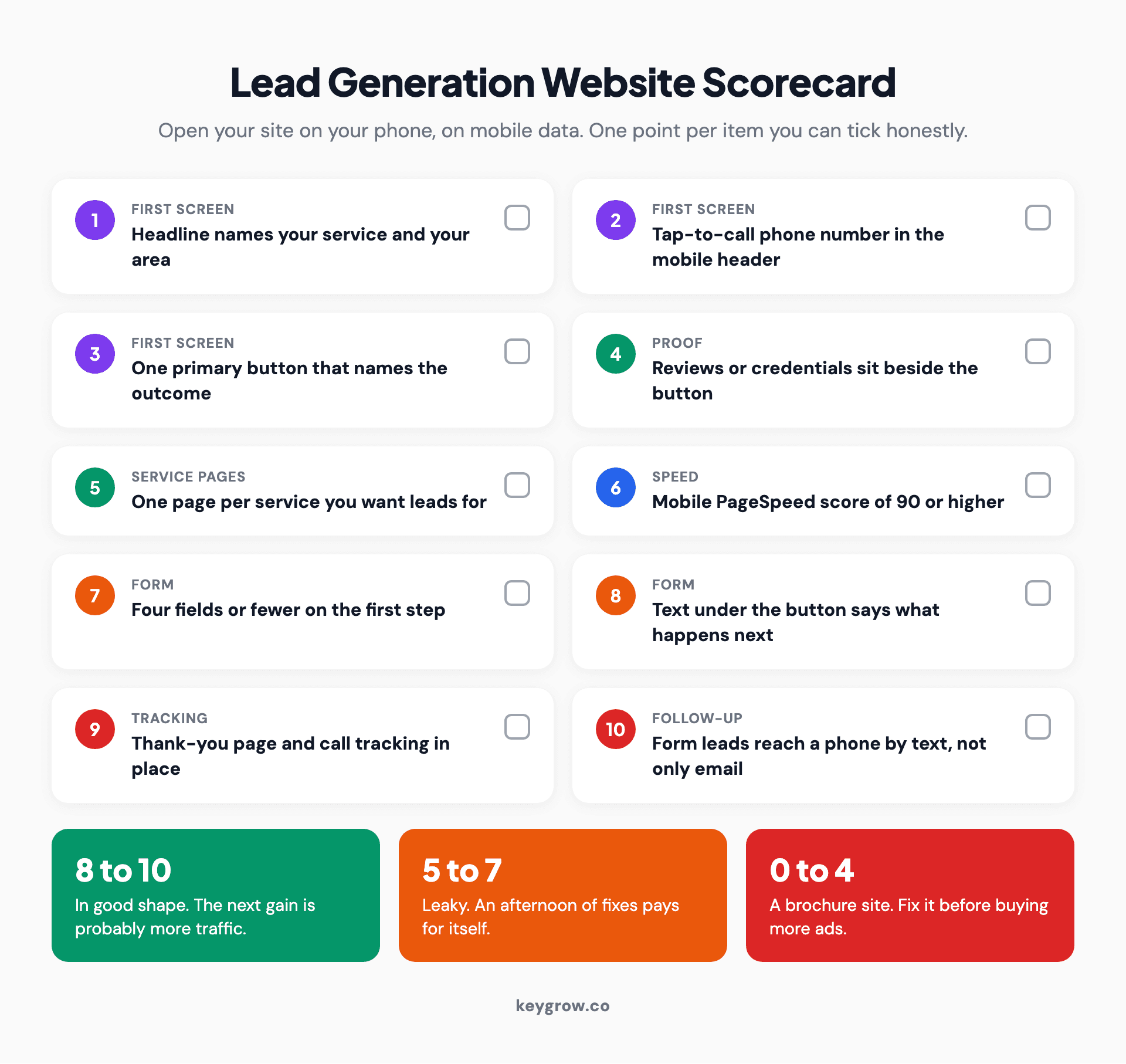
Ten-point lead generation website scorecard: service-and-area headline, tap-to-call header number, one outcome-named button, proof beside the button, one page per service, mobile PageSpeed score of 90 or higher, four form fields or fewer, next-step text under the button, thank-you page and call tracking, and form leads sent to a phone by text, with score bands of 8 to 10, 5 to 7 and 0 to 4.
A score of 8 or more means your site is in good shape and the next gain is probably traffic. A score of 5 to 7 means an afternoon of the fixes above will pay for itself. Under 5, the site is a brochure, and no amount of ad spend will make it behave like a lead generation website.
If you would like a second opinion on your score, or want the rebuild done for you, tell us about your site and we will tell you honestly which fixes matter first.



