

Here is the part almost every guide buries: the way to optimize your website URL structure for SEO is to fix the few things that genuinely matter, leave most URLs alone, and treat any URL change as a small migration with real risk. Clean URLs help people and crawlers understand a page. They barely move rankings on their own. Google's own John Mueller has said URL length is not a ranking factor, just a light signal for picking which duplicate to index.
So if you came here looking for twelve cosmetic rules that will lift your traffic, the honest version is shorter and less exciting. A handful of rules matter. The bigger skill is deciding whether to touch an existing URL at all, because a botched change costs far more traffic than a slightly-too-long URL ever could.
Let's get practical.
Does your URL structure actually affect rankings?
The short answer: barely, and not the way most guides imply. URL structure mostly helps users and crawlers read your page, which is different from ranking you higher.
Google treats the URL as an identifier for a page, not a place to earn ranking points. In a statement reported by Search Engine Roundtable, Mueller described URL length as only a very light signal used during canonicalization, the process of choosing which version of a duplicate page to keep. Shorter URLs looking "better for SEO" is a side effect of that, not a ranking reward.
The correlation studies get quoted out of context. In an analysis of 11.8 million results, Backlinko found that position-one URLs were on average 9.2 characters shorter than position-ten URLs, with the average top-ten URL sitting around 66 characters. The authors call it a very slight correlation, not a strong ranking effect. Pages that rank well tend to be older, better-linked, and from tidier sites, and tidier sites tend to have shorter URLs. The URL is a symptom of good site hygiene, not the cause of the ranking.
Here's the reality. A clean URL earns you three things: a human can read it and trust the link before clicking, a crawler can understand your site's shape, and a future migration is easier because the structure is sane. None of those is "a higher ranking from the URL itself." Keep that distinction and you will stop wasting weekends renaming pages.
What a search-friendly URL really looks like, piece by piece
A search-friendly URL is short, lowercase, readable, served over HTTPS, and built from words instead of ID numbers. Break it into parts and it gets concrete.
Take a sensible blog URL: https://example.com/blog/url-structure-tips. The pieces are the protocol (https://), the domain (example.com), the path (/blog/), and the slug (url-structure-tips). The protocol should be HTTPS. Per W3Techs data, HTTPS is now the default for 90.1 percent of all websites as of June 2026, which makes it a baseline expectation, not an edge.
The path tells crawlers and humans where the page sits. The slug describes the page in a few real words. Google's own guidance, in its URL structure docs, recommends descriptive words over long ID numbers, hyphens to separate words, and percent-encoding for any non-ASCII characters.

A marketer working at a desk in a bright daylight office, reviewing a website and dashboard on a large monitor
What a search-friendly URL is not: a string of numbers (/p?id=8842), a category buried five folders deep, a slug with spaces or capitals or special characters, or a session ID glued to the end. Those still get indexed. They just read worse to a person deciding whether to click.
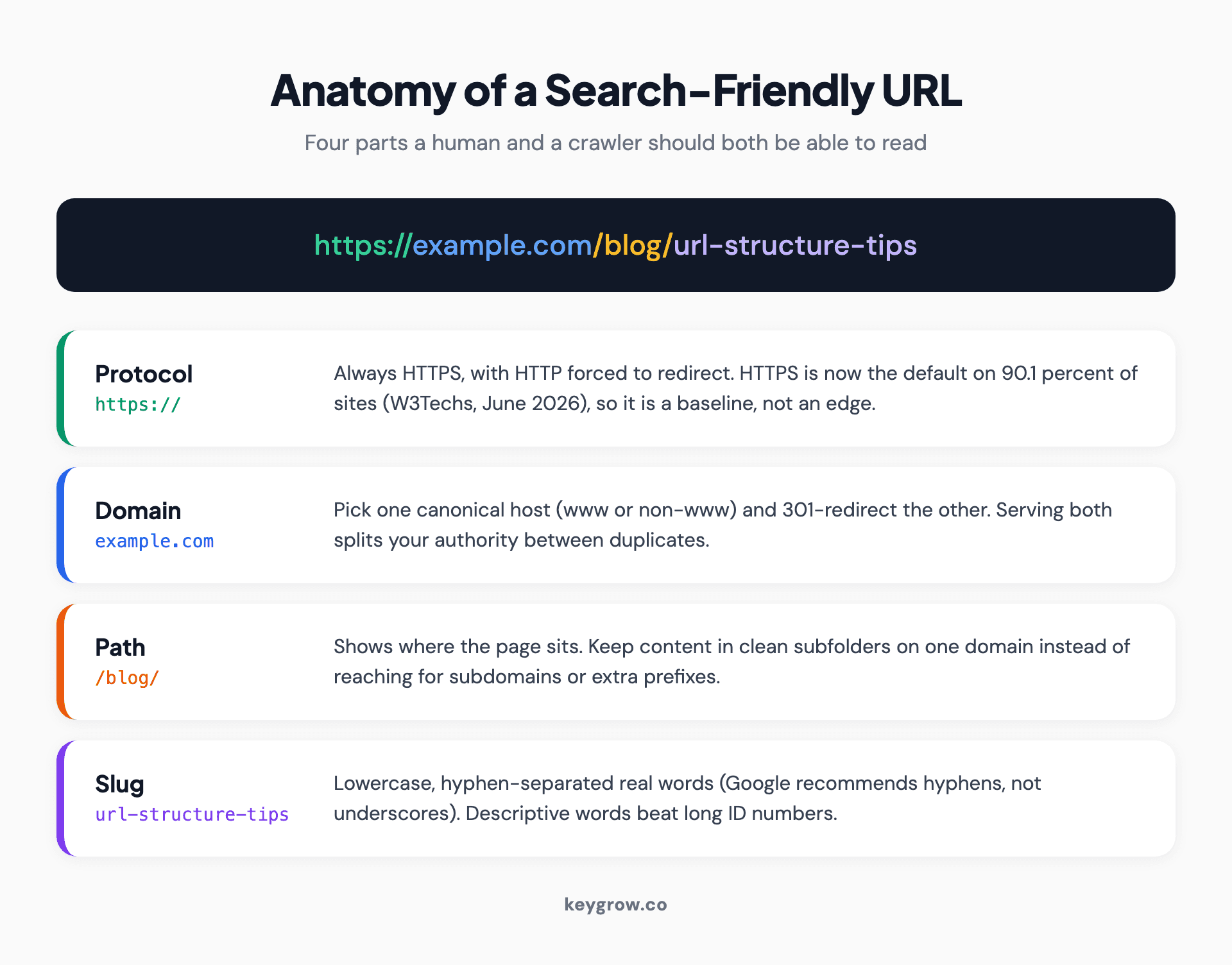
Anatomy of a search-friendly URL labeling the protocol, domain, path, and slug with HTTPS and descriptive words
Which URL rules genuinely matter, and which are just tidy
Most "URL best practice" lists mix two very different things: rules that prevent real SEO problems, and rules that just look neat. Sort them and the work gets shorter.
The rules that genuinely matter, because they prevent duplicate content, broken links, or crawl confusion:
The rules that are just tidy, nice to follow on new pages, not worth retrofitting old ones:
A strong opinion, backed by a number: chasing the tidy list on existing pages is one of the worst trades in SEO. The same Backlinko study that gets cited to justify short URLs only found a 9.2-character difference between top and bottom of page one. That is not worth the risk of a redirect you implement wrong. Spend the time on a technical SEO site audit instead, where the wins are real.
Hyphens, lowercase, stop words and length: the small stuff, settled with evidence
Use hyphens, keep it lowercase, drop unnecessary stop words, and stop worrying about exact character counts. That settles four of the most-asked URL questions in one line.
Hyphens, not underscores. This one is not opinion. Google's URL structure documentation explicitly recommends hyphens to separate words, because Google reads red-shoes as two words and red_shoes as one token. Use hyphens.
Lowercase only. Servers can treat /Page and /page as two different URLs, which creates accidental duplicates. Force lowercase at the server or CMS level and the problem disappears.
Stop words. Dropping "the", "a", and "of" makes a slug shorter and no worse. Keep them only when removing them changes meaning. The slug how-to-train-a-dog reads fine; how-train-dog reads like a telegram.
Length. There is no magic number. The Backlinko average of 66 characters is a description of what ranks, not a rule you must hit. Aim short because short URLs are easier to read and share, then move on. Mueller's point stands: length is not a ranking factor.
Trailing slashes and www vs non-www: pick one and enforce it
Pick one trailing-slash convention and one host (www or non-www), then redirect every other version to it. The goal is one canonical address per page so you never split signals between duplicates. Almost every competing guide skips this, and it is where real duplicate-content problems start.
Trailing slashes. To a server, /page and /page/ can be two distinct URLs serving identical content. Google usually figures out the canonical, but "usually" is not a strategy. Choose one form, set up a 301 redirect from the other, and make sure your internal links and your XML sitemap all use the chosen form. Most flat-file and blog setups use no trailing slash on pages; many platforms add one to directory-style paths. Either is fine. Consistency is the rule, not the specific choice.
www vs non-www. The address https://www.example.com and the address https://example.com are technically different hostnames. Pick one as canonical, redirect the other with a 301, and declare your preference everywhere: internal links, canonical tags, sitemap, and any hardcoded references. There is no SEO advantage to www or to the bare domain. The advantage is in choosing one and never serving both.

Close-up of hands resting near a laptop keyboard while working on a website in the browser
The failure mode is subtle. If half your inbound links point at the www version and half at the bare domain, and both resolve without redirecting, you have effectively two copies of your site sharing one pool of authority. Consolidating them is one of the cleaner wins in a technical audit, and it is the kind of thing that makes a planned website redesign without losing SEO go smoothly instead of sideways.
Subfolders, subdomains or ccTLDs: how to choose your structure
For most sites, put content in subfolders on one domain. Reach for subdomains only when there is a real technical or organizational reason, and use country-code domains only when you are seriously committed to specific countries.
Subfolders (example.com/blog/) keep all your content under one domain, sharing one authority profile. That is the default, and for the vast majority of sites it is the right call. A blog, a help center, and a store can all live in subfolders and feed the same domain.
Subdomains (blog.example.com) are treated by Google as part of the same site in most respects today, so the old "subdomains tank your SEO" panic is overstated. But they add operational overhead: separate analytics, separate technical configs, sometimes authority that is slower to build. Use a subdomain when there is a genuine reason, such as a separately hosted app, a store on a different platform, or a region that needs isolation.
For international sites, Google's URL structure documentation recommends either country-specific domains (example.de) or country and language subdirectories (example.com/de/), and advises using the audience's own language in the path. Country-code domains carry the strongest geo-signal and the highest cost, since you maintain and build authority for separate domains. Subdirectories are cheaper and inherit your main domain's authority, which is why they are the common starting point.
When is a fancy structure not worth it? If you run one site for one country, this entire decision is noise. Put your pages in subfolders and spend the saved hours on content and links.
Handling parameters, filters and faceted navigation without creating duplicate-content chaos
Decide which URLs deserve to be indexed and which are just filtered views, then canonicalize, noindex, or block the rest. This is the part of URL strategy that actually breaks ecommerce sites, and most guides wave at it.
Query parameters are the key-value strings on the end of a URL after a question mark, such as ?color=blue, ?sort=price, or ?utm_source=email. They are not evil. Left uncontrolled, though, they spawn thousands of near-duplicate URLs from a handful of real pages. A filtered category page with five filter options can generate an explosion of crawlable URLs that all show slight variations of the same products.
Here's the pattern in practice:
1. Tracking parameters (UTMs and similar): canonicalize the clean URL. The parameter version should carry a canonical tag pointing at the parameter-free page. These add nothing to the index.
2. Filter and sort parameters that produce near-duplicate listings: canonicalize to the main category, or noindex the filtered views, so you do not flood the index with thin variations.
3. Filters that create genuinely useful landing pages (a popular brand-plus-category combination people actually search): give those a clean, static, indexable URL on purpose, and let them rank.
4. Faceted combinations no one searches: block them from crawling once you have set canonicals, so crawl budget goes to pages that matter, not to a string like ?color=blue&size=4&sort=newest.
The principle underneath all four: clean path segments (/shoes/running/) are for pages you want indexed and ranking. Parameters are for states and filters you mostly do not. Keeping that line clear is what keeps a large catalog from drowning its own important pages, and it connects directly to whether your sitemaps are doing their job, since your sitemap should list only the canonical, indexable versions.
Editing the slug in WordPress, Shopify, Squarespace and Webflow
Every major CMS lets you edit the slug, but some lock the folder prefix, and that constraint should shape your expectations before you start renaming.
WordPress. Edit the slug in the post or page editor under the title (the "Permalink" field), and set your global pattern under Settings, Permalinks. Choose a clean structure like Post name once and leave it. When you change a published post's slug, WordPress does not always add a redirect, so install a redirect plugin or add the 301 yourself.
Shopify. You can edit the URL handle on products, collections, and pages, but Shopify forces prefixes you cannot remove: products live under /products/, collections under /collections/. That is a platform constraint, not an SEO problem, and it is the same for every Shopify store, so do not fight it. Shopify does create an automatic redirect when you change a handle, which is one thing it gets right.
Squarespace. Edit the URL slug in a page's settings. Like other platforms it applies certain collection prefixes (blog posts, products) depending on your setup. Check whether changing a slug creates an automatic redirect on your plan, and add one manually if it does not.
Webflow. Edit the slug in page settings or in a Collection item. Webflow adds 301 redirects automatically when you change a static page slug, and lets you manage redirects in site settings. Collection URLs follow the Collection's URL pattern, which you set once at the Collection level.
The gotcha worth repeating: some platforms lock the prefix (/products/, /collections/, /blog/). You cannot flatten those, and you should not try. Work within the structure your CMS gives you and put your effort into clear, stable slugs.
Should you change an existing URL? A leave-it-or-change-it framework
Default to leaving it alone. Only change an existing URL when the upside is concrete and the current URL is causing a real problem, because every change carries migration risk that usually outweighs a cosmetic gain.
Run any proposed change through this:
Leave it alone when:
Consider changing when:
The asymmetry is the whole point. A slightly-too-long URL costs you almost nothing, per the studies above. A redirect chain you forgot to clean up, internal links you never updated, or a canonical you left pointing at a dead address can cost you rankings for months. When in doubt, leave it.
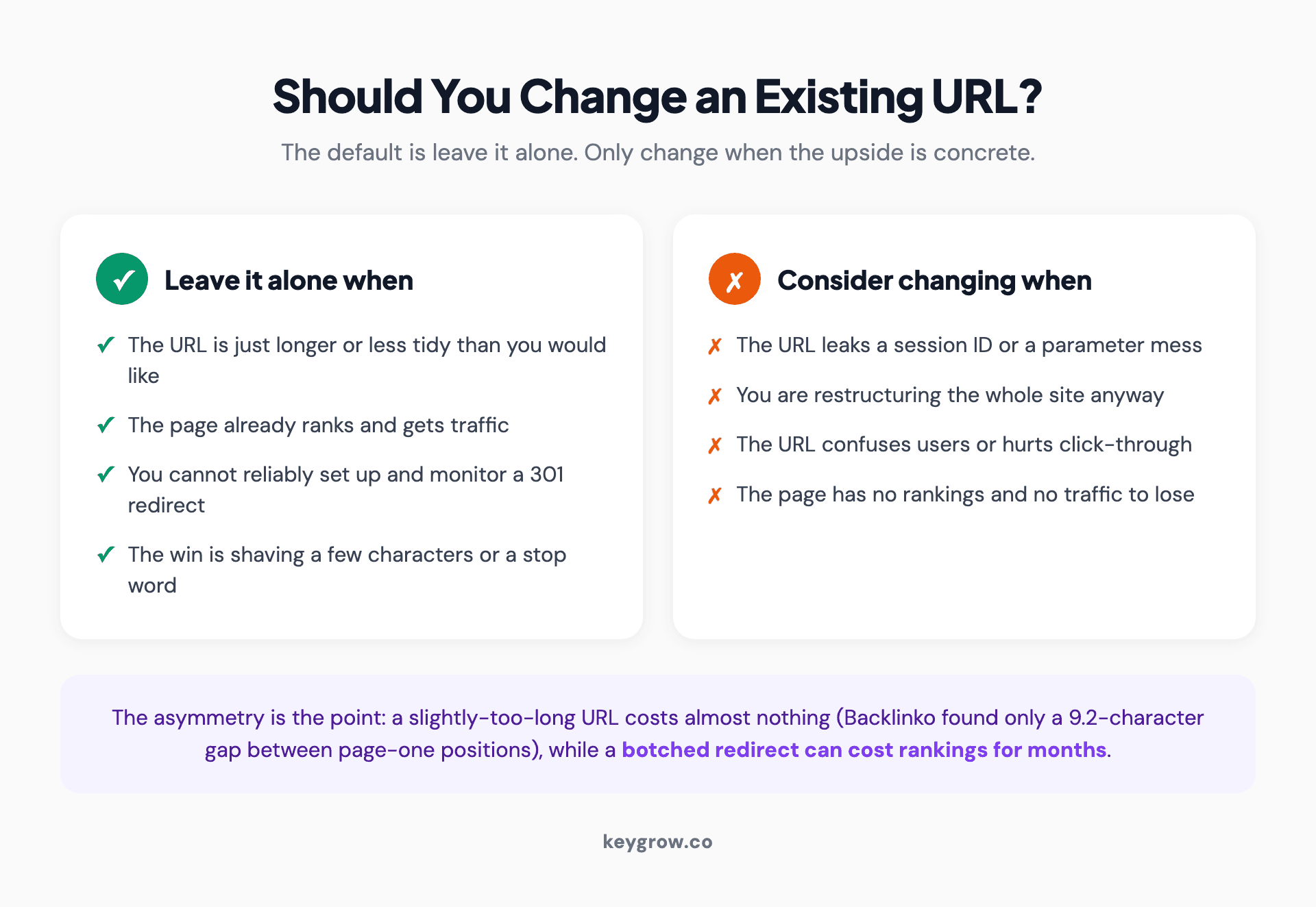
Leave it or change it decision flow for an existing URL with four leave signals and four change signals
How to change a URL the right way: the 301 migration playbook
If you have decided a change is worth it, treat it as a mini migration: map old to new, redirect with 301s, update every internal reference, then monitor. Skipping any step is how URL changes lose traffic.
1. Map old to new. Build a spreadsheet with every old URL and its exact new destination. One row per URL. No "I'll redirect the rest to the homepage" shortcuts, since redirecting unrelated pages to the homepage tells Google the old page is gone, not moved.
2. Implement 301 redirects. A 301 is a permanent redirect and it passes the large majority of link equity. Use 301, not 302 (temporary), for permanent URL changes.
3. Avoid redirect chains. A chain is old URL to middle URL to final URL. Each hop wastes crawl budget and dilutes signals. Always redirect the original URL straight to the final destination in one hop. If you migrate twice over the years, update the original redirect to point at the newest URL, not at the previous redirect.
4. Update internal links. Change your menus, in-content links, buttons, and footers to point at the new URL directly. Internal links should never rely on the redirect; that is sloppy and slow.
5. Update canonicals and the sitemap. Point canonical tags at the new URLs and submit a fresh XML sitemap listing only the new, canonical addresses. Remove the old URLs from the sitemap.
6. Keep the redirects in place. Do not delete 301s after a month. External links and bookmarks keep hitting the old URLs for years, so the redirects stay.
This is exactly the discipline a careful redesign uses, and the same playbook scales from one URL to ten thousand. The mechanics do not change. Only the size of the spreadsheet does.
How to confirm it worked in Google Search Console
Check that Google has indexed the new URL, selected your intended canonical, and that traffic held steady, all of which Search Console shows for free. A URL change is not done when the redirect fires; it is done when Search Console confirms the new page is indexed and the old one is gone.
Run these five checks after the redirect goes live:
If the numbers hold and the canonical is correct, you are done. If clicks fell and stayed down, walk back through the playbook. Nine times out of ten the cause is a missed redirect, a chain, or internal links you forgot to update. None of those is mysterious once you know where Search Console surfaces them.
When you do not need help with any of this
Most single-site, single-country businesses do not need an agency for URL structure. If you run one site, your pages live in clean subfolders, and you are not mid-migration, you are done. Set HTTPS, pick a www and trailing-slash convention, use readable slugs on new pages, and stop. There is no hidden tenth step that lifts your rankings.
Where it gets worth paying for help is scale and risk: a large ecommerce catalog with faceted navigation eating its own crawl budget, a platform migration moving thousands of URLs at once, or a duplicate-content mess across www, non-www, HTTP, and trailing-slash variants that is splitting your authority four ways. That is the work where a wrong move costs real traffic and a methodical hand pays for itself. It is also the kind of project where being month-to-month matters, because you can bring help in for the migration and step back out once the structure is stable. If that is your situation, that is what our SEO work is built for, alongside the broader question of whether keywords still matter for the pages those URLs point at.
FAQs
Does URL length affect SEO?
Not as a direct ranking factor. Google's John Mueller has said URL length is used only as a light signal for canonicalization, choosing which duplicate to index, not for ranking. Backlinko's 11.8-million-result study found position-one URLs were just 9.2 characters shorter than position-ten URLs, which the authors call a very slight correlation. Keep URLs reasonably short for readability, not for rankings.
Should I use hyphens or underscores in URLs?
Use hyphens. Google's URL structure documentation explicitly recommends hyphens to separate words, because Google reads red-shoes as two words and red_shoes as a single token. This is one of the few URL rules that is documented, not debated. Convert any underscores in important URLs only as part of a planned redirect, not on a whim.
Are subfolders or subdomains better for SEO?
Subfolders are the safer default for most sites, since all your content sits on one domain and shares one authority profile. Google treats subdomains as part of the same site in most respects today, so the old fear of subdomains is overstated, but they add operational overhead. Use a subdomain only when there is a real technical reason, such as a separately hosted app or store.
Will changing my URL hurt my Google rankings?
It can, if you do it carelessly, which is why the default is to leave working URLs alone. Done right, with a 301 redirect from old to new, no redirect chains, updated internal links and canonicals, and a fresh sitemap, you can change a URL with minimal loss. Done wrong, a missed redirect or a chain can cost rankings for months. Always confirm the result in Google Search Console.
How long should a URL be for SEO?
There is no required length. Backlinko found the average top-ten URL is around 66 characters, but that describes what ranks, not a rule to hit. Aim short because short URLs are easier to read, click, and share. Past that, length is not a ranking factor, so do not rewrite working URLs to shave characters.
Do I need a trailing slash at the end of my URLs?
You do not need one specifically, but you do need to be consistent. To a server, /page and /page/ can be two different URLs serving the same content, which risks duplicates. Pick one form, 301-redirect the other to it, and make sure your internal links and sitemap all use the chosen version.
Build it right once, then leave it alone
URL structure is one of the few areas of SEO where the winning move is mostly restraint. Set HTTPS, choose a single canonical host and trailing-slash convention, use readable hyphenated slugs in clean subfolders, and handle parameters so filters do not flood your index. That is the list that matters. Everything else on the typical twelve-point checklist is tidiness, worth a few minutes on a new page and almost never worth the risk of changing an old one.
The real skill is the change-or-leave decision, and the bias should be toward leave. When a change is genuinely warranted, run the 301 playbook in full and confirm it in Search Console. Get the structure right once, then point your energy at the things that actually move rankings: content, links, and a site that loads fast and reads clearly. The URL was never the lever. It was just the label.


