


Type site:yourdomain.com into Google before you read anything else.
If nothing from your site comes back, Google has not indexed it, and the cause is usually a setting, a block or time. If your pages do come back, your website is on Google, and you are looking at a ranking problem: it shows up, just somewhere nobody scrolls to.
So, why is my website not showing up on Google? It comes down to one of six causes, and they sit in a fixed order: the site is not indexed, something is blocking Google, the site is too new, Google has taken manual action or flagged a hack, the pages are indexed but ranking low, or you are searching a phrase your customers never type. Check them top to bottom and stop at the first one that fails. A fix lower down does nothing while a step above it is broken. No number of reviews or blog posts will rescue a page that carries a noindex tag.
Each step below has a one-minute check and a fix. Most need a free Google Search Console account. No account yet? Setting one up is today's job.
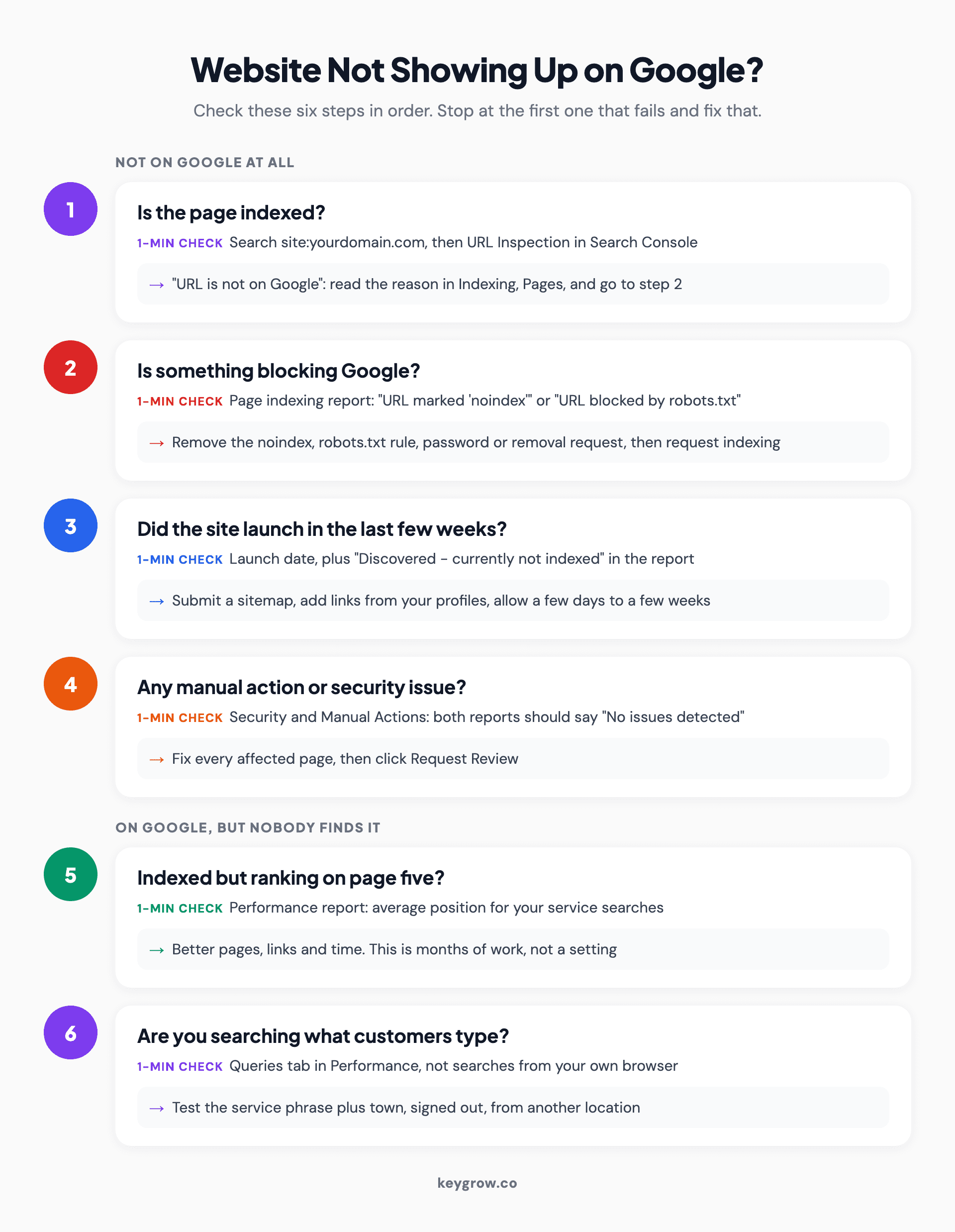
Six-step decision flow for a website not showing up on Google: check indexing with URL Inspection, look for noindex or robots.txt blocks, allow a few days to a few weeks for a new site, rule out manual actions and security issues, then check rankings and the search phrase, stopping at the first step that fails.
What the site: search tells you, and what it does not
The site: search is a rough first sort. Zero results means a real indexing problem. Some results means you are indexed, at least partly, and the useful work is reading what shows up.
Google's own documentation for the operator says the list it returns is not always exhaustive, so a missing page is a clue, not proof. Look for two things: whether your money pages (home, services, contact) are there, and whether anything is there that you never made. A staging copy of the site or pages of spam in a language you do not speak usually show up here first.
Ignore any guide that tells you to use the info: operator. Google's search operator documentation lists four operators now, and info: is not one of them. For a definite answer on one page, Google points you to URL Inspection in Search Console. That is step 1.
Step 1: Is Google indexing the site at all?
Paste your homepage URL into the search bar at the top of Search Console. URL Inspection answers in seconds: "URL is on Google" or "URL is not on Google".
The two results are not mirror images. Per Google's URL Inspection help, "on Google" means the page is eligible to appear in results, which is not the same as appearing. "Not on Google" means it cannot appear at all. Run it on your homepage and your top three service pages, the ones that make you money.
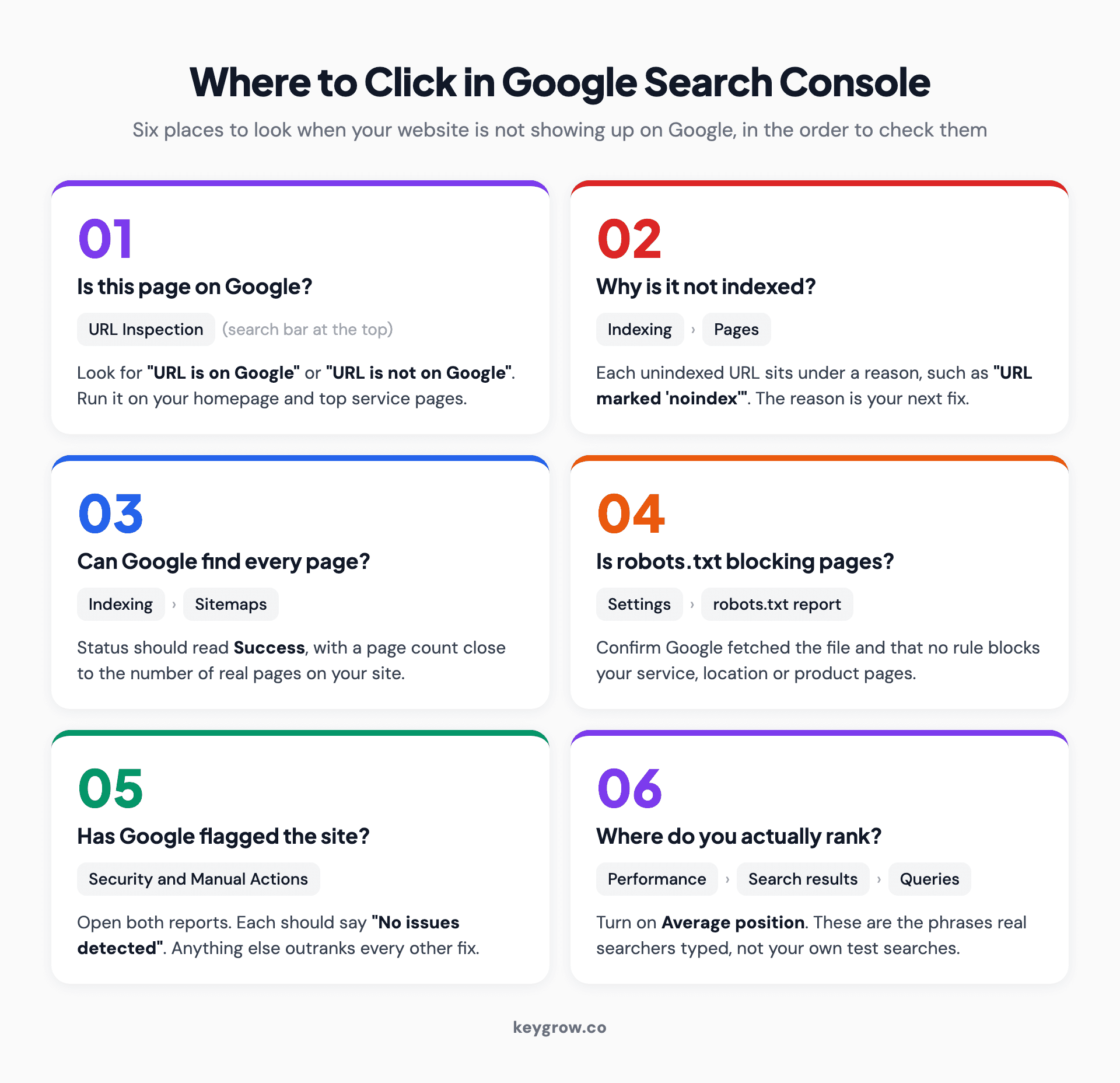
Numbered route through Google Search Console for the six checks: URL Inspection in the top search bar, Indexing then Pages, Indexing then Sitemaps, Settings then robots.txt report, Security and Manual Actions, and Performance then Search results then Queries.
If a money page says "not on Google", open Indexing, then Pages. The Page indexing report sorts every unindexed URL under a reason, and that reason is your next step. Do not panic at a long list. Google's Search Console help says plainly not to expect every URL on a site to be indexed, and tag pages, filtered views and old thank-you pages are usually fine left out.
Two quick fixes cover most new or neglected sites. First, submit a sitemap to Google under Indexing, then Sitemaps. Second, after fixing a page, click Request indexing in URL Inspection. There is a quota on individual requests, so use it on the pages that matter.
Also check you are looking at the right property. A URL-prefix property covers only the exact prefix you entered, so one set up for http://yourdomain.com says nothing about https://www.yourdomain.com. A Domain property covers every version.
Step 2: Find what is telling Google to stay out
If a page is not indexed, the cause is often an instruction on your own site telling Google to stay away. The Page indexing report names it for you: "URL marked 'noindex'" or "URL blocked by robots.txt".

Two developers reviewing website code on monitors in an office.
The two blocks behave differently, and mixing them up is behind a lot of bad fixes.
A noindex rule tells Google to drop the page from results. Google has to crawl the page to read that rule, so its documentation says the page must not also be blocked by robots.txt. Robots.txt controls crawling, not indexing. Google's robots.txt guide says it is not a mechanism for keeping a page out of Google, and a blocked URL can still appear in results with no description under it.
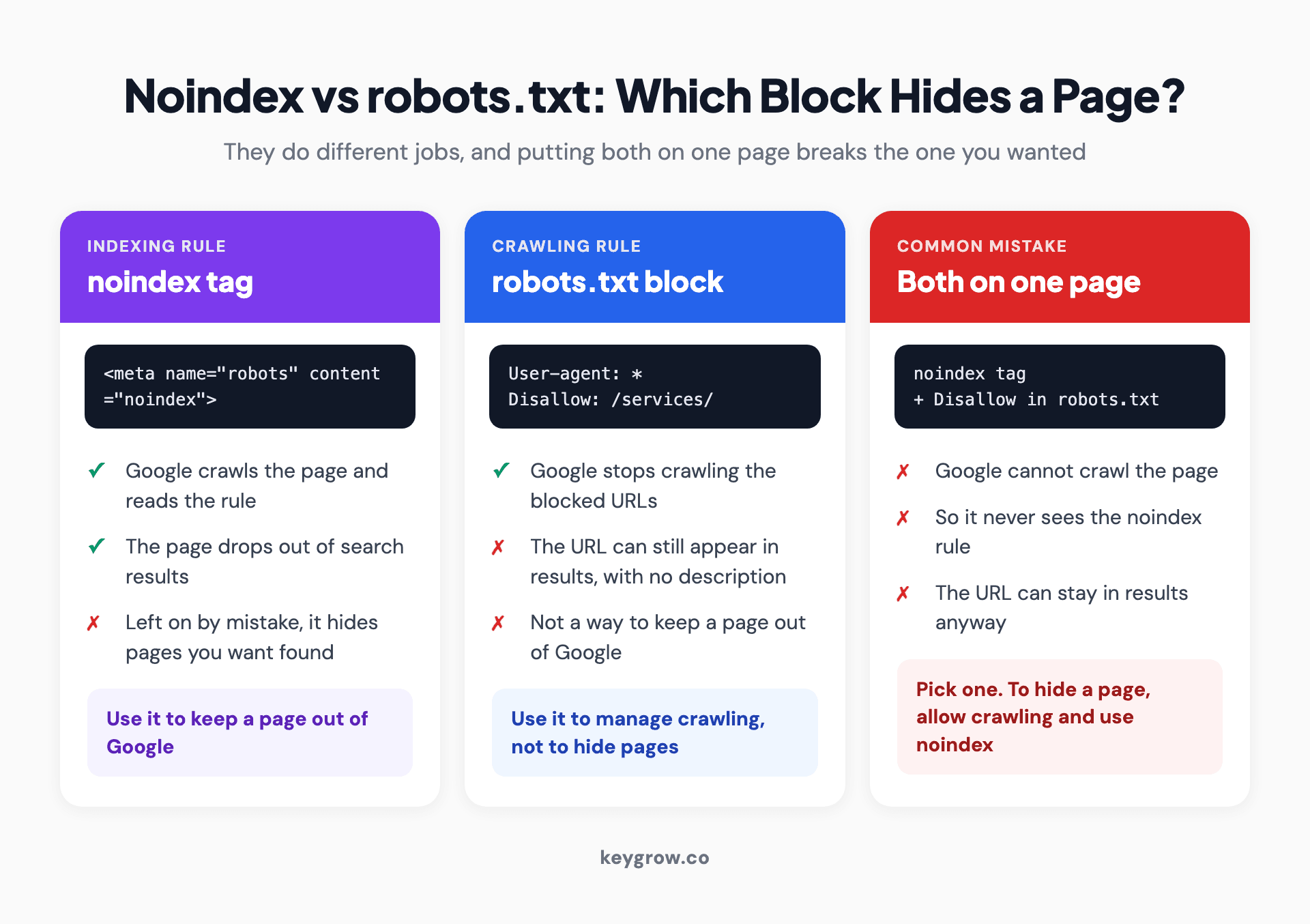
Three comparison cards: a noindex tag removes a page from Google results once Google crawls it; a robots.txt block stops crawling but the URL can still appear without a description; using both on one page means Google never sees the noindex rule.
Where these blocks usually come from:
- WordPress has a "Discourage search engines from indexing this site" box under Settings, then Reading. Developers tick it while building and nobody unticks it at launch. Other site builders often have a similar toggle.
- A redesign went live with the staging site's noindex tags or robots.txt file. Our guide to redesigning a website without losing SEO covers the launch-day checks.
- A plugin or theme update switched a whole page type, often services or locations, to noindex.
- The page sits behind a password. A 401 or 403 in the report means Google was locked out.
- Someone used the Removals tool in Search Console months ago and forgot about it.
The fix is the same shape every time. Remove the rule, run "Test live URL" in URL Inspection to confirm Google now sees an indexable page, then request indexing.
Step 3: Is the site just too new?
If nothing is blocked and the site launched in the last few weeks, it may simply be waiting in line. Google's guide to asking Google to recrawl says crawling can take anywhere from a few days to a few weeks, and that requesting a crawl does not mean inclusion happens instantly, or at all.
New sites are slow because Google finds pages through links and sitemaps, and a new domain has almost no links pointing at it. You can help it along:
- Submit the sitemap and request indexing on the homepage and main service pages.
- Link to the site from places Google already crawls: your Google Business Profile, your social profiles, any trade directory you belong to.
- Link your own pages to each other, so a crawler that lands on the homepage can reach every service page in a click or two.
Two statuses in the Page indexing report turn up constantly on new sites. "Discovered - currently not indexed" means Google found the URL but has not crawled it yet. "Crawled - currently not indexed" means it fetched the page and chose not to index it for now. Google's help says the second one does not necessarily need attention. On a page that matters, though, it often means the page looks thin or too similar to another page, and adding real substance is the fix.
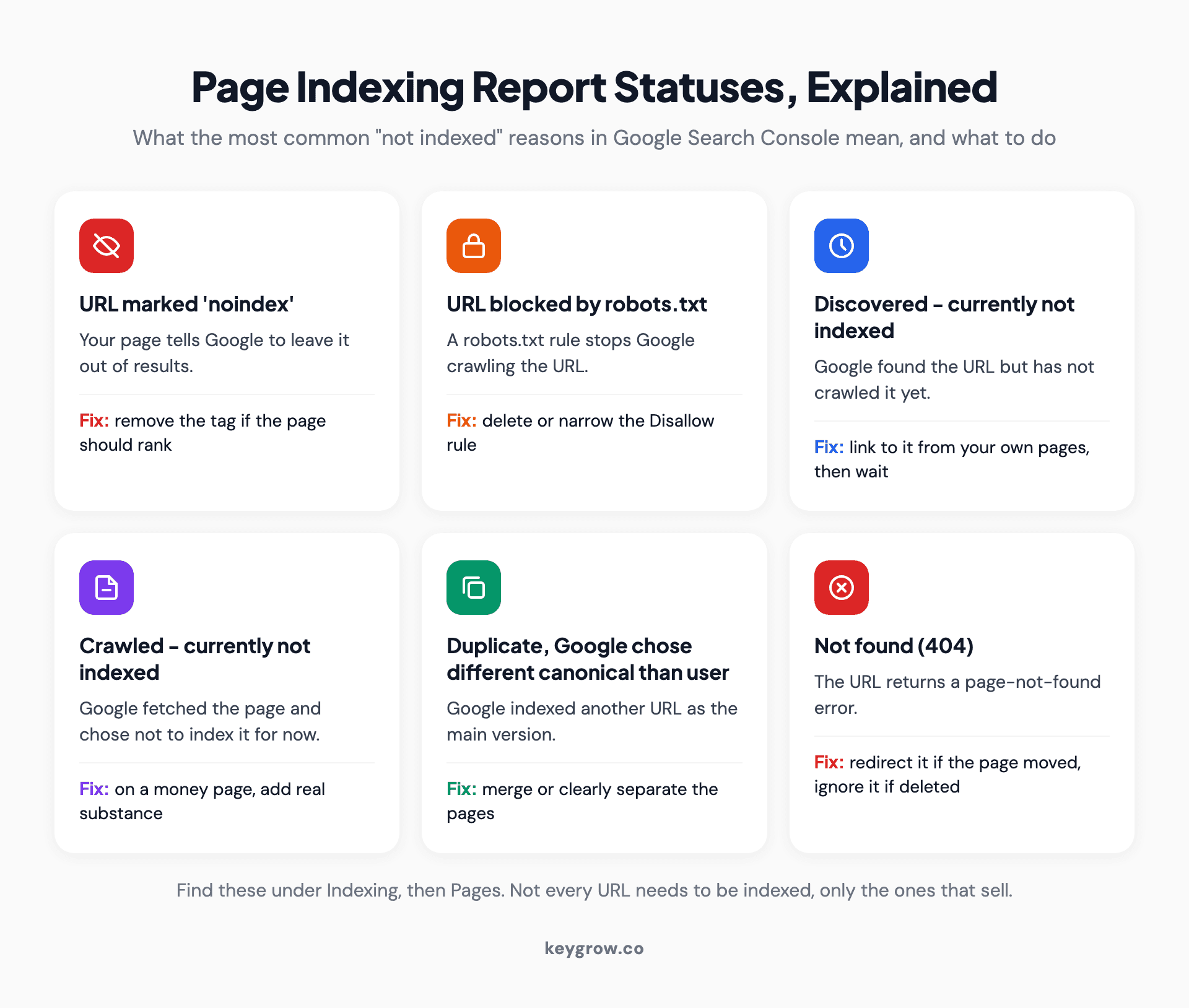
Icon grid of six Page indexing report statuses in Google Search Console and what each means: URL marked noindex, URL blocked by robots.txt, Discovered currently not indexed, Crawled currently not indexed, Duplicate with Google choosing a different canonical, and Not found 404.
If you are about to launch or rebuild, it is cheaper to get this right before go-live than to chase it after. Every one of our website design and development plans includes SEO foundations as standard.
Step 4: Rule out a manual action or a hacked site
This check takes thirty seconds. Open Security and Manual Actions in Search Console and read both reports. You want "No issues detected" on each.
A manual action is a human reviewer at Google deciding your site broke its spam policies. According to Google's manual actions help, some or all of a site with a manual action will not be shown in results. The report lists which page patterns are affected. To recover, you fix the problem on every affected page, since fixing some earns no partial return, then click Request Review. Most reviews take several days or weeks, and Google asks you not to resubmit while one is pending. If the report names unnatural links or thin content, our explainer on how Google penalties work walks through each type.
The Security issues report covers hacked content, malware and deceptive pages. Search Console help says affected sites can get a warning label in search results or a full-page browser warning, which costs you the click even when you still rank. The recovery steps match: clean every affected page, then request a review.
Your site: search from earlier doubles as a hack detector. Pages you never wrote, often in another language and selling pills or knock-off goods, mean someone else is publishing on your domain.
Step 5: The pages are indexed but rank on page five
If URL Inspection says "on Google" and the two reports are clean, you do not have a visibility problem. You have a ranking problem. That is slower work, and nothing in Search Console settings will fix it.
Confirm it in Performance, then Search results. Turn on Average position and look at the Queries tab. Impressions with almost no clicks, at positions in the 30s and 40s, means Google shows your page for the right searches, just behind thirty or more competitors.
What moves a page up is the unglamorous list: a page that answers the search better than the ones above it, a fast site that works on a phone, links from other sites, and time. Our guide to why SEO takes so long explains where those months go.
For a sense of the timeline: when a doctor's practice in Dubai grew its organic traffic 1,519% and reached 130+ patient calls a month, it took 12 months of technical fixes, content and authority building. Months one to three looked unimpressive. Which is why "page one in 30 days" is a red flag, full stop. Anyone promising it is either targeting phrases nobody searches or about to do something that ends up in the step 4 report.
One fork in the road: if your business is missing from the map results rather than the regular listings, that is a different system with different fixes. Our diagnostic on a business not showing on Google Maps covers it.
Step 6: Search the phrase your customers actually type
Sometimes nothing is broken and the owner is testing the wrong search from the wrong place.

A woman working on a laptop at a desk by a window.
You search your full business name. Your customers search "landscaper near me" or "patio installation" plus their town. Both are fair tests, and they answer different questions. If your business name returns nothing, go back to step 1. If the name works but the service search does not, you are back at step 5.
Your own results are also personalized. Google takes your location and, when you are signed in, your search activity into account, so the owner searching from the office sees a different page from a customer across town. Search Console removes that bias. Its Queries tab lists the phrases that real searchers typed when your site appeared, with the average position for each. If the phrase you keep checking is not in that list at all, Google does not yet connect your site to it, and the page targeting it needs work.
A worked example: walking the tree
This one is made up, though the pattern is a familiar one. A landscaping company launches a rebuilt website in March. By May, calls from the site have dried up, and the owner cannot find the site for "landscaper" plus their town.
Step 1: the site: search returns the homepage, the contact page and a staging subdomain. URL Inspection on the patio services page says "URL is not on Google". Step 2: the Page indexing report lists all eleven service pages under "URL marked 'noindex'". The developer had built on staging with noindex switched on, and the setting came across at launch.
Stop there. Steps 3 to 6 do not matter yet. The owner had spent April chasing reviews and paying for a blog post a week, none of which could help while the service pages told Google not to list them.
The fix took ten minutes: remove the noindex, add a noindex to the staging subdomain instead, test the live URLs, request indexing, resubmit the sitemap. Then the waiting started, which takes days to weeks, as step 3 explains.
When you can fix this yourself
Steps 1 to 4 and step 6 cost nothing and usually take an afternoon. If the cause is a ticked box, a stray noindex or a missing sitemap, fix it yourself and spend nothing. A single-location business with more time than money should always do this part on its own.
Step 5 is different. Climbing from page five to page one takes content, links and months of patience, and that is where paying for help can make sense. If you would rather hand the diagnosis and the fixes to someone else, our technical SEO services cover both. And once the site is back, a quarterly SEO health check catches the next stray noindex before it costs you three months.
FAQs
How long does it take for a new website to show up on Google?
Google says crawling can take anywhere from a few days to a few weeks. Submitting a sitemap and requesting indexing in Search Console help Google find the site, but they do not make it instant. Showing up for your business name comes first; ranking for competitive service searches takes months.
Why does my website show up for my business name but not for my services?
Because your site is indexed but ranks low for the service phrases. Google can match your name easily, while service searches put you against every competitor in your area. Check the Queries tab in the Search Console Performance report to see where you actually rank.
Why did my website suddenly disappear from Google?
Check the Manual actions and Security issues reports first, then the Page indexing report for new noindex or robots.txt entries. A recent site update, plugin change or redesign is a common trigger. If all of those are clean, compare the drop date with Google's announced core updates.
Does submitting my site to Google get it indexed?
Submitting a sitemap or requesting indexing tells Google the pages exist, but Google decides whether to index them. Its documentation says a request does not mean inclusion happens instantly or at all. Pages with real content and links from other pages on your site get indexed more reliably.
Why can I find my website on Google but my customers cannot?
Google personalizes results using your location and, when you are signed in, your search activity. You are probably searching your business name from near your office, while customers search service phrases from elsewhere. Use the Search Console Performance report instead of your own searches.
Find the first broken step
A lot of wasted effort on this problem comes from working on step 5 while step 2 is broken. Match your symptom to a starting point, run that check, and only move down once it passes.
| What you see | Start at | Most likely cause |
|---|---|---|
| site: search returns nothing | Step 1 | Not indexed, or wrong Search Console property |
| Money pages say "URL is not on Google" | Step 2 | Noindex, robots.txt or a login wall |
| Site launched in the last few weeks | Step 3 | Google has not crawled it yet |
| Traffic fell off a cliff overnight | Step 4, then step 2 | Manual action, hack or a new block |
| Name search works, service search does not | Step 5 | Indexed but ranking low |
| You see it, customers do not | Step 6 | Personalized results, wrong phrase |
If you work through all six and still cannot find the break, tell us what you are seeing and we will help you find it.