

Three things can happen when you rewrite a page title. It climbs. It drops. Or, most often, nothing you can see happens at all, because Google quietly swaps your new title for one of its own. That last outcome is the one that catches people out. So, does changing page title affect SEO? Yes, it can move rankings in either direction, but the catch is that Google rewrites more than 60 percent of titles in search results, so a change you make may never appear and may never move a thing.
That is not a reason to leave titles alone forever. It is a reason to treat a title edit like a test you can read, not a lever you yank and hope. The pages below walk through the three outcomes, the controlled experiments behind each one, when a change is worth the risk, and a revert-ready way to make the edit so you are never guessing.
Yes, a title change can move rankings, but here is what actually happens
The title tag is a real ranking signal, just not the biggest one. John Mueller from Google put it plainly when he said, as reported by Search Engine Journal, that changing titles or headings "can result in changes in Search." He has also said elsewhere that Google uses titles "as a tiny factor" and that the title is "not the most critical part of a page."
So the honest framing is this. The title helps Google and searchers understand what the page is about. Rewrite it well and you can earn a small relevance lift or more clicks. Rewrite it badly and you can lose both. Most of the time, though, the visible result is neither, because Google decides your title was not the best one to show and writes its own.
That gives you three possible outcomes from a single edit. A change that helps. A change that hurts. And a change that gets overridden so nothing happens. Knowing which one you are likely to get, before you touch the tag, is the whole game.

Widescreen monitor showing a webpage being edited on a marketer's desk workspace
Outcome 1: the change helps (what the controlled tests show)
A better title can lift organic traffic, and there are real split-test numbers to prove it, not just anecdotes. This is where most "yes, change it" advice comes from, and the cleanest evidence comes from controlled experiments rather than one-page case studies.
SearchPilot runs SEO A/B tests by splitting a site's pages into a control group and a variant group, then measuring the gap. In one of their published tests, moving the brand name to the front of the title tag drove a 15 percent increase in organic traffic. In another, adding the phrase "Updated Daily" to titles drove an 11 percent lift. Those are measured gains against a control, which is the difference between data and a hunch.
Why does this work. A title that matches search intent more closely, leads with the term people actually type, or signals freshness can earn more clicks at the same position and nudge relevance. None of that requires a wholesale rewrite. The wins above came from one structural change each, not from cramming five keywords into 70 characters.
The pattern in practice is small and surgical. Lead with the phrase searchers use. Put the most important word first. Add a real differentiator if you have one (a number, a year, a location). Then leave the rest alone. If you want the broader picture of how titles sit inside the rest of your page tags, our guide to page metadata covers titles, descriptions, and how they work together.
Outcome 2: the change hurts (the 27 percent drop nobody warns you about)
A title change can also tank your traffic, and the same testing method that proves the wins proves the losses. This is the outcome most "5 easy steps to better titles" posts skip entirely.
In one SearchPilot test, removing a single duplicated word from the title tags on a listings site caused a 27 percent drop in organic traffic. SearchPilot called it the largest fail it had ever recorded on the platform. One word. It looked redundant to a human editor and clearly mattered to how Google read those pages. They reverted it.
That is the case for caution. Titles carry weight, and the weight is not always where you would guess. FirstPageSage ranks the title tag as roughly the second-strongest on-page factor at 14 percent weight, behind content quality. Fourteen percent is enough to feel when you get it wrong.
Here is the strong version of this point, with the number attached. We stay month-to-month with every client, cancel anytime, because we have watched a single careless title edit erase a 14 percent share of a page's relevance signal overnight. The kind of agency that locks you into twelve months would rather you not notice. We would rather you keep the ability to walk if our edits cost you traffic, which is a useful incentive for us to test before we ship.
If you are about to do a title change across a redesign or a migration, the downside risk multiplies, because you are changing many tags at once and confounding everything else too. We wrote a full process for that in redesign your site without losing SEO. Read it before you bulk-edit titles in a CMS.
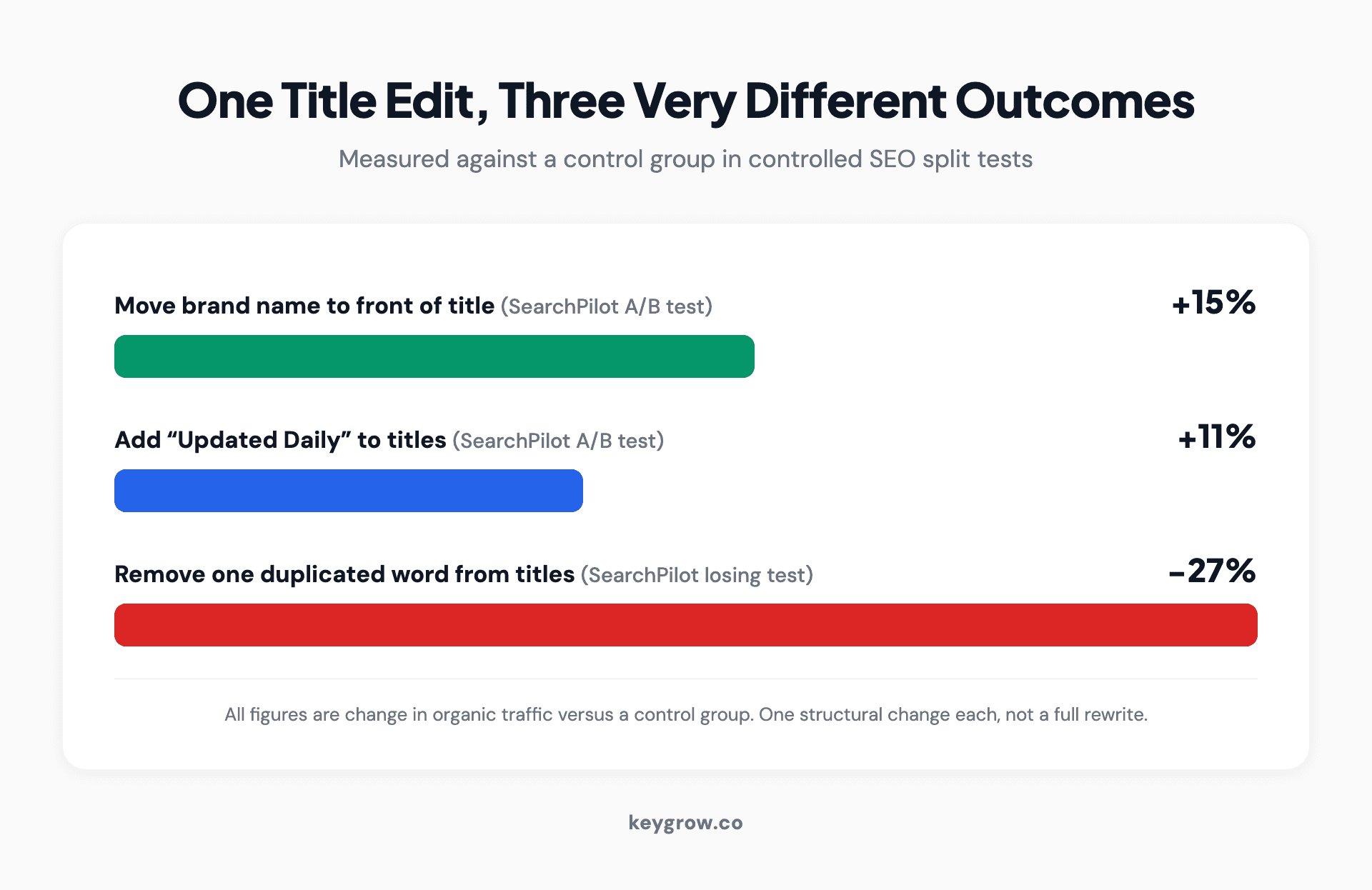
Bar chart comparing organic traffic impact of three controlled title tag changes: moving the brand name to the front lifted traffic 15 percent, adding Updated Daily lifted it 11 percent, and removing one duplicated word dropped traffic 27 percent.
Outcome 3: nothing happens because Google rewrote your title anyway
The most common result of a title change is no visible change at all, because Google replaces your title with its own before it ever shows in search. If you have ever edited a title, waited two weeks, and seen the exact same words in the results, this is why.
The hard number comes from the Zyppy study by Cyrus Shepard, which analyzed 80,959 titles across 2,370 sites. Google rewrote 61.6 percent of the title tags it displayed. More often than not, the title you wrote is not the title users see, and that base rate alone should reset your expectations before you touch a single tag.
So before you blame your edit for doing nothing, check what Google is actually showing. Search for your page, or run the URL through Search Console, and compare the displayed title to your tag. If they differ, your "change" never went live to begin with.

Google search bar on screen showing live search suggestions and result listings
The Zyppy data also tells you how to get rewritten less. Length matters most. Titles between 51 and 60 characters were rewritten least often, around 39 to 42 percent, while titles over 70 characters were rewritten 99.9 percent of the time. Write long, and Google will almost certainly chop it.
Alignment matters too, and this is the underused finding. When a number appeared in both the H1 and the title tag, Google kept it 97.3 percent of the time, versus 74.2 percent when the number lived only in the title. If your title has a "2026" or a "12 steps" you want preserved, put it in the heading on the page as well. The closer your title and on-page H1 agree, the less Google reaches for the rewrite button.
When is a title change actually worth the risk
Change the title when there is a clear gap between what the title says and what searchers want, or when the page underperforms its position. Leave it when the page already does its job. The decision is about expected upside versus downside, and for most pages the math is not close.
Here is the practical decision rule we use.
A title that does not even contain the searcher's main phrase is the clearest reason to edit, and it connects to a bigger question about how much keywords still matter, which we cover in do keywords matter in SEO. Short answer: in the title, intent and clarity beat exact-match stuffing, but the phrase should be in there.
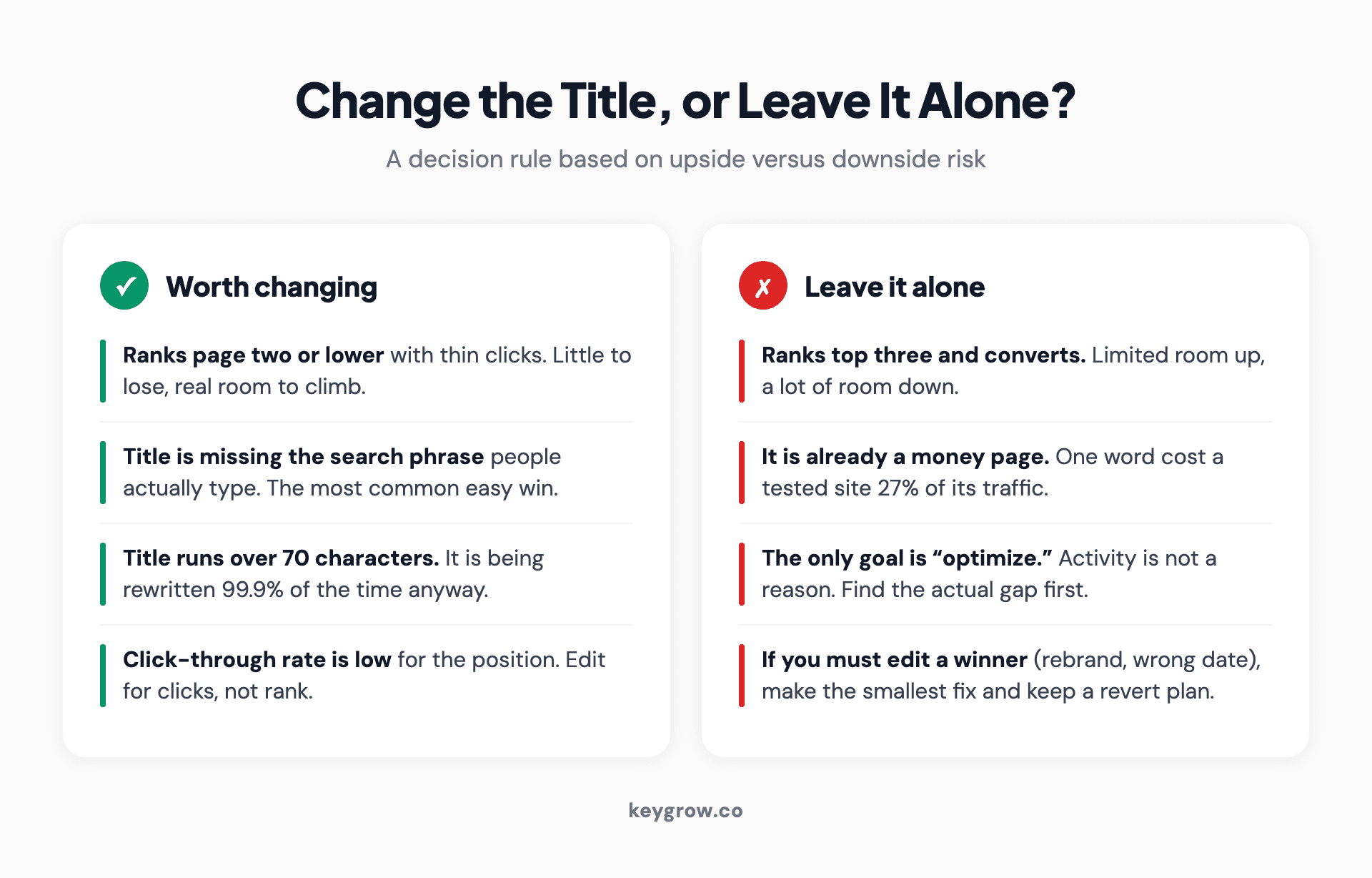
Numbered decision checklist for when to change a page title tag versus when to leave it: change when the page ranks low with thin clicks, when the title is missing the search phrase, when it runs over 70 characters, or when click-through rate is weak for the position, and leave it when the page ranks top three and converts.
When you should leave a strong page's title alone
If a page ranks top three and converts well, the most likely outcome of a title change is nothing good. This is the honest part the listicles skip: not every page is worth touching, and your best pages have the most to lose.
Think about the asymmetry. A page already in the top three has limited room to climb and a lot of room to fall. The SearchPilot loss above was 27 percent from one word. If that page had been a low-traffic also-ran, a 27 percent dip would be a rounding error. On a money page, it is a real revenue hole that takes weeks to claw back, because re-ranking is not instant (more on timing next).
This is also the moment to be blunt about hiring help. If your top pages already rank and convert, you may not need an agency or a consultant poking at them at all. The right move is often to leave them frozen, document why they work, and spend your effort on the page-two pages that have upside. An agency that wants to "optimize" a page that is already winning is selling activity, not results. We turn that work away, because the expected value is negative and we would rather not be the reason your best page slipped.
When a strong page genuinely needs a change (a rebrand, a date that is now wrong, a product that no longer exists), make the smallest edit that fixes the problem and watch it closely with a clear revert trigger. Do not "improve" a winner. Repair it.
How long does it take to re-rank after a title change
Expect a few days for Google to recrawl and reindex the new title, and several weeks before rankings settle, with the exact speed tied to how often Google crawls that page. There is no fixed number, and anyone who quotes you one is guessing. Crawl frequency is the variable nobody on the topic explains.
Two things drive the timeline. First, Google has to recrawl the page to see the new title. High-authority pages on frequently updated sites get crawled often, sometimes daily, so the new title can appear within days. A low-traffic page on a small site might wait weeks for a natural crawl. Second, even after the title is indexed, any ranking effect needs time to stabilize as Google reassesses relevance and gathers fresh click signals.
You can shorten the first part. After you save the change, run the page through the URL Inspection tool in Google Search Console and request indexing. That asks Google to recrawl sooner instead of waiting for the natural cycle. It does not guarantee a ranking change, only a faster look at the new title. If you want to understand crawl behavior across your whole site, our technical SEO audit guide covers crawl rate, indexation, and the tools that surface it.
The practical takeaway: give a title test a minimum of two to four weeks before you read the result, longer for a slow-crawled page, and do not panic at week one when the title may not even be live yet.
A safe, revert-ready process for changing a title tag
Treat a title change as a controlled experiment with a baseline, a single variable, a set window, and a pre-decided revert trigger. The goal is to know whether the change worked, not just to feel like you improved something. Here is the workflow we run.
1. Record the baseline. Before you touch anything, screenshot the current title, position, impressions, clicks, and click-through rate for that query in Search Console. Use a 28-day window so seasonality and daily noise average out. No baseline, no test.
2. Change one thing. Edit only the title, and ideally only one element of it (lead phrase, brand position, a number). If you change the title, the H1, and the intro paragraph all at once, you will never know which one moved the needle.
3. Confirm the change actually went live. Request indexing via URL Inspection, wait a few days, then search the page and check the displayed title. If Google rewrote it back, your test never started. Adjust toward the 51 to 60 character range and align the H1, then try again.
4. Hold the line for the window. Wait at least two to four weeks (longer for low-crawl pages) before judging. Watch for a clear, sustained move, not a one-day blip. A change that matters usually shows as a trend, not a spike.
5. Compare against noise. Look at sibling pages or sitewide traffic over the same window. If everything dipped, an algorithm update or seasonality is the cause, not your title. A real title effect shows up on the changed page and not its neighbors.
6. Set a revert trigger in advance. Decide the number that means "undo this" before you start, for example a sustained 10 percent or greater drop in clicks held for two weeks. If you hit it, revert to the baseline title you screenshotted. Pre-deciding stops you from rationalizing a loss.
Two honest caveats. A single page cannot be a true A/B test the way SearchPilot tests are, because you only have one version live at a time, so you are comparing before and after and trusting the baseline window to control for noise. And on a small site with low traffic, the numbers may be too thin to read with confidence. In that case, make the obviously-better change (add the missing search phrase, cut a 75-character title to 58) and skip the formal measurement, because the upside is clear and the data will never be conclusive at that volume.
We learned the value of a hard revert trigger the slow way. An eviction law firm we worked with had been getting almost nothing from its existing setup, one conversion a week from 22 clicks at 240 dollars each. The fix that turned it into 21 conversions a week was not one heroic edit. It was rebuilding around one clear action and testing changes in small slices with the willingness to roll any of them back. Same discipline applies to a title: change one thing, measure it against a baseline, keep what wins, undo what does not.
Title tag vs H1: which one are you really changing
The title tag is the clickable line in search results and lives in the page head. The H1 is the visible headline on the page itself. They are different fields, they can hold different text, and editing one does not edit the other. Most "I changed my title" confusion starts here.
Search engines read both, and they do slightly different jobs. The title tag is built for the search result and the browser tab. The H1 is built for the person already on the page. A lot of CMS setups and themes pull the same text into both by default, which is why people assume they are one thing. They are not, and you can set them independently.
Here is the part worth acting on. Aligning the title and H1 reduces how often Google rewrites your title, and it preserves elements you care about. Recall the Zyppy finding: numbers in both the H1 and title survived 97.3 percent of the time versus 74.2 percent when the number was title-only. So if you are changing the title, glance at the H1 and decide whether they should agree. They usually should, at least on the core phrase.
If you are reworking titles as part of a broader on-page cleanup, start from our title tag best practices guide, and note that the same logic extends to your URLs, which are another signal Google reads alongside the title. Our guide to URL structure for SEO walks through that, and it pairs naturally with a title pass.
FAQs
How long does it take Google to update a changed title tag in search results?
Usually a few days to a couple of weeks, depending on how often Google crawls the page. High-authority pages on active sites can update within days, while low-traffic pages on small sites may take longer. You can speed up the recrawl by requesting indexing through the URL Inspection tool in Google Search Console, though that only triggers a faster look, not a guaranteed ranking change.
Can changing a title tag hurt my rankings?
Yes. In one controlled SearchPilot split test, removing a single duplicated word from the title tags on a listings site caused a 27 percent drop in organic traffic. The title is roughly the second-strongest on-page factor at 14 percent weight per FirstPageSage, so a careless edit can cost real relevance. Change one element at a time and keep a revert trigger ready.
Why is Google showing a different title than the one I wrote?
Because Google rewrites titles it judges to be a poor match for the query, and it does so often. The Zyppy study of 80,959 titles found Google rewrote 61.6 percent of them, and titles over 70 characters were rewritten 99.9 percent of the time. Keep your title between 51 and 60 characters and align it with your H1 to reduce the odds of a rewrite.
How often can I change my page title without hurting SEO?
There is no penalty for the number of changes, but each change resets the clock and adds noise to your data, so frequent edits make it impossible to tell what worked. Make a change, give it two to four weeks to settle, read the result, then decide. Constant tinkering is the real risk, not the edits themselves.
Does changing the title tag affect the meta description or the H1?
No. The title tag, meta description, and H1 are three separate fields, and editing one does not change the others unless your CMS or theme is set to pull from the same source. They do work together as signals, though, so it is worth checking all three are consistent when you edit one. Aligning the title and H1 in particular reduces Google rewrites.
Should I change the title on a page that already ranks well?
Usually no. A page ranking top three and converting has little room to climb and a lot to lose, and a single word change has caused a 27 percent traffic drop in testing. Leave winning pages alone unless something is factually wrong (a rebrand, an outdated date), and even then make the smallest possible fix with a revert plan ready.
Change it like a test, not a coin flip
A title change is not a magic lever and it is not harmless. It is a real signal at 14 percent on-page weight that can lift traffic 15 percent, drop it 27 percent, or vanish entirely behind a Google rewrite that hits more than 60 percent of titles. The people who get consistent wins are not braver than everyone else. They just refuse to guess.
So pick the pages with upside, the page-two underperformers and the titles missing their search phrase, and leave your winners frozen. Change one element, confirm it actually went live, hold a 28-day baseline against the result, and decide your revert number before you start. Do that and a title edit stops being a coin flip and becomes the cheapest controlled test you can run on a page.
If you would rather hand the testing, measurement, and revert discipline to a team that does this daily, that is what we do, month-to-month, cancel anytime. You can get started here and we will tell you honestly whether your titles are worth touching at all.


