

You can read this whole post, or you can take the one-paragraph version and get on with your day. Here is how to use H1 H2 H3 tags for SEO: use one H1 as the page's real title with your primary keyword in it, use H2s to split the page into clear sections that each answer a question, and use H3s to break a long section into sub-points. Write all of them for a human reading the page, not for a crawler counting keywords. Get the order right (H1, then H2, then H3, no skipping levels) and you have done 95 percent of what matters. The other 5 percent is where this gets interesting, especially now that AI answer engines read your headings to decide whether to quote you.
That is the answer. If you stop here, you will outperform most pages already, because most pages get headings wrong in small, expensive ways. The rest of this is the detail: how to write each tag, a copy-paste outline you can steal, the myths that waste people's time, and the part the top guides skip, which is writing headings so ChatGPT and Google's AI Overviews actually cite you.
One thing up front. Heading tags are not a magic ranking lever. They are a structure tool. They help Google and AI understand what your page is about and where the answer lives, and they help readers scan. That is real, and it matters, but if you came here looking for the trick that vaults you to position one, headings are not it. Good content with clean headings beats thin content with perfect headings every single time.
How to use H1, H2, and H3 tags for SEO: what each one does
H1, H2, and H3 tags structure your content into a hierarchy that tells search engines and readers what each part of the page is about. The H1 is the page's main title, H2s are the major sections, and H3s are sub-points inside those sections. They help with comprehension and scanning far more than they push rankings directly.
Think of headings as the outline of a document. If you printed your page and looked only at the headings, you should understand the whole thing. That is the job. Google's crawler does roughly the same thing: it reads the headings to map the page's topics and figure out which sections answer which queries.
Here is the part people overstate. Headings are a small ranking signal at most, and Google has been clear that the content matters more than the tag wrapped around it. What headings really do is make your content legible. A page a search engine can parse cleanly, with each section's purpose obvious from its heading, is a page that can rank for the right terms and get pulled into featured snippets and AI answers. Legibility is the SEO benefit. The keyword you slot into an H2 is a distant second.

A person reviewing a webpage outline on screen, scanning section headings to understand the page structure
So the right mental model is not "headings rank me." It is "headings make my page understandable, and understandable pages rank." That reframe changes how you write every heading on the page.
How to write an H1 tag (one per page, primary keyword, written for humans)
Write one H1 per page, make it the clear title of what the page is about, and include your primary keyword in a way that reads naturally. It should tell a stranger, in one line, exactly what they will get. Keep it under about 60 characters where you can, so it does not get awkward on small screens.
The H1 is the most important heading because it sets the topic for everything below it. On most sites it is the big headline at the top of the article, separate from the browser-tab title. Get it right and the rest of the page has a clear parent to hang under.
A few rules that hold up:
One related point that trips people up: your H1 and your title tag are usually different, and they should be allowed to be. The title tag is what shows in the browser tab and often in the search result; the H1 is the headline on the page. They can match, but you can also tune them separately. We get into that in our piece on whether changing your page title affects SEO, because editing one without understanding the other is a common own-goal.
How to use H2 tags to break your page into scannable sections
Use H2 tags to divide your page into its major sections, with each H2 phrased as the question or topic that section answers. They are the backbone of a scannable page, and they are what Google and AI engines use to locate the specific part of your content that answers a query.
If the H1 is the title of the book, the H2s are the chapter titles. Every distinct idea on the page gets its own H2. When someone scrolls (and most people scroll before they read), the H2s are the signposts that let them jump to the part they care about. A wall of text with no H2s is a page people bounce from.
The single most useful habit here is to write H2s as questions or clear statements that mirror how people actually search. "How long does local SEO take?" works because it matches a real query and tells the reader exactly what the section delivers. "Timeline" does not, because it makes the reader guess. This is the same reasoning behind structuring whole sites as topic maps, where section-level questions ladder up into a full content plan.
Keep each H2 section roughly self-contained. A good test: could you lift this section out of the page, paste it somewhere else, and would it still make sense on its own? If yes, your H2s are doing their job. If a section only makes sense because of the three paragraphs above it, your structure is muddy.
How to use H3 tags to add detail without breaking the hierarchy
Use H3 tags to break a single H2 section into smaller sub-points when that section gets long or covers several related items. An H3 always lives inside an H2, never on its own, and it should make the section easier to scan rather than pile on headings for the sake of it.
Here is the rule that keeps you out of trouble: an H3 is a child of the H2 above it. If you are writing an H2 called "Common heading mistakes" and you want to list five mistakes with a paragraph each, those five mistakes can each be an H3. They belong to that H2. They would make no sense floating at the top level of the page.
When do you actually need H3s? When a section has genuine sub-parts. A "pricing" H2 with three tiers, an H2 walking through a five-step process, a "frequently confused terms" section with several definitions. If a section is three tight paragraphs, you probably do not need H3s at all. Adding them anyway just clutters the outline.
The thing to avoid is using H3 (or any heading level) for styling. People reach for an H3 because they want smaller-looking text, then their outline ends up with H3s that are not sub-points of anything. If you want different-sized text, that is a CSS job, not a heading-tag job. Headings carry meaning about structure. Borrow them for looks and you confuse the machines reading your outline.
What a correctly structured heading outline looks like (copy-paste example)
A correct outline has exactly one H1, several H2s under it, and H3s nested only inside the H2s they belong to, with no skipped levels. Here is a full skeleton you can copy and adapt to almost any informational page. The infographic just below shows the same structure as a clean visual.
- H3: If you have an isolation valve
- H3: If you do not have an isolation valve
- H3: Removing the tap handle
- H3: Fitting the new washer
- H3: How long does a tap repair take
- H3: Can I fix a leaking tap without turning off the water
Read just the headings and you understand the entire page. That is the test every outline should pass. Notice the H3s only ever appear nested under an H2, and the levels never jump from H1 straight to H3. The hierarchy is intact top to bottom.
This skeleton works for a service page, a blog post, a product guide, almost anything. Swap the topic, keep the shape. If you are mapping out a set of related pages rather than one, the same logic scales: each page's H1 is a node, and the H2s become the questions that page owns.
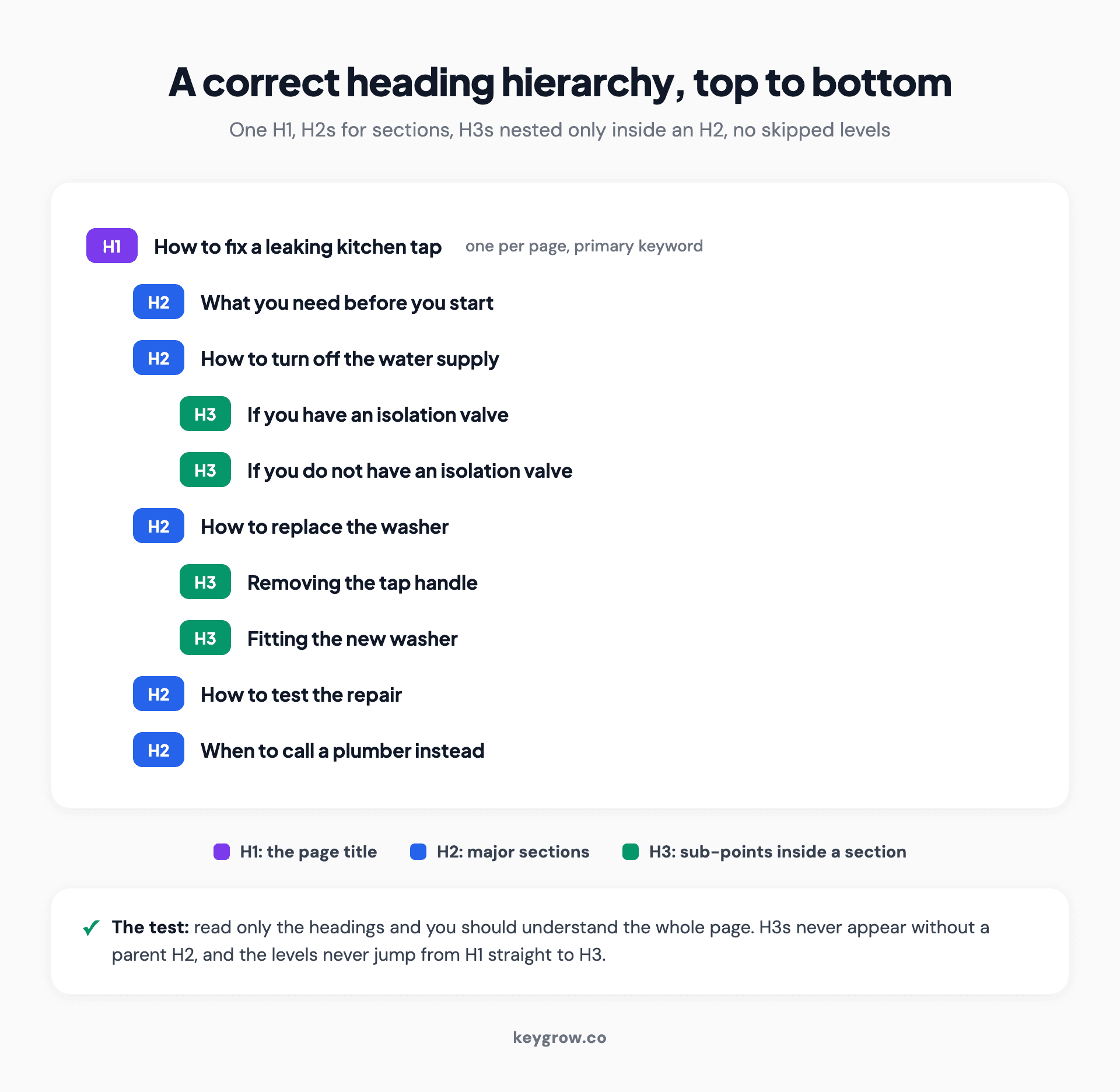
A clean heading hierarchy outline showing one H1 at the top, several H2 section headings nested under it, and H3 sub-points nested only inside their parent H2, with no skipped levels
Does heading order affect rankings, and how many H1s can a page have?
Heading order matters for clarity and accessibility more than for raw rankings, and you can technically have more than one H1 without being penalized. Google has said outright that there is no fixed limit on H1 count. But "you can" and "you should" are different questions, and the honest answer leans toward keeping it simple.
Let me back both halves with actual sources, because this is where the internet is full of confident, wrong advice.
On the H1 count: Google's John Mueller addressed this directly. Per Search Engine Journal, Mueller said you can use H1 tags as often as you want, with no limit, neither an upper nor lower bound, and that a site will rank fine with no H1 or with five H1s. So the old rule that a second H1 will tank your rankings is a myth. It is not a rule Google enforces.
On whether the tag itself moves rankings: there is a clean experiment here. Moz, working with SearchPilot, ran a 50/50 split test on its own blog where it changed headlines from H2 to H1. After eight weeks of data, the change produced no statistically significant difference in organic traffic. The takeaway is blunt: the wrapper (H1 versus H2) mattered far less than the content inside it.
So here is my actual opinion, and I will put a number behind it. Chasing the "perfect" number of H1s is one of the lower-return things you can do in SEO, and I would rank it well below the work that compounds. Our strongest organic case, a doctor's practice in Dubai, took a full 12 months of consistent content, technical fixes, and authority building to reach 1,519 percent traffic growth. Not one hour of that was spent agonising over H1 counts. If you are auditing your headings for the third time and have never published a genuinely useful new page this quarter, you are optimising the wrong thing.
Use one H1 because it is clear, keep your order logical because skipping levels confuses screen readers and crawlers, and then go spend your time on something that actually compounds.
How headings help AI search engines and answer engines cite your page
Headings are how AI answer engines find the exact passage to quote, so a clear, question-led heading structure makes your page far easier to cite. AI systems like ChatGPT and Google's AI Overviews pull short passages, not whole pages, and your headings tell them where each answerable chunk begins and ends.
This is the part most heading guides skip, and it is the part that matters most going forward. The behaviour of answer engines has changed what a good heading is for.
Here is the pattern we see in our own AEO work. Roughly 44 percent of ChatGPT citations come from the first third of a page, which means your H1 and your first couple of H2s carry disproportionate weight; if the answer is not structured near the top, it often does not get cited at all. We dug into this in our breakdown of how to optimize a website for ChatGPT. The structural fix is simple: put a clear, question-form H2 high on the page, and answer it immediately underneath in two or three sentences.
Section length matters too. Sections of roughly 120 to 180 words between headings tend to get cited more often by answer engines, because that is about the size of a quotable, self-contained answer. Too long and the engine cannot isolate a clean passage; too short and there is nothing substantial to quote. Our wider playbook on AI search optimization goes deeper, but the heading-level version is: one question per H2, a tight answer right under it.
Content inside those sections compounds the effect. In the Princeton and Georgia Tech GEO study (see the GEO research paper), adding relevant statistics raised AI-answer visibility by about 40 percent and adding expert quotes by roughly 37 percent. Headings get you found. Cited stats and quotes inside those well-headed sections get you quoted.
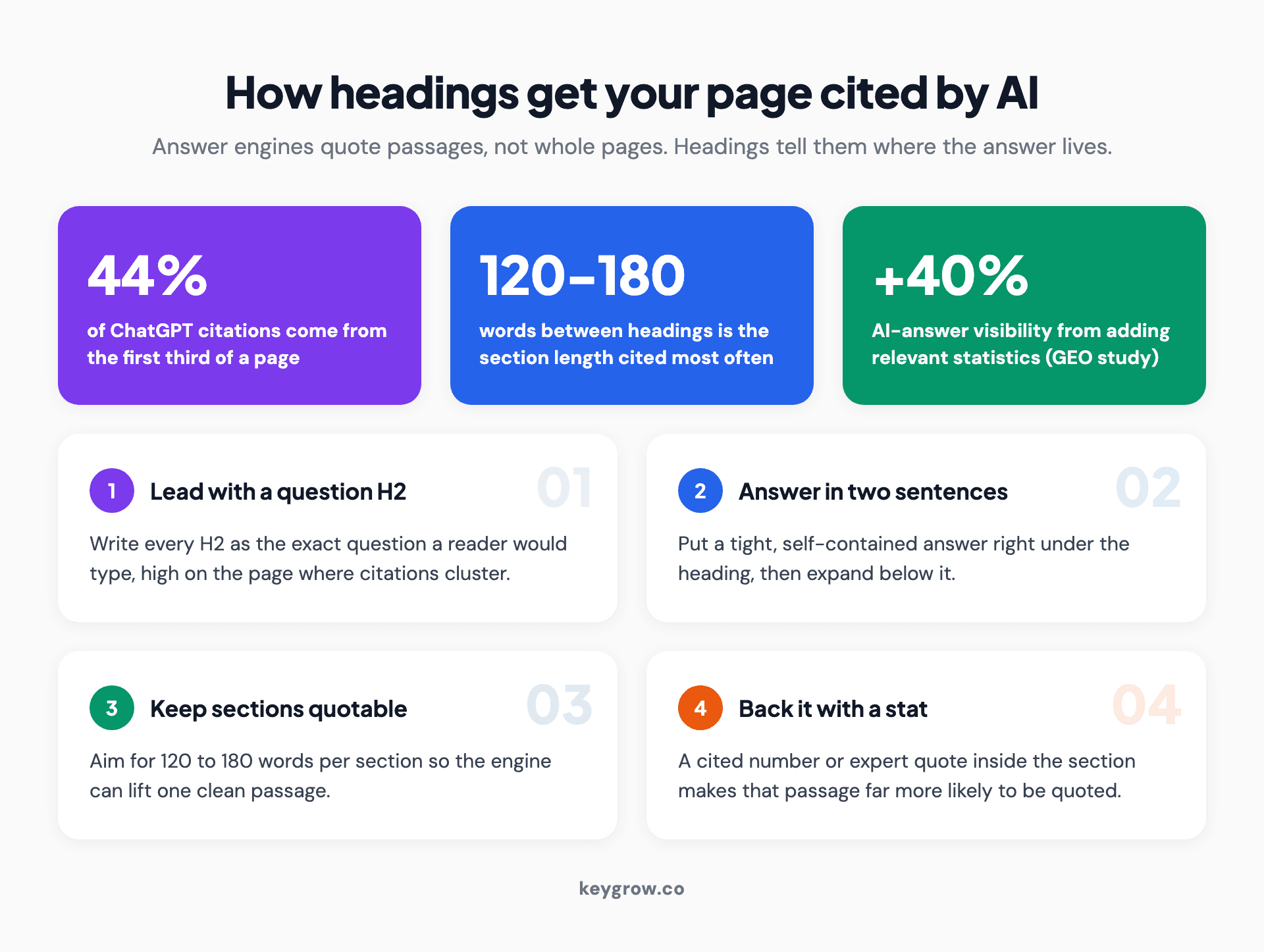
How headings help AI answer engines cite a page: a clear question-form H2 near the top, a tight 120 to 180 word answer underneath, and supporting stats inside the section, with a note that about 44 percent of ChatGPT citations come from the first third of a page
If you take one new habit from this whole post, take this one. Write every H2 as a real question, and answer it in the first two sentences below the heading. That single move helps human skimmers, traditional snippets, and AI citation all at once. It is the highest-return heading habit there is, and almost nobody does it consistently.
Common heading tag mistakes that quietly hurt your SEO
The most common heading mistakes are not dramatic. They are small structural sloppiness that makes your page harder to parse: skipped levels, keyword-stuffed headings, using headings for styling, and burying the answer below the fold. None of these will get you penalized, but together they quietly cap how well a page can perform.
Here is the list we see most often when we audit pages:
Notice none of these is a catastrophe on its own. That is exactly why they persist. They do not throw an error, they do not trigger a penalty, they just slowly make a page worse at its job. Fixing them is some of the cheapest SEO work you will ever do.
Here is the honest "you might not need help with this" moment. If you run a single-location business and your site has a dozen pages, fixing your headings is a one-afternoon job you can absolutely do yourself. Open each page, check there is one clear H1, make sure the H2s read like the questions your customers ask, and confirm you never skip a level. That is the whole task. You do not need an agency for it, and any agency that tries to sell you a "heading optimisation package" as a standalone service is padding an invoice. We would rather you spend that money on something that compounds, like consistent content, and the broader case for whether SEO services are worth it gets into where outside help actually earns its fee.
Where headings do connect to bigger work is in a full audit. When we run a technical SEO site audit, heading structure is one line item among crawlability, indexation, internal links, and speed. It is worth fixing as part of that pass, not as a project of its own.
FAQs
How many H1 tags should a page have?
One H1 per page is the cleanest default, but Google does not penalize multiple H1s. John Mueller confirmed there is no limit, neither an upper nor lower bound, and a site can rank fine with no H1 or with several. Use one anyway, because a single clear title is easier for readers and screen readers to understand.
Do H1, H2, and H3 tags directly affect Google rankings?
Only weakly. Headings help Google understand your page structure and topics, which supports ranking, but the tag itself is a small signal. A Moz split test changing headlines from H2 to H1 found no statistically significant ranking difference after eight weeks. The content inside the heading matters far more than the heading level.
Is the H1 tag the same as the title tag?
No. The H1 is the visible headline at the top of your page, while the title tag is what shows in the browser tab and often in search results. They can match, but they are separate elements and you can tune them independently. Many strong pages have an H1 and a title tag that differ slightly to fit each context.
Can you skip from an H1 straight to an H3?
You can technically, but you should not. Skipping a heading level breaks the logical outline and confuses screen readers, which announce the structure to users navigating by heading. Go in order: H1, then H2, then H3 only inside an H2. A clean hierarchy helps both accessibility and how machines parse your page.
Should you put keywords in every heading?
No. Put your primary keyword in the H1 and use related terms naturally where they fit in your H2s, but stuffing the same keyword into every heading reads as spam to readers and search engines. Headings should describe the section honestly first. Natural language wins, especially now that AI engines reward clear, question-led headings over keyword-crammed ones.
Does heading order matter for SEO?
It matters more for clarity and accessibility than for raw rankings. A logical order (H1, H2, H3 with no skipped levels) makes your page easier for crawlers and screen readers to follow, which indirectly supports performance. Google will not penalize a slightly messy order, but a clean hierarchy is a low-effort way to make your content legible.
Do headings help with featured snippets and AI Overviews?
Yes, significantly. Featured snippets and AI answer engines pull short passages, and clear question-form headings tell them exactly where an answerable chunk begins. Putting a real question in an H2 and answering it in the first two sentences underneath is one of the most reliable ways to win snippets and earn AI citations. Roughly 44 percent of ChatGPT citations come from the first third of a page.
What is the ideal length for a heading tag?
There is no hard limit, but keep H1s under about 60 characters so they read cleanly and do not get truncated, and keep H2s and H3s short enough to scan in a glance. The goal is a heading that tells the reader exactly what the section covers in one quick read. Clarity beats length every time.
Where this leaves you
Headings are structure, not magic. Use one H1 with your primary keyword, write H2s as the questions your readers actually ask, nest H3s only where a section has real sub-parts, and never skip a level. Do that and your page is more legible to readers, to Google, and to the AI engines that now decide whether to quote you. That is the whole job.
The highest-return habit in all of it is the simplest: ask a question in the heading, answer it in the next two sentences. That one move serves human skimmers, featured snippets, and AI citations at the same time. Everything else is cleanup.
If you have tidied your headings and you are wondering what to fix next, that is the conversation we are good at. We are month-to-month, and we will tell you honestly when a job is a one-afternoon DIY fix versus something worth hiring for. Get started here and we will take a look with you.


