

Most nonprofit website redesigns start from the same complaint: the site looks dated. It is the wrong complaint. Nonprofit website design is the work of letting each visitor finish one job quickly: a donor checks you out and gives, a volunteer finds a shift and signs up, and a person who needs help finds it. How modern the site looks comes a distant fourth.
The numbers back this up. In the 2026 M+R Benchmarks Study, 1.6 percent of visitors to nonprofit websites made a donation, while 11 percent of desktop visitors who reached the main donation page gave. The page that decides your online revenue is the donate page, and most redesign briefs barely mention it.
Below are six common beliefs about nonprofit sites, each checked against what donors and volunteers actually do. After them come a page-by-page requirements table, real cost ranges, and an honest note on when you can skip hiring anyone.

Volunteers in blue shirts and gloves packing food into bags at a food bank distribution.
What donors and volunteers check before they act
First they check that you are real, then that the next step is easy. For a donor that means proof and a short form; for a volunteer, the time, place and requirements; for a grantmaker, documents.
Donors check more than most boards assume. In the Give.org 2026 donor trust report, among donors who look for information before giving, 54 percent named the charity's own website as the most influential source, ahead of third-party monitors at 39 percent. The same donor trust survey found 67.7 percent say they need to trust a charity before they donate, yet only 18.3 percent report high trust in charities.
That gap is the job. Your website is the place a cautious stranger goes to close it.
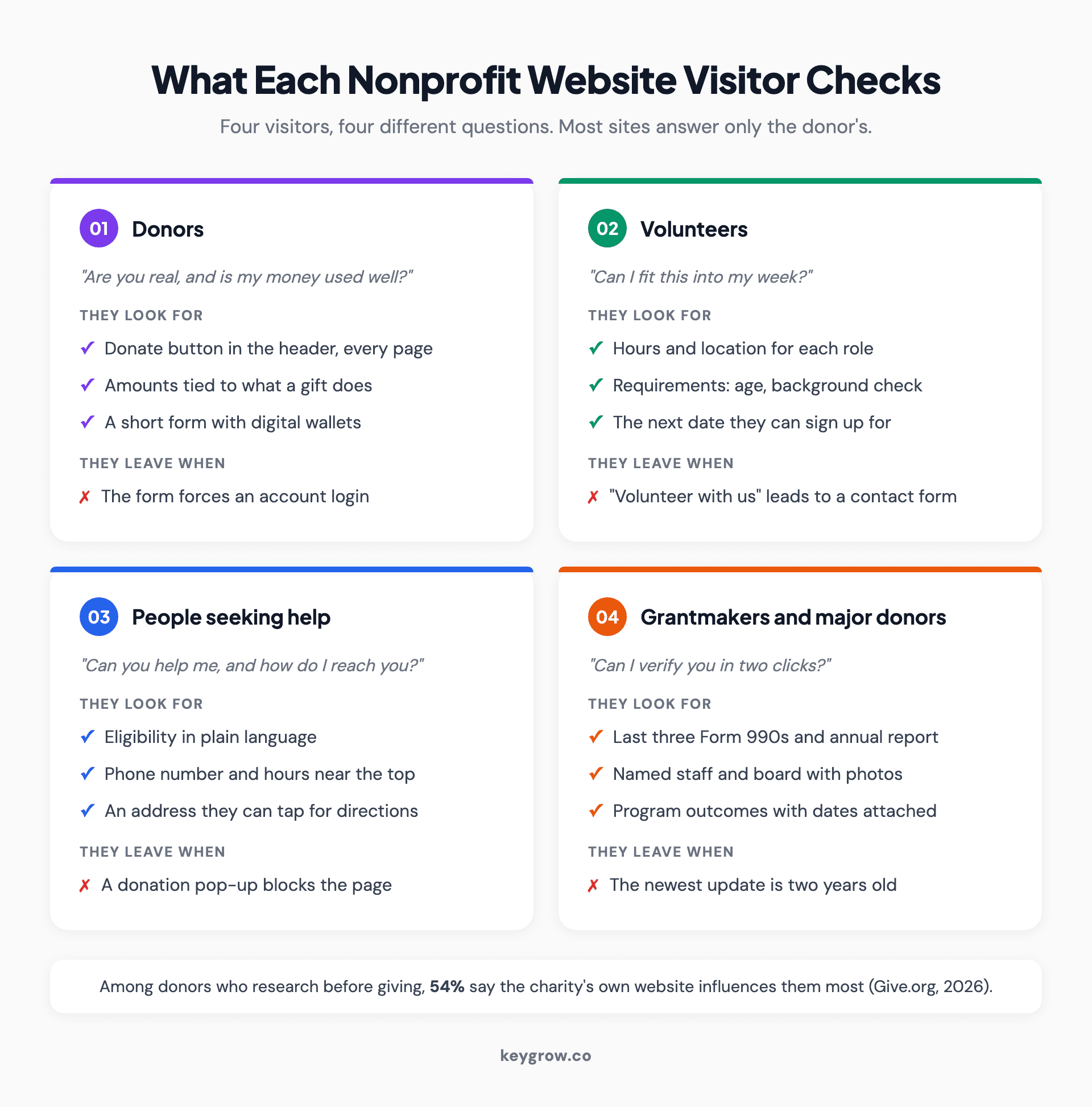
Four cards showing what each nonprofit website visitor checks: donors look for proof and an easy form, volunteers look for time, place and requirements, people seeking help look for eligibility and a phone number, and grantmakers look for financial documents and outcomes.
Each of those visitors arrives with a different question, and most nonprofit sites answer only the first one. The myths below are where that usually goes wrong.
Myth 1: A better-looking homepage raises more money
Reality: the homepage routes people. The donate page converts them, and that is where design changes move revenue.
Per M+R's 2026 study, the average nonprofit earned $1.33 per website visitor in 2025. On the main donation page, 11 percent of desktop users and 8 percent of mobile users completed a gift. Those are very different numbers, and they point at very different pieces of work. A homepage redesign changes how people feel on arrival. A donate page fix changes how many of the people who already decided to give actually finish.
So the homepage has three duties. Say what you do and for whom in one plain sentence. Show the donate button in the header on every page, in a color nothing else uses. Route the other visitors (volunteers, people seeking help) in one click each.
We have seen what one clear action does to a page. An eviction law firm came to us with a landing page that was getting one conversion a week from 22 clicks, at $240 per conversion. Visitors arrived, could not tell what to do next, and left. We rebuilt the page around one action, and in the first week of the new setup (September to October 2022) it produced 21 conversions at $31.79 each. The full numbers are in the eviction firm's case study. Law firms and food banks have little in common, but a confused visitor behaves the same way on both sites. They leave.
Myth 2: Most giving happens on phones now
Half true. Most visits happen on phones, but most of the money still arrives on desktop, so the form has to work on both.
M+R's 2026 website performance benchmarks put mobile at 52 percent of nonprofit website traffic in 2025, but only 43 percent of donation transactions and 28 percent of revenue. The average desktop gift was $168. The average mobile gift was $88.

A hand holding a smartphone showing a simple app screen against a plain background.
Two things follow from that. First, do not design for phones and then squeeze the desktop layout out of it. People making larger gifts are often at a desk, comparing you against another charity in a second tab, and they want to see the detail.
Second, the mobile form is where small organizations bleed. The same M+R data shows small nonprofits converted just 4 percent of mobile visitors on their donation pages, half the sector average. The usual causes are dull and fixable: a form with twelve fields, a forced account login, no digital wallet option, and a page that reloads and wipes the card number. Offering digital wallets is already normal. M+R found 57 percent of nonprofits accepted Apple Pay and 58 percent accepted Google Pay.
Myth 3: Financial documents belong in a filing cabinet
Anyone can ask to see your Form 990. Posting it on your website is the easiest way to answer all of them at once, and it is exactly what a careful donor goes looking for.
The IRS requires a tax-exempt organization to make its annual returns available for public inspection for three years, along with its exemption application. Under the IRS widely available exception, an organization that posts those documents online in a format that reproduces the original (a PDF works) does not have to mail out individual copies on request. It still has to allow in-person inspection. If your situation has wrinkles, check with your accountant.
For design purposes the rule is simple. Put a Financials page one click from About, with the last three 990s, your most recent annual report and your audit if you have one. Name your board. Show real staff with real photos. When only 18.3 percent of people highly trust charities, the organization that makes checking easy wins the people who check.
Myth 4: Volunteers will dig for the sign-up form
In our experience, volunteers decide on four details, usually from a phone, and leave if any one of them is missing.
Those four details are time commitment, location, requirements and the next available date. "Volunteer with us" followed by a contact form answers none of them. A volunteer page that works reads more like a job listing than a thank-you note: what the role is, how many hours, where, whether there is a background check or a minimum age, and a button to sign up for a specific date.
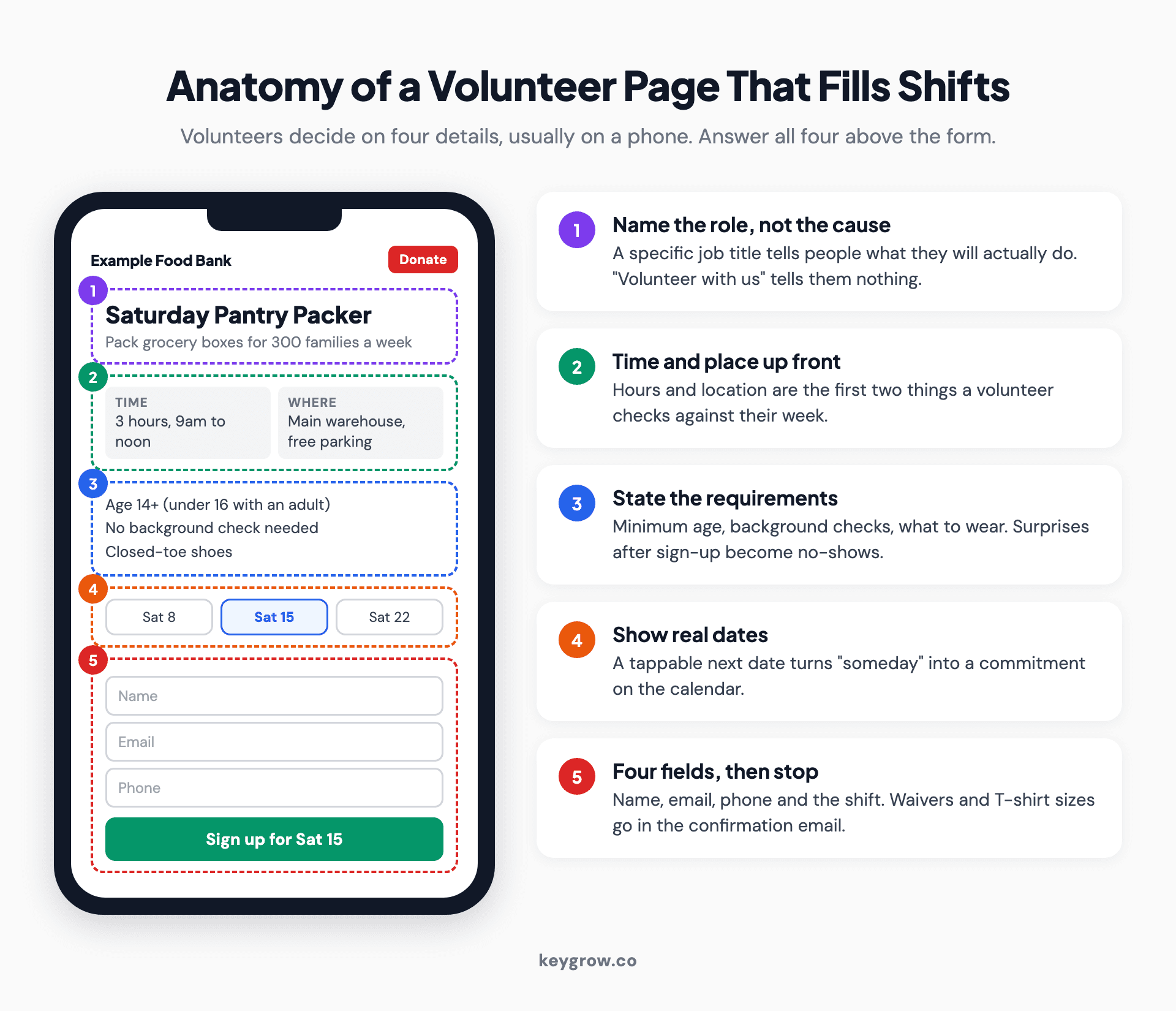
Annotated phone mockup of a nonprofit volunteer page with callouts for role title, time commitment, location, requirements, next shift dates and a short sign-up form.
Keep the sign-up form to name, email, phone and the shift they want. Anything else (emergency contact, T-shirt size, waiver) can come in the confirmation email. Every field you add before the first commitment costs you people who were already willing.
If you recruit for several roles, give each role its own page. That page can then rank in search for what volunteers actually type, which is the role and the town, not your organization's name.
Myth 5: Accessibility is a legal problem for big organizations
Almost every site fails basic accessibility checks, small ones included, and the people your mission serves are often the ones locked out.
WebAIM's 2026 analysis of the top one million home pages found detectable WCAG 2 failures on 95.9 percent of them. Low-contrast text appeared on 83.9 percent and missing form input labels on 51 percent, according to WebAIM. Those two failures matter most on a nonprofit site, because they break the donate form and the volunteer form for screen reader users.
On the legal side, the Justice Department's web guidance says Title III of the ADA applies to the goods and services that businesses open to the public offer on the web, and that there is no detailed technical regulation for them, pointing instead to the Web Content Accessibility Guidelines. Whether and how that applies to your organization is a question for your lawyer, not your web designer. The practical build target most teams use is WCAG 2.2 level AA.
The quick test costs nothing. Put the mouse away and try to complete your own donation with the Tab key. Then run your homepage copy through a readability score checker, because plain language is part of access too.
Myth 6: You need a nonprofit-specific platform
The platform is rarely the bottleneck. Page structure, the donate path and the content decide whether a site works.
This is one of our firmer opinions, and it annoys some vendors. Platform choice is the most argued-about and least important decision in most nonprofit website projects. The WebAIM figure above did not come from one bad platform; it came from almost every site on every platform. A well-built site on a general content system with a good hosted donation form beats an all-in-one nonprofit suite that nobody on staff knows how to edit. If you are weighing it up, our breakdown of whether WordPress is good for SEO covers the trade-offs that actually matter.
What does matter is that the site can be found. Per M+R, 39 percent of traffic to nonprofit websites in 2025 came from organic search. That traffic arrives on program and help pages far more often than on the homepage, which is why SEO for nonprofits starts with the people you serve rather than your donors. If you plan to apply for the Google Ad Grant, the site also needs your own domain and a secure connection before you apply.
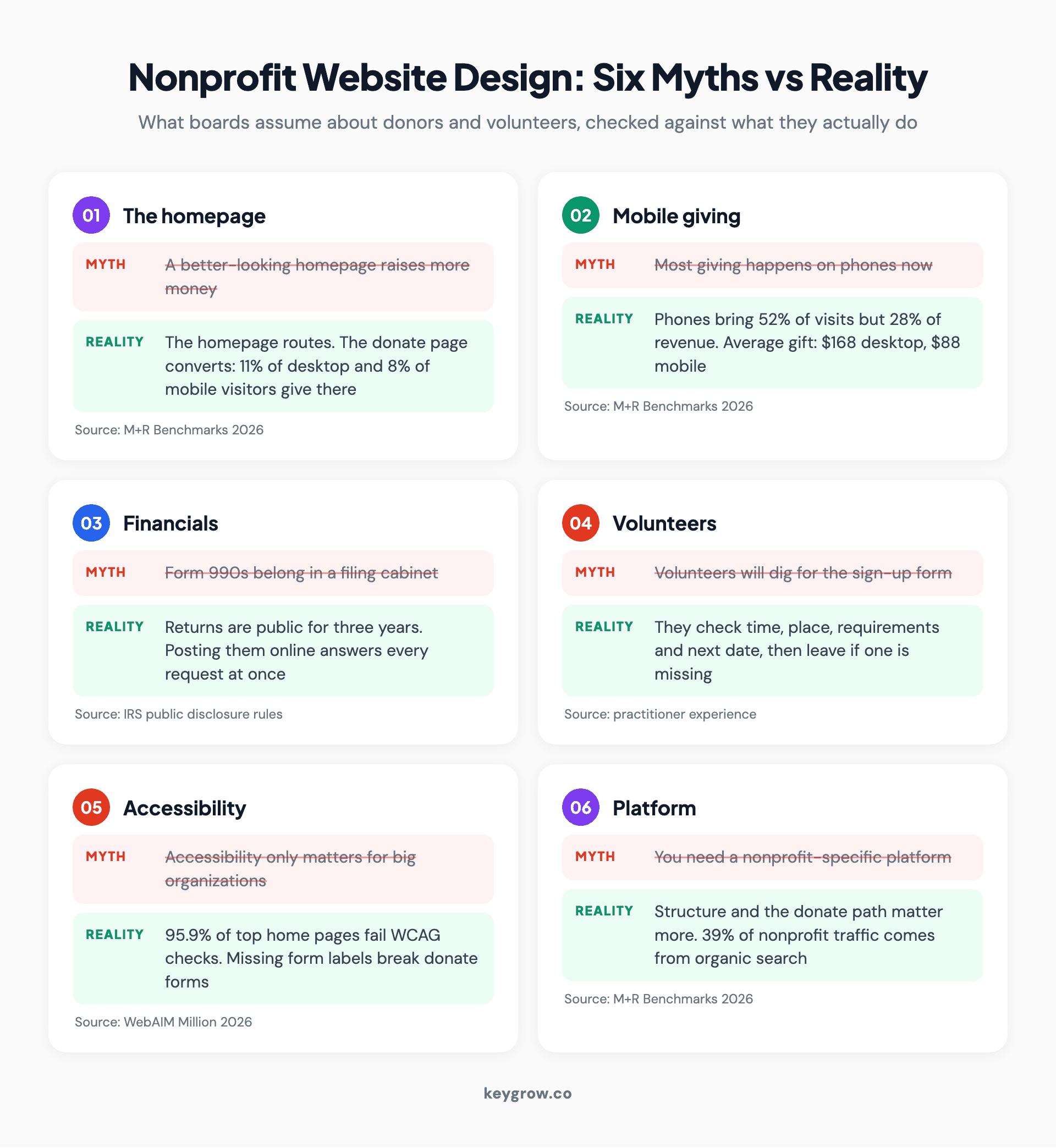
Six myth-versus-reality cards on nonprofit website design covering the homepage, mobile giving, Form 990 financials, volunteer pages, accessibility and platform choice, each with the supporting figure and its source.
The requirements table: every page, who checks it, what passes
This is the list we work from when scoping a nonprofit build. A small organization can cover it in eight to ten pages.
| Page | Who checks it | What they look for | It passes when |
|---|---|---|---|
| Homepage | Everyone, first | What you do, for whom, where | A stranger can say your mission back after five seconds |
| Donate | Donors | Amounts with context, monthly option, short form | A gift takes under a minute on a phone, no account needed |
| Gift confirmation | New donors | Proof it worked, a receipt, one next step | It thanks them by name and offers one clear next action |
| About, team and board | Donors, grantmakers, press | Real names, faces, governance | Staff and board are named with photos, and dates are current |
| Financials | Major donors, grantmakers | 990s, annual report, audit | The last three 990s and the latest report are one click from About |
| Programs and impact | Donors, partners | What you did last year, in numbers | Each program shows an outcome with a date attached |
| Volunteer roles | Volunteers | Time, place, requirements, next date | Each role has its own page and a four-field sign-up |
| Get help | People you serve | Eligibility, hours, phone, address | The phone number is near the top and nothing asks for money |
| Events | Supporters | Date, place, cost, how to register | Registration works on a phone without leaving the page |
| Contact and footer | Everyone | Address, phone, email, registered charity status | Contact details and your tax-exempt status appear on every page |
The Get help row deserves a note. If people reach you in a crisis, that page should carry no donation pop-up and no wall of mission text above the address. Optimize it for the person under stress, not for conversion.
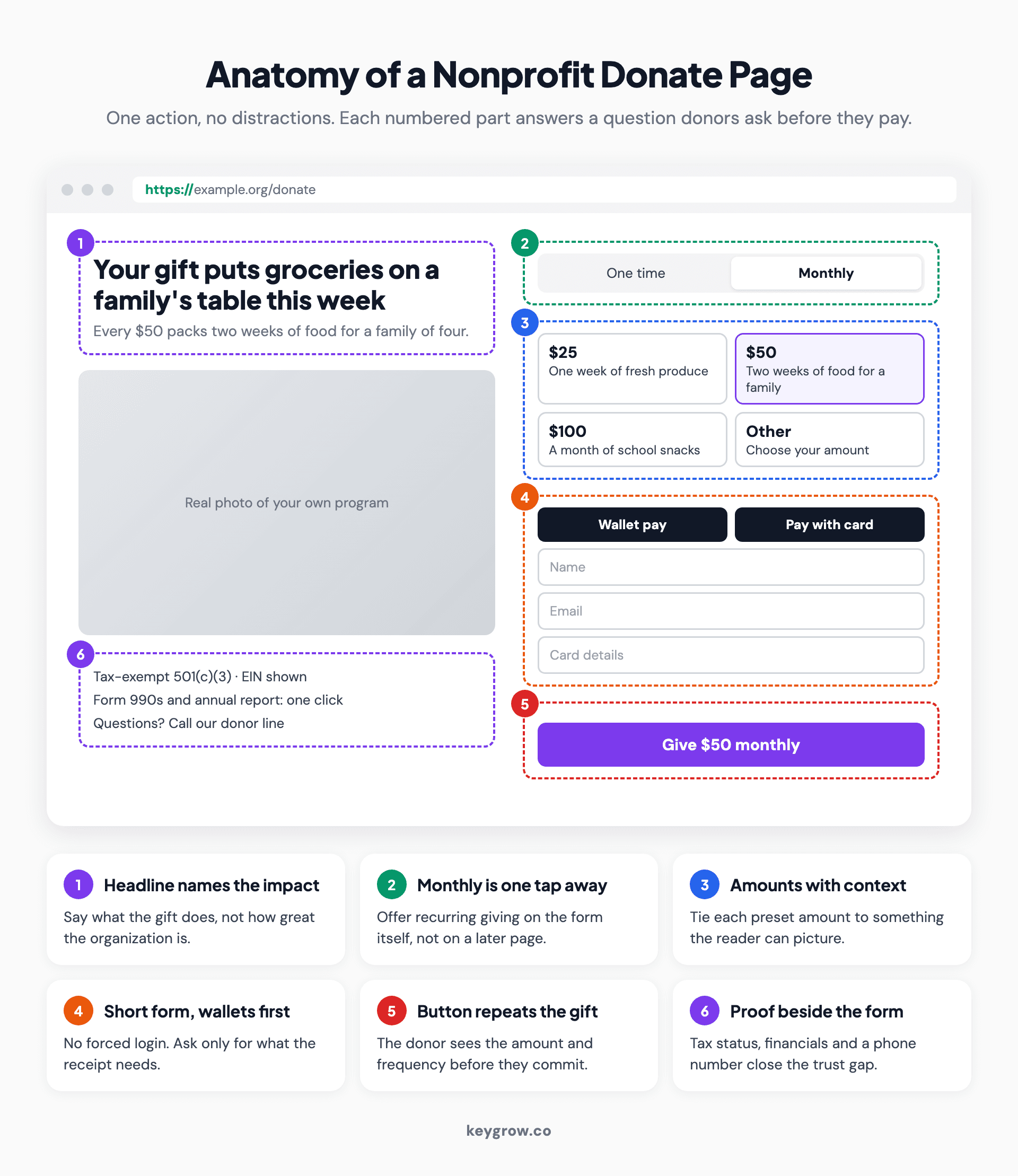
Annotated mockup of a nonprofit donate page with callouts for a headline that names the impact, suggested amounts with context, a monthly toggle, a short form, digital wallet buttons and visible trust details.
For the donate page specifically, build it the way you would build a paid-traffic landing page: one action, no navigation leaks, nothing below the form competing for attention. That is the same discipline as landing page design for a business. On most nonprofit sites, an hour spent here returns more than an hour spent anywhere else.
What nonprofit website design costs in 2026
Expect anything from a monthly builder plan you run yourself to $5,600 for a professionally built 30-page site on our plans. Specialist agency redesigns for large organizations start around $15,000.
| Route | Build cost | Ongoing | Fits |
|---|---|---|---|
| DIY website builder | Staff time, plus a monthly plan | Plan fees plus donation processing | New or volunteer-run organizations with one program |
| KeyGrow Business Website | $1,400 one time | Hosting and care plan optional | Up to 6 pages, copy written for you |
| KeyGrow Premium Website | $2,800 one time | Hosting and care plan optional | Bigger sites with several programs |
| KeyGrow Enterprise Website | $5,600 one time | Hosting and care plan optional | 30 or more pages |
| Specialist nonprofit agency (published 2026 pricing) | $15,000 to $30,000, up to $40,000 to $70,000 for large custom builds | Retainers vary | Large organizations with CRM integrations and advanced custom development |
The agency figures come from one nonprofit-specialist agency's published 2026 pricing guide: a typical redesign runs $15,000 to $30,000, and large builds with many pages and custom development run $40,000 to $70,000. Our own plans include professional copywriting, a WordPress build, SEO foundations and speed optimization. Most of our sites take 6 to 8 weeks from discovery to launch, and simple brochure-size sites 4 to 5 weeks. Every project includes 30 days of post-launch support for bug fixes and small changes.
Two costs catch nonprofits out. Donation platform fees come off every gift, so compare them before choosing a form tool, not after. And copy takes longer than design on almost every project, because program staff are busy delivering programs. For the wider picture of what a website costs and why quotes vary so much, that guide goes line by line.

Three colleagues gathered around a laptop at a table, reviewing a website together.
When you do not need an agency
If you are a new or volunteer-run organization with one program and a small donor list, you probably do not need us or anyone like us yet.
A website builder template, a hosted donation form from your payment processor, a Financials page with your 990 PDF and a volunteer sign-up form will cover the requirements table above. Put the donate button in the header, test the form on your own phone, and spend the money you saved on the program.
Hire help when the work outgrows the people available to do it. The usual triggers are a CRM integration so gifts land on donor records automatically, several programs with their own audiences, an accessibility remediation project, or a migration from an old site with years of content and search rankings you cannot afford to lose. That last one needs a plan before anyone touches the old site. When you get there, choosing a web design agency is mostly about asking the right questions up front.
After launch, someone has to own updates, backups and broken links. A short website maintenance checklist is enough for most small teams, as long as it has a name next to it.
FAQs
What should a nonprofit website include?
At minimum: a clear homepage, a donate page with a short form, an About page naming staff and board, a Financials page with your recent 990s, program pages with outcomes, a volunteer page, and contact details on every page. If you serve people directly, add a Get help page with eligibility, hours and a phone number near the top.
How much does a nonprofit website cost?
A do-it-yourself builder costs staff time plus a monthly plan. Our professionally built sites run from $1,400 for up to six pages to $5,600 for 30 or more pages, one time. Specialist agency redesigns for large organizations start around $15,000 and can pass $40,000 for big custom builds, based on one specialist agency's published 2026 pricing.
What is the best platform for a nonprofit website?
The best platform is the one your staff can update without calling a developer. General content systems like WordPress work well for most nonprofits when paired with a good hosted donation form. Page structure, the donation path and accessibility matter far more than the platform name.
Do nonprofit websites need to be ADA compliant?
The Justice Department's guidance says the ADA covers the web services of organizations open to the public, without setting a detailed technical standard for them. Most teams build to WCAG 2.2 level AA as the practical target. Whether a specific legal duty applies to your organization is a question for your lawyer.
Should our donation form be on our site or a third-party page?
Either can work, as long as the donor never wonders who they are paying. If the form is hosted elsewhere, carry your logo, colors and name onto it and link back to your site. An embedded form on your own donate page is usually the smoother experience.
How long does it take to build a nonprofit website?
A simple brochure-size site usually takes 4 to 5 weeks and most small to mid-size sites take 6 to 8 weeks. The slowest part is almost always content, so start writing program pages and gathering photos before design begins.
Fix the donate path first
If you can only change one thing this quarter, change the path from the donate button to the confirmation page. It is the shortest route between your website and your revenue.
Here is a worked example, with assumptions labelled. Assume 1,000 mobile visitors a month reach your main donation page. At the 4 percent mobile rate M+R reported for small nonprofits, that is 40 gifts. At the 8 percent sector average for mobile, it is 80. Using M+R's $88 average mobile gift, the difference is about $3,520 a month, from the same traffic, without one extra visitor.
So run the audit in this order. Count the clicks from homepage to confirmation. Count the form fields and cut any you do not use. Try the form with a digital wallet, on a phone, over cellular data. Then try it with the Tab key alone. Fix what breaks, and only then talk about the homepage.
This page sits alongside our broader nonprofit marketing strategy guide, which covers what to run once the site is ready. If you want the build done for you, our website design and development team works on fixed one-time plans, or you can tell us where your site stands and we will say honestly whether you need us.