

Picture the usual first attempt. A business owner signs up for Google Ads on a Tuesday night, accepts every default, sets $30 a day, and lets it run. Three weeks later they've spent $600, gotten two calls (one a telemarketer), and concluded that ads don't work. Nothing was wrong with the platform. Everything was wrong with the setup.
Using Google Ads for a small business comes down to three disciplines: work out what you can afford to pay for a customer before spending anything, refuse the money-wasting defaults Google hands every new account, and run the first 30 days as a data-gathering exercise with rules for when to act. This guide walks all three, in order, with the actual numbers.
For context on whether the channel fits your business at all, we've answered whether Google Ads are worth it for small businesses separately. This post assumes you're past "should I" and onto "how."
Does it work for businesses your size?
Yes, with a caveat that explains most failures. Google's own economic impact methodology estimates that for every $1 a business spends on Google Ads, it makes an average of $8 in profit through Google Search and Ads. Averages hide variance: the accounts that hit numbers like that are set up deliberately. The ones that fail usually died at signup, in ways we'll fix below.
The 2026 cross-industry averages, per WordStream's benchmarks, run $5.42 per click, a 6.64 percent clickthrough rate, an 8.18 percent conversion rate, and $66.69 per lead. Costs vary hard by industry: restaurants see clicks around $2, legal pushes $10. Your first job is figuring out what those numbers need to be for you, which is the next section.

Small business food vendor checking new customer inquiries on his phone between orders.
Step 1: Work out your numbers before Google spends them
Every ranking guide says "set a budget you're comfortable with." That's backwards. Comfort is not a marketing metric. Your business's own economics tell you exactly what you can pay, in three lines of arithmetic:
Maximum cost per lead = customer value x close rate. If your average customer is worth $500 and you close 25 percent of inquiries, a lead is worth up to $125 at break-even.
Maximum cost per click = max cost per lead x landing page conversion rate. If 10 percent of visitors become leads, you can pay up to $12.50 a click before losing money.
Daily budget = enough clicks to learn. You need roughly 100 clicks on a keyword before its data means much. At $5 real CPCs and a $30 daily budget, that's about six clicks a day, so a verdict takes two to three weeks per keyword. Fewer keywords, faster answers.
| Example business | Customer value | Close rate | Max cost per lead | Page converts at | Max CPC |
|---|---|---|---|---|---|
| House cleaner | $200 first clean, repeats | 50% | $100+ | 12% | $12 |
| Family lawyer | $4,000 case | 20% | $800 | 8% | $64 |
| Restaurant | $35 ticket | 90% walk-in | ~$31 | n/a, calls/direction taps | ~$3 |
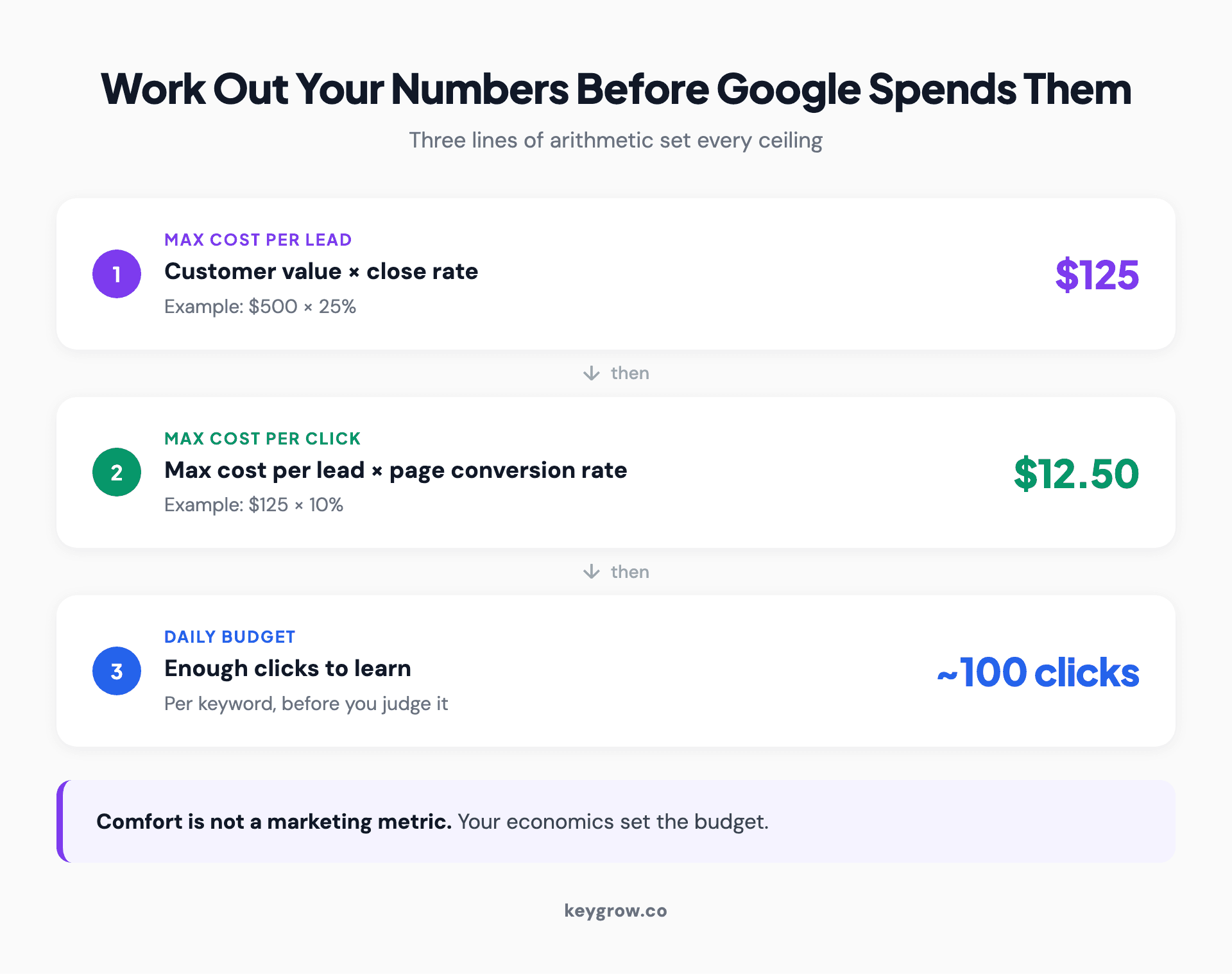
Worked break-even math for a small business Google Ads budget: customer value times close rate sets the maximum cost per lead, page conversion rate sets the maximum cost per click.
Notice the restaurant's ceiling. At roughly $2 clicks and thin per-ticket value, it only works with volume and repeat visits behind it. This math is why "does Google Ads work for small business" has no single answer: it works when the arithmetic works.
A realistic starting budget for most service businesses lands between $1,000 and $2,500 a month, roughly $33 to $83 a day. Less is survivable in cheap-click industries; at $10 a day in a $5-per-click market you're buying two clicks a day and the learning takes months instead of weeks.
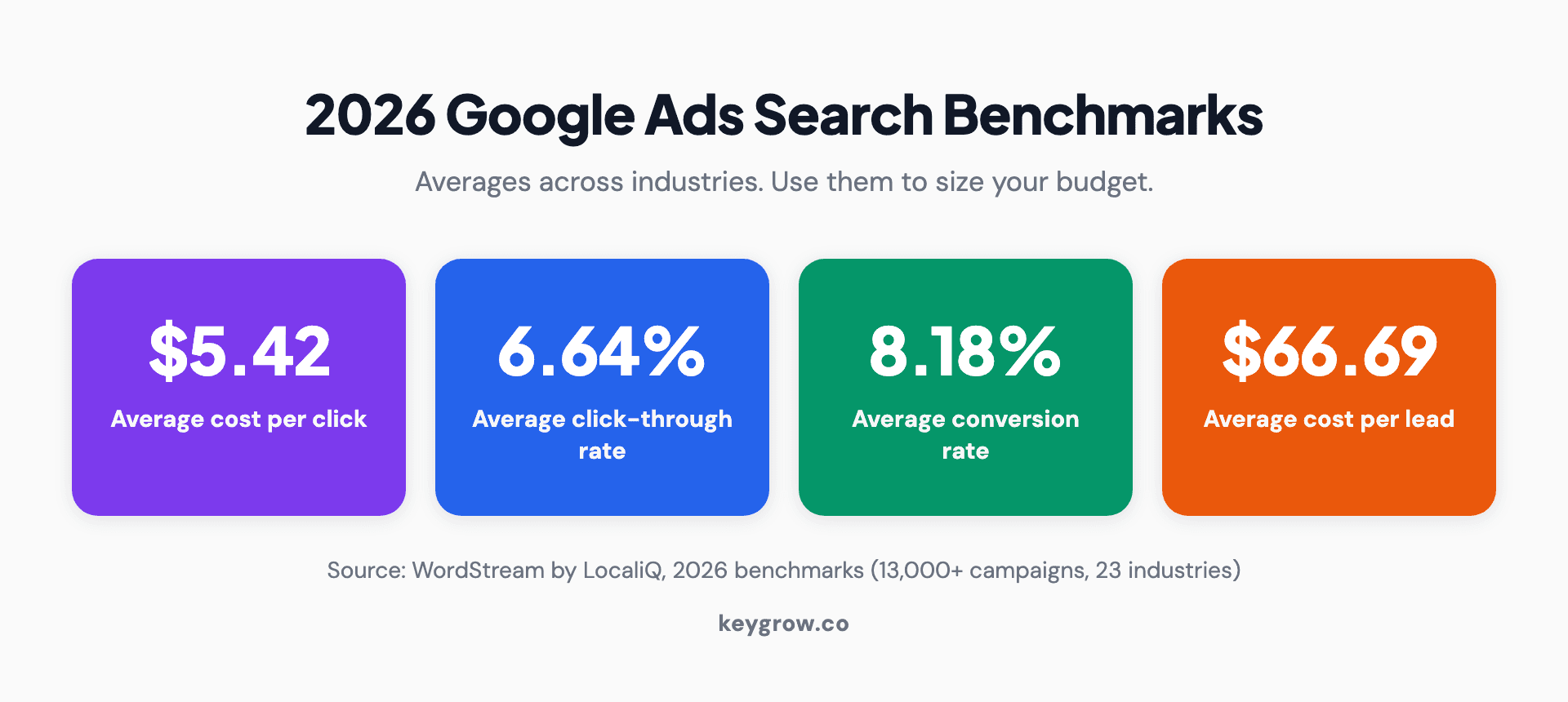
Four stat cards showing 2026 Google Ads search benchmarks: $5.42 average cost per click, 6.64 percent clickthrough rate, 8.18 percent conversion rate, and $66.69 average cost per lead.
Step 2: Refuse the defaults (this is where accounts die)
Google's signup flow is optimized for Google's revenue, not yours. A new account gets funneled toward settings that spend more and report less. Here's the gauntlet, in the order you'll meet it:
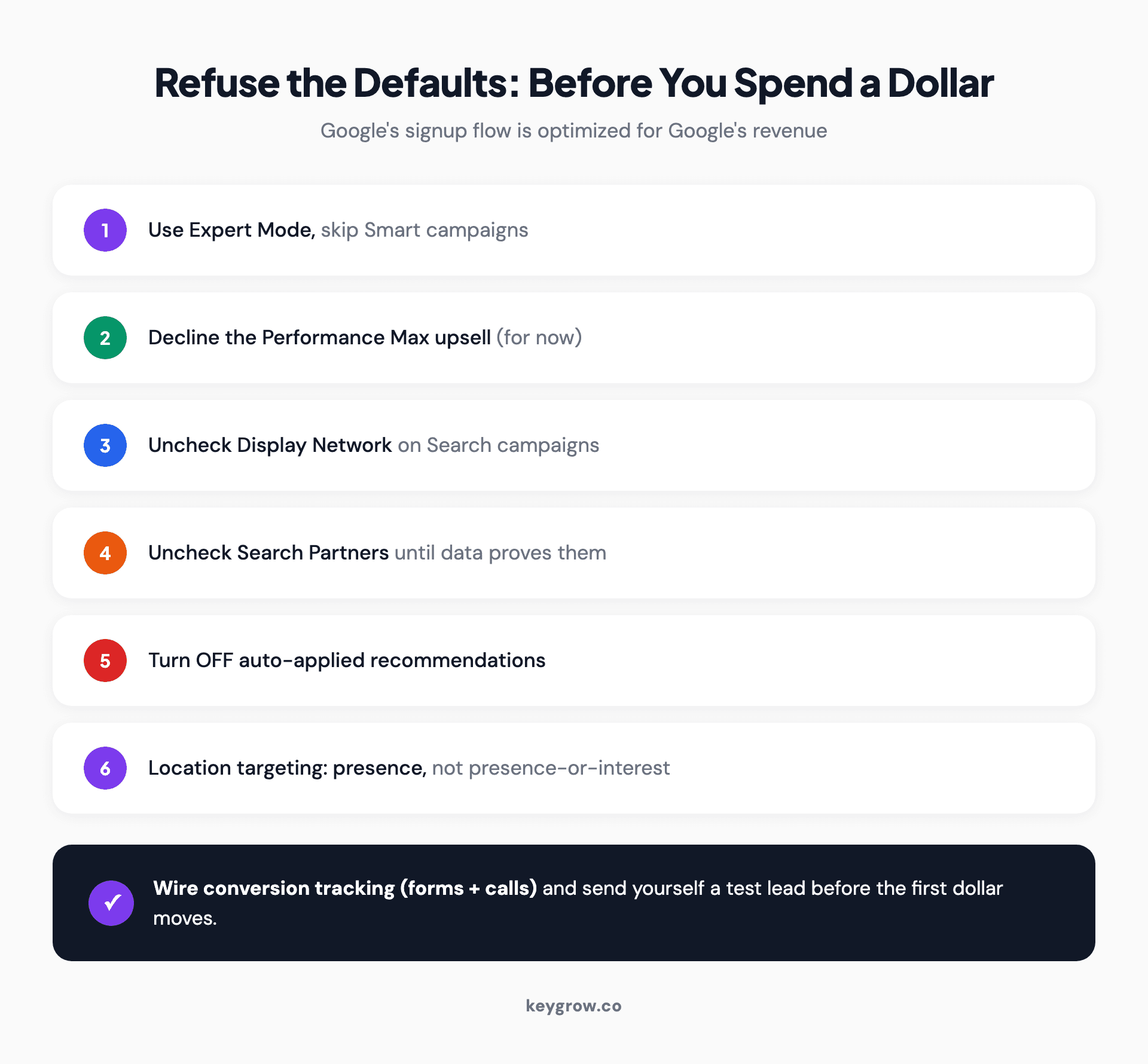
Checklist of the six defaults to refuse when opening a small business Google Ads account: Expert Mode over Smart campaigns, declining Performance Max, unchecking Display and Search Partners, disabling auto-applied recommendations, and presence-only location targeting.
Then wire conversion tracking before the first dollar moves. The minimum viable setup, in plain steps: create a "form submission" conversion action in Google Ads (or import the event from GA4 if your site already tracks it), add a call conversion action using a Google forwarding number so calls from ads get counted, and set your business's real definition of a lead, not "visited the contact page." Then test it like a customer would: submit your own form, watch the conversion land in the interface within a day, and only then let campaigns spend. If your leads mostly call, call tracking isn't optional; local businesses consistently rate phone calls their best lead source, calls convert to customers far more often than form fills, and an account counting only forms is flying on half its instruments.
An account without conversion tracking isn't advertising, it's donating. Every optimization decision you'll ever make depends on this plumbing existing from day one.
Step 3: Pick the right campaign type (it's Search, with one exception)
For almost every small business, the first campaign is a Search campaign: text ads shown to people actively typing what you sell. Highest intent, most control, clearest data.
The one exception worth knowing: if you're a licensed local service provider (plumber, electrician, locksmith, HVAC, some legal and cleaning trades), Google's Local Services Ads charge per lead instead of per click and sit above regular ads. They're worth testing alongside Search, and we've written an honest take on whether LSAs are worth it separately.
What you don't start with: Display (awareness, not intent), YouTube (same), Shopping (ecommerce only), and Performance Max (needs your conversion data to be any good, revisit at month three or later).
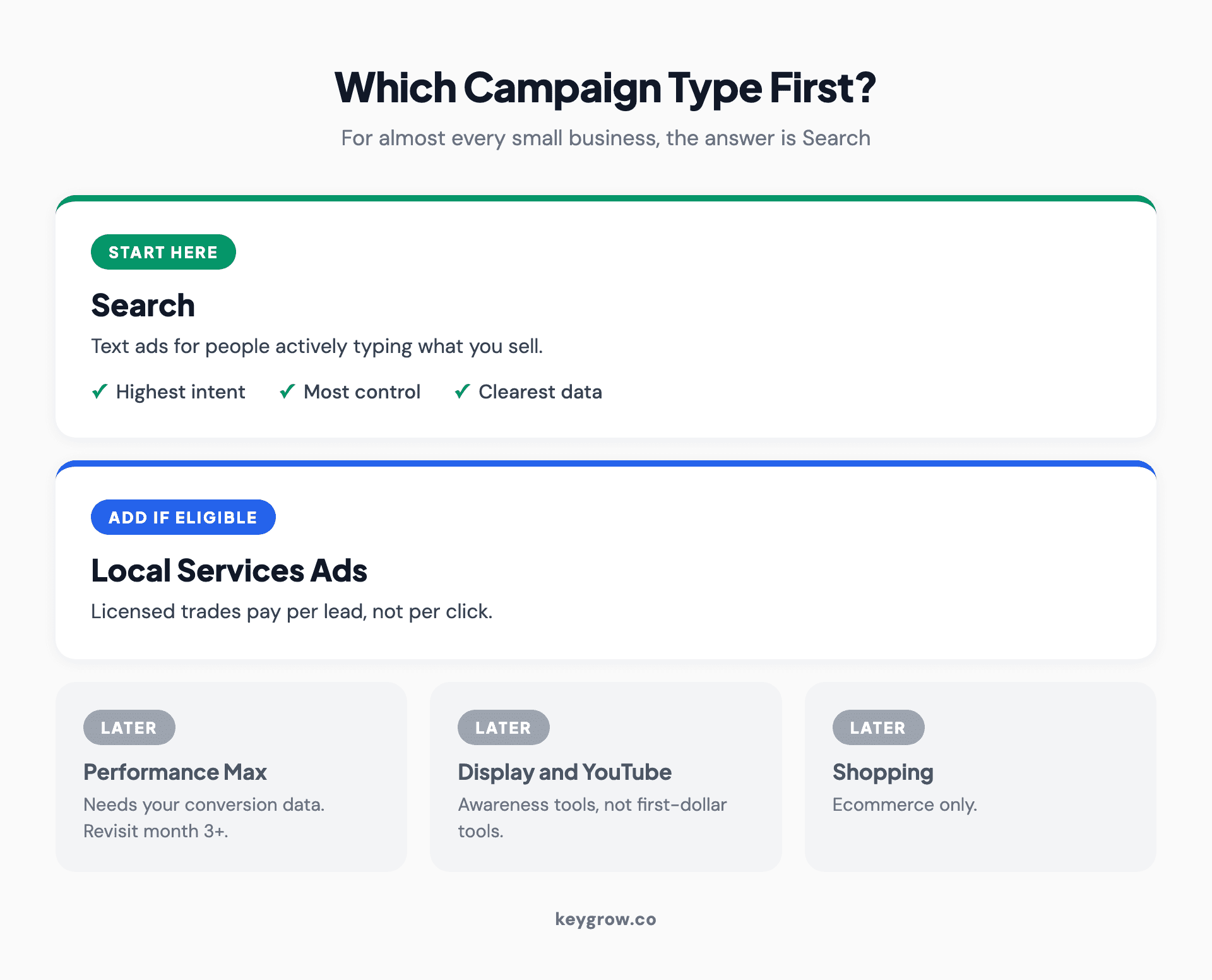
Campaign type decision cards for a small business's first Google Ads campaign: start with Search, add Local Services Ads if your trade qualifies, and save Performance Max, Display, and YouTube for later.
Step 4: Build one tight campaign, not a sprawling one
Small budgets fail when they're spread thin. The structure that works on $50 a day is deliberately narrow:
One campaign, two or three ad groups, each around one service. A cleaner might run "house cleaning," "deep cleaning," and "move-out cleaning." Not thirty keywords across ten themes, five to ten keywords per ad group, all close variants of the same intent.
Use phrase and exact match. Broad match on a new small account hands Google permission to spend your budget finding out what doesn't work. Phrase and exact keep your clicks near your keywords while you learn. Broad match becomes reasonable later, with conversion data and negatives fencing it in.
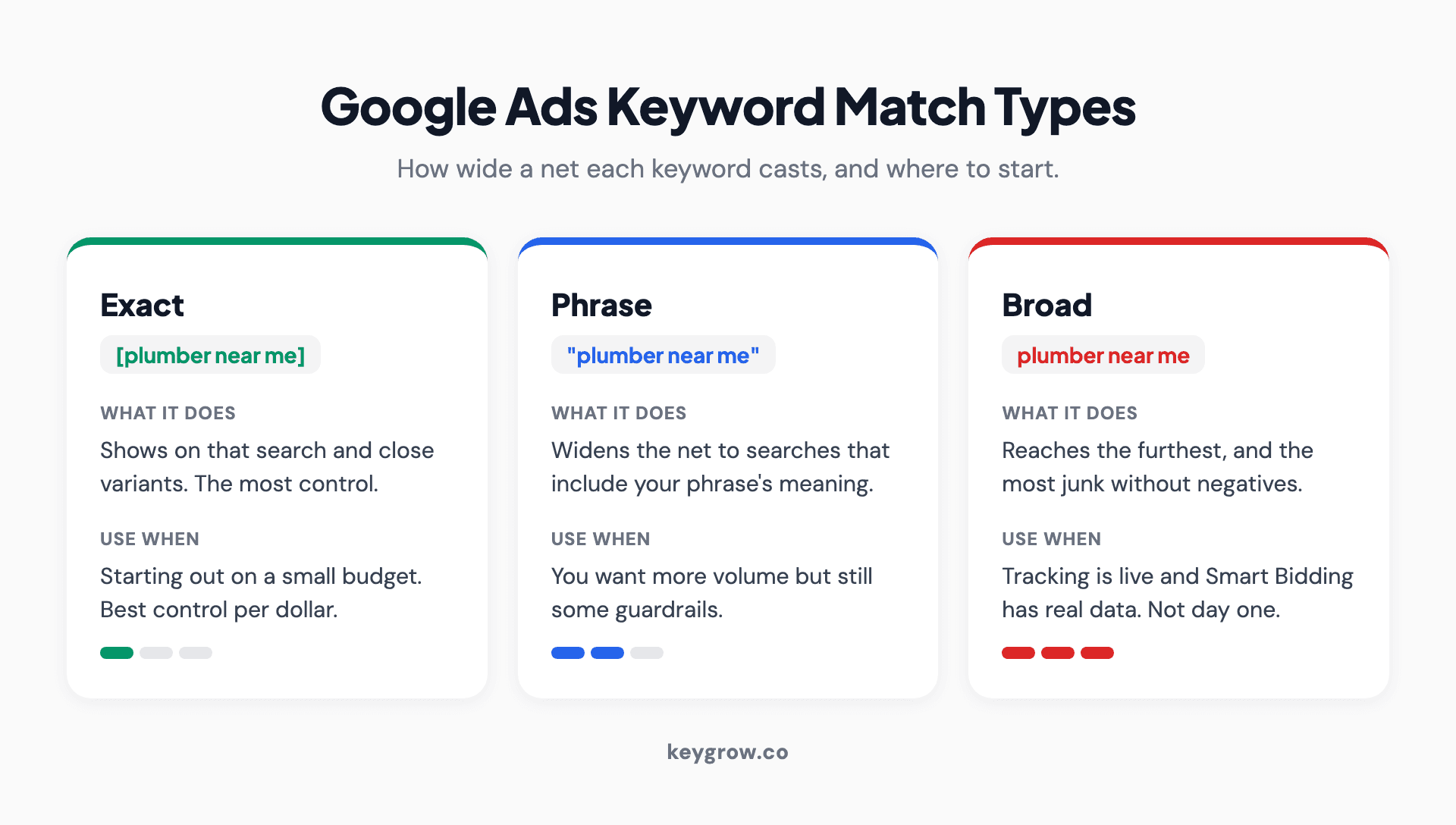
Three-card comparison of Google Ads keyword match types, exact, phrase, and broad, showing what each does and when a small business should use it.
Start your negative keyword list on day one. "Free," "jobs," "salary," "DIY," "how to," plus whatever your industry's junk queries are. Then feed it weekly from the search terms report, which is where you'll discover the surprising garbage your keywords matched. Our negative keywords guide has ready-made starter lists.
Write ads that qualify, not just attract. Include the price range, the service area, the specialty. "Move-Out Cleaning From $180, East Side, Booked in 24 Hrs" pre-screens clickers in a way "Best Cleaning Services" never will. Every unqualified click you prevent is budget saved. There's a full method in our ad copy guide.

Person researching search keywords on a laptop at the start of a small Google Ads campaign build.
A real example of qualification beating volume: a cash home buyer we worked with was drowning in junk leads. The fix wasn't more traffic, it was filtering: negative keywords, tighter match types, and qualifying language in the ads themselves. Serious leads went up 600 percent between December and January on the same budget. Small accounts don't need more clicks, they need fewer wrong ones.
Add every free asset that fits. Ad assets (the platform's name for extensions) expand your ad with sitelinks, callouts, a clickable phone number, and your location, at no extra cost per click. A text ad with four sitelinks and a call button takes up twice the screen of a bare one, and for mobile service searches the call asset alone can carry a campaign, since plenty of customers want to dial, not browse. Ten minutes of setup, permanently better real estate.
Send clicks to a page that matches the ad. The homepage is where paid clicks go to die: too many choices, no single action. A page per service with one form or one phone number beats it in nearly every test we've run, and we've laid out why landing pages win in detail.
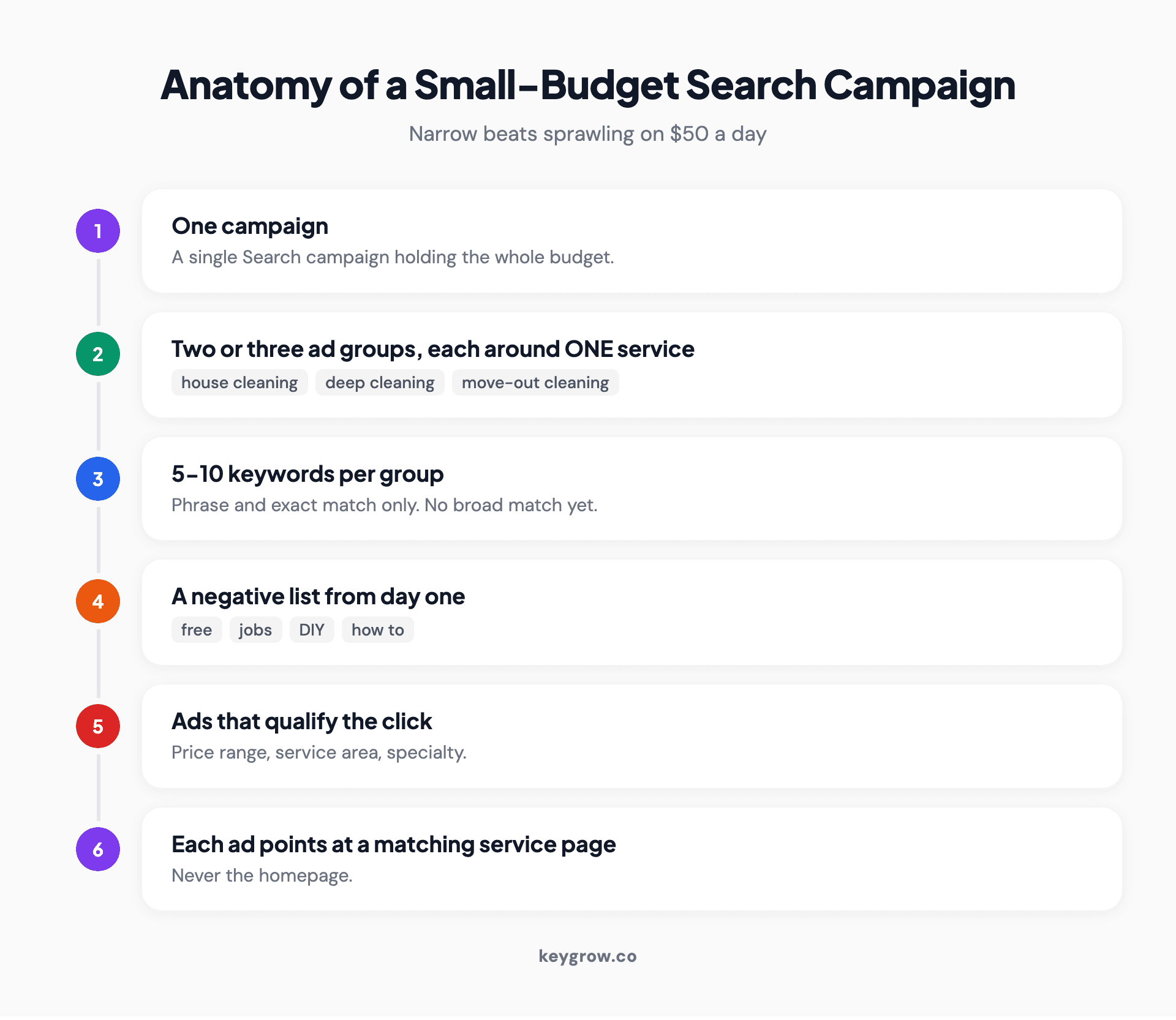
Anatomy of a tight small business Search campaign: one campaign, three single-service ad groups, phrase and exact match keywords, a growing negative list, and qualifying ad copy pointing at matching landing pages.
Step 5: Set bidding for the learning phase
Start on Maximize Clicks with a max CPC cap set at the affordable-click number from Step 1, or Manual CPC if you want full control. The point of month one isn't efficiency, it's affordable data.
Switch to conversion-based bidding (Maximize Conversions, then a target CPA) once the account has meaningful conversion volume, around 15 to 30 conversions in a 30-day window. Handing Google "get me conversions" bidding before any conversions exist is asking the algorithm to optimize toward a mystery.
Local targeting: the small business advantage
You can't outspend national players, and locally you don't have to. Nobody in another city is competing for "emergency plumber near me" in yours.

Independent coffee shop counter during a morning rush, the kind of local demand Google Ads location targeting captures.
Target a radius or set of zip codes that matches where you actually take jobs, not the metro. Write the city into your ads and landing pages, since "Plumber in Mesa" beats "Plumber" for a Mesa searcher every time. Check the bid adjustments by location once data accrues: most service businesses find one or two neighborhoods produce most of the profitable leads, and shifting budget toward them is free efficiency. Local intent is enormous and skews toward people ready to act, which is precisely the traffic a small budget should buy first.
The first 30 days: what to check, when, and what to do about it
Here's the playbook nobody publishes, the difference between "monitor your campaigns" and knowing what you're looking for.
Days 1-3: confirm the machinery. Ads approved and serving? Conversion tracking firing (send yourself a test lead)? Any keyword flagged low volume? Don't judge performance, there isn't any yet.
Day 7: first search terms pass. Read every query that triggered your ads. Add negatives for the junk. Check nothing is spending wildly beyond your max CPC. Expect the numbers to look mediocre; week one is tuition.
Day 14: first real decisions. Any keyword that has spent two to three times your maximum cost per lead with zero conversions gets paused or cut to exact match. Compare your two ads per group and note the early leader. Add the next round of negatives, there will be more.
Day 30: the verdict pass. Now there's enough data to mean something. Cost per lead versus your Step 1 ceiling: over it isn't failure, it's a to-do list, usually landing page or ad qualification. Shift budget toward the ad groups producing leads. If you've crossed roughly 15 to 30 conversions, start the move to conversion-based bidding. And write down what a lead cost you this month; that number is the baseline every future month gets judged against.
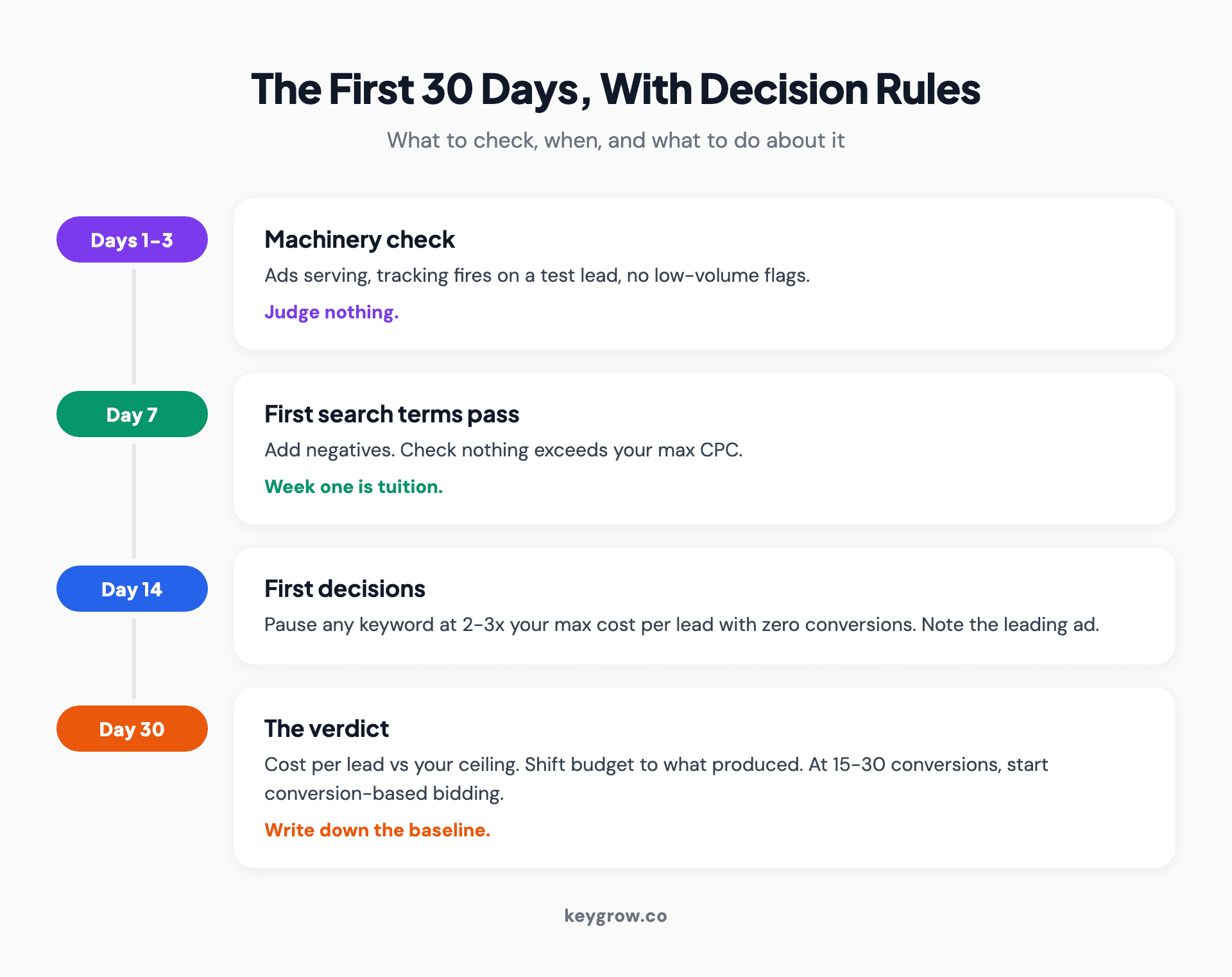
Thirty-day small business Google Ads playbook showing what to check at day 3, day 7, day 14, and day 30, from tracking tests through the first pause decisions to the month-one verdict.
From month two onward the rhythm settles into a weekly fifteen minutes (search terms, pacing, anything broken) and a monthly hour (budget shifts, a new test, bid target adjustments). It's genuinely not a daily job, and accounts fiddled with daily usually perform worse than accounts managed on a calendar.
The numbers that matter (ignore the rest)
Google's interface will happily show you forty metrics. A small business needs four:
| Watch weekly | Why |
|---|---|
| Cost per lead | The number your Step 1 math set a ceiling for |
| Conversions | Actual leads, not clicks, not impressions |
| Search terms report | Where wasted spend hides and negatives come from |
| Budget pacing | Spending your plan, not Google's |
Impressions, clicks, and clickthrough rate are diagnostics, useful when something breaks, not measures of success. The trap that catches most beginners is optimizing toward clicks because clicks are the number that moves first. A campaign with half the clicks and twice the leads is a better campaign.
The mistakes that burn small budgets fastest
Beyond the signup defaults, five habits reliably drain small accounts. Each is cheap to avoid and expensive to learn firsthand.
Bidding on competitor names too early. Competitor campaigns convert poorly for unknown brands, since the searcher wanted them, not you. There's a right way to do it later; month one isn't it. We've covered competitor brand keywords separately.
Judging the account by week one. The first week's cost per lead is nearly always the worst you'll ever see, and owners who panic-pause on day five lock in tuition without collecting the lesson.
Sending every ad to the homepage. Covered above, but it's the single most repeated small-business mistake, so it earns a second mention. The ad promises a service; the homepage offers a tour.
Running one ad per ad group. With one ad you learn nothing. With two meaningfully different ads you learn something every week. The difference in setup time is ten minutes.
Quietly widening the net when leads are slow. Slow weeks tempt owners to add broad keywords, expand the radius, and raise the budget all at once. Now three variables changed and none can be judged. Widen one thing at a time, with a week between moves.
DIY or get help? The honest version
Here's our bias, stated plainly: DIY is the right call more often than agencies admit. A single-location business with more time than money should run this playbook itself, and plenty of owners manage a tight one-campaign account in an hour a week indefinitely. The platform is not magic, it's settings plus arithmetic plus discipline.
The point where paying for help starts to make sense is when the math flips: when your spend is high enough that the waste a professional removes exceeds their fee, when you're expanding past the one-campaign setup into multiple services or locations, or when the hour a week reliably doesn't happen and the account decays unattended. For most small accounts that line sits somewhere past $1,500 to $2,500 a month in ad spend. Below it, keep the fee.
If you do hire, month-to-month beats lock-in, and any agency worth paying will show you cost per lead in the first reporting call, not impressions. That's how we run PPC management, and it's also why we'll tell you plainly if your account is too small to justify us yet.
FAQs
Is $10 a day enough for Google Ads?
Usually not for service businesses. At the 2026 average of $5.42 per click, $10 buys one or two clicks a day, which stretches the learning phase from weeks into months. It can work in low-CPC niches like restaurants where clicks run near $2. If $300 a month is the honest ceiling, spend it in a cheap-click industry or put it toward your Google Business Profile and website basics first.
How much should a small business spend on Google Ads per month?
Between $1,000 and $2,500 a month is a realistic starting range for most service businesses, enough click volume to learn what works within a few weeks. The better answer comes from your own math: work out your maximum affordable cost per lead, decide how many leads you want, and multiply. Budget is an output of the arithmetic, not a number you pick for comfort.
How long does it take for Google Ads to start working?
Ads can serve within a day of launch, and the first leads often arrive in week one. Trustworthy performance data takes about 30 days at a moderate budget, and accounts typically hit their stride over two to three months as negatives accumulate, weak keywords get cut, and bidding switches to conversion targets. Judge the first month as a data purchase, not a profit center.
Do Google Ads work for small businesses?
Yes, when the underlying math works: a customer value high enough to absorb your industry's click costs, a page that converts visitors, and someone answering the phone. They fail predictably when accounts run on default settings, send clicks to homepages, or operate in markets where the affordable cost per click is below what the auction charges.
Should I use Google Ads or Meta ads for my small business?
Google Ads captures people actively searching for what you sell right now, which makes it the default for service businesses living on urgent, high-intent demand. Meta ads interrupt people who weren't looking, which suits visual products, offers with broad appeal, and building awareness over time. If the phone ringing this week matters most, start with Google, and add Meta once search demand is captured.
What is a good clickthrough rate for small business ads?
The 2026 search average is 6.64 percent, and well-built local campaigns often beat it since city-specific ads match intent tightly. But treat CTR as a diagnostic, not a goal: a qualifying ad that scares off bad fits will have a lower CTR and a better cost per lead than a vague crowd-pleaser, and cost per lead is the number that pays rent.
If you remember one thing
Run the arithmetic before Google runs your card. Customer value times close rate is your lead ceiling, times page conversion rate is your click ceiling, and enough clicks to learn is your budget. Every default you refuse at signup and every junk query you cut in week two exists to keep your spend under those ceilings.
The owners who succeed with Google Ads aren't the ones with the biggest budgets. They're the ones who know their numbers and make the platform respect them. If you'd like a second pair of eyes on yours before or after launch, we'll give you a straight answer, including "you don't need us yet."


